website-builder

byPiyush Raj

You are a senior product designer and front-end engineer building "Craftly": an original, natural-language website builder for students, creators, freelancers and small businesses. Work autonomously. Don't ask questions; make reasonable decisions and log them in README.md under "Decisions". STACK (fixed): React 18, Vite, Tailwind CSS, React Router, lucide-react, plain JavaScript (JSX). No other runtime dependencies. Google Fonts via <link> with system fallbacks. public/_redirects containing "/* /index.html 200". BRAND: Name Craftly. Tagline "Turn a clear idea into a working website." Voice: helpful, calm, plain, short sentences. Banned words: revolutionary, magic, instant, effortless, seamless, supercharge, unlock. No fake stats, logos, reviews or user counts. Mention AI only once, honestly, in the Responsible section. DESIGN TOKENS Colors: bg #FAF7F2 | surface #FFFFFF | sand #EDE6DA | line #E3DDD1 | muted #6B6B66 | ink #1F2321 forest-700 #1F4D3A (primary) | forest-800 #173B2C (hover) | forest-50 #E8F0EB action #D9622B (ONLY the single most important CTA per screen) | error #B3261E | success #2E7D4F All text/background pairs pass WCAG AA. Type: headings Fraunces 600; body/UI Inter 400/500/600. Scale 12/14/16/18/22/30/44/60. Line-height 1.5 body, 1.1 headings. Max 65ch. Layout: 12-col grid, max-width 1200px, gutter 24px (16px mobile), 4px spacing multiples, section padding 96px desktop / 56px mobile. Shape: radius 8px (inputs, buttons), 12px (panels). 1px borders in `line`. One shadow: 0 1px 2px rgba(31,35,33,.06), 0 4px 12px rgba(31,35,33,.05). Motion: 150ms color/opacity only. Respect prefers-reduced-motion. Focus: 2px forest outline, 2px offset, on every interactive element. Icons: lucide-react only, stroke 1.75, sizes 16/20. Forbidden visuals: gradients, glow, glassmorphism, emojis, stock photos, card-on-card nesting. Product visuals are real HTML/CSS UI, not images. ENGINEERING RULES - Folders: src/{components/ui,components,pages,layouts,data/templates,lib,hooks,context,styles}. One component per file. - Every page: semantic landmarks, one h1, <title> + meta description, keyboard operable. - No console errors/warnings, no unused imports/files, no dead links, no no-op buttons, no placeholder text, no raw errors shown to users. - All localStorage reads/writes wrapped in try/catch. Keys: craftly:v1:* - After finishing a phase: run `npm run build`, fix everything, then reply with the REPORT format below. REPORT FORMAT (end of every phase) 1) Files created/changed. 2) How I verified (commands, widths 360/768/1280). 3) Known issues. 4) "Ready for next phase: yes/no".

LandingLoginResponsibleSite EditorSign UpMy SitesPublishNew Site
Landing

Comments (0)

No comments yet. Be the first!

System Requirements

System Requirements Document for website-builder

1. Introduction

Craftly is an original, natural-language website builder for students, creators, freelancers and small businesses. Its product intent is stated by its own tagline: "Turn a clear idea into a working website." A user describes the site they want in plain language, Craftly turns that description into a working website structure with pages and content, the user reviews and edits the generated pages and copy, and then publishes the site so it is reachable at a shareable address.

The audience is non-technical and often nervous: they have a clear idea and no confidence that a tool will respect it. Craftly's voice is therefore helpful, calm, plain, and written in short sentences. The product never claims more than it does: no fake stats, logos, reviews or user counts appear anywhere, and AI is mentioned exactly once, honestly, in the Responsible section.

This document specifies the current build: the fixed front-end stack, the brand and design tokens, the engineering rules, the eight-page information architecture, the functional requirements for each accepted persona, the core user flows, and the end-of-phase reporting contract.

Page 1 of 37

2. System Overview

Craftly is delivered as a single-page React application built with React 18, Vite, Tailwind CSS, React Router, lucide-react and plain JavaScript (JSX), with no other runtime dependencies. Google Fonts are loaded via <link> with system fallbacks, and public/_redirects contains /* /index.html 200 so client-side routes resolve on static hosting.

The current product surface is eight pages:

PageAccessPurpose
LandingPublicAnonymous first impression: what Craftly is, who it is for, what it does
LoginPublicReturning verification for users who own durable sites
ResponsiblePublicHonest, single mention of AI
Sign UpPublicSelf-service enrollment before creating a first site
My SitesRequires loginDurable, revisitable overview of the user's generated sites
New SiteRequires loginDescribe a website idea in natural language and receive a generated site
Site EditorRequires loginEdit the generated site's pages and content
PublishRequires loginPublish the site so it is reachable at a shareable address

Actors. Four accepted human personas use Craftly: Student creator, Independent creator, Freelancer, and Small business owner. All four share the same accepted lifecycle — describe, review, edit, publish — and differ in what they are building and why. Craftly owns application identity: a user establishes identity once through self-service enrollment, and returning verification protects durable sites, editing and publishing.

Page 2 of 37

Accepted behavior. A user writes a natural-language description of their site, receives a generated working website structure with pages and content, reviews it, edits pages and content, and publishes it to a shareable address. Sites persist across sessions and are revisitable from My Sites.

Narrow exclusions. Craftly does not use gradients, glow, glassmorphism, emojis, stock photos, or card-on-card nesting. Product visuals are real HTML/CSS UI, not images. No fake stats, logos, reviews or user counts are shown. The banned words — revolutionary, magic, instant, effortless, seamless, supercharge, unlock — never appear in product copy. No runtime dependency beyond the fixed stack is introduced.

Page 3 of 37

2a. Product Interpretation and Delivery Boundary

Craftly is a first-party web application. Every page in the current product is owned and rendered by Craftly itself; there is no provider-owned or external destination in the current scope, and no headless delivery surface.

Identity and access. Craftly owns application identity. A new user establishes identity through self-service enrollment on Sign Up — there is no invitation or provisioning boundary. A returning user verifies identity on Login. Landing, Login, Responsible and Sign Up are anonymously reachable. My Sites, New Site, Site Editor and Publish require login, because each of them reads or writes durable, user-owned state: the user's sites, their pages and content, and their published address. The entry interaction that establishes access is never owned by a protected page: Sign Up and Login are their own anonymous access boundaries, and protected state stays unavailable until identity is established.

Current versus future. Everything specified in this document is current. Nothing in the accepted requirement thread establishes a future horizon, so no future section is carried. The build proceeds in phases; each phase ends with npm run build, a fix pass, and a report in the fixed REPORT format.

2b. Source Content Inventory

Not applicable. No reference directive in this project declares content_source authority, so no source content inventory is included.

2c. Page Content and Component Coverage

Page 4 of 37

Landing

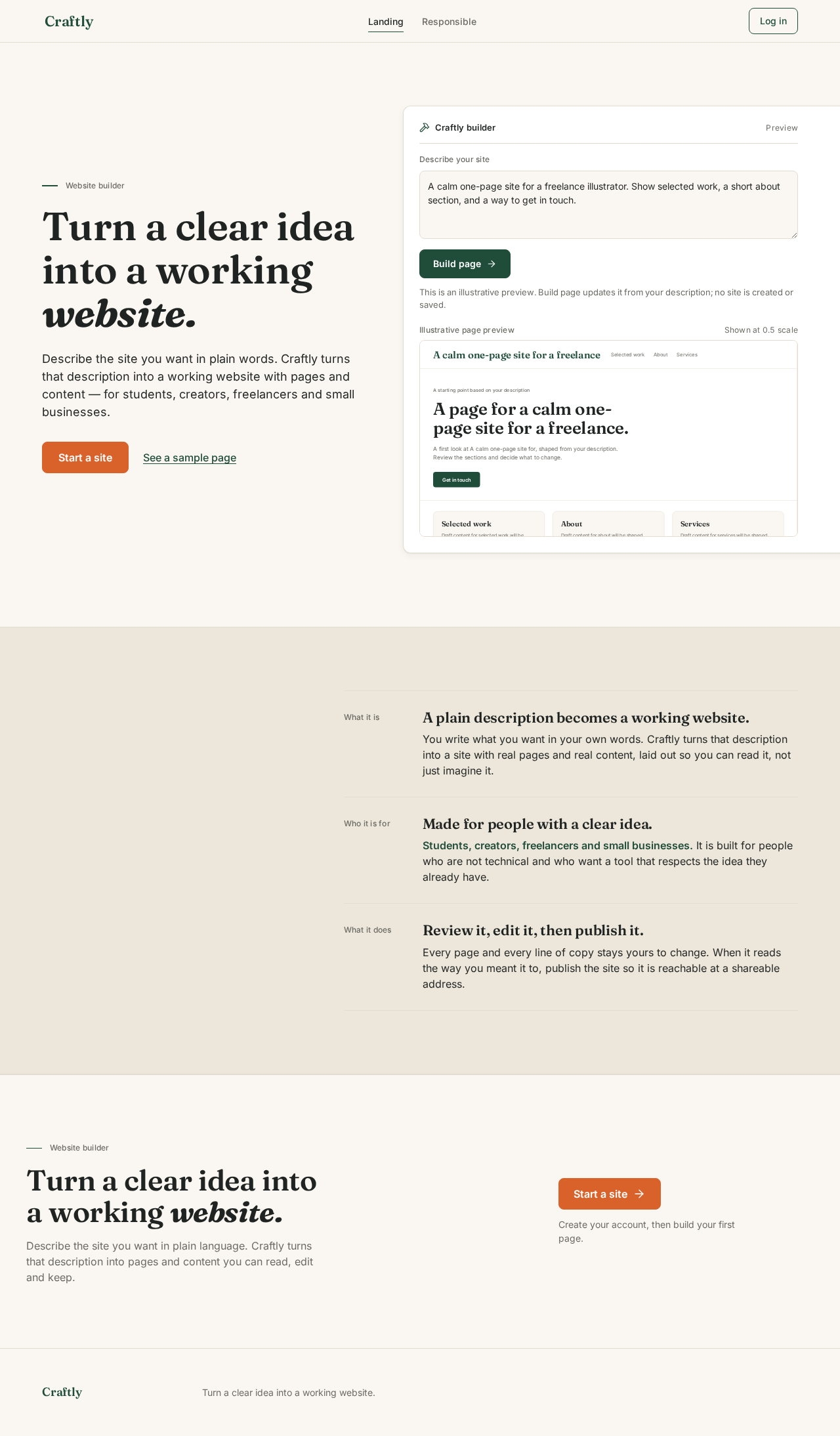
  • Information and state. Anonymous public entry. States what Craftly is, who it is for (students, creators, freelancers, small businesses), and what it does: a plain description becomes a working website. Carries the tagline "Turn a clear idea into a working website." No fake stats, logos, reviews or user counts.
  • Primary action. Start a site — the single #D9622B action on the screen, 48px tall, radius 8px, routing to Sign Up.
  • Supporting actions. See a sample page as a plain underlined forest link; Log in in the masthead; Responsible in the masthead navigation.
  • Domain entities. None persisted. The hero panel holds a real, non-persisted prompt textarea and a real Build page button that demonstrates the builder; it does not create a site.
  • Component responsibilities. Masthead (64px, sticky, wordmark left, nav centre, one action right, 1px #E3DDD1 rule full viewport width); HeroCopy (eyebrow Website builder at 12px muted with a 24px forest rule, Fraunces 600 display headline with final word italic, one 18px Inter sentence at 65ch); HeroBuilderPanel (white 12px-radius surface, 1px #E3DDD1 border, the one permitted shadow, real textarea, forest Build page button, scrolling strip of a generated page rendered as real HTML at 0.5 scale, bleeding past the right grid line); FeatureSections (paper and sand grounds separated by 1px rules, never cards); Footer.
  • States. Loading: none required; the hero panel fades 0→1 opacity over 400ms on first paint. Empty: not applicable. Success: the hero panel is present and legible. Error: not applicable. Recovery: under prefers-reduced-motion the hero panel is present from first paint with no fade.
  • Responsive. At 375px the panel drops below the copy, keeps its left border, loses the bleed, and the headline sets at 36px. Headline, wordmark, labels and controls stay whole inside the viewport at 375px, 768px and 1280px.
Page 5 of 37

Login

  • Information and state. Anonymous access boundary for returning users who own durable sites. Explains that logging in returns the user to their own sites.
  • Primary action. Log in — the single #D9622B action on the screen.
  • Supporting actions. Create an account link to Sign Up; Back to home link to Landing.
  • Domain entities. User identity (email and password), session continuity.
  • Component responsibilities. AuthForm (labelled email and password fields, radius 8px, 1px line border, inline field-level validation); FormError region; AuthFooter cross-link.
  • States. Loading: submit control shows a busy state and is disabled while verification runs. Empty: fields start empty with visible labels, never placeholder-only. Success: the user is returned to My Sites with their own sites listed. Error: a plain, non-technical message in #B3261E states that the email or password did not match; no raw error is shown. Recovery: the user can correct the field and resubmit, or follow the link to Sign Up.
Page 6 of 37

Responsible

  • Information and state. Public section that honestly mentions AI exactly once, in plain language, describing what Craftly does with a user's description and what it does not claim. No other page or section mentions AI.
  • Primary action. Start a site — the single #D9622B action on the screen.
  • Supporting actions. Back to home link to Landing.
  • Domain entities. None.
  • Component responsibilities. ResponsibleContent (Fraunces 600 h1, Inter body at 65ch, the single honest AI sentence); Masthead; Footer.
  • States. Loading: none. Empty: not applicable. Success: content renders as static text. Error: not applicable. Recovery: not applicable.
Page 7 of 37

Sign Up

  • Information and state. Anonymous self-service enrollment for a user who independently begins using Craftly, with no invitation or provisioning boundary. States plainly that an account keeps the user's sites.
  • Primary action. Create account — the single #D9622B action on the screen.
  • Supporting actions. Log in link to Login; Back to home link to Landing.
  • Domain entities. User identity (email, password), first site ownership.
  • Component responsibilities. AuthForm (labelled email and password fields with the same radius, border and validation treatment as Login); FormError region; AuthFooter cross-link.
  • States. Loading: submit control shows a busy state and is disabled while enrollment runs. Empty: fields start empty with visible labels. Success: identity is established and the user continues to New Site to describe their first site. Error: a plain message in #B3261E states what needs correcting (for example, that the email is already in use); no raw error is shown. Recovery: the user corrects the field and resubmits, or follows the link to Login.
Page 8 of 37

My Sites

  • Information and state. Requires login. Durable, revisitable overview of the user's own generated sites, each with its pages and content, and each site's publish state.
  • Primary action. New site — the single #D9622B action on the screen, routing to New Site.
  • Supporting actions. Per-site Edit (Site Editor) and Publish (Publish); Log out.
  • Domain entities. Site (name, pages, content, publish state, shareable address when published).
  • Component responsibilities. SiteList (one row per site, hairline #E3DDD1 dividers, no card-on-card nesting); SiteRow (site name, page count, publish state, actions); EmptySites state; Masthead.
  • States. Loading: a quiet loading state while the user's sites are read. Empty: a plain message explaining that no sites exist yet, with the New site action as the next step. Success: every owned site is listed with its pages, content and publish state. Error: a plain message in #B3261E that the sites could not be loaded, with a retry action; no raw error is shown. Recovery: retry re-reads the user's sites; the user can also start a new site.
Page 9 of 37

New Site

  • Information and state. Requires login. Focused creation owner where the user describes a website idea in natural language and receives a generated working website structure with pages and content.
  • Primary action. Build site — the single #D9622B action on the screen.
  • Supporting actions. Cancel returning to My Sites; after generation, Open editor (Site Editor) and Publish (Publish).
  • Domain entities. Natural-language description; generated Site with pages and content; generation state.
  • Component responsibilities. PromptField (labelled multi-line natural-language field, radius 8px, 1px line border, 65ch measure); GenerationStatus (in-progress, complete, failed); GeneratedSitePreview (the generated pages and content rendered as real HTML/CSS UI, not an image); Masthead.
  • States. Loading: GenerationStatus shows that the description is being turned into a site, and the submit control is disabled. Empty: the prompt field starts empty with a visible label and a plain prompt to describe the site. Success: the generated site appears with its pages and content, and the user can open the editor or publish. Error: a plain message in #B3261E that the site could not be built, with the user's description preserved so it can be retried or edited; no raw error is shown. Recovery: retry with the same description, or revise the description and build again.
Page 10 of 37

Site Editor

  • Information and state. Requires login. Focused editing owner where the user edits the generated site's pages and content. Three-zone layout on a sand ground: prompt column (3 cols), white canvas (6 cols), sand inspector rail (3 cols), so the user's own page is the only white surface on screen.
  • Primary action. Save changes — the single #D9622B action on the screen.
  • Supporting actions. Page selection within the site; content field editing in the inspector rail; Publish (Publish); Back to My Sites.
  • Domain entities. Site, Page, content fields, unsaved-change state, save state.
  • Component responsibilities. EditorPromptColumn; EditorCanvas (the user's page rendered as real HTML/CSS UI); EditorInspectorRail (labelled content fields, radius 8px, 1px line border); StickyEditorToolbar (the one floating element permitted the single shadow); SaveStatus.
  • States. Loading: the site's pages and content load into the canvas and rail. Empty: a site with no editable content yet shows a plain message and the fields to add it. Success: SaveStatus confirms in #2E7D4F that changes were saved. Error: a plain message in #B3261E that changes could not be saved, with the user's edits kept in place; no raw error is shown. Recovery: retry the save; the user can keep editing without losing work. Motion: the canvas cross-fades between template previews in 150ms; under prefers-reduced-motion the cross-fade is instant.
Page 11 of 37

Publish

  • Information and state. Requires login. Owner of publishing the site so it is reachable at a shareable address. Shows the site being published, its pages, and its current publish state.
  • Primary action. Publish site — the single #D9622B action on the screen.
  • Supporting actions. Copy address for the shareable address; Open editor (Site Editor); Back to My Sites.
  • Domain entities. Site, publish state, shareable address.
  • Component responsibilities. PublishSummary (site name, pages, current state); PublishStatus; ShareableAddress (the address with a copy control); Masthead.
  • States. Loading: publish state is read for the selected site. Empty: a site that has never been published shows a plain message and the publish action. Success: PublishStatus confirms in #2E7D4F that the site is live, and the shareable address is shown. Error: a plain message in #B3261E that the site could not be published, with a retry action; no raw error is shown. Recovery: retry publishing; the user can return to the editor to change content first.
Page 12 of 37

3. Functional Requirements

Each requirement is a distinct story point with provenance, lifecycle facts and observable acceptance. Provenance is explicit for source-stated behavior, basic_default for accepted defaults, and required_inference for indispensable inferred mechanics.

FR-1 — Natural-language site creation (explicit) As a Student creator, Independent creator, Freelancer or Small business owner, I should describe my website in natural language and receive a working website structure with pages and content, so that a clear idea becomes a working website.

  • Trigger/input: a natural-language description entered on New Site.
  • Observable result: a generated site with pages and content, rendered as real HTML/CSS UI.
  • Access state: requires login.
  • Failure/recovery: if generation fails, a plain message states the site could not be built, the description is preserved, and the user can retry or revise it.
  • Continuation: the user opens the editor or publishes.
Page 13 of 37

FR-2 — Review the generated site (explicit) As a Student creator, Independent creator, Freelancer or Small business owner, I should review the generated site's pages and content, so that I can confirm the result matches my idea.

  • Trigger/input: completion of generation on New Site, or opening a site from My Sites.
  • Observable result: the site's pages and content are visible and readable.
  • Access state: requires login.
  • Failure/recovery: if the site cannot be loaded, a plain message and a retry action are shown.
  • Continuation: the user edits the site or publishes it.

FR-3 — Edit pages and content (explicit) As a Student creator, Independent creator, Freelancer or Small business owner, I should edit the generated site's pages and content, so that the published site says what I mean.

  • Trigger/input: selecting a page and changing content fields in the Site Editor.
  • Observable result: the canvas reflects the edited content, and saving confirms in #2E7D4F.
  • Access state: requires login.
  • Failure/recovery: if a save fails, a plain message states changes could not be saved and the edits remain in place for retry.
  • Continuation: the user saves and continues editing, or moves to Publish.
Page 14 of 37

FR-4 — Publish to a shareable address (explicit) As a Student creator, Independent creator, Freelancer or Small business owner, I should publish my site so that it is reachable at a shareable address.

  • Trigger/input: the publish action on Publish for a selected site.
  • Observable result: the site is live and its shareable address is shown with a copy control.
  • Access state: requires login.
  • Failure/recovery: if publishing fails, a plain message states the site could not be published, with a retry action.
  • Continuation: the user copies the address, or returns to the editor to change content.

FR-5 — Durable, revisitable sites (explicit) As a Student creator, Independent creator, Freelancer or Small business owner, I should return to Craftly and find my sites, their pages and content, and their publish state, so that my work is not lost between visits.

  • Trigger/input: opening My Sites after logging in.
  • Observable result: every site the user owns is listed with its pages, content and publish state.
  • Access state: requires login.
  • Failure/recovery: if sites cannot be loaded, a plain message and a retry action are shown.
  • Continuation: the user opens a site in the editor, publishes it, or starts a new site.
Page 15 of 37

FR-6 — Self-service enrollment (required_inference) As a Student creator, Independent creator, Freelancer or Small business owner, I should create my own account before building my first site, so that my sites belong to me and can be resumed.

  • Trigger/input: the Start a site action on Landing, or the Create account action on Sign Up.
  • Observable result: identity is established and the user continues to describe their first site.
  • Access state: anonymous entry; the interaction is owned by Sign Up, not by a protected page.
  • Failure/recovery: a plain message in #B3261E states what needs correcting; the user corrects the field and resubmits, or follows the link to Login.
  • Continuation: the user describes their first site on New Site.

FR-7 — Returning verification (required_inference) As a Student creator, Independent creator, Freelancer or Small business owner, I should verify my identity when I return, so that I can reach my own durable sites, editing and publishing.

  • Trigger/input: the Log in action on Login.
  • Observable result: the user reaches My Sites with their own sites listed.
  • Access state: anonymous entry; the interaction is owned by Login, not by a protected page.
  • Failure/recovery: a plain message in #B3261E states the email or password did not match; the user corrects the field and resubmits, or follows the link to Sign Up.
  • Continuation: the user opens a site, edits it, or publishes it.
Page 16 of 37

FR-8 — Honest AI disclosure (explicit) As a Student creator, Independent creator, Freelancer or Small business owner, I should read one honest statement about AI in the Responsible section, so that I understand what Craftly does with my description.

  • Trigger/input: opening Responsible from the masthead.
  • Observable result: the section states plainly what Craftly does, mentioning AI exactly once and nowhere else in the product.
  • Access state: public.
  • Failure/recovery: not applicable; the content is static.
  • Continuation: the user starts a site or returns to Landing.

FR-9 — Brand voice and honesty constraints (explicit) As a Student creator, Independent creator, Freelancer or Small business owner, I should read copy that is helpful, calm, plain and short, so that I trust what the product tells me.

  • Trigger/input: any page render.
  • Observable result: no banned word (revolutionary, magic, instant, effortless, seamless, supercharge, unlock) appears; no fake stats, logos, reviews or user counts appear; AI is mentioned only in Responsible.
  • Access state: all pages.
  • Failure/recovery: copy is corrected before a phase is reported complete.
  • Continuation: not applicable.
Page 17 of 37

FR-10 — Keyboard-operable, accessible pages (explicit) As a Student creator, Independent creator, Freelancer or Small business owner, I should operate every page by keyboard and read every text/background pair at WCAG AA, so that I can use Craftly regardless of how I navigate.

  • Trigger/input: keyboard navigation and focus on any interactive element.
  • Observable result: every interactive element shows a 2px forest outline at 2px offset; every text/background pair passes WCAG AA; each page has semantic landmarks, one h1, a <title> and a meta description.
  • Access state: all pages.
  • Failure/recovery: failures are fixed before the phase is reported complete.
  • Continuation: not applicable.

FR-11 — Durable local state safety (explicit) As a Student creator, Independent creator, Freelancer or Small business owner, I should have my local state handled safely, so that a storage problem never breaks the product.

  • Trigger/input: any localStorage read or write.
  • Observable result: every read and write is wrapped in try/catch and every key is prefixed craftly:v1:*.
  • Access state: all pages.
  • Failure/recovery: a failed storage operation is caught and the user sees a plain message, never a raw error.
  • Continuation: the user can continue working in the session.
Page 18 of 37

4. User Personas

The active human catalog is closed at four personas. All four share the same accepted lifecycle — describe, review, edit, publish — and differ in what they are building, what they need the site to do, and what "done" means to them.

Student creator

A student who has a clear idea for a personal or academic site and needs to turn it into a working website without writing code. Their context is a first site, often built between other work, with no budget for a developer and no interest in learning one. Their primary goal is to get a real, shareable page that presents them and their work. Their distinct accepted responsibilities are describing the site in natural language, reviewing the generated structure, and publishing a shareable site. Their inputs are a plain description of who they are and what the site is for; their decision is whether the generated pages and copy match that description. They interact with the other personas only in the sense that they share the same product surface — there is no cross-persona handoff in the accepted behavior. Observable success: a published site at a shareable address that they can send to someone.

Page 19 of 37

Independent creator

A creator who needs a portfolio or project site to present their work. Their context is an existing body of work that needs a home, and an audience they want to send there. Their primary goal is a site that presents the work clearly and can be shared. Their distinct accepted responsibilities are starting from a natural-language description, adjusting the generated pages and content, and publishing a site they can share with an audience. Their inputs are a description of the work and how it should be presented; their decision is which generated pages to keep and how to word them. Observable success: a published portfolio or project site whose pages and copy they have reviewed and adjusted.

Freelancer

A freelancer who needs a professional site to present services and be contacted. Their context is a business that depends on being findable and credible, and a site that must say what they do and how to reach them. Their primary goal is a live site that presents services and contact information. Their distinct accepted responsibilities are describing the business in plain language, refining the generated pages and copy, and publishing a live site. Their inputs are a description of services and contact details; their decision is whether the generated pages cover what a client needs to know. Observable success: a published site that presents their services and contact route.

Page 20 of 37

Small business owner

A small business owner who needs a simple business website without hiring a developer. Their context is running a business, not building websites, and needing a credible presence customers can reach. Their primary goal is a simple business site published for customers. Their distinct accepted responsibilities are describing the business in natural language, reviewing and adjusting the generated site, and publishing it for customers. Their inputs are a description of the business and what customers need to know; their decision is whether the generated site is accurate enough to show customers. Observable success: a published business site at a shareable address.

5. Core User Flows

Page 21 of 37

Flow A — A new user describes an idea and publishes a site

(Student creator, Independent creator, Freelancer, Small business owner)

  1. The user arrives on Landing anonymously. The page states what Craftly is, who it is for, and what it does, and shows the tagline "Turn a clear idea into a working website."
  2. The user reads the hero and chooses the single #D9622B action, Start a site. They may instead follow See a sample page to look at a sample first, or Responsible to read the honest AI statement.
  3. Sign Up opens as an anonymous access boundary. The user enters an email and a password and chooses Create account.
  4. If enrollment fails, a plain message in #B3261E states what needs correcting, the user's input is preserved, and the user corrects the field and resubmits — or follows the link to Login if they already have an account.
  5. On success, identity is established and the user continues to New Site.
  6. On New Site, the user writes a natural-language description of the site they want. GenerationStatus shows that the description is being turned into a site, and the submit control is disabled.
  7. If generation fails, a plain message states the site could not be built, the description is preserved, and the user retries or revises the description and builds again.
  8. On success, the generated site appears with its pages and content, rendered as real HTML/CSS UI. The user reviews the pages and copy.
  9. The user chooses Open editor to refine the site, or Publish to publish it as generated.
Page 22 of 37

Flow B — A returning user resumes and edits a site

(Student creator, Independent creator, Freelancer, Small business owner)

  1. The user opens Login anonymously and enters their email and password, choosing the single #D9622B action, Log in.
  2. If verification fails, a plain message in #B3261E states the email or password did not match; the user corrects the field and resubmits, or follows the link to Sign Up.
  3. On success, the user reaches My Sites, where every site they own is listed with its pages, content and publish state.
  4. If the sites cannot be loaded, a plain message and a retry action are shown; retry re-reads the user's sites.
  5. The user selects a site and chooses Edit, opening Site Editor.
  6. In the three-zone editor, the user selects a page, sees it on the white canvas, and changes content fields in the sand inspector rail.
  7. The user chooses the single #D9622B action, Save changes. SaveStatus confirms in #2E7D4F that changes were saved.
  8. If the save fails, a plain message states changes could not be saved and the edits remain in place; the user retries the save without losing work.
  9. The user continues editing, or moves to Publish.
Page 23 of 37

Flow C — A user publishes a site and shares the address

(Student creator, Independent creator, Freelancer, Small business owner)

  1. From My Sites or Site Editor, the user opens Publish for a selected site.
  2. Publish shows the site's name, its pages, and its current publish state. If the site has never been published, a plain message says so and the publish action is offered.
  3. The user chooses the single #D9622B action, Publish site.
  4. If publishing fails, a plain message states the site could not be published, with a retry action; the user retries, or returns to the editor to change content first.
  5. On success, PublishStatus confirms in #2E7D4F that the site is live, and the shareable address is shown.
  6. The user chooses Copy address and shares the address with their audience.
  7. The user returns to My Sites, where the site now shows its published state, or opens Site Editor to make further changes.

Flow D — A user reads the honest AI statement

(Student creator, Independent creator, Freelancer, Small business owner)

  1. From the masthead on any public page, the user opens Responsible.
  2. The section states plainly what Craftly does with a user's description, mentioning AI exactly once and nowhere else in the product.
  3. The user chooses the single #D9622B action, Start a site, or follows Back to home to return to Landing.
Page 24 of 37

Flow E — A user starts an additional site

(Student creator, Independent creator, Freelancer, Small business owner)

  1. From My Sites, the user chooses the single #D9622B action, New site.
  2. New Site opens and the user describes the new site in natural language.
  3. The generated site appears with its pages and content; the user reviews it and continues to Site Editor or Publish.
  4. The new site is added to the user's durable list on My Sites, alongside their existing sites.

6. Visuals Colors and Theme

The creative direction is authoritative for this section. The muse is Jony Ive; the headline is quiet precision — one calm surface, one honest accent, a workspace you can trust. The emotional register is calm reassurance: the feeling of sitting down at a well-made desk, not a launch event. Because the product's own visual language is HTML/CSS UI, the design celebrates real interface as the hero subject rather than decorating around it.

Page 25 of 37

Colour tokens (light mode)

RoleTokenHexUse
Backgroundbg#FAF7F2Warm paper ground; carries roughly 70% of every screen
Surfacesurface#FFFFFFPanels that sit on the paper ground, never full-bleed sections
Sandsand#EDE6DAQuiet bands and the editor's inspector rail
Lineline#E3DDD11px hairlines that divide regions
Mutedmuted#6B6B66Labels and secondary lines only
Inkink#1F2321All reading text
Primaryforest-700#1F4D3AWordmark, section rules, primary buttons, focus rings, active states
Primary hoverforest-800#173B2CHover state for forest controls
Primary tintforest-50#E8F0EBQuiet forest-tinted fills
Actionaction#D9622BExactly one element per screen: the single most important CTA
Errorerror#B3261EForm and save error states only
Successsuccess#2E7D4FForm and save success states only

Every pair — ink on bg, ink on white, forest on bg, white on forest, white on action — is checked to WCAG AA at body size. #D9622B appears exactly once per screen and nowhere else; it is the one warm signal in a cool green system.

Page 26 of 37

Typography

  • Headings: Fraunces 600, optical sizing on, tracking −0.01em, sentence case, line-height 1.1. One editorial gesture: the first line of the hero and of each page h1 may set its final word in italic Fraunces.
  • Body/UI: Inter 400/500/600.
  • Scale: 12 / 14 / 16 / 18 / 22 / 30 / 44 / 60, a 1.25 modular ladder.
  • Sizes: body 16px/1.5; UI 14px/1.5; labels 12px/1.4 with 0.02em tracking; h3 22; h2 30; page h1 44 (mobile 30); hero display 60 (mobile 36, 44 at 768).
  • Measure: reading text capped at 65ch. Data and editor chrome use tabular Inter at 13–14px.
  • Loading: Google Fonts via <link> with system fallbacks.
Page 27 of 37

Shape, layout and motion

  • Radii: 8px on inputs and buttons, 12px on panels. No pill buttons, no blobs, no rounded-then-squared hybrids.
  • Borders: hairline 1px #E3DDD1 does the dividing work shadows would otherwise do.
  • Shadow: the single permitted shadow 0 1px 2px rgba(31,35,33,.06), 0 4px 12px rgba(31,35,33,.05) is reserved for the one floating element per screen — the command palette and the sticky editor toolbar.
  • Layout: 12-column grid, 1200px max-width, 24px gutters (16px at 375px), all spacing on 4px multiples, sections padded 96px desktop / 56px mobile. Every page opens with a hairline-ruled masthead: wordmark left, navigation centre, one action button right, 64px tall, sticky. Heroes are asymmetric: copy in columns 1–6, the live product panel in columns 7–12 bleeding past the right grid line to the viewport edge. Sections alternate paper and sand grounds with a single 1px rule between them, never a card. The editor is a three-zone layout — prompt column (3 cols), canvas (6 cols), inspector rail (3 cols) — on a sand ground, so the user's own page floats as the only white object on screen.
  • Motion: restrained and physical. 150ms ease-out on colour, opacity and border only; no transforms on layout elements, no bounce, no particles. One purposeful reveal per page: the product panel in the hero fades from 0 to 1 opacity over 400ms on first paint, and section content fades in once as it enters the viewport. The editor canvas cross-fades between template previews in 150ms. Under prefers-reduced-motion all fades become instant and the hero panel is present from first paint.
  • Focus: 2px forest outline at 2px offset on every interactive element.
  • Icons: lucide-react only, stroke 1.75, sizes 16/20, used only where they carry meaning.
Page 28 of 37

Imagery

No photography, no illustration, no 3D, no icons used as decoration. The only imagery is real, rendered HTML/CSS interface: the prompt field, the generated page preview, the inspector controls, the publish panel — built as live components inside the marketing pages so the hero and feature sections show the actual product at real scale rather than a mockup image.

Avoid

Blue or indigo primaries on white; gradients, glow, glassmorphism, drop-shadow stacks and card-on-card nesting; any second accent colour competing with #D9622B on the same screen; stock photography, illustration, 3D renders or emoji standing in for the real interface; a centered hero with headline, subtext and a button floating over decoration; pill-shaped buttons, oversized rounded blobs or radii above 12px; motion beyond 150ms colour/opacity fades, parallax, bounce or scroll-jacking; marketing copy using the banned words or invented stats, logos, reviews or user counts.

Page 29 of 37

7. Signature Design Concept

The lit workbench. The Landing page is a full-width paper ground #FAF7F2. The left half (columns 1–6) holds an eyebrow line Website builder at 12px in muted with a 24px forest rule before it, then a Fraunces 600 display headline at clamp(36px, 5vw, 60px) reading "Turn a clear idea into a working website." with the final word in italic, capped at 14ch per line so it stacks into three generous lines. Beneath it, one 18px Inter sentence at 65ch and a single #D9622B button, Start a site, 48px tall, radius 8px, with the secondary See a sample page as a plain underlined forest link beside it.

The right half (columns 7–12, bleeding off the right viewport edge) is the live builder panel: a white 12px-radius surface with a 1px #E3DDD1 border and the one permitted shadow, holding a real textarea with typed prompt text, a forest Build page button inside it, and below a scrolling strip of the generated page rendered as real HTML at 0.5 scale. Nothing is centered; the composition is a two-column conversation between a sentence and a working machine. The product's own interface is the single lit subject — no screenshot, no mockup, no illustration.

At 375px the panel drops below the copy, keeps its left border and loses the bleed, and the headline sets at 36px. Headline, wordmark, labels and controls stay whole inside the viewport and their container at 375px, 768px and 1280px, wrapping or scaling to fit, with no other element covering any part of them.

8. Interaction Model & Motion Direction

Interaction Model: Static (direction) Motion Tempo: restrained Hero Dimensionality: layered_2d

Page 30 of 37

Landing Hero Motion Brief

  • Focal subject: the live builder panel in the hero's right half — a real textarea, a real forest Build page button, and a scrolling strip of the generated page rendered as real HTML at 0.5 scale, bleeding off the right viewport edge.
  • Input → transformation → outcome thesis: the user's typed sentence is the input; the panel's generated page preview is the transformation; the outcome is a working page the user can see before they commit. The motion only reveals that the machine is already working — it never simulates work the product does not do.
  • Motion vocabulary: restrained and physical. 150ms ease-out on colour, opacity and border only; no transforms on layout elements, no bounce, no particles. One purposeful reveal: the product panel fades from 0 to 1 opacity over 400ms on first paint, and section content fades in once as it enters the viewport.
  • Composed first frame: paper ground #FAF7F2; left half holds the eyebrow, the three-line Fraunces headline with its italic final word, the 18px Inter sentence, the single #D9622B Start a site button and the underlined forest See a sample page link; right half holds the white builder panel with its 1px #E3DDD1 border and single shadow, already composed and legible.
  • Reduced-motion state: under prefers-reduced-motion all fades become instant and the hero panel is present from first paint, fully composed and legible.

No user-requested 3D or WebGL scene is specified, and the direction's hero dimensionality is layered_2d, so no Canvas/R3F/Drei requirement is introduced.

Page 31 of 37

9. Non-Functional Requirements

NFR-1 — Fixed stack (explicit) React 18, Vite, Tailwind CSS, React Router, lucide-react, plain JavaScript (JSX). No other runtime dependencies. Google Fonts via <link> with system fallbacks. Rationale: the stack is a fixed user constraint; adding a dependency would violate it.

NFR-2 — Static-host routing (explicit) public/_redirects contains /* /index.html 200, so client-side routes resolve on static hosting. Rationale: required for React Router routes to work in production.

NFR-3 — Accessibility (explicit) All text/background pairs pass WCAG AA. Every page has semantic landmarks, one h1, a <title> and a meta description, and is keyboard operable. Every interactive element shows a 2px forest outline at 2px offset. Rationale: the audience is non-technical and must be able to use the product regardless of how they navigate.

NFR-4 — Motion and reduced motion (explicit) Motion is limited to 150ms colour/opacity changes, with the single 400ms hero panel reveal on first paint. prefers-reduced-motion is respected: all fades become instant and the hero panel is present from first paint. Rationale: explicit motion constraint and accessibility.

NFR-5 — Clean runtime (explicit) No console errors or warnings, no unused imports or files, no dead links, no no-op buttons, no placeholder text, and no raw errors shown to users. Rationale: explicit engineering rule; raw errors would break the calm, plain voice.

Page 32 of 37

NFR-6 — Storage safety (explicit) All localStorage reads and writes are wrapped in try/catch, and all keys are prefixed craftly:v1:*. Rationale: explicit engineering rule; a storage failure must never break the product.

NFR-7 — Project structure (explicit) Folders: src/{components/ui,components,pages,layouts,data/templates,lib,hooks,context,styles}. One component per file. Rationale: explicit engineering rule.

NFR-8 — Phase verification and reporting (explicit) After finishing a phase: run npm run build, fix everything, then reply in the REPORT format — (1) files created/changed, (2) how verified with commands and widths 360/768/1280, (3) known issues, (4) "Ready for next phase: yes/no". Rationale: explicit engineering rule.

NFR-9 — Autonomous decisions (explicit) Work autonomously without asking questions; log reasonable decisions in README.md under "Decisions". Rationale: explicit engineering rule.

NFR-10 — Responsive integrity (explicit) Headlines, wordmarks, labels, numbers, card text and controls stay entirely inside the viewport and their container at 375px, 768px and 1280px, wrapping or scaling to fit, with no other element covering any part of them. Rationale: explicit readability constraint; the hero panel's bleed is carried by the panel, never by readable text or controls.

Page 33 of 37

10. Tech Stack

LayerChoiceProvenance
UI libraryReact 18explicit
Build toolViteexplicit
StylingTailwind CSSexplicit
RoutingReact Routerexplicit
Iconslucide-react (stroke 1.75, sizes 16/20)explicit
LanguagePlain JavaScript (JSX)explicit
FontsGoogle Fonts via <link> with system fallbacks (Fraunces 600 headings, Inter 400/500/600 body/UI)explicit
Static routingpublic/_redirects containing /* /index.html 200explicit
Local persistencelocalStorage, keys prefixed craftly:v1:*, all access wrapped in try/catchexplicit

No other runtime dependency is introduced. No backend, database, container or orchestration layer is specified by the accepted requirements; the current product is a client-rendered application with local durable state.

Page 34 of 37

11. Assumptions and Constraints

Assumptions

  1. [Assumption — narrow] The four accepted personas share one product lifecycle and one access model; no persona-specific permission or visibility difference is established by the source, so none is implemented.
  2. [Assumption — narrow] The hero builder panel on Landing is a live demonstration of the builder's interface. It does not create or persist a site; site creation happens on New Site after identity is established.
  3. [Assumption — narrow] "Working website" means a generated site with pages and content that the user can review, edit and publish to a shareable address, as stated by the accepted requirements.
  4. [Assumption — narrow] Durable state is held locally under craftly:v1:* keys, consistent with the explicit storage rule and the absence of any specified backend.

Constraints

Page 35 of 37
  1. Fixed stack: React 18, Vite, Tailwind CSS, React Router, lucide-react, plain JavaScript (JSX). No other runtime dependencies.
  2. Google Fonts via <link> with system fallbacks.
  3. public/_redirects must contain /* /index.html 200.
  4. Banned words: revolutionary, magic, instant, effortless, seamless, supercharge, unlock.
  5. No fake stats, logos, reviews or user counts.
  6. AI is mentioned only once, honestly, in the Responsible section.
  7. action #D9622B is used only for the single most important CTA per screen.
  8. All text/background pairs pass WCAG AA.
  9. Motion is limited to 150ms colour/opacity only; prefers-reduced-motion is respected.
  10. Focus: 2px forest outline, 2px offset, on every interactive element.
  11. Icons: lucide-react only, stroke 1.75, sizes 16/20.
  12. Forbidden visuals: gradients, glow, glassmorphism, emojis, stock photos, card-on-card nesting; product visuals are real HTML/CSS UI, not images.
  13. Folders: src/{components/ui,components,pages,layouts,data/templates,lib,hooks,context,styles}; one component per file.
  14. Every page: semantic landmarks, one h1, <title> + meta description, keyboard operable.
  15. No console errors/warnings, no unused imports/files, no dead links, no no-op buttons, no placeholder text, no raw errors shown to users.
  16. All localStorage reads/writes wrapped in try/catch; keys prefixed craftly:v1:*.
  17. Work autonomously; do not ask questions; log decisions in README.md under "Decisions".
  18. End every phase by running npm run build, fixing everything, and replying in the REPORT format.
Page 36 of 37

12. Glossary

  • Craftly — the product: an original, natural-language website builder for students, creators, freelancers and small businesses.
  • Natural-language description — the plain-language text a user writes on New Site describing the website they want.
  • Generated site — the working website structure with pages and content that Craftly produces from a natural-language description.
  • Page — a single page within a generated site, with its own content.
  • Content — the editable text and fields that make up a page.
  • Site Editor — the three-zone editing surface (prompt column, white canvas, sand inspector rail) where a user edits a generated site's pages and content.
  • Publish — the act of making a site reachable at a shareable address.
  • Shareable address — the address at which a published site can be reached and shared.
  • My Sites — the durable, revisitable overview of the sites a user owns, with their pages, content and publish state.
  • Masthead — the 64px sticky header on every page: wordmark left, navigation centre, one action right, separated from content by a 1px #E3DDD1 rule.
  • Action colour — #D9622B, used on exactly one element per screen: the single most important CTA.
  • REPORT format — the fixed end-of-phase report: files created/changed; how verified with commands and widths 360/768/1280; known issues; "Ready for next phase: yes/no".
Page 37 of 37
Landing design preview
Landing: Read what Craftly does
Landing: Choose Start a site
Responsible: Read the AI statement
Responsible: Choose Start a site
Sign Up: Enter email and password
Sign Up: 1. Create account
Sign Up: 2. Correct flagged field and resubmit
Login: Enter email and password
Login: 1. Log in
Login: 2. Correct credentials and resubmit
New Site: 1. Describe services and contact
New Site: 2. Build site
New Site: 3. Revise description and build again
New Site: 4. Check client questions covered
Site Editor: 5. Select page and edit content
Site Editor: 6. Save changes
Site Editor: 7. Retry save with edits kept
Publish: 8. Check pages and publish state
Publish: 9. Publish the client-facing site
Publish: 10. Retry publishing
Publish: 11. Copy address for clients
My Sites: 12. View sites and publish state
My Sites: 13. Retry loading sites
My Sites: 14. Open site in editor
My Sites: 15. Open site to publish
My Sites: 16. Start another site
Landing design preview
Landing: Read what Craftly does
Landing: Choose Start a site
Responsible: Read the AI statement
Responsible: Choose Start a site
Sign Up: Enter email and password
Sign Up: 1. Create account
Sign Up: 2. Correct flagged field and resubmit
Login: Enter email and password
Login: 1. Log in
Login: 2. Correct credentials and resubmit
New Site: 1. Describe services and contact
New Site: 2. Build site
New Site: 3. Revise description and build again
New Site: 4. Check client questions covered
Site Editor: 5. Select page and edit content
Site Editor: 6. Save changes
Site Editor: 7. Retry save with edits kept
Publish: 8. Check pages and publish state
Publish: 9. Publish the client-facing site
Publish: 10. Retry publishing
Publish: 11. Copy address for clients
My Sites: 12. View sites and publish state
My Sites: 13. Retry loading sites
My Sites: 14. Open site in editor
My Sites: 15. Open site to publish
My Sites: 16. Start another site