
website-builder

byPiyush Raj

You are a senior product designer and front-end engineer building "Craftly": an original, natural-language website builder for students, creators, freelancers and small businesses. Work autonomously. Don't ask questions; make reasonable decisions and log them in README.md under "Decisions". STACK (fixed): React 18, Vite, Tailwind CSS, React Router, lucide-react, plain JavaScript (JSX). No other runtime dependencies. Google Fonts via <link> with system fallbacks. public/_redirects containing "/* /index.html 200". BRAND: Name Craftly. Tagline "Turn a clear idea into a working website." Voice: helpful, calm, plain, short sentences. Banned words: revolutionary, magic, instant, effortless, seamless, supercharge, unlock. No fake stats, logos, reviews or user counts. Mention AI only once, honestly, in the Responsible section. DESIGN TOKENS Colors: bg #FAF7F2 | surface #FFFFFF | sand #EDE6DA | line #E3DDD1 | muted #6B6B66 | ink #1F2321 forest-700 #1F4D3A (primary) | forest-800 #173B2C (hover) | forest-50 #E8F0EB action #D9622B (ONLY the single most important CTA per screen) | error #B3261E | success #2E7D4F All text/background pairs pass WCAG AA. Type: headings Fraunces 600; body/UI Inter 400/500/600. Scale 12/14/16/18/22/30/44/60. Line-height 1.5 body, 1.1 headings. Max 65ch. Layout: 12-col grid, max-width 1200px, gutter 24px (16px mobile), 4px spacing multiples, section padding 96px desktop / 56px mobile. Shape: radius 8px (inputs, buttons), 12px (panels). 1px borders in `line`. One shadow: 0 1px 2px rgba(31,35,33,.06), 0 4px 12px rgba(31,35,33,.05). Motion: 150ms color/opacity only. Respect prefers-reduced-motion. Focus: 2px forest outline, 2px offset, on every interactive element. Icons: lucide-react only, stroke 1.75, sizes 16/20. Forbidden visuals: gradients, glow, glassmorphism, emojis, stock photos, card-on-card nesting. Product visuals are real HTML/CSS UI, not images. ENGINEERING RULES - Folders: src/{components/ui,components,pages,layouts,data/templates,lib,hooks,context,styles}. One component per file. - Every page: semantic landmarks, one h1, <title> + meta description, keyboard operable. - No console errors/warnings, no unused imports/files, no dead links, no no-op buttons, no placeholder text, no raw errors shown to users. - All localStorage reads/writes wrapped in try/catch. Keys: craftly:v1:* - After finishing a phase: run `npm run build`, fix everything, then reply with the REPORT format below. REPORT FORMAT (end of every phase) 1) Files created/changed. 2) How I verified (commands, widths 360/768/1280). 3) Known issues. 4) "Ready for next phase: yes/no".

LandingLoginResponsibleSite EditorSign UpMy SitesPublishNew Site
Landing

Comments (0)

No comments yet. Be the first!

Architecture

No Services Diagrams Yet

Architecture diagrams will be automatically generated when the Project Manager creates tasks for your project.

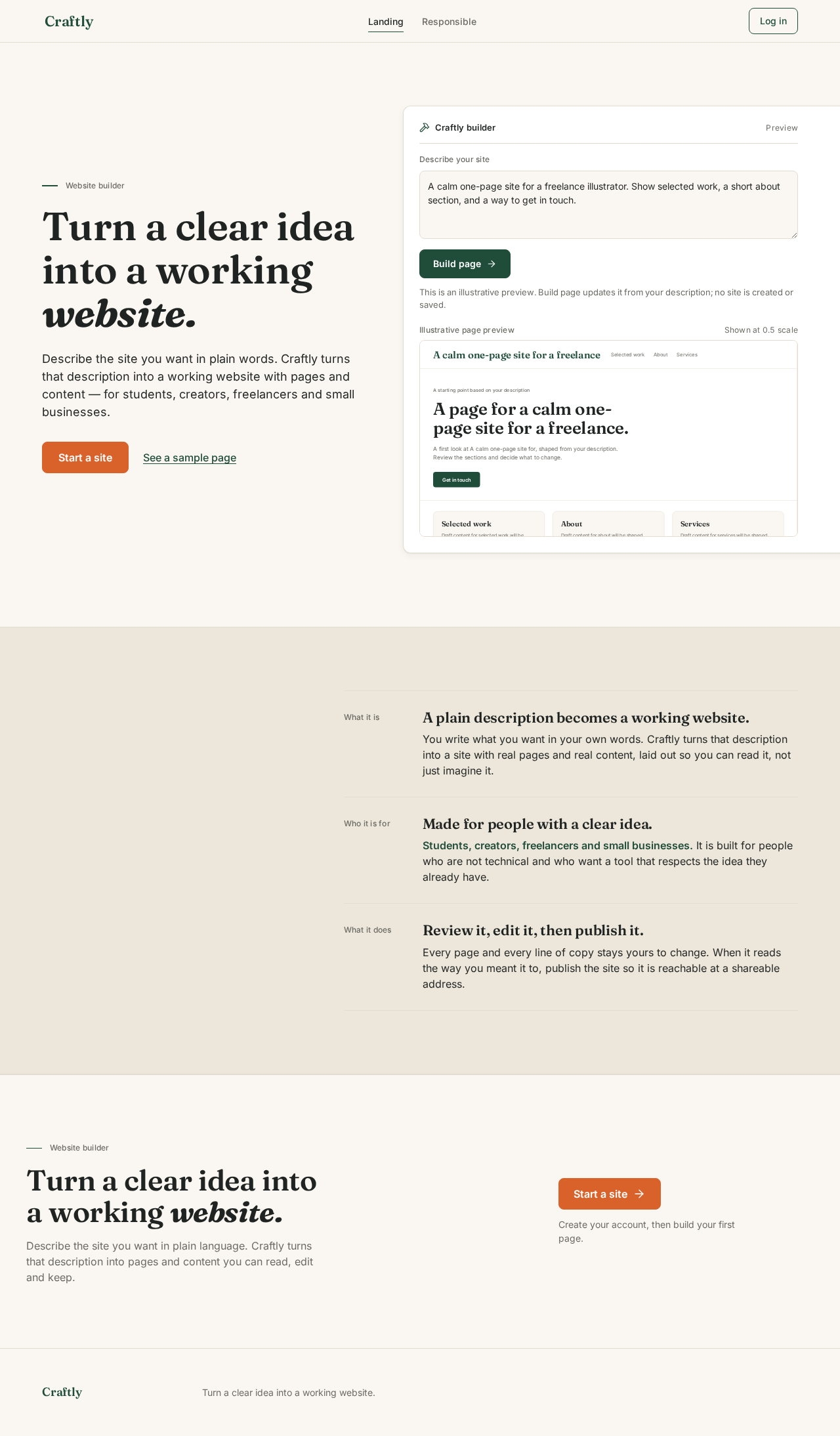
Landing design preview
Landing: Read what Craftly does
Landing: Choose Start a site
Responsible: Read the AI statement
Responsible: Choose Start a site
Sign Up: Enter email and password
Sign Up: 1. Create account
Sign Up: 2. Correct flagged field and resubmit
Login: Enter email and password
Login: 1. Log in
Login: 2. Correct credentials and resubmit
New Site: 1. Describe services and contact
New Site: 2. Build site
New Site: 3. Revise description and build again
New Site: 4. Check client questions covered
Site Editor: 5. Select page and edit content
Site Editor: 6. Save changes
Site Editor: 7. Retry save with edits kept
Publish: 8. Check pages and publish state
Publish: 9. Publish the client-facing site
Publish: 10. Retry publishing
Publish: 11. Copy address for clients
My Sites: 12. View sites and publish state
My Sites: 13. Retry loading sites
My Sites: 14. Open site in editor
My Sites: 15. Open site to publish
My Sites: 16. Start another site
Landing design preview
Landing: Read what Craftly does
Landing: Choose Start a site
Responsible: Read the AI statement
Responsible: Choose Start a site
Sign Up: Enter email and password
Sign Up: 1. Create account
Sign Up: 2. Correct flagged field and resubmit
Login: Enter email and password
Login: 1. Log in
Login: 2. Correct credentials and resubmit
New Site: 1. Describe services and contact
New Site: 2. Build site
New Site: 3. Revise description and build again
New Site: 4. Check client questions covered
Site Editor: 5. Select page and edit content
Site Editor: 6. Save changes
Site Editor: 7. Retry save with edits kept
Publish: 8. Check pages and publish state
Publish: 9. Publish the client-facing site
Publish: 10. Retry publishing
Publish: 11. Copy address for clients
My Sites: 12. View sites and publish state
My Sites: 13. Retry loading sites
My Sites: 14. Open site in editor
My Sites: 15. Open site to publish
My Sites: 16. Start another site