vivid-software
Make the best software in the world that does everything

Comments (0)
Sign in to leave a comment
Project Tasks
22 planning tasksGenerate system requirement document
Generate personas & user flows
Create flow for Primary User
Landing
Fix Landing review finding: frontend/src/components/Landing Hero.jsx: the required…
Fix Landing review finding: Q2 as reviewed now: frontend/src/pages/Landing.jsx still…
Fix Landing review findings: Hero headline line is vertically clipped by… (+1 more)
Fix Landing: The required full-bleed data-visualisation band is an empty slot (), leaving a large…
Fix Landing: The required ghost “Open workspace” link is absent from the hero; contains only the…
Landing / Hero
Landing / What It Is
Landing / Data Band
Landing / Who It Is For
Landing / How It Works
Landing / Entry
Landing / Footer
Fix Landing: Hero headline line is vertically clipped by in .
Footer
Retry First Page
Workspace
Architecture
Workspace task plan
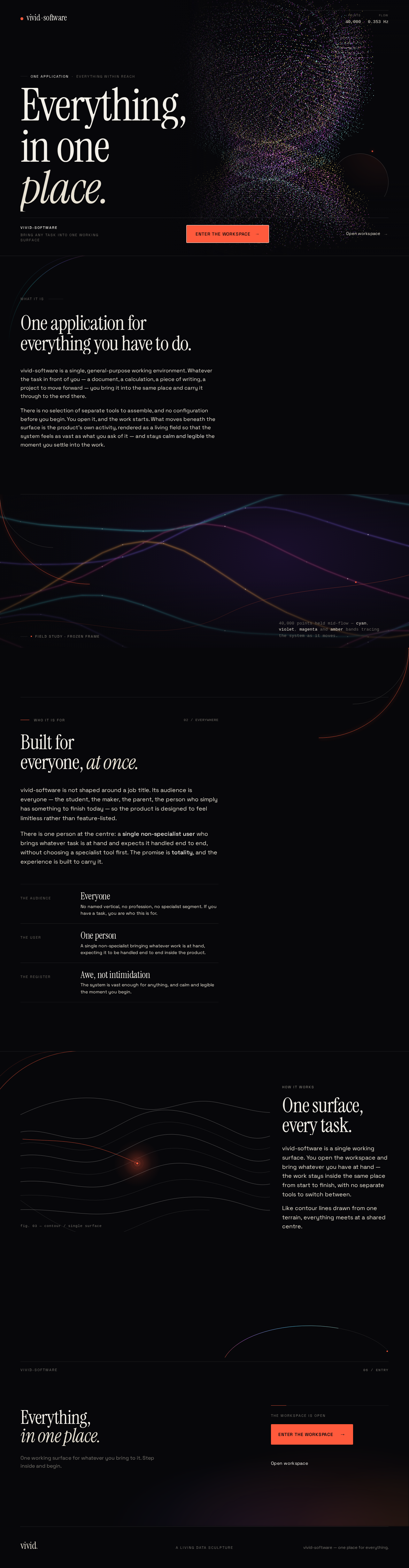
One applicationEverything within reach
Everything,in oneplace.
What it is
One application for everything you have to do.
vivid-software is a single, general-purpose working environment. Whatever the task in front of you — a document, a calculation, a piece of writing, a project to move forward — you bring it into the same place and carry it through to the end there.
There is no selection of separate tools to assemble, and no configuration before you begin. You open it, and the work starts. What moves beneath the surface is the product's own activity, rendered as a living field so that the system feels as vast as what you ask of it — and stays calm and legible the moment you settle into the work.
40,000 points held mid-flow — cyan, violet, magenta and amber bands tracing the system as it moves.
40,000 points held mid-flow — cyan, violet, magenta and amber bands tracing the system as it moves.
Who it is for02 / Everywhere
Built for everyone, at once.
vivid-software is not shaped around a job title. Its audience is everyone — the student, the maker, the parent, the person who simply has something to finish today — so the product is designed to feel limitless rather than feature-listed.
There is one person at the centre: a single non-specialist user who brings whatever task is at hand and expects it handled end to end, without choosing a specialist tool first. The promise is totality, and the experience is built to carry it.
- The audienceEveryoneNo named vertical, no profession, no specialist segment. If you have a task, you are who this is for.
- The userOne personA single non-specialist bringing whatever work is at hand, expecting it to be handled end to end inside the product.
- The registerAwe, not intimidationThe system is vast enough for anything, and calm and legible the moment you begin.
How it works
One surface,
every task.
vivid-software is a single working surface. You open the workspace and bring whatever you have at hand — the work stays inside the same place from start to finish, with no separate tools to switch between.
Like contour lines drawn from one terrain, everything meets at a shared centre.
Everything, in one place.
One working surface for whatever you bring to it. Step inside and begin.
One applicationEverything within reach
Everything,in oneplace.
What it is
One application for everything you have to do.
vivid-software is a single, general-purpose working environment. Whatever the task in front of you — a document, a calculation, a piece of writing, a project to move forward — you bring it into the same place and carry it through to the end there.
There is no selection of separate tools to assemble, and no configuration before you begin. You open it, and the work starts. What moves beneath the surface is the product's own activity, rendered as a living field so that the system feels as vast as what you ask of it — and stays calm and legible the moment you settle into the work.
40,000 points held mid-flow — cyan, violet, magenta and amber bands tracing the system as it moves.
40,000 points held mid-flow — cyan, violet, magenta and amber bands tracing the system as it moves.
Who it is for02 / Everywhere
Built for everyone, at once.
vivid-software is not shaped around a job title. Its audience is everyone — the student, the maker, the parent, the person who simply has something to finish today — so the product is designed to feel limitless rather than feature-listed.
There is one person at the centre: a single non-specialist user who brings whatever task is at hand and expects it handled end to end, without choosing a specialist tool first. The promise is totality, and the experience is built to carry it.
- The audienceEveryoneNo named vertical, no profession, no specialist segment. If you have a task, you are who this is for.
- The userOne personA single non-specialist bringing whatever work is at hand, expecting it to be handled end to end inside the product.
- The registerAwe, not intimidationThe system is vast enough for anything, and calm and legible the moment you begin.
How it works
One surface,
every task.
vivid-software is a single working surface. You open the workspace and bring whatever you have at hand — the work stays inside the same place from start to finish, with no separate tools to switch between.
Like contour lines drawn from one terrain, everything meets at a shared centre.
Everything, in one place.
One working surface for whatever you bring to it. Step inside and begin.
No comments yet. Be the first!