vivid-software
Make the best software in the world that does everything

Comments (0)
Sign in to leave a comment
System Requirements
System Requirements Document for vivid-software
1. Introduction
vivid-software is a single, general-purpose application built to do everything a user needs. The requester's intent is deliberately total: rather than a narrow tool for one job, vivid-software is a unified working environment where a single non-specialist user can bring whatever task they have at hand and have it handled end to end inside the product. The product is also to be built to the highest quality standard the requester names — "the best software in the world."
The audience is everyone. There is no named vertical, profession, or specialist segment; the promise is totality, so the product must feel limitless rather than feature-listed, while remaining calm and legible the moment a user begins working. The emotional register is awe at capability without intimidation.
This document is the System Requirements Document for vivid-software. It defines the current delivery: a public entry surface that explains what the product is and what it does, and a single general working surface where the user accomplishes their task. It preserves the requester's design direction (a living data sculpture, in the spirit of Refik Anadol) as the authoritative visual and motion language.
2. System Overview
vivid-software is delivered as a custom first-party web application with two current surfaces:
- Landing — the anonymous public entry surface. It explains what the general-purpose application is, who it is for, and what it does before any work begins, and it is the doorway into the workspace.
- Workspace — the single general working surface. The user opens it and starts working on their task directly, with no defined setup flow.
There is exactly one active human actor, the Primary User: a general user who opens the app to accomplish whatever task they have at hand and expects it to be handled end to end within the product. No separate roles, administrators, or specialist personas exist in the current scope.
Current accepted behavior is intentionally broad in intent and narrow in structure: the product is a single all-purpose application (explicit), and it is built to the highest quality standard the requester describes (explicit). The two surfaces and the single persona are the minimum truthful structure that lets a user discover the product and then work in it.
Removed from scope
- None. No concept has been explicitly removed by the requester.
2a. Product Interpretation and Delivery Boundary
vivid-software is owned and delivered entirely by the application itself. Both current surfaces are first-party custom UI. There is no provider-owned surface, no external destination, and no headless delivery boundary in the current scope.
Access is open. The Landing surface is anonymously reachable and requires no identity. The Workspace is likewise reachable without a defined setup flow — the requester specified no account creation, sign-in, invitation, or provisioning step, and no accepted journey requires durable actor-specific state to be privately owned or resumed across sessions. Accordingly, no application-owned identity, authentication, or account-management capability is introduced. If a future requirement establishes durable per-user state that must be privately owned or resumed, identity establishment would become an indispensable prerequisite and would be added then, not now.
The current horizon covers the Landing and Workspace surfaces and the general-purpose working promise. Anything beyond that — additional surfaces, integrations, or specialized capabilities — is future work and is not part of current acceptance.
2c. Page Content and Component Coverage
Landing
Purpose and information/state. The anonymous public entry surface. It communicates what vivid-software is, who it is for, and what it does, and it provides the single path into the Workspace. It has no loading state tied to user data, no empty state, and no error state beyond the static page itself; it is a static-composed page whose only live element is the generative hero field.
Primary action. A single coral primary CTA that enters the Workspace.
Supporting actions. A ghost "Open workspace" link in the top-right, which is a second entry point to the same destination.
Domain entities. None persisted. The hero field is driven by the product's own activity data (categories of tasks map to hue bands, recency to brightness, volume to flow speed); on the anonymous Landing this is presentational and does not expose private user data.
Components.
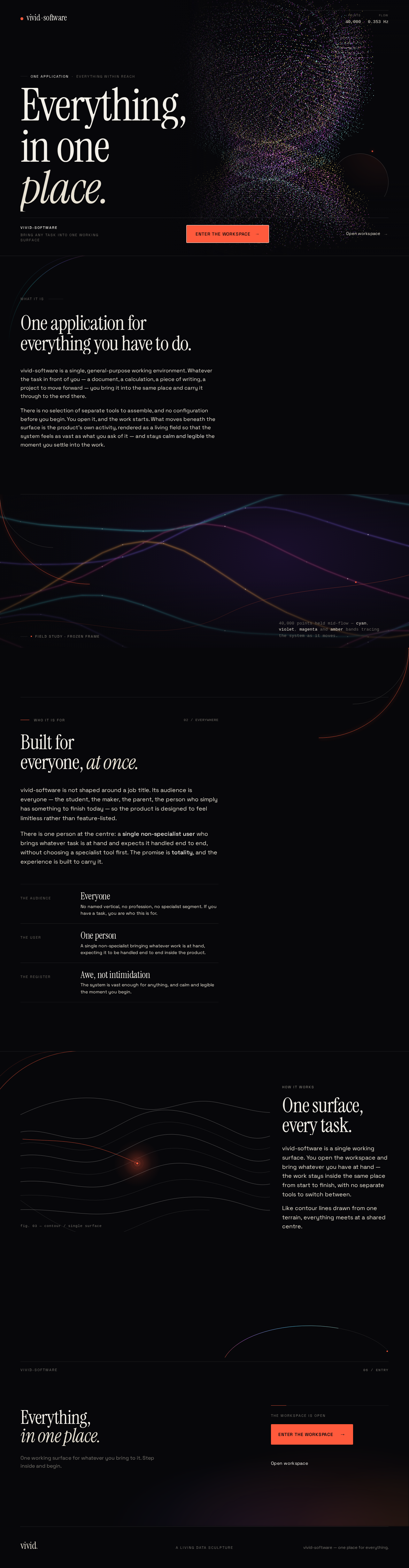
- Full-bleed generative particle/fluid canvas occupying the first viewport, filling the right two-thirds and bleeding off all edges.
- Top-left wordmark.
- Top-right ghost "Open workspace" link.
- Oversized Instrument Serif headline "Everything, in one place," anchored bottom-left, stacked over three lines.
- Single coral CTA pinned beneath the headline on a hairline rule.
- Monospace live counters (Space Mono) in the top-right showing the field's particle count and flow rate, as a museum-plaque detail.
- Editorial single-column sections below the hero (measure capped at 62ch) alternating with full-bleed data-visualisation bands, explaining what the product is and who it is for.
- A topographic contour diagram rendered in hairline white for the "how it works" band.
- Thin luminous quarter-arc stroke marking each section transition.
States. Success: the page renders and both entry controls lead to the Workspace. Reduced motion: the field freezes to a static high-quality frame and type reveals become instant. Failure/recovery: if the WebGL field cannot initialize, the page falls back to a static high-quality frame of the field so the headline, CTA, and explanatory copy remain fully readable and the entry controls remain usable.
Workspace
Purpose and information/state. The single general working surface where the Primary User opens the app and starts working on their task. It is the destination for all accepted work; it has no setup flow and no prerequisite configuration.
Primary action. Begin and carry out the user's task within the working canvas.
Supporting actions. Navigate tool groups from the left rail; return to the Landing surface via the wordmark.
Domain entities. The user's current working content within the canvas. No durable account-bound entity is established in current scope.
Components.
- Narrow 240px left rail of hairline-separated tool groups.
- Open canvas area where the user works.
- The generative data field persisting faintly at 8% opacity behind the working surface, slowed to near-still.
- Flat graphite panels separated by hairlines (no shadows, no glassmorphism).
- Hairline 1px rules as dividers.
States. Empty: the canvas presents the working surface with the faint field behind it and no prior content. Active: the user's working content occupies the canvas. Reduced motion: the background field holds a static frame. Failure/recovery: if the background field cannot render, the canvas remains fully usable on the flat graphite ground.
3. Functional Requirements
FR-1 — A single general-purpose application that does everything a user needs. As a Primary User, I should be able to bring whatever task I have at hand into one application and have it handled end to end within the product, so that I do not need separate tools for different work.
- Provenance: explicit.
- Trigger/input: the user opens the Workspace with a task in mind.
- Observable result: the task is carried out within the single Workspace surface rather than being redirected elsewhere.
- Access state: open; no identity or setup required.
- Failure/recovery: if the user cannot proceed, the Workspace remains the single place to continue; the user is not sent to another product.
- Continuation: the user continues working in the same Workspace.
- Owner: Workspace.
FR-2 — Built to the highest quality standard. As a Primary User, I should experience the product as the best software in the world — polished, coherent, and dependable — so that the promise of totality is matched by the quality of the experience.
- Provenance: explicit.
- Trigger/input: any use of the Landing or Workspace.
- Observable result: consistent visual language, legible type and controls at every viewport, working entry controls, and graceful reduced-motion and fallback behavior.
- Access state: open.
- Failure/recovery: degraded rendering (for example, unavailable WebGL) falls back to a static high-quality frame without losing readable content or usable controls.
- Continuation: the user proceeds normally.
- Owner: Landing and Workspace.
FR-3 — Anonymous public entry that explains the product. As a Primary User, I should be able to arrive at the Landing surface without an account and immediately understand what vivid-software is, who it is for, and what it does, so that I can decide to start working.
- Provenance: required_inference.
- Trigger/input: the user visits the Landing surface.
- Observable result: the headline, explanatory copy, and entry controls are visible and readable.
- Access state: anonymous; no identity required.
- Failure/recovery: if the generative field fails, a static frame preserves all readable content and controls.
- Continuation: the user selects the primary CTA or the "Open workspace" link.
- Owner: Landing.
FR-4 — Enter the Workspace from the Landing surface. As a Primary User, I should be able to enter the Workspace from the Landing surface with a single action, so that I can begin working immediately.
- Provenance: required_inference.
- Trigger/input: the user activates the coral primary CTA or the ghost "Open workspace" link.
- Observable result: the Workspace opens with the working canvas ready.
- Access state: open; no setup flow.
- Failure/recovery: if the Workspace fails to open, the user remains on the Landing surface and can retry either entry control.
- Continuation: the user begins their task in the Workspace.
- Owner: Landing → Workspace.
FR-5 — Start working immediately in the Workspace. As a Primary User, I should be able to open the Workspace and start working on my task without a defined setup flow, so that nothing stands between me and the work.
- Provenance: required_inference.
- Trigger/input: the user arrives in the Workspace.
- Observable result: the working canvas is presented with the faint data field behind it and the left rail of tool groups available.
- Access state: open.
- Failure/recovery: if the background field cannot render, the canvas remains usable on the flat graphite ground.
- Continuation: the user works in the canvas and navigates tool groups from the rail.
- Owner: Workspace.
FR-6 — Return from the Workspace to the Landing surface. As a Primary User, I should be able to return to the Landing surface from the Workspace, so that I can revisit what the product offers.
- Provenance: required_inference.
- Trigger/input: the user activates the wordmark in the Workspace.
- Observable result: the Landing surface is shown.
- Access state: open.
- Failure/recovery: if navigation fails, the user remains in the Workspace with work intact.
- Continuation: the user may re-enter the Workspace.
- Owner: Workspace → Landing.
4. User Personas
Primary User
Product context. The Primary User is a general user with no specialist role and no named vertical. They arrive at vivid-software because it promises to do everything they need in one place, and they expect not to have to assemble a stack of separate tools. They may encounter the product for the first time on the Landing surface, or they may go straight to the Workspace.
Primary goal. Accomplish whatever task they have at hand, end to end, inside a single application — and feel that the product is vast enough to handle anything without being intimidating.
Distinct accepted responsibilities.
- Understand what the product is, who it is for, and what it does (on the Landing surface).
- Decide to begin work and enter the Workspace.
- Bring their task into the Workspace and carry it out there.
- Navigate the tool groups in the left rail as their work requires.
- Return to the Landing surface if they want to revisit the product's promise.
Relevant inputs and decisions. The task the user brings; the decision to enter the Workspace via the primary CTA or the "Open workspace" link; the choice of tool group in the left rail.
Interactions with other accepted participants. None. The Primary User is the only active human actor in current scope; there are no counterparties, approvers, or recipients whose state changes as a result of the user's work.
Observable success. The user reaches the Workspace in one action, finds a calm and legible working surface, and completes their task within the product without being redirected elsewhere. The experience reads as the best software in the world: coherent, polished, and dependable, with readable text and controls at every viewport and graceful behavior under reduced motion.
What makes this role different. There is no narrower role to contrast with — the defining characteristic of this persona is its breadth. The product's design must serve a user who could bring any task, which is why the visual language expresses totality (a living data sculpture) while the working surface stays restrained and clear.
5. Core User Flows
Flow A — Discover the product and enter the Workspace
- Starting context. The Primary User arrives at the Landing surface anonymously, with no account and no prior setup.
- First impression. The full-bleed generative particle field fills the right two-thirds of the viewport and bleeds off all edges. The wordmark sits top-left; the ghost "Open workspace" link sits top-right; monospace live counters show the field's particle count and flow rate.
- Reading the promise. The oversized Instrument Serif headline "Everything, in one place" is anchored bottom-left over three lines in warm paper white, with the single coral CTA pinned beneath it on a hairline rule. As the user scrolls, the field compresses and editorial sections alternate with full-bleed data-visualisation bands, explaining what the product is and who it is for.
- Decision. The user decides to begin work.
- Action. The user activates the coral primary CTA (or the ghost "Open workspace" link).
- Observable result. The Workspace opens with the working canvas ready.
- Failure/recovery. If the Workspace fails to open, the user remains on the Landing surface and can retry either entry control. If the WebGL field cannot initialize, a static high-quality frame preserves the headline, CTA, and explanatory copy, and both entry controls remain usable.
- Continuation. The user proceeds to Flow B.
Flow B — Work on a task in the Workspace
- Starting context. The Primary User is in the Workspace, having entered from the Landing surface or directly.
- Orientation. The Workspace presents a two-pane layout: a narrow 240px left rail of hairline-separated tool groups and an open canvas area. The data field persists faintly at 8% opacity behind the working surface, slowed to near-still.
- Action. The user selects a tool group from the left rail and begins working in the canvas.
- Observable result. The user's working content occupies the canvas on flat graphite panels separated by hairlines.
- Failure/recovery. If the background field cannot render, the canvas remains fully usable on the flat graphite ground. Under reduced motion, the field holds a static frame.
- Continuation. The user continues working, switching tool groups as needed.
Flow C — Return to the Landing surface
- Starting context. The Primary User is working in the Workspace.
- Action. The user activates the wordmark.
- Observable result. The Landing surface is shown.
- Failure/recovery. If navigation fails, the user remains in the Workspace with work intact.
- Continuation. The user may re-enter the Workspace via either entry control.
6. Visuals Colors and Theme
The creative direction is authoritative for this section. The muse is Refik Anadol; the headline is "Everything, in one place."
Mode. Dark mode only.
Colour tokens (exact hex by role).
- Background / void:
#07070A— dominant ground, roughly 70% of any screen. - Surface (panels, cards):
#111218— flat graphite. - Text:
#F4F1EA— warm paper white. - Primary type:
#E8E2D4— warm paper white, slightly warmer. - Accent:
#FF5A3C— molten coral-orange. One hot accent only; reserved for the single primary CTA, active states, and the leading edge of the data flow. - Muted:
#6E6A63— warm grey for metadata and micro-labels. - Hairline borders:
1pxinrgba(244,241,234,0.10). - Generative canvas spectrum: luminous multi-hue cyan → violet → magenta → amber, always at low luminance against the void, never as a background wash behind text.
Typography.
- Headings: Instrument Serif, light-to-regular weight, tightly tracked at
-0.02em, line-height0.92for display lines. - Body: Space Grotesk.
- Micro-labels: uppercase Space Grotesk at
11pxwith0.18emtracking for section eyebrows and data annotations. - Numerals: Space Mono for live counters.
- Scale (1.4 modular): display
clamp(48px, 11vw, 168px)(48 mobile → 96 tablet → 168 desktop); H2 32/48/64; H3 22/28/32; body 16/17/18; caption 12/13/13. Display lines wrap to at most three words per line at every breakpoint.
Shape language. Almost no chrome. Full-bleed generative canvas with no card borders; only hairline 1px rules as section dividers. Buttons are sharp-cornered (2px radius) rectangles with a 1px paper-white border; the coral fill appears only on the primary. Secondary actions are ghost text with an underline that animates from 0 to 100% width. Workspace panels are flat graphite rectangles separated by hairlines, never floating with shadows — depth comes from the data field, not from drop shadows. One recurring motif: a thin luminous quarter-circle arc stroke marking section transitions.
Layout. Museum-like. A full-bleed generative canvas occupies the first viewport, with the headline and CTA overlaid bottom-left in a strict 12-column grid with 80px desktop gutters (24px mobile). Subsequent sections alternate between a full-bleed data-visualisation band and a single-column, wide-margin editorial text block (measure capped at 62ch). The Workspace is a two-pane layout: a narrow 240px left rail of hairline-separated tool groups and an open canvas area where the data field persists faintly behind the working surface.
Imagery. No stock photography, no product mockups, no illustration. The imagery is the generative data sculpture: a real-time particle/fluid render (Three.js / React Three Fiber, ~40k points) whose colour and density are driven by the product's own activity data — categories of tasks map to hue bands, recency to brightness, volume to flow speed. Secondary imagery: macro stills of the frozen field used as section dividers, and a topographic contour diagram rendered in hairline white for the "how it works" band.
Accessibility of type and controls. Headlines, wordmarks, labels, numbers, card text, and controls stay entirely inside the viewport and their container at 375px, 768px, and 1280px, wrapping or scaling (for example clamp(...) with its mobile size) to fit. No other element covers any part of them. Imagery, decoration, and motion may be cropped, bled off an edge, rotated, overlapped, or cut as the direction asks, provided they cover no readable text or control.
Forbidden. The generic indigo/blue-on-white SaaS template; centred headline + subtext + blue button hero; gradient-blob or mesh-gradient backgrounds behind text; a grid of identical hover-lift feature cards; stock photography or device mockups; more than one accent colour in the UI chrome; glassmorphism panels or frosted blur cards; Inter, Roboto, Arial, Helvetica, Poppins, or system-ui for headings or body; feature-list sections that read as a checklist of capabilities.
7. Signature Design Concept
The public entry is a living data sculpture. A full-bleed, near-black viewport is dominated by a slow-moving luminous particle field that fills the right two-thirds and bleeds off all edges. The headline "Everything, in one place" is set in Instrument Serif at clamp(48px, 11vw, 168px) in warm paper white, anchored bottom-left and stacked over three lines, with a single coral CTA sitting beneath it on a hairline rule. A small wordmark holds the top-left; a ghost "Open workspace" link holds the top-right. Monospace live counters in the top-right show the field's own particle count and flow rate as a museum-plaque detail.
The composition is asymmetric, cinematic, and unmistakably a data sculpture rather than a SaaS hero. As the user scrolls, the field compresses and hands off into the Workspace, where it persists at 8% opacity behind flat graphite working panels — the "everything" system always faintly alive behind the work. A thin luminous quarter-arc stroke sweeps across every section transition, echoing the flow lines of the field.
The concept recomposes only accepted content and controls: the headline, the wordmark, the two entry controls, the explanatory sections, and the field itself. It introduces no new behavior, page, or destination.
8. Interaction Model & Motion Direction
Interaction Model: Animated Motion Tempo: cinematic Hero Dimensionality: webgl
Landing Hero Motion Brief
- Focal subject. A real-time particle/fluid field of roughly 40k points, rendered with Three.js / React Three Fiber, whose colour and density are driven by the product's own activity data — categories of tasks map to hue bands, recency to brightness, volume to flow speed.
- Input → transformation → outcome thesis. As the user scrolls from the hero into the workspace, the field compresses and dims, handing off from a full-bleed luminous sculpture into a faint 8% living background behind the working surface — the same system, now calm and legible behind the work.
- Motion vocabulary. Continuous slow generative flow on a 30–60s loop — the field drifts, breathes, and morphs. Type reveals on scroll via a 600ms clip-path wipe from bottom. Hover on the primary CTA triggers a subtle light sweep across the coral fill. In the Workspace, the field dims to 8% opacity and slows to near-still.
- Composed first frame. Near-black void; the field filling the right two-thirds and bleeding off all edges; wordmark top-left; ghost "Open workspace" link top-right; monospace live counters top-right; the three-line Instrument Serif headline anchored bottom-left in warm paper white; the single coral CTA beneath it on a hairline rule.
- Reduced-motion state. The field freezes to a static high-quality frame and all reveals become instant; the headline, CTA, and entry controls remain fully readable and usable.
Landing Hero 3D Scene Brief — DIRECTION-DERIVED
A single crafted real-time scene: a compact particle/fluid field of ~40k points in a near-black void, its hue bands, brightness, and flow speed driven by the product's own activity data. The scene shows the product's defining state — a vast, self-organising system of systems — at low luminance against the void, never as a background wash behind text. It compresses and dims on scroll into the Workspace's 8% background, and freezes to a static high-quality frame under reduced motion.
9. Non-Functional Requirements
- Quality standard. The product is built to the highest quality standard the requester describes — "the best software in the world." (explicit)
- Readability at every viewport. Headlines, wordmarks, labels, numbers, card text, and controls stay entirely inside the viewport and their container at 375px, 768px, and 1280px, wrapping or scaling to fit, with no other element covering any part of them. (explicit)
- Motion accessibility. All motion respects
prefers-reduced-motion: the field freezes to a static high-quality frame and reveals become instant. (explicit) - Graceful degradation. If the WebGL field cannot initialize, a static high-quality frame preserves all readable content and usable controls on both surfaces. (required_inference)
- Performance of the hero. The generative field runs as a real-time render at roughly 40k points on a 30–60s loop without blocking interaction with the headline, CTA, or entry controls. (explicit)
- Single accent discipline. Exactly one accent colour (
#FF5A3C) appears in the UI chrome. (explicit) - No identity requirement. Neither current surface requires an account, sign-in, invitation, or provisioning step. (required_inference, consistent with the absence of any source-stated identity requirement)
10. Tech Stack
- Frontend. React, with Three.js / React Three Fiber for the generative particle/fluid hero, as specified in the creative direction.
- Typography. Instrument Serif (headings), Space Grotesk (body and micro-labels), Space Mono (numerals), loaded as web fonts.
- Styling. CSS with the exact tokens in Section 6;
clamp(...)for the type scale. - Backend. A single shared backend process for any server-side behavior the Workspace requires, reusing one process, port, and deployment rather than introducing separate services.
- Deployment. Docker / docker-compose for the frontend and the shared backend. Kubernetes is not required by any current source constraint.
11. Assumptions and Constraints
- Assumption (narrow). The requester's "does everything" is a product promise about breadth of purpose, not an enumerated feature list; no specific capability beyond the two current surfaces is accepted as current scope. (required_inference)
- Assumption (narrow). No durable per-user state must be privately owned or resumed across sessions in current scope, so no identity establishment is introduced. If that changes, identity becomes an indispensable prerequisite and would be added then. (required_inference)
- Constraint. The creative direction is authoritative for palette, typography, shape language, layout, motion, and imagery, and the forbidden list in Section 6 is binding. (explicit)
- Constraint. The generic indigo/blue-on-white SaaS template is forbidden. (explicit)
- Constraint. Readable text and controls stay whole at every viewport; the gesture of cropping or bleeding is carried by imagery and decoration instead. (explicit)
- Constraint. The page contract is closed: Landing and Workspace, with Landing anonymously reachable and Workspace reachable without a setup flow. (required_inference)
12. Glossary
- Primary User — the single active human actor: a general user who brings any task to vivid-software and expects it handled end to end.
- Landing — the anonymous public entry surface that explains the product and provides the path into the Workspace.
- Workspace — the single general working surface where the user carries out their task.
- Data sculpture / generative field — the real-time particle/fluid render (~40k points) whose colour and density are driven by the product's own activity data.
- Quarter-arc — the thin luminous quarter-circle stroke marking section transitions.
- Museum-plaque detail — the monospace live counters showing the field's particle count and flow rate.
- Reduced motion — the
prefers-reduced-motionstate in which the field freezes to a static high-quality frame and reveals become instant.
One applicationEverything within reach
Everything,in oneplace.
What it is
One application for everything you have to do.
vivid-software is a single, general-purpose working environment. Whatever the task in front of you — a document, a calculation, a piece of writing, a project to move forward — you bring it into the same place and carry it through to the end there.
There is no selection of separate tools to assemble, and no configuration before you begin. You open it, and the work starts. What moves beneath the surface is the product's own activity, rendered as a living field so that the system feels as vast as what you ask of it — and stays calm and legible the moment you settle into the work.
40,000 points held mid-flow — cyan, violet, magenta and amber bands tracing the system as it moves.
40,000 points held mid-flow — cyan, violet, magenta and amber bands tracing the system as it moves.
Who it is for02 / Everywhere
Built for everyone, at once.
vivid-software is not shaped around a job title. Its audience is everyone — the student, the maker, the parent, the person who simply has something to finish today — so the product is designed to feel limitless rather than feature-listed.
There is one person at the centre: a single non-specialist user who brings whatever task is at hand and expects it handled end to end, without choosing a specialist tool first. The promise is totality, and the experience is built to carry it.
- The audienceEveryoneNo named vertical, no profession, no specialist segment. If you have a task, you are who this is for.
- The userOne personA single non-specialist bringing whatever work is at hand, expecting it to be handled end to end inside the product.
- The registerAwe, not intimidationThe system is vast enough for anything, and calm and legible the moment you begin.
How it works
One surface,
every task.
vivid-software is a single working surface. You open the workspace and bring whatever you have at hand — the work stays inside the same place from start to finish, with no separate tools to switch between.
Like contour lines drawn from one terrain, everything meets at a shared centre.
Everything, in one place.
One working surface for whatever you bring to it. Step inside and begin.
One applicationEverything within reach
Everything,in oneplace.
What it is
One application for everything you have to do.
vivid-software is a single, general-purpose working environment. Whatever the task in front of you — a document, a calculation, a piece of writing, a project to move forward — you bring it into the same place and carry it through to the end there.
There is no selection of separate tools to assemble, and no configuration before you begin. You open it, and the work starts. What moves beneath the surface is the product's own activity, rendered as a living field so that the system feels as vast as what you ask of it — and stays calm and legible the moment you settle into the work.
40,000 points held mid-flow — cyan, violet, magenta and amber bands tracing the system as it moves.
40,000 points held mid-flow — cyan, violet, magenta and amber bands tracing the system as it moves.
Who it is for02 / Everywhere
Built for everyone, at once.
vivid-software is not shaped around a job title. Its audience is everyone — the student, the maker, the parent, the person who simply has something to finish today — so the product is designed to feel limitless rather than feature-listed.
There is one person at the centre: a single non-specialist user who brings whatever task is at hand and expects it handled end to end, without choosing a specialist tool first. The promise is totality, and the experience is built to carry it.
- The audienceEveryoneNo named vertical, no profession, no specialist segment. If you have a task, you are who this is for.
- The userOne personA single non-specialist bringing whatever work is at hand, expecting it to be handled end to end inside the product.
- The registerAwe, not intimidationThe system is vast enough for anything, and calm and legible the moment you begin.
How it works
One surface,
every task.
vivid-software is a single working surface. You open the workspace and bring whatever you have at hand — the work stays inside the same place from start to finish, with no separate tools to switch between.
Like contour lines drawn from one terrain, everything meets at a shared centre.
Everything, in one place.
One working surface for whatever you bring to it. Step inside and begin.
No comments yet. Be the first!