visitor-management-gateflow
 Sudarshan Samala
Below is a compressed enterprise PRD under 9,999 characters, suitable for giving directly to an AI coding agent or using as a project specification. Enterprise VMS — Product Requirements Document Product: GateFlow VMS Type: Enterprise Visitor Management System Goal: Replace manual visitor registers with a secure, scalable, multi-tenant visitor, security and facility-management platform. 1. Vision Complete visitor lifecycle: Pre-registration → Invitation → QR → Arrival → Verification → Approval → Badge → Check-in → Monitoring → Check-out → Audit → Analytics Target customers: Corporates, schools, hospitals, factories, warehouses, data centers, government offices and multi-location enterprises. 2. User Roles Super Admin Organization Admin Facility Admin Security Admin Security Guard Receptionist Employee/Host Department Manager Contractor Manager Visitor Auditor IT Admin Emergency Officer Implement granular RBAC permissions such as visitor:create, visitor:approve, visitor:checkout, audit:read, settings:update. 3. Core Modules 1. Dashboard 2. Visitor Management 3. Invitations/Pre-registration 4. Walk-in Visitors 5. Check-in/Check-out 6. Host Management 7. Approval Workflows 8. QR Pass 9. Badge Management 10. Kiosk 11. Security Guard Console 12. Contractors 13. Employees/Departments 14. Watchlist/Blacklist 15. Vehicles/Parking 16. Deliveries 17. Meeting Rooms 18. Emergency Management 19. Notifications 20. Reports 21. Analytics 22. Audit Logs 23. Device Management 24. Locations/Buildings/Floors 25. Integrations 26. API/Webhooks 27. System Settings 28. Subscription/Plans 4. Visitor Lifecycle INVITED ↓ EXPECTED ↓ ARRIVED ↓ PENDING_APPROVAL ↓ APPROVED ↓ CHECKED_IN ↓ INSIDE ↓ CHECKED_OUT Alternative states: DENIED, EXPIRED, BLACKLISTED. Visitor profile: Name, photo, phone, email, company, designation, ID type, masked ID reference, host, department, purpose, visitor type, vehicle, emergency contact, status, timestamps. Visitor types: Guest, Client, Vendor, Contractor, Interviewee, Delivery, Parent, VIP, Government Official, Service Provider and custom types. 5. Pre-registration Host creates: Visitor details Date/time Location/building Host Department Purpose Vehicle Meeting room Special instructions Generate secure QR invitation with expiry/revocation. 6. Walk-in Visitor arrives → Reception enters/scans details → Identity verification → Select host → Approval request → Host approves → Badge generated → Check-in 7. Kiosk Touch-first interface: Check In | Check Out | Scan QR Features: QR scanner, camera, ID verification, photo capture, badge printing, multilingual UI, accessibility, offline queue and automatic session reset. 8. Security Console Show: Expected visitors Current occupants Pending approvals Alerts Visitor search QR scan Verification Approve/deny Badge issue Checkout Vehicle entry Emergency mode Incident reporting 9. Approval Engine Support: Single approval Multi-level Sequential Parallel Conditional Auto approval Time-based approval Example: Contractor → Documents → Facility Manager → Security → Badge VIP → Facility Manager approval Watchlist match → Security review 10. Badge Custom templates with: Logo, visitor name, company, host, date/time, visitor ID and QR. Badge types: Visitor, Contractor, VIP, Vendor, Temporary. 11. Watchlist Store authorized watchlist records with reason, severity, expiry and notes. Potential matches must trigger human review; don't automatically deny based solely on weak name/photo similarity. 12. Contractor & Vehicle Contractor lifecycle: Company → Worker → Documents → Verification → Training → Approval → Access → Expiry Vehicle data: Number, type, driver, visitor, parking, entry/exit and purpose. Support delivery/courier tracking. 13. Emergency Real-time occupancy: Building A Employees: 312 Visitors: 42 Contractors: 33 Total: 387 Unaccounted: 7 Features: emergency activation, occupancy by building/floor, evacuation status, muster tracking, emergency notifications and exportable occupant list. 14. Dashboard KPIs: Visitors today Currently inside Expected visitors Pending approvals Checked out Denied Watchlist alerts Contractors Vehicles Average visit duration Widgets: live activity, visitor trends, locations, departments, visitor types and peak hours. 15. Notifications Email, SMS, Push, Microsoft Teams and approved WhatsApp Business provider. Example: “John Doe from Acme has arrived at Reception.” Host actions: Approve / Reject / Call Reception 16. Reports Visitor register, daily/monthly visitors, occupancy, contractors, vehicles, badges, denied visitors, audit and emergency reports. Export: CSV, XLSX, PDF. 17. Multi-Tenant Architecture Platform ├─ Organization A │ ├─ Bangalore │ └─ Hyderabad ├─ Organization B └─ Organization C All tenant data must be isolated using tenant_id, authorization checks and preferably PostgreSQL Row-Level Security where appropriate. 18. UI/UX Design language: Microsoft 365 + Linear + Stripe-style enterprise dashboard. Desktop: sidebar + top navigation. Tablet: collapsible sidebar. Mobile: responsive drawer/bottom navigation. Kiosk: large touch controls. Navigation Dashboard VISITOR OPERATIONS Visitors Invitations Approvals Check-ins Check-outs SECURITY Live Security Watchlist Incidents Emergency PEOPLE Employees Hosts Contractors FACILITIES Locations Buildings Rooms Parking OPERATIONS Vehicles Deliveries Badges Devices INSIGHTS Analytics Reports Audit Logs ADMIN Users Roles Workflows Integrations API Settings 19. Colour Palette Primary: #0F172A Navy Brand Blue: #2563EB Background: #F8FAFC Surface: #FFFFFF Border: #E2E8F0 Text: #0F172A Muted: #64748B Success: #16A34A Warning: #F59E0B Danger: #DC2626 Info: #0891B2 Dark mode: #020617, #0F172A, #1E293B, #334155, #F8FAFC Font: Inter. Icons: Lucide. Use colour + text/icons for status; never rely on colour alone. 20. Technology Stack Frontend: React + TypeScript + Vite/Next.js UI: Tailwind CSS + shadcn/ui State/API: TanStack Query Forms: React Hook Form + Zod Charts: Recharts Backend: Node.js + NestJS + TypeScript API: REST + WebSocket + OpenAPI Database: PostgreSQL + Prisma Cache: Redis Queue: BullMQ Storage: AWS S3 Search: PostgreSQL initially → OpenSearch at scale Auth: JWT + MFA + OIDC/SAML SSO: Microsoft Entra ID / Okta / Google Containers: Docker Proxy: NGINX CI/CD: GitHub Actions Cloud: AWS Monitoring: OpenTelemetry + Prometheus + Grafana Logs: Loki Testing: Vitest/Jest + Playwright IaC: Terraform 21. Security Implement: MFA SSO RBAC Tenant isolation TLS Encryption at rest Secrets management Input validation Rate limiting Secure headers CORS Audit trails Session management Token rotation Data retention Document access control Backup/restore Security monitoring Never store passwords, tokens or unnecessary sensitive ID data in logs. 22. API POST /api/v1/auth/login POST /api/v1/auth/refresh GET /api/v1/visitors POST /api/v1/visitors GET /api/v1/visitors/:id PATCH /api/v1/visitors/:id POST /api/v1/invitations GET /api/v1/invitations POST /api/v1/invitations/:id/cancel GET /api/v1/approvals POST /api/v1/approvals/:id/approve POST /api/v1/approvals/:id/reject POST /api/v1/visits/:id/check-in POST /api/v1/visits/:id/check-out POST /api/v1/visits/:id/extend 23. Database Core tables: organizations, users, roles, permissions, locations, buildings, floors, rooms, employees, departments, visitors, visitor_documents, visits, invitations, approvals, badges, badge_templates, vehicles, parking_slots, contractors, contractor_documents, watchlists, notifications, devices, access_events, audit_logs, incidents, emergency_events, integrations, api_keys, webhooks 24. Audit Logging Every sensitive action records: Timestamp User Tenant Action Resource Resource ID Location IP/device metadata Result Audit logs should be append-only/tamper-resistant. 25. Integrations Microsoft 365 / Outlook Microsoft Teams Google Workspace Entra ID Okta HRMS Access-control systems RFID Turnstiles QR scanners Badge printers ANPR/LPR SIEM platforms Email/SMS providers 26. Performance Targets Dashboard: <2 sec target API p95: <500 ms target Check-in: <2 sec target Search: <500 ms target Availability: 99.9%+ target 27. AI — Phase 3 AI assistant can answer: > “Who is currently inside Building A?” > “What were peak visitor hours last month?” > “Show denied visitors this week.” AI can detect unusual patterns such as after-hours attempts or abnormal visit duration, but security decisions should remain explainable and human-reviewed. 28. Development Roadmap Phase 1: Architecture, UX, DB, authentication, RBAC, multi-tenancy. Phase 2: Visitors, hosts, invitations, QR, approvals, check-in/out. Phase 3: Badges, kiosk, notifications, contractors, vehicles, deliveries. Phase 4: Emergency, SSO, Teams, calendar, reports, audit, device management. Phase 5: Access control, advanced analytics, AI, mobile PWA, SIEM, SCIM and enterprise integrations. 29. MVP Build first: Multi-tenancy + Auth/RBAC + Locations + Employees + Visitors + Hosts + Invitations + QR + Approval + Check-in/out + Badges + Notifications + Dashboard + Reports + Audit Logs. 30. Success Metrics Check-in time <2 minutes > 95% digital visitor adoption Reduced reception workload 100% visitor auditability Real-time occupancy visibility Zero cross-tenant data exposure High kiosk uptime High host approval response rate Product positioning: Don't build merely a digital visitor register. Build an Enterprise Visitor + Physical Security + Occupancy + Access Orchestration Platform that can scale from one office to thousands of locations.


Comments (0)
Sign in to leave a comment
Project Tasks
97 planning tasksGenerate system requirement document
Generate personas & user flows
Create flow for Super Admin
Create flow for Organization Admin
Create flow for Facility Admin
Create flow for Security Admin
Create flow for Security Guard
Create flow for Receptionist
Create flow for Employee/Host
Create flow for Department Manager
Create flow for Contractor Manager
Create flow for Visitor
Create flow for Auditor
Create flow for IT Admin
Create flow for Emergency Officer
Landing
Fix 9 Landing files: sample Status is not defined
Fix Landing review findings: Visitor Lifecycle flow breaks into disconnected rows on… (+1 more)
Landing / Occupancy Instrument
Landing / Platform Positioning
Landing / Identity Access
Landing / Footer
Footer
Login
Fix Login review finding: frontend/src/components/Login Verification Console.jsx: this…
Login / Navigation
Login / Instrument Header
Login / Verification Console
Login / Identity Band
Login / Footer Slot
Sign Up
Fix Sign Up review finding: frontend/src/components/Sign Up Enrollment Console.jsx: this…
Sign Up / Navigation Slot
Sign Up / Instrument Masthead
Sign Up / Enrollment Console
Sign Up / Identity Band
Sign Up / Footer Slot
Dashboard
Dashboard / Navigation Slot
Dashboard / Scope Controls
Dashboard / Occupancy Instrument
Dashboard / Kpi Ruled Rows
Dashboard / Live Activity Ticker
Dashboard / Trend Charts
Dashboard / Widget Grid
Dashboard / Pending Approvals
Dashboard / Watchlist Alerts
Dashboard / Footer Slot
Visitors
Visitors / Navigation Slot
Visitors / Register Masthead
Visitors / Register Table
Visitors / Record Console
Visitors / Detail Panel
Visitors / Footer Slot
Invitations
Invitations / Navigation Slot
Invitations / Masthead
Invitations / Console
Invitations / Ruled List
Invitations / Footer Slot
Approvals
Approvals / Navigation Slot
Approvals / Masthead
Approvals / Queue Table
Approvals / Decision Console
Approvals / Chain History Panel
Approvals / Footer Slot
Check-ins
Check-outs
Live Security
Watchlist
Incidents
Emergency
Employees
Hosts
Contractors
Locations
Buildings
Rooms
Parking
Vehicles
Deliveries
Badges
Devices
Analytics
Reports
Audit Logs
Users
Roles
Workflows
Integrations
API
Settings
Navigation
Architecture
Workspace task plan
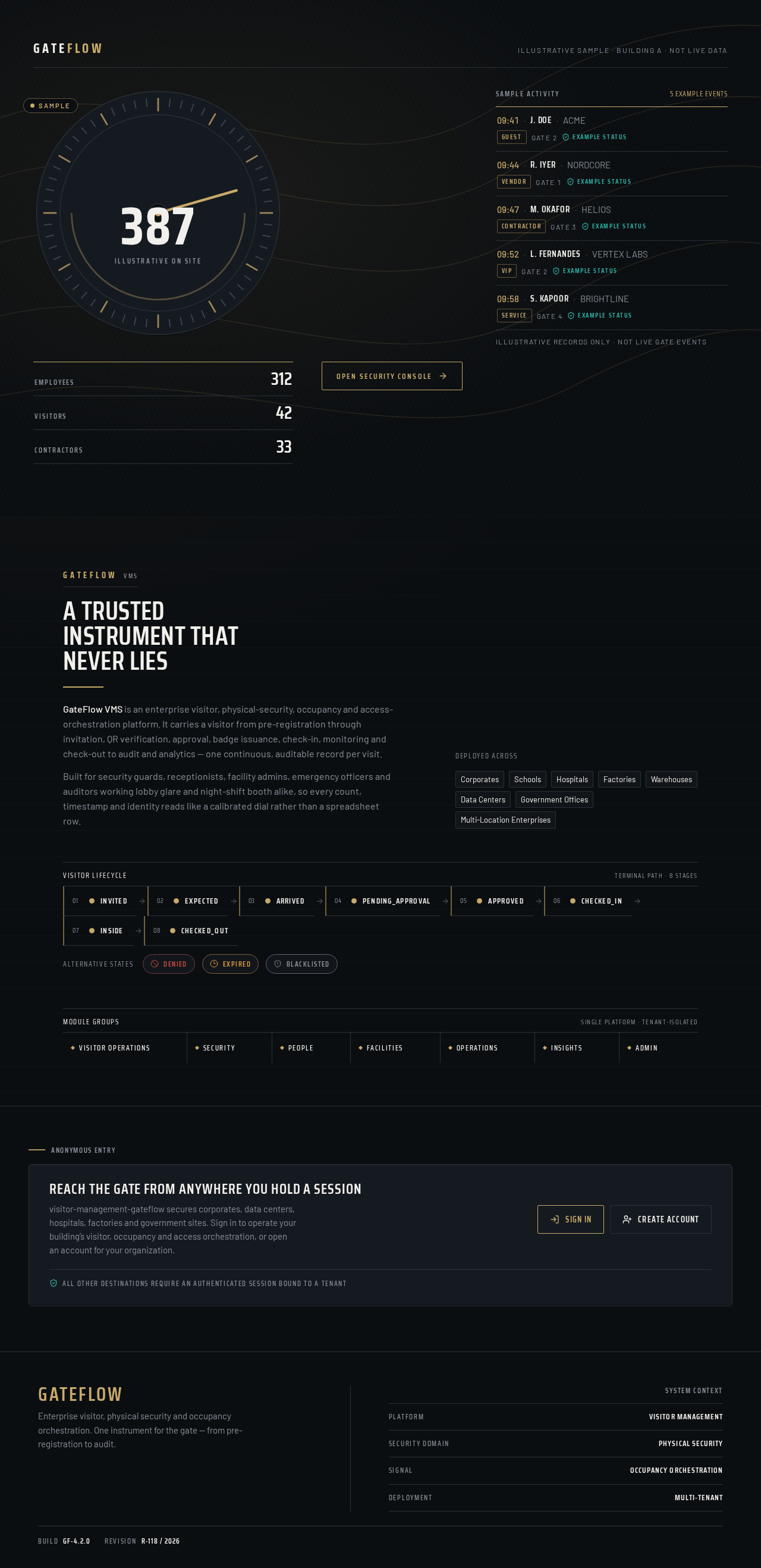
A trusted instrument that never lies
GateFlow VMS is an enterprise visitor, physical-security, occupancy and access-orchestration platform. It carries a visitor from pre-registration through invitation, QR verification, approval, badge issuance, check-in, monitoring and check-out to audit and analytics — one continuous, auditable record per visit.
Built for security guards, receptionists, facility admins, emergency officers and auditors working lobby glare and night-shift booth alike, so every count, timestamp and identity reads like a calibrated dial rather than a spreadsheet row.
Reach the gate from anywhere you hold a session
visitor-management-gateflow secures corporates, data centers, hospitals, factories and government sites. Sign in to operate your building’s visitor, occupancy and access orchestration, or open an account for your organization.
All other destinations require an authenticated session bound to a tenant
A trusted instrument that never lies
GateFlow VMS is an enterprise visitor, physical-security, occupancy and access-orchestration platform. It carries a visitor from pre-registration through invitation, QR verification, approval, badge issuance, check-in, monitoring and check-out to audit and analytics — one continuous, auditable record per visit.
Built for security guards, receptionists, facility admins, emergency officers and auditors working lobby glare and night-shift booth alike, so every count, timestamp and identity reads like a calibrated dial rather than a spreadsheet row.
Reach the gate from anywhere you hold a session
visitor-management-gateflow secures corporates, data centers, hospitals, factories and government sites. Sign in to operate your building’s visitor, occupancy and access orchestration, or open an account for your organization.
All other destinations require an authenticated session bound to a tenant
No comments yet. Be the first!