visitor-management-gateflow
 Sudarshan Samala
Below is a compressed enterprise PRD under 9,999 characters, suitable for giving directly to an AI coding agent or using as a project specification. Enterprise VMS — Product Requirements Document Product: GateFlow VMS Type: Enterprise Visitor Management System Goal: Replace manual visitor registers with a secure, scalable, multi-tenant visitor, security and facility-management platform. 1. Vision Complete visitor lifecycle: Pre-registration → Invitation → QR → Arrival → Verification → Approval → Badge → Check-in → Monitoring → Check-out → Audit → Analytics Target customers: Corporates, schools, hospitals, factories, warehouses, data centers, government offices and multi-location enterprises. 2. User Roles Super Admin Organization Admin Facility Admin Security Admin Security Guard Receptionist Employee/Host Department Manager Contractor Manager Visitor Auditor IT Admin Emergency Officer Implement granular RBAC permissions such as visitor:create, visitor:approve, visitor:checkout, audit:read, settings:update. 3. Core Modules 1. Dashboard 2. Visitor Management 3. Invitations/Pre-registration 4. Walk-in Visitors 5. Check-in/Check-out 6. Host Management 7. Approval Workflows 8. QR Pass 9. Badge Management 10. Kiosk 11. Security Guard Console 12. Contractors 13. Employees/Departments 14. Watchlist/Blacklist 15. Vehicles/Parking 16. Deliveries 17. Meeting Rooms 18. Emergency Management 19. Notifications 20. Reports 21. Analytics 22. Audit Logs 23. Device Management 24. Locations/Buildings/Floors 25. Integrations 26. API/Webhooks 27. System Settings 28. Subscription/Plans 4. Visitor Lifecycle INVITED ↓ EXPECTED ↓ ARRIVED ↓ PENDING_APPROVAL ↓ APPROVED ↓ CHECKED_IN ↓ INSIDE ↓ CHECKED_OUT Alternative states: DENIED, EXPIRED, BLACKLISTED. Visitor profile: Name, photo, phone, email, company, designation, ID type, masked ID reference, host, department, purpose, visitor type, vehicle, emergency contact, status, timestamps. Visitor types: Guest, Client, Vendor, Contractor, Interviewee, Delivery, Parent, VIP, Government Official, Service Provider and custom types. 5. Pre-registration Host creates: Visitor details Date/time Location/building Host Department Purpose Vehicle Meeting room Special instructions Generate secure QR invitation with expiry/revocation. 6. Walk-in Visitor arrives → Reception enters/scans details → Identity verification → Select host → Approval request → Host approves → Badge generated → Check-in 7. Kiosk Touch-first interface: Check In | Check Out | Scan QR Features: QR scanner, camera, ID verification, photo capture, badge printing, multilingual UI, accessibility, offline queue and automatic session reset. 8. Security Console Show: Expected visitors Current occupants Pending approvals Alerts Visitor search QR scan Verification Approve/deny Badge issue Checkout Vehicle entry Emergency mode Incident reporting 9. Approval Engine Support: Single approval Multi-level Sequential Parallel Conditional Auto approval Time-based approval Example: Contractor → Documents → Facility Manager → Security → Badge VIP → Facility Manager approval Watchlist match → Security review 10. Badge Custom templates with: Logo, visitor name, company, host, date/time, visitor ID and QR. Badge types: Visitor, Contractor, VIP, Vendor, Temporary. 11. Watchlist Store authorized watchlist records with reason, severity, expiry and notes. Potential matches must trigger human review; don't automatically deny based solely on weak name/photo similarity. 12. Contractor & Vehicle Contractor lifecycle: Company → Worker → Documents → Verification → Training → Approval → Access → Expiry Vehicle data: Number, type, driver, visitor, parking, entry/exit and purpose. Support delivery/courier tracking. 13. Emergency Real-time occupancy: Building A Employees: 312 Visitors: 42 Contractors: 33 Total: 387 Unaccounted: 7 Features: emergency activation, occupancy by building/floor, evacuation status, muster tracking, emergency notifications and exportable occupant list. 14. Dashboard KPIs: Visitors today Currently inside Expected visitors Pending approvals Checked out Denied Watchlist alerts Contractors Vehicles Average visit duration Widgets: live activity, visitor trends, locations, departments, visitor types and peak hours. 15. Notifications Email, SMS, Push, Microsoft Teams and approved WhatsApp Business provider. Example: “John Doe from Acme has arrived at Reception.” Host actions: Approve / Reject / Call Reception 16. Reports Visitor register, daily/monthly visitors, occupancy, contractors, vehicles, badges, denied visitors, audit and emergency reports. Export: CSV, XLSX, PDF. 17. Multi-Tenant Architecture Platform ├─ Organization A │ ├─ Bangalore │ └─ Hyderabad ├─ Organization B └─ Organization C All tenant data must be isolated using tenant_id, authorization checks and preferably PostgreSQL Row-Level Security where appropriate. 18. UI/UX Design language: Microsoft 365 + Linear + Stripe-style enterprise dashboard. Desktop: sidebar + top navigation. Tablet: collapsible sidebar. Mobile: responsive drawer/bottom navigation. Kiosk: large touch controls. Navigation Dashboard VISITOR OPERATIONS Visitors Invitations Approvals Check-ins Check-outs SECURITY Live Security Watchlist Incidents Emergency PEOPLE Employees Hosts Contractors FACILITIES Locations Buildings Rooms Parking OPERATIONS Vehicles Deliveries Badges Devices INSIGHTS Analytics Reports Audit Logs ADMIN Users Roles Workflows Integrations API Settings 19. Colour Palette Primary: #0F172A Navy Brand Blue: #2563EB Background: #F8FAFC Surface: #FFFFFF Border: #E2E8F0 Text: #0F172A Muted: #64748B Success: #16A34A Warning: #F59E0B Danger: #DC2626 Info: #0891B2 Dark mode: #020617, #0F172A, #1E293B, #334155, #F8FAFC Font: Inter. Icons: Lucide. Use colour + text/icons for status; never rely on colour alone. 20. Technology Stack Frontend: React + TypeScript + Vite/Next.js UI: Tailwind CSS + shadcn/ui State/API: TanStack Query Forms: React Hook Form + Zod Charts: Recharts Backend: Node.js + NestJS + TypeScript API: REST + WebSocket + OpenAPI Database: PostgreSQL + Prisma Cache: Redis Queue: BullMQ Storage: AWS S3 Search: PostgreSQL initially → OpenSearch at scale Auth: JWT + MFA + OIDC/SAML SSO: Microsoft Entra ID / Okta / Google Containers: Docker Proxy: NGINX CI/CD: GitHub Actions Cloud: AWS Monitoring: OpenTelemetry + Prometheus + Grafana Logs: Loki Testing: Vitest/Jest + Playwright IaC: Terraform 21. Security Implement: MFA SSO RBAC Tenant isolation TLS Encryption at rest Secrets management Input validation Rate limiting Secure headers CORS Audit trails Session management Token rotation Data retention Document access control Backup/restore Security monitoring Never store passwords, tokens or unnecessary sensitive ID data in logs. 22. API POST /api/v1/auth/login POST /api/v1/auth/refresh GET /api/v1/visitors POST /api/v1/visitors GET /api/v1/visitors/:id PATCH /api/v1/visitors/:id POST /api/v1/invitations GET /api/v1/invitations POST /api/v1/invitations/:id/cancel GET /api/v1/approvals POST /api/v1/approvals/:id/approve POST /api/v1/approvals/:id/reject POST /api/v1/visits/:id/check-in POST /api/v1/visits/:id/check-out POST /api/v1/visits/:id/extend 23. Database Core tables: organizations, users, roles, permissions, locations, buildings, floors, rooms, employees, departments, visitors, visitor_documents, visits, invitations, approvals, badges, badge_templates, vehicles, parking_slots, contractors, contractor_documents, watchlists, notifications, devices, access_events, audit_logs, incidents, emergency_events, integrations, api_keys, webhooks 24. Audit Logging Every sensitive action records: Timestamp User Tenant Action Resource Resource ID Location IP/device metadata Result Audit logs should be append-only/tamper-resistant. 25. Integrations Microsoft 365 / Outlook Microsoft Teams Google Workspace Entra ID Okta HRMS Access-control systems RFID Turnstiles QR scanners Badge printers ANPR/LPR SIEM platforms Email/SMS providers 26. Performance Targets Dashboard: <2 sec target API p95: <500 ms target Check-in: <2 sec target Search: <500 ms target Availability: 99.9%+ target 27. AI — Phase 3 AI assistant can answer: > “Who is currently inside Building A?” > “What were peak visitor hours last month?” > “Show denied visitors this week.” AI can detect unusual patterns such as after-hours attempts or abnormal visit duration, but security decisions should remain explainable and human-reviewed. 28. Development Roadmap Phase 1: Architecture, UX, DB, authentication, RBAC, multi-tenancy. Phase 2: Visitors, hosts, invitations, QR, approvals, check-in/out. Phase 3: Badges, kiosk, notifications, contractors, vehicles, deliveries. Phase 4: Emergency, SSO, Teams, calendar, reports, audit, device management. Phase 5: Access control, advanced analytics, AI, mobile PWA, SIEM, SCIM and enterprise integrations. 29. MVP Build first: Multi-tenancy + Auth/RBAC + Locations + Employees + Visitors + Hosts + Invitations + QR + Approval + Check-in/out + Badges + Notifications + Dashboard + Reports + Audit Logs. 30. Success Metrics Check-in time <2 minutes > 95% digital visitor adoption Reduced reception workload 100% visitor auditability Real-time occupancy visibility Zero cross-tenant data exposure High kiosk uptime High host approval response rate Product positioning: Don't build merely a digital visitor register. Build an Enterprise Visitor + Physical Security + Occupancy + Access Orchestration Platform that can scale from one office to thousands of locations.


Comments (0)
Sign in to leave a comment
System Requirements
System Requirements Document for visitor-management-gateflow
1. Introduction
GateFlow VMS is an enterprise Visitor Management System built to replace manual visitor registers with a secure, scalable, multi-tenant visitor, security and facility-management platform. The product is positioned not as a digital visitor register but as an Enterprise Visitor + Physical Security + Occupancy + Access Orchestration Platform that can scale from one office to thousands of locations.
The system covers the complete visitor lifecycle: Pre-registration → Invitation → QR → Arrival → Verification → Approval → Badge → Check-in → Monitoring → Check-out → Audit → Analytics.
Target customers are corporates, schools, hospitals, factories, warehouses, data centers, government offices and multi-location enterprises. The audience spans platform administrators, organization and facility administrators, security administrators and guards, receptionists, employee hosts, department managers, contractor managers, visitors, auditors, IT administrators and emergency officers.
2. System Overview
GateFlow VMS is delivered as a first-party multi-tenant web application with a touch-first kiosk surface, backed by a Node.js/NestJS service layer, PostgreSQL with Prisma, Redis, BullMQ, AWS S3 storage, and REST + WebSocket + OpenAPI interfaces. Tenant data is isolated by tenant_id, authorization checks and PostgreSQL Row-Level Security where appropriate.
Current accepted behavior includes: visitor lifecycle management across INVITED, EXPECTED, ARRIVED, PENDING_APPROVAL, APPROVED, CHECKED_IN, INSIDE and CHECKED_OUT states with DENIED, EXPIRED and BLACKLISTED alternatives; pre-registration and QR invitations with expiry/revocation; walk-in registration; kiosk check-in/check-out/QR scan; a Security Guard Console; a configurable approval engine; badge management; watchlist with mandatory human review; contractor and vehicle lifecycle; deliveries; meeting rooms; emergency management with real-time occupancy and muster tracking; dashboard KPIs and widgets; multi-channel notifications; reports with CSV/XLSX/PDF export; analytics; append-only audit logs; device management; locations/buildings/floors/rooms; integrations; API/webhooks; system settings; and subscription/plans.
Narrow exclusions and horizons: the AI assistant is Phase 3, not MVP. MVP is limited to multi-tenancy + Auth/RBAC + Locations + Employees + Visitors + Hosts + Invitations + QR + Approval + Check-in/out + Badges + Notifications + Dashboard + Reports + Audit Logs. Phase 5 covers access control, advanced analytics, AI, mobile PWA, SIEM, SCIM and enterprise integrations. Watchlist matches must never be auto-denied on weak name/photo similarity alone. AI security decisions remain explainable and human-reviewed.
2a. Product Interpretation and Delivery Boundary
GateFlow VMS is delivered as a first-party application. Administrators, operators, hosts, auditors and other staff authenticate into the application to control durable tenant and visitor state. The public Landing page is anonymously reachable and explains the product; Login provides returning verification; Sign Up provides first-use self-service enrollment because the source establishes no universal invitation or provisioning boundary for initial application use. All other destinations are role-restricted and require an authenticated session bound to a tenant.
Provider-owned and external work is preserved with its accepted owners: Microsoft 365/Outlook, Microsoft Teams, Google Workspace, Entra ID, Okta, HRMS, access-control systems, RFID, turnstiles, QR scanners, badge printers, ANPR/LPR, SIEM platforms and email/SMS providers remain external integrations. WhatsApp notifications must use an approved WhatsApp Business provider. The AI assistant is a Phase 3 capability and is not part of current MVP acceptance.
2b. Source Content Inventory
Not applicable — no reference directive with content_source was supplied.
2c. Page Content and Component Coverage
Landing
- Information/state: anonymous product entry explaining GateFlow VMS, its enterprise audience, and its visitor-security purpose; hero occupancy dial with total on-site count, ruled rows for EMPLOYEES / VISITORS / CONTRACTORS, live-activity ticker, and a single restrained CTA to open the Security Console.
- Primary actions: proceed to Login; proceed to Sign Up.
- Supporting actions: read product positioning; view live-activity examples.
- Domain entities: none persisted.
- Component responsibilities: hero dial, ruled label/value rows, live-activity ticker, CTA, navigation to identity surfaces.
- States: loading (dial placeholder), empty (no live sample), success (dial and ticker render), error (fallback static copy), recovery (retry fetch).
Login
- Information/state: returning verification for Super Admin, Organization Admin, Facility Admin, Security Admin, Security Guard, Receptionist, Employee/Host, Department Manager, Contractor Manager, Auditor, IT Admin and Emergency Officer.
- Primary actions: submit credentials; complete MFA challenge; complete SSO/OIDC/SAML handshake.
- Supporting actions: navigate to Sign Up; recover session.
- Domain entities: users, sessions, tokens.
- Component responsibilities: credential form (React Hook Form + Zod), MFA prompt, SSO provider buttons, error region.
- States: loading, empty (no session), success (session established, redirect to Dashboard), error (invalid credentials, MFA failure), recovery (retry, refresh token).
Sign Up
- Information/state: first-use self-service enrollment for Organization Admin and Employee/Host.
- Primary actions: create account; verify email/phone; establish tenant association.
- Supporting actions: navigate to Login.
- Domain entities: users, organizations, tenant associations.
- Component responsibilities: enrollment form, verification step, tenant binding.
- States: loading, empty, success (account created, redirect to Login or Dashboard), error (duplicate, invalid input), recovery (resend verification).
Dashboard
- Information/state: KPIs — visitors today, currently inside, expected visitors, pending approvals, checked out, denied, watchlist alerts, contractors, vehicles, average visit duration; widgets — live activity, visitor trends, locations, departments, visitor types, peak hours.
- Primary actions: drill into KPI detail; open live activity; open pending approvals.
- Supporting actions: filter by location/department; change time window.
- Domain entities: visits, visitors, approvals, watchlists, contractors, vehicles.
- Component responsibilities: occupancy dial, KPI ruled rows, live-activity ticker, trend charts (Recharts), widget grid.
- States: loading, empty (no activity), success, error, recovery.
Visitors
- Information/state: visitor records with name, photo, phone, email, company, designation, ID type, masked ID reference, host, department, purpose, visitor type, vehicle, emergency contact, status, timestamps.
- Primary actions: create visitor; edit visitor; view visitor detail; change status.
- Supporting actions: search; filter by status/type/location; export.
- Domain entities: visitors, visitor_documents, visits.
- Component responsibilities: ruled data table, detail panel, form (React Hook Form + Zod), status pills with icon + text.
- States: loading, empty, success, error, recovery.
Invitations
- Information/state: invitations with visitor details, date/time, location/building, host, department, purpose, vehicle, meeting room, special instructions; QR invitation with expiry/revocation.
- Primary actions: create invitation; issue QR; cancel invitation; revoke QR.
- Supporting actions: search; filter; resend notification.
- Domain entities: invitations, visitors, visits.
- Component responsibilities: invitation form, QR renderer, expiry/revocation controls, ruled list.
- States: loading, empty, success, error, recovery.
Approvals
- Information/state: approval requests supporting single, multi-level, sequential, parallel, conditional, auto and time-based approval; examples — Contractor → Documents → Facility Manager → Security → Badge; VIP → Facility Manager approval; Watchlist match → Security review.
- Primary actions: approve; reject; escalate; reassign.
- Supporting actions: view approval chain; add comment; view history.
- Domain entities: approvals, visits, contractors, watchlists.
- Component responsibilities: approval queue, chain visualizer, decision controls, audit trail link.
- States: loading, empty, success, error, recovery.
Check-ins
- Information/state: arrivals with identity verification, host selection, approval request, badge generation, check-in.
- Primary actions: register walk-in; scan QR; verify identity; select host; request approval; issue badge; check in.
- Supporting actions: search expected visitors; view pending approvals.
- Domain entities: visits, visitors, badges, approvals.
- Component responsibilities: walk-in form, QR scanner, ID verification, photo capture, badge print trigger.
- States: loading, empty, success, error, recovery.
Check-outs
- Information/state: visitor departure records and checkout state.
- Primary actions: check out visitor; extend visit.
- Supporting actions: search inside visitors; view visit history.
- Domain entities: visits, visitors, badges.
- Component responsibilities: inside-visitor list, checkout control, extend control.
- States: loading, empty, success, error, recovery.
Live Security
- Information/state: expected visitors, current occupants, pending approvals, alerts, visitor search, QR scan, verification, approve/deny, badge issue, checkout, vehicle entry, emergency mode, incident reporting.
- Primary actions: verify; approve/deny; issue badge; check out; record vehicle entry; activate emergency mode; file incident.
- Supporting actions: search; scan QR; view alerts.
- Domain entities: visits, visitors, approvals, badges, vehicles, incidents, emergency_events.
- Component responsibilities: live occupancy panel, alert feed, verification controls, incident form.
- States: loading, empty, success, error, recovery.
Watchlist
- Information/state: authorized watchlist records with reason, severity, expiry and notes; potential matches flagged for human review.
- Primary actions: create record; edit record; review potential match; resolve match.
- Supporting actions: search; filter by severity/expiry.
- Domain entities: watchlists, visitors.
- Component responsibilities: watchlist table, match review panel, decision controls with icon + text.
- States: loading, empty, success, error, recovery.
Incidents
- Information/state: security incident records.
- Primary actions: file incident; update incident; close incident.
- Supporting actions: search; filter; attach evidence.
- Domain entities: incidents, audit_logs.
- Component responsibilities: incident form, incident list, detail view.
- States: loading, empty, success, error, recovery.
Emergency
- Information/state: real-time occupancy by building/floor (employees, visitors, contractors, total, unaccounted); evacuation status; muster tracking; emergency notifications; exportable occupant list.
- Primary actions: activate emergency mode; send emergency notifications; mark muster; export occupant list.
- Supporting actions: filter by building/floor; view unaccounted.
- Domain entities: emergency_events, visits, employees, contractors.
- Component responsibilities: occupancy dial per building, muster board, notification trigger, export control.
- States: loading, empty, success, error, recovery.
Employees
- Information/state: employees and department relationships used by visitor operations.
- Primary actions: create employee; edit employee; assign department.
- Supporting actions: search; filter; import.
- Domain entities: employees, departments.
- Component responsibilities: employee table, department assignment, import control.
- States: loading, empty, success, error, recovery.
Hosts
- Information/state: host records and host participation in visits.
- Primary actions: designate host; edit host; view host visits.
- Supporting actions: search; filter by department.
- Domain entities: employees, visits, invitations.
- Component responsibilities: host table, host-visit linkage.
- States: loading, empty, success, error, recovery.
Contractors
- Information/state: contractor companies, workers, documents, verification, training, approval, access, expiry.
- Primary actions: create company; add worker; upload documents; verify; record training; approve; grant access; track expiry.
- Supporting actions: search; filter by expiry; view access events.
- Domain entities: contractors, contractor_documents, access_events.
- Component responsibilities: contractor lifecycle stepper, document vault, expiry alerts.
- States: loading, empty, success, error, recovery.
Locations
- Information/state: tenant locations and site hierarchy.
- Primary actions: create location; edit location; archive location.
- Supporting actions: search; view hierarchy.
- Domain entities: locations, buildings, floors.
- Component responsibilities: hierarchy tree, location form.
- States: loading, empty, success, error, recovery.
Buildings
- Information/state: buildings and occupancy context.
- Primary actions: create building; edit building; assign to location.
- Supporting actions: search; view occupancy.
- Domain entities: buildings, floors, rooms.
- Component responsibilities: building table, occupancy summary.
- States: loading, empty, success, error, recovery.
Rooms
- Information/state: meeting rooms and room assignment for visits.
- Primary actions: create room; edit room; assign to visit.
- Supporting actions: search; view schedule.
- Domain entities: rooms, visits.
- Component responsibilities: room table, assignment control.
- States: loading, empty, success, error, recovery.
Parking
- Information/state: parking capacity and visitor vehicle placement.
- Primary actions: allocate slot; release slot; edit capacity.
- Supporting actions: search; view occupancy.
- Domain entities: parking_slots, vehicles.
- Component responsibilities: parking map/list, allocation control.
- States: loading, empty, success, error, recovery.
Vehicles
- Information/state: vehicle number, type, driver, visitor, parking, entry/exit and purpose.
- Primary actions: register vehicle; record entry; record exit; assign parking.
- Supporting actions: search; filter; view history.
- Domain entities: vehicles, parking_slots, visits.
- Component responsibilities: vehicle table, entry/exit controls.
- States: loading, empty, success, error, recovery.
Deliveries
- Information/state: delivery and courier tracking.
- Primary actions: log delivery; update status; notify recipient.
- Supporting actions: search; filter; view history.
- Domain entities: deliveries, visitors, vehicles.
- Component responsibilities: delivery list, status controls.
- States: loading, empty, success, error, recovery.
Badges
- Information/state: badge issuance, types (Visitor, Contractor, VIP, Vendor, Temporary) and templates with logo, visitor name, company, host, date/time, visitor ID and QR.
- Primary actions: issue badge; reprint; revoke; edit template.
- Supporting actions: search; filter by type; preview template.
- Domain entities: badges, badge_templates.
- Component responsibilities: badge preview (machined credential), template editor, print trigger.
- States: loading, empty, success, error, recovery.
Devices
- Information/state: kiosks, scanners, printers and connected operational devices.
- Primary actions: register device; assign to location; monitor status; decommission.
- Supporting actions: search; filter by status.
- Domain entities: devices, access_events.
- Component responsibilities: device table, status indicators with icon + text.
- States: loading, empty, success, error, recovery.
Analytics
- Information/state: trends, peak hours and explainable anomaly findings.
- Primary actions: select metric; change time range; drill into anomaly.
- Supporting actions: filter by location/department; export.
- Domain entities: visits, access_events, audit_logs.
- Component responsibilities: dial-like gauges, ruled sparkline strips, anomaly review panel.
- States: loading, empty, success, error, recovery.
Reports
- Information/state: visitor register, daily/monthly visitors, occupancy, contractors, vehicles, badges, denied visitors, audit and emergency reports.
- Primary actions: generate report; export CSV/XLSX/PDF.
- Supporting actions: filter by date/location; schedule report.
- Domain entities: visits, contractors, vehicles, badges, audit_logs, emergency_events.
- Component responsibilities: report selector, preview, export controls.
- States: loading, empty, success, error, recovery.
Audit Logs
- Information/state: append-only sensitive-action records with timestamp, user, tenant, action, resource, resource ID, location, IP/device metadata and result.
- Primary actions: search; filter; export.
- Supporting actions: view detail; verify integrity.
- Domain entities: audit_logs.
- Component responsibilities: append-only log table, filter controls, integrity indicator.
- States: loading, empty, success, error, recovery.
Users
- Information/state: application users across authorized tenant scopes.
- Primary actions: invite user; edit user; assign role; deactivate.
- Supporting actions: search; filter by role/tenant.
- Domain entities: users, roles, permissions.
- Component responsibilities: user table, role assignment, invitation control.
- States: loading, empty, success, error, recovery.
Roles
- Information/state: granular RBAC roles and permissions such as visitor:create, visitor:approve, visitor:checkout, audit:read, settings:update.
- Primary actions: create role; edit role; assign permissions.
- Supporting actions: search; clone role.
- Domain entities: roles, permissions.
- Component responsibilities: permission matrix, role editor.
- States: loading, empty, success, error, recovery.
Workflows
- Information/state: approval and lifecycle workflows supporting single, multi-level, sequential, parallel, conditional, auto and time-based approval.
- Primary actions: create workflow; edit workflow; activate/deactivate.
- Supporting actions: test workflow; view history.
- Domain entities: approvals, workflows.
- Component responsibilities: workflow builder, step editor, condition editor.
- States: loading, empty, success, error, recovery.
Integrations
- Information/state: enterprise, identity, communication, access-control and monitoring integrations — Microsoft 365/Outlook, Microsoft Teams, Google Workspace, Entra ID, Okta, HRMS, access-control systems, RFID, turnstiles, QR scanners, badge printers, ANPR/LPR, SIEM platforms, email/SMS providers.
- Primary actions: connect integration; configure; disconnect.
- Supporting actions: test connection; view logs.
- Domain entities: integrations, api_keys, webhooks.
- Component responsibilities: integration catalog, configuration forms, status indicators.
- States: loading, empty, success, error, recovery.
API
- Information/state: API access, keys and webhooks; endpoints POST /api/v1/auth/login, POST /api/v1/auth/refresh, GET/POST /api/v1/visitors, GET/PATCH /api/v1/visitors/:id, POST/GET /api/v1/invitations, POST /api/v1/invitations/:id/cancel, GET /api/v1/approvals, POST /api/v1/approvals/:id/approve, POST /api/v1/approvals/:id/reject, POST /api/v1/visits/:id/check-in, POST /api/v1/visits/:id/check-out, POST /api/v1/visits/:id/extend.
- Primary actions: create API key; revoke key; configure webhook.
- Supporting actions: view OpenAPI spec; test endpoint.
- Domain entities: api_keys, webhooks.
- Component responsibilities: key manager, webhook editor, OpenAPI viewer.
- States: loading, empty, success, error, recovery.
Settings
- Information/state: system, tenant, security, retention and operational settings.
- Primary actions: update settings; configure retention; configure security policies.
- Supporting actions: view audit trail of changes.
- Domain entities: organizations, users, roles, permissions.
- Component responsibilities: settings sections, save controls, validation.
- States: loading, empty, success, error, recovery.
3. Functional Requirements
FR-01 — Multi-tenant platform foundation (explicit)
As a Super Admin, I should operate a multi-tenant platform where the platform contains organizations, and each organization contains locations (e.g., Organization A → Bangalore, Hyderabad; Organization B; Organization C), so that all tenant data is isolated using tenant_id, authorization checks and PostgreSQL Row-Level Security where appropriate.
- Trigger/input: tenant-scoped request with authenticated identity.
- Observable result: only the caller's authorized tenant data is returned; zero cross-tenant exposure.
- Access: authenticated, role-restricted.
- Failure/recovery: unauthorized cross-tenant access is denied and audited; caller retries within scope.
- Continuation: tenant-scoped operations proceed.
FR-02 — Granular RBAC (explicit)
As a Super Admin, I should configure granular RBAC permissions such as visitor:create, visitor:approve, visitor:checkout, audit:read, settings:update, so that each role receives only its authorized capabilities.
- Trigger/input: role/permission assignment.
- Observable result: users see and act only within granted permissions.
- Access: role-restricted.
- Failure/recovery: denied actions return an authorization error and are audited.
- Continuation: authorized actions proceed.
FR-03 — Visitor lifecycle states (explicit) As an Organization Admin, I should manage visitors through INVITED → EXPECTED → ARRIVED → PENDING_APPROVAL → APPROVED → CHECKED_IN → INSIDE → CHECKED_OUT, with DENIED, EXPIRED and BLACKLISTED alternatives, so that every visit has a traceable state.
- Trigger/input: lifecycle events (invitation, arrival, approval, check-in, check-out).
- Observable result: visitor status reflects the current lifecycle state with timestamps.
- Access: role-restricted.
- Failure/recovery: invalid transitions are rejected; state remains consistent.
- Continuation: next lifecycle step becomes available.
FR-04 — Visitor profile (explicit) As a Receptionist, I should capture and view visitor profile fields — name, photo, phone, email, company, designation, ID type, masked ID reference, host, department, purpose, visitor type, vehicle, emergency contact, status, timestamps — so that each visitor record is complete and auditable.
- Trigger/input: form submission or scan.
- Observable result: visitor record persisted with masked ID reference.
- Access: role-restricted.
- Failure/recovery: validation errors surface; partial data is not committed.
- Continuation: record available for invitation, check-in and reporting.
FR-05 — Visitor types (explicit) As a Receptionist, I should classify visitors as Guest, Client, Vendor, Contractor, Interviewee, Delivery, Parent, VIP, Government Official, Service Provider or a custom type, so that routing and approvals match the visitor category.
- Trigger/input: type selection.
- Observable result: visitor type stored and used by approval and badge logic.
- Access: role-restricted.
- Failure/recovery: invalid type rejected.
- Continuation: type-specific workflow applies.
FR-06 — Pre-registration and QR invitation (explicit) As an Employee/Host, I should create a pre-registration with visitor details, date/time, location/building, host, department, purpose, vehicle, meeting room and special instructions, and generate a secure QR invitation with expiry/revocation, so that invited visitors can arrive and be verified.
- Trigger/input: host form submission.
- Observable result: invitation issued with QR and expiry; revocable.
- Access: role-restricted.
- Failure/recovery: expired or revoked QR is rejected at scan; host can reissue.
- Continuation: visitor moves to EXPECTED.
FR-07 — Walk-in flow (explicit) As a Receptionist, I should process a walk-in: visitor arrives → reception enters/scans details → identity verification → select host → approval request → host approves → badge generated → check-in, so that unplanned visitors are handled securely.
- Trigger/input: walk-in arrival.
- Observable result: visitor checked in with badge after host approval.
- Access: role-restricted.
- Failure/recovery: host denial or verification failure blocks check-in; reception can escalate.
- Continuation: visitor enters INSIDE state.
FR-08 — Kiosk (explicit) As a Visitor, I should use a touch-first kiosk with Check In | Check Out | Scan QR, QR scanner, camera, ID verification, photo capture, badge printing, multilingual UI, accessibility, offline queue and automatic session reset, so that self-service arrival works reliably.
- Trigger/input: touch interaction or QR scan.
- Observable result: check-in/check-out recorded; badge printed; session resets automatically.
- Access: kiosk surface.
- Failure/recovery: offline queue stores events and syncs on reconnect; session resets on timeout.
- Continuation: visitor proceeds to host or exits.
FR-09 — Security Guard Console (explicit) As a Security Guard, I should see expected visitors, current occupants, pending approvals, alerts, visitor search, QR scan, verification, approve/deny, badge issue, checkout, vehicle entry, emergency mode and incident reporting, so that I can run live security operations.
- Trigger/input: console interaction.
- Observable result: verification, approval, badge, checkout, vehicle and incident actions recorded.
- Access: role-restricted.
- Failure/recovery: failed scans or verifications surface errors; guard can retry or escalate.
- Continuation: live state updates.
FR-10 — Approval engine (explicit) As a Department Manager, I should participate in single, multi-level, sequential, parallel, conditional, auto and time-based approvals — e.g., Contractor → Documents → Facility Manager → Security → Badge; VIP → Facility Manager approval; Watchlist match → Security review — so that entry decisions follow configured policy.
- Trigger/input: approval request.
- Observable result: approval chain advances or halts per decision.
- Access: role-restricted.
- Failure/recovery: rejection or timeout routes to fallback; requester is notified.
- Continuation: approved visits proceed to badge/check-in.
FR-11 — Badge management (explicit) As a Facility Admin, I should manage custom badge templates with logo, visitor name, company, host, date/time, visitor ID and QR, and issue badge types Visitor, Contractor, VIP, Vendor and Temporary, so that every visitor carries a valid credential.
- Trigger/input: badge issue request.
- Observable result: badge generated and printable; template applied.
- Access: role-restricted.
- Failure/recovery: print failure allows reprint; revoked badges are invalidated.
- Continuation: visitor proceeds to check-in.
FR-12 — Watchlist with human review (explicit) As a Security Admin, I should store authorized watchlist records with reason, severity, expiry and notes, and ensure potential matches trigger human review — never automatic denial based solely on weak name/photo similarity — so that security decisions remain fair and explainable.
- Trigger/input: watchlist match detected.
- Observable result: match flagged for human review; decision recorded.
- Access: role-restricted.
- Failure/recovery: unresolved matches remain pending; no auto-deny.
- Continuation: reviewer decision routes to approval or denial.
FR-13 — Contractor lifecycle (explicit) As a Contractor Manager, I should manage the contractor lifecycle — Company → Worker → Documents → Verification → Training → Approval → Access → Expiry — so that contractor access is verified and time-bound.
- Trigger/input: contractor onboarding.
- Observable result: contractor access granted with expiry; documents and training recorded.
- Access: role-restricted.
- Failure/recovery: missing documents or expired training block access.
- Continuation: contractor access events tracked.
FR-14 — Vehicle and parking (explicit) As a Facility Admin, I should record vehicle number, type, driver, visitor, parking, entry/exit and purpose, and support delivery/courier tracking, so that vehicle movement is controlled and auditable.
- Trigger/input: vehicle entry/exit event.
- Observable result: vehicle record with parking assignment and timestamps.
- Access: role-restricted.
- Failure/recovery: unregistered vehicles flagged; guard can register on the spot.
- Continuation: vehicle history available for reporting.
FR-15 — Emergency management (explicit) As an Emergency Officer, I should activate emergency mode, view real-time occupancy by building/floor (employees, visitors, contractors, total, unaccounted), track evacuation status and muster, send emergency notifications and export the occupant list, so that evacuations are accounted for.
- Trigger/input: emergency activation.
- Observable result: occupancy and muster status displayed; notifications sent; export available.
- Access: role-restricted.
- Failure/recovery: notification failure retries; manual export fallback.
- Continuation: emergency mode deactivated after resolution.
FR-16 — Dashboard KPIs and widgets (explicit) As an Organization Admin, I should view KPIs — visitors today, currently inside, expected visitors, pending approvals, checked out, denied, watchlist alerts, contractors, vehicles, average visit duration — and widgets for live activity, visitor trends, locations, departments, visitor types and peak hours, so that operations are visible at a glance.
- Trigger/input: dashboard load.
- Observable result: KPIs and widgets render within the dashboard performance target.
- Access: role-restricted.
- Failure/recovery: partial data shows placeholders; retry available.
- Continuation: drill-down into detail pages.
FR-17 — Notifications (explicit) As an Employee/Host, I should receive notifications via Email, SMS, Push, Microsoft Teams and an approved WhatsApp Business provider — e.g., "John Doe from Acme has arrived at Reception." — with host actions Approve / Reject / Call Reception, so that I can respond to arrivals promptly.
- Trigger/input: arrival event.
- Observable result: notification delivered; host action recorded.
- Access: role-restricted.
- Failure/recovery: delivery failure retries; fallback channel used.
- Continuation: approval or rejection updates visit state.
FR-18 — Reports and export (explicit) As an Auditor, I should generate visitor register, daily/monthly visitors, occupancy, contractors, vehicles, badges, denied visitors, audit and emergency reports, and export as CSV, XLSX and PDF, so that compliance and operations can be reviewed.
- Trigger/input: report request.
- Observable result: report rendered and exportable in the requested format.
- Access: role-restricted.
- Failure/recovery: export failure retries; partial data flagged.
- Continuation: report archived or shared.
FR-19 — Audit logging (explicit) As an Auditor, I should inspect append-only/tamper-resistant audit records capturing timestamp, user, tenant, action, resource, resource ID, location, IP/device metadata and result for every sensitive action, so that all activity is traceable.
- Trigger/input: sensitive action.
- Observable result: immutable audit entry created.
- Access: role-restricted.
- Failure/recovery: write failure blocks the sensitive action; retry.
- Continuation: audit trail available for review and export.
FR-20 — Locations, buildings, floors, rooms (explicit) As an Organization Admin, I should manage locations, buildings, floors and rooms, so that visits, occupancy and emergency tracking are site-aware.
- Trigger/input: hierarchy edits.
- Observable result: hierarchy persisted and referenced by visits and occupancy.
- Access: role-restricted.
- Failure/recovery: invalid hierarchy rejected.
- Continuation: hierarchy used across modules.
FR-21 — Employees, departments and hosts (explicit) As an Organization Admin, I should manage employees, departments and hosts, so that visitor operations have accurate host and department context.
- Trigger/input: employee/host edits.
- Observable result: records available for invitations, approvals and reporting.
- Access: role-restricted.
- Failure/recovery: duplicate or invalid records rejected.
- Continuation: records used in visits.
FR-22 — Device management (explicit) As an IT Admin, I should manage kiosks, scanners, printers and connected operational devices, so that operational hardware is registered and monitored.
- Trigger/input: device registration or status change.
- Observable result: device status visible; access events attributed.
- Access: role-restricted.
- Failure/recovery: offline device flagged; reconnection retried.
- Continuation: device events flow into audit and analytics.
FR-23 — Integrations (explicit) As an IT Admin, I should configure Microsoft 365/Outlook, Microsoft Teams, Google Workspace, Entra ID, Okta, HRMS, access-control systems, RFID, turnstiles, QR scanners, badge printers, ANPR/LPR, SIEM platforms and email/SMS providers, so that GateFlow interoperates with enterprise systems.
- Trigger/input: integration configuration.
- Observable result: integration connected and events exchanged.
- Access: role-restricted.
- Failure/recovery: connection failure surfaces error; retry or disable.
- Continuation: integration events feed modules.
FR-24 — API and webhooks (explicit) As an IT Admin, I should manage API access, keys and webhooks exposing POST /api/v1/auth/login, POST /api/v1/auth/refresh, GET/POST /api/v1/visitors, GET/PATCH /api/v1/visitors/:id, POST/GET /api/v1/invitations, POST /api/v1/invitations/:id/cancel, GET /api/v1/approvals, POST /api/v1/approvals/:id/approve, POST /api/v1/approvals/:id/reject, POST /api/v1/visits/:id/check-in, POST /api/v1/visits/:id/check-out, POST /api/v1/visits/:id/extend, so that external systems integrate securely.
- Trigger/input: API call or webhook event.
- Observable result: request processed; webhook delivered.
- Access: role-restricted.
- Failure/recovery: rate limiting and validation errors returned; retry supported.
- Continuation: integration flows proceed.
FR-25 — System settings (explicit) As a Super Admin, I should manage system, tenant, security, retention and operational settings, so that the platform is configured per organization.
- Trigger/input: settings update.
- Observable result: settings persisted and applied.
- Access: role-restricted.
- Failure/recovery: invalid settings rejected; previous values retained.
- Continuation: settings take effect across modules.
FR-26 — Subscription and plans (explicit) As a Super Admin, I should manage subscription and plans, so that tenant entitlements are governed.
- Trigger/input: plan assignment or change.
- Observable result: tenant entitlements updated.
- Access: role-restricted.
- Failure/recovery: invalid plan change rejected.
- Continuation: entitlements applied.
FR-27 — Analytics (explicit) As an Organization Admin, I should review trends, peak hours and explainable anomaly findings, so that operations can be optimized.
- Trigger/input: analytics query.
- Observable result: charts and anomaly findings rendered.
- Access: role-restricted.
- Failure/recovery: query failure retries; partial data flagged.
- Continuation: findings feed reports.
FR-28 — AI assistant (Phase 3) (explicit, future) As an Organization Admin, I should ask the AI assistant questions such as "Who is currently inside Building A?", "What were peak visitor hours last month?" and "Show denied visitors this week?", and receive explainable, human-reviewed anomaly detection for after-hours attempts or abnormal visit duration, so that insights remain trustworthy.
- Trigger/input: natural-language query.
- Observable result: answer with explainable reasoning; anomalies flagged for human review.
- Access: role-restricted.
- Failure/recovery: low-confidence answers flagged; human review required.
- Continuation: findings feed analytics and reports.
- Horizon: Phase 3, not MVP.
FR-29 — First-use enrollment (required_inference) As an Organization Admin or Employee/Host, I should establish first-use identity through Sign Up, so that I can access protected tenant work.
- Trigger/input: first visit to Sign Up.
- Observable result: account created and bound to a tenant.
- Access: anonymous entry.
- Failure/recovery: verification failure allows retry.
- Continuation: proceed to Login.
FR-30 — Returning verification (required_inference) As any authenticated role, I should verify identity through Login with MFA and SSO/OIDC/SAML support, so that protected destinations remain bound to the correct participant.
- Trigger/input: credential submission.
- Observable result: session established with tenant scope.
- Access: anonymous entry to Login.
- Failure/recovery: invalid credentials or MFA failure allow retry.
- Continuation: access protected destinations.
FR-31 — Role-specific operator provisioning (required_inference) As a Super Admin or Organization Admin, I should invite or provision role-specific operators, so that guards, receptionists, hosts, auditors and other staff receive appropriate access.
- Trigger/input: invitation or provisioning action.
- Observable result: operator account created with assigned role.
- Access: role-restricted.
- Failure/recovery: invitation failure allows resend.
- Continuation: operator completes Login.
FR-32 — Backend durable state (required_inference) As the system, I should persist durable visitor, approval, badge, occupancy, audit and tenant state, so that all accepted lifecycles remain consistent and recoverable.
- Trigger/input: state-changing operation.
- Observable result: state persisted with tenant isolation.
- Access: system process.
- Failure/recovery: transaction failure rolls back; retry supported.
- Continuation: state available to dependent modules.
4. User Personas
Super Admin — Platform-level owner. Manages tenants, users, roles, workflows, integrations, API keys/webhooks and system settings across organizations, and reviews audit logs to keep tenant data isolated and the platform compliant. Primary goal: maintain a secure, isolated, compliant multi-tenant platform. Distinct responsibilities: tenant lifecycle, RBAC configuration, integration governance, subscription/plans, audit review. Inputs/decisions: tenant provisioning, role/permission assignment, integration enablement, plan changes. Interactions: with Organization Admins, IT Admins, Security Admins and Auditors. Observable success: zero cross-tenant exposure, complete audit trail, functioning integrations.
Organization Admin — Runs visitor, security and facility operations for one organization across its locations. Configures locations/buildings/floors/rooms, employees, departments, hosts, badge templates, workflows and reports, and monitors dashboard KPIs and analytics. Primary goal: operational excellence across all sites. Distinct responsibilities: organizational configuration, KPI monitoring, report generation. Inputs/decisions: site setup, workflow configuration, badge template design. Interactions: with Facility Admins, Department Managers, Security Admins and Auditors. Observable success: accurate KPIs, timely reports, configured workflows.
Facility Admin — Owns facility-side operations such as locations, buildings, rooms, parking, deliveries, devices and badge issuance, and uses occupancy and emergency data to keep sites running and evacuations accounted for. Primary goal: smooth facility operations and safe evacuations. Distinct responsibilities: facility configuration, parking allocation, badge issuance, device oversight. Inputs/decisions: room/parking assignment, badge template selection, device registration. Interactions: with Receptionists, Security Guards, Emergency Officers and Contractor Managers. Observable success: accurate occupancy, functioning devices, accounted evacuations.
Security Admin — Configures and oversees security operations: watchlist records, approval workflows, incident reporting, emergency activation, device and access-control integrations, and reviews audit logs and security alerts. Primary goal: maintain a secure, fair and explainable security posture. Distinct responsibilities: watchlist governance, approval workflow design, incident oversight, security integration management. Inputs/decisions: watchlist record creation, workflow configuration, incident review. Interactions: with Security Guards, Facility Admins, IT Admins and Auditors. Observable success: human-reviewed watchlist matches, configured workflows, resolved incidents.
Security Guard — Works the Security Guard Console to see expected visitors, current occupants, pending approvals and alerts, scan QR codes, verify identity, approve or deny entry, issue badges, record vehicle entry, check visitors out, activate emergency mode and file incident reports. Primary goal: control site access in real time. Distinct responsibilities: live verification, approval decisions, badge issuance, vehicle entry, incident filing. Inputs/decisions: QR scans, identity verification, approve/deny decisions. Interactions: with Receptionists, hosts, Facility Admins and Emergency Officers. Observable success: accurate live occupancy, timely decisions, complete incident records.
Receptionist — Handles front-desk arrival flow: registers or scans walk-in visitors, verifies identity, selects the host, raises approval requests, generates badges and performs check-in/check-out, and monitors expected visitors and live activity. Primary goal: fast, accurate visitor processing. Distinct responsibilities: walk-in registration, host selection, approval requests, badge generation, check-in/check-out. Inputs/decisions: visitor details, host selection, approval escalation. Interactions: with visitors, hosts, Security Guards and Facility Admins. Observable success: check-in under 2 minutes, accurate records, high digital adoption.
Employee/Host — Pre-registers visitors with details, date/time, location, department, purpose, vehicle, meeting room and special instructions, generates QR invitations with expiry/revocation, and responds to arrival notifications by approving, rejecting or calling reception. Primary goal: host visitors efficiently and securely. Distinct responsibilities: pre-registration, QR invitation issuance, arrival response. Inputs/decisions: visitor details, approval/rejection decisions. Interactions: with visitors, Receptionists and Department Managers. Observable success: timely approvals, accurate invitations, high approval response rate.
Department Manager — Participates in multi-level, sequential, parallel and conditional approval workflows for visitors, contractors and VIPs in their department, and reviews department-level visitor and occupancy reporting. Primary goal: ensure department visits comply with policy. Distinct responsibilities: approval decisions, department reporting. Inputs/decisions: approval/rejection, escalation. Interactions: with hosts, Security Admins and Organization Admins. Observable success: timely approvals, accurate department reports.
Contractor Manager — Manages the contractor lifecycle — company, worker, documents, verification, training, approval, access and expiry — and tracks contractor vehicles, parking and access events. Primary goal: maintain compliant contractor access. Distinct responsibilities: contractor onboarding, document verification, training tracking, expiry management. Inputs/decisions: document approval, training completion, access grant. Interactions: with Facility Admins, Security Admins and contractors. Observable success: verified contractors, tracked expiries, compliant access.
Visitor — Receives a QR invitation, arrives at the site, completes identity verification and photo capture, receives a badge, is checked in and monitored while inside, and is checked out at the end of the visit. Primary goal: complete a smooth, verified visit. Distinct responsibilities: presenting QR, completing verification, wearing badge, checking out. Inputs/decisions: QR presentation, identity documents. Interactions: with Receptionists, Security Guards and hosts. Observable success: fast check-in, valid badge, timely checkout.
Auditor — Reads append-only audit logs and reports covering sensitive actions, denied visitors, badges, occupancy and emergency events to verify compliance and traceability. Primary goal: verify compliance and traceability. Distinct responsibilities: audit log review, report generation, integrity verification. Inputs/decisions: audit queries, report filters. Interactions: with Super Admins, Security Admins and Organization Admins. Observable success: complete audit trail, accurate reports, verified integrity.
IT Admin — Manages authentication and platform plumbing: SSO/OIDC/SAML providers, MFA, API keys and webhooks, integrations, device management, session and token settings, and monitoring of system health. Primary goal: maintain secure, available platform infrastructure. Distinct responsibilities: SSO configuration, API key management, device management, monitoring. Inputs/decisions: provider configuration, key rotation, device registration. Interactions: with Super Admins, Security Admins and Facility Admins. Observable success: functioning SSO, secure API access, monitored health.
Emergency Officer — Activates emergency mode, monitors real-time occupancy by building and floor, tracks evacuation status and muster, sends emergency notifications and exports occupant lists including unaccounted persons. Primary goal: account for all occupants during emergencies. Distinct responsibilities: emergency activation, occupancy monitoring, muster tracking, notification dispatch, occupant export. Inputs/decisions: activation decision, muster confirmation. Interactions: with Facility Admins, Security Admins and Security Guards. Observable success: accurate occupancy, complete muster, timely notifications.
5. Core User Flows
Flow 1 — Super Admin: Tenant and RBAC setup
- Super Admin opens Landing and proceeds to Login.
- Super Admin authenticates with credentials and MFA (or SSO via Entra ID/Okta/Google).
- Super Admin opens Users and invites or provisions role-specific operators.
- Super Admin opens Roles and configures granular permissions such as
visitor:create,visitor:approve,visitor:checkout,audit:read,settings:update. - Super Admin opens Workflows and configures approval workflows (single, multi-level, sequential, parallel, conditional, auto, time-based).
- Super Admin opens Integrations and connects Microsoft 365/Outlook, Microsoft Teams, Google Workspace, Entra ID, Okta, HRMS, access-control systems, RFID, turnstiles, QR scanners, badge printers, ANPR/LPR, SIEM platforms and email/SMS providers.
- Super Admin opens API and creates API keys and webhooks.
- Super Admin opens Settings and configures system, tenant, security, retention and operational settings.
- Super Admin opens Audit Logs and verifies append-only records.
- Observable result: tenant isolated, roles configured, integrations connected, audit trail complete.
- Failure/recovery: invalid configuration rejected; previous values retained; retry.
- Continuation: Organization Admin proceeds with organizational setup.
Flow 2 — Organization Admin: Organizational configuration
- Organization Admin logs in.
- Opens Locations and creates locations (e.g., Bangalore, Hyderabad).
- Opens Buildings and assigns buildings to locations.
- Opens Rooms and creates meeting rooms.
- Opens Employees and creates employees with department assignments.
- Opens Hosts and designates hosts.
- Opens Badges and configures badge templates with logo, visitor name, company, host, date/time, visitor ID and QR.
- Opens Dashboard and monitors KPIs — visitors today, currently inside, expected visitors, pending approvals, checked out, denied, watchlist alerts, contractors, vehicles, average visit duration — and widgets for live activity, visitor trends, locations, departments, visitor types and peak hours.
- Observable result: organization configured; KPIs visible.
- Failure/recovery: invalid hierarchy rejected; retry.
- Continuation: operational modules ready.
Flow 3 — Employee/Host: Pre-registration and QR invitation
- Host logs in and opens Invitations.
- Host creates a pre-registration with visitor details, date/time, location/building, host, department, purpose, vehicle, meeting room and special instructions.
- Host generates a secure QR invitation with expiry/revocation.
- System issues QR and notifies the visitor.
- Visitor arrives; host receives notification "John Doe from Acme has arrived at Reception." via Email, SMS, Push, Microsoft Teams or approved WhatsApp Business provider.
- Host acts: Approve / Reject / Call Reception.
- Observable result: visitor moves to EXPECTED, then ARRIVED, then PENDING_APPROVAL, then APPROVED.
- Failure/recovery: expired or revoked QR rejected at scan; host reissues.
- Continuation: visitor proceeds to check-in.
Flow 4 — Receptionist: Walk-in processing
- Receptionist logs in and opens Check-ins.
- Visitor arrives without invitation.
- Receptionist enters or scans visitor details.
- Receptionist performs identity verification.
- Receptionist selects host.
- Receptionist raises approval request.
- Host approves (via notification action or Approvals page).
- System generates badge.
- Receptionist completes check-in.
- Observable result: visitor checked in with badge; status CHECKED_IN → INSIDE.
- Failure/recovery: host denial or verification failure blocks check-in; receptionist escalates.
- Continuation: visitor proceeds to host.
Flow 5 — Visitor: Kiosk self-service
- Visitor approaches kiosk.
- Visitor selects Check In, Check Out or Scan QR.
- Kiosk scans QR, captures photo, verifies ID.
- Kiosk prints badge.
- Kiosk resets session automatically.
- Observable result: check-in/check-out recorded; badge printed.
- Failure/recovery: offline queue stores events and syncs on reconnect; session resets on timeout.
- Continuation: visitor proceeds to host or exits.
Flow 6 — Security Guard: Live security operations
- Security Guard logs in and opens Live Security.
- Guard views expected visitors, current occupants, pending approvals and alerts.
- Guard searches visitor or scans QR.
- Guard verifies identity.
- Guard approves or denies entry.
- Guard issues badge.
- Guard records vehicle entry.
- Guard checks out visitor when departing.
- Guard activates emergency mode if needed.
- Guard files incident report.
- Observable result: live state updated; actions audited.
- Failure/recovery: failed scans or verifications surface errors; guard retries or escalates.
- Continuation: live state remains current.
Flow 7 — Department Manager: Approval workflow
- Department Manager logs in and opens Approvals.
- Manager views pending approval requests for their department.
- Manager reviews approval chain (e.g., Contractor → Documents → Facility Manager → Security → Badge; VIP → Facility Manager approval; Watchlist match → Security review).
- Manager approves or rejects.
- Observable result: approval chain advances or halts.
- Failure/recovery: rejection or timeout routes to fallback; requester notified.
- Continuation: approved visits proceed to badge/check-in.
Flow 8 — Security Admin: Watchlist review
- Security Admin logs in and opens Watchlist.
- Admin creates authorized watchlist records with reason, severity, expiry and notes.
- System detects potential match.
- Match flagged for human review — never auto-denied based solely on weak name/photo similarity.
- Admin reviews match and decides.
- Observable result: decision recorded; no auto-deny.
- Failure/recovery: unresolved matches remain pending.
- Continuation: decision routes to approval or denial.
Flow 9 — Contractor Manager: Contractor lifecycle
- Contractor Manager logs in and opens Contractors.
- Manager creates contractor company.
- Manager adds worker.
- Manager uploads documents.
- Manager verifies documents.
- Manager records training.
- Manager requests approval.
- System grants access with expiry.
- Manager tracks access events and expiry.
- Observable result: contractor access granted and time-bound.
- Failure/recovery: missing documents or expired training block access.
- Continuation: contractor access events tracked.
Flow 10 — Facility Admin: Vehicle and parking
- Facility Admin logs in and opens Vehicles.
- Admin registers vehicle with number, type, driver, visitor, parking, entry/exit and purpose.
- Admin assigns parking slot.
- Admin records entry/exit.
- Admin tracks delivery/courier activity in Deliveries.
- Observable result: vehicle record with parking assignment and timestamps.
- Failure/recovery: unregistered vehicles flagged; guard can register on the spot.
- Continuation: vehicle history available for reporting.
Flow 11 — Emergency Officer: Emergency response
- Emergency Officer logs in and opens Emergency.
- Officer activates emergency mode.
- Officer views real-time occupancy by building/floor (employees, visitors, contractors, total, unaccounted).
- Officer tracks evacuation status and muster.
- Officer sends emergency notifications.
- Officer exports occupant list.
- Observable result: occupancy and muster status displayed; notifications sent; export available.
- Failure/recovery: notification failure retries; manual export fallback.
- Continuation: emergency mode deactivated after resolution.
Flow 12 — Auditor: Audit and reporting
- Auditor logs in and opens Audit Logs.
- Auditor searches and filters append-only records with timestamp, user, tenant, action, resource, resource ID, location, IP/device metadata and result.
- Auditor opens Reports and generates visitor register, daily/monthly visitors, occupancy, contractors, vehicles, badges, denied visitors, audit and emergency reports.
- Auditor exports as CSV, XLSX or PDF.
- Observable result: complete audit trail and reports.
- Failure/recovery: export failure retries; partial data flagged.
- Continuation: reports archived or shared.
Flow 13 — IT Admin: Platform plumbing
- IT Admin logs in and opens Integrations.
- Admin configures SSO/OIDC/SAML providers (Entra ID, Okta, Google).
- Admin configures MFA.
- Admin opens API and manages API keys and webhooks.
- Admin opens Devices and registers kiosks, scanners, printers and connected operational devices.
- Admin monitors system health via OpenTelemetry + Prometheus + Grafana and Loki.
- Observable result: functioning SSO, secure API access, monitored health.
- Failure/recovery: connection failure surfaces error; retry or disable.
- Continuation: integration events feed modules.
Flow 14 — Organization Admin: Analytics and AI (Phase 3)
- Organization Admin logs in and opens Analytics.
- Admin reviews trends, peak hours and explainable anomaly findings.
- Admin asks AI assistant questions such as "Who is currently inside Building A?", "What were peak visitor hours last month?" and "Show denied visitors this week?"
- AI detects unusual patterns such as after-hours attempts or abnormal visit duration.
- Security decisions remain explainable and human-reviewed.
- Observable result: answer with explainable reasoning; anomalies flagged for human review.
- Failure/recovery: low-confidence answers flagged; human review required.
- Continuation: findings feed analytics and reports.
- Horizon: Phase 3, not MVP.
6. Visuals Colors and Theme
The CREATIVE DIRECTION is authoritative for this section. The muse is MARQ by Garmin — precision instrument luxury for the gate. GateFlow reads like a tool watch, not a SaaS dashboard. The headline is: "A trusted instrument that never lies."
Palette (dark mode, authoritative):
- Background:
#0B0E11(near-black titanium ground) - Surface:
#151A20(graphite instrument panels) - Text:
#F2F0EC - Primary:
#C8A96A(champagne-gold instrument accent — occupancy needle, active nav rail, selected states, badge chrome, key numerals) - Accent:
#2FB6A8(teal — single functional signal for live/verified states) - Muted:
#8A9099(labels at 14px+ on#151A20only) - Hairline borders:
#2A3138 - Status semantics (always paired with icon + text label): success
#4FAE7A, warning#D89A3C, danger#C24A3F, info#2FB6A8
Proportion: ~80% dark ground, ~15% graphite panel, ~4% gold, ~1% teal. The accent must feel like a machined detail, not a wash.
Typography:
- Headings: Saira Condensed — Condensed technical sans for display and data. Uppercase micro-labels at 11–12px with 0.14em tracking; oversized condensed numerals for KPI dials at 600–700 weight with tight 0.96 line-height. Headlines set in Saira Condensed SemiBold, uppercase, tracked slightly open, so "GATEFLOW" and "BUILDING A · 387 ON SITE" read as engraved instrument markings.
- Body: Barlow Regular/Medium at 15–16px with 1.55 line-height for calm legibility in guard booths and reception desks.
- Tabular numerals (
font-variant-numeric: tabular-nums) are mandatory for every count, timestamp and ID. - Scale: 1.333 modular — 128/96/64/48/32/24/18/16/14/12. Display numerals
clamp(56px, 9vw, 128px); section headingsclamp(28px, 3.4vw, 48px); body 16px desktop / 15px mobile; micro-labels 12px uppercase tracked 0.14em. All display sizes useclamp()so the largest numeral stays inside its container at 375px.
Shape language: Instrument geometry — circular gauges and bezel rings as the primary motif, with ruled horizontal data rows beneath them. Corner radii are small and precise: 2px on data tables and badges, 6px on panels, 999px only on the occupancy dial ring and status pills. Hairline 1px rules in #2A3138 separate every data row, mimicking a watch dial's chapter ring. No soft blobs, no large friendly radii, no drop shadows; depth comes from a single subtle inner highlight along the top edge of panels (rgba(255,255,255,0.04)) and a 1px darker lower edge.
Layout: A dark instrument console: persistent left nav rail (72px icon rail at tablet, 248px labelled rail at desktop, bottom tab bar at 375px) with grouped sections exactly as the PRD specifies — Visitor Operations, Security, People, Facilities, Operations, Insights, Admin — each group preceded by a 12px uppercase tracked rule. The dashboard is a dial-and-ruled-rows composition, not a grid of identical cards: a large occupancy dial top-left, a vertical live-activity ticker column beside it, and full-width ruled tables for expected visitors, pending approvals and watchlist alerts. Data rows are label/value pairs aligned on a strict 8-pt grid with tabular numerals right-aligned in their column. Tables scroll horizontally on mobile with sticky first column; nothing readable is clipped. Kiosk layout is a separate touch surface: three enormous dial-like buttons (Check In / Check Out / Scan QR) at 220px+ diameter, no chrome, auto-reset countdown in the corner.
Imagery: Macro material photography and engineered textures — brushed titanium, sapphire-glass edges, knurled bezel rings, topographic contour lines, and a single hero object: a machined access badge/credential rendered like a watch case, lit from the upper left on a near-black ground. Occupancy and trend visuals are dial-like gauges and ruled sparkline strips, not gradient area charts. No stock people, no flat clip art, no illustrated characters. Where a location is shown, use a monochrome site photograph treated with a dark titanium grade and overlaid with contour lines.
Avoid: Any blue or indigo in the UI chrome — no #2563EB, no #0F172A-as-brand-blue, no bootstrap-blue buttons on white. White or near-white page grounds. Inter, Roboto, Arial, Helvetica, Open Sans, Lato, Poppins or system-ui for any heading or body text. A grid of identical rounded hover-lift cards as the dashboard layout. Gradient-blob heroes, glassmorphism panels, soft multicolour gradients. Friendly illustration, character spot art or rounded pill buttons with bounce animation. Colour as the sole carrier of status — every state pairs colour with an icon and a text label. Cropping or overlapping any readable label, numeral, table cell or control at 375px, 768px or 1280px.
7. Signature Design Concept
The Occupancy Dial as the product's front door. The Landing page is a dark instrument panel, not a centred SaaS hero. Left two-thirds: an oversized occupancy dial — a 420px (desktop) / 260px (mobile) ring in graphite #151A20 with a champagne-gold #C8A96A needle and an inner ring of chapter ticks — with the total "387 ON SITE" set in Saira Condensed at clamp(56px, 9vw, 128px), and beneath it three ruled rows: EMPLOYEES 312 · VISITORS 42 · CONTRACTORS 33, each with a gold hairline rule and right-aligned tabular numerals. A small teal "LIVE" pill with a breathing dot sits at the dial's top-left arc. Right third: a vertical live-activity ticker of arrival events ("09:41 · J. DOE · ACME · GATE 2 · VERIFIED"), each row a hairline-ruled strip with a gold visitor-type tag. Behind the dial, at low opacity, a macro titanium texture with topographic contour lines, parallaxing at 0.85× on scroll. A single restrained CTA — "OPEN SECURITY CONSOLE" in gold outline, sharp 2px corners — is pinned beneath the ruled rows, never centred over a gradient blob. No blue button, no blob, no centred headline stack.
This concept recomposes only accepted content, states and controls: the occupancy figures, the live-activity events, the visitor-type tags, the verification marks and the CTA to the Security Console are all drawn from the accepted PRD. It introduces no new behaviour, page or destination.
8. Interaction Model & Motion Direction
Interaction Model: Animated Motion Tempo: cinematic Hero Dimensionality: dimensional_css
Landing Hero Motion Brief:
- Focal subject: the machined access badge/credential rendered like a watch case, lit from the upper left on a near-black ground, with the occupancy dial as the dominant instrument.
- Input → transformation → outcome thesis: as live arrival events stream in (input), the champagne-gold needle sweeps 380ms
cubic-bezier(0.22, 1, 0.36, 1)and the total counts up digit by digit (transformation), so the visitor immediately understands GateFlow as a live occupancy instrument (outcome). - Motion vocabulary: needle sweeps on the occupancy dial when the count changes (380ms
cubic-bezier(0.22, 1, 0.36, 1)); counting numerals that tick up digit by digit; a slow 24-second product turntable on the hero's titanium badge render; scroll-linked parallax between the dial layer and the ruled data layer at 0.85×/1.0× depth. No bounce, no particles, no gradient drift. Live activity rows enter with a 6px slide and 200ms fade, never a hover-lift. - Composed first frame: the dial at rest with the needle at its current value, the total "387 ON SITE" in condensed numerals, the three ruled rows beneath, the teal "LIVE" pill breathing at the top-left arc, the ticker showing the most recent arrival, and the gold-outline CTA pinned beneath the ruled rows.
- Reduced-motion state: the dial jumps to its value, the turntable freezes on a still frame, and tickers become static wrapped lists of whole rows.
9. Non-Functional Requirements
NFR-01 — Performance targets (explicit) Dashboard <2 sec; API p95 <500 ms; check-in <2 sec; search <500 ms; availability 99.9%+. Rationale: explicit PRD performance targets for high-stakes operational environments.
NFR-02 — Tenant isolation (explicit)
All tenant data must be isolated using tenant_id, authorization checks and preferably PostgreSQL Row-Level Security where appropriate. Rationale: explicit hard constraint; zero cross-tenant data exposure is a success metric.
NFR-03 — Log hygiene (explicit) Never store passwords, tokens or unnecessary sensitive ID data in logs. Rationale: explicit hard constraint.
NFR-04 — Watchlist human review (explicit) Potential watchlist matches must trigger human review; do not automatically deny based solely on weak name/photo similarity. Rationale: explicit hard constraint.
NFR-05 — Explainable AI (explicit) AI security decisions should remain explainable and human-reviewed. Rationale: explicit hard constraint; AI is Phase 3.
NFR-06 — Append-only audit (explicit) Audit logs should be append-only/tamper-resistant. Rationale: explicit hard constraint; 100% visitor auditability is a success metric.
NFR-07 — Status accessibility (explicit) Use colour plus text/icons for status; never rely on colour alone. Rationale: explicit hard constraint.
NFR-08 — Masked ID references (explicit) Visitor ID references are stored masked. Rationale: explicit hard constraint.
NFR-09 — Approved WhatsApp provider (explicit) WhatsApp notifications must use an approved WhatsApp Business provider. Rationale: explicit hard constraint.
NFR-10 — Security controls (explicit) Implement MFA, SSO, RBAC, tenant isolation, TLS, encryption at rest, secrets management, input validation, rate limiting, secure headers, CORS, audit trails, session management, token rotation, data retention, document access control, backup/restore and security monitoring. Rationale: explicit PRD security requirements.
NFR-11 — Search scaling (explicit) Search uses PostgreSQL initially, moving to OpenSearch at scale. Rationale: explicit hard constraint.
NFR-12 — Success metrics (explicit) Check-in time <2 minutes; >95% digital visitor adoption; reduced reception workload; 100% visitor auditability; real-time occupancy visibility; zero cross-tenant data exposure; high kiosk uptime; high host approval response rate. Rationale: explicit PRD success metrics.
NFR-13 — Readable text and controls (explicit) Headlines, wordmarks, labels, numbers, cards' text and controls stay entirely inside the viewport and their container at 375px, 768px and 1280px, wrapping or scaling to fit; no other element covers any part of them. Rationale: explicit creative direction constraint.
10. Tech Stack
Preserved from the authoritative source:
- Frontend: React + TypeScript + Vite/Next.js
- UI: Tailwind CSS + shadcn/ui
- State/API: TanStack Query
- Forms: React Hook Form + Zod
- Charts: Recharts
- Backend: Node.js + NestJS + TypeScript
- API: REST + WebSocket + OpenAPI
- Database: PostgreSQL + Prisma
- Cache: Redis
- Queue: BullMQ
- Storage: AWS S3
- Search: PostgreSQL initially → OpenSearch at scale
- Auth: JWT + MFA + OIDC/SAML
- SSO: Microsoft Entra ID / Okta / Google
- Containers: Docker
- Proxy: NGINX
- CI/CD: GitHub Actions
- Cloud: AWS
- Monitoring: OpenTelemetry + Prometheus + Grafana
- Logs: Loki
- Testing: Vitest/Jest + Playwright
- IaC: Terraform
Core database tables: organizations, users, roles, permissions, locations, buildings, floors, rooms, employees, departments, visitors, visitor_documents, visits, invitations, approvals, badges, badge_templates, vehicles, parking_slots, contractors, contractor_documents, watchlists, notifications, devices, access_events, audit_logs, incidents, emergency_events, integrations, api_keys, webhooks.
11. Assumptions and Constraints
Assumptions:
- A1: The application owns identity for administrators, operators, hosts, auditors and other staff; first-use enrollment occurs through Sign Up and returning verification through Login with MFA and SSO/OIDC/SAML support. (required_inference)
- A2: Role-specific operators may be invited or provisioned by Super Admins or Organization Admins where organizational administration requires it. (required_inference)
- A3: Backend execution persists durable visitor, approval, badge, occupancy, audit and tenant state. (required_inference)
- A4: The Landing page is anonymously reachable and explains the product; Login and Sign Up are anonymously reachable entry surfaces. (required_inference)
- A5: All other destinations are role-restricted and require an authenticated session bound to a tenant. (required_inference)
Constraints:
- C1: All tenant data must be isolated using
tenant_id, authorization checks and preferably PostgreSQL Row-Level Security where appropriate. (explicit) - C2: Never store passwords, tokens or unnecessary sensitive ID data in logs. (explicit)
- C3: Potential watchlist matches must trigger human review; do not automatically deny based solely on weak name/photo similarity. (explicit)
- C4: AI security decisions should remain explainable and human-reviewed. (explicit)
- C5: Audit logs should be append-only/tamper-resistant. (explicit)
- C6: Use colour plus text/icons for status; never rely on colour alone. (explicit)
- C7: Visitor ID references are stored masked. (explicit)
- C8: WhatsApp notifications must use an approved WhatsApp Business provider. (explicit)
- C9: AI assistant capability is Phase 3, not MVP. (explicit)
- C10: MVP is limited to multi-tenancy + Auth/RBAC + Locations + Employees + Visitors + Hosts + Invitations + QR + Approval + Check-in/out + Badges + Notifications + Dashboard + Reports + Audit Logs. (explicit)
- C11: Phase 1 covers architecture, UX, DB, authentication, RBAC and multi-tenancy; Phase 2 visitors, hosts, invitations, QR, approvals, check-in/out; Phase 3 badges, kiosk, notifications, contractors, vehicles, deliveries; Phase 4 emergency, SSO, Teams, calendar, reports, audit, device management; Phase 5 access control, advanced analytics, AI, mobile PWA, SIEM, SCIM and enterprise integrations. (explicit)
- C12: Performance targets: dashboard <2 sec, API p95 <500 ms, check-in <2 sec, search <500 ms, availability 99.9%+. (explicit)
- C13: Search uses PostgreSQL initially, moving to OpenSearch at scale. (explicit)
- C14: The generic indigo/blue-on-white SaaS template is forbidden; the MARQ by Garmin instrument aesthetic is authoritative for visuals. (explicit creative direction)
- C15: Readable text and controls stay whole at every viewport; imagery, decoration and motion may be cropped or bled off edges as the direction asks. (explicit creative direction)
12. Glossary
- GateFlow VMS: The enterprise Visitor Management System specified in this document.
- Tenant: An organization whose data is isolated by
tenant_idand authorization checks. - Visitor lifecycle: INVITED → EXPECTED → ARRIVED → PENDING_APPROVAL → APPROVED → CHECKED_IN → INSIDE → CHECKED_OUT, with DENIED, EXPIRED and BLACKLISTED alternatives.
- QR invitation: A secure, expirable and revocable QR pass issued during pre-registration.
- Walk-in: A visitor arriving without a pre-registration, processed by reception.
- Kiosk: A touch-first self-service surface with Check In | Check Out | Scan QR.
- Security Guard Console: The Live Security surface for expected visitors, current occupants, pending approvals, alerts, verification, approve/deny, badge issue, checkout, vehicle entry, emergency mode and incident reporting.
- Approval engine: Configurable single, multi-level, sequential, parallel, conditional, auto and time-based approval workflows.
- Badge: A printed credential with logo, visitor name, company, host, date/time, visitor ID and QR; types Visitor, Contractor, VIP, Vendor, Temporary.
- Watchlist: Authorized records with reason, severity, expiry and notes; matches trigger human review.
- Contractor lifecycle: Company → Worker → Documents → Verification → Training → Approval → Access → Expiry.
- Emergency mode: Activation state for occupancy, evacuation, muster, notifications and occupant export.
- Muster: The process of accounting for occupants during an evacuation.
- RBAC: Role-Based Access Control with granular permissions such as
visitor:create,visitor:approve,visitor:checkout,audit:read,settings:update. - Audit log: Append-only/tamper-resistant record of sensitive actions with timestamp, user, tenant, action, resource, resource ID, location, IP/device metadata and result.
- Occupancy dial: The signature visual instrument showing total on-site count with a champagne-gold needle on a graphite chapter ring.
- MVP: Multi-tenancy + Auth/RBAC + Locations + Employees + Visitors + Hosts + Invitations + QR + Approval + Check-in/out + Badges + Notifications + Dashboard + Reports + Audit Logs.
- Phase 3 AI assistant: Future capability answering occupancy, peak-hour and denied-visitor questions with explainable, human-reviewed anomaly detection.
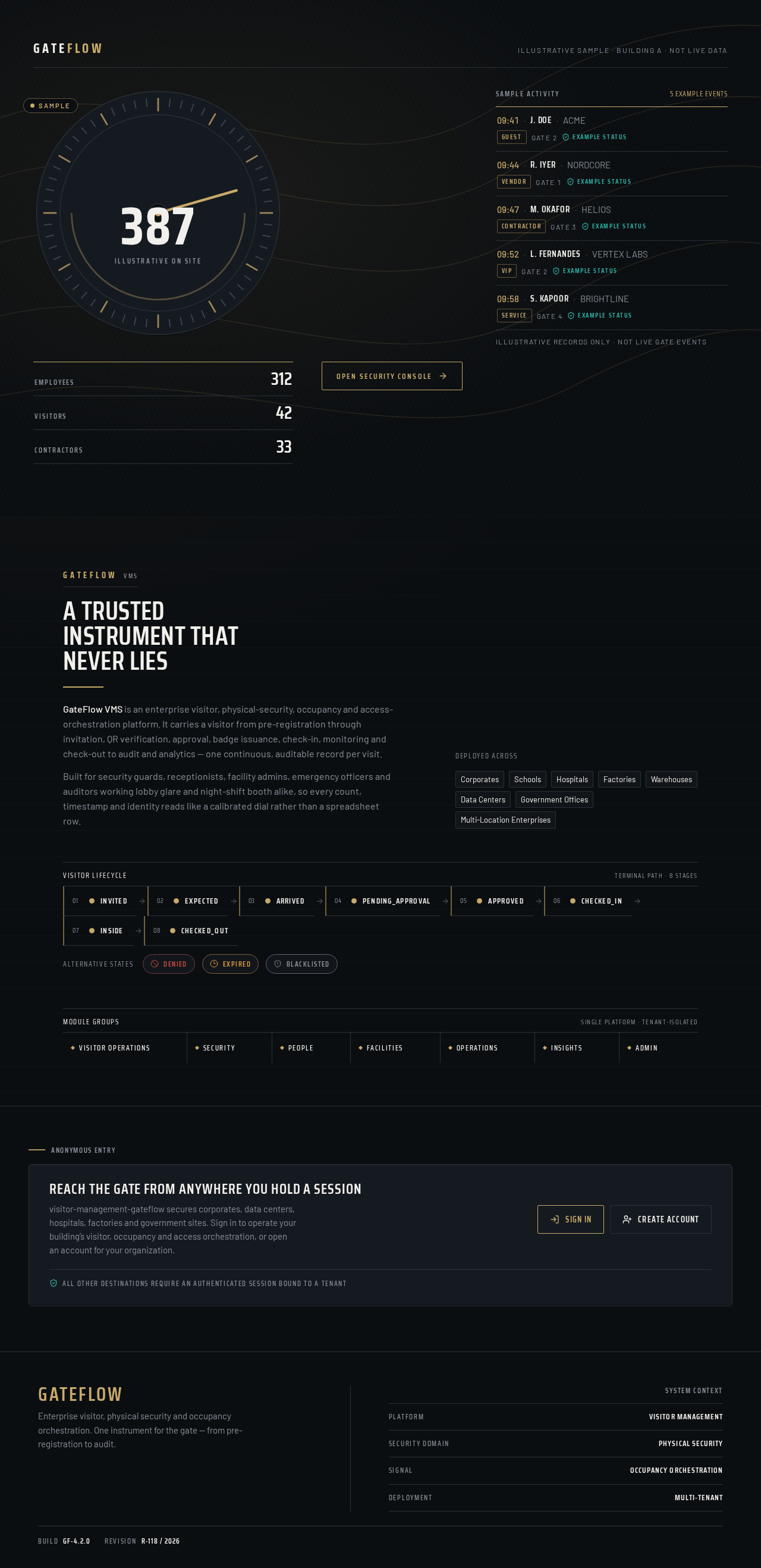
A trusted instrument that never lies
GateFlow VMS is an enterprise visitor, physical-security, occupancy and access-orchestration platform. It carries a visitor from pre-registration through invitation, QR verification, approval, badge issuance, check-in, monitoring and check-out to audit and analytics — one continuous, auditable record per visit.
Built for security guards, receptionists, facility admins, emergency officers and auditors working lobby glare and night-shift booth alike, so every count, timestamp and identity reads like a calibrated dial rather than a spreadsheet row.
Reach the gate from anywhere you hold a session
visitor-management-gateflow secures corporates, data centers, hospitals, factories and government sites. Sign in to operate your building’s visitor, occupancy and access orchestration, or open an account for your organization.
All other destinations require an authenticated session bound to a tenant
A trusted instrument that never lies
GateFlow VMS is an enterprise visitor, physical-security, occupancy and access-orchestration platform. It carries a visitor from pre-registration through invitation, QR verification, approval, badge issuance, check-in, monitoring and check-out to audit and analytics — one continuous, auditable record per visit.
Built for security guards, receptionists, facility admins, emergency officers and auditors working lobby glare and night-shift booth alike, so every count, timestamp and identity reads like a calibrated dial rather than a spreadsheet row.
Reach the gate from anywhere you hold a session
visitor-management-gateflow secures corporates, data centers, hospitals, factories and government sites. Sign in to operate your building’s visitor, occupancy and access orchestration, or open an account for your organization.
All other destinations require an authenticated session bound to a tenant
No comments yet. Be the first!