video-edit
 Mehtab Watson
Tum kya kya kar sakte ho ? Video edit kar sakte ho?

Comments (0)
Sign in to leave a comment
System Requirements
System Requirements Document for Video Edit
1. Introduction
Video Edit is a recreated website project. Mehtab Watson will supply a link to an existing website; that site is to be recreated and made better, with Apple-style tabs, smooth animation, and smooth page transitions throughout. The recreated site is the product: a public, anonymous, single-page experience whose visitors move between tabs with a sliding champagne indicator, watch pages crossfade and lift, and read the recreated site's content laid out in calm, exact, premium surfaces.
The audience is the site visitor — anyone who opens the recreated website and moves between its tabs. There is no account, no editing backend, and no private state; the product is the crafted public surface itself.
The source website link has not been supplied yet. Until it is, the recreation's content, structure, and imagery are pending that link; the interaction contract (Apple-style tabs, smooth animation, smooth page transitions) and the visual direction are fixed and can be built now.
Success Criteria
- A visitor can move between every tab of the recreated site, and the tab indicator slides as one continuous element to the active tab.
- Every page transition crossfades and lifts 12px with 600ms physical easing, with no bounce.
- The recreated site is demonstrably better than the supplied source: smoother motion, cleaner typography, and a more exact layout than the original.
- Readable text and controls stay whole at 375px, 768px, and 1280px.
- With
prefers-reduced-motion, the site remains fully usable in a static arrangement.
2. System Overview
Video Edit is a single public page — Landing — that presents the recreated website. It is anonymous and requires no identity. The page is organized around a slim Apple-style top tab bar; each tab reveals a section of the recreated site's content inside one full-width media stage and ruled value rows beneath it. All navigation happens in-page with smooth transitions; there is no separate route per tab that reloads the document.
Actors: the Site visitor (the only active human persona) opens Landing and moves between tabs. There are no other human participants; no counterparty, recipient, or beneficiary exists in the accepted behavior. The backend and database are provisioned infrastructure that serve the frontend; they do not introduce product capabilities, accounts, or domain entities beyond what the recreated content requires.
Current delivery: a React single-page frontend with Framer Motion transitions, a shared FastAPI backend for any content/API needs of the recreated site, and MariaDB for application-owned persistent data. The source website link is a pending input; the recreation's factual content is populated from that link when supplied.
Removed from scope
- Video editing functionality (the project name is "Video Edit", but no editing, timeline manipulation, rendering, or media processing is an accepted capability)
- User accounts, sign-in, and profiles
- Feedback submission and enhancement-request forms
- Documentation-of-deviations surfaces
2a. Product Interpretation and Delivery Boundary
The product is the recreated public website, delivered first-party by this application. Access is anonymous and public: a visitor opens Landing and immediately sees the tab bar, the media stage, and the hero. No identity is established, because no accepted behavior requires durable actor-specific state, a commitment, a decision, or a value transfer bound to a participant.
The reference website link is an input to the build, not a runtime feature: the recreation is authored from the supplied link's structure, content, and visual inspiration, and the finished site is what visitors use. The site does not parse or fetch arbitrary URLs at runtime on behalf of visitors.
Future boundaries: nothing beyond the current recreation is committed. Any later expansion (for example, additional tabs sourced from a later link) is future work and is not part of current acceptance.
2b. Source Content Inventory
The reference directive declares content_source authority for "Website link to be supplied by the user." That link has not been supplied. No verified factual entities, collection items, fields, values, dates, contacts, links, or media references from the source site exist yet, and none may be invented. When the link is supplied, its content is to be preserved item-by-item: every factual entity, collection item, field, value, description, date, contact, link, and media reference, with source-owned content distinguished from host-owned content and unverified facts marked as unverified.
2c. Page Content and Component Coverage
Landing
Information and state
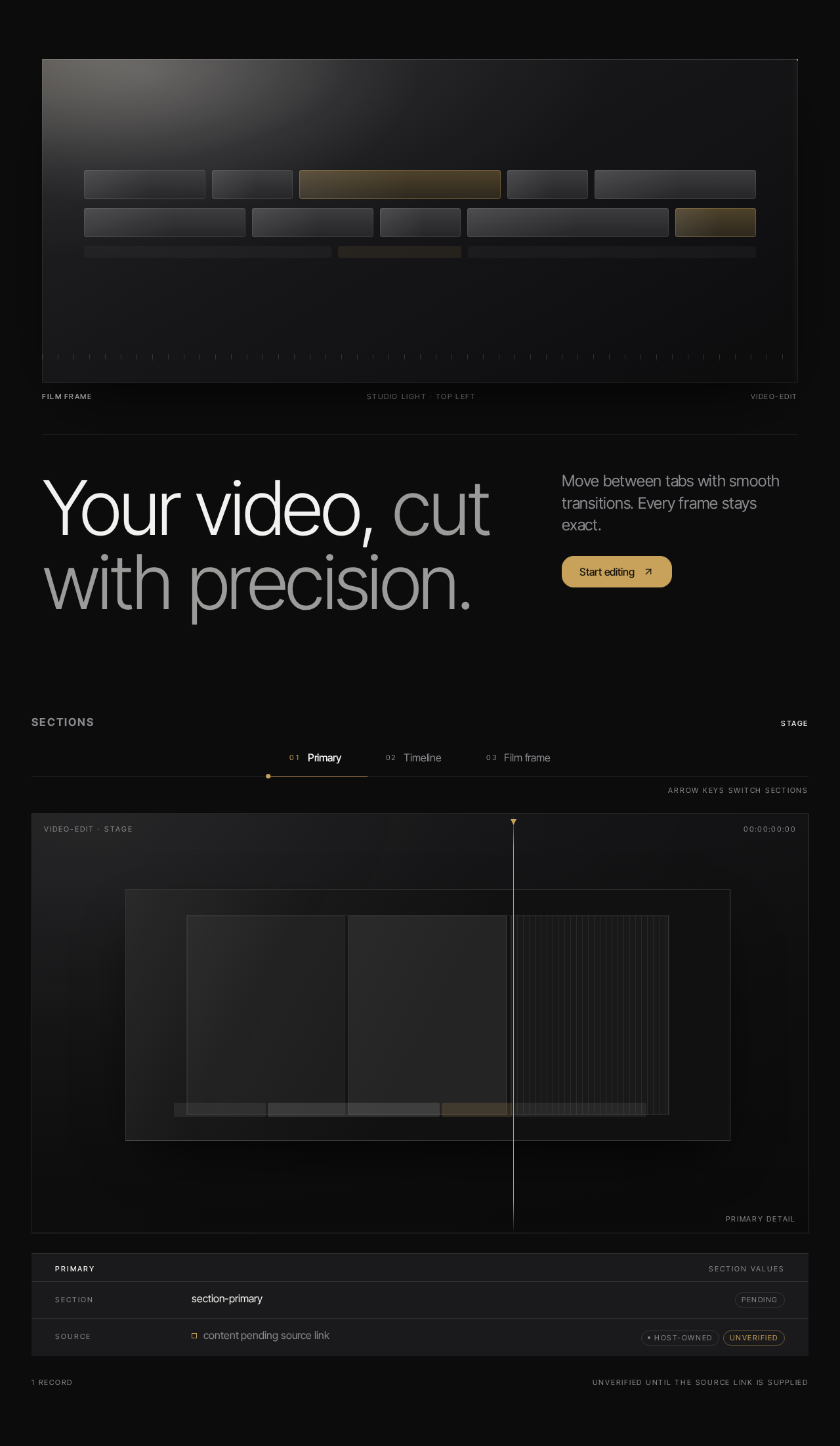
- Hero: headline "Your video, cut with precision."; subline "Move between tabs with smooth transitions. Every frame stays exact."; call to action "Start editing".
- Active tab identity (which tab is selected), driving the indicator position and the visible section.
- Recreated site content per tab: a full-width media stage and hairline ruled label/value rows, populated from the supplied source link when available.
- Pending-source state: when the source link has not yet been supplied, tab content areas show the recreated structure with clearly marked unverified/placeholder content rather than invented facts.
Primary actions
- Select a tab in the slim top tab bar; the champagne indicator slides to it and the section crossfades and lifts into place.
- Activate the "Start editing" call to action, which moves the visitor into the first tab's content (the site's primary section) with the same smooth transition.
Supporting actions
- Hover navigation links with a smooth color transition.
- Keyboard navigation across tabs (arrow keys / Tab + Enter) with visible focus.
Domain entities
- Tab (name, order, content reference).
- Content section (media frame reference, ruled rows of label/value pairs).
- Source content record (source-owned vs host-owned, verified vs unverified) — populated only from the supplied link.
Component responsibilities
- Top tab bar: renders tabs, tracks active tab, hosts the single sliding champagne indicator, handles keyboard and pointer selection.
- Media stage: full-bleed film frame with a thin champagne playhead that sweeps once on load; sharp rectangular frame, no rounded media.
- Hero block: oversized light headline stacked at the left edge under the frame, subline, call to action.
- Ruled value rows: hairline 1px dividers pairing a label and a value, like a spec sheet.
- Transition layer: crossfade + 12px lift at 600ms physical easing for tab changes and page transitions.
States
- Loading: media stage shows a graphite placeholder with the playhead line at rest; tab bar is interactive immediately.
- Empty: a tab with no supplied source content shows its ruled rows with an explicit "content pending source link" marker, never fabricated values.
- Success: tab selected, indicator at rest under the active tab, section fully visible.
- Error: if content for a tab fails to load, the section shows a short message and a retry control; the tab bar remains usable and other tabs remain reachable.
- Recovery: retry re-requests the section; on repeated failure the visitor can still switch tabs.
- Reduced motion: no crossfade/lift or playhead sweep; sections swap instantly and the indicator jumps to the active tab; all content remains readable and reachable.
3. Functional Requirements
FR-1 — Supply the source website link (explicit) As Mehtab Watson, I should be able to supply the link of the website to be recreated, so that the recreation is built from a real source.
- Trigger/input: the link is provided before the recreation starts.
- Result: the link becomes the authoritative source for structure, content, and visual inspiration.
- Access: build-time input, not a visitor-facing capability.
- Failure/recovery: until the link is supplied, the recreation proceeds on the fixed interaction and visual contract with content marked pending.
- Continuation: once supplied, content is populated per FR-2.
FR-2 — Recreate the supplied website (explicit) As a Site visitor, I should see a faithful recreation of the supplied website, so that I recognize the source and get its content.
- Trigger/input: visitor opens Landing.
- Result: the recreated site's structure and content are presented, preserving exact factual, structural, and visual details from the source; source-owned and host-owned content are distinguished and unverified facts are marked.
- Access: public, anonymous.
- Failure/recovery: missing or unloadable source content is marked pending/unverified rather than invented; a retry is offered.
- Continuation: the visitor moves between tabs (FR-4).
FR-3 — Make it better than the source (explicit) As a Site visitor, I should experience a version of the site that is better than the original, so that the recreation is an upgrade rather than a copy.
- Result: smoother motion, cleaner typography, and a more exact layout than the source, within the fixed visual direction.
- Access: public, anonymous.
- Failure/recovery: enhancements never remove source content; if an enhancement conflicts with source fidelity, source content wins.
FR-4 — Apple-style tabs (explicit) As a Site visitor, I should navigate the site through Apple-style tabs, so that moving between sections feels native and precise.
- Trigger/input: visitor selects a tab by pointer or keyboard.
- Result: the active tab changes, one champagne indicator slides to it, and the corresponding section becomes visible.
- Access: public, anonymous.
- Failure/recovery: if a section fails to load, the tab remains selectable and shows the error state; the visitor can switch to another tab.
- Continuation: the visitor reads the section and selects another tab.
FR-5 — Smooth animation (explicit) As a Site visitor, I should see smooth animation on interactive elements, so that the site feels crafted and calm.
- Trigger/input: hover, tab selection, and load.
- Result: navigation links transition color smoothly; the playhead sweeps once on load; the indicator slides; no bounce or particles.
- Access: public, anonymous.
- Failure/recovery: with
prefers-reduced-motion, animations are suppressed and the static arrangement remains fully usable. - Continuation: the visitor continues navigating.
FR-6 — Smooth page transitions (explicit) As a Site visitor, I should see smooth page transitions, so that moving between sections never feels abrupt.
- Trigger/input: tab change or call-to-action activation.
- Result: the outgoing section crossfades out and the incoming section crossfades in with a 12px lift, at 600ms physical easing.
- Access: public, anonymous.
- Failure/recovery: reduced-motion replaces the transition with an instant swap; a failed incoming section still completes the transition into its error state.
- Continuation: the visitor is on the new section and can navigate again.
FR-7 — Anonymous public entry (required_inference) As a Site visitor, I should reach the recreated site without signing in, so that I can view it immediately.
- Trigger/input: visitor opens the site.
- Result: Landing renders with hero, tab bar, and media stage; no identity is requested.
- Access: none required.
- Failure/recovery: if the app shell fails to load, a static fallback message is shown.
- Continuation: FR-4.
FR-8 — Responsive, accessible presentation (explicit) As a Site visitor, I should read and operate the site at any viewport, so that nothing is cut off or unusable.
- Result: headlines, labels, numbers, and controls stay entirely inside the viewport and their container at 375px, 768px, and 1280px, wrapping or scaling with
clamp(); tabs are keyboard operable with visible focus; reduced-motion is honored. - Access: public, anonymous.
- Failure/recovery: overflow is handled by wrapping or scrolling, never by clipping readable text or controls.
4. User Personas
Site visitor
Product context. The Site visitor is anyone who opens the recreated website. They arrive with no account and no prior state; the site is a public surface they browse.
Primary goal. See the recreated site's content and move between its sections with Apple-style tabs, smooth animation, and smooth page transitions.
Distinct responsibilities.
- Selects tabs and reads each section's media stage and ruled value rows.
- Activates the "Start editing" call to action to enter the primary section.
- Judges the recreation against the source: is it faithful, and is it better?
Inputs and decisions. Which tab to open next; whether the content is legible and complete at their viewport; whether motion feels smooth rather than abrupt.
Interactions with other participants. None. The Site visitor is the only active human participant; there is no counterparty, recipient, or beneficiary in the accepted behavior.
Observable success. The indicator sits under the chosen tab, the section is fully visible, transitions felt smooth, and every label and control was readable at their screen size.
5. Core User Flows
Flow A — First visit and tab navigation
- The Site visitor opens the recreated site. Landing renders anonymously (FR-7): the slim top tab bar appears, the full-bleed film frame is lit from the top left, and the champagne playhead sweeps once across the frame (FR-5).
- The oversized light headline "Your video, cut with precision." stacks at the left edge under the frame, with the subline and the "Start editing" call to action (FR-2, FR-3).
- The visitor selects a tab in the tab bar by pointer or keyboard (FR-4). The single champagne indicator slides to the active tab, and the outgoing section crossfades out while the incoming section crossfades in with a 12px lift at 600ms physical easing (FR-6).
- The visitor reads the section: the media stage and the hairline ruled label/value rows (FR-2).
- The visitor selects another tab; step 3 repeats. Continuation: the visitor keeps moving between tabs for as long as they browse.
Failure/recovery. If a section's content fails to load, the section shows a short error message and a retry control; the tab bar stays usable, and the visitor can switch tabs or retry (FR-4, FR-6). If the source link has not yet been supplied, the section shows its ruled rows with an explicit "content pending source link" marker instead of invented values (FR-2).
Reduced motion. With prefers-reduced-motion, the playhead does not sweep and sections swap instantly; the indicator jumps to the active tab; all content remains readable and reachable (FR-5, FR-8).
Flow B — Entering the primary section via the call to action
- On Landing, the visitor activates "Start editing" (FR-2).
- The site transitions to the primary section using the same crossfade-and-lift transition (FR-6), and the indicator moves to that tab (FR-4).
- The visitor reads the primary section and continues browsing via the tab bar (Flow A, step 3).
Flow C — Supplying the source link (build-time)
- Mehtab Watson supplies the website link before the recreation starts (FR-1).
- The link becomes the authoritative source for structure, content, and visual inspiration; the recreation's content is populated from it, preserving exact factual, structural, and visual details, distinguishing source-owned from host-owned content, and marking unverified facts (FR-2).
- The visitor then experiences the populated site through Flow A.
6. Visuals Colors and Theme
Muse and headline. Quiet precision after Jony Ive — a fine instrument, not a showpiece.
Mode. Dark.
Colour tokens (exact hex by role)
- Background (graphite ground, ~70%):
#0C0C0D - Surface (aluminium grey, ~20%):
#1A1A1C - Text / primary:
#F2F2F0 - Accent (champagne, ~10% — active tab indicator and playhead only):
#C8A15A - Muted:
#8A8A8E
Typography
- Headings: Inter Tight, Light 300, tight tracking, very large scale.
- Body: Inter Tight.
- Small uppercase labels: 11px with wide tracking.
- Scale: 1.5 modular — 128 / 72 / 44 / 24 / 16 / 12; headline
clamp(44px, 9vw, 128px)from mobile to desktop.
Shape language. Soft continuous-curve radii at 18px and 28px; hairline 1px dividers; sharp rectangular media frames (no rounded media).
Layout. Single-column focus with wide margins: slim top tab bar, one full-width media stage, then ruled value rows.
Imagery. Studio-lit macro shots of a video timeline and a film frame on a plain graphite ground. No stock people, no clip art.
Avoid. Gradient blob heroes and blue buttons; identical hover-lift card grids; bouncy or playful motion; stock photography of people.
7. Signature Design Concept
The public entry is a dark, full-bleed stage holding one large film frame lit from the top left. Above it sits a slim Apple-style tab bar with a single champagne indicator. Under the frame, an oversized light headline stacks at the left edge, with the subline and "Start editing" beneath it. A thin champagne playhead line crosses the frame and sweeps once on load, then rests. Hairline ruled rows below pair a label and a value like a spec sheet. The whole composition recomposes only accepted content and controls: the tab bar, the media stage, the hero copy, and the ruled rows.
8. Interaction Model & Motion Direction
Interaction Model: Animated Motion Tempo: restrained Hero Dimensionality: layered_2d
Landing Hero Motion Brief
- Focal subject: the studio-lit film frame on the graphite ground, with the champagne playhead line.
- Thesis: on load, the playhead line sweeps once across the frame (input: page load) → the line travels left to right at 600ms physical easing (transformation) → it comes to rest at the frame's edge, and the headline and tab bar settle into place (outcome).
- Motion vocabulary: slow physical easing at 600ms; the tab indicator slides as one element; sections crossfade and lift 12px; no bounce, no particles.
- Composed first frame: graphite ground, film frame lit from the top left, tab bar above with the indicator under the first tab, headline stacked at the left edge under the frame, playhead line at the frame's left edge.
- Reduced-motion state: the playhead line is drawn at rest, the headline and tab bar are fully visible, and no sweep or crossfade occurs.
9. Non-Functional Requirements
- Accessibility (explicit): tabs are keyboard operable with visible focus; motion honors
prefers-reduced-motion; text meets contrast against the dark ground. - Responsiveness (explicit): readable text and controls stay whole at 375px, 768px, and 1280px; headlines scale with
clamp(); overflow wraps or scrolls rather than clipping. - Motion performance (explicit): transitions run at 600ms physical easing without jank; animations are compositor-friendly (transform/opacity).
- Source fidelity (explicit): do not summarize, conflate, or inject details not present in the user directives or the referenced source; mark unverified facts; preserve the distinction between source-owned and host-owned content.
- Maintainability (explicit): clean, maintainable codebase that can be customized or extended further.
10. Tech Stack
- Frontend: React single-page application with Framer Motion for smooth animations and page transitions; custom CSS for the Apple aesthetic (minimal palettes, hairline dividers, continuous-curve radii).
- Backend: shared FastAPI process for application APIs and domain modules serving the recreated site's content.
- Database: MariaDB for application-owned persistent data (e.g., recreated content records and their source-owned/host-owned, verified/unverified markers).
- Infrastructure: docker-compose with
frontend,backend, anddatabaseservices.
11. Assumptions and Constraints
- Constraint (explicit): the source website link is not supplied yet; Mehtab Watson will give it later. Until then, content is marked pending and no source facts are invented.
- Constraint (explicit): the recreation must not summarize, conflate, or inject details not present in the user directives or the referenced source.
- Assumption (required_inference): the recreated site is a single public page with in-page tabs rather than separate routes, since the user asked for smooth page transitions and Apple-style tabs.
- Assumption (required_inference): no identity, accounts, or permissions are needed; the site is anonymous and public.
- Assumption (required_inference): the backend and database serve the recreated content; they do not add editing, accounts, or feedback capabilities.
- Default — not specified by user: exact source content, tab names, and section copy beyond the supplied hero copy are pending the source link.
12. Glossary
- Landing: the single public page of the recreated site.
- Tab bar: the slim Apple-style top navigation with one sliding champagne indicator.
- Media stage: the full-width film frame area of a section.
- Ruled value rows: hairline-divided label/value pairs styled like a spec sheet.
- Playhead: the thin champagne line that sweeps once across the film frame on load.
- Source link: the website link Mehtab Watson supplies for recreation.
- Source-owned / host-owned content: content originating from the source site versus content authored for the recreation.
- Reduced motion: the
prefers-reduced-motionstate in which animation is suppressed and a static arrangement is shown.
Your video, cut with precision.
Move between tabs with smooth transitions. Every frame stays exact.
Start editingSections
StageYour video, cut with precision.
Move between tabs with smooth transitions. Every frame stays exact.
Start editing
No comments yet. Be the first!