vibetune
 Ebenezer 2007
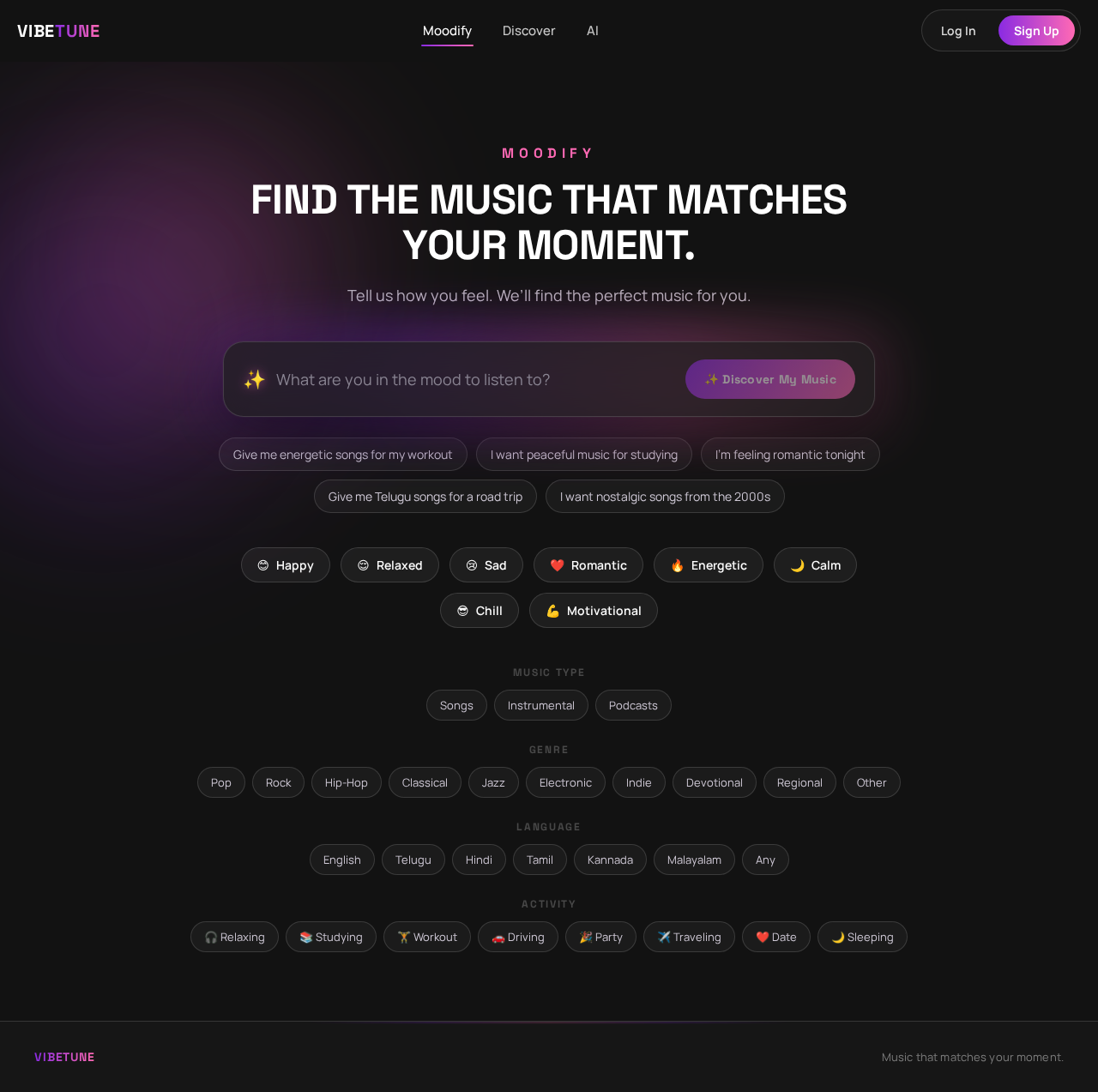
Build a modern, responsive AI-powered music discovery website called “Moodify”. Main concept Moodify helps users discover songs and create personalized playlists based on their mood, activity, situation, preferred language, genre, and music taste. Instead of simply searching for a song, users can describe how they feel or what they are doing in natural language. Example: “I’m feeling a little sad. It’s raining outside and I want peaceful Telugu songs.” The AI should understand the request and recommend suitable music. Design Create a premium, modern music-app interface with: Dark background Purple, blue, and pink gradient accents Large modern typography Glassmorphism cards Smooth animations and hover effects Rounded buttons and cards Music-themed visual elements Fully responsive design for desktop, tablet, and mobile Clean and minimal interface, not cluttered Home page Create a hero section with: MOODIFY “Find the music that matches your moment.” Subtitle: “Tell us how you feel. We’ll find the perfect music for you.” Add a large AI input box with placeholder: “What are you in the mood to listen to?” Example suggestions: “Give me energetic songs for my workout” “I want peaceful music for studying” “I’m feeling romantic tonight” “Give me Telugu songs for a road trip” “I want nostalgic songs from the 2000s” Add a prominent button: ✨ Discover My Music Below the input, show quick mood buttons: 😊 Happy 😌 Relaxed 😢 Sad ❤️ Romantic 🔥 Energetic 🌙 Calm 😎 Chill 💪 Motivational Preference section Allow users to optionally select: Music type Songs Instrumental Podcasts Genre Pop Rock Hip-Hop Classical Jazz Electronic Indie Devotional Regional Other Language English Telugu Hindi Tamil Kannada Malayalam Any Activity 🎧 Relaxing 📚 Studying 🏋️ Workout 🚗 Driving 🎉 Party ✈️ Traveling ❤️ Date 🌙 Sleeping AI recommendation page After the user submits their request, show: “We found music for your mood” First display an AI interpretation: Mood: Calm Activity: Studying Energy: Low Language: English Genre: Ambient / Lo-fi Then display 5–10 recommended songs. Each song card should contain: Album artwork Song title Artist Genre Duration Mood tags Play button Like button Save button “Why this song?” button When “Why this song?” is clicked, show a short AI-generated explanation. Example: “This song has a calm tempo and soft instrumentation, making it a good choice for focused study sessions.” AI Playlist Generator Add a feature called: “Create My Playlist” The user can enter: “Create a 45-minute playlist for a late-night drive.” The AI should generate a playlist with: Playlist name Description Cover image Songs Estimated duration Mood Energy level Example: 🌙 Midnight Drive “Smooth and atmospheric songs for a peaceful late-night journey.” [▶ Play Playlist] “Describe Your Moment” feature Create a special section where users describe their current situation. Heading: “Describe your moment.” Example: “It’s raining outside. I’m sitting by my window alone and want something peaceful.” The AI should identify: Emotion Environment Activity Energy level Musical characteristics Then generate recommendations based on those characteristics. Personalized section Create a section called: “Made For You” Show: Recommended for you Because you liked... Recently discovered Your favorite moods Your favorite genres Allow users to like/dislike songs so the recommendation system can gradually personalize results. Favorites page Create a My Music page containing: Liked songs Saved playlists Recently discovered songs Favorite artists Favorite genres Favorite moods Navigation Create a clean navigation bar: **Moodify | Discover | AI


Comments (0)
Sign in to leave a comment
No comments yet. Be the first!