vibetune
 Ebenezer 2007
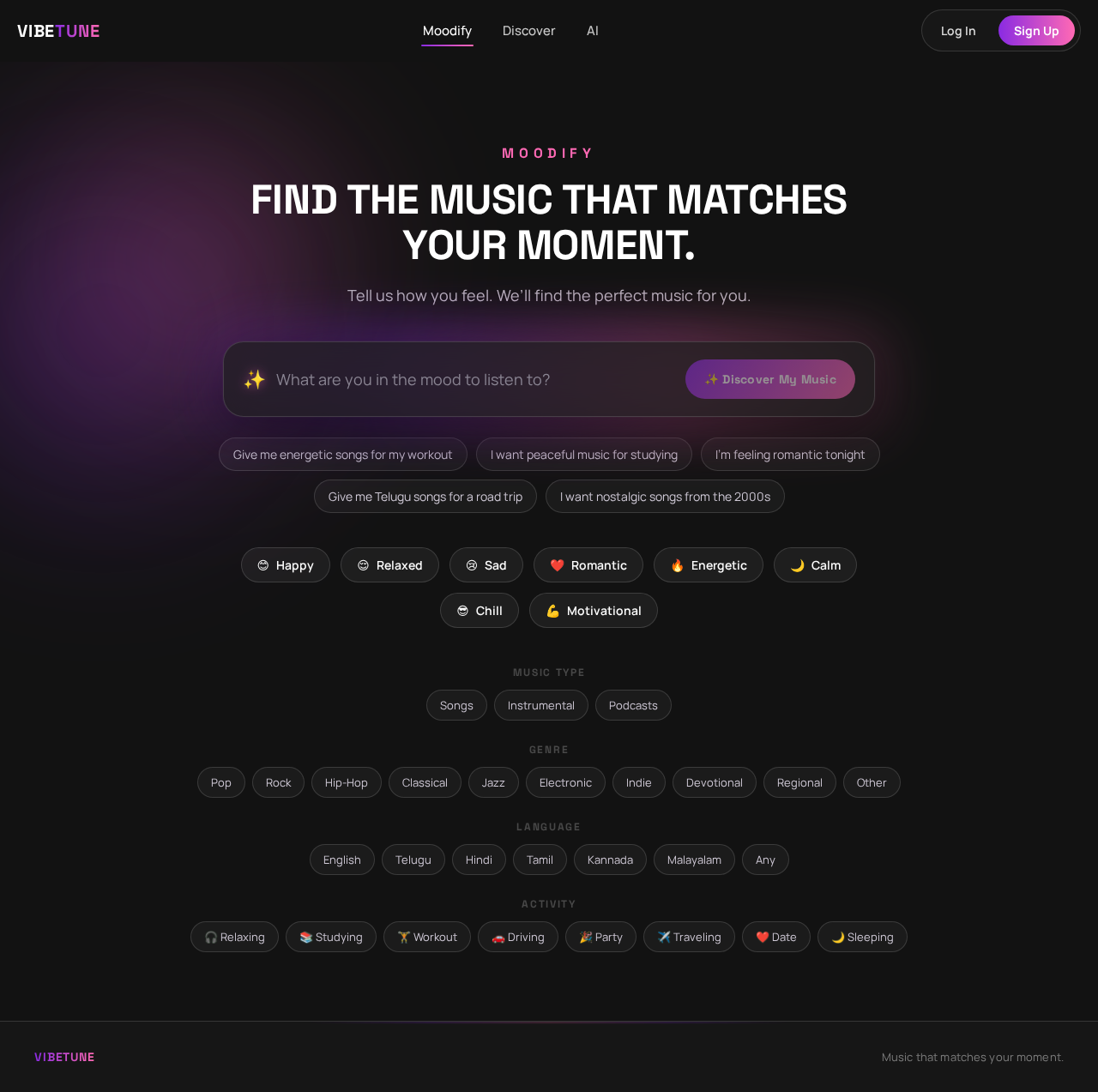
Build a modern, responsive AI-powered music discovery website called “Moodify”. Main concept Moodify helps users discover songs and create personalized playlists based on their mood, activity, situation, preferred language, genre, and music taste. Instead of simply searching for a song, users can describe how they feel or what they are doing in natural language. Example: “I’m feeling a little sad. It’s raining outside and I want peaceful Telugu songs.” The AI should understand the request and recommend suitable music. Design Create a premium, modern music-app interface with: Dark background Purple, blue, and pink gradient accents Large modern typography Glassmorphism cards Smooth animations and hover effects Rounded buttons and cards Music-themed visual elements Fully responsive design for desktop, tablet, and mobile Clean and minimal interface, not cluttered Home page Create a hero section with: MOODIFY “Find the music that matches your moment.” Subtitle: “Tell us how you feel. We’ll find the perfect music for you.” Add a large AI input box with placeholder: “What are you in the mood to listen to?” Example suggestions: “Give me energetic songs for my workout” “I want peaceful music for studying” “I’m feeling romantic tonight” “Give me Telugu songs for a road trip” “I want nostalgic songs from the 2000s” Add a prominent button: ✨ Discover My Music Below the input, show quick mood buttons: 😊 Happy 😌 Relaxed 😢 Sad ❤️ Romantic 🔥 Energetic 🌙 Calm 😎 Chill 💪 Motivational Preference section Allow users to optionally select: Music type Songs Instrumental Podcasts Genre Pop Rock Hip-Hop Classical Jazz Electronic Indie Devotional Regional Other Language English Telugu Hindi Tamil Kannada Malayalam Any Activity 🎧 Relaxing 📚 Studying 🏋️ Workout 🚗 Driving 🎉 Party ✈️ Traveling ❤️ Date 🌙 Sleeping AI recommendation page After the user submits their request, show: “We found music for your mood” First display an AI interpretation: Mood: Calm Activity: Studying Energy: Low Language: English Genre: Ambient / Lo-fi Then display 5–10 recommended songs. Each song card should contain: Album artwork Song title Artist Genre Duration Mood tags Play button Like button Save button “Why this song?” button When “Why this song?” is clicked, show a short AI-generated explanation. Example: “This song has a calm tempo and soft instrumentation, making it a good choice for focused study sessions.” AI Playlist Generator Add a feature called: “Create My Playlist” The user can enter: “Create a 45-minute playlist for a late-night drive.” The AI should generate a playlist with: Playlist name Description Cover image Songs Estimated duration Mood Energy level Example: 🌙 Midnight Drive “Smooth and atmospheric songs for a peaceful late-night journey.” [▶ Play Playlist] “Describe Your Moment” feature Create a special section where users describe their current situation. Heading: “Describe your moment.” Example: “It’s raining outside. I’m sitting by my window alone and want something peaceful.” The AI should identify: Emotion Environment Activity Energy level Musical characteristics Then generate recommendations based on those characteristics. Personalized section Create a section called: “Made For You” Show: Recommended for you Because you liked... Recently discovered Your favorite moods Your favorite genres Allow users to like/dislike songs so the recommendation system can gradually personalize results. Favorites page Create a My Music page containing: Liked songs Saved playlists Recently discovered songs Favorite artists Favorite genres Favorite moods Navigation Create a clean navigation bar: **Moodify | Discover | AI


Comments (0)
Sign in to leave a comment
System Requirements
System Requirements Document for vibetune
1. Introduction
Vibetune is a modern, responsive AI-powered music discovery website designed to help users discover songs and create personalized playlists based on their mood, activity, situation, preferred language, genre, and music taste. Users can describe their feelings or activities in natural language, and the AI will recommend suitable music.
2. System Overview
Vibetune offers a premium, modern music-app interface with features such as mood-based music recommendations, personalized playlist generation, and user preference customization. The website is fully responsive and designed with a dark theme, featuring purple, blue, and pink gradient accents, large modern typography, and glassmorphism cards. The system supports anonymous access to the Moodify page, with identity establishment required for saving preferences and playlists.
2a. Product Interpretation and Delivery Boundary
Vibetune is a public-entry website with a focus on AI-powered music discovery. Users can access the Moodify page anonymously, but must sign up or log in to save personalized preferences and playlists. The system is designed to be fully responsive and visually appealing, with a focus on a clean and minimal interface.
2b. Source Content Inventory
Not applicable as no content source directive was provided.
2c. Page Content and Component Coverage
Moodify
- Hero Section
- Title: "MOODIFY"
- Subtitle: "Find the music that matches your moment."
- AI Input Box with placeholder: "What are you in the mood to listen to?"
- Example suggestions for input
- Discover My Music button
- Quick Mood Buttons: Happy, Relaxed, Sad, Romantic, Energetic, Calm, Chill, Motivational
Sign Up
- User Enrollment
- Form for creating a new account
- Fields: Email, Password, Confirm Password
- Sign Up button
Login
- User Verification
- Form for returning users to log in
- Fields: Email, Password
- Login button
Discover
- Music Discovery
- AI interpretation display: Mood, Activity, Energy, Language, Genre
- Recommended Songs: 5–10 song cards with album artwork, title, artist, genre, duration, mood tags, play, like, save, and "Why this song?" actions
- Explanation display for "Why this song?"
AI
- Playlist Generation
- "Create My Playlist" feature
- Input for playlist request
- Generated Playlist: Name, Description, Cover Image, Songs, Estimated Duration, Mood, Energy Level
My Music
- Personalized Content
- Sections: Liked Songs, Saved Playlists, Recently Discovered Songs, Favorite Artists, Favorite Genres, Favorite Moods
3. Functional Requirements
- As a Listener, I should be able to describe my mood or activity in natural language to receive music recommendations. (explicit)
- As a Listener, I should be able to select optional preferences for music type, genre, language, and activity. (explicit)
- As a Listener, I should be able to use quick mood buttons for instant music suggestions. (explicit)
- As a Listener, I should be able to view AI interpretations of my mood and activity before receiving recommendations. (explicit)
- As a Listener, I should be able to see 5–10 recommended songs with detailed song cards. (explicit)
- As a Listener, I should be able to click "Why this song?" to see an AI-generated explanation. (explicit)
- As a Playlist Creator, I should be able to request a playlist in natural language and receive a generated playlist. (explicit)
- As a Listener, I should be able to describe my current situation for personalized recommendations. (explicit)
- As a Listener, I should be able to like or dislike songs to personalize future recommendations. (explicit)
- As a Listener, I should be able to access my personalized content in the My Music section. (explicit)
4. User Personas
Listener
The Listener uses Vibetune to discover music that matches their current mood or activity. They interact with the AI to receive song recommendations, select preferences, and explore personalized content. Their primary goal is to find music that enhances their current experience.
Playlist Creator
The Playlist Creator uses Vibetune to generate playlists for specific occasions or moods. They provide natural language requests to the AI and review the generated playlists. Their primary goal is to create playlists that fit their desired mood or activity.
5. Core User Flows
5.1 Listener Music Discovery
- Start: User accesses the Moodify page.
- Input: User enters a mood or activity description in the AI input box.
- AI Interpretation: System displays AI interpretation of mood and activity.
- Recommendation: System shows 5–10 recommended songs.
- Interaction: User can play, like, save, or request an explanation for each song.
- Continuation: User can explore more recommendations or adjust preferences.
5.2 Playlist Creation
- Start: User accesses the AI page.
- Input: User enters a natural language request for a playlist.
- Generation: System generates a playlist with name, description, and songs.
- Review: User reviews the playlist details.
- Continuation: User can save or play the playlist.
5.3 Personalized Content Access
- Start: User logs in and accesses the My Music page.
- View: User views personalized content sections.
- Interaction: User can play, like, or save songs and playlists.
- Continuation: User can explore more personalized recommendations.
6. Visuals Colors and Theme
- Muse: Michal Malewicz
- Palette:
- Background: #121212
- Surface: #1e1e1e
- Text: #ffffff
- Primary: #8a2be2
- Accent: #ff69b4
- Muted: #484848
- Typography:
- Headings: Space Grotesk — Bold, large, tight tracking, uppercase
- Body: Manrope
- Scale: 1.25 modular, 48/36/24/18/16
- Shape Language: Rounded cards, large input boxes, pill buttons
- Layout: Responsive grid layout with prominent hero and mood buttons
- Motion: Smooth hover animations and gentle transitions
7. Signature Design Concept
The public entry page, Moodify, features a large AI input box with a gradient glow, set against a dark background. Glassmorphic cards display song recommendations, and gradient mood buttons offer quick selection. The design emphasizes a clean, modern aesthetic with smooth animations and a prominent call-to-action.
8. Interaction Model & Motion Direction
- Interaction Model: Animated
- Motion Tempo: Expressive
- Hero Dimensionality: Layered_2d
- Landing Hero Motion Brief: The focal subject is the AI input box, which transforms into a dynamic recommendation display upon user input. Smooth transitions and gradient accents enhance the interactive experience.
9. Non-Functional Requirements
- The website must be fully responsive for desktop, tablet, and mobile. (explicit)
- The interface should maintain a clean and minimal presentation, avoiding clutter. (explicit)
- AI processing must persist applicable user records and feedback. (required_inference)
10. Tech Stack
- Frontend: React
- Backend: Python/FastAPI
- Storage: Appropriate database for user records and music data
- Deployment: Docker/docker-compose, Kubernetes if required
11. Assumptions and Constraints
- The product is an internal planning scope for a public-entry website; no explicit account or participation boundary is stated. (explicit)
- Anonymous visitors can reach Moodify before identity establishment. (required_inference)
- A listener or playlist creator can self-enroll before creating durable preferences or playlists. (required_inference)
12. Glossary
- AI Interpretation: The system's analysis of user input to determine mood, activity, energy, language, and genre.
- Glassmorphism: A design style using translucent surfaces to create a frosted-glass effect.
- Gradient Accents: Color transitions used to highlight interactive elements.
- Moodify: The public entry page of Vibetune where users begin their music discovery journey.
No comments yet. Be the first!