velvet-bean
 Krisha Parmar
Create a unique and aesthetic 3-page coffee shop website called Velvet Bean. Create Home, Menu, and Contact pages with a premium, cozy coffee-shop design using warm colors, elegant typography, and high-quality images. Make it a beautifully animated website with smooth page transitions, scroll animations, elegant hover effects, and subtle animated background elements. Include popular coffee items and opening hours, and make the website fully responsive without adding complex functionality.


Comments (0)
Sign in to leave a comment
System Requirements
System Requirements Document for velvet-bean
1. Introduction
Velvet Bean is a neighbourhood specialty coffee shop with a premium, cozy register. This project delivers its public website: a unique, aesthetic, exactly three-page experience — Home, Menu, and Contact — that presents the brand, the popular coffee items, and the opening hours to prospective customers.
The product intent is sensory and brand-led rather than transactional. The site must feel made by hand: warm colors, elegant typography, high-quality art-directed imagery, and a beautifully animated surface with smooth page transitions, scroll animations, elegant hover effects, and subtle animated background elements. It must be fully responsive across mobile, tablet, and desktop, and it must not add complex functionality — no ordering, accounts, payments, reservations, or backend workflows. The audience is the everyday ritual drinker and the weekend lingerer who wants craft, warmth, and personality rather than a corporate chain's sterility.
2. System Overview
Velvet Bean is a static-presentation, three-page marketing website. All three pages are publicly reachable with no access requirement: a visitor lands on Home, browses Menu for popular coffee items, and visits Contact for contact details and opening hours. Navigation between the three pages is animated with a terracotta page-transition wipe.
The only accepted human actor is the Coffee Shop Visitor. There is no application-owned identity, no sign-in, no session continuity, and no differentiated permissions — the site is fully public and stateless from the visitor's perspective. There are no provider-owned or external destinations; every accepted behavior is owned by one of the three first-party pages.
Current delivery is a responsive, animated, image-led front-end. Explicitly out of scope: any complex functionality (ordering, cart, checkout, payments, reservations, table booking, user accounts, reviews, live chat, newsletter signup workflows, or admin tooling).
2a. Product Interpretation and Delivery Boundary
The website is a public, no-account brand surface. Every page is anonymously reachable; nothing on the site requires a visitor to identify themselves, and no visitor-specific state is stored or resumed. Because no accepted behavior creates a durable relationship, obligation, entitlement, or value transfer, no identity establishment or verification lifecycle is required, and none is added.
The delivery boundary is deliberately narrow. The site presents the brand, the popular coffee items, and the opening hours, and it lets a visitor move between the three pages with rich, purposeful motion. Everything beyond presentation and navigation — ordering, payment, booking, accounts, messaging, and any server-side workflow — sits outside the current horizon and is not built. Contact details are presented for the visitor to use through their own channels; the site itself does not transmit, store, or process any visitor submission.
2b. Source Content Inventory
Not applicable. No reference directive in this project declares a content_source, so no verified external content inventory is carried into this document. All product facts (brand name, page set, popular coffee items, opening hours, contact details) are supplied by the authoritative user requirement thread and the creative direction.
2c. Page Content and Component Coverage
The page inventory is the closed, ordered contract: Home, Menu, Contact. Each is represented exactly once below.
Home
- Information and state: Brand presentation for Velvet Bean; the cozy, premium atmosphere; a hero composition; highlights that lead the visitor onward to Menu and Contact. No visitor-specific or dynamic state.
- Primary actions: Navigate to Menu; navigate to Contact.
- Supporting actions: Hover the header wordmark and nav items (hand-drawn underline swash); hover the "OPEN UNTIL 8" badge (ring rotates 8°); scroll to trigger staggered headline reveals.
- Domain entities: Brand identity (Velvet Bean, EST. 2019); hero photograph (single cup being poured, crema swirl in the lower-right third); opening-status indicator; popular-item highlights.
- Component responsibilities:
- Header / navigation bar — Velvet Bean wordmark, links to Home, Menu, Contact; wordmark briefly inverts to crema as the page-transition wipe passes over it; steam mark rotates 8° with a hand-drawn wobble on hover.
- Hero band — full-bleed, low-lit pour photograph; 9-column Fraunces headline "SLOW / MORNINGS" in crema cream at
clamp(64px, 12vw, 148px), second line italic and indented two columns, overhanging the photograph's right edge by exactly two columns on desktop and sitting fully inside the viewport above the photo on mobile; full-width 2px terracotta rule beneath the headline. - Hero meta row — bottom-left uppercase Work Sans label "VELVET BEAN · EST. 2019" with a 6px amber dot; bottom-right circular "OPEN UNTIL 8" badge with a hand-drawn terracotta ring and a slowly pulsing (2.4s) amber dot when the shop is open.
- Highlight band(s) — popular coffee items and brand atmosphere, separated by full-bleed 2px terracotta rules; each band is a stacked poster band rather than a whitespace-separated section.
- Animated background layer — three slow-drifting blurred crema-coloured blobs at 6% opacity on a 40s loop, plus a subtle grain overlay at 4% opacity.
- Footer — brand mark, condensed opening hours, and links to Menu and Contact.
- States:
- Loading: hero photograph loads progressively; text and rules render immediately so the composition is never empty.
- Empty: not applicable — Home has no collection that can be empty.
- Success: hero, highlights, and navigation render fully; scroll reveals fire as bands enter the viewport.
- Error / recovery: if the hero photograph fails to load, the espresso-dark ground, headline, rules, and badge remain fully legible and the layout holds; the visitor can still navigate to Menu and Contact.
- Reduced motion: wipes become instant cuts, reveals become static, blobs freeze.
Menu
- Information and state: The popular coffee items offered by Velvet Bean, presented as a ruled ledger. No visitor-specific or dynamic state.
- Primary actions: Browse the item list; navigate to Home or Contact.
- Supporting actions: Hover a menu row (row slides 6px right; terracotta dotted leader draws left-to-right in 180ms); scroll to reveal category numerals and rows.
- Domain entities: Menu categories (numbered 01, 02, 03 in the left margin); menu items (name, price); the dotted leader rule; item imagery where art-directed photography is used.
- Component responsibilities:
- Header / navigation bar — shared with Home; same wordmark, links, and hover behavior.
- Category band — large Fraunces category numeral (01, 02, 03) in the left margin with the category name; separated from the next band by a full-bleed 2px terracotta rule.
- Menu ledger list — two-column ruled list of name + dotted leader + price; name in Fraunces 700, price in Fraunces 900 amber numerals; collapses to a single column below 768px.
- Item imagery — art-directed, warm-duotone photographs of popular coffee items where used, kept whole inside their container at every viewport.
- Animated background layer — same drifting blobs and grain overlay as Home.
- Footer — brand mark, condensed opening hours, and links to Home and Contact.
- States:
- Loading: list text and rules render immediately; item images load progressively without shifting the ledger layout.
- Empty: not applicable — the popular coffee items are authored content, not a fetched collection.
- Success: all categories and rows render with correct names, leaders, and prices; hover animation plays on each row.
- Error / recovery: if an item image fails to load, the row's name, leader, and price remain fully readable and the ledger stays intact.
- Reduced motion: hover slide and leader draw resolve instantly; scroll reveals become static.
Contact
- Information and state: Velvet Bean's contact details and opening hours, presented as a three-band stack. No visitor-specific or dynamic state.
- Primary actions: Read the address and contact details; read the opening-hours table; navigate to Home or Menu.
- Supporting actions: Hover the "OPEN UNTIL 8" badge (ring rotates 8°); scroll to reveal the bands; use the visitor's own device to act on the displayed contact details.
- Domain entities: Address block; opening-hours table (days and hours, with the current day highlighted in amber); photographic map-card; "OPEN UNTIL 8" badge.
- Component responsibilities:
- Header / navigation bar — shared with Home and Menu.
- Address band — a big address block in Fraunces display type, with the shop's contact details.
- Opening-hours band — a ruled opening-hours table with the current day highlighted in amber; full-bleed 2px terracotta rules above and below.
- Map-card band — a photographic map-card treated with the warm duotone so it sits inside the palette.
- "OPEN UNTIL 8" badge — hand-drawn circular badge with a terracotta ring that rotates 8° on hover and an amber dot that pulses slowly (2.4s) when the shop is open.
- Animated background layer — same drifting blobs and grain overlay.
- Footer — brand mark, condensed opening hours, and links to Home and Menu.
- States:
- Loading: text, table, and rules render immediately; the map-card image loads progressively.
- Empty: not applicable — contact details and opening hours are authored content.
- Success: address, hours table with the current day highlighted, and map-card all render; the badge reflects the open state.
- Error / recovery: if the map-card image fails to load, the address block and hours table remain fully readable and the visitor can still act on the displayed details.
- Reduced motion: badge pulse and ring rotation resolve to static; scroll reveals become static.
3. Functional Requirements
FR-1 — Three-page site structure (explicit) As a Coffee Shop Visitor, I should be able to reach exactly three pages — Home, Menu, and Contact — so that I can explore the whole site without encountering any other destination.
- Trigger/input: the visitor loads the site or uses the navigation.
- Observable result: exactly three pages exist and are reachable; no additional page, route, or destination is present.
- Access state: all three pages are publicly reachable with no access requirement.
- Failure/recovery: if a navigation target is unavailable, the visitor remains on the current page with the header navigation still usable.
- Continuation: the visitor moves between the three pages via the header navigation.
FR-2 — Premium, cozy brand presentation (explicit) As a Coffee Shop Visitor, I should see a unique and aesthetic presentation with a premium, cozy coffee-shop feel so that Velvet Bean reads as a crafted neighbourhood café rather than a generic template.
- Trigger/input: the visitor lands on any page.
- Observable result: warm colors, elegant typography, and high-quality art-directed imagery are present on every page, with no blue/indigo/violet accents and no white page grounds.
- Access state: public.
- Failure/recovery: if an image fails to load, the espresso-dark ground, typography, and rules preserve the premium register.
- Continuation: the visitor continues browsing the current page or navigates onward.
FR-3 — Popular coffee items on the Menu page (explicit) As a Coffee Shop Visitor, I should be able to browse Velvet Bean's popular coffee items on the Menu page so that I can learn what the shop serves.
- Trigger/input: the visitor opens the Menu page and scrolls the ledger.
- Observable result: popular coffee items are listed with their names and prices in the ruled ledger format, organized under numbered categories.
- Access state: public.
- Failure/recovery: if an item image fails to load, the item's name, leader, and price remain fully readable.
- Continuation: the visitor continues down the ledger or navigates to Home or Contact.
FR-4 — Opening hours on the Contact page (explicit) As a Coffee Shop Visitor, I should be able to view Velvet Bean's opening hours on the Contact page so that I know when the shop is open.
- Trigger/input: the visitor opens the Contact page.
- Observable result: a ruled opening-hours table shows the days and hours, with the current day highlighted in amber.
- Access state: public.
- Failure/recovery: if the map-card image fails to load, the hours table remains fully readable.
- Continuation: the visitor acts on the hours or navigates to Home or Menu.
FR-5 — Contact details on the Contact page (explicit) As a Coffee Shop Visitor, I should be able to view Velvet Bean's contact details on the Contact page so that I can reach the shop through my own channels.
- Trigger/input: the visitor opens the Contact page.
- Observable result: a big address block presents the shop's address and contact details in Fraunces display type.
- Access state: public.
- Failure/recovery: if the map-card image fails to load, the address block remains fully readable.
- Continuation: the visitor uses their own device to act on the displayed details, or navigates onward.
FR-6 — Smooth page transitions (explicit) As a Coffee Shop Visitor, I should experience a smooth animated transition when moving between Home, Menu, and Contact so that navigation feels crafted rather than abrupt.
- Trigger/input: the visitor activates a navigation link.
- Observable result: a 420ms terracotta wipe sweeps from bottom-left to top-right, revealing the new page underneath, with the Velvet Bean wordmark briefly inverted to crema as the wipe passes over it.
- Access state: public.
- Failure/recovery: if the transition cannot play, the destination page still loads and is fully usable.
- Continuation: the visitor arrives on the destination page and continues browsing.
- Reduced motion: the wipe becomes an instant cut.
FR-7 — Scroll animations (explicit) As a Coffee Shop Visitor, I should see content animate into view as I scroll so that the page feels alive and paced.
- Trigger/input: the visitor scrolls a page.
- Observable result: display headlines rise word-by-word (translateY 24px, opacity 0→1, 60ms stagger); body copy fades in as a block.
- Access state: public.
- Failure/recovery: if the animation cannot play, all content is visible in its final state.
- Continuation: the visitor continues scrolling through the page.
- Reduced motion: reveals become static.
FR-8 — Elegant hover effects (explicit) As a Coffee Shop Visitor, I should see elegant hover effects on interactive elements so that the site responds with tactile, hand-made character.
- Trigger/input: the visitor hovers a nav item, a menu row, or the "OPEN UNTIL 8" badge.
- Observable result: a hand-drawn underline swash draws under nav items; a menu row slides 6px right and its terracotta dotted leader draws left-to-right in 180ms; the badge ring rotates 8°; the header steam mark rotates 8° with a hand-drawn wobble.
- Access state: public.
- Failure/recovery: if hover effects cannot play, the underlying elements remain fully readable and usable.
- Continuation: the visitor clicks through or continues browsing.
- Reduced motion: hover effects resolve instantly to their end state.
FR-9 — Subtle animated background elements (explicit) As a Coffee Shop Visitor, I should see subtle animated background elements so that the site has quiet, continuous atmosphere.
- Trigger/input: the visitor views any page.
- Observable result: three slow-drifting blurred crema-coloured blobs at 6% opacity on a 40s loop, plus a subtle grain overlay at 4% opacity, sit behind the content.
- Access state: public.
- Failure/recovery: if the background animation cannot play, the espresso-dark ground renders cleanly and all content remains legible.
- Continuation: the visitor continues browsing.
- Reduced motion: the blobs freeze.
FR-10 — Fully responsive layout (explicit) As a Coffee Shop Visitor, I should be able to read and use the whole site on mobile, tablet, and desktop so that nothing is cut off or unreadable at any viewport.
- Trigger/input: the visitor opens the site at 375px, 768px, or 1280px.
- Observable result: headlines, wordmarks, labels, numbers, item images, cards, and controls stay entirely inside the viewport and their container, wrapping or scaling (for example
font-size: clamp(...)with its mobile size) to fit; the Menu ledger collapses to one column below 768px; the Home hero headline sits fully inside the viewport above the photo on mobile. - Access state: public.
- Failure/recovery: if a layout cannot fit, content wraps or scales rather than clipping; only decoration (shapes, textures, rules, background art) may crop or bleed.
- Continuation: the visitor continues browsing at their viewport.
FR-11 — No complex functionality (explicit) As a Coffee Shop Visitor, I should encounter a simple, presentation-only site so that nothing distracts from the brand and the coffee.
- Trigger/input: the visitor uses any page.
- Observable result: no ordering, cart, checkout, payment, reservation, account, review, live chat, newsletter workflow, or admin tooling is present.
- Access state: public.
- Failure/recovery: not applicable — there is no complex workflow to fail.
- Continuation: the visitor browses the three pages and leaves.
4. User Personas
Coffee Shop Visitor
Product context. The Coffee Shop Visitor is a prospective customer of Velvet Bean — the everyday ritual drinker or the weekend lingerer. They arrive at the site with a sensory, low-commitment intent: they want to feel the shop's character, see what it serves, and find out when it is open and where it is. They are not shopping online and are not looking for an account, an order, or a booking.
Primary goal. To quickly learn what Velvet Bean serves and when it is open, while enjoying a premium, cozy, hand-made-feeling brand experience.
Distinct accepted responsibilities. This is the only accepted human actor, and their work is entirely exploratory and read-only:
- Land on Home and take in the brand presentation, the hero composition, and the highlights.
- Browse the popular coffee items on Menu, reading names and prices in the ruled ledger.
- Read the address and the opening-hours table on Contact, and act on those details through their own channels.
- Move between the three pages using the animated navigation.
Relevant inputs or decisions. The visitor decides whether the shop's offerings and hours match what they want, and whether to visit in person. Their inputs are simply navigation choices and scrolling; they make no commitment, submit no data, and create no account.
Interactions with other accepted participants. There are no other accepted human participants. The visitor's only counterparty is the shop itself, represented by the site's content. There is no handoff, no counterparty response, and no shared state.
Observable success. The visitor can state what Velvet Bean serves, when it is open, and where it is, having moved through all three pages without encountering any broken layout, unreadable text, or unexpected functionality.
Constraints carried from source. The visitor's experience must be fully responsive, richly but purposefully animated, and free of complex functionality. No access requirement applies to any page.
5. Core User Flows
Flow 1 — Discovering Velvet Bean on Home
- The Coffee Shop Visitor opens the Velvet Bean site and lands on Home (public, no access requirement).
- The hero band renders: the full-bleed, low-lit pour photograph with the crema swirl in the lower-right third, the 9-column Fraunces headline "SLOW / MORNINGS" in crema cream with its second line italic and indented, and the full-width 2px terracotta rule beneath it.
- The visitor reads the bottom-left label "VELVET BEAN · EST. 2019" with its 6px amber dot, and the bottom-right circular "OPEN UNTIL 8" badge with its hand-drawn terracotta ring and slowly pulsing amber dot.
- The visitor scrolls; display headlines rise word-by-word (translateY 24px, opacity 0→1, 60ms stagger) and body copy fades in as a block, while the hero photograph drifts 20px and the badge parallaxes at 0.5x.
- The visitor hovers the header wordmark and nav items; the steam mark rotates 8° with a hand-drawn wobble and the hand-drawn underline swash draws under the hovered nav item.
- The visitor reads the highlight bands — popular coffee items and brand atmosphere — separated by full-bleed 2px terracotta rules.
- Observable result: the visitor has absorbed the brand presentation and the open-until indicator.
- Continuation: the visitor selects Menu from the header.
- Failure/recovery: if the hero photograph fails to load, the espresso-dark ground, headline, rules, and badge remain fully legible and the visitor can still navigate onward.
Flow 2 — Browsing popular coffee items on Menu
- From Home, the Coffee Shop Visitor selects Menu in the header.
- A 420ms terracotta wipe sweeps from bottom-left to top-right, revealing the Menu page underneath, with the Velvet Bean wordmark briefly inverted to crema as the wipe passes over it.
- The Menu page renders its ruled ledger: category numerals 01, 02, 03 in the left margin with their category names, each band separated by a full-bleed 2px terracotta rule.
- The visitor scrolls; category numerals and rows reveal as the bands enter the viewport.
- The visitor hovers a menu row; the row slides 6px right and the hand-drawn terracotta dotted leader draws from left to right in 180ms, with the item name in Fraunces 700 and the price in Fraunces 900 amber numerals.
- Observable result: the visitor has read the popular coffee items and their prices.
- Continuation: the visitor selects Contact from the header.
- Failure/recovery: if an item image fails to load, the row's name, leader, and price remain fully readable and the ledger stays intact. On a viewport below 768px, the ledger collapses to a single column and every row remains fully readable.
Flow 3 — Checking contact details and opening hours on Contact
- From Menu, the Coffee Shop Visitor selects Contact in the header.
- The 420ms terracotta wipe sweeps bottom-left to top-right and reveals the Contact page.
- The Contact page renders its three-band stack: the big address block in Fraunces display type, the ruled opening-hours table with the current day highlighted in amber, and the photographic map-card treated with the warm duotone — each separated by full-bleed 2px terracotta rules.
- The visitor reads the address and contact details, then reads the opening-hours table to find the current day's hours.
- The visitor hovers the "OPEN UNTIL 8" badge; the terracotta ring rotates 8° and the amber dot pulses slowly (2.4s) because the shop is open.
- Observable result: the visitor knows where Velvet Bean is, how to reach it, and when it is open.
- Continuation: the visitor acts on the displayed details through their own device, or navigates back to Home or Menu.
- Failure/recovery: if the map-card image fails to load, the address block and hours table remain fully readable and the visitor can still act on the displayed details.
Flow 4 — Moving between pages with reduced motion
- The Coffee Shop Visitor has set
prefers-reduced-motionon their device and opens the site on Home. - The hero, headline, rules, and badge render in their final state; the drifting crema blobs are frozen and the grain overlay is static.
- The visitor selects Menu; the page transition is an instant cut rather than a wipe.
- Scroll reveals are static — all content is visible in its final state as the visitor scrolls.
- Hover effects resolve instantly to their end state: the menu row is already shifted and the dotted leader is already drawn.
- Observable result: the visitor reads the popular coffee items and their prices with no motion.
- Continuation: the visitor selects Contact and reads the address and opening hours, again with no motion.
6. Visuals Colors and Theme
The creative direction is authoritative for this section. The muse is Stefan Sagmeister, and the headline concept is "Handmade warmth, poured bold — Velvet Bean as tactile typographic art." Type is built from real materials, imperfection is on purpose, and wit has an edge — the language of a coffee shop that roasts its own beans and pours latte art by hand.
Color tokens
Dark mode (the only mode — the entire site sits on the espresso dark):
| Role | Token | Hex | Usage |
|---|---|---|---|
| Background | Espresso dark ground | #1B120C | Carries 60% of the surface |
| Surface | Roasted surface | #2A1C13 | Cards and panels, always with a 1px #3A2A1E hairline |
| Text | Crema cream | #F4E9DC | The only body/heading text colour; ~13:1 contrast on the ground |
| Primary | Roasted terracotta | #C4552B | Buttons, dividers, hover states — never as a large field |
| Accent | Honey amber | #E8B44A | Steam mark, "open now" dot, price numerals, link underline |
| Muted | Muted walnut | #9A7B62 | Secondary metadata, timestamps, captions |
| Hairline | Surface border | #3A2A1E | 1px border on every surface |
No white anywhere. No blue, indigo, or violet accent. No gradient-blob heroes, glassmorphism, or frosted-glass surfaces.
Typography
- Headings: Fraunces at 900 weight with
SOFT=100, WONK=1for display — a slightly wonky, hand-cut serif that reads as letterpress. Headlines are set tight (tracking-0.02em, leading0.92) and often in two stacked lines, with the second line indented or set in italic to break the grid on purpose. - Body: Work Sans 400/500 at generous
1.7leading, never wider than62ch. - Type scale (1.414 modular): display
64pxmobile →148pxdesktop (clamp); h240px→72px; h324px→32px; body16px→18px; label12px→13pxuppercase with0.18emtracking. - Forbidden: Inter, Roboto, Poppins, Montserrat, and
system-uianywhere. Fraunces and Work Sans only.
Shape language
Hard edges everywhere — no border-radius above 2px except on the cup-rim circle motif. Rules are 2px solid terracotta and run full-bleed. Stamps and badges are square with 3px offset outlines. The only curves in the system are the circle (cup rim, steam mark, open/closed dot) and the hand-drawn underline swash that appears under nav items on hover.
Layout
A 12-column grid with a deliberately broken rhythm. The Home hero is a full-bleed photograph with a stacked Fraunces headline that overhangs the photo's right edge by 2 columns on desktop and sits entirely inside the viewport at 375px. Menu is a two-column ruled list (name + dotted leader + price) that collapses to one column below 768px, with a large Fraunces category numeral (01, 02, 03) in the left margin. Contact is a three-band stack: a big address block, a ruled opening-hours table with the current day highlighted in amber, and a photographic map-card. Every section is separated by a full-bleed 2px terracotta rule, never by whitespace alone.
Imagery style
Art-directed photography with real texture: macro shots of crema and latte art, hands cupping a warm mug, a burlap sack of green beans, the espresso machine's brass group head. Photos are treated with a warm duotone (espresso shadows, crema highlights) so they sit inside the palette rather than fight it. Where photography would be too literal, use photographed handmade typography — beans spelling a word, a latte-art swirl forming the 'V' of Velvet. No stock photography of people at laptops or generic café interiors.
7. Signature Design Concept
The public entry — Home — is built as a single photographic poster band with an overhanging headline, and it is the site's defining gesture.
The composition. A full-bleed, low-lit photograph of a single cup being poured, shot from slightly above so the crema swirl fills the lower-right third. Over it, a 9-column Fraunces headline "SLOW / MORNINGS" in crema cream at clamp(64px, 12vw, 148px). The second line is indented two columns and set in italic. On desktop the two lines overhang the photograph's right edge by exactly two columns; on mobile the headline sits fully inside the viewport above the photo. A terracotta 2px rule runs the full width beneath the headline.
The anchors. Bottom-left: a small uppercase Work Sans label "VELVET BEAN · EST. 2019" with a 6px amber dot. Bottom-right: a circular "OPEN UNTIL 8" badge with a hand-drawn terracotta ring and an amber dot that pulses slowly (2.4s) when the shop is open.
The depth. The whole hero is layered_2d — the photograph drifts 20px on scroll, the headline stays put, the badge parallaxes at 0.5x.
The signature moves carried through the site. Menu rows as a ruled ledger with a hand-drawn terracotta dotted leader that draws itself on hover and prices in Fraunces 900 amber numerals. A 420ms terracotta page-transition wipe that sweeps bottom-left to top-right between Home, Menu, and Contact, with the Velvet Bean wordmark briefly inverted to crema as the wipe passes over it. Full-bleed 2px terracotta rules separating every section instead of whitespace, turning each page into a set of stacked poster bands rather than a scrolling column.
Readability guarantee. Headlines, wordmarks, labels, numbers, item images, cards, and controls stay entirely inside the viewport and their container at 375px, 768px, and 1280px, wrapping or scaling to fit. Crops, bleeds, and off-edge placement are reserved for decoration only — shapes, textures, rules, and background art. The hero headline's overhang is carried by the decorative rule and photograph bleed, never by running readable text off an edge.
8. Interaction Model & Motion Direction
Interaction Model: Animated Motion Tempo: expressive Hero Dimensionality: layered_2d
Landing Hero Motion Brief
- Focal subject: the full-bleed, low-lit photograph of a single cup being poured, shot from slightly above, with the crema swirl filling the lower-right third.
- Input → transformation → outcome thesis: as the visitor scrolls, the photograph drifts 20px while the "SLOW / MORNINGS" headline stays put and the "OPEN UNTIL 8" badge parallaxes at 0.5x — the layers separate, giving the poster band physical depth without moving any readable text off its mark.
- Motion vocabulary: a 420ms terracotta wipe sweeping bottom-left to top-right on page transitions; staggered word-by-word headline rises (translateY 24px, opacity 0→1, 60ms stagger) on display headlines only; body copy fading as a block; a 6px rightward slide with a 180ms left-to-right dotted-leader draw on menu rows; an 8° rotation with a hand-drawn wobble on the header steam mark; an 8° ring rotation on the "OPEN UNTIL 8" badge; three slow-drifting blurred crema-coloured blobs at 6% opacity on a 40s loop; a grain overlay at 4% opacity.
- Composed first frame: the pour photograph fills the band, the crema swirl in the lower-right third; "SLOW / MORNINGS" sits in crema cream with the second line italic and indented, overhanging the photo's right edge by two columns on desktop; the terracotta rule runs full width beneath; the "VELVET BEAN · EST. 2019" label and amber dot sit bottom-left; the "OPEN UNTIL 8" badge sits bottom-right with its ring and pulsing amber dot.
- Reduced-motion state: the wipe becomes an instant cut, scroll reveals become static, the blobs freeze, and hover effects resolve instantly to their end state. All content remains fully visible and readable.
9. Non-Functional Requirements
NFR-1 — Responsive across viewports (explicit)
The site must be fully responsive at 375px, 768px, and 1280px. Headlines, wordmarks, labels, numbers, item images, cards, and controls stay entirely inside the viewport and their container, wrapping or scaling (for example font-size: clamp(...) with its mobile size) to fit, and no other element covers any part of them. The Menu ledger collapses to one column below 768px. Rationale: explicit user requirement that the website be fully responsive.
NFR-2 — Readable text and needed content stay whole (explicit, from creative direction)
Crops, bleeds, and off-edge placement are for decoration only — shapes, textures, rules, and background art. The one exception is moving content (marquees, tickers, carousels, horizontally scrollable rows), which may cross the viewport or container edge by design and is judged by whether it actually moves and whether every item becomes fully readable as it passes. With prefers-reduced-motion, moving content stops and shows whole items, wrapping into rows or sitting in a horizontally scrollable row (overflow-x: auto). Rationale: the creative direction's readability rule takes precedence over any crop or bleed gesture.
NFR-3 — Reduced-motion support (explicit, from creative direction)
All motion must respect prefers-reduced-motion: wipes become instant cuts, reveals become static, blobs freeze, and hover effects resolve instantly. Rationale: accessibility and the creative direction's stated motion contract.
NFR-4 — Color contrast (explicit, from creative direction)
Crema cream (#F4E9DC) is the only body/heading text colour and sits at approximately 13:1 contrast on the espresso-dark ground (#1B120C). Rationale: the creative direction specifies this contrast ratio as a hard property of the palette.
NFR-5 — No complex functionality (explicit) The site must not add complex functionality. No ordering, cart, checkout, payments, reservations, table booking, user accounts, reviews, live chat, newsletter signup workflows, or admin tooling. Rationale: explicit user constraint.
NFR-6 — Performance of imagery and motion (required_inference) High-quality art-directed imagery and continuous background animation must not block first render: text, rules, and layout render immediately while images load progressively, and the animated background layer sits behind content without intercepting interaction. Rationale: causally necessary so that the accepted premium imagery and animated background requirements do not make the pages unusable while assets load.
NFR-7 — Static, stateless delivery (required_inference) The site stores no visitor-specific state and requires no session continuity; every page is anonymously reachable and no visitor data is collected, transmitted, or persisted. Rationale: causally necessary given that no accepted behavior creates a durable relationship, obligation, entitlement, or value transfer, and no access requirement applies to any page.
10. Tech Stack
- Front-end: React — a component-based single-page application delivering the three pages (Home, Menu, Contact) with client-side routing and the animated page-transition wipe. [Default — not specified by user]
- Styling: CSS with custom properties for the color tokens,
clamp()for the type scale, and keyframe animations for the background blobs, grain overlay, and hover effects. [Default — not specified by user] - Typography: Fraunces (headings, with
SOFT=100, WONK=1at 900 weight) and Work Sans (body, 400/500), self-hosted or loaded via a font service. Source-specified by the creative direction. - Imagery: art-directed photography treated with a warm duotone (espresso shadows, crema highlights), served in responsive formats. Source-specified by the creative direction.
- Build and tooling: a standard modern front-end build pipeline with a development server and a production build. [Default — not specified by user]
- Containerization: Docker with
docker-composefor a reproducible local and deployment build. [Default — not specified by user] - Backend: none. The site is presentation-only and requires no server-side application, database, or API. Derived from the explicit "no complex functionality" constraint.
Kubernetes is not required: the delivery is a static, three-page presentation site with no orchestration needs.
11. Assumptions and Constraints
Constraints (binding):
- Exactly 3 pages: Home, Menu, and Contact. No additional page, route, or destination may be added. (explicit)
- Do not add complex functionality. No ordering, cart, checkout, payments, reservations, accounts, reviews, live chat, newsletter workflows, or admin tooling. (explicit)
- The website must be fully responsive. (explicit)
- The site is called Velvet Bean and consists of the Home, Menu, and Contact pages. (explicit)
- No blue, indigo, or violet accent; no white or near-white page grounds; no rounded cards with hover-lift and soft drop shadows; no gradient-blob heroes, glassmorphism, or frosted-glass surfaces; no Inter, Roboto, Poppins, Montserrat, or
system-ui; no bouncy spring easing; no centred headline + subtext + button hero compositions. (explicit, from creative direction) - The generic indigo/blue-on-white SaaS template is forbidden for this project. (explicit, from creative direction)
Assumptions (narrow and labeled):
- No access requirement applies to any page. All three pages are publicly reachable and no identity, sign-in, or session continuity is introduced. (explicit, from the page contract)
- The popular coffee items and opening hours are authored static content, not fetched from a live source, since no backend or data source is accepted. (required_inference)
- Contact details are presented for the visitor to act on through their own channels; the site does not transmit, store, or process any visitor submission. (required_inference)
- The "OPEN UNTIL 8" badge reflects the shop's open state as authored content, consistent with the opening hours shown on the Contact page. (required_inference)
- The current day highlighted in amber on the opening-hours table is determined from the visitor's device clock at render time. (required_inference)
- The site is delivered as a front-end application with no server-side component. (required_inference, consistent with the no-complex-functionality constraint)
12. Glossary
- Velvet Bean — the neighbourhood specialty coffee shop this website presents; established 2019.
- Coffee Shop Visitor — the single accepted human actor: a prospective customer browsing the site to learn what the shop serves, when it is open, and where it is.
- Home — the public landing page presenting the brand, the hero composition, and highlights.
- Menu — the page listing Velvet Bean's popular coffee items in a ruled ledger.
- Contact — the page presenting the address, contact details, opening hours, and a photographic map-card.
- Popular coffee items — the coffee offerings listed on the Menu page, each with a name and a price.
- Opening hours — the days and hours the shop is open, shown as a ruled table on the Contact page with the current day highlighted in amber.
- Page-transition wipe — the 420ms terracotta sweep from bottom-left to top-right that reveals a new page, with the Velvet Bean wordmark briefly inverted to crema as it passes.
- Ruled ledger — the Menu list format: item name in Fraunces 700, a hand-drawn terracotta dotted leader, and the price in Fraunces 900 amber numerals.
- Dotted leader — the hand-drawn terracotta rule that draws left-to-right in 180ms between a menu item's name and its price on hover.
- "OPEN UNTIL 8" badge — the circular badge in the Home hero and on the Contact page, with a hand-drawn terracotta ring that rotates 8° on hover and an amber dot that pulses slowly (2.4s) when the shop is open.
- Warm duotone — the photographic treatment using espresso shadows and crema highlights so images sit inside the palette.
- Poster band — a full-bleed section separated from the next by a 2px terracotta rule rather than by whitespace.
prefers-reduced-motion— the user's device-level motion preference; when set, wipes become instant cuts, reveals become static, blobs freeze, and hover effects resolve instantly.
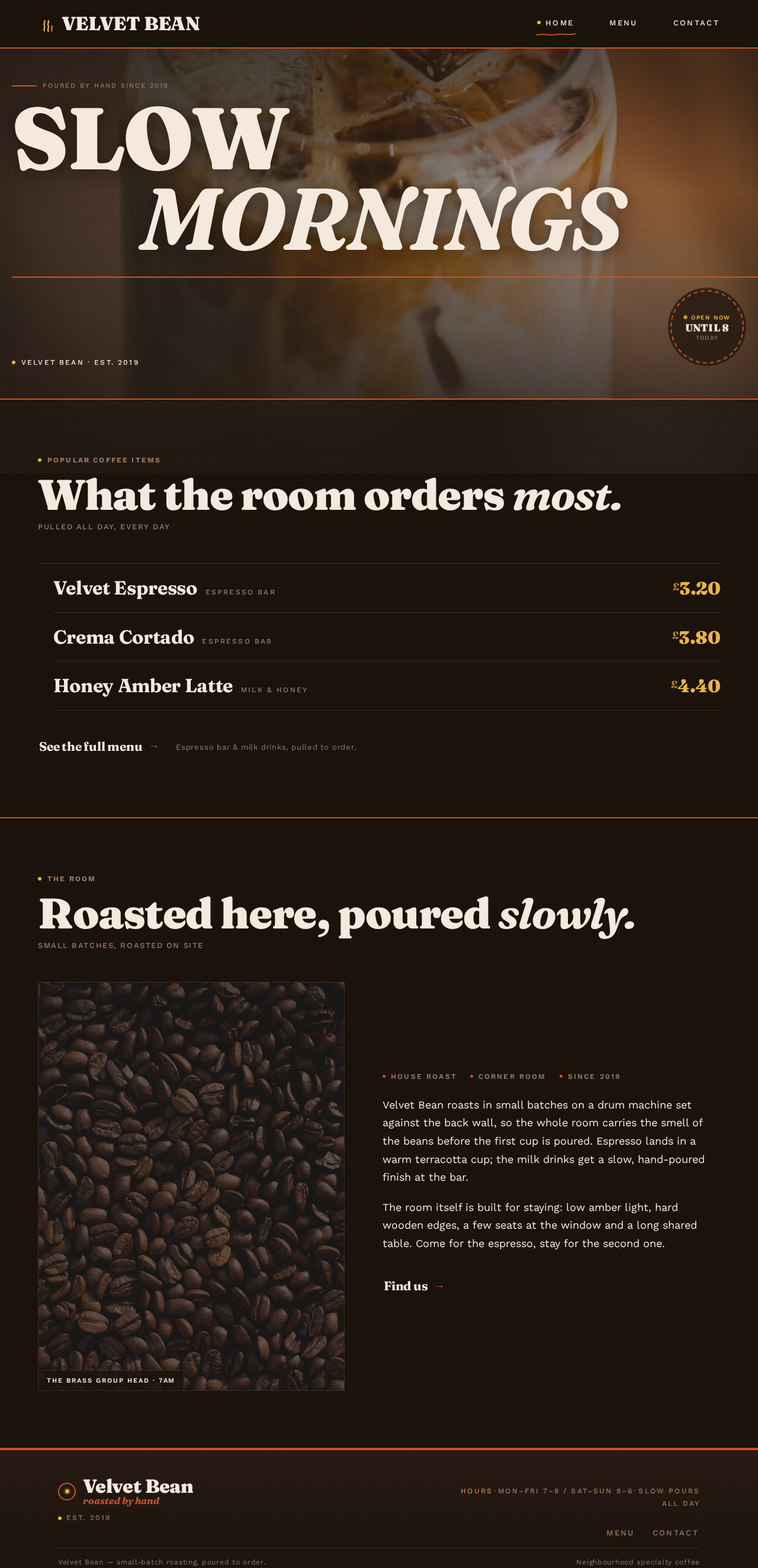

Poured by hand since 2019
SLOWMORNINGS
What the room orders most.
- Velvet EspressoEspresso BarPrice 3.20
- Crema CortadoEspresso BarPrice 3.80
- Honey Amber LatteMilk & HoneyPrice 4.40
Roasted here, poured slowly.

- House roast
- Corner room
- Since 2019
Velvet Bean roasts in small batches on a drum machine set against the back wall, so the whole room carries the smell of the beans before the first cup is poured. Espresso lands in a warm terracotta cup; the milk drinks get a slow, hand-poured finish at the bar.
The room itself is built for staying: low amber light, hard wooden edges, a few seats at the window and a long shared table. Come for the espresso, stay for the second one.
Poured by hand since 2019
SLOWMORNINGS
What the room orders most.
- Velvet EspressoEspresso BarPrice 3.20
- Crema CortadoEspresso BarPrice 3.80
- Honey Amber LatteMilk & HoneyPrice 4.40
Roasted here, poured slowly.
- House roast
- Corner room
- Since 2019
Velvet Bean roasts in small batches on a drum machine set against the back wall, so the whole room carries the smell of the beans before the first cup is poured. Espresso lands in a warm terracotta cup; the milk drinks get a slow, hand-poured finish at the bar.
The room itself is built for staying: low amber light, hard wooden edges, a few seats at the window and a long shared table. Come for the espresso, stay for the second one.
No comments yet. Be the first!