vedic-astrology-astrobizz
 Toji Zenin
Create a completely new, premium, mobile-first Vedic Astrology application interface for ASTROBIZZ. I want a unique mobile design specifically created for smartphones. Do not make it look like a desktop website squeezed into a phone screen. ### 1. DESIGN AND THEME Create a luxurious, modern and visually impressive astrology application. Theme: - Deep midnight navy blue. - Royal blue gradients. - Premium champagne gold. - Elegant celestial illustrations. - Beautiful planetary animations. - Subtle golden glowing effects. - Premium typography. - Smooth transitions and micro-interactions. The overall experience should feel like a high-end astrology app. ### 2. MOBILE NAVIGATION Create a beautiful mobile navigation experience with: - ASTROBIZZ branding. - Elegant menu. - Kundali Generator. - Astrology Services. - AI Astrologer. - Profile section. Use a clean and modern app-like layout. ### 3. PROFESSIONAL KUNDALI INPUT FORM Create a multi-step Kundali generation form with beautiful, easy-to-use input controls. **Personal Details:** - Full Name - Gender (optional) - Date of Birth - Time of Birth - Place of Birth ### 4. DATE OF BIRTH SELECTOR — VERY IMPORTANT Do NOT use a basic DD/MM/YYYY text field. Do NOT use an ordinary calendar popup. Instead, create a beautiful, premium scrolling wheel-style date selector. Requirements: - Separate scrollable Day, Month and Year columns. - Smooth vertical scrolling. - Clearly highlighted selected values. - Elegant gold selection indicator. - Easy navigation across years. - Proper validation for leap years and different month lengths. - Mobile touch-friendly interaction. It should look like a premium native mobile application date selector. ### 5. TIME OF BIRTH SELECTOR Create a beautiful time-selection interface. Include: - Scrollable hour selector. - Scrollable minute selector. - Separate AM and PM selection. - Clearly highlighted selected time. - Smooth scrolling and touch interaction. Also include a "Birth Time Unknown" option. Make sure AM/PM is correctly converted into 24-hour time before sending the calculation request. ### 6. PLACE OF BIRTH Create a professional searchable location selector. - Search city by name. - Display autocomplete suggestions. - Show city, state and country. - Obtain accurate latitude and longitude. - Allow users to confirm their birthplace. Never use random coordinates. ### 7. KUNDALI GENERATION Create an impressive gold-accented "Generate My Kundali" button. On clicking: - Show elegant astronomical loading animations. - Display calculation progress. - Calculate planetary positions. - Determine Ascendant and Moon Sign. - Generate the birth chart. Use actual astronomical calculation APIs. Never show fabricated results. ### 8. KUNDALI RESULT DASHBOARD Create a beautiful mobile dashboard with: - Birth Details - Ascendant - Moon Sign - Nakshatra and Pada - D1 Rashi Chart - D9 Navamsa Chart - Planetary Positions - House Details - Vimshottari Mahadasha - Antardasha - Important Yogas Use premium cards, tabs, expandable sections and readable tables. ### 9. MOBILE EXPERIENCE - Design specifically for 360px–430px screens. - No horizontal scrolling. - No overlapping elements. - No clipped text. - Large touch-friendly controls. - Smooth animations. - Proper spacing. - Fast and intuitive navigation. ### 10. FINAL REQUIREMENT Actually build and implement the complete mobile interface. Do not just provide a mockup, screenshot or design suggestions. Make it professional, luxurious, functional and visually outstanding. The final mobile experience should look like a premium astrology application that users would love to use.

Comments (0)
Sign in to leave a comment
System Requirements
System Requirements Document for vedic-astrology-astrobizz
1. Introduction
ASTROBIZZ is a new, premium, mobile-first Vedic Astrology application interface built specifically for smartphones. It is not a desktop website compressed into a phone viewport; every surface is designed for a 360px–430px mobile screen with large touch targets, smooth motion, and a luxurious midnight-navy, royal-blue, and champagne-gold visual language.
The product lets a person enter their birth details through a guided multi-step Kundali form — using a premium scrolling wheel date selector, a scrollable time selector with AM/PM and a "Birth Time Unknown" option, and a searchable birthplace selector that returns accurate latitude and longitude — then generate a real Vedic birth chart through actual astronomical calculation APIs. The result is presented on a premium mobile dashboard covering Birth Details, Ascendant, Moon Sign, Nakshatra and Pada, D1 Rashi Chart, D9 Navamsa Chart, Planetary Positions, House Details, Vimshottari Mahadasha, Antardasha, and Important Yogas, organized with cards, tabs, expandable sections, and readable tables.
The audience is premium mobile users seeking a calm, expensive, instrument-grade astrology experience. The app also provides an Astrology Services section, an AI Astrologer section for asking astrology questions, and a Profile section, all reachable through an elegant app-like mobile navigation with ASTROBIZZ branding.
The final requirement is to actually build and implement the complete mobile interface — not a mockup, screenshot, or design suggestion.
2. System Overview
ASTROBIZZ is delivered as a React mobile-first frontend backed by a shared FastAPI backend, with MariaDB for application-owned persistent data and a LiteLLM gateway (backed by PostgreSQL) for the backend's model-provider calls. The frontend renders the ASTROBIZZ-branded mobile shell, the multi-step Kundali Generator with wheel-style date and time selectors and searchable birthplace selection, the Kundali Result dashboard, Astrology Services, AI Astrologer, and Profile. The backend exposes the application APIs, performs the astronomical calculation calls, converts AM/PM to 24-hour time before the calculation request, and brokers AI Astrologer model calls through LiteLLM.
Active human actors are the Kundali Seeker, the AI Astrologer User, and the Astrology Service Client. Application-owned identity is used: anonymous visitors reach Landing, Login, and Sign Up; protected work (Kundali Generator, Kundali Result, Astrology Services, AI Astrologer, Profile) requires a verified account so that a person's birth details, generated Kundali, service requests, and AI conversation history remain bound to them and can be resumed.
Current scope is the mobile interface and its supporting backend behavior described in this document. Out of scope: desktop-first layouts, fabricated astrological results, random birthplace coordinates, and mockup-only delivery.
Removed from scope
- Basic DD/MM/YYYY text field for Date of Birth (also: DD/MM/YYYY text field)
- Ordinary calendar popup for Date of Birth (also: calendar popup)
- Desktop website squeezed into a phone screen (also: desktop-first layout)
- Mockup, screenshot, or design-suggestions-only delivery (also: mockup-only delivery)
- Fabricated astrological results (also: fabricated results)
- Random coordinates for Place of Birth (also: random coordinates)
2a. Product Interpretation and Delivery Boundary
ASTROBIZZ is a first-party mobile application interface. The React frontend owns all human interaction: the branded mobile shell and navigation, the multi-step Kundali form with its wheel date selector, time selector, and birthplace search, the generation progress experience, the result dashboard, Astrology Services, AI Astrologer, and Profile. The shared FastAPI backend owns the application APIs, the astronomical calculation integration, the AM/PM-to-24-hour conversion before the calculation request, persistence of birth details and generated Kundali results in MariaDB, and brokering AI Astrologer model calls through the LiteLLM gateway (which uses its own PostgreSQL store, separate from application-owned data).
Access is application-owned. Landing, Login, and Sign Up are anonymously reachable. Kundali Generator, Kundali Result, Astrology Services, AI Astrologer, and Profile require a verified account so that durable, actor-specific state — birth details, generated charts, service requests, and AI conversation history — is privately owned and resumable. A protected destination never establishes access to itself; identity is established on the anonymous Login or Sign Up surfaces.
Astronomical results are produced only by actual astronomical calculation APIs; the app never displays fabricated results. Birthplace coordinates come only from a confirmed location suggestion; the app never uses random coordinates. All current behavior is delivered now; no future-horizon features are committed in this document.
2b. Source Content Inventory
Not applicable — no reference directive with content_source was supplied.
2c. Page Content and Component Coverage
Landing
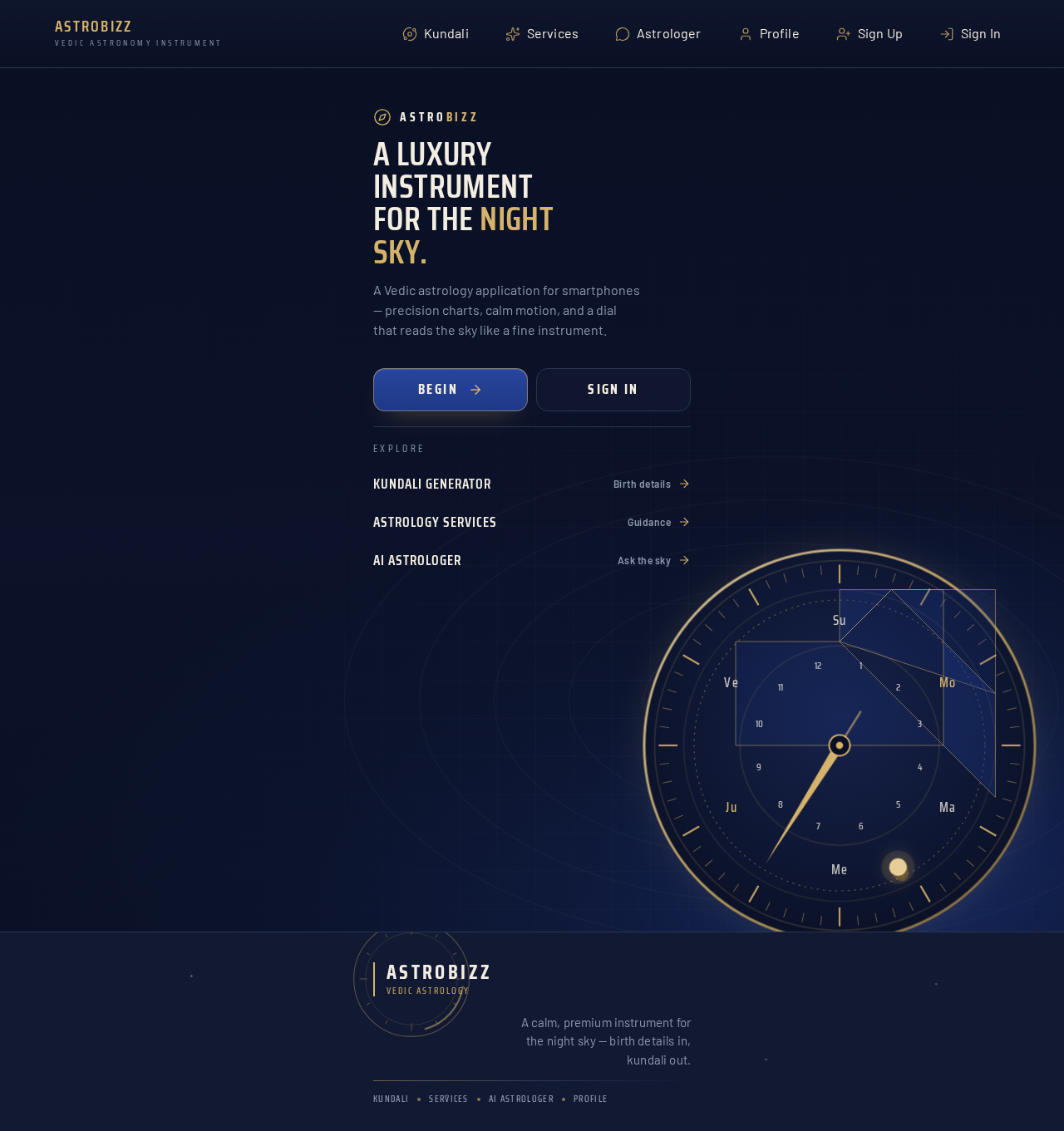
- Information/state: Full-bleed midnight navy sky; ASTROBIZZ wordmark and a 32px condensed headline stacked at top left; a large gold-ringed astrolabe dial sitting low and bleeding off the right edge; entry actions to begin or sign in. Anonymous state.
- Primary actions: Begin (go to Sign Up), Sign In (go to Login).
- Supporting actions: Navigate to public information about the Kundali Generator, Astrology Services, and AI Astrologer.
- Domain entities: None persisted; presentation of ASTROBIZZ brand and product purpose.
- Component responsibilities: Hero with dimensional-CSS astrolabe dial and slow planetary orbit; wordmark; headline; primary and secondary entry buttons; reduced-motion static arrangement.
- States: Loading (hero imagery), empty (n/a), success (entry actions available), error (imagery fallback to static dial), recovery (retry imagery load).
Login
- Information/state: Returning-user verification form; anonymous access.
- Primary actions: Submit credentials to verify identity and continue to the intended protected destination.
- Supporting actions: Navigate to Sign Up; return to Landing.
- Domain entities: Account identity (email/credential), session.
- Component responsibilities: Credential fields, submit control, inline validation, error messaging, link to Sign Up.
- States: Loading (submitting), empty (blank form), success (session established, redirect to intended destination), error (invalid credentials with recovery message), recovery (retry, or go to Sign Up).
Kundali Generator
- Information/state: Multi-step birth detail form with progress indication; requires login. Steps cover Personal Details (Full Name, optional Gender, Date of Birth, Time of Birth, Place of Birth) and generation.
- Primary actions: Enter Full Name; optionally select Gender; select Date of Birth via wheel selector; select Time of Birth via wheel selector with AM/PM or choose "Birth Time Unknown"; search and confirm Place of Birth; tap the gold-accented "Generate My Kundali" button.
- Supporting actions: Move between steps; edit previously entered values; clear a selection; retry a failed city search.
- Domain entities: Birth profile (name, gender, date, time or unknown flag, confirmed place with latitude/longitude), generation request, calculation progress.
- Component responsibilities:
- Step indicator and navigation.
- Full Name input; optional Gender control.
- Date wheel: separate scrollable Day, Month, Year columns; fixed gold hairline selection band; selected values in champagne, scaled up; leap-year and month-length validation; easy year navigation; touch-friendly scrolling.
- Time wheel: scrollable hour and minute columns; separate AM/PM selection; highlighted selected time; "Birth Time Unknown" toggle; AM/PM converted to 24-hour time before the calculation request.
- Place search: city name search, autocomplete suggestions showing city, state, and country, selection returning accurate latitude and longitude, explicit confirmation of birthplace.
- Gold-accented "Generate My Kundali" button.
- Astronomical loading animation with calculation progress.
- States: Loading (city search, generation progress), empty (no suggestions yet), success (confirmed place, generation started), error (invalid date combination, no city results, calculation failure with retry), recovery (adjust inputs and regenerate).
Sign Up
- Information/state: New-user account creation form; anonymous access.
- Primary actions: Submit new account details to establish identity and continue to the intended protected destination.
- Supporting actions: Navigate to Login; return to Landing.
- Domain entities: Account identity, session.
- Component responsibilities: Account fields, submit control, inline validation, error messaging, link to Login.
- States: Loading (submitting), empty (blank form), success (account created, session established, redirect), error (validation or duplicate account with recovery), recovery (correct fields or go to Login).
Kundali Result
- Information/state: Premium mobile dashboard for a generated Kundali; requires login. Sections: Birth Details, Ascendant, Moon Sign, Nakshatra and Pada, D1 Rashi Chart, D9 Navamsa Chart, Planetary Positions, House Details, Vimshottari Mahadasha, Antardasha, Important Yogas.
- Primary actions: Read each section; switch tabs; expand and collapse sections; scroll tables.
- Supporting actions: Return to Kundali Generator to generate another Kundali; revisit a saved result.
- Domain entities: Birth details, Ascendant, Moon Sign, Nakshatra and Pada, D1 Rashi chart, D9 Navamsa chart, planetary positions, house details, Vimshottari Mahadasha periods, Antardasha periods, Important Yogas.
- Component responsibilities:
- Ascendant gauge: circular dial with tick marks and a gold needle that sweeps in on load.
- Ruled-header dark cards for each section.
- Tabs for chart and table groups.
- Expandable sections for dasha and yoga detail.
- Planetary table with tabular numerals and a thin gold rule between sign and degree columns.
- Count-up numerals on positions.
- States: Loading (fetching saved result), empty (no result yet — prompt to generate), success (all sections populated), error (result unavailable with retry), recovery (regenerate or retry).
Astrology Services
- Information/state: Catalog of astrology services available to the client; requires login.
- Primary actions: Browse services; open a service; complete a service request.
- Supporting actions: Return to the list; revisit a submitted request.
- Domain entities: Service listing, service request.
- Component responsibilities: Service cards, service detail, request form, confirmation state.
- States: Loading (fetching services), empty (no services available), success (request submitted with confirmation), error (submission failure with retry), recovery (retry or return to list).
AI Astrologer
- Information/state: Conversational astrology guidance surface; requires login.
- Primary actions: Ask an astrology question; read the guidance response.
- Supporting actions: Continue the conversation; revisit prior conversation.
- Domain entities: Conversation, question, guidance response.
- Component responsibilities: Message input, send control, conversation transcript, response loading indicator, error messaging.
- States: Loading (awaiting model response), empty (no conversation yet with prompt to ask), success (guidance displayed), error (model unavailable with retry), recovery (resend question).
Profile
- Information/state: User profile section; requires login.
- Primary actions: View profile information and account context.
- Supporting actions: Navigate to saved Kundali results, service requests, and AI conversations.
- Domain entities: Account profile, linked birth details and saved results.
- Component responsibilities: Profile summary, links to owned records.
- States: Loading (fetching profile), empty (minimal profile), success (profile displayed), error (profile unavailable with retry), recovery (retry).
3. Functional Requirements
FR-1 — Premium mobile-first ASTROBIZZ interface (explicit) As a Kundali Seeker, I should use a completely new, premium, mobile-first Vedic Astrology interface branded ASTROBIZZ, so that the experience feels like a high-end astrology app built for smartphones.
- Trigger: opening the app.
- Observable result: ASTROBIZZ-branded mobile interface rendered for 360px–430px screens.
- Access: Landing is anonymous; protected destinations require login.
- Failure/recovery: if a protected destination is opened without a session, the user is routed to Login and returned after verification.
- Continuation: navigate via the mobile menu.
FR-2 — Luxury theme and motion (explicit) As a Kundali Seeker, I should see deep midnight navy blue, royal blue gradients, premium champagne gold, elegant celestial illustrations, beautiful planetary animations, subtle golden glowing effects, premium typography, and smooth transitions and micro-interactions, so that the app feels luxurious and visually impressive.
- Observable result: themed surfaces, celestial illustrations, planetary animations, gold glow, premium type, and smooth transitions across the app.
- Failure/recovery: with reduced motion, animations resolve to static values while the theme remains intact.
FR-3 — Mobile navigation with ASTROBIZZ branding (explicit) As a Kundali Seeker, I should use a beautiful mobile navigation with ASTROBIZZ branding, an elegant menu, and entries for Kundali Generator, Astrology Services, AI Astrologer, and Profile, so that I can move through the app in a clean, app-like layout.
- Observable result: branded navigation exposing the four destinations; active destination indicated.
- Access: navigation is visible in the app shell; protected destinations require login.
FR-4 — Multi-step Kundali form (explicit) As a Kundali Seeker, I should enter Full Name, optional Gender, Date of Birth, Time of Birth, and Place of Birth in a multi-step Kundali generation form with beautiful, easy-to-use controls, so that I can supply accurate birth details.
- Trigger: opening Kundali Generator (requires login).
- Observable result: stepwise form capturing each field; optional Gender may be left blank.
- Failure/recovery: invalid or missing required fields block progression with inline guidance.
- Continuation: proceed to generation once all required fields are valid.
FR-5 — Wheel-style Date of Birth selector (explicit) As a Kundali Seeker, I should select Date of Birth with separate scrollable Day, Month, and Year columns, smooth vertical scrolling, clearly highlighted selected values, an elegant gold selection indicator, easy year navigation, and proper leap-year and month-length validation, so that date entry feels like a premium native mobile selector.
- Constraint: no basic DD/MM/YYYY text field and no ordinary calendar popup.
- Observable result: three scroll columns with a fixed gold hairline band; selected values in champagne and scaled up; invalid day/month combinations prevented.
- Failure/recovery: selecting a month or year that shortens the month adjusts or blocks an invalid day with clear feedback.
- Continuation: proceed to Time of Birth.
FR-6 — Time of Birth selector with AM/PM and unknown option (explicit) As a Kundali Seeker, I should select Time of Birth with scrollable hour and minute columns, separate AM/PM selection, a clearly highlighted selected time, smooth touch scrolling, and a "Birth Time Unknown" option, so that I can record my birth time accurately or mark it unknown.
- Observable result: hour, minute, and AM/PM selections highlighted; "Birth Time Unknown" toggles the time selection off.
- Continuation: proceed to Place of Birth.
FR-7 — AM/PM to 24-hour conversion before calculation (explicit) As a Kundali Seeker, I should have my selected AM/PM time correctly converted to 24-hour time before the calculation request is sent, so that the astronomical calculation uses the correct time.
- Observable result: the calculation request carries 24-hour time; the displayed selection remains in the user's chosen AM/PM form.
- Failure/recovery: if conversion cannot be applied, generation is blocked with an error rather than sending an ambiguous time.
FR-8 — Searchable birthplace selector with accurate coordinates (explicit) As a Kundali Seeker, I should search a city by name, see autocomplete suggestions showing city, state, and country, obtain accurate latitude and longitude, and confirm my birthplace, so that my chart is calculated for the correct location.
- Constraint: never use random coordinates.
- Observable result: confirmed birthplace with accurate latitude and longitude attached to the request.
- Failure/recovery: no suggestions shows an empty state; the user may refine the query; generation is blocked until a birthplace is confirmed.
- Continuation: proceed to generation.
FR-9 — Gold-accented Generate My Kundali action (explicit) As a Kundali Seeker, I should tap an impressive gold-accented "Generate My Kundali" button to start the calculation, so that my Kundali is generated from my confirmed details.
- Trigger: tap on "Generate My Kundali" with valid, confirmed inputs.
- Observable result: generation begins; the button reflects the in-progress state.
- Failure/recovery: invalid inputs block the request with inline guidance.
FR-10 — Astronomical loading animation and calculation progress (explicit) As a Kundali Seeker, I should see elegant astronomical loading animations and calculation progress while my Kundali is generated, so that I understand the calculation is underway.
- Observable result: planetary orbit animation and progress indication during calculation.
- Failure/recovery: on calculation failure, an error state offers retry; reduced motion shows a static progress state.
FR-11 — Real astronomical calculation (explicit) As a Kundali Seeker, I should have planetary positions, Ascendant, Moon Sign, and the birth chart calculated through actual astronomical calculation APIs, so that I never see fabricated results.
- Constraint: never show fabricated results.
- Observable result: results derived from the astronomical calculation API for the confirmed birth details.
- Failure/recovery: if the calculation API fails, no result is shown; the user is offered retry.
FR-12 — Kundali Result dashboard content (explicit) As a Kundali Seeker, I should view a beautiful mobile dashboard showing Birth Details, Ascendant, Moon Sign, Nakshatra and Pada, D1 Rashi Chart, D9 Navamsa Chart, Planetary Positions, House Details, Vimshottari Mahadasha, Antardasha, and Important Yogas, so that I can read my complete Kundali.
- Access: requires login; the result is bound to the signed-in user.
- Observable result: all listed sections populated from the calculation.
- Failure/recovery: unavailable result shows an error with retry or a prompt to generate.
- Continuation: revisit the saved result later.
FR-13 — Premium cards, tabs, expandable sections, readable tables (explicit) As a Kundali Seeker, I should read the dashboard through premium cards, tabs, expandable sections, and readable tables, so that dense astrological data stays legible on a phone.
- Observable result: tabbed and expandable card sections; tables with tabular numerals and a thin gold rule between sign and degree columns; no horizontal scrolling, overlap, or clipped text.
FR-14 — Mobile experience constraints (explicit) As a Kundali Seeker, I should use the app on 360px–430px screens with no horizontal scrolling, no overlapping elements, no clipped text, large touch-friendly controls, smooth animations, proper spacing, and fast, intuitive navigation, so that the experience feels native and effortless.
- Observable result: layouts fit the target widths; controls meet touch-friendly sizing; text remains whole.
FR-15 — Astrology Services (explicit) As an Astrology Service Client, I should open Astrology Services to find and use astrology services, so that I can complete a service request in the app.
- Access: requires login.
- Observable result: service listing and a completed service request with confirmation.
- Failure/recovery: submission failure offers retry; empty catalog shows an empty state.
- Continuation: revisit the submitted request from Profile.
FR-16 — AI Astrologer (explicit) As an AI Astrologer User, I should open AI Astrologer to ask astrology questions and receive guidance in the app, so that I get answers within ASTROBIZZ.
- Access: requires login.
- Observable result: question submitted and guidance response displayed; conversation retained for the signed-in user.
- Failure/recovery: model unavailability shows an error with retry; the question can be resent.
- Continuation: continue the conversation or revisit it later.
FR-17 — Profile section (explicit) As a Kundali Seeker, I should open the Profile section from the mobile navigation, so that I can see my profile and my owned records.
- Access: requires login.
- Observable result: profile information displayed with links to owned Kundali results, service requests, and AI conversations.
- Failure/recovery: profile fetch failure offers retry.
FR-18 — Account enrollment and verification (required_inference) As a Kundali Seeker, I should enroll or verify an account before protected app work, so that my birth details, Kundali results, service requests, and AI conversations remain privately mine and resumable.
- Trigger: choosing to begin protected work without a session.
- Observable result: account created on Sign Up or verified on Login; session established; user returned to the intended destination.
- Failure/recovery: invalid credentials or validation errors show recovery guidance; the user may switch between Login and Sign Up.
- Continuation: proceed to the intended protected destination.
FR-19 — Confirm city suggestion before calculation (required_inference) As a Kundali Seeker, I should confirm a city suggestion before the app sends the calculation request, so that the coordinates used are the ones I chose.
- Observable result: only a confirmed suggestion's latitude and longitude are attached to the request.
- Failure/recovery: without confirmation, generation is blocked with guidance to confirm a birthplace.
FR-20 — 24-hour conversion enforced before request (required_inference) As a Kundali Seeker, I should have the app enforce 24-hour conversion before the calculation request, so that the request is never sent with an ambiguous time.
- Observable result: the backend receives 24-hour time; a missing or invalid conversion blocks the request with an error.
4. User Personas
Kundali Seeker
- Product context: A premium mobile user who wants a real Vedic birth chart generated from their own birth details and presented in a luxurious, instrument-grade interface.
- Primary goal: Enter accurate birth details and receive a complete, non-fabricated Kundali they can read on their phone.
- Distinct accepted responsibilities: Completes the multi-step Kundali form (Full Name, optional Gender, Date of Birth via wheel selector, Time of Birth via wheel selector or "Birth Time Unknown", Place of Birth via searchable confirmation); triggers "Generate My Kundali"; reads the result dashboard across Birth Details, Ascendant, Moon Sign, Nakshatra and Pada, D1 Rashi Chart, D9 Navamsa Chart, Planetary Positions, House Details, Vimshottari Mahadasha, Antardasha, and Important Yogas.
- Relevant inputs or decisions: Exact date, time (or unknown), and confirmed birthplace; whether to include optional Gender; whether to regenerate.
- Interactions with other accepted participants: Shares the account and navigation shell with the AI Astrologer User and Astrology Service Client; the same person may hold all three roles.
- Observable success: A populated result dashboard whose values come from the astronomical calculation API, with no horizontal scrolling, overlap, or clipped text.
AI Astrologer User
- Product context: A premium mobile user who wants conversational astrology guidance inside ASTROBIZZ rather than leaving the app.
- Primary goal: Ask astrology questions and receive guidance in the app.
- Distinct accepted responsibilities: Opens AI Astrologer from the mobile navigation, submits a question, reads the guidance response, and continues or revisits the conversation.
- Relevant inputs or decisions: The question text; whether to continue or start a new question.
- Interactions with other accepted participants: Uses the same account and navigation as the Kundali Seeker and Astrology Service Client; may reference their own generated Kundali context.
- Observable success: A displayed guidance response bound to their account and available on revisit.
Astrology Service Client
- Product context: A premium mobile user who wants to find and use astrology services within the app.
- Primary goal: Find an astrology service and complete a service request.
- Distinct accepted responsibilities: Opens Astrology Services from the mobile navigation, browses the catalog, opens a service, and completes a service request with confirmation.
- Relevant inputs or decisions: Which service to use; the details required to submit the request.
- Interactions with other accepted participants: Uses the same account and navigation as the Kundali Seeker and AI Astrologer User; may revisit the submitted request from Profile.
- Observable success: A confirmed service request visible in their account.
5. Core User Flows
Flow A — First visit and account enrollment (Kundali Seeker)
- The visitor opens ASTROBIZZ and lands on Landing (anonymous), seeing the midnight navy hero, ASTROBIZZ wordmark, condensed headline, and the gold-ringed astrolabe dial bleeding off the right edge.
- The visitor taps Begin and arrives at Sign Up (anonymous).
- The visitor submits new account details; validation errors are shown inline if any field is invalid.
- On success, a session is established and the visitor is returned to the intended protected destination (for a new Kundali, Kundali Generator).
- A returning visitor instead taps Sign In on Landing, verifies on Login, and is returned to the intended destination. If credentials fail, an error with recovery guidance appears and the visitor may switch to Sign Up.
Flow B — Generate a Kundali (Kundali Seeker)
- The signed-in Kundali Seeker opens Kundali Generator from the mobile navigation.
- In the Personal Details step, they enter Full Name and optionally select Gender.
- They open the Date of Birth wheel: separate Day, Month, and Year columns scroll smoothly under a fixed gold hairline band; the selected values turn champagne and scale up. They scroll years easily to their birth year. If they pick a month or year that shortens the month, an invalid day is prevented or adjusted with clear feedback (leap-year and month-length validation).
- They open the Time of Birth wheel: hour and minute columns scroll with separate AM/PM selection, and the selected time is clearly highlighted. Alternatively they toggle Birth Time Unknown, which disables the time selection.
- They open Place of Birth and type a city name; autocomplete suggestions appear showing city, state, and country. They select the correct suggestion and explicitly confirm their birthplace, which attaches accurate latitude and longitude. No random coordinates are ever used.
- They tap the gold-accented Generate My Kundali button. The app converts the AM/PM selection to 24-hour time before sending the calculation request; if the time is unknown, the unknown flag is sent instead.
- Kundali Generator shows elegant astronomical loading animations and calculation progress while the backend calls the actual astronomical calculation API to compute planetary positions, Ascendant, Moon Sign, and the birth chart.
- On success, the app opens Kundali Result with the generated chart bound to the signed-in user.
- Failure/recovery: if the calculation API fails, no result is shown; an error state offers retry, and the user may adjust inputs and regenerate. If no birthplace was confirmed, generation is blocked with guidance to confirm one.
- Continuation: the saved result can be reopened later from Profile or by returning to Kundali Result.
Flow C — Read the Kundali dashboard (Kundali Seeker)
- The Kundali Seeker opens Kundali Result (requires login) for a saved or newly generated Kundali.
- The Ascendant gauge renders as a circular dial with tick marks and a gold needle that sweeps in on load; with reduced motion the needle appears at its final position.
- They read Birth Details, Moon Sign, and Nakshatra and Pada in ruled-header dark cards.
- They switch tabs to view the D1 Rashi Chart and D9 Navamsa Chart.
- They expand Planetary Positions and House Details tables, which use tabular numerals and a thin gold rule between sign and degree columns; position numerals count up on load.
- They expand Vimshottari Mahadasha and Antardasha to read the periods, and Important Yogas to read the identified yogas.
- Failure/recovery: if the result cannot be loaded, an error with retry appears; if no result exists, an empty state prompts them to generate one on Kundali Generator.
Flow D — Ask the AI Astrologer (AI Astrologer User)
- The signed-in AI Astrologer User opens AI Astrologer from the mobile navigation.
- They type an astrology question and send it.
- The app shows a response-loading indicator while the backend brokers the request through the LiteLLM gateway.
- The guidance response appears in the conversation transcript and is retained for the signed-in user.
- Failure/recovery: if the model is unavailable, an error with retry appears and the question can be resent.
- Continuation: the user continues the conversation or revisits it later from Profile.
Flow E — Use an astrology service (Astrology Service Client)
- The signed-in Astrology Service Client opens Astrology Services from the mobile navigation.
- They browse the service catalog and open a service.
- They complete the service request and submit it.
- A confirmation state shows the submitted request.
- Failure/recovery: if submission fails, an error with retry appears; an empty catalog shows an empty state.
- Continuation: the submitted request is revisitable from Profile.
Flow F — Review the profile (any signed-in persona)
- The signed-in user opens Profile from the mobile navigation.
- They view their profile information and links to their owned Kundali results, service requests, and AI conversations.
- Failure/recovery: if the profile cannot be loaded, an error with retry appears.
6. Visuals Colors and Theme
Muse: MARQ by Garmin — a luxury instrument for the night sky. The app must feel like a precision instrument: calm, expensive, and dial-like.
Headline: "A luxury instrument for the night sky."
Mode: Dark mode only.
Color tokens (exact hex by role):
- Background:
#0A1024(deep midnight navy — takes ~70% of the surface). - Surface:
#121A33(dark card ground). - Text:
#F3EEE2(warm off-white). - Primary:
#1E3A8A(royal blue — chart bands and primary button edge). - Accent:
#D6B36A(champagne gold — selection, gauges, key numbers). - Muted:
#8E97AD(secondary labels). - Hairline:
#2A3555(1px card border). - Gold glow:
#D6B36Aat under 12% opacity.
Typography:
- Headings: Saira Condensed — condensed technical caps for chart labels and numbers; tight tracking on data.
- Body: Barlow — humanist reading text.
- Scale: 1.25 modular — 40 / 32 / 24 / 19 / 16px; mobile headline 32px, desktop 40px.
- Tabular numerals for all planetary positions and degrees.
Shape language: Circular gauges, thin gold bezel rings, and ruled data rows. Cards use 14px radii with a 1px #2A3555 hairline.
Layout: One mobile column from 360px to 430px. Fixed bottom tab bar with four gold-icon tabs. Each result block is a dark card with a ruled header row.
Imagery: Macro celestial renders — a gold dial ring, a faint topographic star grid, and one glowing planet sphere. No stock people.
Avoid: White or near-white backgrounds; blue gradient blobs behind the hero; identical hover-lift card grids; playful rounded toy shapes; light-mode charts with thin grey text.
7. Signature Design Concept
The public entry is a full-bleed midnight navy sky. A large gold-ringed astrolabe dial sits low and bleeds off the right edge, rendered in dimensional CSS with a slow planetary orbit and a faint topographic star grid behind it. The ASTROBIZZ wordmark and one 32px Saira Condensed headline stack at the top left over the dial, with the primary "Begin" control and a secondary "Sign In" control beneath. The dial's gold bezel ring catches a subtle glow under 12% opacity; the planet sphere drifts on a slow orbit. Readable text and controls remain whole at 375px, 768px, and 1280px, wrapping or scaling with clamp(); only the dial imagery bleeds off the edge. With prefers-reduced-motion, the dial and planet render static at their composed positions.
8. Interaction Model & Motion Direction
Interaction Model: Animated Motion Tempo: cinematic Hero Dimensionality: dimensional_css
Landing Hero Motion Brief
- Focal subject: The gold-ringed astrolabe dial with a glowing planet sphere and faint topographic star grid.
- Input → transformation → outcome thesis: On load, the dial's gold needle sweeps from rest to its composed position while the planet completes a slow orbit; the ASTROBIZZ wordmark and headline settle into place. The outcome is a calm, instrument-grade first frame that invites the visitor to Begin or Sign In.
- Motion vocabulary: Needle sweeps, slow planetary orbit, count-up numerals on positions, gold glow under 12% opacity, smooth micro-interactions on controls.
- Composed first frame: Midnight navy sky, dial low and bleeding off the right edge, wordmark and 32px condensed headline top left, Begin and Sign In controls beneath.
- Reduced-motion state: Static dial at final needle position, static planet, static wordmark and headline; all controls remain usable.
Signature moves carried through the app: the date wheel's fixed gold hairline band across three scroll columns with champagne scaled-up selected values; the Ascendant gauge's circular dial with tick marks and a gold needle that sweeps in on load; planetary table rows with tabular numerals and a thin gold rule between sign and degree columns; the bottom tab bar as a dark titanium rail with a gold glow under the active tab icon.
9. Non-Functional Requirements
- Mobile-first layout (explicit): Designed specifically for 360px–430px screens; no horizontal scrolling, no overlapping elements, no clipped text; large touch-friendly controls; proper spacing; fast, intuitive navigation.
- Readable text and controls (explicit): Headlines, wordmarks, labels, numbers, card text, and controls stay entirely inside the viewport and their container at 375px, 768px, and 1280px, wrapping or scaling to fit; no other element covers them. Imagery and decoration may bleed or overlap as the direction asks.
- Reduced motion (explicit): With
prefers-reduced-motion, provide a usable static arrangement; moving content wraps or scrolls so each item can be brought fully into view. - No fabricated results (explicit): All astrological values come from actual astronomical calculation APIs.
- No random coordinates (explicit): Birthplace coordinates come only from a confirmed location suggestion.
- Correct time conversion (explicit): AM/PM is converted to 24-hour time before the calculation request.
- Durable, actor-bound state (required_inference): Birth details, generated Kundali results, service requests, and AI conversations persist in MariaDB and remain bound to the signed-in account so they can be resumed.
- Access control (required_inference): Landing, Login, and Sign Up are anonymous; Kundali Generator, Kundali Result, Astrology Services, AI Astrologer, and Profile require a verified session.
- Performance (explicit): Fast and intuitive navigation with smooth animations and micro-interactions.
10. Tech Stack
- Frontend: React application UI, mobile-first, rendering the ASTROBIZZ shell, wheel selectors, result dashboard, and all pages.
- Backend: Shared FastAPI process exposing application APIs and domain modules, including astronomical calculation integration, AM/PM-to-24-hour conversion, persistence, and AI Astrologer brokering.
- Application database: MariaDB for application-owned persistent data (accounts, birth details, Kundali results, service requests, AI conversations).
- AI gateway: LiteLLM gateway for the backend's model-provider calls.
- Gateway database: PostgreSQL supporting LiteLLM, separate from application-owned storage.
- Deployment: docker-compose with the backend, database, frontend, litellm, and postgres services.
11. Assumptions and Constraints
- Assumption: The astronomical calculation API is an external provider integrated by the shared backend; the app displays only its results.
- Assumption: The location search provider returns city, state, country, latitude, and longitude for autocomplete suggestions.
- Assumption: A single account may hold all three persona roles; personas are not permission tiers.
- Constraint: No basic DD/MM/YYYY text field and no ordinary calendar popup for Date of Birth.
- Constraint: Never use random coordinates for Place of Birth.
- Constraint: Never show fabricated astrological results.
- Constraint: Build and implement the complete mobile interface; do not deliver only a mockup, screenshot, or design suggestions.
- Constraint: Design for 360px–430px screens with no horizontal scrolling, no overlapping elements, and no clipped text.
- Constraint: The design must be mobile-first and specifically created for smartphones, not a desktop website squeezed into a phone screen.
12. Glossary
- Kundali: A Vedic birth chart derived from birth date, time, and place.
- Ascendant (Lagna): The zodiac sign rising on the eastern horizon at birth.
- Moon Sign (Rashi): The zodiac sign occupied by the Moon at birth.
- Nakshatra and Pada: The lunar mansion and its quarter division at birth.
- D1 Rashi Chart: The primary birth chart showing planetary positions by sign.
- D9 Navamsa Chart: The ninth-division divisional chart.
- Vimshottari Mahadasha: The major planetary period system in Vedic astrology.
- Antardasha: The sub-period within a Mahadasha.
- Yoga: A notable planetary combination in the chart.
- Wheel selector: The scrolling Day/Month/Year and hour/minute/AM-PM columns with a fixed gold selection band.
- 24-hour time: The time format sent to the calculation request after AM/PM conversion.
- LiteLLM: The model-provider gateway used by the backend for AI Astrologer calls.
No comments yet. Be the first!