Dense conceptual lessons, read closely. Open a concept chapter in the Lesson Reader and work through the material line by line, moving between chapters from the left rail without losing your place.
ux-ui-learning
by Saikiran Gouroju
Saikiran GourojuBuild a UX/UI learning platform, also using AI to learn where users ask questions between the lines. The user reads wherever he has a doubt or needs more examples or explanations; they just have to click on drag and select the content, and an AI button should appear at the end of the copy and ask AI, and if they choose that, an AI popup will appear, and they can ask what they want, and AI will reply that, and the user can save the AI chat. Seccion, also once user completed a concept chapter or any important lesson, at the end there should be a quiz, and they will gather the points and based on those points, the app will suggest and try to fill that gap of the users


Comments (0)
Sign in to leave a comment
Architecture
No Services Diagrams Yet
ux-ui-learning
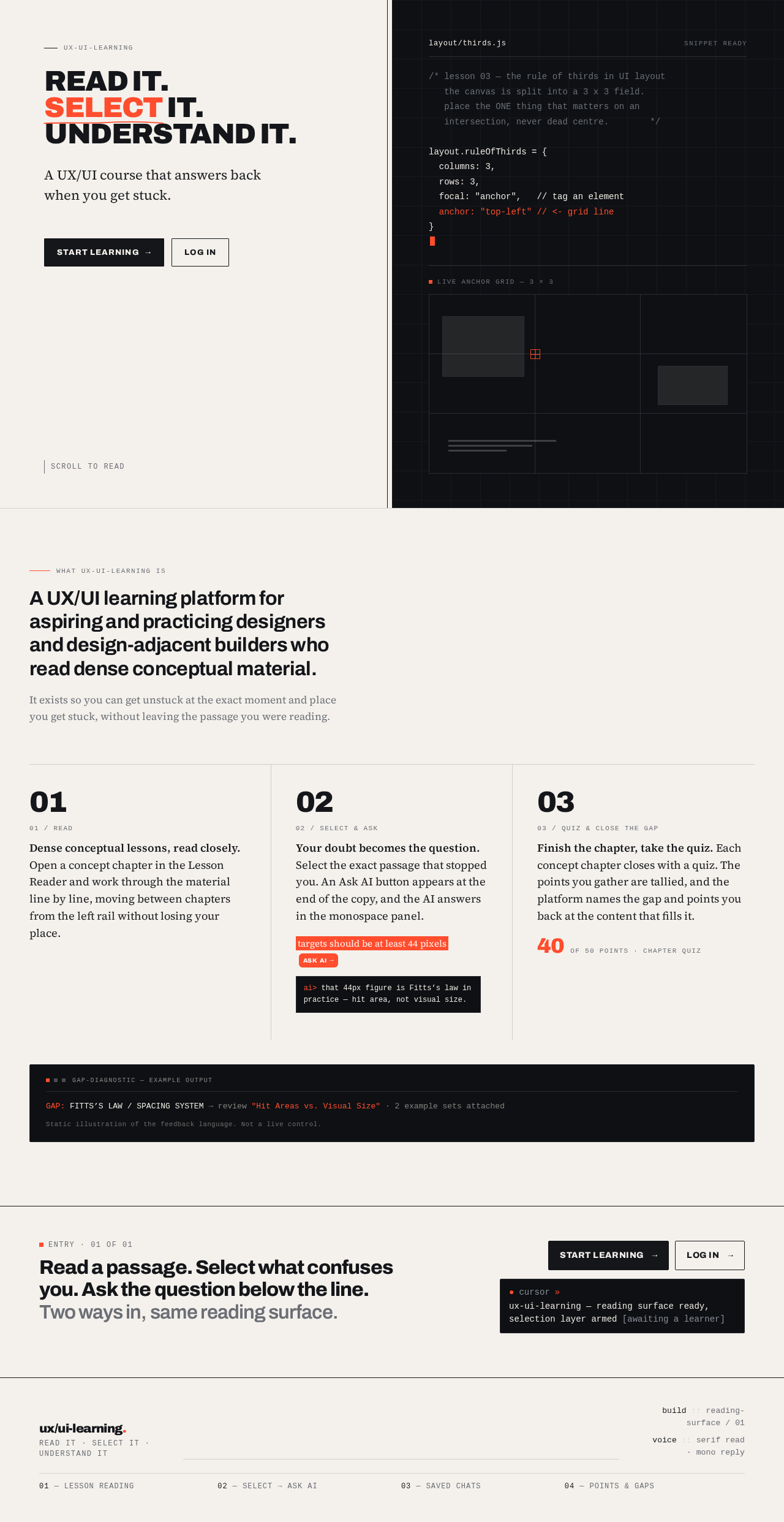
Read it.Select it.Understand it.
A UX/UI course that answers back when you get stuck.
Scroll to read
layout/thirds.js
/* lesson 03 — the rule of thirds in UI layout
   the canvas is split into a 3 x 3 field.
   place the ONE thing that matte
live anchor grid — 3 × 3
What ux-ui-learning is
A UX/UI learning platform for aspiring and practicing designers and design-adjacent builders who read dense conceptual material.
It exists so you can get unstuck at the exact moment and place you get stuck, without leaving the passage you were reading.
Your doubt becomes the question. Select the exact passage that stopped you. An Ask AI button appears at the end of the copy, and the AI answers in the monospace panel.
targets should be at least 44 pixelsAsk AI
that 44px figure is Fitts’s law in practice — hit area, not visual size.
Finish the chapter, take the quiz. Each concept chapter closes with a quiz. The points you gather are tallied, and the platform names the gap and points you back at the content that fills it.
40of 50 points · chapter quiz
gap-diagnostic — example output
GAP: FITTS’S LAW / SPACING SYSTEM → review "Hit Areas vs. Visual Size" · 2 example sets attached
Static illustration of the feedback language. Not a live control.
Entry · 01 of 01
Read a passage. Select what confuses you. Ask the question below the line. Two ways in, same reading surface.
ux-ui-learning — reading surface ready, selection layer armed [awaiting a learner]
ux-ui-learning
Read it.Select it.Understand it.
A UX/UI course that answers back when you get stuck.
Scroll to read
layout/thirds.js
/* lesson 03 — the rule of thirds in UI layout
   the canvas is split into a 3 x 3 field.
   place the ONE thing that matte
live anchor grid — 3 × 3
What ux-ui-learning is
A UX/UI learning platform for aspiring and practicing designers and design-adjacent builders who read dense conceptual material.
It exists so you can get unstuck at the exact moment and place you get stuck, without leaving the passage you were reading.
Dense conceptual lessons, read closely. Open a concept chapter in the Lesson Reader and work through the material line by line, moving between chapters from the left rail without losing your place.
Your doubt becomes the question. Select the exact passage that stopped you. An Ask AI button appears at the end of the copy, and the AI answers in the monospace panel.
targets should be at least 44 pixelsAsk AI
that 44px figure is Fitts’s law in practice — hit area, not visual size.
Finish the chapter, take the quiz. Each concept chapter closes with a quiz. The points you gather are tallied, and the platform names the gap and points you back at the content that fills it.
40of 50 points · chapter quiz
gap-diagnostic — example output
GAP: FITTS’S LAW / SPACING SYSTEM → review "Hit Areas vs. Visual Size" · 2 example sets attached
Static illustration of the feedback language. Not a live control.
Entry · 01 of 01
Read a passage. Select what confuses you. Ask the question below the line. Two ways in, same reading surface.
ux-ui-learning — reading surface ready, selection layer armed [awaiting a learner]
No comments yet. Be the first!