urban-start
 Diya Trivedi
start project to build simple simgle page design of calculator

Comments (0)
Sign in to leave a comment
System Requirements
System Requirements Document for urban-start
1. Introduction
urban-start is a simple calculator delivered as a single-page design. The product intent is narrow and complete: one page where a person can perform everyday arithmetic — enter numbers and operators, see the computed result, and clear the entry to start again. There is no account, no context, and no trust barrier; the interface itself is the product.
The audience is anyone who needs a quick sum. Success is a correct result obtained from one page. The design register is light, tactile, and immediately legible — a small tool with personality, closer to a well-loved desk gadget than a productivity suite.
This document is the System Requirements Document for the project named urban-start.
2. System Overview
urban-start is a single-page web calculator. The delivered surface is exactly one page, Calculator, which is anonymously reachable and hosts all calculator interaction: number and operator entry, computed result display, and clearing the entry. There is no second page, no modal, and no sign-up flow.
Actors
- Calculator User (active human persona): a person who opens the single-page calculator to perform everyday arithmetic.
- Application (system actor): the React frontend and shared FastAPI backend that render the page and evaluate arithmetic.
Current delivery
- A React frontend renders the single Calculator page.
- A shared FastAPI backend process provides application APIs and domain modules.
- A MariaDB database is provisioned as application-owned persistent storage. No durable calculator state, history, or identity is required by the accepted behavior, so the database holds no calculator domain entities in the current scope.
- The calculator page is public and anonymous; no identity establishment or verification is required to use it.
Accepted behavior
- Number and operator entry on a keypad.
- Computed result display.
- Clearing the entry to start a new calculation.
Narrow exclusions
- No account, sign-up, or authentication flow.
- No second page, modal, or navigation.
- No calculation history, memory, or persistence of past sums.
- No scientific, programmer, or unit-conversion modes.
Removed from scope
- None. No concept was explicitly removed by the user.
2a. Product Interpretation and Delivery Boundary
urban-start is a first-party, browser-delivered single-page calculator. The page is anonymously reachable: a visitor opens it and immediately has a working calculator. There is no pre-identity lifecycle, because no accepted behavior requires the user to supply information, make a decision, or establish identity before calculating.
All calculator interaction — entry, result display, and clearing — lives on the one Calculator page. The shared FastAPI backend supports arithmetic evaluation where server-side computation is used; the React frontend owns the visible page, keypad, and display. The provisioned MariaDB database remains available infrastructure but carries no calculator domain data in the current scope.
Everything described in this document is current. No future-horizon requirements were stated by the user.
2c. Page Content and Component Coverage
Calculator
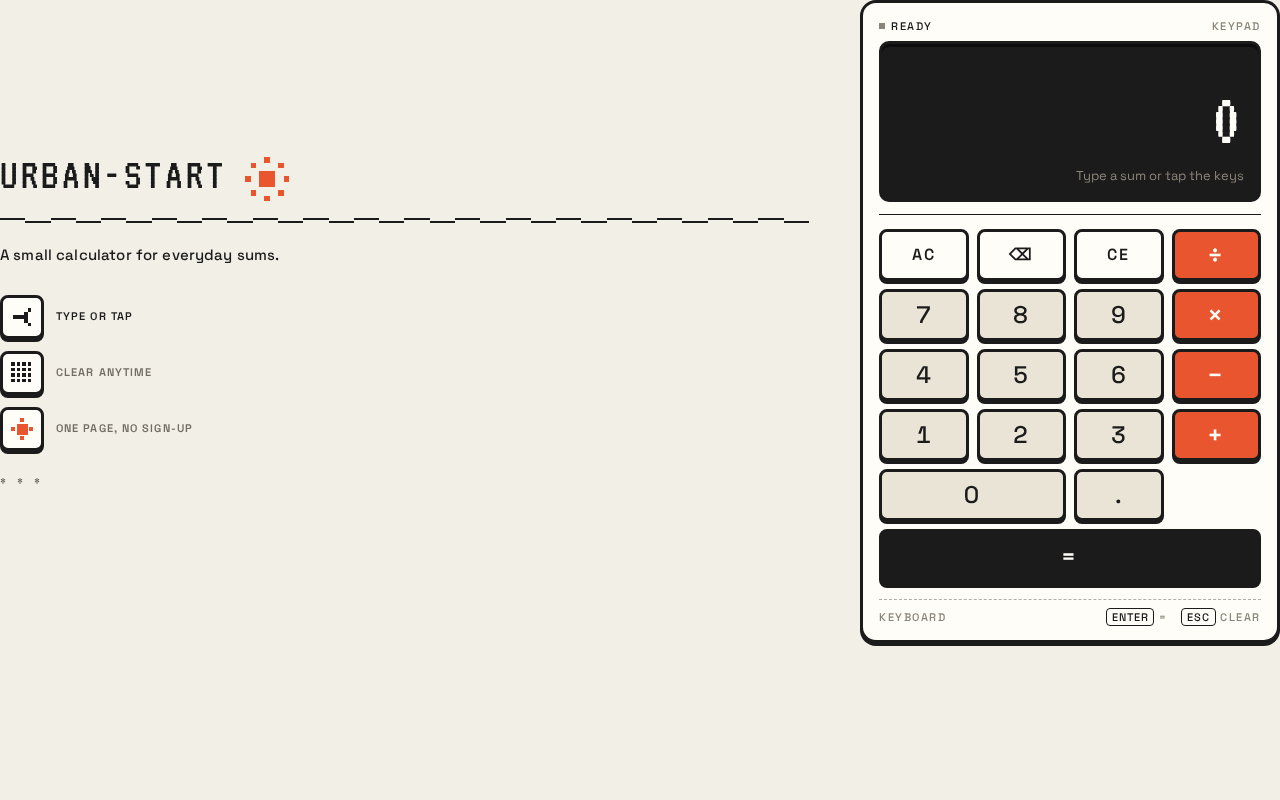
The single page of the product. It is anonymously reachable and contains the entire calculator experience plus a short editorial introduction.
Information and state
- Wordmark: "URBAN-START" in VT323, uppercase, tracked, at the top-left of the editorial column.
- Plain-talk description: a one-line description ("A small calculator for everyday sums.").
- Three helper notes with pixel-icon stamps: "type or tap", "clear anytime", "one page, no sign-up".
- Display: a dark near-black inset bar showing the running expression in off-white VT323 and the result in accent #E8552F. Numerals are tabular so the display never jitters.
- Keypad: a 4-column grid of keys — digit keys (pale warm fill #E9E4D6), an operator column in accent #E8552F with off-white glyphs, and a full-width near-black equals bar.
- Page states: initial (empty expression, display shows a zero/ready state), entry in progress (running expression visible), result shown (computed result in accent), cleared (returned to initial state), and error (invalid expression surfaced in the display).
Primary actions
- Press a digit key to append a digit to the running expression.
- Press an operator key to append an operator.
- Press equals to compute and display the result.
- Press clear to reset the entry and start a new calculation.
Supporting actions
- Keyboard entry: typing digits and operators on a physical keyboard produces the same result as tapping keys ("type or tap").
Domain entities
- Expression: the running sequence of digits and operators entered by the user.
- Result: the computed numeric outcome of the expression.
Neither entity is persisted; both exist only in the page session.
Component responsibilities
- Editorial column: wordmark, description, and three pixel-stamp helper notes.
- Calculator panel: the off-white slab with 3px near-black outline and 3px offset shadow that contains the display and keypad.
- Display component: renders the running expression and the result with the specified typography and colors.
- Keypad component: renders the 4-column key grid with digit, operator, equals, and clear keys; handles press feedback.
- Pixel decoration: a single pixel-sun stamp and a pixel divider rule as inline SVG accents.
States
- Loading: not applicable in a material sense; the page renders immediately.
- Empty: initial state with an empty expression and a ready display.
- Success: a computed result is shown in accent #E8552F.
- Error: an invalid or incomplete expression (for example, a trailing operator when equals is pressed) is surfaced in the display rather than producing a silent wrong answer; the user can clear and re-enter.
- Recovery: pressing clear at any time returns the page to the initial state.
3. Functional Requirements
FR-1 — Open the calculator As a Calculator User I should open the single Calculator page and immediately see a working calculator, so that I can begin a sum without any setup.
- Provenance: explicit (single-page calculator design).
- Trigger: the user navigates to the page.
- Observable result: the Calculator page renders with the wordmark, description, display, and keypad visible.
- Access state: anonymous; no identity required.
- Failure/recovery: if the page fails to load, the user reloads; no partial state is retained.
- Continuation: the user proceeds to enter a calculation.
FR-2 — Enter numbers As a Calculator User I should press digit keys to build a number in the running expression, so that I can enter the operands of my sum.
- Provenance: required_inference (number entry is indispensable to a calculator).
- Trigger: the user presses a digit key (or types a digit).
- Observable result: the digit is appended to the running expression shown in the display.
- Access state: anonymous.
- Failure/recovery: none material; the user can clear and re-enter.
- Continuation: the user continues entering digits or selects an operator.
FR-3 — Enter operators As a Calculator User I should press operator keys to place an operator in the running expression, so that I can specify the arithmetic operation.
- Provenance: required_inference (operator entry is indispensable to a calculator).
- Trigger: the user presses an operator key (or types an operator).
- Observable result: the operator appears in the running expression in the display.
- Access state: anonymous.
- Failure/recovery: if an operator is entered in an invalid position, the display surfaces the invalid state and the user can clear.
- Continuation: the user enters the next operand.
FR-4 — Compute and display the result As a Calculator User I should press equals to compute my expression and see the result, so that I get the answer to my sum.
- Provenance: required_inference (computed result display is indispensable to a calculator).
- Trigger: the user presses the equals key.
- Observable result: the computed result is displayed in accent #E8552F in the display bar.
- Access state: anonymous.
- Failure/recovery: an invalid or incomplete expression surfaces an error state in the display; the user clears and re-enters.
- Continuation: the user reads the result, then clears to start a new sum or continues from the result.
FR-5 — Clear the entry As a Calculator User I should press clear to reset the entry, so that I can start a new calculation cleanly.
- Provenance: required_inference (clearing the entry is indispensable to a calculator).
- Trigger: the user presses the clear key.
- Observable result: the running expression and result are reset to the initial ready state.
- Access state: anonymous.
- Failure/recovery: none material.
- Continuation: the user begins a new calculation.
FR-6 — Keyboard entry As a Calculator User I should be able to type digits and operators on a physical keyboard, so that I can calculate without tapping.
- Provenance: required_inference (the helper note "type or tap" states keyboard entry is supported).
- Trigger: the user types a digit, operator, equals, or clear key on the keyboard.
- Observable result: the same effect as the corresponding on-screen key press.
- Access state: anonymous.
- Failure/recovery: unrecognized keys are ignored.
- Continuation: the user continues the calculation.
4. User Personas
Calculator User
Product context. The Calculator User is anyone who needs a quick sum — a student checking homework, a shopper adding prices, a colleague splitting a bill. They arrive with no account, no context, and no expectation beyond a working calculator. The page is the entire product.
Primary goal. Get a correct arithmetic result from one page, quickly, without setup.
Distinct accepted responsibilities.
- Enter numbers and operators to build an expression.
- Press equals to compute and read the result.
- Clear the entry to start a new calculation.
- Optionally type on a physical keyboard instead of tapping.
Relevant inputs and decisions. The digits and operators they enter, and the decision of when to press equals versus clear. They decide when a sum is complete and when to start over.
Interactions with other accepted participants. The Calculator User interacts only with the application (the page and its backend). There is no other human participant in the accepted behavior.
Observable success. A correct result appears in the display in accent #E8552F, and the user can clear and start again at any time.
What makes this role distinct. The role is defined by a single, self-contained task with no handoff, no persistence, and no identity. Its work is entirely local to one page session.
5. Core User Flows
Flow 1 — Perform a simple sum
- The Calculator User opens the Calculator page. The page renders with the wordmark "URBAN-START", the description "A small calculator for everyday sums.", the three helper notes, the display, and the keypad. (Owner: Calculator page.)
- The user presses digit keys to enter the first operand. The digits appear in the running expression in the display. (Owner: Calculator page.)
- The user presses an operator key. The operator appears in the running expression. (Owner: Calculator page.)
- The user presses digit keys to enter the second operand. The digits appear in the running expression. (Owner: Calculator page.)
- The user presses equals. The computed result appears in the display in accent #E8552F. (Owner: Calculator page; backend evaluates the expression where server-side computation is used.)
- The user reads the result. To start a new sum, they press clear; the display resets to the initial ready state. (Owner: Calculator page.)
Failure/recovery. If the user presses equals on an incomplete or invalid expression, the display surfaces an error state instead of a silent wrong answer. The user presses clear and re-enters the expression.
Continuation. After reading a result, the user may clear to start a new sum or continue entering from the result.
Flow 2 — Calculate by keyboard
- The Calculator User opens the Calculator page.
- The user types digits and operators on the physical keyboard. The same digits and operators appear in the running expression as if the on-screen keys were pressed. (Owner: Calculator page.)
- The user presses the equals key on the keyboard. The computed result appears in the display in accent #E8552F. (Owner: Calculator page.)
- The user presses the clear key on the keyboard to reset the entry. (Owner: Calculator page.)
Failure/recovery. Unrecognized keys are ignored; the user continues typing valid input.
Flow 3 — Clear and start over
- The Calculator User is mid-calculation with a running expression in the display.
- The user presses clear. The running expression and any result are reset to the initial ready state. (Owner: Calculator page.)
- The user begins a new calculation by entering digits and operators. (Owner: Calculator page.)
6. Visuals Colors and Theme
The creative direction is authoritative for this section: Charming clarity — a calculator that feels like a friendly little machine, after the muse Susan Kare.
Headline. A small calculator for everyday sums.
Color tokens (light mode)
| Role | Hex | Usage |
|---|---|---|
| Background | #F2EFE6 | Warm paper page ground |
| Surface | #FFFDF7 | Calculator panel and key surfaces |
| Text | #1B1B1B | Near-black type and outlines |
| Primary | #1B1B1B | Wordmark, equals bar, key outlines |
| Accent | #E8552F | Operator column, equals glyphs, result readout |
| Muted | #8A857A | Micro-labels and secondary helper text |
The accent is kept to roughly 10% of the surface so it reads as a signal, not a theme. Digit keys use a pale warm fill #E9E4D6. No gradients, no glass, no blur.
Typography
- Headings and display: VT323, uppercase, monospaced pixel-terminal, generous tracking.
- Body and key labels: Space Grotesk, medium weight, 0.06em tracking for small caps; tabular numerals.
- Scale (1.25 modular): display readout
clamp(40px, 9vw, 76px)in VT323; wordmarkclamp(28px, 5vw, 44px); key labels 20–24px Space Grotesk; micro-labels 11px uppercase tracked; helper text 15px.
Shape language. Chunky 8px-radius keys with a hard 3px near-black border and a 3px offset bottom shadow that compresses on press. The calculator body is a single rounded 16px panel with a hairline inner rule under the display. Every surface is flat fill with a crisp outline.
Spacing rhythm. Generous paper margins around the panel; the panel is capped at 420px wide on desktop; 16px gutters at 375px.
Imagery style. No photography. Pixel pictograms — a tiny pixel sun, a pixel arrow, a 4×4 pixel grid stamp — rendered as inline SVG on the paper ground, plus the calculator itself as the hero object. Small chunky-outline badges mark the three helper notes.
7. Signature Design Concept
The public entry is the Calculator page itself, composed as a small product poster.
- Left editorial column (desktop): the VT323 wordmark "URBAN-START" set large and tracked at the top-left, stacked over the plain-talk line "A small calculator for everyday sums.", followed by three small pixel-icon feature stamps: "type or tap", "clear anytime", "one page, no sign-up".
- Right column: the calculator panel as the dominant object — an off-white rounded slab with a 3px near-black border and a 3px offset shadow, capped at 420px wide. Its display is a dark near-black inset bar with the running expression in off-white VT323 and the result in hot accent #E8552F. Beneath it, a 4×5 key grid where digit keys are pale warm fill, the operator column is solid #E8552F, and the equals key is a full-width near-black bar.
- Decoration: a single pixel-sun stamp and a pixel divider rule are the only decoration. No gradient, no centered blue CTA, no blob — the machine is the hero.
- Responsive behavior: at 768px the columns stack with the wordmark above the panel; at 375px the panel goes full-width with 16px gutters, keys in a 4-column grid with 44px minimum hit targets, and the display readout scales down but never wraps mid-number. Everything stays inside the viewport and its container.
8. Interaction Model & Motion Direction
Interaction Model: Animated Motion Tempo: restrained Hero Dimensionality: flat
Landing Hero Motion Brief
- Focal subject: the calculator panel itself — the off-white slab with its dark inset display and hot accent operator column.
- Input → transformation → outcome thesis: a key press (input) compresses the key's 3px offset shadow instantly over 80ms with no easing theatrics (transformation), and the display result performs a single 120ms pixel-step reveal where the number appears in two or three discrete frames rather than a smooth fade (outcome). Hover on keys lifts the offset shadow by 1px.
- Motion vocabulary: frame-based, physical, restrained. No parallax, no scroll animation, no continuous loops.
- Composed first frame: the warm paper field with the VT323 wordmark at top-left, the description beneath it, the three pixel-stamp helper notes, and the calculator panel right-of-center with its display showing the ready state and the keypad at rest.
- Reduced-motion state: under
prefers-reduced-motionall motion collapses to instant state changes with no frame stepping; the page remains fully usable as a static arrangement.
9. Non-Functional Requirements
- Single-page constraint (explicit): the calculator design must be a single page. No second page, modal, or sign-up flow exists.
- Anonymous access (explicit): the page is reachable without an account; no identity establishment or verification is required.
- Readable text and controls (explicit, from the creative direction): headlines, wordmarks, labels, numbers, and controls stay entirely inside the viewport and their container at 375px, 768px, and 1280px, wrapping or scaling to fit; no other element covers any part of them.
- Accessible hit targets (explicit, from the creative direction): keys have a 44px minimum hit target at 375px.
- Reduced motion (explicit, from the creative direction): under
prefers-reduced-motionall motion collapses to instant state changes. - No persistence of calculator state (required_inference): expressions and results exist only in the page session; no history or memory is stored.
- Correct arithmetic (required_inference): the computed result must be arithmetically correct for the entered expression.
10. Tech Stack
- Frontend: React application UI rendering the single Calculator page.
- Backend: shared FastAPI process for application APIs and domain modules, including arithmetic evaluation where server-side computation is used.
- Database: MariaDB, provisioned as application-owned persistent storage. No calculator domain entities are stored in the current scope.
- Containerization: Docker / docker-compose for the backend, database, and frontend services.
11. Assumptions and Constraints
- Assumption: the calculator supports the four basic arithmetic operations (addition, subtraction, multiplication, division) as the ordinary meaning of "simple calculator." No scientific or programmer functions are included.
- Assumption: the page is publicly reachable and anonymous; no identity is required.
- Constraint (explicit): the design is a single page.
- Constraint (explicit): the product is a simple calculator.
- Constraint (explicit, from the creative direction): the generic indigo/blue-on-white SaaS template is forbidden; the specified palette, fonts, surfaces, tone, and layout are preserved.
- Constraint (explicit, from the creative direction): no photography, no glassmorphism, no gradient blobs, no continuous looping animation, no second page, modal, or sign-up flow.
12. Glossary
- Calculator page: the single page of the product, anonymously reachable, hosting all calculator interaction.
- Expression: the running sequence of digits and operators entered by the user, shown in the display.
- Result: the computed numeric outcome of an expression, shown in accent #E8552F.
- Clear: the action that resets the expression and result to the initial ready state.
- Pixel stamp: a small chunky-outline inline SVG pictogram (pixel sun, pixel arrow, 4×4 grid) used as a helper-note badge.
- VT323: the monospaced pixel-terminal typeface used for the wordmark and display readout.
- Space Grotesk: the typeface used for all readable UI copy, key labels, and micro-labels.
Urban-Start
A small calculator for everyday sums.
- type or tap
- clear anytime
- one page, no sign-up
Urban-Start
A small calculator for everyday sums.
- type or tap
- clear anytime
- one page, no sign-up
No comments yet. Be the first!