
uploaded-document

byLokesh Kothur

What is the content inside the given uploaded document.

Landing
Landing

Comments (0)

No comments yet. Be the first!

System Requirements

System Requirements Document for uploaded-document

1. Introduction

The user asked what content is inside the given uploaded document (attachment: sample.pdf). The user chose the project name "uploaded-document".

Page 1 of 9

1.1 Source overview

Sample PDF

This is a simple PDF file. Fun fun fun.

Lorem ipsum dolor sit amet, consectetuer adipiscing elit. Phasellus facilisis odio sed mi.

Curabitur suscipit. Nullam vel nisi. Etiam semper ipsum ut lectus. Proin aliquam, erat eget

pharetra commodo, eros mi condimentum quam, sed commodo justo quam ut velit.

Integer a erat. Cras laoreet ligula cursus enim. Aenean scelerisque velit et tellus.

Vestibulum dictum aliquet sem. Nulla facilisi. Vestibulum accumsan ante vitae elit. Nulla

erat dolor, blandit in, rutrum quis, semper pulvinar, enim. Nullam varius congue risus.

Vivamus sollicitudin, metus ut interdum eleifend, nisi tellus pellentesque elit, tristique

accumsan eros quam et risus. Suspendisse libero odio, mattis sit amet, aliquet eget,

hendrerit vel, nulla. Sed vitae augue. Aliquam erat volutpat. Aliquam feugiat vulputate nisl.

Suspendisse quis nulla pretium ante pretium mollis. Proin velit ligula, sagittis at, egestas a,

pulvinar quis, nisl.

Page 2 of 9

Pellentesque sit amet lectus. Praesent pulvinar, nunc quis iaculis sagittis, justo quam

lobortis tortor, sed vestibulum dui metus venenatis est. Nunc cursus ligula. Nulla facilisi.

Phasellus ullamcorper consectetuer ante. Duis tincidunt, urna id condimentum luctus, nibh

ante vulputate sapien, id sagittis massa orci ut enim. Pellentesque vestibulum convallis

sem. Nulla consequat quam ut nisl. Nullam est. Curabitur tincidunt dapibus lorem. Proin

velit turpis, scelerisque sit amet, iaculis nec, rhoncus ac, ipsum. Phasellus lorem arcu,

feugiat eu, gravida eu, consequat molestie, ipsum. Nullam vel est ut ipsum volutpat

feugiat. Aenean pellentesque.

In mauris. Pellentesque dui nisi, iaculis eu, rhoncus in, venenatis ac, ante. Ut odio justo,

scelerisque vel, facilisis non, commodo a, pede. Cras nec massa sit amet tortor volutpat

varius. Donec lacinia, neque a luctus aliquet, pede massa imperdiet ante, at varius lorem

pede sed sapien. Fusce erat nibh, aliquet in, eleifend eget, commodo eget, erat. Fusce

consectetuer. Cras risus tortor, porttitor nec, tristique sed, convallis semper, eros. Fusce

Page 3 of 9

vulputate ipsum a mauris. Phasellus mollis. Curabitur sed urna. Aliquam nec sapien non

nibh pulvinar convallis. Vivamus facilisis augue quis quam. Proin cursus aliquet metus.

Suspendisse lacinia. Nulla at tellus ac turpis eleifend scelerisque. Maecenas a pede vitae

enim commodo interdum. Donec odio. Sed sollicitudin dui vitae justo.

Morbi elit nunc, facilisis a, mollis a, molestie at, lectus. Suspendisse eget mauris eu tellus

molestie cursus. Duis ut magna at justo dignissim condimentum. Cum sociis natoque

penatibus et magnis dis parturient montes, nascetur ridiculus mus. Vivamus varius. Ut sit

amet diam suscipit mauris ornare aliquam. Sed varius. Duis arcu. Etiam tristique massa

eget dui. Phasellus congue. Aenean est erat, tincidunt eget, venenatis quis, commodo at,

quam.

2. System Overview

No additional details specified.

3. Functional Requirements

No additional details specified.

Page 4 of 9

4. User Personas

No additional details specified.

5. Core User Flows

No additional details specified.

Page 5 of 9

6. Visuals Colors and Theme

[Design proposal; unspecified choices are defaults.]

Palette and theme. Light mode only. Warm paper ground #EDEAE3; document sheet surface #F7F5F0 (never pure white); near-black ink #1A1A18 for all reading text on both grounds (>12:1 contrast); graphite #2B2B28 for rules, panel edges and the instrument strip; Braun signal orange #E4570F as the only saturated colour, held under 5% of the page — active tab underline, page-count marker, the signal dot beside the document name, focus rings, and the sheet's 2px top edge; muted warm grey #8A857B for labels and metadata only, never body copy. No blue, indigo or violet anywhere.

Type. Headings Archivo 600–700, tight −0.02em tracking, flush-left ragged-right, sentence case for the document title; metadata labels ALL-CAPS at 11–12px with +0.14em letterspacing (FILE, PAGES, SIZE, TYPE); figures in Archivo tabular 13px. Body reading in Source Serif 4 at 18/17px, 1.65 leading, 62ch measure. Modular scale 1.333: display clamp(56px, 8vw, 96px), h2 32/28, h3 22/20. No Inter/Roboto/Helvetica/system-ui.

Shape and surface. 8px-radius pressable controls; hairline 1px graphite rules at 20% opacity; square document sheet with one hard 2px orange top edge; a single flat 1px offset under the sheet and no other shadow; circles reserved for the page dial. No glass, blur, gradients or pills.

Imagery. The document is the imagery: the paper sheet with real extracted text, ruled page-number margins, a CSS-drawn circular page dial, and a 48px diagrammatic line-art PDF glyph (one folded corner, three text rules), flat and two-colour. No photography, people or decorative illustration.

Fit. Headlines, labels, numbers and controls stay whole inside the viewport and their container at 375px, 768px and 1280px, wrapping or scaling via clamp(); nothing covers readable text or controls.

Page 6 of 9

7. Signature Design Concept

[Design proposal; unspecified choices are defaults.]

Muse: Dieter Rams — a document read as a Braun instrument panel. The subject is one uploaded PDF, sample.pdf, of placeholder Latin text, opened by one reader who simply wants to see what is inside it. There is no account and no workflow; the register is 'honest instrument' — ordered, quiet, trustworthy, every mark earning its place. Functional clarity, not warmth or spectacle.

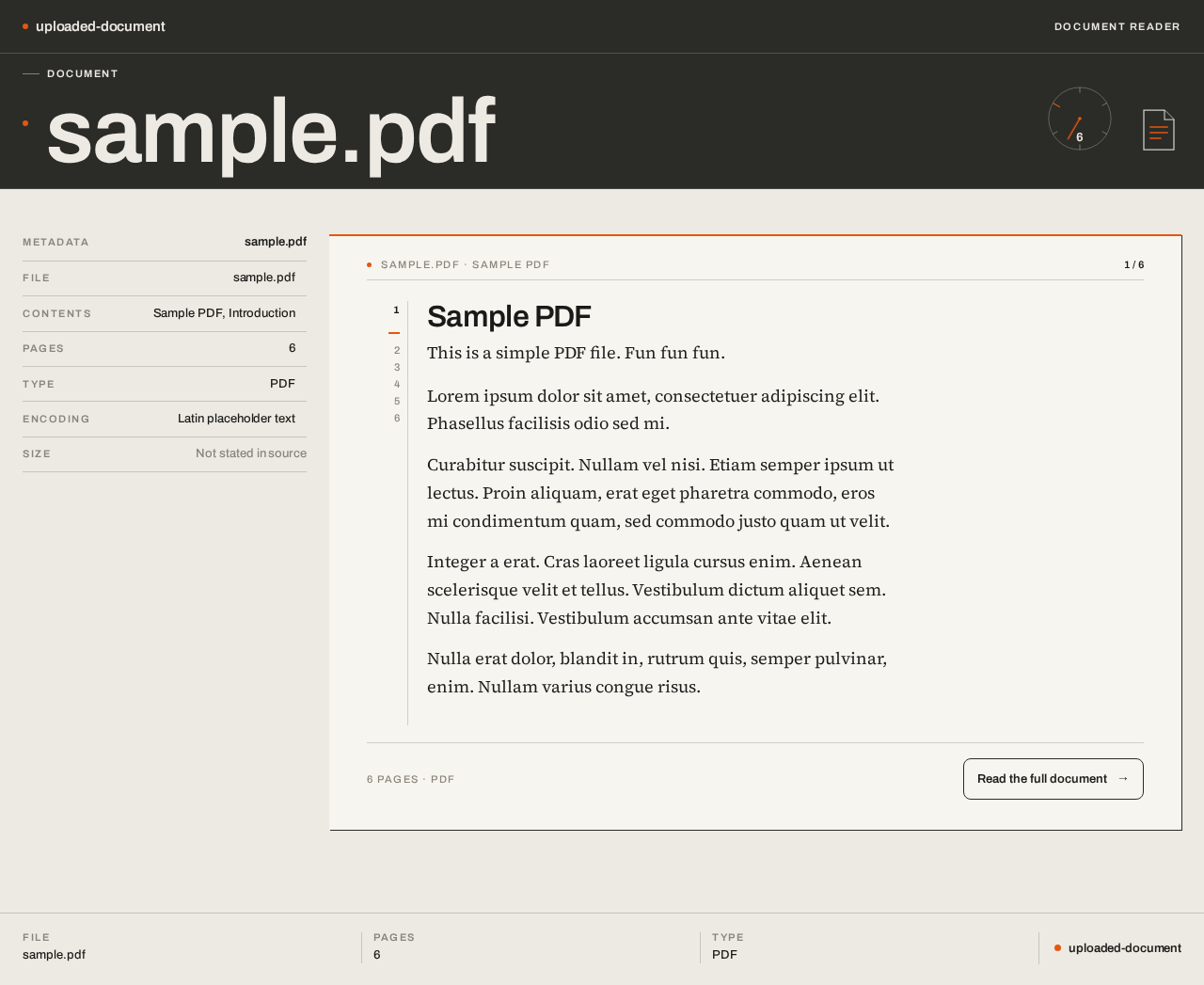
The hero is the text. The first screen is a faceplate, not a SaaS hero. A full-width graphite strip (~120px desktop) carries the caps label DOCUMENT at left, the title sample.pdf in oversized Archivo bleeding to the grid's left edge, and at right a circular orange page dial reading 6 inside a hairline ring. Directly beneath, the paper sheet begins already showing the document's real first lines — 'Sample PDF / This is a simple PDF file. Fun fun fun.' — set in the serif at 18px on a 62ch measure under a 2px orange rule. No centred headline, no subtext, no button, no gradient: a title, a dial, a sheet of words.

Layout. Fixed 12-column grid, 24px gutters (16px at 375px). Below the strip, a two-pane split: a 3-column left rail stacking labelled rows (Contents, Pages, Type, Encoding) with values right-aligned in tabular figures like a Braun faceplate, each row on a 1px hairline; a 9-column right pane holding the sheet with its own running header and page numbers in the margin. On mobile the rail collapses to a horizontal scrollable strip of labelled chips above the sheet. The footer is a ruled data row, not a marketing block.

Page 7 of 9

Signature moves. The graphite instrument strip on every page — a faceplate, not a nav bar; the sheet as hero with real extracted text above the fold; label/value pairs with right-aligned tabular values; the CSS page dial as the only looping motion; control hover inverting to solid graphite with paper text — pressable, mechanical, never a lift or glow.

Avoid. Blue/indigo/violet accents; pure #FFFFFF grounds, soft shadows, glass or blur; pill buttons, gradient blobs, hover-lift cards; photography or stock imagery; centred hero with subtext and CTA; letter-spaced caps in body copy; marketing sections — this page has one job.

8. Interaction Model & Motion Direction

[Design proposal; unspecified choices are defaults.]

Interaction Model: Static (direction) Motion Tempo: restrained Hero Dimensionality: flat

Landing Hero Motion Brief. Focal subject: the paper sheet of real extracted text beneath the graphite faceplate, with the orange page dial at its right. Thesis: the reader scrolls the sheet → the dial's needle steps to the next page marker → the reader always knows where they are in the six-page document. Vocabulary is mechanical and instant: 120ms linear state changes, no easing theatre; control hover inverts fill to graphite with paper text rather than lifting; the dial needle steps discretely, never sweeps. Composed first frame: graphite strip with DOCUMENT, oversized sample.pdf, orange dial at 6; orange 2px rule; first serif lines of the document already visible. Reduced motion: the dial is static and pages simply scroll.

Landing Hero 3D Scene Brief — DIRECTION-DERIVED. Not applicable: hero dimensionality is flat, so no Canvas/R3F/Drei is required; the dial and PDF glyph are drawn in CSS/SVG.

Page 8 of 9

9. Non-Functional Requirements

No additional details specified.

10. Tech Stack

No technology choices are specified in the available evidence. The source material consists of the contents of a sample PDF document and the user's request to identify that content, together with the chosen project name "uploaded-document"; it names no languages, frameworks, libraries, data stores, hosting, or delivery platforms.

Because the evidence establishes no required layers, no defaults are introduced here. Any stack decisions remain open and should be recorded once they are explicitly chosen; this chapter will then be updated to reflect them at their stated layer, distinguishing suggested from required technologies.

11. Assumptions and Constraints

No additional details specified.

12. Glossary

No additional details specified.

Page 9 of 9
Landing design preview
reader wants the complete document text beyond the first lines shown on the Landing sheet
reader continues past the visible portion of the sheet
sheet scroll crosses a page marker
reader has reached the end of the six-page document
reader has seen the document content and its metadata
Landing: Open the public Landing page no account or identity required to begin viewing the uploaded document sample.pdf
Landing: View the graphite instrument strip with the DOCUMENT label, the oversized title sample.pdf, the orange signal dot and the circular page dial reading 6
Landing: Read the aligned label/value metadata pairs FILE, PAGES, SIZE, TYPE in the left rail
Landing: Read the document's real first lines 'Sample PDF / This is a simple PDF file. Fun fun fun.' on the paper sheet beneath the orange 2px rule
Landing: Continue from the Landing sheet into the full Document view to read the complete extracted text
Document: View the paper-white document sheet with the full extracted Latin text, its running header and page numbers in the margin
Document: Read the extracted document text in the serif body at reading size on the 62ch measure
Document: Scroll the sheet through the six pages of the document
Document: Observe the orange page dial's needle step to the next page marker as the sheet scrolls, tracking current position in the six-page document
Document: Read the left rail labelled rows Contents, Pages, Type, Encoding with right-aligned tabular values
Document: Finish reading the document content, having seen what is inside sample.pdf
Landing design preview
reader wants the complete document text beyond the first lines shown on the Landing sheet
reader continues past the visible portion of the sheet
sheet scroll crosses a page marker
reader has reached the end of the six-page document
reader has seen the document content and its metadata
Landing: Open the public Landing page no account or identity required to begin viewing the uploaded document sample.pdf
Landing: View the graphite instrument strip with the DOCUMENT label, the oversized title sample.pdf, the orange signal dot and the circular page dial reading 6
Landing: Read the aligned label/value metadata pairs FILE, PAGES, SIZE, TYPE in the left rail
Landing: Read the document's real first lines 'Sample PDF / This is a simple PDF file. Fun fun fun.' on the paper sheet beneath the orange 2px rule
Landing: Continue from the Landing sheet into the full Document view to read the complete extracted text
Document: View the paper-white document sheet with the full extracted Latin text, its running header and page numbers in the margin
Document: Read the extracted document text in the serif body at reading size on the 62ch measure
Document: Scroll the sheet through the six pages of the document
Document: Observe the orange page dial's needle step to the next page marker as the sheet scrolls, tracking current position in the six-page document
Document: Read the left rail labelled rows Contents, Pages, Type, Encoding with right-aligned tabular values
Document: Finish reading the document content, having seen what is inside sample.pdf