universal-health-merchandise
 Arsalan Siddiqui
Create a CMS web application for a company `Universal Health Merchandise` Technical Stack: - User should be able to login as admin and edit content on the website - Frontend in latest lts Angular - Backend in Java using Spring Boot that should handle authentication, authorization, and CRUD operations for the CMS - Database in PostgreSQL in docker container - Use JWT for authentication - Use Docker for containerization with docker-compose to start the application with DB and backend service Website details: - Create a theme like `https://www.medline.ca/` with `Universal Health Merchandise` branding and logo. It should not look like a copy of `https://www.medline.ca/`. Also menu should at the top like website `https://roxon.ca/en/` - It should have the following pages: - Home something like `https://www.medline.ca/` - `Who We Serve` page - Products e.g `https://www.medline.ca/en/products` - News and Updates e.g `https://roxon.ca/en/blog/` - About Us e.g `https://www.medline.ca/about-us/team` - Contact Us e.g `https://roxon.ca/en/contact/`


Comments (0)
Sign in to leave a comment
System Requirements
System Requirements Document for universal-health-merchandise
1. Introduction
Universal Health Merchandise requires a branded CMS web application that presents the company’s healthcare merchandise and supply offering to public website visitors while allowing an authorized administrator to log in and manage website content without developer involvement.
The application will provide a public-facing website for learning about Universal Health Merchandise, the audiences it serves, its products, news and updates, company information, and contact details. It will also provide a secure CMS area for an Admin Content Editor to create, update, and delete managed content.
The public experience must use Universal Health Merchandise branding and logo, take structural and visual inspiration from the referenced healthcare and industrial websites without copying them, and use a distinctive healthcare-supply visual system.
2. System Overview
Universal Health Merchandise will be delivered as a CMS web application with:
- A public Angular frontend using the latest LTS version of Angular.
- A Java Spring Boot backend responsible for CMS CRUD operations, authentication, authorization, and protected API access.
- JWT-based authentication for the CMS administrator.
- A PostgreSQL database running in a Docker container for persistent CMS data.
- Docker containerization and
docker-composeorchestration to start the backend service and PostgreSQL database. - A public top navigation menu providing access to the six required public pages.
- Protected CMS pages for administrator login, content browsing, and content editing.
Current Actors
- Admin Content Editor — logs in to the CMS and manages website content.
- Website Visitor — anonymously browses the public website to learn about Universal Health Merchandise and locate relevant information.
Current Public Website Pages
- Home
- Who We Serve
- Products
- News and Updates
- About Us
- Contact Us
Current CMS Pages
- Login
- Content
- Content Editor
Current Scope Exclusions
The current scope does not establish:
- Public user registration.
- Customer purchasing, checkout, order management, or payment processing.
- Customer accounts.
- Supplier portals.
- A separate editor role with permissions distinct from the administrator.
- Public submission workflows beyond displaying contact information.
- Map integration; it remains optional and is not required for the current release.
- Copying the branding, wording, layout, logo, imagery, or distinctive components of Medline or Roxon.
2a. Product Interpretation and Delivery Boundary
The application is a public healthcare merchandise information website with an authenticated CMS administration area.
Website Visitors may access the public pages without logging in. They can use the top navigation and page-level links to explore company information, served audiences, products, updates, company information, and contact details.
The Admin Content Editor must authenticate through the Login page using provisioned administrator credentials. Successful credential verification issues a JWT-backed session that grants access to the Content and Content Editor pages. Protected CMS requests must use the authenticated JWT session. Unauthorized users must not access CMS content-management functions.
The CMS must support management of website content, including content for the public pages, products, news and updates, and team or leadership profiles where those content records are used on the public website.
The project’s reference websites are inspiration-only sources. They may inform high-level layout patterns and structural approaches, but Universal Health Merchandise must remain visually and editorially distinct.
2c. Page Content and Component Coverage
Home
-
Access and purpose
- Publicly accessible without login.
- Acts as the primary entry surface for Universal Health Merchandise.
- Introduces the company, its healthcare merchandise and supply context, and key pathways to public content.
-
Information and content
- Universal Health Merchandise branding and logo.
- Hero headline: “Supplies that keep care moving.”
- Introductory company or mission content managed through the CMS.
- Featured products or services content managed through the CMS.
- Quick links to relevant public pages.
- A primary call to action using accepted public navigation or contact content.
-
Primary actions
- Navigate to Products.
- Navigate to Who We Serve.
- Navigate to Contact Us.
- Use the top navigation menu to reach any public page.
- Use Admin Login from the utility navigation strip.
-
Components
- Narrow utility row containing available contact information and Admin Login.
- Persistent top navigation menu with Home, Who We Serve, Products, News and Updates, About Us, and Contact Us.
- Hero information board with route marker, headline, supporting content, visual media, and action area.
- Featured content blocks and quick-link navigation.
- CMS-managed imagery and supporting text.
-
States
- Loading state while public CMS content is retrieved.
- Empty state when optional featured content has not been created.
- Error state when content cannot be retrieved, with an understandable message and a retry option where applicable.
- Success state when published content is displayed.
Who We Serve
-
Access and purpose
- Publicly accessible without login.
- Explains the audiences, client segments, partners, institutions, care teams, clinics, or procurement-minded customers served by Universal Health Merchandise.
-
Information and content
- CMS-managed page introduction.
- Audience or customer-segment descriptions.
- Service promises and relevant product pathways where content is available.
- Connected route-stop presentation for served customer segments.
-
Primary actions
- Review served audience segments.
- Select a segment to reveal its related description.
- Navigate to relevant Products content.
- Navigate to Contact Us.
-
Components
- Numbered route marker and page title.
- Horizontal served-audience route line.
- Segment selector or route-stop controls.
- Structured segment description panel.
- Links to related product and contact content.
-
States
- Loading state while served-audience content is retrieved.
- Empty state when no served-audience segments are published.
- Error state with a retry path when page content cannot be retrieved.
- Selected-segment state showing the currently active segment and its content.
Products
-
Access and purpose
- Publicly accessible without login.
- Presents Universal Health Merchandise product offerings and product categories.
-
Information and content
- CMS-managed product categories.
- Product listings with product images, names, and links.
- Product details accessible through expandable or clickable interactions.
- A featured product image panel associated with the selected category or product content.
-
Primary actions
- Browse product categories.
- Select a product category.
- Review product listings for the selected category.
- Open or expand product details.
- Follow product links where managed content provides them.
- Navigate to Contact Us.
-
Components
- Numbered route marker and Products page title.
- Vertical category index with restrained coded category line markers.
- Product table or structured listing area.
- Product image panel.
- Expandable or clickable product-detail controls.
- CMS-managed product image, name, description, category, and link content.
-
States
- Loading state while categories and product records are retrieved.
- Empty state when no product records are published for a selected category.
- Selected-category state that updates the visible product listing and featured image panel.
- Expanded-detail state for an opened product detail.
- Error state with a clear retry option when products cannot be retrieved.
News and Updates
-
Access and purpose
- Publicly accessible without login.
- Presents company news and updates in a chronological or featured arrangement.
-
Information and content
- CMS-managed news and update records.
- Article summary information.
- Publication date where supplied by the content record.
- Category or update code where supplied by the content record.
- Read-more links to full managed article content.
-
Primary actions
- Browse available news and updates.
- Select a read-more link to view the full article content within the managed public experience.
- Use the top navigation to continue to another public page.
-
Components
- Numbered route marker and page title.
- Featured or chronological article arrangement.
- Editorial-strip article summaries.
- Date and category-code area.
- Article title area.
- Read-more action control.
-
States
- Loading state while news and update records are retrieved.
- Empty state when no news or updates are published.
- Error state with a clear retry option when updates cannot be retrieved.
- Success state showing published summaries and available article links.
About Us
-
Access and purpose
- Publicly accessible without login.
- Presents company overview information and team or leadership profiles.
-
Information and content
- CMS-managed company overview.
- Team or leadership profiles.
- Profile images and biographies where published.
-
Primary actions
- Review company overview content.
- Browse team or leadership profiles.
- Select available profile details where the managed content provides an interaction.
- Navigate to Contact Us.
-
Components
- Numbered route marker and page title.
- Company overview content block.
- Team or leadership profile list.
- Profile image and biography presentation.
- CMS-managed content rendering for profile records.
-
States
- Loading state while company and profile content is retrieved.
- Empty state when no team profiles are published.
- Error state with a retry option when content cannot be retrieved.
- Success state showing company and available team information.
Contact Us
-
Access and purpose
- Publicly accessible without login.
- Provides available Universal Health Merchandise contact information.
-
Information and content
- CMS-managed physical location information where provided.
- CMS-managed contact information where provided.
- Links or contact methods where provided by managed content.
-
Primary actions
- Review contact information.
- Use available contact links or methods where published.
- Return to other public pages through the top navigation.
-
Components
- Numbered route marker and page title.
- Contact-information blocks.
- Physical location block where managed content is available.
- Optional map integration only if later approved and configured.
-
States
- Loading state while contact content is retrieved.
- Empty state when a contact-information subsection has no published content.
- Error state with a clear message and retry option when content cannot be retrieved.
- Success state showing available contact information.
Login
-
Access and purpose
- Publicly accessible as the CMS authentication entry point.
- Used only by the Admin Content Editor.
-
Information and content
- Administrator credential-entry controls.
- Authentication error feedback.
- Clear indication that CMS access is restricted.
-
Primary actions
- Enter provisioned administrator credentials.
- Submit credentials for authentication.
- Return to public website navigation if CMS access is not required.
-
Components
- Login form.
- Credential validation messages.
- Submit control.
- Authentication status feedback.
-
States
- Initial credential-entry state.
- Validation-error state for missing or invalid input.
- Authentication-in-progress state.
- Authentication-failure state that does not expose sensitive credential details.
- Successful-login state that issues a JWT-backed session and continues to Content.
- Expired or invalid-session recovery state that returns the user to Login.
Content
-
Access and purpose
- Restricted to an authenticated Admin Content Editor.
- Provides a revisitable CMS content-management list for selecting content to create, update, or delete.
-
Information and content
- Managed content records for public page content.
- Product catalog records.
- News and update records.
- Team or leadership profile records.
- Content type, title or identifying label, associated public page, and available status information.
-
Primary actions
- Browse CMS content records.
- Select a content record for editing.
- Start creation of a new managed content record.
- Initiate deletion of a managed content record.
- Return to the public website or continue to another CMS action.
-
Components
- Fixed CMS navigation rail.
- Table-first content list.
- Content-type and page association indicators.
- Status chips where content status is available.
- Create-content control.
- Edit action control.
- Delete action control.
-
States
- Loading state while content records are retrieved.
- Empty state when no records exist for a content type.
- Error state with retry guidance when CMS records cannot be retrieved.
- Unauthorized state that redirects to Login when a valid JWT session is unavailable.
- Success state after a content record is created, updated, or deleted, with the list refreshed to reflect the saved result.
Content Editor
-
Access and purpose
- Restricted to an authenticated Admin Content Editor.
- Provides the focused workspace for creating, updating, and deleting a selected CMS content record.
-
Information and content
- Content type and associated public page.
- Editable content fields appropriate to the selected record.
- Product data, news/update data, team-profile data, or page-content data as applicable.
- Media references or image fields where supported by the managed content record.
- Current saved content values for existing records.
-
Primary actions
- Create a new content record.
- Update a selected content record.
- Delete a selected content record.
- Save valid content changes.
- Cancel editing and return to Content.
- Recover from validation or save errors without losing unsaved input where feasible.
-
Components
- Contextual editing pane.
- Content metadata area.
- Structured fields for the selected content type.
- Save control.
- Cancel control.
- Delete control for existing records.
- Validation and error-feedback area.
-
States
- New-record state.
- Existing-record editing state.
- Field-validation error state.
- Save-in-progress state.
- Save-success state that confirms the persisted result and enables return to Content.
- Save-failure state preserving entered content where feasible and allowing retry.
- Delete-success state returning to Content with the record removed from the list.
- Unauthorized state redirecting to Login when the JWT session is invalid or expired.
3. Functional Requirements
FR-01 — Public Website Navigation
As a Website Visitor, I should be able to use a top navigation menu to access Home, Who We Serve, Products, News and Updates, About Us, and Contact Us so that I can move between the required public website pages.
- Provenance: explicit
- Access: public; no login required.
- Trigger/Input: The visitor selects a top-navigation entry.
- Observable result: The selected public page is displayed.
- Acceptance criteria:
- The top navigation must include exactly these public entries: Home, Who We Serve, Products, News and Updates, About Us, and Contact Us.
- The navigation must be positioned at the top of the public website.
- The active public page must be visually identifiable.
- Navigation must remain available across the public website pages.
- A navigation-loading or routing failure must provide a clear recovery path such as retrying or choosing another available public link.
FR-02 — Home Page Content
As a Website Visitor, I should be able to view the Universal Health Merchandise Home page so that I can understand the company and reach key website content.
- Provenance: explicit
- Access: public; no login required.
- Trigger/Input: The visitor opens Home.
- Observable result: Home displays Universal Health Merchandise branding, logo, introductory content, featured content, quick links, and a call to action when such content is published.
- Acceptance criteria:
- Home must display Universal Health Merchandise branding and logo.
- Home must include the hero headline “Supplies that keep care moving.”
- Home must support CMS-managed intro or mission content.
- Home must support CMS-managed featured products or services content.
- Home must provide quick links to key public pages.
- Home must provide a primary call to action using available public navigation or contact content.
- If optional featured content is absent, the rest of Home must remain usable.
- If Home content cannot be retrieved, the page must show a clear error state and a retry option where applicable.
FR-03 — Who We Serve Content
As a Website Visitor, I should be able to view the Who We Serve page so that I can understand the audiences and partners served by Universal Health Merchandise.
- Provenance: explicit
- Access: public; no login required.
- Trigger/Input: The visitor opens Who We Serve or selects it from navigation.
- Observable result: The page displays CMS-managed served-audience information.
- Acceptance criteria:
- The page must explain the client segments, partners, institutions, care teams, clinics, or procurement-minded customers served where such content is managed.
- The page must support CMS-managed audience descriptions.
- The page must support audience-specific service promises and relevant product pathways where published.
- A visitor must be able to select an available audience segment to view its associated description.
- If no audience segments are published, the page must show an appropriate empty state.
- If content retrieval fails, the page must show a clear error state and recovery path.
FR-04 — Product Category Browsing
As a Website Visitor, I should be able to browse product categories and listings so that I can explore Universal Health Merchandise offerings.
- Provenance: explicit
- Access: public; no login required.
- Trigger/Input: The visitor opens Products and selects a product category.
- Observable result: The Products page displays the selected category’s product listings and associated featured product imagery where available.
- Acceptance criteria:
- Products must provide product category navigation.
- Products must display CMS-managed product listings with images, names, and links where available.
- Selecting a category must update the visible product listing.
- The selected-category state must be visually identifiable.
- The page must provide an empty state when no products are published for the selected category.
- The page must provide an error state and retry option if product content cannot be retrieved.
FR-05 — Product Detail Viewing
As a Website Visitor, I should be able to open or expand product details so that I can review available information about a product.
- Provenance: explicit
- Access: public; no login required.
- Trigger/Input: The visitor selects an available product detail control.
- Observable result: The selected product’s available detail information is displayed.
- Acceptance criteria:
- Product details must be expandable or clickable.
- The selected product detail must visibly open without navigating away unless the managed product link intentionally directs elsewhere.
- The visitor must be able to close or leave the detail view and continue browsing products.
- If a product record lacks optional detail content, the product listing must remain usable.
- A retrieval failure must not display misleading product data and must provide a recovery option.
FR-06 — News and Updates Browsing
As a Website Visitor, I should be able to browse News and Updates summaries so that I can review available company updates.
- Provenance: explicit
- Access: public; no login required.
- Trigger/Input: The visitor opens News and Updates.
- Observable result: The page displays CMS-managed news or update summaries in chronological or featured arrangement.
- Acceptance criteria:
- The page must support blog or news summary content.
- Each available summary must support a read-more link to its full managed article content.
- The page must support a chronological or featured arrangement of published records.
- If no records are published, the page must show an empty state.
- If content retrieval fails, the page must display an error state and recovery option.
FR-07 — About Us Content
As a Website Visitor, I should be able to view company and team information on About Us so that I can learn about Universal Health Merchandise and its leadership or team.
- Provenance: explicit
- Access: public; no login required.
- Trigger/Input: The visitor opens About Us.
- Observable result: The page displays CMS-managed company overview information and available team or leadership profiles.
- Acceptance criteria:
- About Us must support a company overview.
- About Us must support team or leadership profiles with images and biographies where published.
- The page must remain usable if team profiles have not yet been published.
- If content retrieval fails, the page must provide a clear error state and retry option.
FR-08 — Contact Information Viewing
As a Website Visitor, I should be able to view Contact Us information so that I can identify available ways to contact Universal Health Merchandise.
- Provenance: explicit
- Access: public; no login required.
- Trigger/Input: The visitor opens Contact Us.
- Observable result: The page displays CMS-managed contact and physical location information where available.
- Acceptance criteria:
- Contact Us must support contact information.
- Contact Us must support physical location information where provided.
- Available managed contact links or methods must be actionable where applicable.
- Map integration is optional and must not be required for the page to function.
- If contact content cannot be retrieved, the page must show an understandable error state and recovery option.
FR-09 — Administrator Login
As an Admin Content Editor, I should be able to log in using provisioned administrator credentials so that I can access protected CMS content-management functions.
- Provenance: explicit for administrator login; required_inference for provisioned credentials and JWT session issuance.
- Access: public Login page; successful authentication is required for CMS access.
- Trigger/Input: The administrator enters credentials and submits the Login form.
- Observable result: Successful credential verification issues a JWT-backed session and continues to Content.
- Acceptance criteria:
- An administrator account must be provisioned with credentials for CMS access.
- The Login page must be accessible without an existing CMS session.
- Valid administrator credentials must result in a JWT being issued for subsequent CMS requests.
- Invalid credentials must not grant CMS access.
- Authentication failure must show an understandable error without exposing sensitive credential details.
- Missing or invalid form input must show validation feedback.
- After successful login, the administrator must be directed to Content.
- An expired or invalid session must require the administrator to authenticate again.
FR-10 — Protected CMS Access
As an Admin Content Editor, I should be able to access CMS pages only through an authenticated JWT-backed session so that protected website content is not exposed to unauthorized users.
- Provenance: explicit for authentication and authorization; required_inference for protected-route continuity.
- Access: authenticated administrator access required.
- Trigger/Input: The administrator requests Content, Content Editor, or a protected CMS API operation.
- Observable result: Authorized requests proceed; unauthorized or expired-session requests are denied and returned to Login.
- Acceptance criteria:
- Content and Content Editor must require an authenticated administrator session.
- The frontend must use route protection for CMS pages.
- The backend must protect CMS API operations using JWT authentication and authorization.
- A missing, invalid, or expired JWT must not permit CMS content-management access.
- The administrator must be redirected or returned to Login when protected access cannot be validated.
- Public pages must remain accessible without administrator authentication.
FR-11 — CMS Content Browsing
As an Admin Content Editor, I should be able to view managed CMS content records so that I can select the content I need to manage.
- Provenance: required_inference supporting the explicit admin content-editing commitment.
- Access: authenticated administrator access required.
- Trigger/Input: The administrator opens Content after login or returns from Content Editor.
- Observable result: A list of available managed content records is displayed.
- Acceptance criteria:
- Content must display available records for public page content, products, news and updates, and team or leadership profiles where such records exist.
- Each record must identify its content type and relevant page or content association.
- The administrator must be able to select a record for editing.
- The administrator must be able to initiate creation of a new record.
- The administrator must be able to initiate deletion of an existing record.
- A loading state must be displayed while CMS records are retrieved.
- An empty state must be displayed when no records exist for a relevant content type.
- A retrieval failure must show a clear error and permit retry.
FR-12 — CMS Content Creation
As an Admin Content Editor, I should be able to create CMS content records so that new website content can be published without developer involvement.
- Provenance: explicit for CMS CRUD operations; required_inference for create workflow mechanics.
- Access: authenticated administrator access required.
- Trigger/Input: The administrator starts a new record from Content and enters valid content in Content Editor.
- Observable result: A new CMS content record is persisted and becomes available in the Content list and associated public rendering when published.
- Acceptance criteria:
- The administrator must be able to create content records for supported website content types.
- Supported content must include public page content, product catalog content, news or update content, and team or leadership profile content where applicable.
- Content Editor must provide fields appropriate to the selected content type.
- Invalid or incomplete required input must display validation feedback.
- A successful save must confirm the persisted result.
- A save failure must display an understandable error and allow retry.
- Entered content must be preserved where feasible after a save failure.
- Following successful creation, the administrator must be able to return to Content and see the created record.
FR-13 — CMS Content Updating
As an Admin Content Editor, I should be able to update existing CMS content records so that the public website reflects current information.
- Provenance: explicit for CMS CRUD operations.
- Access: authenticated administrator access required.
- Trigger/Input: The administrator selects an existing record from Content, changes available fields in Content Editor, and saves.
- Observable result: The changed record is persisted and the public website reflects the saved published content.
- Acceptance criteria:
- Content Editor must load the selected record’s current saved values.
- The administrator must be able to update applicable text
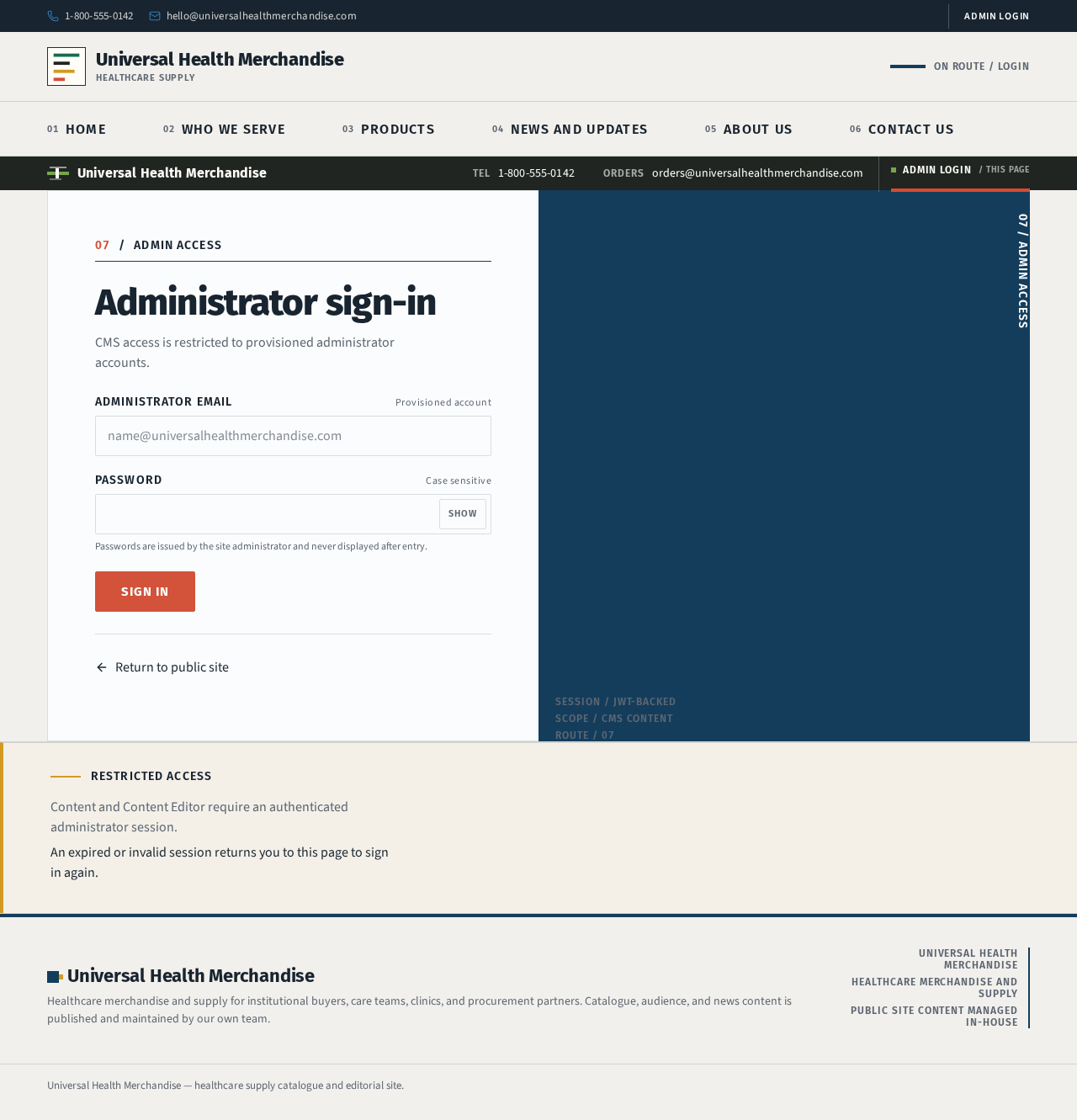
07ADMIN ACCESS
Administrator sign-in
CMS access is restricted to provisioned administrator accounts.
Passwords are issued by the site administrator and never displayed after entry.
Restricted access
Content and Content Editor require an authenticated administrator session.
An expired or invalid session returns you to this page to sign in again.
07ADMIN ACCESS
Administrator sign-in
CMS access is restricted to provisioned administrator accounts.
Passwords are issued by the site administrator and never displayed after entry.
Restricted access
Content and Content Editor require an authenticated administrator session.
An expired or invalid session returns you to this page to sign in again.
No comments yet. Be the first!