ultra-todo
 Diya Trivedi
start a project to build a simple single page design of todo

Comments (0)
Sign in to leave a comment
System Requirements
System Requirements Document for ultra-todo
1. Introduction
ultra-todo is a simple single-page todo application. The product intent is deliberately minimal: one page where a person can add todo items and see their todo items in one place. There is no navigation, no second page, and no surrounding application shell — the page is the app.
The audience is a single consumer user, likely on a phone, who wants to capture tasks as they come and review the current list without friction. The design treats the daily act of writing a task down and crossing it off as a small reward rather than a chore.
2. System Overview
ultra-todo is delivered as a single custom page named Todo, served by a React frontend and backed by a shared FastAPI backend process with a MariaDB database for application-owned persistent data. The page is the anonymous public entry surface and the only destination in the product.
Current accepted behavior:
- A user can add todo items.
- A user can view their todo items on the single page.
Actors:
- Todo user — the single human persona who captures tasks and reviews the current list on the Todo page.
- Backend service — the shared FastAPI process that stores and returns todo items (non-persona system actor).
- Database — MariaDB holding application-owned todo data (non-persona system actor).
Ownership: all human-facing behavior lives on the single Todo page. The backend and database support it but never own a human interaction.
Narrow exclusions: the product is a simple single-page design. There is no navigation, no footer links, no second page, and no additional application surface.
Removed from scope
- None.
2a. Product Interpretation and Delivery Boundary
The entire product is one page. A visitor lands directly on the Todo page with no sign-in step, no onboarding, and no navigation to anywhere else. The page presents an oversized typographic hero and a todo panel containing the add-task input and the current task list. Adding a task and viewing the list are the complete current scope.
Delivery is first-party: the React frontend renders the page, and the shared FastAPI backend persists and returns todo items through the MariaDB database. No provider-owned or external surfaces are part of the current product. No future features are currently accepted; anything beyond adding and viewing todo items on the single page is out of scope for this document.
2c. Page Content and Component Coverage
Todo
The single page of the product, and the anonymous public entry surface. It combines the typographic hero with the todo panel.
Information and state
- The wordmark stack: "ULTRA" and "TODO" in oversized Archivo Black, with "TODO" in hot pink.
- The current list of todo items, each rendered as a chunky card with a hard-edged square checkbox and the task text.
- The add-task input (full-width pill) with a hot-pink plus button pinned to its right edge.
- A lime sticker pill reading "ONE PAGE. ZERO FRICTION." rotated -4deg, pinned to the top-right of the todo card.
- A slow outline-type marquee of the word "TODO" along the bottom edge of the viewport.
- Page states: loading (list being fetched), empty (no todo items yet), populated (one or more todo items), success (a newly added item appears in the list), error (the list or an add request fails), and recovery (retry or re-submit).
Primary actions
- Type a task into the add-task pill and submit via the plus button (or keyboard submit) to add a todo item.
- View the current todo items in the list.
Supporting actions
- Retry loading the list after a fetch failure.
- Re-submit an add request after a failure, with the typed text preserved.
Domain entities
- Todo item — a task with its text and its position in the list. Persisted by the backend in MariaDB.
Component responsibilities
- Hero block — renders the ULTRA/TODO wordmark stack, bleeds off the top-left, and is overlapped by the todo panel by 24px on desktop.
- Sticker pill — decorative rotated lime label overlapping the todo card border.
- Add-task pill — captures task text, validates non-empty input, and triggers the add action; shows a disabled/pending state while the request is in flight.
- Task list — renders each todo item as a card with checkbox and text; shows the empty state when there are no items.
- Task card — displays one todo item's text and checkbox; on completion the lime strike-through bar wipes across the text and the card tilts 1deg then settles.
- Marquee — decorative outline-type "TODO" ticker along the bottom edge; becomes a static single line under reduced motion.
- Status region — announces loading, empty, error, and success states accessibly.
States
- Loading — a placeholder in the task list area while the list is fetched.
- Empty — a friendly empty message inside the task list area inviting the first task.
- Success — the new task card scales in from 0.9 with a slight rotation settle (250ms) and appears at its place in the list.
- Error — an inline message in the todo panel when the list fails to load or an add request fails; the typed text is preserved and the add control remains available for retry.
- Recovery — retry control for list load; re-submit for add.
3. Functional Requirements
FR-1 — Add a todo item (explicit) As a Todo user I should be able to add a todo item from the single Todo page so that my task is recorded.
- Trigger/input: the user types task text into the add-task pill and submits via the plus button or keyboard submit.
- Observable result: the new todo item appears in the task list on the Todo page, and the input clears.
- Access state: anonymous; no sign-in required.
- Failure/recovery: if the add request fails, an inline error is shown, the typed text is preserved, and the user can re-submit.
- Continuation: the user can immediately add another task or view the updated list.
FR-2 — View todo items (explicit) As a Todo user I should be able to view my todo items on the single page so that I can see what I have captured.
- Trigger/input: opening the Todo page.
- Observable result: the current todo items render as cards in the task list; when there are none, an empty state is shown.
- Access state: anonymous; no sign-in required.
- Failure/recovery: if the list fails to load, an inline error with a retry control is shown.
- Continuation: the user can add a new task from the same page.
FR-3 — Complete a todo item (required_inference) As a Todo user I should be able to mark a todo item complete on the Todo page so that I can see my progress at a glance.
- Trigger/input: the user activates the hard-edged square checkbox on a task card.
- Observable result: a lime strike-through bar wipes left-to-right across the task text in 200ms and the card tilts 1deg then settles; the completed state is reflected in the list.
- Access state: anonymous.
- Failure/recovery: if the completion request fails, the card returns to its prior state and an inline error is shown.
- Continuation: the user can continue viewing or adding tasks.
- Rationale: a todo list whose items can be added and viewed but never marked done cannot express the accepted "crossing it off" ritual that the design is built around; completion is the indispensable state transition for a todo item.
FR-4 — Persist todo items (required_inference) As a Todo user I should have my todo items retained by the application so that they are still visible when I return to the page.
- Trigger/input: any add or completion action.
- Observable result: the backend stores the todo item in MariaDB and returns it on subsequent page loads.
- Access state: anonymous; the application owns the stored data.
- Failure/recovery: storage failures surface as the inline errors in FR-1 and FR-3.
- Continuation: the list reflects the stored state on reload.
4. User Personas
Todo user
Product context. A single consumer user, likely on a phone, who wants to capture tasks as they come and see them in one place. The product is a daily ritual, and the design is meant to make that ritual feel like a small reward.
Primary goal. Record a task quickly and see the current list without navigating anywhere.
Distinct accepted responsibilities.
- Types a task into the add-task pill and submits it.
- Reviews the current list of todo items on the same page.
- Marks items complete and watches the strike-through settle.
Relevant inputs or decisions. The task text; whether to submit now or keep typing; whether to retry after a failure.
Interactions with other accepted participants. None beyond the application itself; the Todo user is the only human actor.
Observable success. The task is recorded and visible in the list on the single page, with no navigation required.
5. Core User Flows
Flow 1 — Add a todo item
- The Todo user opens the Todo page. The hero wordmark stack and the todo panel render; the task list shows the current items or the empty state.
- The user taps the add-task pill and types a task.
- The user submits via the hot-pink plus button (or keyboard submit). The add control shows a pending state.
- On success, the new task card scales in from 0.9 with a slight rotation settle (250ms) and appears in the list; the input clears.
- On failure, an inline error appears in the todo panel, the typed text is preserved, and the user re-submits.
- Continuation: the user can add another task or view the updated list.
Flow 2 — View todo items
- The Todo user opens the Todo page.
- While the list loads, a placeholder is shown in the task list area.
- On success, the current todo items render as cards; if there are none, the empty state invites the first task.
- On failure, an inline error with a retry control is shown; the user retries and the list loads.
- Continuation: the user can add a task from the same page.
Flow 3 — Complete a todo item
- The Todo user views the task list on the Todo page.
- The user activates the hard-edged square checkbox on a task card.
- On success, the lime strike-through bar wipes left-to-right across the text in 200ms and the card tilts 1deg then settles.
- On failure, the card returns to its prior state and an inline error is shown.
- Continuation: the user can continue viewing or adding tasks.
6. Visuals Colors and Theme
Muse and headline. Jessica Walsh — playful maximalism for the world's smallest productivity ritual. The surface carries all the personality: saturated colour fields, chunky grotesque type, sticker shapes, and bouncy motion.
Palette (light mode)
| Role | Hex |
|---|---|
| Background | #F4E9D8 |
| Surface | #FFF6E6 |
| Text | #1A1410 |
| Primary | #F2317A |
| Accent | #C6F24E |
| Muted | #7A6A5C |
Cream ground carries the whole page; card surfaces sit one step lighter with a 2px ink border and a hard offset shadow. Hot pink is the primary action colour for add and complete. Acid lime is the secondary pop for completed task highlights and sticker accents. Ink is used for all type and the 2px outlines; muted for secondary labels. Colours are flat blocks, never gradients.
Typography
- Headings: Archivo Black, all-caps for the wordmark and oversized hero headline, tight tracking (-0.02em), set very large.
- Body: Syne at 600 for section labels and task text, 400 for body copy. No italic, no thin weights.
- Sticker labels: Syne 700 uppercase at 12px with 0.12em tracking.
- Scale (1.333 modular): hero display
clamp(56px, 9vw, 128px); section display 40px; card title 22px; task text 18px; label 12px; body 16px. Line height 0.92 for display, 1.5 for body.
Shape language. Hard-edged colour blocks with 2px ink outlines and hard offset shadows (4px 4px 0 #1A1410) rather than soft blur. Chunky rounded sticker shapes (radius 999px for pills, 20px for cards) sit on top of the hard-edged blocks. Rotated elements at -3deg to 3deg for sticker energy. No gradients, no glass, no blur.
Layout. Single page, one column on mobile, two-zone split on desktop: an oversized headline zone on the left (7 columns) and a colour-blocked todo panel on the right (5 columns) that overlaps the headline zone by 24px so the type appears to run behind the panel. The task list is a vertical stack of chunky cards, each with a hard-edged square checkbox and a lime strike-through bar. The add-task input is a full-width pill with a hot-pink plus button pinned to its right edge. No navigation, no footer links.
Imagery. No photography. Typographic and shape-based: oversized Archivo Black wordmarks, sticker shapes with hand-drawn-style icon glyphs (a check, a star, a lightning bolt) drawn as thick 3px strokes, and flat colour blocks. Optionally one simple glossy pink blob as a decorative sticker in the hero corner, cropped by the viewport edge.
Readability constraint. Headlines, wordmarks, labels, numbers, cards' text and controls stay entirely inside the viewport and their container at 375px, 768px and 1280px, wrapping or scaling to fit. Decoration and motion may be cropped, bled, rotated, or overlapped as the direction asks, as long as they cover no readable text or control.
7. Signature Design Concept
The public entry is a cream full-bleed ground. "ULTRA" in Archivo Black at clamp(56px, 9vw, 128px) sits flush left and bleeds off the top-left corner of the viewport, and "TODO" stacks beneath it in the same size but in hot pink, forming a solid typographic block that dominates the left two-thirds of the screen. On the right, a cream card with a 2px ink border and a hard 6px offset shadow overlaps the "TODO" word by 24px, containing the add-task pill and the first three task cards. A lime sticker pill reading "ONE PAGE. ZERO FRICTION." is rotated -4deg and pinned to the top-right of the card, partially overlapping its border. A pink outline marquee of the word "TODO" runs along the bottom edge of the viewport. No centred headline, no subtext paragraph, no blue button, no gradient blob.
Signature moves:
- Oversized Archivo Black "ULTRA / TODO" stack that bleeds off the top-left of the viewport with the second word in hot pink, and the todo panel physically overlapping the type by 24px so the letters appear to run behind the card.
- Hard offset shadows (
4px 4px 0ink) and 2px ink outlines on every card and input — no soft blur anywhere — giving the page a screen-printed poster feel. - A lime strike-through bar that wipes left-to-right across a completed task's text in 200ms while the card tilts 1deg and settles.
- A rotated lime sticker pill ("ONE PAGE. ZERO FRICTION.") pinned to the corner of the todo card, overlapping its border at -4deg, with Syne 700 uppercase 12px tracked label.
- A slow outline-type marquee of the word "TODO" running along the bottom edge of the viewport at 40s per loop, stroke-only so it reads as texture rather than content.
8. Interaction Model & Motion Direction
Interaction Model: Animated Motion Tempo: expressive Hero Dimensionality: layered_2d
Landing Hero Motion Brief
- Focal subject. The oversized "ULTRA / TODO" typographic stack bleeding off the top-left, with the todo panel overlapping it by 24px.
- Input → transformation → outcome thesis. As the user types and submits a task, the new task card scales in from 0.9 with a slight rotation settle (250ms,
cubic-bezier(0.34, 1.56, 0.64, 1)); as the user completes a task, a lime strike-through bar wipes left-to-right in 200ms and the card tilts 1deg then settles. The hero itself stays composed; the motion lives in the todo panel. - Motion vocabulary. Expressive but controlled: bouncy scale-and-settle on add, wipe-and-tilt on complete, and a slow 40s outline-type marquee of "TODO" along the bottom edge.
- Composed first frame. Cream ground; "ULTRA" flush left bleeding off the top-left; "TODO" in hot pink stacked beneath; cream todo card with 2px ink border and 6px offset shadow overlapping the type by 24px; lime sticker pill rotated -4deg at the card's top-right; outline "TODO" marquee along the bottom edge.
- Reduced-motion state. All transitions become instant, the marquee stops and displays as a static single line.
9. Non-Functional Requirements
- Single-page constraint (explicit): the design must be a simple single page. There is no navigation, no footer links, and no second page.
- Readability at every viewport (explicit): headlines, wordmarks, labels, numbers, cards' text and controls stay entirely inside the viewport and their container at 375px, 768px and 1280px, wrapping or scaling to fit; no other element covers any part of them.
- Reduced motion (explicit): with
prefers-reduced-motion, all transitions become instant and the marquee displays as a static single line. - Accessible status announcements (required_inference): loading, empty, error, and success states are announced to assistive technology so the anonymous user is not left without feedback.
- Persistence (required_inference): todo items are stored in MariaDB by the shared FastAPI backend so they survive page reloads.
10. Tech Stack
- Frontend: React application UI.
- Backend: shared FastAPI process for application APIs and domain modules.
- Database: MariaDB for application-owned persistent data.
- Infrastructure: docker-compose with the
frontend,backend, anddatabaseservices. No additional services are required for the current scope.
11. Assumptions and Constraints
- A1 (assumption): The product is anonymous; no sign-in, account, or identity step is part of the current scope.
- A2 (assumption): Todo items are owned by the application and persisted in MariaDB; no per-user separation is required for the current single-user scope.
- A3 (constraint): The design must be a simple single page; no navigation, footer links, or second page.
- A4 (constraint): The generic indigo/blue-on-white SaaS template is forbidden for this project.
- A5 (constraint): No photography, gradients, glassmorphism, or soft blurred shadows.
12. Glossary
- Todo item — a task captured by the Todo user, with its text and position in the list.
- Todo page — the single page of the product and the anonymous public entry surface.
- Add-task pill — the full-width input with the hot-pink plus button used to add a todo item.
- Task card — the chunky card rendering one todo item with a hard-edged square checkbox and text.
- Strike-through bar — the lime bar that wipes across a completed task's text.
- Sticker pill — the rotated lime label reading "ONE PAGE. ZERO FRICTION."
- Marquee — the slow outline-type "TODO" ticker along the bottom edge of the viewport.
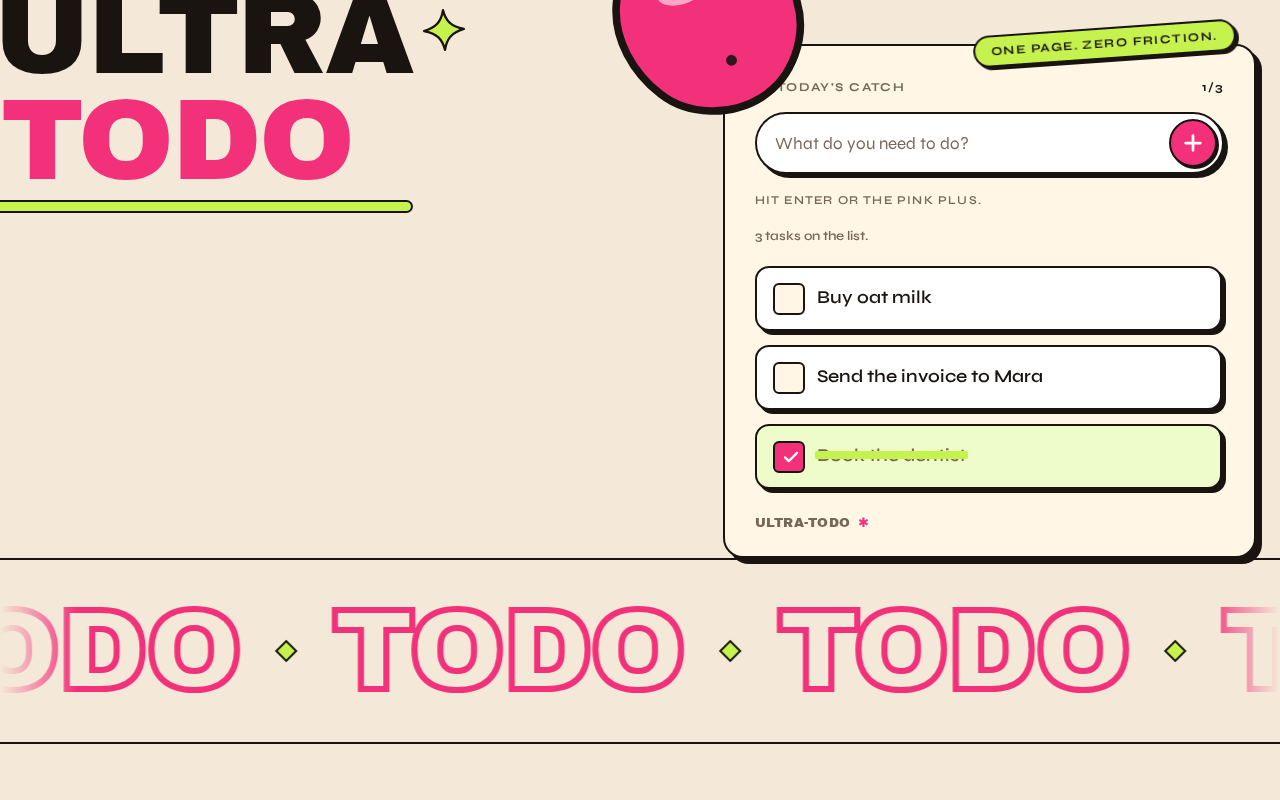
UltraTodo
- Buy oat milk
- Send the invoice to Mara
- Book the dentist
UltraTodo
- Buy oat milk
- Send the invoice to Mara
- Book the dentist
No comments yet. Be the first!