ultra-premium
 Pratik Kamble
Build a premium, modern, responsive web application called: BUILDER AI ERP This is an AI-powered construction and real-estate management system for a builder company. IMPORTANT: For this first build, focus on creating the complete professional UI/UX and application structure. Do not destroy or simplify the requested modules. The application should look like a premium modern SaaS product, not like a basic HTML/Excel application. DESIGN: - Premium professional construction/real-estate dashboard - Clean modern interface - Dark and light mode - Excellent typography - Modern cards - Beautiful charts - Smooth animations - Responsive desktop/tablet/mobile layout - Professional sidebar navigation - Top navigation with global search, notifications and user profile - Indian currency formatting such as ₹1,25,000 - Use realistic demo data - Avoid excessive gradients - Make the UI clean, elegant and easy for an accountant/site supervisor to use MAIN SIDEBAR: Dashboard SALES - Flats & Customers - Collections - Payment Schedule PURCHASE - Purchase Orders - Material Received - Vendor Bills - Vendor Payments ACCOUNTS - Party Ledger - Expenses - Cash / Bank - GST CONTRACTORS - Contractors - Contractor Bills - Contractor Payments HR - Employees - Salary - Employee Advances REPORTS AI COPILOT SETTINGS DASHBOARD: Create an executive dashboard showing: - Total Project Value - Total Flat Sales - Collection Received - Customer Outstanding - Vendor Outstanding - Contractor Outstanding - Total Material Purchase - Total Project Expenses - Salary Paid - Cash Position Include attractive charts for: - Monthly Cash Inflow vs Outflow - Flat Collections - Project Expenses - Vendor Outstanding - Material Purchases Add date and project filters. FLATS & CUSTOMERS: Create a professional table/card interface for: Flat Number Customer Name Floor Project Agreement Value Amount Received Balance Collection % Status Clicking a flat should open its complete customer profile and installment/payment history. PURCHASE ORDERS: Create a professional PO management interface with: PO Number Date Vendor Material Ordered Quantity Received Quantity Pending Quantity Rate Total Status Statuses: Draft Approved Partially Received Completed Cancelled MATERIAL RECEIVED: Create a material receiving interface showing: Date GRN PO Vendor Material Ordered Qty Received Qty Pending Qty Rate Amount Status VENDOR BILLING: Create vendor bill management with: Vendor Invoice Number Invoice Date PO Taxable Amount CGST SGST IGST Total Due Date Payment Status PARTY LEDGER: Create a professional accounting ledger showing: Date Party Reference Description Debit Credit Running Balance Project Include filters and search. CONTRACTORS: Create contractor master, bills, payments and outstanding screens. EMPLOYEES: Create employee master, salary processing and advance tracking. REPORTS: Create a reports center with cards for: Project Summary Flat Collection Customer Outstanding Vendor Ledger Vendor Outstanding Contractor Ledger Purchase Register Material Register GST Report Payment Register Expense Register Salary Register Project Cost Report AI COPILOT: Create a prominent AI assistant accessible from the entire application. It should look like a modern chat-based business AI assistant. Example user commands: "Chaturvedi flat 701 se 5 lakh NEFT mila" "Kshisagar ko 50000 cash payment kiya" "Herambe se 200 bag cement mangaya 320 per bag" "Herambe ka invoice 1024 taxable 1 lakh GST 18%" "Is month vendor ko kitna payment hua?" "Chaturvedi ka balance kitna hai?" The AI interface should show: User command AI interpretation Detected information Confirmation card Confirm / Edit / Cancel buttons IMPORTANT: Financial actions must require user confirmation before being saved. The AI should eventually connect to the application's database and perform safe actions through validated backend functions. GLOBAL SEARCH: Allow searching across: Flats Customers Vendors Contractors Employees POs Invoices Payments Ledger entries NOTIFICATIONS: Create notification UI for: Overdue customer payments Overdue vendor bills Pending purchase orders Pending contractor payments Low material stock Duplicate invoices Important AI warnings SETTINGS: Create settings screens for: Company Projects Users Roles & Permissions Tax / GST Payment Modes Materials Backup / Data Export AI Settings Use reusable components and a scalable application architecture. Make the first version visually impressive and production-oriented. Do not make it look like a template. The final UI should feel like a serious premium construction ERP used by a professional builder company.


Comments (0)
Sign in to leave a comment
System Requirements
System Requirements Document for ultra-premium
1. Introduction
The ultra-premium project, titled "BUILDER AI ERP," is an AI-powered construction and real-estate management system designed for a builder company. The primary intent is to create a premium, modern, and responsive web application that serves as a professional SaaS product. The application aims to provide a comprehensive suite of modules for managing various aspects of construction and real-estate operations, ensuring a clean, elegant, and user-friendly interface suitable for accountants and site supervisors.
2. System Overview
The BUILDER AI ERP system is designed to deliver a high-end user experience with a focus on precision, luxury, and engineered detail. It includes a range of modules covering sales, purchase, accounts, contractors, HR, reports, AI assistant, and settings. The application features a responsive design with dark and light modes, professional navigation, and advanced search capabilities. The system is intended for use by professionals in the construction industry, providing tools for efficient management and decision-making.
2a. Product Interpretation and Delivery Boundary
The application is delivered as a premium SaaS product with a focus on a professional UI/UX. It includes a comprehensive set of modules without simplification, ensuring a robust and scalable architecture. The system supports both desktop and mobile devices, with a responsive layout and smooth animations. Access is structured around a professional sidebar navigation and top navigation bar, with global search and notifications. The application does not include light mode as the default and avoids generic SaaS templates.
2b. Source Content Inventory
Not applicable as no content source directive was provided.
2c. Page Content and Component Coverage
Dashboard
- Information/State: Total Project Value, Total Flat Sales, Collection Received, Customer Outstanding, Vendor Outstanding, Contractor Outstanding, Total Material Purchase, Total Project Expenses, Salary Paid, Cash Position.
- Primary Actions: View detailed reports, Apply date and project filters.
- Components: Attractive charts for Monthly Cash Inflow vs Outflow, Flat Collections, Project Expenses, Vendor Outstanding, Material Purchases.
- States: Loading, Success, Error, Filtered views.
Flats & Customers
- Information/State: Flat Number, Customer Name, Floor, Project, Agreement Value, Amount Received, Balance, Collection %, Status.
- Primary Actions: View customer profile, View installment/payment history.
- Components: Professional table/card interface.
- States: Loading, Success, Error, Detailed view on click.
Purchase Orders
- Information/State: PO Number, Date, Vendor, Material, Ordered Quantity, Received Quantity, Pending Quantity, Rate, Total, Status.
- Primary Actions: Manage PO status, Approve/Cancel PO.
- Components: PO management interface.
- States: Draft, Approved, Partially Received, Completed, Cancelled.
Material Received
- Information/State: Date, GRN, PO, Vendor, Material, Ordered Qty, Received Qty, Pending Qty, Rate, Amount, Status.
- Primary Actions: Record material receipt, Update status.
- Components: Material receiving interface.
- States: Loading, Success, Error.
Vendor Billing
- Information/State: Vendor, Invoice Number, Invoice Date, PO, Taxable Amount, CGST, SGST, IGST, Total, Due Date, Payment Status.
- Primary Actions: Manage vendor bills, Update payment status.
- Components: Vendor bill management.
- States: Loading, Success, Error.
Party Ledger
- Information/State: Date, Party, Reference, Description, Debit, Credit, Running Balance, Project.
- Primary Actions: Filter/search entries, View detailed ledger.
- Components: Accounting ledger interface.
- States: Loading, Success, Error, Filtered views.
Contractors
- Information/State: Contractor details, Bills, Payments, Outstanding amounts.
- Primary Actions: Manage contractor records, Process payments.
- Components: Contractor management screens.
- States: Loading, Success, Error.
Employees
- Information/State: Employee details, Salary, Advances.
- Primary Actions: Manage employee records, Process salaries.
- Components: Employee management interface.
- States: Loading, Success, Error.
Reports
- Information/State: Various financial and operational reports.
- Primary Actions: Generate/view reports, Apply filters.
- Components: Reports center with cards for different reports.
- States: Loading, Success, Error.
AI Copilot
- Information/State: User command, AI interpretation, Detected information.
- Primary Actions: Confirm/Edit/Cancel actions.
- Components: Chat-based AI assistant interface.
- States: Loading, Success, Error, Confirmation required.
Settings
- Information/State: Company settings, Projects, Users, Roles & Permissions, Tax/GST, Payment Modes, Materials, Backup/Data Export, AI Settings.
- Primary Actions: Update settings, Manage roles and permissions.
- Components: Settings screens.
- States: Loading, Success, Error.
3. Functional Requirements
- As a user, I should be able to view an executive dashboard with key financial metrics and attractive charts. (explicit)
- As a user, I should be able to manage flats and customers with detailed profiles and payment history. (explicit)
- As a user, I should be able to manage purchase orders with status updates and detailed information. (explicit)
- As a user, I should be able to record material receipts and update their status. (explicit)
- As a user, I should be able to manage vendor bills and update payment statuses. (explicit)
- As a user, I should be able to view and filter party ledger entries. (explicit)
- As a user, I should be able to manage contractor records, bills, and payments. (explicit)
- As a user, I should be able to manage employee records, process salaries, and track advances. (explicit)
- As a user, I should be able to generate and view various reports with filters. (explicit)
- As a user, I should be able to interact with an AI assistant for business queries and actions, with confirmation required for financial actions. (explicit)
- As a user, I should be able to search globally across different entities in the application. (explicit)
- As a user, I should receive notifications for overdue payments, pending orders, and other important alerts. (explicit)
- As a user, I should be able to configure application settings, including company details, projects, and user roles. (explicit)
4. User Personas
- Accountant: Responsible for managing financial records, processing payments, and generating reports. Uses the application to ensure accurate financial tracking and compliance.
- Site Supervisor: Oversees construction projects, manages materials and contractors, and ensures project timelines are met. Uses the application to track project progress and resource allocation.
5. Core User Flows
Accountant
- Login to the application.
- Navigate to the Dashboard to view key financial metrics.
- Access the Party Ledger to review and filter financial entries.
- Generate reports from the Reports center for financial analysis.
- Interact with the AI Copilot for quick queries and confirmations.
- Receive notifications for overdue payments and pending actions.
- Update settings for company details and user roles as needed.
Site Supervisor
- Login to the application.
- Navigate to Flats & Customers to manage customer profiles and payment history.
- Access Purchase Orders to update and manage order statuses.
- Record material receipts in the Material Received section.
- Manage contractor records and payments in the Contractors section.
- Receive notifications for low material stock and pending contractor payments.
- Interact with the AI Copilot for project-related queries.
6. Visuals Colors and Theme
- Muse: MARQ by Garmin
- Palette (dark mode):
- Background: #1A1A1A
- Surface: #2E2E2E
- Text: #FAFAFA
- Primary: #00A99D
- Accent: #FFD700
- Muted: #737373
- Typography:
- Headings: Saira — Condensed technical sans
- Body: Barlow Condensed
- Scale: 1.25 modular, 48/30/24/18/14
- Shape language: Circular gauges and bezels with precise data rows.
- Layout: Modular sections with circular gauges, edge-to-edge dark UI.
- Imagery: Macro product photography and engineered textures.
7. Signature Design Concept
The public entry features a composed hero with a large circular gauge displaying real-time data, set against a dark titanium background with a teal accent glow. This design emphasizes precision and luxury, aligning with the MARQ by Garmin muse.
8. Interaction Model & Motion Direction
- Interaction Model: Static
- Motion Tempo: Restrained
- Hero Dimensionality: Layered_2d
- Landing Hero Motion Brief: The hero features a large circular gauge with real-time data updates, using needle sweeps and counting numbers for clarity. The motion is restrained, focusing on precision and readability.
9. Non-Functional Requirements
- The application must support both dark and light modes, with dark mode as the primary.
- The system should be responsive and accessible on desktop, tablet, and mobile devices.
- The application must handle Indian currency formatting accurately.
- The UI should be clean and professional, avoiding excessive gradients and generic templates.
10. Tech Stack
- Frontend: React
- Backend: Python/FastAPI
- Database: PostgreSQL
- Containerization: Docker/docker-compose
- Deployment: Kubernetes (if required)
11. Assumptions and Constraints
- The application will use realistic demo data for initial development.
- Financial actions performed by the AI assistant require user confirmation.
- The application architecture must be scalable and support future enhancements.
12. Glossary
- AI Copilot: An AI-powered assistant within the application for handling business queries and actions.
- GRN: Goods Receipt Note, a document confirming the receipt of goods.
- PO: Purchase Order, a document issued by a buyer to a seller indicating types, quantities, and agreed prices for products or services.
- SaaS: Software as a Service, a software distribution model in which applications are hosted by a service provider and made available to customers over the internet.
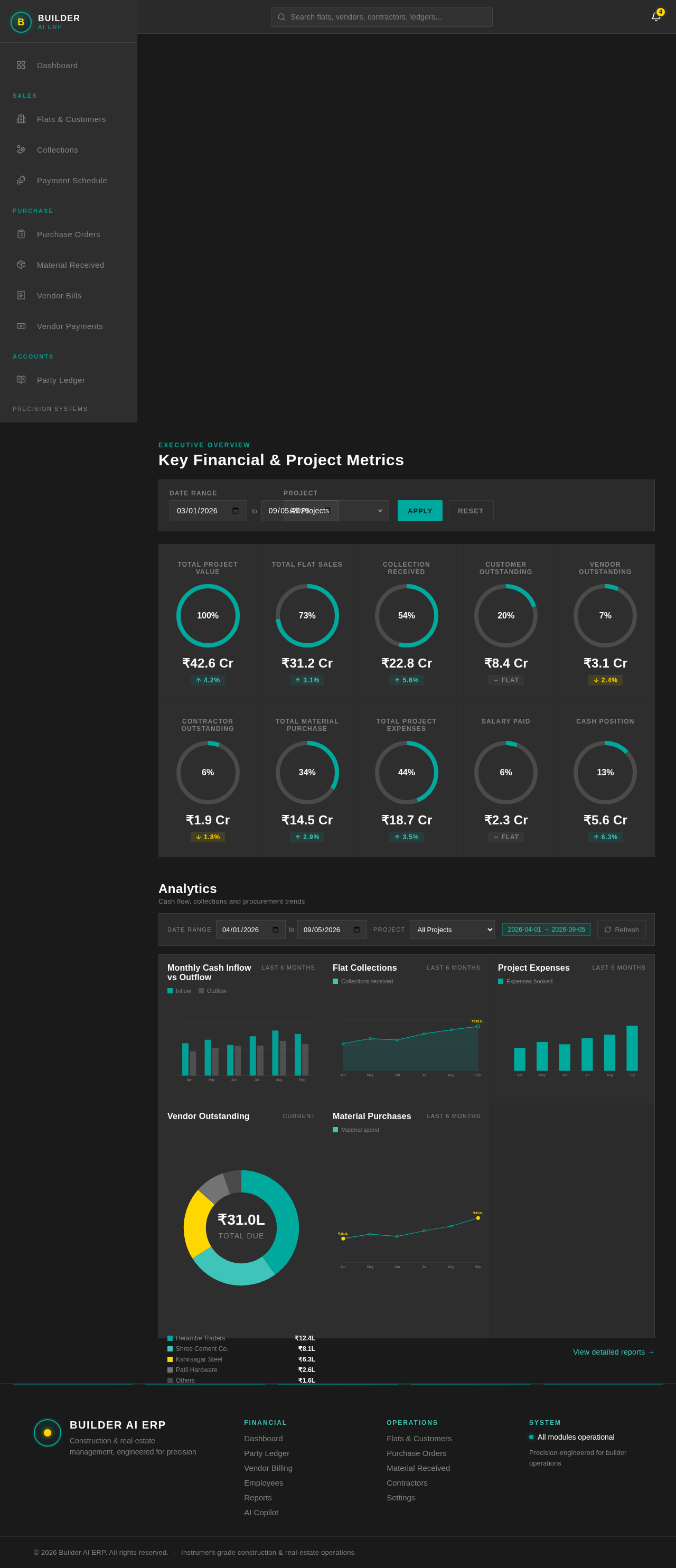
Key Financial & Project Metrics
Analytics
Cash flow, collections and procurement trendsMonthly Cash Inflow vs Outflow
Last 6 MonthsFlat Collections
Last 6 MonthsProject Expenses
Last 6 MonthsVendor Outstanding
Current- Herambe Traders₹12.4L
- Shree Cement Co.₹8.1L
- Kshirsagar Steel₹6.3L
- Patil Hardware₹2.6L
- Others₹1.6L
Material Purchases
Last 6 MonthsKey Financial & Project Metrics
Analytics
Cash flow, collections and procurement trendsMonthly Cash Inflow vs Outflow
Last 6 MonthsFlat Collections
Last 6 MonthsProject Expenses
Last 6 MonthsVendor Outstanding
Current- Herambe Traders₹12.4L
- Shree Cement Co.₹8.1L
- Kshirsagar Steel₹6.3L
- Patil Hardware₹2.6L
- Others₹1.6L
No comments yet. Be the first!