ultra-premium
 Pratik Kamble
Build a premium, modern, responsive web application called: BUILDER AI ERP This is an AI-powered construction and real-estate management system for a builder company. IMPORTANT: For this first build, focus on creating the complete professional UI/UX and application structure. Do not destroy or simplify the requested modules. The application should look like a premium modern SaaS product, not like a basic HTML/Excel application. DESIGN: - Premium professional construction/real-estate dashboard - Clean modern interface - Dark and light mode - Excellent typography - Modern cards - Beautiful charts - Smooth animations - Responsive desktop/tablet/mobile layout - Professional sidebar navigation - Top navigation with global search, notifications and user profile - Indian currency formatting such as ₹1,25,000 - Use realistic demo data - Avoid excessive gradients - Make the UI clean, elegant and easy for an accountant/site supervisor to use MAIN SIDEBAR: Dashboard SALES - Flats & Customers - Collections - Payment Schedule PURCHASE - Purchase Orders - Material Received - Vendor Bills - Vendor Payments ACCOUNTS - Party Ledger - Expenses - Cash / Bank - GST CONTRACTORS - Contractors - Contractor Bills - Contractor Payments HR - Employees - Salary - Employee Advances REPORTS AI COPILOT SETTINGS DASHBOARD: Create an executive dashboard showing: - Total Project Value - Total Flat Sales - Collection Received - Customer Outstanding - Vendor Outstanding - Contractor Outstanding - Total Material Purchase - Total Project Expenses - Salary Paid - Cash Position Include attractive charts for: - Monthly Cash Inflow vs Outflow - Flat Collections - Project Expenses - Vendor Outstanding - Material Purchases Add date and project filters. FLATS & CUSTOMERS: Create a professional table/card interface for: Flat Number Customer Name Floor Project Agreement Value Amount Received Balance Collection % Status Clicking a flat should open its complete customer profile and installment/payment history. PURCHASE ORDERS: Create a professional PO management interface with: PO Number Date Vendor Material Ordered Quantity Received Quantity Pending Quantity Rate Total Status Statuses: Draft Approved Partially Received Completed Cancelled MATERIAL RECEIVED: Create a material receiving interface showing: Date GRN PO Vendor Material Ordered Qty Received Qty Pending Qty Rate Amount Status VENDOR BILLING: Create vendor bill management with: Vendor Invoice Number Invoice Date PO Taxable Amount CGST SGST IGST Total Due Date Payment Status PARTY LEDGER: Create a professional accounting ledger showing: Date Party Reference Description Debit Credit Running Balance Project Include filters and search. CONTRACTORS: Create contractor master, bills, payments and outstanding screens. EMPLOYEES: Create employee master, salary processing and advance tracking. REPORTS: Create a reports center with cards for: Project Summary Flat Collection Customer Outstanding Vendor Ledger Vendor Outstanding Contractor Ledger Purchase Register Material Register GST Report Payment Register Expense Register Salary Register Project Cost Report AI COPILOT: Create a prominent AI assistant accessible from the entire application. It should look like a modern chat-based business AI assistant. Example user commands: "Chaturvedi flat 701 se 5 lakh NEFT mila" "Kshisagar ko 50000 cash payment kiya" "Herambe se 200 bag cement mangaya 320 per bag" "Herambe ka invoice 1024 taxable 1 lakh GST 18%" "Is month vendor ko kitna payment hua?" "Chaturvedi ka balance kitna hai?" The AI interface should show: User command AI interpretation Detected information Confirmation card Confirm / Edit / Cancel buttons IMPORTANT: Financial actions must require user confirmation before being saved. The AI should eventually connect to the application's database and perform safe actions through validated backend functions. GLOBAL SEARCH: Allow searching across: Flats Customers Vendors Contractors Employees POs Invoices Payments Ledger entries NOTIFICATIONS: Create notification UI for: Overdue customer payments Overdue vendor bills Pending purchase orders Pending contractor payments Low material stock Duplicate invoices Important AI warnings SETTINGS: Create settings screens for: Company Projects Users Roles & Permissions Tax / GST Payment Modes Materials Backup / Data Export AI Settings Use reusable components and a scalable application architecture. Make the first version visually impressive and production-oriented. Do not make it look like a template. The final UI should feel like a serious premium construction ERP used by a professional builder company.


Comments (0)
Sign in to leave a comment
Architecture
No Services Diagrams Yet
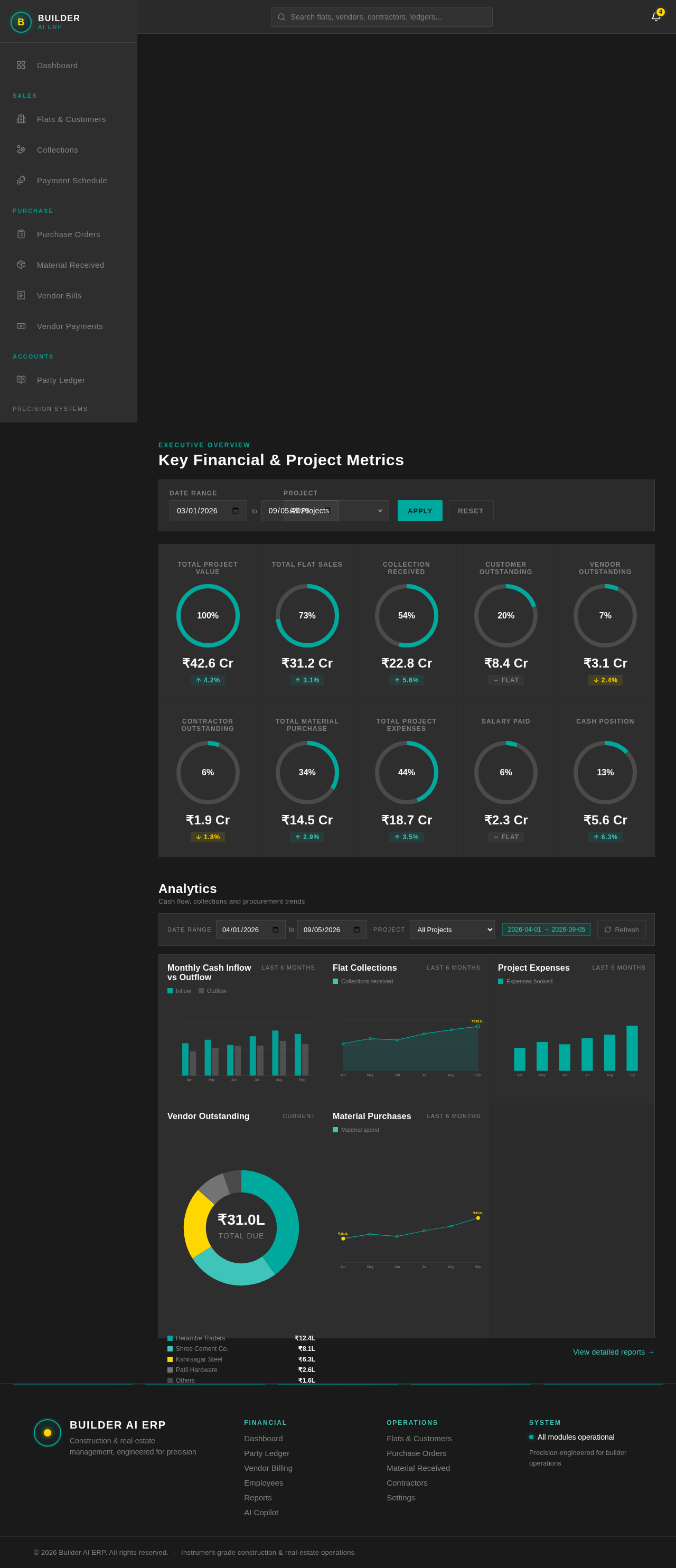
Key Financial & Project Metrics
Analytics
Cash flow, collections and procurement trendsMonthly Cash Inflow vs Outflow
Last 6 MonthsFlat Collections
Last 6 MonthsProject Expenses
Last 6 MonthsVendor Outstanding
Current- Herambe Traders₹12.4L
- Shree Cement Co.₹8.1L
- Kshirsagar Steel₹6.3L
- Patil Hardware₹2.6L
- Others₹1.6L
Material Purchases
Last 6 MonthsKey Financial & Project Metrics
Analytics
Cash flow, collections and procurement trendsMonthly Cash Inflow vs Outflow
Last 6 MonthsFlat Collections
Last 6 MonthsProject Expenses
Last 6 MonthsVendor Outstanding
Current- Herambe Traders₹12.4L
- Shree Cement Co.₹8.1L
- Kshirsagar Steel₹6.3L
- Patil Hardware₹2.6L
- Others₹1.6L
No comments yet. Be the first!