tough-application
 Patryk Biniek
Create a full-stack web application for managing student tutoring registrations (adding and removing students). The system should allow the user (admin/teacher) to manually input student data into a form and store it in a SQL database. Each new entry should be automatically assigned an incremental ID number (1 to n). Required student fields: Auto-generated ID (1, 2, 3, ...) First name Last name Address Subject (e.g., math, physics, etc.) School class Level (basic or extended) Lesson day (day of the week) Lesson time (start time and end time) Hourly rate Functional requirements: Add Student A form should allow entering all the above data. After submission, the data must be saved in a SQL database. The table displayed on the website should update instantly without requiring a page reload (use AJAX / Fetch API or WebSockets). Display Students Show all students in a dynamic table. Data must be fetched directly from the SQL database. The table should refresh automatically after every insert or delete. Delete Student Provide a way to delete a student by entering their assigned ID number. After deletion, the database should be updated immediately and the table refreshed. Technical requirements: Use a backend (Node.js / Express or Python Flask or Django — choose one). Use SQL database (MySQL, PostgreSQL, or SQLite). Frontend should be responsive and simple (HTML, CSS, JavaScript). Use asynchronous requests (AJAX/Fetch) for real-time updates. Ensure proper validation of form inputs. Keep the UI clean: table view + form for adding + input field/button for deleting. Bonus (optional): Add search/filter by subject or day. Prevent duplicate entries for the same student at the same time slot. Add confirmation before deleting a student.
Comments (0)
Sign in to leave a comment
Project Tasks10
Implement Theme and Structure
As a user, I want to see a visually consistent application so that the UI matches the mock-design pages exactly. This task covers implementing the color palette (#F5F5F5 background, #FFFFFF surface, #333333 text, #007ACC accent, #CCCCCC muted), typography, layout structure, and removing any scaffold pages not needed by the application (e.g., login, signup, welcome, ai-assistant, settings). Scope: apply global CSS/theme, set up base layout components, and align all existing scaffold pages to the design system. This task must remain independent of all other tasks.
Implement Add Student API
As a user, I want to use a backend API to add a student so that submitted form data is validated and stored in MySQL. Create a PHP endpoint (e.g., api/add_student.php) that accepts POST requests with all required student fields, assigns an auto-incremented ID, validates inputs (prevent SQL injection and XSS), and inserts the record into the database. Returns JSON success/error response.
Implement Get Students API
As a user, I want to use a backend API to fetch all students so that the dashboard table is populated from the MySQL database. Create a PHP endpoint (e.g., api/get_students.php) that returns all student records as JSON. Support optional query parameters for filtering by subject or lesson day to support the bonus filter feature.
Implement Delete Student API
As a user, I want to use a backend API to delete a student so that removing a record by ID immediately updates the database. Create a PHP endpoint (e.g., api/delete_student.php) that accepts a student ID via POST or DELETE, validates the ID, and removes the corresponding record from MySQL. Returns JSON success/error response.
Build Dashboard Page
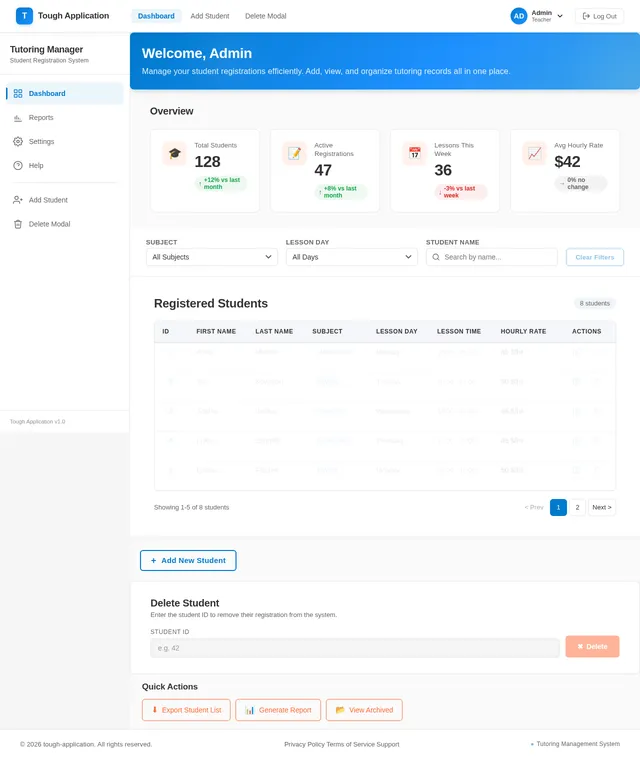
As a user, I want to view the Dashboard page so that I can see all registered students in a dynamic table with live animations. Implement the Dashboard (v2) design: display the student table with fade-in/fade-out row animations on add/delete, include the delete-by-ID input field, and a filter control for subject/day. The page serves as the main hub — it links to the Add Student form and the Delete Modal. Reference the existing Dashboard (v2) JSX design for implementation.
Build Add Student Page
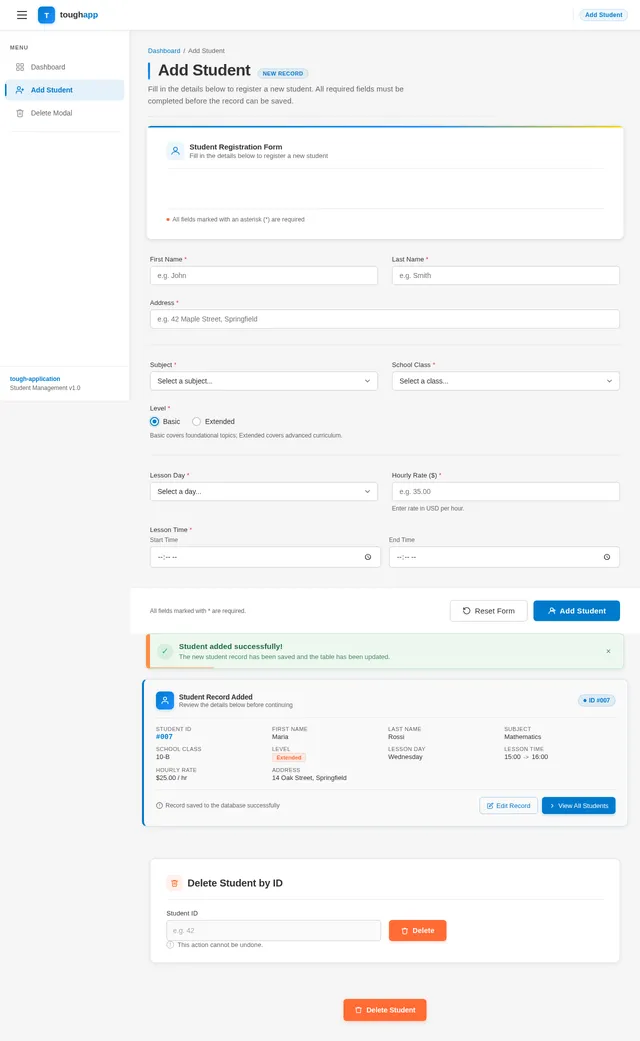
As a user, I want to use the Add Student form so that I can input all required student fields (auto-generated ID, first name, last name, address, subject, school class, level, lesson day, lesson time, hourly rate) and submit them. Implement the Add Student (v2) design with micro-interactions (input fields glow blue on focus). On successful submit, the form should clear and trigger a table refresh on the Dashboard. Reference the existing Add Student (v2) JSX design.
Build Delete Modal Component
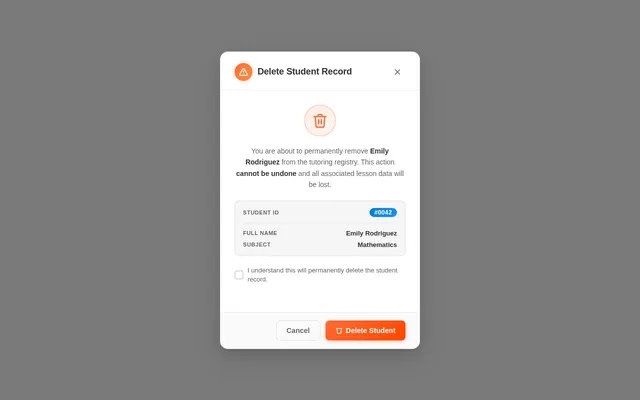
As a user, I want to see a confirmation modal before a student is deleted so that I can confirm or cancel the action. Implement the Delete Modal (v2) design including the shake animation when the user tries to confirm without properly acknowledging. The modal is triggered from the Dashboard delete flow and returns to the Dashboard after confirmation or cancellation. Reference the existing Delete Modal (v2) JSX design.
Implement Duplicate Entry Prevention
As an admin, I want to be prevented from adding duplicate student entries for the same time slot so that data integrity is maintained. Add server-side validation in the Add Student PHP endpoint to check for existing records with the same student details and lesson time. Return a clear error message to the frontend if a duplicate is detected.
Integrate AJAX with Dashboard
As a user, I want the dashboard table to update in real time without a page reload so that adding or deleting students is seamless. Wire up AJAX/Fetch calls on the Dashboard page to the Get Students, Add Student, and Delete Student PHP APIs. Implement fade-in animation on new rows and fade-out on deleted rows. Trigger automatic table refresh after every add or delete action.
Deploy App to AwardSpace
As a user, I want the application to be deployed to AwardSpace.com so that it is accessible online. Upload all PHP files, configure the MySQL database connection for AwardSpace's environment, set up the database tables via phpMyAdmin or SQL script, and verify the app loads within 2 seconds. Ensure all AJAX endpoints are correctly referenced with production URLs.
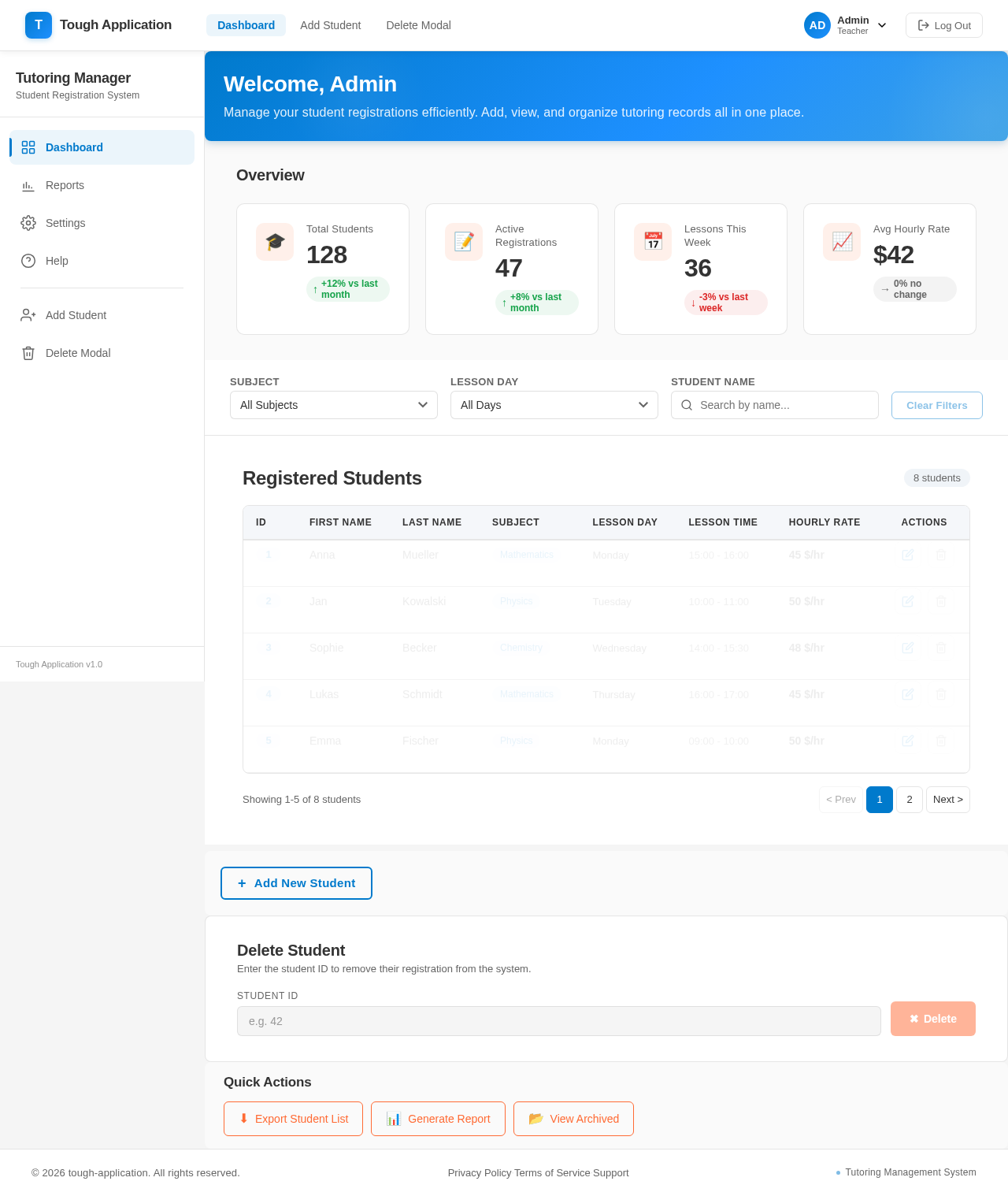
Welcome, Admin
Manage your student registrations efficiently. Add, view, and organize tutoring records all in one place.
Overview
Registered Students
8 students| ID | First Name | Last Name | Subject | Lesson Day | Lesson Time | Hourly Rate | Actions |
|---|---|---|---|---|---|---|---|
| 1 | Anna | Mueller | Mathematics | Monday | 15:00 - 16:00 | 45 $/hr | |
| 2 | Jan | Kowalski | Physics | Tuesday | 10:00 - 11:00 | 50 $/hr | |
| 3 | Sophie | Becker | Chemistry | Wednesday | 14:00 - 15:30 | 48 $/hr | |
| 4 | Lukas | Schmidt | Mathematics | Thursday | 16:00 - 17:00 | 45 $/hr | |
| 5 | Emma | Fischer | Physics | Monday | 09:00 - 10:00 | 50 $/hr |
Student Registration
Delete Student
Enter the student ID to remove their registration from the system.
No comments yet. Be the first!