todo-design
initiate a new project that implements basic calculator functions

Comments (0)
Sign in to leave a comment
System Requirements
fierce-calculator
todo-design
Introduction
The "fierce-calculator" project is designed to create a simple, user-friendly calculator tailored specifically for students in India. The primary goal is to provide a straightforward tool for basic arithmetic operations, aiding students in their academic pursuits.
The "todo-design" project is aimed at creating a simple, user-friendly calculator specifically tailored for students in India. The primary goal is to provide a straightforward tool for basic arithmetic operations, aiding students in their academic pursuits.
System Overview
The fierce-calculator is a web-based application that offers basic arithmetic functionalities. It is designed to be intuitive and accessible, ensuring that students can perform calculations quickly and efficiently. The application will focus on simplicity and ease of use, providing only the essential features necessary for basic computation.
The todo-design is a web-based application that offers basic arithmetic functionalities. It is designed to be intuitive and accessible, ensuring that students can perform calculations quickly and efficiently. The application will focus on simplicity and ease of use, providing only the essential features necessary for basic computation.
Functional Requirements
- As a Student, I should be able to perform addition of two numbers.
- As a Student, I should be able to perform subtraction of two numbers.
- As a Student, I should be able to perform multiplication of two numbers.
- As a Student, I should be able to perform division of two numbers.
User Personas
- Student: The primary user of the fierce-calculator. They require a simple interface to perform basic arithmetic operations to assist with their studies.
- Student: The primary user of the todo-design calculator. They require a simple interface to perform basic arithmetic operations to assist with their studies.
Visuals Colors and Theme
- primary: #4A90E2 (a calm blue, representing trust and reliability)
- primary_light: #A6C8FF (a lighter tint of the primary color for hover states)
- secondary: #F5A623 (a warm amber for emphasis and highlights)
- accent: #D0021B (a vibrant red for call-to-action buttons and active states)
- highlight: #F8E71C (a bright yellow for notifications and active indicators)
- bg: #FFFFFF (a clean white background for clarity)
- surface: rgba(255, 255, 255, 0.9) (a slightly translucent white for panels)
- text: #333333 (a dark gray for primary text for readability)
- text_muted: #777777 (a softer gray for secondary text)
- border: rgba(0, 0, 0, 0.1) (a subtle gray for borders)
- primary: #3B5998 (a deep indigo, symbolizing wisdom and reliability)
- primary_light: #8B9DC3 (a lighter tint of the primary color for hover states)
- secondary: #FF6F61 (a coral hue for emphasis and highlights)
- accent: #FFD700 (a vibrant gold for call-to-action buttons and active states)
- highlight: #FFB347 (a warm orange for notifications and active indicators)
- bg: #F5F5F5 (a soft gray background for clarity)
- surface: rgba(255, 255, 255, 0.95) (a slightly translucent white for panels)
- text: #2C2C2C (a dark charcoal for primary text for readability)
- text_muted: #6D6D6D (a softer gray for secondary text)
- border: rgba(0, 0, 0, 0.15) (a subtle gray for borders)
Signature Design Concept
The fierce-calculator will feature an interactive "floating calculator" design on the homepage. Users will see a 3D calculator model that they can rotate and interact with using their mouse or touch gestures. As users hover over different buttons, the calculator will animate with subtle lighting effects, giving a sense of depth and engagement. The calculator's display will dynamically update with each input, providing immediate feedback. This concept will be implemented using @react-three/fiber for the 3D model and framer-motion for smooth animations and transitions.
The todo-design calculator will feature an interactive "floating notebook" design on the homepage. Users will see a 3D notebook model that they can flip through using their mouse or touch gestures. Each page of the notebook will represent a different arithmetic operation, and as users hover over different sections, the notebook will animate with subtle page-turning effects, giving a sense of engagement and interaction. The notebook's display will dynamically update with each input, providing immediate feedback. This concept will be implemented using @react-three/fiber for the 3D model and framer-motion for smooth animations and transitions.
Interaction Model & Motion Direction
The landing page will utilize a "parallax" interaction model. The calculator will appear to float above a layered background that moves at different speeds as the user scrolls, creating a sense of depth. This approach will enhance the visual appeal and provide an engaging first impression. Internal pages, such as settings or history (if added in the future), will adopt a "static" model to prioritize clarity and ease of use.
The landing page will utilize a "parallax" interaction model. The notebook will appear to float above a layered background that moves at different speeds as the user scrolls, creating a sense of depth. This approach will enhance the visual appeal and provide an engaging first impression. Internal pages, such as settings or history (if added in the future), will adopt a "static" model to prioritize clarity and ease of use.
Non-Functional Requirements
- The application should load within 2 seconds on a standard broadband connection.
- The calculator must be responsive and accessible on both desktop and mobile devices.
- The system should handle up to 100 concurrent users without performance degradation.
Tech Stack
- Frontend: React for Web
- Backend: Python with FastAPI
- Database: Not applicable for this version as no data persistence is required.
Assumptions and Constraints
- The application is intended for educational purposes and is not designed for complex scientific calculations.
- The calculator will not store any user data or calculation history in this version.
- The application will be developed to support English as the primary language.
Glossary
- Arithmetic Operations: Basic mathematical functions including addition, subtraction, multiplication, and division.
- Responsive Design: An approach to web design that makes web pages render well on a variety of devices and window or screen sizes.
- 3D Model: A digital representation of a three-dimensional object used in the interactive design of the calculator.
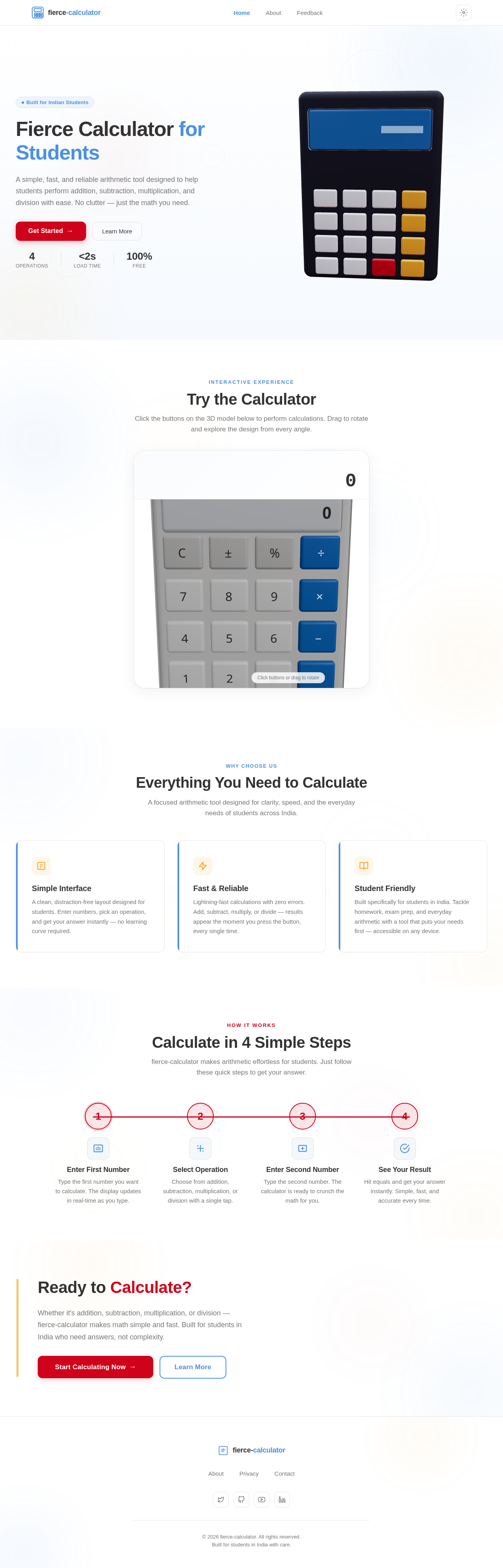
Fierce Calculator for Students
A simple, fast, and reliable arithmetic tool designed to help students perform addition, subtraction, multiplication, and division with ease. No clutter — just the math you need.
Interactive Experience
Try the Calculator
Click the buttons on the 3D model below to perform calculations. Drag to rotate and explore the design from every angle.
Everything You Need to Calculate
A focused arithmetic tool designed for clarity, speed, and the everyday needs of students across India.
Simple Interface
A clean, distraction-free layout designed for students. Enter numbers, pick an operation, and get your answer instantly — no learning curve required.
Fast & Reliable
Lightning-fast calculations with zero errors. Add, subtract, multiply, or divide — results appear the moment you press the button, every single time.
Student Friendly
Built specifically for students in India. Tackle homework, exam prep, and everyday arithmetic with a tool that puts your needs first — accessible on any device.
Calculate in 4 Simple Steps
fierce-calculator makes arithmetic effortless for students. Just follow these quick steps to get your answer.
Enter First Number
Type the first number you want to calculate. The display updates in real-time as you type.
Select Operation
Choose from addition, subtraction, multiplication, or division with a single tap.
Enter Second Number
Type the second number. The calculator is ready to crunch the math for you.
See Your Result
Hit equals and get your answer instantly. Simple, fast, and accurate every time.
Ready to Calculate?
Whether it's addition, subtraction, multiplication, or division — fierce-calculator makes math simple and fast. Built for students in India who need answers, not complexity.
Fierce Calculator for Students
A simple, fast, and reliable arithmetic tool designed to help students perform addition, subtraction, multiplication, and division with ease. No clutter — just the math you need.
Interactive Experience
Try the Calculator
Click the buttons on the 3D model below to perform calculations. Drag to rotate and explore the design from every angle.
Everything You Need to Calculate
A focused arithmetic tool designed for clarity, speed, and the everyday needs of students across India.
Simple Interface
A clean, distraction-free layout designed for students. Enter numbers, pick an operation, and get your answer instantly — no learning curve required.
Fast & Reliable
Lightning-fast calculations with zero errors. Add, subtract, multiply, or divide — results appear the moment you press the button, every single time.
Student Friendly
Built specifically for students in India. Tackle homework, exam prep, and everyday arithmetic with a tool that puts your needs first — accessible on any device.
Calculate in 4 Simple Steps
fierce-calculator makes arithmetic effortless for students. Just follow these quick steps to get your answer.
Enter First Number
Type the first number you want to calculate. The display updates in real-time as you type.
Select Operation
Choose from addition, subtraction, multiplication, or division with a single tap.
Enter Second Number
Type the second number. The calculator is ready to crunch the math for you.
See Your Result
Hit equals and get your answer instantly. Simple, fast, and accurate every time.
Ready to Calculate?
Whether it's addition, subtraction, multiplication, or division — fierce-calculator makes math simple and fast. Built for students in India who need answers, not complexity.
No comments yet. Be the first!