tinyplay-kids
 Yasu Tousif
Build a complete, production-ready Android app called "TinyPlay Kids" for babies (1–3 years) and children (3–8 years). It must be Google Play Families Policy and COPPA compliant, fast, and crash-free. PLATFORM - Android (Kotlin + Jetpack Compose), min SDK 24, target SDK 35 (latest required by Play Store). - Portrait and landscape supported. Works fully OFFLINE after install. - Output a signed release AAB (not just APK), ready for Play Store upload. HOME SCREEN - Large, colourful, rounded game icons (min 96dp touch size), no small text. - Two modes: "Baby Mode" (ages 1–3) and "Kids Mode" (ages 3–8). - Friendly mascot character that waves and speaks. - Parent Gate (small math question or press-and-hold 3 seconds) before settings, rating, or any external link. GAMES (each must start with one tap, no reading required) Baby Mode: 1. Tap & Pop Bubbles – bubbles float up, pop with sound and sparkle. 2. Animal Sounds – tap an animal, hear its sound, see it dance. 3. Colour Splash – touch screen to paint with fingers. 4. Shapes Sorting – drag big shapes into matching holes. Kids Mode: 5. Alphabet & Numbers Learning – letter/number with voice and picture. 6. Memory Match – flip cards (3 difficulty levels). 7. Puzzle – simple jigsaw (4, 6, 9 pieces). 8. Drawing & Colouring Book – 20 outlines, colour palette, undo, save. 9. Counting Fruits – count and tap the right number. 10. Catch the Stars – move basket left/right, endless but gentle. KEEP KIDS ENGAGED (no manipulation) - Instant positive feedback: cheerful sounds, confetti, stars after every success. - Never show "wrong" or "game over"; use "Try again!" with a gentle sound. - Daily star rewards, sticker collection book, unlockable mascot outfits (earned only by playing, never by buying). - Difficulty adapts automatically: easier after 2 mistakes, harder after 5 successes. - Short sessions (2–5 min per round) with a friendly "Take a break" reminder after 20 minutes. DESIGN - Bright pastel colours, big rounded buttons, smooth animations (60 fps). - Cartoon, friendly art; all assets original or royalty-free (no copyrighted characters). - Child-friendly voice and music; separate volume sliders for music and sound; mute button on every screen. - Large touch targets, no tiny buttons, no swipe gestures that are hard for toddlers. SAFETY & PLAY STORE COMPLIANCE - NO ads at launch (or only Google-certified family-safe ads if added later), no in-app purchases, no social features, no chat, no location, no contacts, no microphone, no camera. - No personal data collected. No analytics that identify children. No third-party trackers. - Only permissions allowed: none (do not request INTERNET unless absolutely required). - Include a Privacy Policy screen and a ready-to-host privacy policy text. - Include an in-app "For Parents" section: screen time limit, sound toggle, about. BUG-PREVENTION REQUIREMENTS - Handle screen rotation, app pause/resume, low memory, and back button without crashing. - Release sound players and animations properly (no memory leaks). - Null-safe code, try/catch around file and audio operations, graceful fallback if an asset fails to load. - Save progress locally (DataStore); corrupted data must reset safely, not crash. - Test on small, medium and large phones and tablets. - Enable ProGuard/R8 correctly and verify the release build runs the same as debug. - Write unit tests for game logic and run a full manual test checklist before final output. DELIVERABLES 1. Complete source code, organised in clean packages. 2. Step-by-step instructions to build the signed AAB and create the keystore. 3. Play Store listing text: app title, short description (80 chars), full description, keywords. 4. Data safety form answers (no data collected) and content rating answers (Everyone / Designed for Families). 5. App icon (512x512), feature graphic (1024x500) and screenshot ideas. 6. A final checklist confirming: no crashes, no warnings, no policy violations. Build it one game at a time. After each game, test it, fix every bug, and only then continue to the next. At the end, run a full review and list any remaining risks.

Comments (0)
Sign in to leave a comment
Project Tasks
61 planning tasksGenerate system requirement document
Generate personas & user flows
Create flow for Baby Mode Player (ages 1–3)
Create flow for Kids Mode Player (ages 3–8)
Create flow for Parent / Guardian
Home Screen
Fix Home Screen review findings: Tablet game grid uses three columns instead of the… (+7 more)
Fix Home Screen review findings: Tablet game grid uses three columns instead of the… (+5 more)
Home Screen / Navigation
Home Screen / Home Hero Band
Home Screen / Home Mode And Tile Grid
Home Screen / Footer
Navigation
Footer
Home Screen
Fix Home Screen review findings: Duplicate mute and parent controls appear on mobile… (+1 more)
Fix Home Screen review finding: frontend/src/components/Home Mode And Tile Grid.jsx: the Home…
Fix Home Screen review findings: frontend/src/components/Home Mode And Tile Grid.jsx: uses… (+1 more)
Home Screen / Navigation
Home Screen / Home Hero Band
Home Screen / Home Mode And Tile Grid
Home Screen / Footer
Design first page
Baby Mode
Kids Mode
Tap & Pop Bubbles
Animal Sounds
Colour Splash
Shapes Sorting
Alphabet & Numbers Learning
Memory Match
Puzzle
Drawing & Colouring Book
Counting Fruits
Catch the Stars
Privacy Policy
For Parents
Retry Failed Pages
Baby Mode
Baby Mode / Navigation Slot
Baby Mode / Hub Band
Baby Mode / Footer Slot
Tap & Pop Bubbles
Tap & Pop Bubbles / Tap Pop Bubbles Header Slot
Tap & Pop Bubbles / Tap Pop Bubbles Play Field
Tap & Pop Bubbles / Tap Pop Bubbles Footer Slot
Animal Sounds
Colour Splash
Shapes Sorting
Kids Mode
Alphabet & Numbers Learning
Memory Match
Puzzle
Drawing & Colouring Book
Counting Fruits
Catch the Stars
For Parents
Privacy Policy
Design remaining pages
Architecture
Workspace task plan
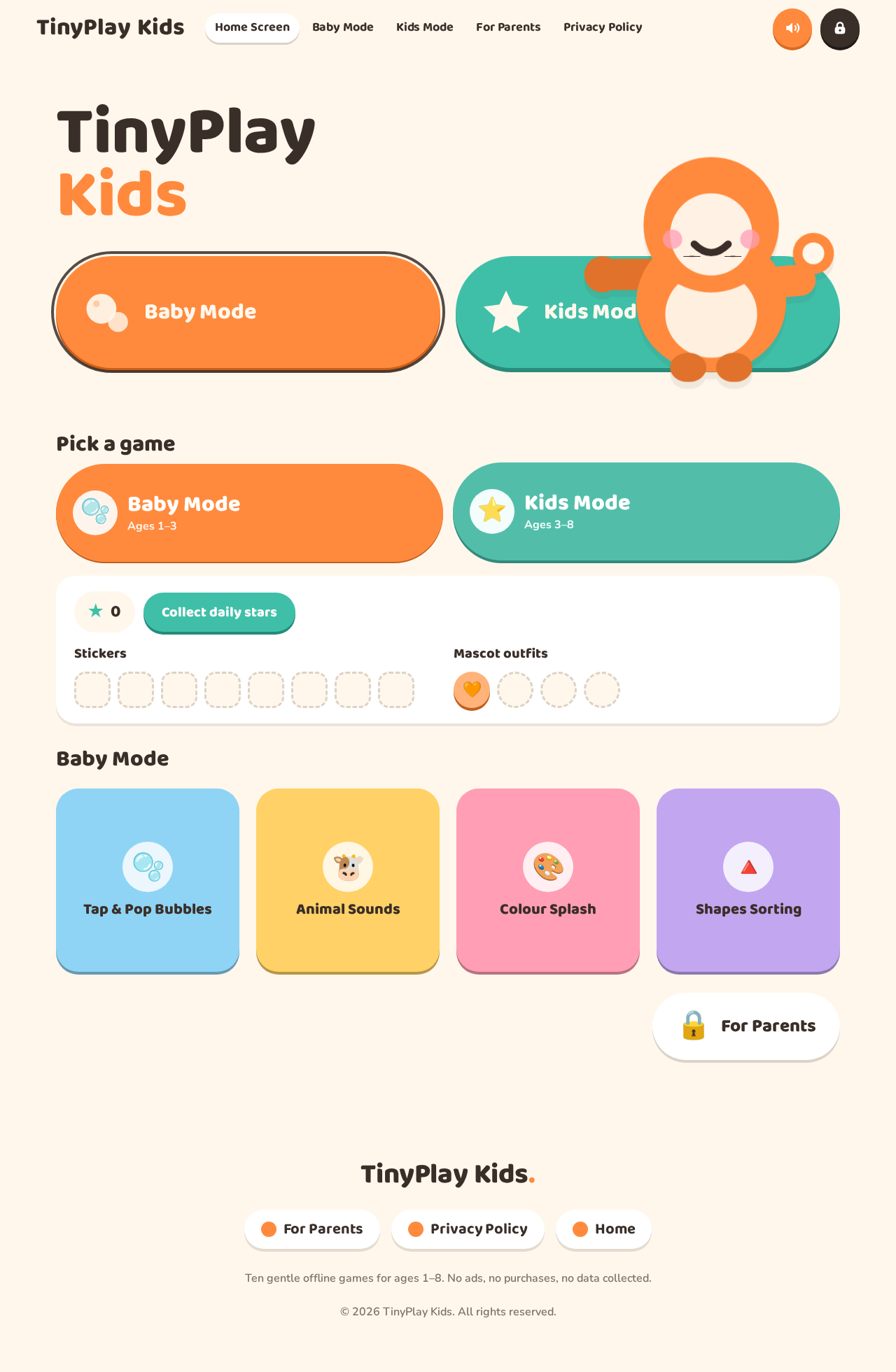
TinyPlayKids
Hi! Play with me.
Pick a game
0
Stickers
Mascot outfits
Baby Mode
TinyPlayKids
Hi! Play with me.
Pick a game
0
Stickers
Mascot outfits
No comments yet. Be the first!