tinyplay-kids
 Yasu Tousif
Build a complete, production-ready Android app called "TinyPlay Kids" for babies (1–3 years) and children (3–8 years). It must be Google Play Families Policy and COPPA compliant, fast, and crash-free. PLATFORM - Android (Kotlin + Jetpack Compose), min SDK 24, target SDK 35 (latest required by Play Store). - Portrait and landscape supported. Works fully OFFLINE after install. - Output a signed release AAB (not just APK), ready for Play Store upload. HOME SCREEN - Large, colourful, rounded game icons (min 96dp touch size), no small text. - Two modes: "Baby Mode" (ages 1–3) and "Kids Mode" (ages 3–8). - Friendly mascot character that waves and speaks. - Parent Gate (small math question or press-and-hold 3 seconds) before settings, rating, or any external link. GAMES (each must start with one tap, no reading required) Baby Mode: 1. Tap & Pop Bubbles – bubbles float up, pop with sound and sparkle. 2. Animal Sounds – tap an animal, hear its sound, see it dance. 3. Colour Splash – touch screen to paint with fingers. 4. Shapes Sorting – drag big shapes into matching holes. Kids Mode: 5. Alphabet & Numbers Learning – letter/number with voice and picture. 6. Memory Match – flip cards (3 difficulty levels). 7. Puzzle – simple jigsaw (4, 6, 9 pieces). 8. Drawing & Colouring Book – 20 outlines, colour palette, undo, save. 9. Counting Fruits – count and tap the right number. 10. Catch the Stars – move basket left/right, endless but gentle. KEEP KIDS ENGAGED (no manipulation) - Instant positive feedback: cheerful sounds, confetti, stars after every success. - Never show "wrong" or "game over"; use "Try again!" with a gentle sound. - Daily star rewards, sticker collection book, unlockable mascot outfits (earned only by playing, never by buying). - Difficulty adapts automatically: easier after 2 mistakes, harder after 5 successes. - Short sessions (2–5 min per round) with a friendly "Take a break" reminder after 20 minutes. DESIGN - Bright pastel colours, big rounded buttons, smooth animations (60 fps). - Cartoon, friendly art; all assets original or royalty-free (no copyrighted characters). - Child-friendly voice and music; separate volume sliders for music and sound; mute button on every screen. - Large touch targets, no tiny buttons, no swipe gestures that are hard for toddlers. SAFETY & PLAY STORE COMPLIANCE - NO ads at launch (or only Google-certified family-safe ads if added later), no in-app purchases, no social features, no chat, no location, no contacts, no microphone, no camera. - No personal data collected. No analytics that identify children. No third-party trackers. - Only permissions allowed: none (do not request INTERNET unless absolutely required). - Include a Privacy Policy screen and a ready-to-host privacy policy text. - Include an in-app "For Parents" section: screen time limit, sound toggle, about. BUG-PREVENTION REQUIREMENTS - Handle screen rotation, app pause/resume, low memory, and back button without crashing. - Release sound players and animations properly (no memory leaks). - Null-safe code, try/catch around file and audio operations, graceful fallback if an asset fails to load. - Save progress locally (DataStore); corrupted data must reset safely, not crash. - Test on small, medium and large phones and tablets. - Enable ProGuard/R8 correctly and verify the release build runs the same as debug. - Write unit tests for game logic and run a full manual test checklist before final output. DELIVERABLES 1. Complete source code, organised in clean packages. 2. Step-by-step instructions to build the signed AAB and create the keystore. 3. Play Store listing text: app title, short description (80 chars), full description, keywords. 4. Data safety form answers (no data collected) and content rating answers (Everyone / Designed for Families). 5. App icon (512x512), feature graphic (1024x500) and screenshot ideas. 6. A final checklist confirming: no crashes, no warnings, no policy violations. Build it one game at a time. After each game, test it, fix every bug, and only then continue to the next. At the end, run a full review and list any remaining risks.

Comments (0)
Sign in to leave a comment
System Requirements
System Requirements Document for tinyplay-kids
1. Introduction
TinyPlay Kids is a complete, production-ready Android application for babies (1–3 years) and young children (3–8 years). It is a fully offline collection of ten one-tap games, split into two age-appropriate modes — Baby Mode (ages 1–3) and Kids Mode (ages 3–8) — wrapped in a warm, cartoon, non-competitive play experience that a parent can trust. The product must be Google Play Families Policy and COPPA compliant, fast, and crash-free.
The audience is twofold. The primary players are toddlers who cannot read and young children who are emerging readers; they interact by tapping, dragging, and touching the screen, and they must never encounter a "wrong" state, a "game over" screen, a purchase prompt, an advertisement, or any external link. The secondary audience is the parent or guardian who installs the app, decides whether it is safe, and configures screen-time and sound settings behind a Parent Gate.
The product is delivered as a signed release AAB ready for Play Store upload, together with complete source code, build instructions, store listing text, data safety and content rating answers, store graphics, and a final verification checklist.
2. System Overview
TinyPlay Kids is a single Android application built with Kotlin and Jetpack Compose, targeting min SDK 24 and target SDK 35. It runs fully offline after install and requests no runtime permissions. All game content, audio, and art ship inside the app package.
The app opens on a Home Screen that presents the wordmark, a friendly waving mascot that speaks a short greeting, two large mode pills ("Baby Mode" 1–3 and "Kids Mode" 3–8), and a grid of large colourful rounded game tiles. Selecting a mode switches the tile grid and the mascot outfit. Every game starts with one tap and requires no reading.
Ten games are provided. Baby Mode contains Tap & Pop Bubbles, Animal Sounds, Colour Splash, and Shapes Sorting. Kids Mode contains Alphabet & Numbers Learning, Memory Match, Puzzle, Drawing & Colouring Book, Counting Fruits, and Catch the Stars.
Engagement is built on positive reinforcement only: cheerful sounds, confetti, and stars after every success; "Try again!" with a gentle sound instead of any failure state; daily star rewards; a sticker collection book; and unlockable mascot outfits earned only by playing. Difficulty adapts automatically — easier after 2 mistakes, harder after 5 successes. Rounds are short (2–5 minutes) and a friendly "Take a break" reminder appears after 20 minutes.
A Parent Gate (a small math question or a 3-second press-and-hold) protects settings, rating, and any external link. Behind it, the "For Parents" section provides a screen time limit, a sound toggle, and about information, and the Privacy Policy screen presents the policy text.
2a. Product Interpretation and Delivery Boundary
TinyPlay Kids is delivered as a first-party, self-contained Android application. There is no account, no sign-in, no server, and no network dependency: the app is installed from the Play Store and then works entirely offline. All progress, preferences, stars, stickers, and unlocked outfits are stored locally on the device with DataStore, and corrupted data resets safely rather than crashing.
Access is intentionally open for the child-facing surfaces. The Home Screen, both mode hubs, and all ten games are reachable without any identity or gate, because the players are toddlers and young children who cannot authenticate. The only protected boundary in the product is the Parent Gate, which stands between the child surface and parent-facing destinations (settings, rating, external links, and the "For Parents" and Privacy Policy content). This gate is a child-proofing interaction, not an account system.
Current scope is the ten games, the two mode hubs, the Home Screen, the Parent Gate, the "For Parents" section, and the Privacy Policy screen, plus the offline local persistence and lifecycle safety that make them usable. Explicitly out of current scope: advertisements at launch (only Google-certified family-safe ads may be added later), in-app purchases, social features, chat, location, contacts, microphone, camera, personal data collection, child-identifying analytics, and third-party trackers. The app requests no permissions and does not request INTERNET unless it becomes absolutely required.
2b. Source Content Inventory
Not applicable. No reference directive in this project declares a content_source, so no source content inventory is produced.
2c. Page Content and Component Coverage
Home Screen
- Information and state: Full-bleed cream (#FFF7EC) hero band containing the "TinyPlay Kids" wordmark in Baloo 2 800, the waving mascot overlapping the wordmark's right edge, and two giant mode pills ("Baby Mode" 1–3 with a bubble illustration, "Kids Mode" 3–8 with a star illustration). Below the hero, a 2-column grid of game tiles (3 columns at 600dp+, 4 columns at 840dp+). A persistent mute toggle (56dp) and a "For Parents" padlock control (56dp) sit top-right. A star counter is visible in a corner.
- Primary actions: Tap a mode pill to switch the entire tile grid and mascot outfit; tap a game tile to launch that game with one tap; tap the mute toggle to mute/unmute; tap the "For Parents" padlock to begin the Parent Gate.
- Supporting actions: Mascot waves on a 2.4s loop and blinks every 5s; mascot speaks a short greeting on first launch (suppressed when muted).
- Domain entities: Game tile (name, pictogram, pastel colour, mode membership), mode (Baby/Kids), mascot (outfit state), star counter, mute state.
- Component responsibilities: Hero band renders wordmark and mascot; mode pill row renders the two mode selectors; game tile grid renders the mode's tiles as offset-shadow stickers; top-right control cluster renders mute and padlock; star counter renders accumulated stars.
- States: Loading — brief asset warm-up with a static mascot frame. Empty — not applicable (tiles are fixed). Success — tile press scales to 0.94 with a 120ms spring and launches the game. Error/recovery — if an asset fails to load, the tile falls back to a coloured shape with its label, never an empty box.
Baby Mode
- Information and state: Mode hub for the four toddler games, presented as large colourful rounded tiles (min 96dp touch target, rendered ~160dp on phones, ~200dp on tablets) with a large pictogram and one short label. Mascot shown in its Baby Mode outfit. Persistent mute toggle and a 64dp round back pill.
- Primary actions: Tap a game tile to start that game with one tap; tap back to return to the Home Screen; tap mute.
- Supporting actions: Mascot idle animation; tile press spring.
- Domain entities: Baby Mode game tile (Tap & Pop Bubbles, Animal Sounds, Colour Splash, Shapes Sorting), mascot outfit, mute state.
- Component responsibilities: Tile grid renders the four Baby Mode games; back pill returns to Home; mute toggle controls audio.
- States: Loading — static frame while tiles compose. Empty — not applicable. Success — tile press launches the game. Error/recovery — missing pictogram falls back to a coloured shape with the label.
Kids Mode
- Information and state: Mode hub for the six Kids Mode games and learning activities, presented as large colourful rounded tiles with a large pictogram and one short label. Mascot shown in its Kids Mode outfit. Persistent mute toggle and a 64dp round back pill.
- Primary actions: Tap a game tile to start that game with one tap; tap back to return to the Home Screen; tap mute.
- Supporting actions: Mascot idle animation; tile press spring.
- Domain entities: Kids Mode game tile (Alphabet & Numbers Learning, Memory Match, Puzzle, Drawing & Colouring Book, Counting Fruits, Catch the Stars), mascot outfit, mute state.
- Component responsibilities: Tile grid renders the six Kids Mode games; back pill returns to Home; mute toggle controls audio.
- States: Loading — static frame while tiles compose. Empty — not applicable. Success — tile press launches the game. Error/recovery — missing pictogram falls back to a coloured shape with the label.
Tap & Pop Bubbles
- Information and state: A play field where bubbles float upward. Each popped bubble produces a sound and a sparkle. A star counter increments on each pop. Persistent mute toggle and a 64dp round back pill.
- Primary actions: Tap a bubble to pop it.
- Supporting actions: Bubbles float continuously; sparkle animation on pop; cheerful sound on pop; confetti burst on success milestones.
- Domain entities: Bubble (position, size, colour), pop event, sparkle effect, star counter.
- Component responsibilities: Play field renders and animates bubbles; pop handler triggers sound, sparkle, and star increment; star counter renders progress.
- States: Loading — static frame while the field composes. Empty — field begins with bubbles already floating. Success — pop produces sound, sparkle, and a star. Error/recovery — if a sound asset fails, the pop still shows sparkle and star; if the field fails to compose, a coloured placeholder with the game label is shown.
Animal Sounds
- Information and state: A set of large animal figures. Tapping an animal plays its sound and makes it dance. Persistent mute toggle and a 64dp round back pill.
- Primary actions: Tap an animal to hear its sound and see it dance.
- Supporting actions: Animal dance animation; cheerful sound; confetti on repeated success.
- Domain entities: Animal (name, figure, sound asset, dance animation), tap event.
- Component responsibilities: Animal grid renders figures; tap handler plays sound and triggers dance; mute toggle controls audio.
- States: Loading — static frame while animals compose. Empty — not applicable. Success — tap plays sound and dance. Error/recovery — if an animal sound fails to load, the animal still dances and a gentle fallback tone plays; missing figure falls back to a coloured shape with the animal label.
Colour Splash
- Information and state: A blank canvas that the child paints on with fingers. A colour palette is available. Persistent mute toggle and a 64dp round back pill.
- Primary actions: Touch and drag on the canvas to paint; select a colour from the palette.
- Supporting actions: Cheerful sound on colour selection; confetti on completed strokes.
- Domain entities: Canvas, stroke (path, colour, width), palette colour.
- Component responsibilities: Canvas renders and captures touch strokes; palette renders colour choices; mute toggle controls audio.
- States: Loading — static frame while the canvas composes. Empty — blank canvas ready to paint. Success — strokes render immediately. Error/recovery — if the canvas fails to compose, a coloured placeholder with the game label is shown.
Shapes Sorting
- Information and state: Large shapes and matching holes. The child drags each shape into its matching hole. Persistent mute toggle and a 64dp round back pill.
- Primary actions: Drag a big shape into the matching hole.
- Supporting actions: Cheerful sound and sparkle on correct match; confetti on completion; gentle "Try again!" with a gentle sound if the shape does not match.
- Domain entities: Shape (type, colour, position), hole (type, position), match event.
- Component responsibilities: Shape tray renders draggable shapes; hole board renders target holes; match handler validates placement and triggers feedback; mute toggle controls audio.
- States: Loading — static frame while shapes compose. Empty — not applicable. Success — correct match snaps the shape, plays sound, and shows sparkle. Error/recovery — a non-matching drop shows "Try again!" with a gentle sound and returns the shape; missing shape art falls back to a coloured shape with the label.
Alphabet & Numbers Learning
- Information and state: A letter or number displayed with a voice pronunciation and a picture. Persistent mute toggle and a 64dp round back pill.
- Primary actions: Tap a letter or number to hear its voice and see its picture.
- Supporting actions: Cheerful sound on tap; confetti on success; star increment.
- Domain entities: Letter, number, voice asset, picture asset, star counter.
- Component responsibilities: Letter/number display renders the glyph and picture; tap handler plays the voice; star counter renders progress; mute toggle controls audio.
- States: Loading — static frame while content composes. Empty — not applicable. Success — tap plays voice and shows picture. Error/recovery — if a voice asset fails, the picture still shows and a gentle fallback tone plays; missing picture falls back to a coloured shape with the label.
Memory Match
- Information and state: A grid of face-down cards with three difficulty levels. The child flips cards to find matching pairs. Persistent mute toggle and a 64dp round back pill.
- Primary actions: Tap a card to flip it; select a difficulty level.
- Supporting actions: Cheerful sound on match; confetti on completed board; gentle "Try again!" with a gentle sound on a non-match; star increment.
- Domain entities: Card (face, position, flipped state), difficulty level (3 levels), match event, star counter.
- Component responsibilities: Card grid renders and flips cards; difficulty selector renders the three levels; match handler validates pairs and triggers feedback; star counter renders progress; mute toggle controls audio.
- States: Loading — static frame while the board composes. Empty — not applicable. Success — matched pair stays face-up with sound and confetti. Error/recovery — non-match flips cards back with "Try again!" and a gentle sound; missing card art falls back to a coloured shape with the label.
Puzzle
- Information and state: A simple jigsaw with 4, 6, or 9 pieces. The child drags pieces into place. Persistent mute toggle and a 64dp round back pill.
- Primary actions: Drag a puzzle piece into its place; select a piece count (4, 6, or 9).
- Supporting actions: Cheerful sound on correct placement; confetti on completion; gentle "Try again!" with a gentle sound on incorrect placement; star increment.
- Domain entities: Puzzle piece (image region, position, placed state), piece count (4/6/9), star counter.
- Component responsibilities: Piece tray renders draggable pieces; board renders target slots; placement handler validates and triggers feedback; piece-count selector renders the three options; star counter renders progress; mute toggle controls audio.
- States: Loading — static frame while the puzzle composes. Empty — not applicable. Success — correct placement snaps the piece with sound and confetti. Error/recovery — incorrect placement shows "Try again!" with a gentle sound and returns the piece; missing piece art falls back to a coloured shape with the label.
Drawing & Colouring Book
- Information and state: 20 outlines to colour, a colour palette, an undo control, and a save control. Persistent mute toggle and a 64dp round back pill.
- Primary actions: Select an outline; select a colour; colour the outline; undo the last action; save the drawing locally.
- Supporting actions: Cheerful sound on colour selection; confetti on save; star increment.
- Domain entities: Outline (20 outlines), colour palette, stroke, undo stack, saved drawing (local file), star counter.
- Component responsibilities: Outline selector renders the 20 outlines; canvas renders and captures colouring strokes; palette renders colour choices; undo control reverses the last stroke; save control writes the drawing locally; star counter renders progress; mute toggle controls audio.
- States: Loading — static frame while outlines compose. Empty — blank outline ready to colour. Success — save writes the drawing and shows confetti. Error/recovery — if saving fails, a gentle message appears and the drawing remains on screen; missing outline art falls back to a coloured shape with the label.
Counting Fruits
- Information and state: A set of fruits to count and a set of number choices. The child counts the fruits and taps the right number. Persistent mute toggle and a 64dp round back pill.
- Primary actions: Count the fruits; tap the correct number.
- Supporting actions: Cheerful sound and confetti on correct answer; gentle "Try again!" with a gentle sound on incorrect answer; star increment.
- Domain entities: Fruit (type, position), number choice, answer event, star counter.
- Component responsibilities: Fruit display renders countable fruits; number choice row renders selectable numbers; answer handler validates and triggers feedback; star counter renders progress; mute toggle controls audio.
- States: Loading — static frame while content composes. Empty — not applicable. Success — correct answer shows sound, confetti, and a star. Error/recovery — incorrect answer shows "Try again!" with a gentle sound; missing fruit art falls back to a coloured shape with the label.
Catch the Stars
- Information and state: A basket that moves left and right, and stars that fall gently. The game is endless but gentle. Persistent mute toggle and a 64dp round back pill.
- Primary actions: Move the basket left or right to catch falling stars.
- Supporting actions: Cheerful sound and sparkle on catch; confetti on milestones; star increment.
- Domain entities: Basket (position), star (position, fall speed), catch event, star counter.
- Component responsibilities: Play field renders the basket and falling stars; movement handler moves the basket; catch handler triggers sound, sparkle, and star increment; star counter renders progress; mute toggle controls audio.
- States: Loading — static frame while the field composes. Empty — field begins with stars already falling. Success — catch produces sound, sparkle, and a star. Error/recovery — if the field fails to compose, a coloured placeholder with the game label is shown; missing star art falls back to a coloured shape.
Privacy Policy
- Information and state: The in-app privacy policy text, presented in parent-facing typography (Nunito, min 16sp, 18sp in the For Parents section). Reachable only after the Parent Gate. A 64dp round back pill.
- Primary actions: Read the policy; tap back to return.
- Supporting actions: None beyond navigation.
- Domain entities: Privacy policy text (ready-to-host).
- Component responsibilities: Policy text renderer; back pill.
- States: Loading — static frame while text composes. Empty — not applicable. Success — policy text renders fully. Error/recovery — if text fails to load, a fallback message with the policy summary is shown.
For Parents
- Information and state: A parent-gated area containing a screen time limit control, a sound toggle, and about information. Parent-facing typography (Nunito, min 16sp, 18sp in this section). A 64dp round back pill.
- Primary actions: Set the screen time limit; toggle sound; read about information; navigate to the Privacy Policy.
- Supporting actions: None beyond navigation and settings changes.
- Domain entities: Screen time limit setting, sound toggle setting, about information, privacy policy link.
- Component responsibilities: Screen time limit control renders and persists the limit; sound toggle renders and persists the sound state; about section renders app information; privacy policy link navigates to the Privacy Policy screen; back pill returns.
- States: Loading — static frame while settings compose. Empty — not applicable. Success — settings changes persist locally. Error/recovery — if settings fail to load, defaults are shown and a gentle message appears.
3. Functional Requirements
FR-1 — Install and launch offline. As a Parent / Guardian, I should install the signed offline Android application with no runtime permissions, so that my child can play without any network access. (required_inference)
- Trigger/input: Install the signed release AAB from the Play Store and launch the app.
- Observable result: The app opens on the Home Screen and all content is available without a network connection.
- Access state: No identity or gate required.
- Failure/recovery: If an asset fails to load, a coloured shape with the label is shown instead of an empty box.
- Continuation: The child can select a mode and start a game.
FR-2 — Home Screen with large colourful rounded game icons. As a Baby Mode Player (ages 1–3) or Kids Mode Player (ages 3–8), I should see large, colourful, rounded game icons (min 96dp touch size) with no small text, so that I can start a game by tapping a big picture. (explicit)
- Trigger/input: Open the app.
- Observable result: The Home Screen shows the wordmark, mascot, two mode pills, and a grid of large rounded game tiles.
- Access state: No identity or gate required.
- Failure/recovery: Missing pictogram falls back to a coloured shape with the label.
- Continuation: Tapping a tile starts the game with one tap.
FR-3 — Two modes: Baby Mode and Kids Mode. As a Baby Mode Player (ages 1–3) or Kids Mode Player (ages 3–8), I should see two modes — "Baby Mode" (ages 1–3) and "Kids Mode" (ages 3–8) — so that I get games suited to my age. (explicit)
- Trigger/input: Tap a mode pill on the Home Screen.
- Observable result: The entire tile grid and the mascot outfit switch to the selected mode.
- Access state: No identity or gate required.
- Failure/recovery: If the mode switch fails, the previous mode remains visible.
- Continuation: The child taps a game tile in the selected mode.
FR-4 — Friendly mascot that waves and speaks. As a Baby Mode Player (ages 1–3) or Kids Mode Player (ages 3–8), I should see a friendly mascot character that waves and speaks, so that the app feels welcoming. (explicit)
- Trigger/input: Open the app or switch modes.
- Observable result: The mascot waves on a 2.4s loop, blinks every 5s, and speaks a short greeting on first launch.
- Access state: No identity or gate required.
- Failure/recovery: If the greeting audio fails, the mascot still waves and blinks; if muted, the greeting is suppressed.
- Continuation: The child proceeds to select a mode or game.
FR-5 — Parent Gate before settings, rating, or external links. As a Parent / Guardian, I should complete the Parent Gate (a small math question or a press-and-hold 3 seconds) before accessing settings, rating, or any external link, so that my child cannot reach them. (explicit)
- Trigger/input: Tap the "For Parents" padlock or any control that leads to settings, rating, or an external link.
- Observable result: A press-and-hold 3-second ring fills around the padlock, with a small math fallback; only after completion does the protected destination open.
- Access state: The gate is the only protected boundary; child-facing surfaces remain open.
- Failure/recovery: If the gate is not completed, the protected destination does not open and the child surface remains.
- Continuation: After passing the gate, the parent reaches the protected destination.
FR-6 — Tap & Pop Bubbles. As a Baby Mode Player (ages 1–3), I should tap floating bubbles and see them pop with sound and sparkle, so that I get instant playful feedback. (explicit)
- Trigger/input: Tap a bubble in the play field.
- Observable result: The bubble pops with a cheerful sound and a sparkle, and a star is added to the counter.
- Access state: No identity or gate required.
- Failure/recovery: If the sound asset fails, the pop still shows sparkle and star.
- Continuation: More bubbles float up and the child can keep popping.
FR-7 — Animal Sounds. As a Baby Mode Player (ages 1–3), I should tap an animal, hear its sound, and see it dance, so that I learn animal sounds through play. (explicit)
- Trigger/input: Tap an animal figure.
- Observable result: The animal's sound plays and the animal dances.
- Access state: No identity or gate required.
- Failure/recovery: If the animal sound fails, the animal still dances and a gentle fallback tone plays.
- Continuation: The child can tap another animal.
FR-8 — Colour Splash. As a Baby Mode Player (ages 1–3), I should touch the screen to paint with my fingers, so that I can make colourful marks. (explicit)
- Trigger/input: Touch and drag on the canvas; select a colour from the palette.
- Observable result: Colourful strokes appear where the child touches.
- Access state: No identity or gate required.
- Failure/recovery: If the canvas fails to compose, a coloured placeholder with the game label is shown.
- Continuation: The child can keep painting or select another colour.
FR-9 — Shapes Sorting. As a Baby Mode Player (ages 1–3), I should drag big shapes into matching holes, so that I learn shape matching. (explicit)
- Trigger/input: Drag a big shape toward a hole.
- Observable result: A correct match snaps the shape into the hole with a cheerful sound and sparkle; a non-match shows "Try again!" with a gentle sound.
- Access state: No identity or gate required.
- Failure/recovery: A non-matching drop returns the shape with "Try again!" and a gentle sound.
- Continuation: The child can try another shape or hole.
FR-10 — Alphabet & Numbers Learning. As a Kids Mode Player (ages 3–8), I should see a letter or number with voice and picture, so that I learn letters and numbers. (explicit)
- Trigger/input: Tap a letter or number.
- Observable result: The voice pronounces the letter or number and the picture is shown.
- Access state: No identity or gate required.
- Failure/recovery: If the voice asset fails, the picture still shows and a gentle fallback tone plays.
- Continuation: The child can tap another letter or number.
FR-11 — Memory Match. As a Kids Mode Player (ages 3–8), I should flip cards at 3 difficulty levels, so that I can match pairs at a level that suits me. (explicit)
- Trigger/input: Tap a card to flip it; select a difficulty level.
- Observable result: Matched pairs stay face-up with a cheerful sound and confetti; non-matches flip back with "Try again!" and a gentle sound.
- Access state: No identity or gate required.
- Failure/recovery: Non-matches flip back with "Try again!" and a gentle sound.
- Continuation: The child can keep flipping or change difficulty.
FR-12 — Puzzle. As a Kids Mode Player (ages 3–8), I should complete a simple jigsaw with 4, 6, or 9 pieces, so that I can build a picture at a level that suits me. (explicit)
- Trigger/input: Drag a puzzle piece into its place; select a piece count (4, 6, or 9).
- Observable result: Correct placements snap with a cheerful sound and confetti; incorrect placements show "Try again!" with a gentle sound.
- Access state: No identity or gate required.
- Failure/recovery: Incorrect placements return the piece with "Try again!" and a gentle sound.
- Continuation: The child can keep placing pieces or change piece count.
FR-13 — Drawing & Colouring Book. As a Kids Mode Player (ages 3–8), I should colour 20 outlines with a colour palette, undo, and save, so that I can create and keep my drawings. (explicit)
- Trigger/input: Select an outline; select a colour; colour the outline; tap undo; tap save.
- Observable result: Colouring strokes render; undo reverses the last stroke; save writes the drawing locally with confetti.
- Access state: No identity or gate required.
- Failure/recovery: If saving fails, a gentle message appears and the drawing remains on screen.
- Continuation: The child can continue colouring or select another outline.
FR-14 — Counting Fruits. As a Kids Mode Player (ages 3–8), I should count fruits and tap the right number, so that I practise counting. (explicit)
- Trigger/input: Count the fruits; tap a number.
- Observable result: A correct answer shows a cheerful sound, confetti, and a star; an incorrect answer shows "Try again!" with a gentle sound.
- Access state: No identity or gate required.
- Failure/recovery: An incorrect answer shows "Try again!" with a gentle sound.
- Continuation: The child can try again or move to the next set.
FR-15 — Catch the Stars. As a Kids Mode Player (ages 3–8), I should move a basket left and right to catch stars in an endless but gentle game, so that I can play without pressure. (explicit)
- Trigger/input: Move the basket left or right.
- Observable result: Caught stars produce a cheerful sound, sparkle, and a star increment; the game continues endlessly.
- Access state: No identity or gate required.
- Failure/recovery: If the field fails to compose, a coloured placeholder with the game label is shown.
- Continuation: The game continues endlessly and gently.
FR-16 — Each game starts with one tap, no reading required. As a Baby Mode Player (ages 1–3) or Kids Mode Player (ages 3–8), I should start each game with one tap and no reading, so that I can play independently. (explicit)
- Trigger/input: Tap a game tile.
- Observable result: The game starts immediately.
- Access state: No identity or gate required.
- Failure/recovery: If the game fails to start, the tile remains and can be tapped again.
- Continuation: The child plays the game.
FR-17 — Instant positive feedback. As a Baby Mode Player (ages 1–3) or Kids Mode Player (ages 3–8), I should get cheerful sounds, confetti, and stars after every success, so that I feel encouraged. (explicit)
- Trigger/input: Complete a successful action in any game.
- Observable result: A cheerful sound plays, confetti bursts, and a star is added to the counter.
- Access state: No identity or gate required.
- Failure/recovery: If a sound asset fails, confetti and star still appear.
- Continuation: The child continues playing.
FR-18 — Never show "wrong" or "game over". As a Baby Mode Player (ages 1–3) or Kids Mode Player (ages 3–8), I should never see "wrong" or "game over", and instead see "Try again!" with a gentle sound, so that I am never discouraged. (explicit)
- Trigger/input: Make a non-matching or incorrect action.
- Observable result: "Try again!" appears with a gentle sound; no failure state is shown.
- Access state: No identity or gate required.
- Failure/recovery: The gentle "Try again!" response is the recovery.
- Continuation: The child can try again.
FR-19 — Daily star rewards, sticker collection book, and unlockable mascot outfits. As a Kids Mode Player (ages 3–8), I should earn daily star rewards, collect stickers, and unlock mascot outfits only by playing, so that I have goals without any purchase. (explicit)
- Trigger/input: Play games and accumulate stars.
- Observable result: Daily star rewards are granted, stickers are added to the collection book, and mascot outfits unlock as stars accumulate.
- Access state: No identity or gate required.
- Failure/recovery: If progress data is corrupted, it resets safely without crashing.
- Continuation: The child continues playing to earn more.
FR-20 — Difficulty adapts automatically. As a Kids Mode Player (ages 3–8), I should have difficulty adapt automatically — easier after 2 mistakes, harder after 5 successes — so that the game stays at my level. (explicit)
- Trigger/input: Make 2 mistakes or achieve 5 successes.
- Observable result: The difficulty becomes easier after 2 mistakes and harder after 5 successes, silently.
- Access state: No identity or gate required.
- Failure/recovery: Difficulty changes are silent and never signal a mistake.
- Continuation: The child continues playing at the adapted difficulty.
FR-21 — Short sessions with a "Take a break" reminder. As a Baby Mode Player (ages 1–3) or Kids Mode Player (ages 3–8), I should have short sessions (2–5 min per round) with a friendly "Take a break" reminder after 20 minutes, so that I do not play too long. (explicit)
- Trigger/input: Play continuously for 20 minutes.
- Observable result: A friendly "Take a break" reminder appears.
- Access state: No identity or gate required.
- Failure/recovery: The reminder is gentle and does not interrupt play abruptly.
- Continuation: The child can continue or take a break.
FR-22 — Bright pastel colours, big rounded buttons, smooth animations (60 fps). As a Baby Mode Player (ages 1–3) or Kids Mode Player (ages 3–8), I should see bright pastel colours, big rounded buttons, and smooth animations at 60 fps, so that the app feels pleasant and responsive. (explicit)
- Trigger/input: Interact with any screen.
- Observable result: Colours are bright pastel, buttons are big and rounded, and animations run smoothly at 60 fps.
- Access state: No identity or gate required.
- Failure/recovery: If animations cannot run smoothly, a static frame is shown.
- Continuation: The child continues interacting.
FR-23 — Cartoon, friendly art; all assets original or royalty-free. As a Parent / Guardian, I should see cartoon, friendly art with all assets original or royalty-free and no copyrighted characters, so that the app is safe and legally clean. (explicit)
- Trigger/input: View any screen.
- Observable result: All art is cartoon and friendly, original or royalty-free, with no copyrighted characters.
- Access state: No identity or gate required.
- Failure/recovery: Missing art falls back to a coloured shape with the label.
- Continuation: The child continues playing.
FR-24 — Child-friendly voice and music; separate volume sliders; mute button on every screen. As a Parent / Guardian, I should have child-friendly voice and music, separate volume sliders for music and sound, and a mute button on every screen, so that I can control audio. (explicit)
- Trigger/input: Adjust the music slider, adjust the sound slider, or tap the mute button.
- Observable result: Music and sound volumes change independently; mute silences all audio.
- Access state: The mute button is available on every screen; volume sliders are in the parent-gated "For Parents" section.
- Failure/recovery: If an audio asset fails, the app continues silently without crashing.
- Continuation: The child continues playing with the chosen audio settings.
FR-25 — Large touch targets, no tiny buttons, no hard swipe gestures. As a Baby Mode Player (ages 1–3), I should have large touch targets, no tiny buttons, and no swipe gestures that are hard for toddlers, so that I can play easily. (explicit)
- Trigger/input: Interact with any control.
- Observable result: All touch targets are large (min 96dp for game tiles) and no hard swipe gestures are required.
- Access state: No identity or gate required.
- Failure/recovery: If a touch misses, the control remains available.
- Continuation: The child continues interacting.
FR-26 — No ads at launch, no in-app purchases, no social features, no chat, no location, no contacts, no microphone, no camera. As a Parent / Guardian, I should have no ads at launch (or only Google-certified family-safe ads if added later), no in-app purchases, no social features, no chat, no location, no contacts, no microphone, and no camera, so that my child is safe. (explicit)
- Trigger/input: Use the app.
- Observable result: None of these features are present.
- Access state: Not applicable.
- Failure/recovery: Not applicable.
- Continuation: The child plays safely.
FR-27 — No personal data collected; no child-identifying analytics; no third-party trackers. As a Parent / Guardian, I should have no personal data collected, no analytics that identify children, and no third-party trackers, so that my child's privacy is protected. (explicit)
- Trigger/input: Use the app.
- Observable result: No personal data is collected, no child-identifying analytics run, and no third-party trackers are present.
- Access state: Not applicable.
- Failure/recovery: Not applicable.
- Continuation: The child plays privately.
FR-28 — Only permissions allowed: none. As a Parent / Guardian, I should have the app request no permissions (and not request INTERNET unless absolutely required), so that the app cannot access sensitive capabilities. (explicit)
- Trigger/input: Install and use the app.
- Observable result: The app requests no permissions.
- Access state: Not applicable.
- Failure/recovery: Not applicable.
- Continuation: The child plays offline.
FR-29 — Privacy Policy screen and ready-to-host privacy policy text. As a Parent / Guardian, I should have a Privacy Policy screen and a ready-to-host privacy policy text, so that I can review the policy. (explicit)
- Trigger/input: Pass the Parent Gate and open the Privacy Policy screen.
- Observable result: The privacy policy text is displayed in-app and is available as ready-to-host text.
- Access state: Protected by the Parent Gate.
- Failure/recovery: If the text fails to load, a fallback message with the policy summary is shown.
- Continuation: The parent returns to the "For Parents" section.
FR-30 — In-app "For Parents" section. As a Parent / Guardian, I should have an in-app "For Parents" section with a screen time limit, a sound toggle, and about information, so that I can configure the app. (explicit)
- Trigger/input: Pass the Parent Gate and open the "For Parents" section.
- Observable result: The screen time limit control, sound toggle, and about information are shown.
- Access state: Protected by the Parent Gate.
- Failure/recovery: If settings fail to load, defaults are shown and a gentle message appears.
- Continuation: The parent adjusts settings and returns to the child surface.
FR-31 — Handle screen rotation, app pause/resume, low memory, and back button without crashing. As a Parent / Guardian, I should have the app handle screen rotation, app pause/resume, low memory, and the back button without crashing, so that play is never interrupted by a crash. (explicit)
- Trigger/input: Rotate the screen, pause/resume the app, trigger low memory, or press the back button.
- Observable result: The app continues without crashing and preserves the current state.
- Access state: Not applicable.
- Failure/recovery: The app recovers gracefully and preserves state.
- Continuation: The child continues playing.
FR-32 — Release sound players and animations properly (no memory leaks). As a Parent / Guardian, I should have sound players and animations released properly with no memory leaks, so that the app stays fast. (explicit)
- Trigger/input: Play games over time.
- Observable result: Sound players and animations are released when not in use; memory usage remains stable.
- Access state: Not applicable.
- Failure/recovery: Resources are released on pause and when a game is not focused.
- Continuation: The child continues playing.
FR-33 — Null-safe code, try/catch around file and audio operations, graceful fallback. As a Parent / Guardian, I should have null-safe code, try/catch around file and audio operations, and a graceful fallback if an asset fails to load, so that the app never crashes on a missing asset. (explicit)
- Trigger/input: Encounter a missing or failing asset.
- Observable result: The app falls back gracefully (a coloured shape with the label) instead of crashing.
- Access state: Not applicable.
- Failure/recovery: The graceful fallback is the recovery.
- Continuation: The child continues playing.
FR-34 — Save progress locally (DataStore); corrupted data resets safely. As a Parent / Guardian, I should have progress saved locally with DataStore and corrupted data reset safely, so that progress is preserved without crashes. (explicit)
- Trigger/input: Play games and accumulate progress; encounter corrupted data.
- Observable result: Progress is saved locally; corrupted data resets safely without crashing.
- Access state: Not applicable.
- Failure/recovery: Corrupted data resets safely.
- Continuation: The child continues playing with reset progress.
FR-35 — Test on small, medium and large phones and tablets. As a Parent / Guardian, I should have the app tested on small, medium, and large phones and tablets, so that it works on my device. (explicit)
- Trigger/input: Run the app on small, medium, and large phones and tablets.
- Observable result: The app works correctly on all tested device sizes.
- Access state: Not applicable.
- Failure/recovery: Layout issues are fixed before release.
- Continuation: The app is released.
FR-36 — Enable ProGuard/R8 correctly and verify the release build runs the same as debug. As a Parent / Guardian, I should have ProGuard/R8 enabled correctly and the release build verified to run the same as debug, so that the release is stable. (explicit)
- Trigger/input: Build the release AAB with ProGuard/R8 enabled.
- Observable result: The release build runs the same as debug.
- Access state: Not applicable.
- Failure/recovery: Any difference is fixed before release.
- Continuation: The release AAB is produced.
FR-37 — Write unit tests for game logic and run a full manual test checklist. As a Parent / Guardian, I should have unit tests for game logic and a full manual test checklist run before final output, so that the app is verified. (explicit)
- Trigger/input: Run unit tests and the manual test checklist.
- Observable result: Unit tests pass and the manual checklist is completed.
- Access state: Not applicable.
- Failure/recovery: Failures are fixed before final output.
- Continuation: The app is released.
FR-38 — Complete source code organised in clean packages. As a Parent / Guardian, I should receive complete source code organised in clean packages, so that the app can be maintained. (explicit)
- Trigger/input: Review the delivered source code.
- Observable result: The source code is complete and organised in clean packages.
- Access state: Not applicable.
- Failure/recovery: Not applicable.
- Continuation: The app can be built and maintained.
FR-39 — Step-by-step instructions to build the signed AAB and create the keystore. As a Parent / Guardian, I should receive step-by-step instructions to build the signed AAB and create the keystore, so that I can produce the release. (explicit)
- Trigger/input: Follow the build instructions.
- Observable result: A signed release AAB is produced.
- Access state: Not applicable.
- Failure/recovery: Instructions cover keystore creation and signing.
- Continuation: The AAB is uploaded to the Play Store.
FR-40 — Play Store listing text. As a Parent / Guardian, I should receive Play Store listing text — app title, short description (80 chars), full description, and keywords — so that I can publish the app. (explicit)
- Trigger/input: Review the listing text.
- Observable result: The listing text is provided.
- Access state: Not applicable.
- Failure/recovery: Not applicable.
- Continuation: The listing is published.
FR-41 — Data safety form answers and content rating answers. As a Parent / Guardian, I should receive data safety form answers (no data collected) and content rating answers (Everyone / Designed for Families), so that I can complete the Play Store forms. (explicit)
- Trigger/input: Review the form answers.
- Observable result: The form answers are provided.
- Access state: Not applicable.
- Failure/recovery: Not applicable.
- Continuation: The forms are submitted.
FR-42 — App icon, feature graphic, and screenshot ideas. As a Parent / Guardian, I should receive an app icon (512x512), a feature graphic (1024x500), and screenshot ideas, so that I can complete the store listing. (explicit)
- Trigger/input: Review the graphics.
- Observable result: The icon, feature graphic, and screenshot ideas are provided.
- Access state: Not applicable.
- Failure/recovery: Not applicable.
- Continuation: The graphics are uploaded.
FR-43 — Final checklist confirming no crashes, no warnings, no policy violations. As a Parent / Guardian, I should receive a final checklist confirming no crashes, no warnings, and no policy violations, so that I can publish with confidence. (explicit)
- Trigger/input: Review the final checklist.
- Observable result: The checklist confirms no crashes, no warnings, and no policy violations.
- Access state: Not applicable.
- Failure/recovery: Any issue is fixed before final output.
- Continuation: The app is published.
FR-44 — Build one game at a time; test and fix every bug before continuing. As a Parent / Guardian, I should have the app built one game at a time, with each game tested and every bug fixed before continuing to the next, and a full review with remaining risks at the end, so that quality is maintained. (explicit)
- Trigger/input: Build each game in sequence.
- Observable result: Each game is tested and bug-free before the next begins; a full review lists remaining risks at the end.
- Access state: Not applicable.
- Failure/recovery: Bugs are fixed before continuing.
- Continuation: The next game is built.
FR-45 — Complete the Parent Gate before accessing settings, rating, or external links. As a Parent / Guardian, I should complete the Parent Gate before accessing settings, rating, or external links, so that my child cannot reach them. (required_inference)
- Trigger/input: Tap a control that leads to settings, rating, or an external link.
- Observable result: The Parent Gate appears and must be completed before the destination opens.
- Access state: The gate is the only protected boundary.
- Failure/recovery: If the gate is not completed, the destination does not open.
- Continuation: After passing the gate, the parent reaches the destination.
FR-46 — Persist progress and preferences locally with safe corrupted-data reset. As a Parent / Guardian, I should have progress and preferences persisted locally with safe corrupted-data reset, so that progress is preserved without crashes. (required_inference)
- Trigger/input: Play games and change settings.
- Observable result: Progress and preferences are saved locally; corrupted data resets safely.
- Access state: Not applicable.
- Failure/recovery: Corrupted data resets safely.
- Continuation: The child continues playing.
FR-47 — Provide lifecycle-safe pause, resume, rotation, back-navigation, and resource cleanup. As a Parent / Guardian, I should have lifecycle-safe pause, resume, rotation, back-navigation, and resource cleanup across play sessions, so that play is never interrupted. (required_inference)
- Trigger/input: Pause, resume, rotate, or navigate back during play.
- Observable result: The app preserves state and cleans up resources without crashing.
- Access state: Not applicable.
- Failure/recovery: The app recovers gracefully and preserves state.
- Continuation: The child continues playing.
4. User Personas
Baby Mode Player (ages 1–3)
Product context: A toddler who cannot read, holding a phone or tablet, playing Baby Mode games — Tap & Pop Bubbles, Animal Sounds, Colour Splash, and Shapes Sorting. This player reaches the app through the Home Screen and the Baby Mode hub, both of which are open without any gate or identity.
Primary goal: To tap big colourful pictures and get immediate, cheerful, sensory feedback — bubbles popping, animals dancing, colours appearing, shapes snapping into place.
Distinct accepted responsibilities: This player starts games with one tap and no reading, interacts by tapping and dragging large targets, and never encounters a "wrong" state or a "game over" screen. When a shape does not match, the player sees "Try again!" with a gentle sound and can immediately retry. The player's work is purely exploratory and sensory; there is no score to protect, no difficulty to select, and no text to read.
Relevant inputs or decisions: Which big tile to tap, which bubble to pop, which animal to tap, where to paint, and which shape to drag where. No reading, no typing, and no hard swipe gestures are required.
Interactions with other accepted participants: The Baby Mode Player shares the device with the Parent / Guardian, who installs the app and configures settings behind the Parent Gate. The player never interacts with the gate or the parent-facing surfaces. The player may also share the device with a Kids Mode Player (ages 3–8) in the same household, but the two modes are separate hubs.
Observable success: Each round is playable independently with sound, sparkle, and gentle "Try again!" responses rather than "wrong" or "game over". The player can start any Baby Mode game with one tap and keep playing without assistance.
Kids Mode Player (ages 3–8)
Product context: An older child who is an emerging reader, playing Kids Mode games — Alphabet & Numbers Learning, Memory Match, Puzzle, Drawing & Colouring Book, Counting Fruits, and Catch the Stars. This player reaches the app through the Home Screen and the Kids Mode hub, both of which are open without any gate or identity.
Primary goal: To play games at a level that suits them, earn stars, collect stickers, and unlock mascot outfits purely by playing.
Distinct accepted responsibilities: This player chooses difficulty levels (Memory Match's 3 levels) and piece counts (Puzzle's 4, 6, or 9 pieces), saves drawings in the Drawing & Colouring Book, and accumulates stars, stickers, and mascot outfits. The player experiences automatic difficulty adaptation — easier after 2 mistakes, harder after 5 successes — and receives daily star rewards. The player never encounters a purchase path, an advertisement, or a "game over" screen.
Relevant inputs or decisions: Which game to play, which difficulty or piece count to select, which cards to flip, which pieces to place, which colours to use, which number to tap, and how to move the basket. The player reads short labels but is not required to read to start a game.
Interactions with other accepted participants: The Kids Mode Player shares the device with the Parent / Guardian, who installs the app and configures settings behind the Parent Gate. The player never interacts with the gate or the parent-facing surfaces. The player may also share the device with a Baby Mode Player (ages 1–3) in the same household, but the two modes are separate hubs.
Observable success: Progress through adaptive difficulty, saved drawings, and collected rewards — all earned without any purchase or ad path. The player can start any Kids Mode game with one tap and continue playing across sessions with progress preserved locally.
Parent / Guardian
Product context: The adult who installs the app, decides whether it is safe for their child, and configures it. This person is the gatekeeper for the only protected boundary in the product: the Parent Gate.
Primary goal: To let their child play safely offline with no ads, purchases, data collection, or external access reachable without the gate.
Distinct accepted responsibilities: This person installs the signed offline app, passes the Parent Gate (a small math question or a 3-second press-and-hold) to reach settings, rating, or external links, and uses the "For Parents" section to set a screen time limit, toggle sound, and read about information. The parent also reads the Privacy Policy screen and can use the ready-to-host privacy policy text. The parent relies on the app requesting no permissions and collecting no personal data.
Relevant inputs or decisions: Whether to install the app, whether to pass the Parent Gate, what screen time limit to set, whether to toggle sound, and whether to read the privacy policy. The parent also decides whether to publish the app using the provided listing text, data safety answers, content rating answers, and graphics.
Interactions with other accepted participants: The parent installs and configures the app for the Baby Mode Player (ages 1–3) and the Kids Mode Player (ages 3–8). The parent is the only participant who interacts with the Parent Gate, the "For Parents" section, and the Privacy Policy screen. The parent also receives the deliverables (source code, build instructions, listing text, form answers, graphics, and final checklist).
Observable success: The child plays safely offline with no ads, purchases, data collection, or external access reachable without the gate. The parent can configure screen time and sound, read the privacy policy, and publish the app with the provided deliverables.
5. Core User Flows
Flow 1 — Baby Mode Player starts and plays Tap & Pop Bubbles
- The Baby Mode Player opens the app on the Home Screen (owner: Home Screen). The cream hero band shows the "TinyPlay Kids" wordmark, the waving mascot, and two giant mode pills.
- The player taps the "Baby Mode" pill (owner: Home Screen). The tile grid switches to the four Baby Mode games and the mascot changes to its Baby Mode outfit.
- The player taps the Tap & Pop Bubbles tile (owner: Baby Mode). The game starts with one tap and no reading.
- The player taps a floating bubble (owner: Tap & Pop Bubbles). The bubble pops with a cheerful sound and a sparkle, and a star is added to the counter.
- The player keeps popping bubbles. More bubbles float up, and the player continues playing.
- If a sound asset fails to load, the pop still shows sparkle and star (owner: Tap & Pop Bubbles). The player continues playing.
- After 20 minutes of continuous play, a friendly "Take a break" reminder appears (owner: Tap & Pop Bubbles). The player can continue or take a break.
- The player taps the 64dp round back pill to return to the Baby Mode hub, then back to the Home Screen.
Flow 2 — Baby Mode Player plays Animal Sounds
- The Baby Mode Player opens the app on the Home Screen (owner: Home Screen) and taps the "Baby Mode" pill.
- The player taps the Animal Sounds tile (owner: Baby Mode). The game starts with one tap.
- The player taps an animal figure (owner: Animal Sounds). The animal's sound plays and the animal dances.
- If the animal sound fails to load, the animal still dances and a gentle fallback tone plays (owner: Animal Sounds). The player continues.
- The player taps another animal and continues playing.
- The player taps the back pill to return to the Baby Mode hub.
Flow 3 — Baby Mode Player plays Colour Splash
- The Baby Mode Player opens the app on the Home Screen (owner: Home Screen) and taps the "Baby Mode" pill.
- The player taps the Colour Splash tile (owner: Baby Mode). The game starts with one tap.
- The player touches and drags on the canvas (owner: Colour Splash). Colourful strokes appear where the child touches.
- The player selects a colour from the palette and keeps painting.
- If the canvas fails to compose, a coloured placeholder with the game label is shown (owner: Colour Splash). The player can return and try again.
- The player taps the back pill to return to the Baby Mode hub.
Flow 4 — Baby Mode Player plays Shapes Sorting
- The Baby Mode Player opens the app on the Home Screen (owner: Home Screen) and taps the "Baby Mode" pill.
- The player taps the Shapes Sorting tile (owner: Baby Mode). The game starts with one tap.
- The player drags a big shape toward a hole (owner: Shapes Sorting).
- If the shape matches, it snaps into the hole with a cheerful sound and sparkle (owner: Shapes Sorting). The player continues.
- If the shape does not match, "Try again!" appears with a gentle sound and the shape returns (owner: Shapes Sorting). The player tries another shape or hole.
- The player taps the back pill to return to the Baby Mode hub.
Flow 5 — Kids Mode Player plays Memory Match
- The Kids Mode Player opens the app on the Home Screen (owner: Home Screen) and taps the "Kids Mode" pill. The tile grid switches to the six Kids Mode games and the mascot changes to its Kids Mode outfit.
- The player taps the Memory Match tile (owner: Kids Mode). The game starts with one tap.
- The player selects a difficulty level from the 3 available levels (owner: Memory Match).
- The player taps a card to flip it (owner: Memory Match).
- If the flipped cards match, they stay face-up with a cheerful sound and confetti, and a star is added (owner: Memory Match). The player continues.
- If the flipped cards do not match, they flip back with "Try again!" and a gentle sound (owner: Memory Match). The player tries again.
- After 2 mistakes, the difficulty becomes easier; after 5 successes, it becomes harder — silently (owner: Memory Match). The player continues at the adapted difficulty.
- The player taps the back pill to return to the Kids Mode hub.
Flow 6 — Kids Mode Player plays Puzzle
- The Kids Mode Player opens the app on the Home Screen (owner: Home Screen) and taps the "Kids Mode" pill.
- The player taps the Puzzle tile (owner: Kids Mode). The game starts with one tap.
- The player selects a piece count — 4, 6, or 9 pieces (owner: Puzzle).
- The player drags a puzzle piece into its place (owner: Puzzle).
- If the piece is correct, it snaps into place with a cheerful sound and confetti, and a star is added (owner: Puzzle). The player continues.
- If the piece is incorrect, "Try again!" appears with a gentle sound and the piece returns (owner: Puzzle). The player tries again.
- The player taps the back pill to return to the Kids Mode hub.
Flow 7 — Kids Mode Player plays Drawing & Colouring Book
- The Kids Mode Player opens the app on the Home Screen (owner: Home Screen) and taps the "Kids Mode" pill.
- The player taps the Drawing & Colouring Book tile (owner: Kids Mode). The game starts with one tap.
- The player selects one of the 20 outlines (owner: Drawing & Colouring Book).
- The player selects a colour from the palette and colours the outline (owner: Drawing & Colouring Book).
- The player taps undo to reverse the last stroke (owner: Drawing & Colouring Book).
- The player taps save (owner: Drawing & Colouring Book). The drawing is written locally with confetti, and a star is added.
- If saving fails, a gentle message appears and the drawing remains on screen (owner: Drawing & Colouring Book). The player can try saving again.
- The player taps the back pill to return to the Kids Mode hub.
Flow 8 — Kids Mode Player plays Counting Fruits
- The Kids Mode Player opens the app on the Home Screen (owner: Home Screen) and taps the "Kids Mode" pill.
- The player taps the Counting Fruits tile (owner: Kids Mode). The game starts with one tap.
- The player counts the fruits and taps a number (owner: Counting Fruits).
- If the number is correct, a cheerful sound, confetti, and a star appear (owner: Counting Fruits). The player continues.
- If the number is incorrect, "Try again!" appears with a gentle sound (owner: Counting Fruits). The player tries again.
- The player taps the back pill to return to the Kids Mode hub.
Flow 9 — Kids Mode Player plays Catch the Stars
- The Kids Mode Player opens the app on the Home Screen (owner: Home Screen) and taps the "Kids Mode" pill.
- The player taps the Catch the Stars tile (owner: Kids Mode). The game starts with one tap.
- The player moves the basket left and right to catch falling stars (owner: Catch the Stars).
- Caught stars produce a cheerful sound, sparkle, and a star increment (owner: Catch the Stars). The game continues endlessly and gently.
- After 20 minutes of continuous play, a friendly "Take a break" reminder appears (owner: Catch the Stars). The player can continue or take a break.
- The player taps the back pill to return to the Kids Mode hub.
Flow 10 — Kids Mode Player plays Alphabet & Numbers Learning
- The Kids Mode Player opens the app on the Home Screen (owner: Home Screen) and taps the "Kids Mode" pill.
- The player taps the Alphabet & Numbers Learning tile (owner: Kids Mode). The game starts with one tap.
- The player taps a letter or number (owner: Alphabet & Numbers Learning). The voice pronounces it and the picture is shown.
- If the voice asset fails, the picture still shows and a gentle fallback tone plays (owner: Alphabet & Numbers Learning). The player continues.
- The player taps another letter or number and continues.
- The player taps the back pill to return to the Kids Mode hub.
Flow 11 — Kids Mode Player earns daily star rewards, stickers, and mascot outfits
- The Kids Mode Player plays Kids Mode games and accumulates stars (owner: Kids Mode games).
- On a new day, the player opens the app and receives daily star rewards (owner: Home Screen).
- As stars accumulate, stickers are added to the collection book and mascot outfits unlock (owner: Home Screen).
- If progress data is corrupted, it resets safely without crashing (owner: Home Screen). The player continues playing.
- The player continues playing to earn more stars, stickers, and outfits — never by buying.
Flow 12 — Parent / Guardian passes the Parent Gate and configures the app
- The Parent / Guardian opens the app on the Home Screen (owner: Home Screen).
- The parent taps the "For Parents" padlock control (owner: Home Screen). The Parent Gate appears as a press-and-hold 3-second ring around the padlock, with a small math fallback.
- The parent completes the gate by holding for 3 seconds or answering the math question (owner: Home Screen).
- The parent reaches the "For Parents" section (owner: For Parents). The screen time limit control, sound toggle, and about information are shown.
- The parent sets a screen time limit and toggles sound (owner: For Parents). The settings persist locally.
- If settings fail to load, defaults are shown and a gentle message appears (owner: For Parents). The parent can try again.
- The parent navigates to the Privacy Policy screen (owner: Privacy Policy) and reads the policy text.
- If the policy text fails to load, a fallback message with the policy summary is shown (owner: Privacy Policy). The parent returns.
- The parent taps the back pill to return to the child surface.
Flow 13 — Parent / Guardian reviews the deliverables and publishes
- The Parent / Guardian reviews the complete source code organised in clean packages (owner: delivered source code).
- The parent follows the step-by-step instructions to create the keystore and build the signed release AAB (owner: build instructions).
- The parent reviews the Play Store listing text — app title, short description (80 chars), full description, and keywords (owner: listing text).
- The parent reviews the data safety form answers (no data collected) and content rating answers (Everyone / Designed for Families) (owner: form answers).
- The parent reviews the app icon (512x512), feature graphic (1024x500), and screenshot ideas (owner: graphics).
- The parent reviews the final checklist confirming no crashes, no warnings, and no policy violations (owner: final checklist).
- The parent uploads the signed release AAB to the Play Store.
6. Visuals Colors and Theme
The visual direction is Warm modular playfulness after Pablo Stanley — a joyful, gentle, non-competitive register that is trustworthy to an adult gatekeeper and soothing to a toddler. The muse is Pablo Stanley: modular vector characters, big rounded shapes, sunny primaries over cream, pill buttons, and springy micro-interactions.
Colour tokens (light mode):
| Role | Hex | Usage |
|---|---|---|
| Background | #FFF7EC | Cream ground carrying every screen — never a white-first page |
| Surface | #FFFFFF | Cards and game tiles, with soft offset shadows so they read as physical stickers on the cream |
| Text (ink) | #3A2E28 | All readable text (11:1 contrast on cream) |
| Primary | #FF8A3D | Tangerine — the mascot's body colour and the main CTA/tile colour |
| Accent | #3FBFA8 | Mint-teal — the success/positive-feedback colour (stars, confetti, correct answers) |
| Muted | #8A7A6E | Parent-facing secondary copy only — never for anything a child must read |
Rotating pastel support set for the ten game tiles (fixed and semantic, not random):
| Game | Tile colour |
|---|---|
| Tap & Pop Bubbles | Bubble sky #8FD4F5 |
| Animal Sounds | Animal butter #FFD166 |
| Colour Splash | Splash rose #FF9EB5 |
| Shapes Sorting | Shapes lilac #C3A6F0 |
| Alphabet & Numbers Learning | ABC sunny #FFD166 |
| Memory Match | Memory coral #FF8A3D |
| Puzzle | Puzzle leaf #8FCB6B |
| Drawing & Colouring Book | Colouring lilac #C3A6F0 |
| Counting Fruits | Counting peach #FFB27A |
| Catch the Stars | Catch navy #6E8FE8 |
Typography: Headings use Baloo 2 at 700–800 with tight tracking (-0.5%), sentence case for game names and mode labels so emerging readers see familiar letterforms. Display sizes are enormous and chunky — the app title is a wordmark, not a sentence. Body and parent-facing copy use Nunito at 600/700 with generous 1.6 line-height, min 16sp body, 18sp in the For Parents section. The type scale is a 1.333 modular scale: child-facing display 34/28/24sp, tile labels 22sp, parent body 18/16/14sp. The wordmark uses clamp(40px, 11vw, 96px) on the marketing surface. All child-facing text is ≥ 22sp; all parent body text is ≥ 16sp.
Shape language: Big continuous radii — game tiles at 32dp, mode pills at 999dp (full pill), parent cards at 24dp, mascot drawn from overlapping circles and capsules. Buttons have a soft 2dp offset shadow (0 4dp 0 in a darker tint of their own colour) rather than a blur, giving the sticker feel. Shapes are chunky and unambiguous — no thin outlines, no sharp corners anywhere in the child surface.
Spacing rhythm: Generous, poster-like spacing. The Home Screen is a two-block vertical composition: the top third is a full-bleed cream hero band containing the wordmark, the waving mascot at ~40% of the band width, and two giant mode pills each ≥ 140dp tall. Below, a 2-column grid of game tiles at min 96dp touch target (rendered ~160dp on phones, ~200dp on tablets). The grid reflows to 3 columns at 600dp+ and 4 columns at 840dp+; landscape keeps two rows visible without scrolling. Every screen has one obvious back affordance (a 64dp round pill) in the same corner.
Imagery style: Original flat-vector modular characters and objects in the Pablo Stanley mode — the mascot is a round cream-and-tangerine creature with capsule arms, drawn as Compose vector paths, plus a small library of hand-drawn-style spot illustrations (a bubble, a fruit basket, a paint blob, a jigsaw piece) used as tile pictograms. No photography, no stock people, no copyrighted characters. Every asset ships as a vector or a small PNG in the APK so the app is fully offline; a missing asset falls back to a coloured shape with the label, never an empty box.
7. Signature Design Concept
The public entry is a colour-blocked poster with a character in it, not a SaaS hero. The Home Screen's first frame is a full-bleed cream (#FFF7EC) band. Left-of-centre sits the "TinyPlay Kids" wordmark in Baloo 2 800 at clamp(40px, 11vw, 96px), set in ink #3A2E28. The mascot — a round tangerine creature with capsule arms — overlaps the wordmark's right edge and is caught mid-wave, roughly 40% of the band width. Beneath the wordmark, two full-width pill buttons stack on phones and sit side-by-side on tablets: "Baby Mode" on tangerine #FF8A3D with a cream bubble illustration, and "Kids Mode" on mint #3FBFA8 with a cream star. Both pills are ≥ 140dp tall with 32sp Baloo 2 labels. A 56dp mute toggle and a 56dp padlock "For Parents" control sit top-right.
Below the hero band, the game tiles read as offset-shadow stickers: each tile is a solid pastel colour with a 4dp hard offset shadow in a darker tint of itself, scaling to 0.94 on press — no blur, no hover-lift grid. The mode pills are themselves the primary navigation, switching the entire tile grid and mascot outfit rather than opening a menu. Success feedback is a paper-confetti burst in the exact pastel palette plus a star that flies into a persistent corner counter — never a modal, never the word "wrong". The Parent Gate is drawn in the same visual language: a press-and-hold 3-second ring that fills around the padlock, with a small math fallback, styled as a chunky child-proof cap rather than a system dialog.
The concept recomposes only accepted content, states, and controls: the wordmark, the mascot, the two mode pills, the game tile grid, the mute toggle, the padlock, the star counter, and the Parent Gate. It introduces no new behaviour, page, or destination.
8. Interaction Model & Motion Direction
Interaction Model: Animated Motion Tempo: expressive Hero Dimensionality: layered_2d
Landing Hero Motion Brief
- Focal subject: The round tangerine mascot with capsule arms, overlapping the "TinyPlay Kids" wordmark's right edge on the cream hero band.
- Input → transformation → outcome thesis: On first launch, the mascot waves on a 2.4s loop and blinks every 5s, and speaks a short greeting; when the child taps a mode pill, the tile grid and the mascot outfit switch together, so the hero transforms from a greeting into the child's chosen mode without leaving the screen.
- Motion vocabulary: Springy but gentle — tiles scale to 0.94 on press with a 120ms spring; the mascot waves on a 2.4s loop and blinks every 5s; confetti bursts on every success with 40 paper pieces in the palette's pastel set; correct answers pulse the tile once and drop a star into a corner counter; difficulty changes are silent — no motion signals a mistake.
- Composed first frame: A cream (
#FFF7EC) full-bleed band, the wordmark in ink#3A2E28left-of-centre, the mascot mid-wave overlapping the wordmark's right edge, two giant mode pills stacked beneath, and the 56dp mute toggle and padlock top-right. - Reduced-motion state: All loops stop when the app is paused or a game is not focused, and all animations respect the Android "Remove animations" setting by falling back to a single static frame — the mascot holds a mid-wave pose, the tiles hold their resting scale, and the confetti is replaced by a static star increment.
9. Non-Functional Requirements
NFR-1 — Google Play Families Policy and COPPA compliance. The app must be Google Play Families Policy and COPPA compliant. (explicit) Rationale: required for Play Store publication and child safety.
NFR-2 — Performance and stability. The app must be fast and crash-free, with smooth animations at 60 fps. (explicit) Rationale: the audience is toddlers and young children who need immediate, uninterrupted feedback.
NFR-3 — Offline operation. The app must work fully offline after install. (explicit) Rationale: the app must not depend on a network connection.
NFR-4 — Platform targets. Android with Kotlin + Jetpack Compose, min SDK 24, target SDK 35. (explicit) Rationale: target SDK 35 is the latest required by the Play Store.
NFR-5 — Orientation support. Portrait and landscape must both be supported. (explicit) Rationale: children hold devices in both orientations.
NFR-6 — Signed release AAB. The output must be a signed release AAB (not just an APK), ready for Play Store upload. (explicit) Rationale: the Play Store requires an AAB.
NFR-7 — No ads at launch. No ads at launch; only Google-certified family-safe ads may be added later. (explicit) Rationale: child safety and Play Families Policy.
NFR-8 — No in-app purchases. No in-app purchases. (explicit) Rationale: child safety and Play Families Policy.
NFR-9 — No social features, chat, location, contacts, microphone, or camera. None of these features may be present. (explicit) Rationale: child safety and Play Families Policy.
NFR-10 — No personal data collection, no child-identifying analytics, no third-party trackers. (explicit) Rationale: COPPA and Play Families Policy.
NFR-11 — No permissions. The app must request no permissions and must not request INTERNET unless absolutely required. (explicit) Rationale: minimizes the app's access to sensitive capabilities.
NFR-12 — Rewards earned only by playing. Mascot outfits and rewards must be earned only by playing, never by buying. (explicit) Rationale: no purchase path for children.
NFR-13 — No "wrong" or "game over". The app must never show "wrong" or "game over" to the child. (explicit) Rationale: non-competitive, encouraging experience.
NFR-14 — Original or royalty-free art. All art assets must be original or royalty-free — no copyrighted characters. (explicit) Rationale: legal cleanliness and Play Store compliance.
NFR-15 — Large touch targets only. No tiny buttons and no swipe gestures that are hard for toddlers; large touch targets only. (explicit) Rationale: toddler motor skills.
NFR-16 — ProGuard/R8 enabled and verified. ProGuard/R8 must be enabled correctly and the release build must run the same as debug. (explicit) Rationale: release stability.
NFR-17 — Device coverage. The app must be tested on small, medium, and large phones and tablets. (explicit) Rationale: layout correctness across devices.
NFR-18 — Unit tests and manual checklist. Unit tests for game logic must be written and a full manual test checklist must be run before final output. (explicit) Rationale: quality assurance.
NFR-19 — Incremental build discipline. Build one game at a time; after each game, test it, fix every bug, and only then continue to the next; at the end, run a full review and list any remaining risks. (explicit) Rationale: quality control.
NFR-20 — Lifecycle safety. Handle screen rotation, app pause/resume, low memory, and back button without crashing; release sound players and animations properly (no memory leaks); null-safe code, try/catch around file and audio operations, graceful fallback if an asset fails to load. (explicit) Rationale: crash-free operation.
NFR-21 — Local persistence with safe reset. Save progress locally (DataStore); corrupted data must reset safely, not crash. (explicit) Rationale: progress preservation without crashes.
10. Tech Stack
- Language: Kotlin. (explicit)
- UI framework: Jetpack Compose. (explicit)
- Platform: Android, min SDK 24, target SDK 35. (explicit)
- Local storage: DataStore for progress and preferences, with safe corrupted-data reset. (explicit)
- Build output: Signed release AAB, with ProGuard/R8 enabled and verified to run the same as debug. (explicit)
- Audio: Local sound and music assets shipped in the APK, with separate volume sliders for music and sound and a mute button on every screen. (explicit)
- Art: Original flat-vector assets drawn as Compose vector paths or small PNGs shipped in the APK, with a coloured-shape fallback for missing assets. (explicit)
- Testing: Unit tests for game logic and a full manual test checklist. (explicit)
- Typography: Baloo 2 (headings) and Nunito (body), bundled with the app for offline use. (creative direction)
11. Assumptions and Constraints
Assumptions
- A-1: The app is installed from the Play Store and then works fully offline; no network connection is required at any point. (explicit)
- A-2: The child-facing surfaces (Home Screen, Baby Mode, Kids Mode, and all ten games) are open without any identity or gate, because the players are toddlers and young children who cannot authenticate. (required_inference)
- A-3: The Parent Gate is the only protected boundary in the product; it protects settings, rating, external links, the "For Parents" section, and the Privacy Policy screen. (explicit)
- A-4: All progress, preferences, stars, stickers, and unlocked outfits are stored locally on the device with DataStore. (explicit)
- A-5: The app requests no permissions and does not request INTERNET unless it becomes absolutely required. (explicit)
- A-6: The mascot speaks a short greeting on first launch; this is suppressed when muted. (creative direction)
- A-7: The ten game tiles use the fixed pastel support set defined in the creative direction. (creative direction)
Constraints
- C-1: Google Play Families Policy and COPPA compliance is mandatory. (explicit)
- C-2: No ads at launch; only Google-certified family-safe ads may be added later. (explicit)
- C-3: No in-app purchases. (explicit)
- C-4: No social features, no chat, no location, no contacts, no microphone, no camera. (explicit)
- C-5: No personal data collected; no analytics that identify children; no third-party trackers. (explicit)
- C-6: Only permissions allowed: none (do not request INTERNET unless absolutely required). (explicit)
- C-7: Mascot outfits and rewards earned only by playing, never by buying. (explicit)
- C-8: Never show "wrong" or "game over" to the child. (explicit)
- C-9: All art assets must be original or royalty-free — no copyrighted characters. (explicit)
- C-10: No tiny buttons and no swipe gestures that are hard for toddlers; large touch targets only. (explicit)
- C-11: Works fully offline after install. (explicit)
- C-12: Output must be a signed release AAB, not just an APK. (explicit)
- C-13: min SDK 24, target SDK 35. (explicit)
- C-14: ProGuard/R8 must be enabled correctly and the release build must run the same as debug. (explicit)
- C-15: Build one game at a time; test and fix every bug before continuing to the next game. (explicit)
- C-16: The generic indigo/blue-on-white SaaS template is forbidden for this project. (creative direction)
12. Glossary
- AAB (Android App Bundle): The signed release package format required for Play Store upload, as opposed to a plain APK.
- Baby Mode: The mode for players aged 1–3, containing Tap & Pop Bubbles, Animal Sounds, Colour Splash, and Shapes Sorting.
- COPPA: The Children's Online Privacy Protection Act, which governs the collection of personal data from children.
- DataStore: Android's local persistence mechanism used to save progress and preferences on the device.
- Kids Mode: The mode for players aged 3–8, containing Alphabet & Numbers Learning, Memory Match, Puzzle, Drawing & Colouring Book, Counting Fruits, and Catch the Stars.
- Mascot: The round cream-and-tangerine creature with capsule arms that waves, blinks, and speaks a short greeting on the Home Screen.
- Parent Gate: The child-proofing interaction (a small math question or a 3-second press-and-hold) that protects settings, rating, external links, the "For Parents" section, and the Privacy Policy screen.
- Play Families Policy: Google Play's policy governing apps designed for children and families.
- ProGuard/R8: The Android code shrinking and obfuscation tools that must be enabled correctly for the release build.
- Sticker collection book: The collection of stickers earned by playing, part of the reward system.
- "Take a break" reminder: The friendly reminder that appears after 20 minutes of continuous play.
- "Try again!": The gentle, non-punitive response shown instead of "wrong" or "game over", accompanied by a gentle sound.
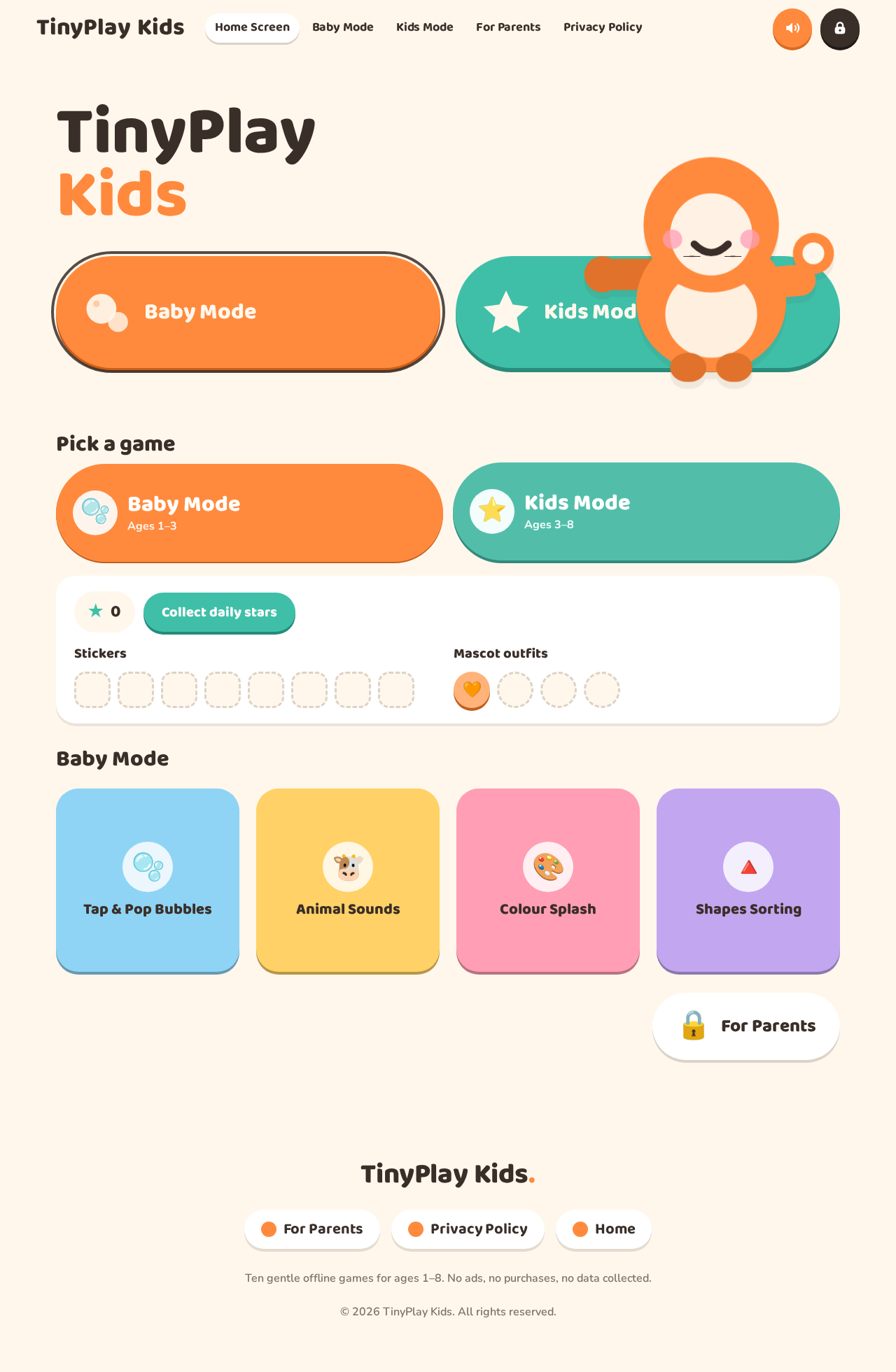
TinyPlayKids
Hi! Play with me.
Pick a game
0
Stickers
Mascot outfits
Baby Mode
TinyPlayKids
Hi! Play with me.
Pick a game
0
Stickers
Mascot outfits
No comments yet. Be the first!