theopenerp
 Deepak Kumar
Build Project X, an AI Business Systems Engineer. PRODUCT VISION Project X helps people turn business requirements into working business systems through conversation. The intended end-to-end journey is: 1. A user describes their business and processes. 2. An AI Business Analyst asks relevant questions. 3. The AI creates a structured Business System Specification (BSS). 4. The user reviews and edits a readable Business Blueprint. 5. The user explicitly approves a version. 6. In later development stages, Project X converts the approved specification into an application, deploys it, and helps maintain it. The BSS is the canonical definition of the business system. Chat is an input to this definition, not a direct instruction to generate or deploy arbitrary production code. THIS BUILD Create the first functional stage: onboarding, organizations, projects, AI conversation, structured BSS generation, blueprint review/editing, approval, and version history. Design clear extension points for future application generation, deployment, and maintenance. Do not claim those capabilities already work. Project X is NOT a timesheet application or a generic chatbot. It is a platform capable of defining many business systems. Initial system categories: - CRM - Quotation management - Task and workflow management - Timesheet management - Simple order management - Custom business systems These categories should guide discovery, not restrict the product to rigid templates. TECHNICAL DIRECTION Prefer: - Next.js with TypeScript - PostgreSQL with Prisma - Google sign-in - Gemini API called exclusively from the server - Runtime-validated structured specifications - A modular repository, such as apps/web and packages/bss, ai, agents, shared First inspect the environment and explain any capability limitations. If this platform requires a different stack, choose the closest portable supported approach and explain the difference. Do not pretend an unsupported database, server function, authentication provider, or integration is connected. Maintain separation between: - Presentation - Business logic - AI provider adapters - Specification schema and validation - Database access - Future application builders and deployment adapters PRODUCT EXPERIENCE Build a polished, responsive application with: - A restrained Project X landing page - Sign-in and onboarding - Organization/project dashboard - New-project flow - Project workspace - Conversation panel - Business Blueprint panel - Version history and activity - Project and organization settings Use a professional, calm visual design, clear typography, accessible components, and helpful empty states. Focus on usability rather than decorative marketing effects. Do not populate a new account with fake customers, fake conversations, or fake deployed apps. Any optional sample content must be clearly labelled and separated from real data. IMPORTANT EXCLUSIONS Do not implement billing, GitHub App integration, customer Google Sheets/Apps Script deployment, Gmail/Calendar integrations, or autonomous production changes in this initial build. Do not advertise these excluded features as functional. Start by implementing the application foundation and navigation. Later prompts will add the data model, BSS, Gemini workflow, blueprint approval, and verification. At the end, report what actually works, what is incomplete, and any configuration I must supply. Never put secrets in chat, source code, or browser-visible configuration.


Comments (0)
Sign in to leave a comment
System Requirements
System Requirements Document for theopenerp
1. Introduction
theopenerp (Project X) is an AI Business Systems Engineer. It helps people turn business requirements into working business systems through conversation. The product's central promise is a disciplined one: a person describes their business and its processes in plain language, an AI Business Analyst asks relevant follow-up questions, and the platform produces a structured, runtime-validated Business System Specification (BSS) that becomes the canonical definition of the business system. The user then reviews and edits a readable Business Blueprint derived from that specification and explicitly approves a version.
This document specifies the first functional stage of theopenerp: onboarding, organizations, projects, AI conversation, structured BSS generation, blueprint review and editing, approval, and version history. It also specifies the extension points that later stages (application generation, deployment, maintenance) will attach to — without claiming those later capabilities already work.
The audience is the people who define business systems: business owners and operators who know their processes but not software architecture, and business systems engineers/builders who define systems across multiple organizations and projects. theopenerp is a platform capable of defining many business systems. It is not a timesheet application and not a generic chatbot.
2. System Overview
theopenerp is a responsive web application delivered as a modular repository. The current stage covers the full definition lifecycle from first sign-in to an approved specification version:
- Identity and access — Google sign-in establishes application identity; onboarding establishes the user's organization context.
- Organizations and projects — users work inside organizations that contain projects; each project is a business system under definition.
- AI conversation — a Conversation panel captures the user's description of their business and processes, and the AI Business Analyst asks relevant follow-up questions.
- Structured BSS generation — the AI produces a structured Business System Specification that is runtime-validated against a schema before it can become canonical.
- Blueprint review and editing — the Business Blueprint panel renders the specification as a readable, editable document of record.
- Approval and version history — the user explicitly approves a version; version history and activity record specification and blueprint versions together with project activity.
- Settings — project settings and organization settings configure project-specific and organization-level boundaries.
Actors. The accepted active human personas are the Business Owner / Operator and the Business Systems Engineer / Builder. The AI Business Analyst is a system-side capability (server-side Gemini adapter), not a human persona. Google is the identity provider; Gemini is the AI provider. Both are non-persona actors.
Ownership and boundaries. Chat is an input to the BSS definition, not a direct instruction to generate or deploy arbitrary production code. The BSS is canonical; the approved version is the artefact of record. Application generation, deployment, and maintenance are future stages and are represented only as clearly labelled, non-functional extension points.
Narrow exclusions for this build. Billing, GitHub App integration, customer Google Sheets/Apps Script deployment, Gmail/Calendar integrations, and autonomous production changes are not implemented and are not advertised as functional.
2a. Product Interpretation and Delivery Boundary
theopenerp is delivered as a first-party web application with application-owned identity. Google sign-in is the accepted identity mechanism; the application owns the user record, organization membership, project membership, conversations, specifications, blueprints, approvals, versions, and activity that follow from it. Because organizations, projects, specifications, and approvals are durable, actor-specific state that must remain bound to the correct participant, identity continuity is indispensable: the landing page is anonymous, sign-in is anonymously reachable, and every protected destination requires an established identity.
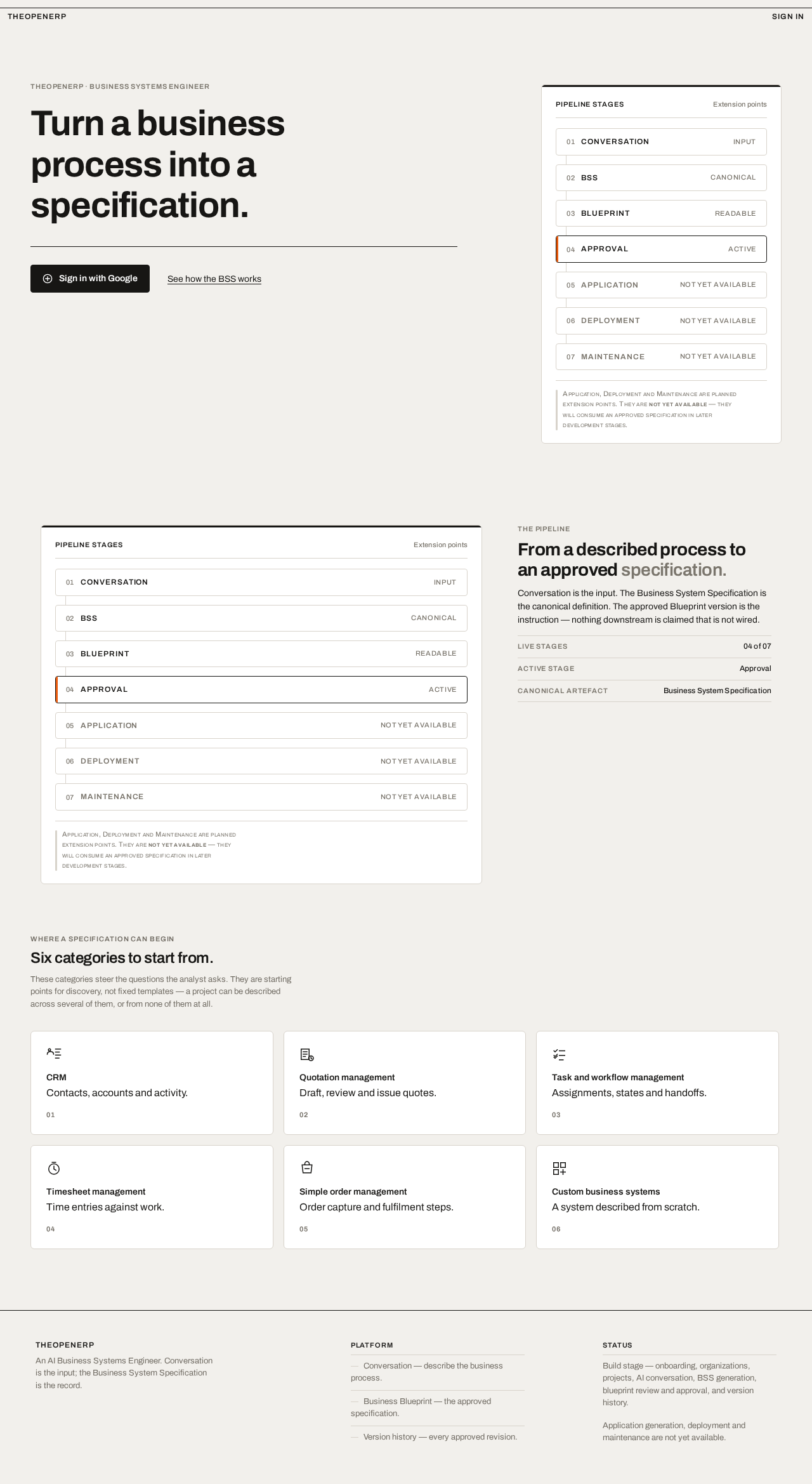
The current delivery boundary is the definition stage. Everything the platform does today ends at an approved specification version. The pipeline is drawn honestly on screen: Conversation → BSS → Blueprint → Approval are live; Application, Deployment, and Maintenance are drawn in muted grey with a "not yet available" caption. No screen claims a capability that is not wired.
Server-side execution is required for accounts, organizations, projects, conversations, BSS validation, blueprints, approvals, versions, and activity. The Gemini API is called exclusively from the server; no provider credential is ever exposed to the browser, source code, or chat. If the environment cannot support a preferred component (for example a managed PostgreSQL instance or a specific auth provider), the closest portable supported approach is chosen and the difference is explained — the platform never pretends an unsupported database, server function, authentication provider, or integration is connected.
2b. Source Content Inventory
Not applicable. No reference directive in this project declares content_source; all product facts derive from the authoritative user requirement thread and the accepted Planning Scope.
2c. Page Content and Component Coverage
Project X landing page
- Information/state. Anonymous entry surface. States the product intent: turn a business process into a specification. Presents the intended users and the conversational business-system definition workflow. Shows the pipeline diagram (Conversation → BSS → Blueprint → Approval live; Application · Deployment · Maintenance muted and captioned "not yet available"). No account data is shown.
- Primary action. "Sign in with Google" — routes to Sign-in.
- Supporting action. "See how the BSS works" — an in-page text link that scrolls to the pipeline/BSS explanation on the same page.
- Domain entities. None persisted; the pipeline diagram and category tiles are static presentation of accepted concepts.
- Component responsibilities. Top hairline rule with wordmark (left) and sign-in (right); asymmetric 12-column hero composition with flush-left headline in columns 1–7 and the bordered pipeline diagram in columns 9–12; a single orange 3px vertical bar marking the active pipeline stage; typographic category tiles for CRM, Quotation management, Task and workflow management, Timesheet management, Simple order management, and Custom business systems, each with a single hairline pictogram on a 24px grid at 1.5px stroke.
- States. Loading: none required (static content). Empty: not applicable. Success: page renders with the hero rule drawing in over 240ms on load. Error: if the sign-in route is unreachable, the CTA surfaces an inline message and remains retryable. Recovery: retry the CTA; the page itself never blocks.
Sign-in
- Information/state. Anonymous access surface. Explains that Google sign-in establishes the identity used for organizations, projects, specifications, and activity. Shows the current configuration state truthfully: if Google credentials are not configured, the page states that sign-in is not yet configured rather than presenting a non-functional button.
- Primary action. "Sign in with Google" — initiates the Google identity flow.
- Supporting action. Return to the landing page.
- Domain entities. User identity (created or matched on first successful sign-in).
- Component responsibilities. Identity provider button; configuration-status notice; error region.
- States. Loading: button enters a pending state during the provider round-trip. Empty: not applicable. Success: identity established, route to Onboarding (first use) or Organization/project dashboard (returning). Error: provider denial, cancellation, or misconfiguration shows a specific, non-secret message. Recovery: retry sign-in; misconfiguration directs the operator to supply credentials outside the browser.
Onboarding
- Information/state. First-use setup after sign-in. Collects the minimum needed to place the user in an organization context. Shows what will be created and confirms that no fake customers, conversations, or deployed apps are seeded.
- Primary action. Create the user's initial organization and complete onboarding.
- Supporting actions. Edit the organization name before confirming; skip optional descriptive fields.
- Domain entities. User, Organization, Organization membership.
- Component responsibilities. Setup form; organization name field; confirmation summary; empty-state guidance for the first project.
- States. Loading: submission pending. Empty: first-use form with no prior data. Success: organization created, route to Organization/project dashboard with an honest empty state. Error: validation or persistence failure shows a field-level or page-level message. Recovery: correct and resubmit; partial state is not left behind.
Organization/project dashboard
- Information/state. Lists the user's organizations and the projects inside them, with each project's current specification status (no specification yet, draft, unapproved, approved) and last activity. Honest empty states when an organization has no projects.
- Primary action. Open a project into the Project workspace.
- Supporting actions. Start the New-project flow; open Organization settings; open Project settings for a listed project.
- Domain entities. Organization, Project, Specification version status, Activity entries.
- Component responsibilities. Organization selector; project list as a ruled table (name, category, status, last activity); status carried by the 3px top-edge colour bar; empty-state panel with a one-line instruction and a single action.
- States. Loading: list skeleton. Empty: bordered panel instructing the user to create their first project, with one action. Success: projects listed with truthful status. Error: load failure shows a retryable message. Recovery: retry; navigation remains available.
New-project flow
- Information/state. Guides discovery and project creation. Presents the initial system categories — CRM, Quotation management, Task and workflow management, Timesheet management, Simple order management, Custom business systems — as guidance, not rigid templates. Captures the project name and an initial description of the business and its processes.
- Primary action. Create the project and enter its Project workspace.
- Supporting actions. Select or change the guiding category; edit the initial description; go back without creating.
- Domain entities. Project, guiding category, initial description, Organization.
- Component responsibilities. Category tiles (typographic, single hairline pictogram each); name field; description field; creation summary; validation messaging.
- States. Loading: submission pending. Empty: no categories preselected. Success: project created and routed to the Project workspace with an empty conversation. Error: validation or persistence failure. Recovery: correct and resubmit; no partial project is created.
Project workspace
- Information/state. Primary project context. Hosts the Conversation panel and the Business Blueprint panel as a hard 50/50 split at 1280px, both mounted and independently scrollable, with a physical segmented switch (joined borders, no gaps) to flip them at 768px and below, and a single stacked column with the switch pinned under the header at 375px. Shows the project's current specification status and the honest pipeline diagram with future stages muted and captioned "not yet available".
- Primary action. Work the definition: converse, generate, review, edit, approve.
- Supporting actions. Open Version history and activity; open Project settings; switch between Conversation and Blueprint panels at narrow viewports.
- Domain entities. Project, Conversation, Message, BSS, Blueprint, Specification version, Approval, Activity entry.
- Component responsibilities. Workspace header with project name and status bar; segmented panel switch; panel containers; pipeline diagram with extension points; status bar at the top edge of each panel (grey draft, orange unapproved, black approved).
- States. Loading: panel-level loading for conversation and blueprint. Empty: no conversation yet — a bordered panel with a one-line instruction and a single action to begin describing the business. Success: both panels render current state. Error: a failed panel load is isolated to that panel and retryable. Recovery: retry the failed panel without losing the other.
Conversation panel
- Information/state. Captures the user's description of their business and processes. Messages are left-aligned blocks with speaker labels in small caps. The AI Business Analyst's follow-up questions appear as messages. The AI "thinking" state is a stepped three-dot indicator advancing in discrete frames. The panel is visibly an input, not the artefact of record.
- Primary action. Send a message describing the business or answering a follow-up question.
- Supporting actions. Request generation of a structured BSS from the conversation so far; scroll back through the thread.
- Domain entities. Conversation, Message (author, body, timestamp), BSS generation request.
- Component responsibilities. Message list; composer; send control; generation control; thinking indicator; error region.
- States. Loading: thread loading; thinking indicator during AI response. Empty: bordered panel with a one-line instruction and a single action. Success: messages appended in order; a generated BSS is announced with its validation outcome. Error: provider or validation failure shows a specific message and preserves the user's input. Recovery: retry the send or the generation; the conversation is never silently discarded.
Business Blueprint panel
- Information/state. Displays and edits the readable blueprint derived from the canonical BSS. Each section is a numbered ruled table of Field / Type / Required / Notes with hairline row rules and tabular figures, editable inline. The panel's 3px top-edge status bar reports draft (grey), unapproved (orange), or approved (black). The blueprint is visibly the artefact of record.
- Primary action. Edit blueprint content inline and save it as a new specification version.
- Supporting actions. Approve the current version explicitly; review the validation result of the underlying BSS; open Version history and activity.
- Domain entities. Blueprint, Blueprint section, Field (name, type, required, notes), BSS, Specification version, Approval.
- Component responsibilities. Numbered section tables; inline editable cells; save control; explicit approve control; status bar; validation summary.
- States. Loading: blueprint loading. Empty: no specification yet — a bordered panel with a one-line instruction and a single action pointing back to the Conversation panel. Success: edits saved as a new version; approval recorded with author and timestamp. Error: schema validation failure blocks canonicalization and approval and reports which fields failed. Recovery: correct the failing fields and re-save; the previous approved version remains intact and reachable.
Version history and activity
- Information/state. A ruled ledger of specification and blueprint versions — version number, status, author, timestamp, delta summary — aligned as columns, with the approved version marked by the orange bar and every earlier row reachable. Project activity is listed alongside.
- Primary action. Open a specific version to inspect it.
- Supporting actions. Compare a version against the current one; return to the Project workspace.
- Domain entities. Specification version, Approval, Activity entry, Author.
- Component responsibilities. Version ledger table with tabular figures; status column; approved-row orange bar; activity list; version detail view.
- States. Loading: ledger loading. Empty: no versions yet — bordered panel with a one-line instruction and a single action. Success: versions and activity listed in order. Error: load failure shows a retryable message. Recovery: retry; the ledger is read-only and never blocks workspace work.
Project settings
- Information/state. Configures project-specific settings and boundaries: project name, guiding category, description, and the project's definition boundaries. Shows the project's current specification status.
- Primary action. Save project settings.
- Supporting actions. Change the guiding category; return to the Project workspace.
- Domain entities. Project, guiding category, description, boundaries.
- Component responsibilities. Settings form; category selector; save control; status summary.
- States. Loading: settings loading. Empty: not applicable for an existing project. Success: settings saved and reflected in the workspace. Error: validation or persistence failure. Recovery: correct and resubmit.
Organization settings
- Information/state. Configures organization-level settings and administration: organization name, organization details, and the list of projects belonging to the organization.
- Primary action. Save organization settings.
- Supporting actions. Open a project from the organization's project list; return to the Organization/project dashboard.
- Domain entities. Organization, Organization membership, Project.
- Component responsibilities. Organization form; membership summary; project list; save control.
- States. Loading: settings loading. Empty: organization with no projects shows an honest empty state with a single action to start the New-project flow. Success: settings saved. Error: validation or persistence failure. Recovery: correct and resubmit.
3. Functional Requirements
Each requirement is a distinct story point with provenance, lifecycle facts, and observable acceptance. Provenance is explicit (stated in the authoritative thread), basic_default (accepted default), or required_inference (indispensable inferred mechanics).
FR-1 — Anonymous product entry. As a visitor, I should see a restrained landing page that explains theopenerp, its intended users, and its conversational business-system definition workflow, so that I understand what the product does before signing in. Provenance: explicit. Trigger: visiting the landing page. Observable result: the page renders the headline, the pipeline diagram with future stages muted and captioned "not yet available", and the category tiles. Access state: anonymous. Failure/recovery: if the sign-in route is unreachable, the CTA shows an inline message and remains retryable. Continuation: the visitor proceeds to Sign-in.
FR-2 — Google sign-in. As a user, I should sign in with Google so that my organizations, projects, specifications, and activity are bound to my identity. Provenance: explicit. Trigger: activating "Sign in with Google". Observable result: identity is established and the user is routed to Onboarding (first use) or the Organization/project dashboard (returning). Access state: anonymous entry, protected state unavailable until identity is established. Failure/recovery: provider denial, cancellation, or misconfiguration shows a specific, non-secret message; retry is available. Continuation: onboarding or dashboard.
FR-3 — First-use onboarding. As a newly signed-in user, I should complete onboarding so that I have an organization context for my projects. Provenance: explicit. Trigger: first successful sign-in. Observable result: an organization is created and the user is routed to the dashboard with an honest empty state. Access state: login required. Failure/recovery: validation or persistence failure shows a field-level or page-level message; no partial state is left behind. Continuation: create the first project.
FR-4 — Organization and project dashboard. As a user, I should see my organizations and their projects with each project's specification status and last activity, so that I can route into active project work. Provenance: explicit. Trigger: opening the dashboard. Observable result: projects are listed as a ruled table with truthful status. Access state: login required. Failure/recovery: load failure shows a retryable message. Continuation: open a project or start a new one.
FR-5 — New-project flow with guiding categories. As a user, I should create a project guided by the initial system categories — CRM, Quotation management, Task and workflow management, Timesheet management, Simple order management, Custom business systems — so that discovery is guided without being restricted to rigid templates. Provenance: explicit. Trigger: starting the New-project flow. Observable result: a project is created with a name, a guiding category, and an initial description, and the user enters its Project workspace. Access state: login required. Failure/recovery: validation or persistence failure; no partial project is created. Continuation: begin the conversation.
FR-6 — Business and process description. As a user, I should describe my business and processes in the Conversation panel so that the AI Business Analyst has the input it needs. Provenance: explicit. Trigger: sending a message. Observable result: the message is appended to the thread with author and timestamp. Access state: project access. Failure/recovery: send failure preserves the user's input and offers retry. Continuation: the AI Business Analyst responds.
FR-7 — AI Business Analyst follow-up questions. As a user, I should receive relevant follow-up questions from the AI Business Analyst after describing my business and processes, so that the specification captures what I actually mean. Provenance: explicit. Trigger: a user message in the conversation. Observable result: the AI Business Analyst's follow-up questions appear as messages, with a stepped three-dot thinking indicator while the response is produced. Access state: project access; server-side Gemini configuration required. Failure/recovery: provider failure shows a specific message and preserves the thread. Continuation: answer the questions or request BSS generation.
FR-8 — Structured BSS generation. As a user, I should have the AI create a structured Business System Specification from the conversation so that the business system has a canonical definition. Provenance: explicit. Trigger: requesting generation from the Conversation panel. Observable result: a structured BSS is produced and runtime-validated against the specification schema. Access state: project access; server-side Gemini configuration required. Failure/recovery: schema validation failure blocks canonicalization and reports which fields failed. Continuation: review the blueprint.
FR-9 — Runtime-validated canonical specification. As a user, I should have the BSS validated at runtime before it becomes canonical, so that the definition of record is structurally sound. Provenance: explicit. Trigger: BSS generation or blueprint save. Observable result: only a schema-valid specification becomes canonical; invalid specifications are rejected with field-level detail. Access state: project access. Failure/recovery: the previous valid version remains intact and reachable. Continuation: correct the failing fields and re-save.
FR-10 — Readable Business Blueprint. As a user, I should review a readable Business Blueprint derived from the canonical BSS, so that I can read the specification as a document of record rather than a chat transcript. Provenance: explicit. Trigger: opening the Business Blueprint panel. Observable result: numbered sections render as ruled tables of Field / Type / Required / Notes with tabular figures. Access state: project access. Failure/recovery: blueprint load failure is isolated to the panel and retryable. Continuation: edit inline.
FR-11 — Blueprint editing. As a user, I should edit the Business Blueprint inline and save my edits as a new specification version, so that the canonical definition reflects my corrections. Provenance: explicit. Trigger: editing a blueprint cell and saving. Observable result: a new specification version is written and the panel's status bar reports the new state. Access state: project access. Failure/recovery: validation failure blocks the save and reports the failing fields; the previous version remains intact. Continuation: approve the version or continue editing.
FR-12 — Explicit version approval. As a user, I should explicitly approve a version, so that the approved specification is the artefact of record and chat is never treated as the instruction. Provenance: explicit. Trigger: activating the approve control on a valid version. Observable result: the version is marked approved with author and timestamp, and the panel's status bar turns black. Access state: project access. Failure/recovery: approval is blocked while the specification is schema-invalid. Continuation: the approved version becomes the input for later stages.
FR-13 — Version history and activity. As a user, I should see specification and blueprint versions together with project activity, so that I can track what was approved and what changed. Provenance: explicit. Trigger: opening Version history and activity. Observable result: a ruled ledger lists version number, status, author, timestamp, and delta summary, with the approved version marked by the orange bar and every earlier row reachable. Access state: project access. Failure/recovery: load failure shows a retryable message; the ledger is read-only. Continuation: inspect a version or return to the workspace.
FR-14 — Project settings. As a user, I should configure project-specific settings and boundaries, so that the project's definition context is correct. Provenance: explicit. Trigger: opening Project settings. Observable result: project name, guiding category, description, and boundaries are saved and reflected in the workspace. Access state: project access. Failure/recovery: validation or persistence failure. Continuation: return to the workspace.
FR-15 — Organization settings. As a user, I should configure organization-level settings and administration, so that the organization context for its projects is correct. Provenance: explicit. Trigger: opening Organization settings. Observable result: organization name and details are saved; the organization's projects are listed. Access state: organization access. Failure/recovery: validation or persistence failure. Continuation: open a project or return to the dashboard.
FR-16 — Honest extension points. As a user, I should see the future stages — application generation, deployment, and maintenance — drawn as clearly labelled, non-functional extension points, so that I am never sold a capability that does not exist. Provenance: explicit. Trigger: viewing the landing page or Project workspace. Observable result: the pipeline diagram shows Conversation → BSS → Blueprint → Approval live and Application · Deployment · Maintenance muted with a "not yet available" caption. Access state: any. Failure/recovery: not applicable. Continuation: none.
FR-17 — No fabricated account content. As a user, I should never see fake customers, fake conversations, or fake deployed apps in a new account, so that I can trust that everything shown is real. Provenance: explicit. Trigger: any first-use state. Observable result: empty states are honest bordered panels with a one-line instruction and a single action; any optional sample content is clearly labelled and separated from real data. Access state: any. Failure/recovery: not applicable. Continuation: create real content.
FR-18 — Server-only AI provider access. As a user, I should have all Gemini API calls made exclusively from the server, so that no provider credential is ever exposed to the browser, source code, or chat. Provenance: explicit. Trigger: any AI interaction. Observable result: the browser never receives a provider credential; AI responses arrive through server-side adapters. Access state: project access. Failure/recovery: missing server-side configuration surfaces as an explicit configuration limitation, not a silent failure. Continuation: the operator supplies configuration outside the browser.
FR-19 — Modular separation of concerns. As a builder, I should have presentation, business logic, AI provider adapters, specification schema and validation, database access, and future application builders and deployment adapters kept separate, so that later stages can attach without rewriting the definition stage. Provenance: explicit. Trigger: development. Observable result: the repository is modular (for example apps/web and packages/bss, ai, agents, shared). Access state: not applicable. Failure/recovery: not applicable. Continuation: future stages attach at the defined extension points.
FR-20 — Truthful capability reporting. As a user, I should receive a report of what actually works, what is incomplete, and any configuration I must supply, so that I know the real state of the system. Provenance: explicit. Trigger: completion of the build. Observable result: a report distinguishes working capabilities, incomplete work, and required configuration. Access state: not applicable. Failure/recovery: not applicable. Continuation: the operator supplies the listed configuration.
FR-21 — Organization and project membership authorization. As a user, I should only reach project work for organizations and projects I belong to, so that protected state remains bound to the correct participant. Provenance: required_inference. Trigger: navigating to a protected destination. Observable result: access is granted only for the user's organizations and projects; protected state is unavailable until identity and membership are established. Access state: login required. Failure/recovery: unauthorized access is refused with a clear message and a route back to the dashboard. Continuation: the user selects a project they belong to.
FR-22 — Approved version as the future-stage input. As a builder, I should have the approved specification version be the only input later application-generation, deployment, and maintenance stages consume, so that the canonical definition remains the single source of truth. Provenance: required_inference. Trigger: a future stage attaching to the extension point. Observable result: the approved version is the referenced artefact; unapproved drafts are not consumed. Access state: not applicable in this stage. Failure/recovery: not applicable in this stage. Continuation: future stages are implemented in later builds.
4. User Personas
Business Owner / Operator
Product context. This persona runs a business and knows its processes in operational detail, but does not think in software architecture. They arrive at theopenerp with a process in their head — how quotes get approved, how jobs get scheduled, how orders move — and need it captured accurately without learning a modelling language.
Primary goal. Produce an approved specification that canonically defines their business system, so that the system they eventually get actually matches how their business works.
Distinct accepted responsibilities. Describes the business and its processes in the Conversation panel; answers the AI Business Analyst's relevant follow-up questions; reviews the readable Business Blueprint; edits blueprint content inline where the AI has misread the business; explicitly approves a version; relies on version history to track what was approved.
Relevant inputs and decisions. Plain-language descriptions of business processes; corrections to field names, types, and required flags in the blueprint; the decision to approve a specific version.
Interactions with other accepted participants. Works with the AI Business Analyst (system-side) through the Conversation panel. May share an organization with a Business Systems Engineer / Builder who created the project; the owner's contribution is the domain truth, the builder's is the structure.
Observable success. An approved specification version exists, is marked approved with author and timestamp, and is reachable in the version ledger. The owner can point at the approved version and say "that is my business."
What makes this role different. The owner supplies domain truth and holds approval authority over meaning. They are not primarily concerned with repository structure, category selection, or organization administration — they are concerned with whether the specification describes their business correctly.
Business Systems Engineer / Builder
Product context. This persona defines business systems for others, often across multiple organizations and projects. They are comfortable with structured specifications, versioning, and the difference between a draft and an approved artefact. They treat theopenerp as an instrument for producing a definition of record.
Primary goal. Produce a reviewed, approved specification ready for later application generation stages, and keep multiple projects organized across organizations.
Distinct accepted responsibilities. Creates new projects using the initial system categories as guidance; drives the AI conversation; refines the Business Blueprint; manages approval and version history; configures project and organization settings; works across multiple organizations and projects.
Relevant inputs and decisions. Project names, guiding category selection, initial descriptions, blueprint structural edits, approval decisions, project and organization settings.
Interactions with other accepted participants. Works with the AI Business Analyst (system-side) to generate and validate the BSS. May work alongside a Business Owner / Operator who supplies domain truth; the builder structures it and manages the project and organization context.
Observable success. Multiple projects exist across organizations, each with a truthful specification status; at least one project has an approved version ready for later stages; project and organization settings reflect the real boundaries.
What makes this role different. The builder owns structure, organization, and the readiness of the specification for downstream stages. They are the persona who cares that the pipeline diagram is honest, that the extension points are real, and that the approved version is the only thing later stages will consume.
5. Core User Flows
Flow A — Business Owner / Operator: describe a business and approve a specification
- Start. The owner visits the Project X landing page (anonymous). They read the headline and the pipeline diagram, noting that Application, Deployment, and Maintenance are muted and captioned "not yet available".
- Sign in. They activate "Sign in with Google" on the landing page and complete the Google identity flow on the Sign-in page. Identity is established.
- Onboard. Because this is first use, they land on Onboarding, name their organization, and confirm. The organization is created and they arrive at the Organization/project dashboard with an honest empty state.
- Create a project. They start the New-project flow, name the project, select the guiding category that fits their business (for example Quotation management), and write an initial description of the business and its processes. The project is created and they enter its Project workspace.
- Describe the business. In the Conversation panel, they send a message describing how their business works — who requests quotes, who approves them, what happens after approval. The message appears in the thread with their speaker label and a timestamp.
- Answer follow-ups. The AI Business Analyst responds with relevant follow-up questions, shown with a stepped three-dot thinking indicator while the response is produced. The owner answers each question in turn. If a provider failure occurs, a specific message appears and their typed input is preserved so they can retry.
- Generate the BSS. When the description is complete, the owner requests generation. The AI produces a structured Business System Specification, which is runtime-validated against the schema. If validation fails, the panel reports which fields failed and the owner continues the conversation to fill the gaps.
- Review the blueprint. The owner opens the Business Blueprint panel. The specification renders as numbered ruled tables of Field / Type / Required / Notes. The panel's status bar shows the current state (grey draft, orange unapproved).
- Edit. The owner finds a field the AI misread — for example a required flag on a customer reference — and edits it inline. Saving writes a new specification version and the status bar updates.
- Approve. The owner activates the explicit approve control on the valid version. The version is marked approved with their author identity and a timestamp, and the status bar turns black.
- Verify. The owner opens Version history and activity and sees the ruled ledger: version number, status, author, timestamp, delta summary, with the approved version marked by the orange bar. Every earlier row is reachable.
- Continue. The approved version is now the artefact of record. The owner knows that later stages will consume this version, and that nothing on screen claims those stages work today.
Flow B — Business Systems Engineer / Builder: define systems across organizations and projects
- Start. The builder signs in with Google on the Sign-in page and arrives at the Organization/project dashboard (returning user, so onboarding is skipped).
- Survey. The dashboard lists their organizations and the projects inside them, each with its specification status and last activity. The builder scans the status column to see which projects are approved and which are still drafts.
- Create a new project. They start the New-project flow, name the project, and choose a guiding category — for example CRM, or Custom business systems when none of the named categories fit. They write an initial description. The project is created and they enter its Project workspace.
- Drive the conversation. In the Conversation panel, the builder describes the business system's structure and answers the AI Business Analyst's follow-up questions. They request BSS generation when the description is sufficient.
- Refine the blueprint. In the Business Blueprint panel, the builder edits the numbered section tables inline — adjusting field types, required flags, and notes — and saves. Each save writes a new specification version. If a save fails schema validation, the failing fields are reported and the previous version remains intact.
- Manage approval. The builder reviews the current version and either approves it explicitly or continues refining. Approval marks the version with author and timestamp and turns the status bar black.
- Check the ledger. The builder opens Version history and activity to confirm the version sequence, compare the current version against an earlier one, and review project activity.
- Configure the project. The builder opens Project settings to correct the project name, change the guiding category, or adjust the project's definition boundaries, and saves.
- Configure the organization. The builder opens Organization settings to update the organization name and details and to see the organization's project list. If the organization has no projects, an honest empty state offers a single action to start the New-project flow.
- Continue. The builder returns to the Project workspace or the dashboard. The approved specification is ready for later application generation stages, which are not functional in this build and are drawn as muted extension points.
Flow C — Returning user: resume an in-progress definition
- Start. The user signs in with Google and arrives at the Organization/project dashboard.
- Locate. They find the project in the list by its status (orange unapproved) and last activity.
- Resume. They open the Project workspace. The Conversation panel shows the prior thread; the Business Blueprint panel shows the current unapproved version with its orange status bar.
- Continue. They add a message to the conversation, request a regenerated BSS, or edit the blueprint inline and save a new version.
- Approve or defer. They either approve the new version explicitly or leave it unapproved. The version ledger records whichever they chose, with author and timestamp.
Flow D — System-side: AI Business Analyst and BSS validation
- Trigger. A user message arrives in a project's conversation.
- Server-side call. The server-side AI provider adapter calls the Gemini API exclusively from the server. No provider credential reaches the browser.
- Response. The AI Business Analyst's follow-up questions are returned and appended to the thread as messages.
- Generation. On a generation request, the adapter produces a structured BSS, which is passed to the specification schema and validation layer.
- Validation outcome. A schema-valid BSS becomes canonical and is rendered in the Business Blueprint panel. A schema-invalid BSS is rejected with field-level detail and does not become canonical.
- Failure handling. If server-side Gemini configuration is missing, the failure surfaces as an explicit configuration limitation rather than a silent error, and the operator is directed to supply configuration outside the browser.
6. Visuals Colors and Theme
The creative direction is authoritative for this section: Less, but better — a specification instrument after Dieter Rams. The register is engineering trust, not marketing hype. The emotional target is calm authority — an instrument panel, not a landing page.
Mode. Light mode is the primary and only specified mode.
Colour tokens by role.
| Role | Token | Value |
|---|---|---|
| Background (page ground) | --color-bg | #F2F0EC |
| Surface (functional panels) | --color-surface | #FFFFFF |
| Text (primary) | --color-text | #171614 |
| Primary (controls, rules, active nav) | --color-primary | #171614 |
| Accent (single signal colour) | --color-accent | #E8590C |
| Muted (metadata, timestamps, hints, disabled) | --color-muted | #7A756C |
| Hairline border | --color-border | #D8D3CB |
Warm off-white #F2F0EC carries the page; pure white #FFFFFF is reserved for functional panels — the conversation thread, the blueprint sheet, the spec table — so surfaces read as instruments placed on a workbench. Near-black #171614 is both text and the primary control colour. Braun orange #E8590C is the single signal accent and is rationed hard: approval state, the currently focused version, the one live CTA per screen, and the strip that marks a spec as "unapproved draft". Muted warm grey #7A756C handles metadata, timestamps, field hints, and disabled controls. No second accent, no gradients, no tinted backgrounds behind text.
Contrast. #171614 on #F2F0EC ≈ 15:1. #7A756C on #FFFFFF ≈ 4.7:1 (metadata only, never body copy). #E8590C on #FFFFFF ≈ 4.0:1, so orange is used for fills, rules, and icons, never for small text on white.
Typography. One grotesque family for the whole system, differentiated by weight and case rather than by a second face.
- Headings: Archivo, 600–700, tight
-0.02emtracking, flush-left ragged-right alignment. No centred headings anywhere. - Body: Archivo.
- Section labels and table headers: Archivo 600 uppercase at 11–12px with
+0.08emletterspacing, functioning as the panel's engraved legends. - Numbers: version counts, timestamps, and spec IDs set in tabular figures so the version history column aligns like a ledger.
- Scale: 1.25 modular on a 4pt baseline, mobile → desktop: 13/14 body, 16/18 lead, 20/24 panel title, 32/44 page title, 40/56 hero. Line-height 1.5 body, 1.15 headings. Measure capped at 68ch for blueprint prose and chat messages.
Shape language. Rectangles with a single 4px radius on controls and 6px on panels — enough to read as machined, not soft. 1px hairline borders in #D8D3CB define every panel, table row, and input; nothing floats on shadow. Buttons are solid #171614 with white labels; secondary buttons are white with a hairline border; the one orange action is solid #E8590C. Toggle groups and segmented controls are physically joined (shared borders, no gaps) so the selected state reads as a switch thrown, not a pill highlighted. Status is carried by a 3px full-width colour bar at the top edge of a panel, never by a rounded badge.
Spacing rhythm. 4pt baseline grid; panel padding on a 16/24/32 rhythm; hairline rules separate every table row and panel section.
Imagery style. No photography, no illustration, no 3D. The imagery is the product's own machinery: ruled specification tables, the field/type/required grid, numbered blueprint sections, a version ledger, and schematic diagrams that show the pipeline — Conversation → BSS → Blueprint → Approval → (Application · Deployment · Maintenance, drawn in hairline grey with a "not yet available" caption). Category cards for CRM, Quotation, Task & Workflow, Timesheet, Orders, and Custom are typographic tiles with a single hairline pictogram each, drawn on a 24px grid at 1.5px stroke.
7. Signature Design Concept
The instrument panel that tells the truth.
The landing page opens as an instrument panel, not a marketing hero. Full-width warm off-white ground (#F2F0EC). Across the top, a 1px black rule at 12px from the edge with the wordmark left and sign-in right. Below it, a 12-column asymmetric composition: columns 1–7 carry an oversized flush-left headline, "Turn a business process into a specification.", set at 40px mobile / 56px desktop in Archivo 700 with tight tracking, wrapping to four lines. Columns 9–12 hold a live, real, bordered diagram — the pipeline as four hairline-bordered boxes stacked vertically with connecting rules, the first three in black and the last two (Application, Deployment) drawn in #7A756C with a small-caps "not yet available" label. Under the headline, one solid #171614 button ("Sign in with Google") and one text link ("See how the BSS works"). No gradient, no blob, no centred stack, no hero image. The only orange on the screen is a 3px vertical bar beside the active pipeline stage.
The concept extends into the workspace as the signature layout: a hard 50/50 split at 1280px between the Conversation panel (left, white surface, messages as left-aligned blocks with speaker labels in small caps) and the Business Blueprint panel (right, white sheet on the grey ground, sections as numbered ruled tables of field/type/required/notes). Conversation on the left is visibly an input; the blueprint on the right is visibly the artefact. The blueprint is rendered as a ruled specification sheet — each section a numbered table with hairline row rules and tabular figures, editable inline — so the canonical BSS is read as a document of record rather than a chat transcript. Status is carried by a 3px full-width colour bar at the top edge of every panel — grey for draft, orange for unapproved, black for approved — so approval state is legible from across the room. Version history is a ledger: aligned columns of version number, status, author, timestamp, and delta summary, with the approved row marked by the orange bar and every earlier row reachable, making "chat is not the instruction, the approved version is" a visible fact.
8. Interaction Model & Motion Direction
Interaction Model: Static Motion Tempo: restrained Hero Dimensionality: flat
Landing Hero Motion Brief.
- Focal subject. The hairline pipeline diagram in columns 9–12: Conversation → BSS → Blueprint → Approval live in black, Application · Deployment · Maintenance muted in
#7A756Cwith a "not yet available" caption. The 3px orange vertical bar marks the active stage. - Input → transformation → outcome thesis. On load, the single hero rule draws in over 240ms; the pipeline diagram is already composed and static. The transformation the page communicates is conceptual, not animated: a business process (input) becomes a structured specification (outcome), and the diagram shows exactly how far the machinery currently reaches. Nothing animates that would imply a capability the product does not have.
- Motion vocabulary. Instant and mechanical. 120ms linear state changes on hover, focus, and tab switches; no easing curves, no bounce, no scroll reveals. The AI "thinking" state is a stepped three-dot indicator that advances in discrete frames rather than pulsing smoothly. When a new BSS version is written, the blueprint panel's orange status bar snaps from "Draft" to "Unapproved v3" with no crossfade. Page transitions are immediate.
- Composed first frame. Warm off-white ground; 1px black rule at 12px from the top edge with wordmark left and sign-in right; flush-left headline in columns 1–7; bordered pipeline diagram in columns 9–12 with the orange active-stage bar; one solid black button and one text link beneath the headline. No gradient, no blob, no centred stack.
- Reduced-motion state. With
prefers-reduced-motion, the hero rule appears fully drawn with no animation, the stepped thinking indicator holds a static frame, and all state changes remain instantaneous. No content is hidden or cropped; every readable element stays whole at 375px, 768px, and 1280px.
9. Non-Functional Requirements
NFR-1 — Server-only AI provider access. The Gemini API is called exclusively from the server. No provider credential is ever placed in chat, source code, or browser-visible configuration. Provenance: explicit. Rationale: the authoritative thread states this as a hard constraint.
NFR-2 — Runtime-validated structured specifications. Every BSS is validated against the specification schema at runtime before it can become canonical or be approved. Provenance: explicit. Rationale: the BSS is the canonical definition; invalid specifications must not become the artefact of record.
NFR-3 — Modular separation of concerns. Presentation, business logic, AI provider adapters, specification schema and validation, database access, and future application builders and deployment adapters are kept separate. Provenance: explicit. Rationale: later stages must attach at defined extension points without rewriting the definition stage.
NFR-4 — Truthful capability reporting. The system never claims a capability that is not wired. Excluded features are not advertised as functional; future stages are drawn as muted, captioned extension points. Provenance: explicit. Rationale: the audience is engineering-trust-oriented and must be able to see what is real.
NFR-5 — No fabricated account content. A new account is never populated with fake customers, fake conversations, or fake deployed apps. Any optional sample content is clearly labelled and separated from real data. Provenance: explicit. Rationale: trust in the definition of record depends on the absence of fabricated data.
NFR-6 — Responsive, accessible interface. The application is polished and responsive with clear typography, accessible components, and helpful empty states. Readable text and controls stay whole at 375px, 768px, and 1280px, wrapping or scaling to fit, and no other element covers any part of them. Provenance: explicit. Rationale: the authoritative thread requires a polished, responsive application with accessible components.
NFR-7 — Professional, calm visual design. The visual design is professional and calm, focused on usability rather than decorative marketing effects. Provenance: explicit. Rationale: the authoritative thread states this directly.
NFR-8 — Durable application state. Accounts, organizations, projects, conversations, BSS validation results, blueprints, approvals, versions, and activity are durably persisted so that actor-specific state remains bound to the correct participant and can be resumed. Provenance: required_inference. Rationale: the accepted journeys require resumable, correctly bound state.
NFR-9 — Environment capability honesty. If the environment cannot support a preferred component, the closest portable supported approach is chosen and the difference is explained. The system never pretends an unsupported database, server function, authentication provider, or integration is connected. Provenance: explicit. Rationale: the authoritative thread requires this inspection and honesty.
NFR-10 — Secret hygiene. Secrets are never placed in chat, source code, or browser-visible configuration. Configuration the operator must supply is reported as a requirement, not as a value. Provenance: explicit. Rationale: the authoritative thread states this as a hard constraint.
10. Tech Stack
Source-specified choices are preserved exactly. Where the environment cannot support a preferred component, the closest portable supported approach is chosen and the difference is explained.
- Framework: Next.js with TypeScript. Provenance: explicit.
- Database: PostgreSQL with Prisma. Provenance: explicit.
- Authentication: Google sign-in. Provenance: explicit.
- AI provider: Gemini API, called exclusively from the server. Provenance: explicit.
- Specification validation: Runtime-validated structured specifications. Provenance: explicit.
- Repository structure: Modular, such as
apps/webandpackages/bss,ai,agents,shared. Provenance: explicit. - Presentation: Next.js application shell and components in
apps/web. Provenance: explicit. - Business logic: Application services separated from presentation. Provenance: explicit.
- AI provider adapters: Server-side adapter layer in
packages/ai. Provenance: explicit. - Specification schema and validation:
packages/bss. Provenance: explicit. - Database access: Prisma client layer separated from business logic. Provenance: explicit.
- Future application builders and deployment adapters: Extension points defined but not implemented in this stage. Provenance: explicit.
- Containerization: Docker / docker-compose for local and deployment parity. [Default — not specified by user]
- Orchestration: Kubernetes only if deployment requires it. [Default — not specified by user]
11. Assumptions and Constraints
Assumptions.
- A1. The operator can supply Google sign-in credentials and server-side Gemini configuration outside the browser. Provenance: required_inference.
- A2. A durable PostgreSQL database and server-side execution environment are available for the current stage. Provenance: required_inference.
- A3. The initial system categories guide discovery and do not restrict the product to rigid templates. Provenance: explicit.
- A4. The BSS is the canonical definition of the business system; chat is an input to that definition. Provenance: explicit.
- A5. Application generation, deployment, and maintenance are future stages and are not functional in this build. Provenance: explicit.
Constraints.
- C1. Do not implement billing in this initial build. Provenance: explicit.
- C2. Do not implement GitHub App integration in this initial build. Provenance: explicit.
- C3. Do not implement customer Google Sheets/Apps Script deployment in this initial build. Provenance: explicit.
- C4. Do not implement Gmail/Calendar integrations in this initial build. Provenance: explicit.
- C5. Do not implement autonomous production changes in this initial build. Provenance: explicit.
- C6. Do not advertise the excluded features as functional. Provenance: explicit.
- C7. Do not claim future application generation, deployment, and maintenance capabilities already work. Provenance: explicit.
- C8. Do not populate a new account with fake customers, fake conversations, or fake deployed apps; any optional sample content must be clearly labelled and separated from real data. Provenance: explicit.
- C9. Never put secrets in chat, source code, or browser-visible configuration. Provenance: explicit.
- C10. Gemini API must be called exclusively from the server. Provenance: explicit.
- C11. Do not pretend an unsupported database, server function, authentication provider, or integration is connected. Provenance: explicit.
- C12. Chat is an input to the BSS definition, not a direct instruction to generate or deploy arbitrary production code. Provenance: explicit.
- C13. theopenerp is not a timesheet application and not a generic chatbot. Provenance: explicit.
12. Glossary
- BSS (Business System Specification). The canonical, runtime-validated structured definition of a business system. It is the artefact of record; chat is an input to it, not a substitute for it.
- Business Blueprint. The readable rendering of the BSS, presented as numbered ruled tables of Field / Type / Required / Notes and editable inline by the user.
- AI Business Analyst. The system-side capability that asks relevant follow-up questions after a user describes their business and processes, and that produces the structured BSS. It is not a human persona.
- Specification version. A saved state of the BSS and its blueprint. Versions are listed in the version ledger with number, status, author, timestamp, and delta summary.
- Approval. The explicit act by which a user marks a valid specification version as the artefact of record. Approval is blocked while the specification is schema-invalid.
- Extension point. A defined seam in the modular repository where a future stage (application generation, deployment, maintenance) attaches. Extension points are drawn on screen as muted, captioned pipeline stages and are not functional in this build.
- Guiding category. One of the initial system categories — CRM, Quotation management, Task and workflow management, Timesheet management, Simple order management, Custom business systems — used to guide discovery without restricting the product to rigid templates.
- Organization. The top-level container for projects, established during onboarding and configured in Organization settings.
- Project. A business system under definition, belonging to an organization, created through the New-project flow and worked in the Project workspace.
- Conversation panel. The workspace panel that captures the user's description of their business and processes and displays the AI Business Analyst's follow-up questions. It is visibly an input.
- Business Blueprint panel. The workspace panel that displays and edits the readable blueprint derived from the canonical BSS and records explicit approval. It is visibly the artefact of record.
- Version history and activity. The ruled ledger of specification and blueprint versions together with project activity, with the approved version marked by the orange bar.
- Runtime validation. Schema validation performed at runtime before a specification can become canonical or be approved.
- Pipeline. The on-screen diagram: Conversation → BSS → Blueprint → Approval (live) → Application · Deployment · Maintenance (muted, captioned "not yet available").
Turn a business
process into a
specification.
The pipeline
From a described process to an approved specification.
Conversation is the input. The Business System Specification is the canonical definition. The approved Blueprint version is the instruction — nothing downstream is claimed that is not wired.
- Live stages04 of 07
- Active stageApproval
- Canonical artefactBusiness System Specification
- Conversationinput
- BSScanonical
- Blueprintreadable
- ApprovalActive
- ApplicationNot yet available
- DeploymentNot yet available
- MaintenanceNot yet available
Application, Deployment and Maintenance are planned extension points. They are not yet available — they will consume an approved specification in later development stages.
Where a specification can begin
Six categories to start from.
These categories steer the questions the analyst asks. They are starting points for discovery, not fixed templates — a project can be described across several of them, or from none of them at all.
CRM
Contacts, accounts and activity.
01
Quotation management
Draft, review and issue quotes.
02
Task and workflow management
Assignments, states and handoffs.
03
Timesheet management
Time entries against work.
04
Simple order management
Order capture and fulfilment steps.
05
Custom business systems
A system described from scratch.
06
Turn a business
process into a
specification.
The pipeline
From a described process to an approved specification.
Conversation is the input. The Business System Specification is the canonical definition. The approved Blueprint version is the instruction — nothing downstream is claimed that is not wired.
- Live stages04 of 07
- Active stageApproval
- Canonical artefactBusiness System Specification
- Conversationinput
- BSScanonical
- Blueprintreadable
- ApprovalActive
- ApplicationNot yet available
- DeploymentNot yet available
- MaintenanceNot yet available
Application, Deployment and Maintenance are planned extension points. They are not yet available — they will consume an approved specification in later development stages.
Where a specification can begin
Six categories to start from.
These categories steer the questions the analyst asks. They are starting points for discovery, not fixed templates — a project can be described across several of them, or from none of them at all.
CRM
Contacts, accounts and activity.
01
Quotation management
Draft, review and issue quotes.
02
Task and workflow management
Assignments, states and handoffs.
03
Timesheet management
Time entries against work.
04
Simple order management
Order capture and fulfilment steps.
05
Custom business systems
A system described from scratch.
06
No comments yet. Be the first!