theopenerp
 Deepak Kumar
Build Project X, an AI Business Systems Engineer. PRODUCT VISION Project X helps people turn business requirements into working business systems through conversation. The intended end-to-end journey is: 1. A user describes their business and processes. 2. An AI Business Analyst asks relevant questions. 3. The AI creates a structured Business System Specification (BSS). 4. The user reviews and edits a readable Business Blueprint. 5. The user explicitly approves a version. 6. In later development stages, Project X converts the approved specification into an application, deploys it, and helps maintain it. The BSS is the canonical definition of the business system. Chat is an input to this definition, not a direct instruction to generate or deploy arbitrary production code. THIS BUILD Create the first functional stage: onboarding, organizations, projects, AI conversation, structured BSS generation, blueprint review/editing, approval, and version history. Design clear extension points for future application generation, deployment, and maintenance. Do not claim those capabilities already work. Project X is NOT a timesheet application or a generic chatbot. It is a platform capable of defining many business systems. Initial system categories: - CRM - Quotation management - Task and workflow management - Timesheet management - Simple order management - Custom business systems These categories should guide discovery, not restrict the product to rigid templates. TECHNICAL DIRECTION Prefer: - Next.js with TypeScript - PostgreSQL with Prisma - Google sign-in - Gemini API called exclusively from the server - Runtime-validated structured specifications - A modular repository, such as apps/web and packages/bss, ai, agents, shared First inspect the environment and explain any capability limitations. If this platform requires a different stack, choose the closest portable supported approach and explain the difference. Do not pretend an unsupported database, server function, authentication provider, or integration is connected. Maintain separation between: - Presentation - Business logic - AI provider adapters - Specification schema and validation - Database access - Future application builders and deployment adapters PRODUCT EXPERIENCE Build a polished, responsive application with: - A restrained Project X landing page - Sign-in and onboarding - Organization/project dashboard - New-project flow - Project workspace - Conversation panel - Business Blueprint panel - Version history and activity - Project and organization settings Use a professional, calm visual design, clear typography, accessible components, and helpful empty states. Focus on usability rather than decorative marketing effects. Do not populate a new account with fake customers, fake conversations, or fake deployed apps. Any optional sample content must be clearly labelled and separated from real data. IMPORTANT EXCLUSIONS Do not implement billing, GitHub App integration, customer Google Sheets/Apps Script deployment, Gmail/Calendar integrations, or autonomous production changes in this initial build. Do not advertise these excluded features as functional. Start by implementing the application foundation and navigation. Later prompts will add the data model, BSS, Gemini workflow, blueprint approval, and verification. At the end, report what actually works, what is incomplete, and any configuration I must supply. Never put secrets in chat, source code, or browser-visible configuration.


Comments (0)
Sign in to leave a comment
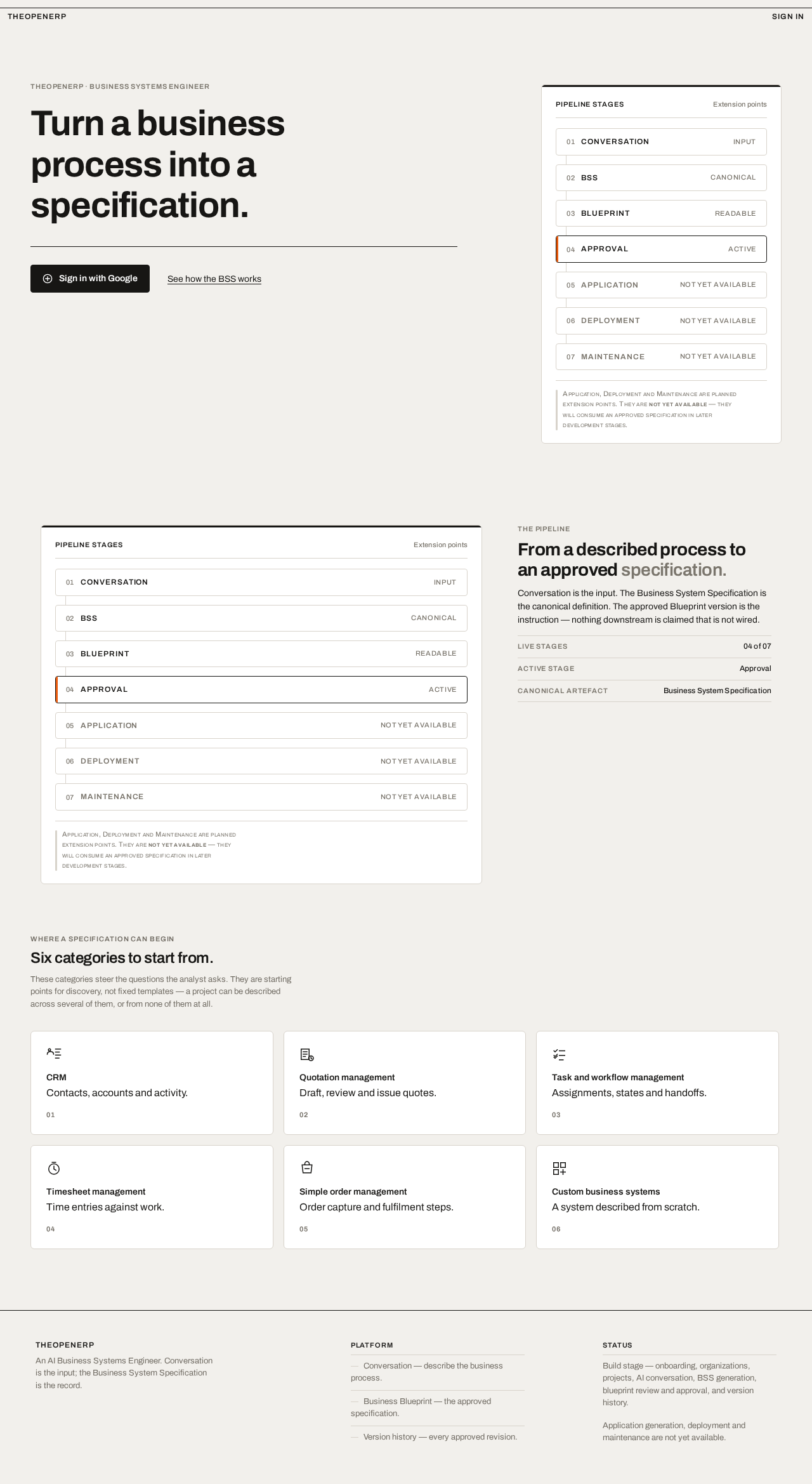
Turn a business
process into a
specification.
The pipeline
From a described process to an approved specification.
Conversation is the input. The Business System Specification is the canonical definition. The approved Blueprint version is the instruction — nothing downstream is claimed that is not wired.
- Live stages04 of 07
- Active stageApproval
- Canonical artefactBusiness System Specification
- Conversationinput
- BSScanonical
- Blueprintreadable
- ApprovalActive
- ApplicationNot yet available
- DeploymentNot yet available
- MaintenanceNot yet available
Application, Deployment and Maintenance are planned extension points. They are not yet available — they will consume an approved specification in later development stages.
Where a specification can begin
Six categories to start from.
These categories steer the questions the analyst asks. They are starting points for discovery, not fixed templates — a project can be described across several of them, or from none of them at all.
CRM
Contacts, accounts and activity.
01
Quotation management
Draft, review and issue quotes.
02
Task and workflow management
Assignments, states and handoffs.
03
Timesheet management
Time entries against work.
04
Simple order management
Order capture and fulfilment steps.
05
Custom business systems
A system described from scratch.
06
Turn a business
process into a
specification.
The pipeline
From a described process to an approved specification.
Conversation is the input. The Business System Specification is the canonical definition. The approved Blueprint version is the instruction — nothing downstream is claimed that is not wired.
- Live stages04 of 07
- Active stageApproval
- Canonical artefactBusiness System Specification
- Conversationinput
- BSScanonical
- Blueprintreadable
- ApprovalActive
- ApplicationNot yet available
- DeploymentNot yet available
- MaintenanceNot yet available
Application, Deployment and Maintenance are planned extension points. They are not yet available — they will consume an approved specification in later development stages.
Where a specification can begin
Six categories to start from.
These categories steer the questions the analyst asks. They are starting points for discovery, not fixed templates — a project can be described across several of them, or from none of them at all.
CRM
Contacts, accounts and activity.
01
Quotation management
Draft, review and issue quotes.
02
Task and workflow management
Assignments, states and handoffs.
03
Timesheet management
Time entries against work.
04
Simple order management
Order capture and fulfilment steps.
05
Custom business systems
A system described from scratch.
06
No comments yet. Be the first!