Page 1 of 19
System Requirements Document for studying-quiz
1. Introduction
studying-quiz is a study website that turns a learner's own material into practice. A learner supplies study material either by uploading files or by providing text in any form, and the site generates quizzes and mind games from that material. The product is built for self-directed learners — students, bootcamp switchers, and lifelong learners — who work late, alone, on their own content, and who want practice turned out of the notes, PDFs, and slide decks they already have.
The audience is the learner studying their own material, and the account holder who logs in to reach that study workspace. The product intent is narrow and deliberate: accept material, generate practice from it, and let the learner run that practice. It is not a course platform, not a social study network, and not a content library.
Page 2 of 19
2. System Overview
studying-quiz is delivered as a first-party web application with custom UI and application-owned identity. The current delivery covers:
- An anonymous Landing surface that explains the study website and its file, text, quiz, and mind-game workflow.
- A log in pages access surface that supports both self-starting enrollment and returning credential verification.
- An authenticated study workspace: Dashboard, Upload, Text Input, Quiz, and Mind Games.
The accepted active human personas are Learner and Account Holder. The Learner supplies study material and runs generated practice activities. The Account Holder authenticates through the log in pages to reach the study workspace under their account.
Material input is accepted in two forms: uploaded files, and text provided in any form. From supplied material the site generates two kinds of practice: quizzes and mind games. Both are practice destinations reached from the authenticated workspace.
Narrow exclusions: the product does not include course authoring, instructor-led classrooms, social feeds, messaging, or a shared content marketplace. No such capability is accepted by the source, and none is added here.
Page 3 of 19
2a. Product Interpretation and Delivery Boundary
Delivery ownership. studying-quiz is a first-party web application. All accepted surfaces — Landing, log in pages, Dashboard, Upload, Text Input, Quiz, and Mind Games — are owned and rendered by the application itself. There is no provider-owned or external-only surface in the current scope, and no headless-only delivery.
Access ownership. Identity is application-owned. The Landing surface is anonymously reachable and carries no access requirement. The log in pages surface is also anonymously reachable, because a protected destination cannot own the interaction that establishes access to itself; it is the entry boundary where a self-starting learner enrolls and where a returning account holder verifies credentials. The Dashboard, Upload, Text Input, Quiz, and Mind Games surfaces require login. Uploaded material, entered text, and generated activities are bound to the account that created them, so a learner can return and continue.
Current versus future boundary. Everything described in this document is current. No future-horizon capability is accepted by the source, so no future section is asserted. Anything not listed as a current surface or requirement — including adjacent account-management features such as password reset flows, profile editing, or role administration — is outside the accepted scope and is not implemented.
2b. Source Content Inventory
No reference directive in this project declares content_source authority, so no source content inventory is included.
2c. Page Content and Component Coverage
Page 4 of 19
Landing
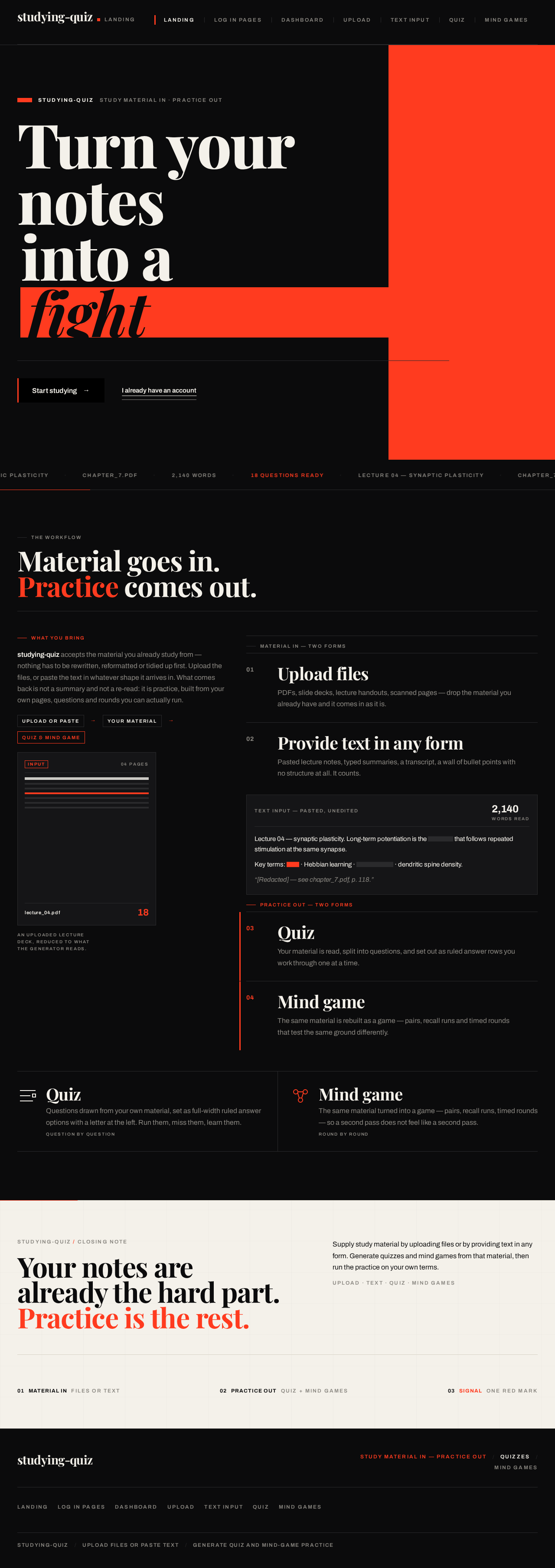
- Information and state. Anonymous first impression. States the product's purpose: study material goes in, quizzes and mind games come out. Presents the workflow — upload files or provide text, then generate quiz and mind-game practice. No account state is required to view it.
- Primary actions. "Start studying" — the rectangular slab that leads an unauthenticated visitor into the log in pages to enroll or verify. "I already have an account" — underlined type that leads a returning account holder into the log in pages.
- Supporting actions. None beyond the two entry controls; the page is a statement, not a menu.
- Domain entities. Study material (as concept), quiz, mind game, account.
- Component responsibilities. Oversized display statement carrying the product's promise; a full-viewport-width hairline marquee rule carrying fragments of study material; the two entry controls; a hairline rule closing the statement block.
- States. Loading: static content, no data fetch required. Empty: not applicable — the page has no collection. Success: the visitor reads the statement and chooses an entry control. Error: not applicable. Recovery: not applicable.
log in pages
- Information and state. The identity access surface. Supports two cohesive modes on the same surface: enrollment for a self-starting learner with no existing account, and credential verification for a returning account holder. Anonymous — reachable without an established session.
- Primary actions. Submit enrollment details to create an account; submit credentials to verify an existing account. Both lead to the authenticated study workspace on success.
- Supporting actions. Switch between the enrollment mode and the verification mode on the same surface.
- Domain entities. Account, credential, session.
- Component responsibilities. Mode switch; credential fields; submission control; inline validation messaging; error region for failed verification or rejected enrollment.
- States. Loading: submission in progress, control disabled with a visible pending state. Empty: fields blank on first arrival. Success: account created or credentials verified; the learner is taken to the Dashboard. Error: invalid credentials, or enrollment details rejected (for example, an already-used identifier); the message is shown inline and the entered values are preserved so the learner can correct and resubmit. Recovery: the learner corrects the field and resubmits without losing the rest of the form.
Dashboard
- Information and state. The authenticated study workspace. Shows the learner's account context and the routes into material input and generated practice. Requires login.
- Primary actions. Go to Upload; go to Text Input; go to Quiz; go to Mind Games.
- Supporting actions. Return to previously supplied material to continue from it.
- Domain entities. Account, study material, quiz, mind game.
- Component responsibilities. Workspace statement heading; entry points to the two material-input surfaces; entry points to the two practice surfaces; indication of material already supplied under the account.
- States. Loading: workspace context resolving. Empty: no material supplied yet — the material-input entry points are presented as the starting action. Success: entry points are available and the learner proceeds. Error: workspace context fails to load — a retry is offered. Recovery: retry reloads the workspace context.
Page 5 of 19
Upload
- Information and state. The workspace for supplying study material as files. Requires login. Shows the selected or uploaded file and its identifying details.
- Primary actions. Select or drop a file to upload as study material; confirm the upload so the material becomes available for generation.
- Supporting actions. Replace the selected file before confirming; remove a selected file.
- Domain entities. Study material, file, account.
- Component responsibilities. Hard-edged drop target with a stroke-only document glyph and instruction set; filename display once a file is chosen; file metadata (name, size); confirm control; error region.
- States. Loading: upload in progress with a visible pending state. Empty: no file chosen — the drop target and instruction set are shown. Success: the file is accepted and the filename replaces the glyph as the headline; the learner can proceed to generate practice. Error: unsupported file or failed upload — the reason is stated and the drop target returns to its empty state. Recovery: the learner selects a different file or retries the upload.
Text Input
- Information and state. The workspace for supplying study material as text in any form. Requires login. Shows the entered or pasted text and its extent.
- Primary actions. Enter or paste text as study material; confirm the text so the material becomes available for generation.
- Supporting actions. Edit the text before confirming; clear the field.
- Domain entities. Study material, text, account.
- Component responsibilities. Text entry region; extent indication (for example, word or character count); confirm control; error region.
- States. Loading: confirmation in progress with a visible pending state. Empty: the entry region is blank with its prompt. Success: the text is accepted and the learner can proceed to generate practice. Error: empty or unusable text submitted — the reason is stated and the entered text is preserved. Recovery: the learner edits the text and resubmits.
Quiz
- Information and state. The practice destination for quizzes generated from supplied study material. Requires login. Shows the material the quiz was generated from, the current question index, and the running score.
- Primary actions. Generate a quiz from the supplied material; answer each question by selecting an option; advance through the quiz; complete the quiz and see the result.
- Supporting actions. Review the material name the quiz came from; see the question index and score while working.
- Domain entities. Study material, quiz, question, answer option, score.
- Component responsibilities. Persistent left rail carrying material name, question index, and score dial; wide right stage carrying the active question; answer options as full-width hairline-ruled editorial rows with display letterforms; correct-answer lock state; completion result with the score dial sweep and tabular numerals.
- States. Loading: quiz generation in progress with a visible pending state. Empty: no material available to generate from — the learner is directed to supply material first. Success: the quiz is generated, questions are answered, and the completed result is shown. Error: generation fails — the reason is stated and the learner can retry generation from the same material. Recovery: retry regenerates the quiz from the same material without re-supplying it.
Page 6 of 19
Mind Games
- Information and state. The practice destination for mind games generated from supplied study material. Requires login. Shows the material the mind game was generated from and the current game state.
- Primary actions. Generate a mind game from the supplied material; play the generated mind game; complete it and see the outcome.
- Supporting actions. Review the material name the mind game came from; see progress within the game.
- Domain entities. Study material, mind game, tile, outcome.
- Component responsibilities. Persistent left rail carrying material name and progress; wide right stage carrying the active game; mind-game tiles drawn as thick-stroke geometric glyphs; completion outcome display.
- States. Loading: mind-game generation in progress with a visible pending state. Empty: no material available to generate from — the learner is directed to supply material first. Success: the mind game is generated, played, and its outcome shown. Error: generation fails — the reason is stated and the learner can retry generation from the same material. Recovery: retry regenerates the mind game from the same material without re-supplying it.
Page 7 of 19
3. Functional Requirements
FR-1 — Study website. As a Learner, I should reach a website built for studying, so that I have one place to turn my own material into practice. (explicit)
- Trigger: the Learner opens the site.
- Observable result: the Landing surface presents the study website and its workflow.
- Access state: anonymous.
- Failure/recovery: not applicable.
- Continuation: the Learner proceeds to enroll or verify through the log in pages.
FR-2 — Upload files as study material. As a Learner, I should upload files as study material, so that my existing documents become the source for practice. (explicit)
- Trigger: the authenticated Learner opens Upload and selects or drops a file.
- Input: one or more files.
- Observable result: the file is accepted and its filename is displayed as the headline of the drop target; the material is bound to the Learner's account.
- Access state: login required.
- Failure/recovery: an unsupported file or a failed upload states the reason and returns the drop target to its empty state so the Learner can choose another file or retry.
- Continuation: the Learner proceeds to generate a quiz or mind game from the uploaded material.
FR-3 — Provide any form of text as study material. As a Learner, I should provide text in any form as study material, so that notes I type or paste can become the source for practice. (explicit)
- Trigger: the authenticated Learner opens Text Input and enters or pastes text.
- Input: text in any form.
- Observable result: the text is accepted and becomes available as study material bound to the Learner's account.
- Access state: login required.
- Failure/recovery: empty or unusable text states the reason and preserves the entered text so the Learner can edit and resubmit.
- Continuation: the Learner proceeds to generate a quiz or mind game from the entered text.
FR-4 — Generate quizzes from the provided material. As a Learner, I should generate a quiz from the material I provided, so that I can test myself on my own content. (explicit)
- Trigger: the authenticated Learner requests quiz generation from supplied material.
- Observable result: a quiz is generated from that material and presented on the Quiz surface with its question index and score.
- Access state: login required.
- Failure/recovery: if generation fails, the reason is stated and the Learner can retry generation from the same material.
- Continuation: the Learner answers the questions and completes the quiz.
FR-5 — Answer and complete a generated quiz. As a Learner, I should answer the generated quiz questions and complete the quiz, so that I get an observable result from my practice. (required_inference)
- Trigger: the Learner selects an answer option on the Quiz surface.
- Observable result: the selected option is marked, the question index advances, the score updates, and on completion the result is shown with the score dial and tabular numerals.
- Access state: login required.
- Failure/recovery: not applicable within a generated quiz; the Learner can restart the quiz from the same material.
- Continuation: the Learner returns to the Dashboard or generates another activity.
FR-6 — Generate mind games from the provided material. As a Learner, I should generate a mind game from the material I provided, so that I can practice my own content in a different form. (explicit)
- Trigger: the authenticated Learner requests mind-game generation from supplied material.
- Observable result: a mind game is generated from that material and presented on the Mind Games surface.
- Access state: login required.
- Failure/recovery: if generation fails, the reason is stated and the Learner can retry generation from the same material.
- Continuation: the Learner plays the generated mind game.
FR-7 — Play and complete a generated mind game. As a Learner, I should play the generated mind game and complete it, so that I get an observable outcome from that practice. (required_inference)
- Trigger: the Learner interacts with the generated mind game on the Mind Games surface.
- Observable result: the game state advances and the completion outcome is displayed.
- Access state: login required.
- Failure/recovery: not applicable within a generated game; the Learner can restart the game from the same material.
- Continuation: the Learner returns to the Dashboard or generates another activity.
FR-8 — Log in pages. As an Account Holder, I should use log in pages, so that I can reach the study site under my account. (explicit)
- Trigger: the Account Holder opens the log in pages from the Landing surface or from a protected destination.
- Observable result: the log in pages present credential entry for verification.
- Access state: anonymous.
- Failure/recovery: invalid credentials state the reason inline and preserve the entered values so the Account Holder can correct and resubmit.
- Continuation: on success the Account Holder reaches the Dashboard.
FR-9 — Self-service enrollment. As a Learner, I should be able to start an account myself from the log in pages, so that I can begin studying without waiting on anyone else. (required_inference)
- Trigger: an unauthenticated visitor chooses to start studying from the Landing surface.
- Observable result: the log in pages present the enrollment mode; on submission an account is created and the Learner reaches the Dashboard.
- Access state: anonymous entry, authenticated result.
- Failure/recovery: rejected enrollment details state the reason inline and preserve the entered values so the visitor can correct and resubmit.
- Continuation: the newly enrolled Learner proceeds to supply study material.
FR-10 — Returning credential verification. As an Account Holder, I should verify my credentials on the log in pages, so that I can resume my own material and activities. (required_inference)
- Trigger: a returning Account Holder submits credentials on the log in pages.
- Observable result: the session is established and the Account Holder reaches the Dashboard with their own material and generated activities available.
- Access state: anonymous entry, authenticated result.
- Failure/recovery: invalid credentials state the reason inline and preserve the entered values so the Account Holder can correct and resubmit.
- Continuation: the Account Holder continues from previously supplied material or supplies new material.
FR-11 — Authentication before the study workspace. As an Account Holder, I should be required to authenticate before reaching the study workspace, uploaded material, or generated activities, so that my material and practice stay bound to my account. (required_inference)
- Trigger: an unauthenticated visitor attempts to reach Dashboard, Upload, Text Input, Quiz, or Mind Games.
- Observable result: the protected destination is not shown; the visitor is directed to the log in pages.
- Access state: login required for the protected destinations.
- Failure/recovery: after a failed verification the visitor remains on the log in pages with the reason stated.
- Continuation: on successful verification the visitor reaches the Dashboard.
FR-12 — Continue from previously supplied material. As a Learner, I should return to material I already supplied, so that I can generate further practice without re-entering it. (required_inference)
- Trigger: the authenticated Learner opens the Dashboard or a practice surface with material already supplied under the account.
- Observable result: the previously supplied material is available as the source for generating a quiz or mind game.
- Access state: login required.
- Failure/recovery: if the material cannot be loaded, the reason is stated and the Learner can supply material again.
- Continuation: the Learner generates a quiz or mind game from that material.
Page 8 of 19
4. User Personas
Page 9 of 19
Learner
Product context. The Learner is the primary study user. They arrive with material they already own — lecture notes, PDFs, slide decks, or text they type or paste — and they want practice turned out of it. They work late, alone, on their own content, and they are self-directed: nobody assigns them the material and nobody grades the result.
Primary goal. Turn their own study material into usable quiz and mind-game study sessions.
Distinct accepted responsibilities. Supplying study material in either accepted form — uploading files, or providing text in any form. Requesting generation of a quiz from that material. Requesting generation of a mind game from that material. Answering and completing a generated quiz. Playing and completing a generated mind game. Returning to material already supplied so further practice can be generated from it.
Relevant inputs and decisions. Which form to supply material in — a file or text. Which material to generate practice from. Which practice to generate — a quiz or a mind game. How to answer each quiz question. How to play each mind game.
Interactions with other accepted participants. The Learner interacts with the Account Holder role only through the shared access boundary: the Learner enrolls through the log in pages to obtain the account under which their material and activities are held. There is no other participant in the Learner's accepted work.
Observable success. A quiz generated from their own material, answered to completion with a visible score. A mind game generated from their own material, played to a visible outcome. Material supplied once and reusable for further practice.
What makes this role's work different. The Learner's work is content transformation and self-testing. The value is not in browsing a catalogue or following an assigned sequence; it is in the fact that the practice is made from the Learner's own material. That is why material input is a first-class responsibility rather than a setting, and why both practice forms are generated from the same supplied source.
Page 10 of 19
Account Holder
Product context. The Account Holder is a user who logs in through the log in pages to access the study site. They may be arriving for the first time to start an account, or returning to resume material and activities they already created.
Primary goal. Gain access to the upload and quiz/mind-game generation features under their account.
Distinct accepted responsibilities. Establishing an account through the log in pages when starting fresh. Verifying credentials through the log in pages when returning. Reaching the authenticated study workspace under their own account.
Relevant inputs and decisions. Whether they are starting fresh or returning. The credential details they submit. How to correct a rejected submission.
Interactions with other accepted participants. The Account Holder role is the access boundary through which the Learner's work is held. The account is what binds uploaded material, entered text, and generated activities to the correct person so they can be resumed.
Observable success. Reaching the Dashboard under their own account, with their own material and generated activities available.
What makes this role's work different. The Account Holder's work is access, not study. Their responsibility is establishing and verifying identity so that durable, account-bound study state exists at all. It is a distinct responsibility from supplying material or running practice, which is why it has its own surface and its own lifecycle.
Page 11 of 19
5. Core User Flows
Flow 1 — A new Learner starts studying and generates a quiz from an uploaded file
- The Learner opens studying-quiz and lands on Landing (anonymous). The page states the workflow: material in, quiz and mind games out.
- The Learner chooses Start studying. This is the enrollment entry, not a protected destination.
- The Learner arrives at log in pages in enrollment mode. They submit their account details.
- On success, an account is created and the Learner reaches Dashboard (login required). On failure, the reason is shown inline, the entered values are preserved, and the Learner corrects and resubmits.
- From the Dashboard the Learner chooses Upload.
- On Upload, the Learner selects or drops a file. The filename replaces the document glyph as the headline, and the file's details are shown.
- The Learner confirms the upload. The material is accepted and bound to their account.
- The Learner proceeds to Quiz and requests generation from the uploaded material.
- The quiz is generated and presented: the left rail shows the material name, the question index, and the score dial; the right stage shows the first question with its answer options as editorial rows.
- The Learner selects an answer. The selected option is marked, the index advances, and the score updates.
- The Learner continues through the questions to completion. The result is shown with the score dial sweep and tabular numerals.
- Continuation: the Learner returns to the Dashboard, generates another quiz from the same material, or moves to Mind Games.
Material failure and recovery: if the upload fails or the file is unsupported, the reason is stated and the drop target returns to its empty state so the Learner can choose another file. If quiz generation fails, the reason is stated and the Learner retries generation from the same material without re-uploading.
Page 12 of 19
Flow 2 — A Learner generates a mind game from pasted text
- The authenticated Learner is on Dashboard.
- The Learner chooses Text Input.
- On Text Input, the Learner pastes or types their notes. The extent of the text is shown.
- The Learner confirms the text. The material is accepted and bound to their account.
- The Learner proceeds to Mind Games and requests generation from the entered text.
- The mind game is generated and presented: the left rail shows the material name and progress; the right stage shows the game with its geometric tiles.
- The Learner plays the game. The game state advances.
- On completion the outcome is displayed.
- Continuation: the Learner returns to the Dashboard or generates a quiz from the same text.
Material failure and recovery: if the text is empty or unusable, the reason is stated and the entered text is preserved so the Learner can edit and resubmit. If mind-game generation fails, the reason is stated and the Learner retries from the same material.
Flow 3 — A returning Account Holder resumes their own material
- The Account Holder opens studying-quiz and lands on Landing (anonymous).
- The Account Holder chooses I already have an account.
- The Account Holder arrives at log in pages in verification mode and submits their credentials.
- On success, the session is established and the Account Holder reaches Dashboard with their own material and generated activities available. On failure, the reason is shown inline, the entered values are preserved, and the Account Holder corrects and resubmits.
- From the Dashboard the Account Holder sees the material they previously supplied and chooses to generate further practice from it.
- The Account Holder generates a quiz or a mind game from that material without re-supplying it.
- Continuation: the Account Holder completes the generated activity and returns to the Dashboard.
Page 13 of 19
Flow 4 — An unauthenticated visitor attempts a protected destination
- An unauthenticated visitor attempts to reach Dashboard, Upload, Text Input, Quiz, or Mind Games.
- The protected destination is not shown. The visitor is directed to log in pages.
- The visitor either enrolls (Flow 1, steps 3–4) or verifies credentials (Flow 3, step 3).
- On success the visitor reaches the Dashboard and can proceed to the destination they originally wanted.
- On failure the visitor remains on the log in pages with the reason stated and can correct and resubmit.
Page 14 of 19
6. Visuals Colors and Theme
Muse and headline. Tobias van Schneider. Editorial swagger for study: black, bone, one hot signal red. The system is type-led, not button-led — oversized display type turns the learner's own material into the hero of the page, and the interface stays quiet enough that generated questions and mind-game tiles carry the colour.
Colour tokens (dark mode).
| Role | Hex | Use |
|---|
| Background | #0B0B0C | Near-black ground, roughly 70% of every screen |
| Surface | #151517 | Flat, hairline-bordered surfaces — never lifted cards |
| Text | #F4F1EA | Bone type; also serves as the "primary" |
| Primary | #F4F1EA | Bone — the type colour and primary emphasis |
| Accent | #FF3B1F | Hot signal red — the single saturated accent |
| Muted | #8A8781 | Metadata, timestamps, file sizes, helper copy |
Accent discipline. #FF3B1F is used only where the product acts: the generate CTA, the active quiz option, the score needle, the focus ring, and the marquee rule. No other saturated colour appears anywhere in the system.
Inverted section. One inverted bone section per page (light ground, black type, red accent) is permitted as a rhythm break.
Typography.
- Headings: Playfair Display, display serif, set enormous and tight. Landing statement
clamp(56px, 11vw, 168px), line-height 0.92, letter-spacing -0.02em, weight 700–900, sentence case (never all-caps). Section headings clamp(34px, 5vw, 64px).
- Body: Archivo. Body copy 17px/1.6 on desktop, 16px/1.65 at 375px, measure capped at 62ch.
- Eyebrow labels: Archivo 600, 11–12px, uppercase, letter-spacing
0.18em, in muted or accent red.
- Numbers: Archivo 700 tabular, set large — scores, question counts, and timers are treated as display type.
- Type scale, 1.5 modular ratio: 168 / 112 / 64 / 40 / 24 / 17 / 14 / 12.
- Micro-labels: 12px uppercase, tracking
0.18em.
Shape language. Sharp corners everywhere — 0px radius on cards, inputs, buttons, and images. The only curves in the system are the circular score dial, the round upload target, and the pill toggle in the quiz. Rules are 1px hairlines in #2A2A2C on dark and #D8D3C7 on bone. Buttons are rectangular slabs of type with generous padding and no shadow. Images and video are full-bleed and hard-cropped to the column edge.
Layout. Asymmetric 12-column editorial grid with a 5/7 and 7/5 split as the default rhythm, 24px gutters, 40px outer margins at 1280px, 20px at 768px, 16px at 375px. Hero type spans columns 1–9 and may run to the viewport edge as decoration only — the words themselves wrap inside the container. Every page opens with a giant left-aligned statement plus a hairline rule; content below alternates between full-bleed bone sections and black sections. Quiz and Mind Games use a two-zone layout: a persistent left rail (material name, question index, score dial) and a wide right stage for the active question. At 375px the rail collapses into a sticky top strip with the dial shrunk to 40px.
Imagery. Almost no photography. The imagery is the learner's own material made visible: monochrome document thumbnails, a redacted-style text extract rendered in Archivo, answer-option letterforms set as display type (A, B, C, D at 96px), and one abstract macro per marketing section — paper grain, ink bleed, a folded page edge — always monochrome with a single red element. Mind-game tiles use thick 2px-stroke geometric glyphs in bone on black, drawn as inline SVG, never emoji or clip art.
Avoid. Any blue, indigo, or violet accent (#0057FF, #2563EB, #6366F1 and neighbours) — the accent is #FF3B1F only. Inter, Roboto, Arial, Helvetica, Open Sans, Lato, Poppins, or system-ui for headings or body. Rounded 12–16px cards with soft drop shadows and hover-lift. Gradient-blob heroes, glassmorphism panels, frosted overlays. A hero built as centred headline plus grey subtext plus coloured button. Emoji, sticker illustrations, mascots, or clip art in the mind-games surface. Stock photography in the mind-game tiles. The generic indigo/blue-on-white SaaS template is forbidden for this project.
Page 15 of 19
7. Signature Design Concept
The type wall. The Landing hero is a type wall, not a product shot. Bone-coloured Playfair Display words — "Turn your notes into a fight" — are set at clamp(56px, 11vw, 168px) across columns 1–10, stacked in three ragged lines, with the word "fight" knocked out of a full-bleed #FF3B1F block that bleeds off the right edge as decoration. The words themselves stay whole inside the container; only the red block bleeds.
Below the block, one hairline rule runs the full viewport width carrying a slow marquee of real study-material fragments — for example, Lecture 04 — Synaptic plasticity · chapter_7.pdf · 2,140 words · 18 questions ready. The marquee is the only moving element on the page.
The only controls are two rectangular slabs bottom-left: "Start studying" in bone on black with a red 3px left edge, and "I already have an account" as underlined type. There is no centred stack, no subheading paragraph, no gradient, and no blue button.
Signature moves carried through the product.
- The oversized Playfair Display statement spanning columns 1–10 with one word knocked out of a full-bleed
#FF3B1F block bleeding off the right edge — decoration bleeds, the words stay whole inside the container.
- The full-viewport-width hairline marquee rule under the hero, carrying fragments of the learner's actual uploaded material, scrolling slowly and stopping into wrapped whole items under
prefers-reduced-motion.
- Upload as a hard-edged bone rectangle on the black ground: a 1px dashed hairline, a 48px stroke-only document glyph, and the instruction set as 24px Archivo. On drop, the filename replaces the glyph in Playfair Display at 40px, so the file itself becomes the headline.
- Quiz answer options as editorial rows, not cards: each option is a full-width hairline-ruled row with a 96px display letter (A/B/C/D) at the left. On hover a 3px
#FF3B1F bar slides in from the left edge while the label shifts to bone. The correct answer locks the row to a solid red bar with black type.
- The score dial: a 1px-stroke circular gauge in bone with a single
#FF3B1F needle that sweeps 900ms on completion, paired with tabular numerals set at 72px — the only curve in the entire system.
Page 16 of 19
8. Interaction Model & Motion Direction
Interaction Model: Static
Motion Tempo: restrained
Hero Dimensionality: flat
Landing Hero Motion Brief.
- Focal subject. The type wall itself — the oversized Playfair Display statement, with the word "fight" knocked out of the full-bleed
#FF3B1F block that bleeds off the right edge.
- Input → transformation → outcome thesis. The learner's own material is the input; the marquee rule beneath the hero carries fragments of that material — file names, word counts, question counts — as it scrolls; the outcome is the promise stated above it, that notes become practice. The motion shows material passing through the system, not a decorative animation.
- Motion vocabulary. Restrained but confident: 420–600ms
cubic-bezier(0.16, 1, 0.3, 1) for entrances, 160ms linear for state changes. One purposeful loop per page — the slow type marquee on the landing rule, and a 900ms score-dial sweep after a quiz round. Hover on a quiz option slides a red 3px bar in from the left and swaps the label colour; no lift, no scale, no bounce. Page transitions are a 240ms black wipe.
- Composed first frame. Bone Playfair Display words stacked in three ragged lines across columns 1–10, the word "fight" reversed out of the red block bleeding off the right edge, a hairline rule beneath carrying the marquee mid-scroll, and the two rectangular controls bottom-left with the red 3px left edge on "Start studying".
- Reduced-motion state. With
prefers-reduced-motion, everything resolves instantly and the marquee becomes a static wrapped line of whole words — no scrolling, no partial items.
Page 17 of 19
9. Non-Functional Requirements
NFR-1 — Readable content stays whole at every viewport. (explicit, from the creative direction)
Headlines, wordmarks, labels, numbers, item images, cards, and controls stay entirely inside the viewport and their container at 375px, 768px, and 1280px, wrapping or scaling (for example, font-size: clamp(...) with its mobile size) to fit. No other element covers any part of them. Crops, bleeds, and off-edge placement are for decoration only: shapes, textures, rules, and background art. Rationale: the oversized type system is the product's identity, and it must remain legible rather than clipped.
NFR-2 — Moving content exception. (explicit, from the creative direction)
Moving and scrollable content — marquees, tickers, carousels, horizontally scrollable rows — may cross the viewport or container edge by design. It is judged by whether it actually moves or scrolls and whether every item becomes fully readable as it passes, never by the item cut at the edge in a still frame. With prefers-reduced-motion it stops and shows whole items: they wrap into rows, or sit in a horizontally scrollable row (overflow-x: auto) whose further items are reached by scrolling. Rationale: the marquee rule is a signature move and must not be mistaken for a clipping defect.
NFR-3 — Reduced-motion support. (explicit, from the creative direction)
With prefers-reduced-motion, all motion resolves instantly and the marquee becomes a static wrapped line of whole words. Rationale: the motion system is decorative and must degrade without loss of content.
NFR-4 — Accent discipline. (explicit, from the creative direction)
#FF3B1F is the only saturated accent in the system. No blue, indigo, or violet accent appears anywhere. Rationale: the palette is black, bone, and one hot signal red; a second accent would break the system.
NFR-5 — Account-bound material continuity. (required_inference)
Uploaded material, entered text, and generated activities are bound to the account that created them, so a returning Account Holder reaches their own material and activities. Rationale: the accepted journeys require the Learner to return to previously supplied material and generate further practice from it without re-supplying it.
NFR-6 — Protected destinations require authentication. (required_inference)
Dashboard, Upload, Text Input, Quiz, and Mind Games are not reachable without an established session. Rationale: material and generated activities are account-bound, and the accepted access contract places login on those destinations.
NFR-7 — Anonymous entry surfaces. (required_inference)
Landing and log in pages are reachable without an established session. Rationale: a protected destination cannot own the interaction that establishes access to itself, so the enrollment and verification interaction must be anonymously reachable.
NFR-8 — Failure states preserve user input. (required_inference)
Failed verification, rejected enrollment, failed upload, and failed generation state the reason and preserve what the user entered or selected, so the user can correct and resubmit. Rationale: the accepted journeys require recovery without re-entering work.
Page 18 of 19
10. Tech Stack
- Frontend: React — the application is a first-party web application with custom UI across Landing, log in pages, Dashboard, Upload, Text Input, Quiz, and Mind Games. (basic_default — not specified by user)
- Backend: Python with FastAPI — the application requires backend integration for account-bound material storage and for generating quizzes and mind games from supplied material. (basic_default — not specified by user)
- Storage: a persistent datastore for accounts, uploaded files, entered text, and generated activities. (basic_default — not specified by user)
- Containerization: Docker and docker-compose for local and deployment packaging. (basic_default — not specified by user)
- Orchestration: Kubernetes is not required by any accepted constraint and is not included. (basic_default — not specified by user)
No source-specified technology choice exists in the authoritative thread, so these are labeled defaults and do not constitute product behavior.
11. Assumptions and Constraints
Assumptions.
- A-1. The Learner and the Account Holder are the same person in different moments of use: enrolling or verifying, then studying. They are modeled as two personas because the accepted responsibilities are distinct — access versus study — not because they are different people. (required_inference)
- A-2. "Any form of text" is taken at face value: typed, pasted, or otherwise entered text is accepted as study material without a prescribed format. (explicit)
- A-3. Generated quizzes and mind games are derived from the material the Learner supplied under their own account, not from a shared or external content pool. (required_inference)
- A-4. The log in pages surface carries both enrollment and verification as two cohesive modes, because the source requests log in pages and the accepted journeys require a self-starting learner to be able to begin. (required_inference)
Constraints.
- C-1. The accepted active human personas are exactly Learner and Account Holder. No other persona is added. (explicit, from the planning boundary)
- C-2. The accepted page inventory is exactly Landing, log in pages, Dashboard, Upload, Text Input, Quiz, and Mind Games, in that order, with Landing and log in pages anonymously reachable and Dashboard, Upload, Text Input, Quiz, and Mind Games requiring login. (explicit, from the planning boundary)
- C-3. The accent is
#FF3B1F only; no blue, indigo, or violet accent is used anywhere. (explicit, from the creative direction)
- C-4. Headings use Playfair Display and body uses Archivo. Inter, Roboto, Arial, Helvetica, Open Sans, Lato, Poppins, and system-ui are not used for headings or body. (explicit, from the creative direction)
- C-5. The shape language is 0px radius on cards, inputs, buttons, and images. The only curves are the circular score dial, the round upload target, and the pill toggle in the quiz. (explicit, from the creative direction)
- C-6. Readable text and needed content stay whole at 375px, 768px, and 1280px; only decoration bleeds or crops. (explicit, from the creative direction)
- C-7. The generic indigo/blue-on-white SaaS template is forbidden for this project. (explicit, from the creative direction)
- C-8. No adjacent account-management capability — password reset, profile editing, role administration, or similar — is included. The log in pages cover enrollment and credential verification only. (required_inference, from the accepted scope)
- C-9. No course authoring, instructor-led classroom, social feed, messaging, or shared content marketplace is included. (required_inference, from the accepted scope)
Page 19 of 19
12. Glossary
- Study material — the content a Learner supplies for practice, either as an uploaded file or as text provided in any form.
- Upload — the authenticated workspace where a Learner supplies study material as files.
- Text Input — the authenticated workspace where a Learner supplies study material as text in any form.
- Quiz — a generated practice activity made from supplied study material, consisting of questions with answer options, a question index, and a score.
- Mind game — a generated practice activity made from supplied study material, presented as a playable game with geometric tiles and a completion outcome.
- Score dial — the 1px-stroke circular gauge with a single
#FF3B1F needle that shows a quiz result; the only curve in the system alongside the round upload target and the quiz pill toggle.
- Learner — the accepted persona who supplies study material and runs generated practice activities.
- Account Holder — the accepted persona who enrolls or verifies credentials through the log in pages to reach the study workspace under their account.
- log in pages — the anonymous identity access surface supporting both self-service enrollment and returning credential verification.
- Landing — the anonymous public entry surface that states the study website and its file, text, quiz, and mind-game workflow.
- Dashboard — the authenticated study workspace from which material input and generated practice are reached.
- Marquee rule — the full-viewport-width hairline rule under the Landing hero carrying fragments of study material; the one purposeful motion loop on that page.
No comments yet. Be the first!