student-management-teacher
 sarvesh gadage
create a student management system website for a single teacher


Comments (0)
Sign in to leave a comment
System Requirements
System Requirements Document for Student Management System
1. Introduction
The Student Management System is a website that lets one teacher keep student records in a single, calm place. The teacher records students and manages their student data in one place — viewing the roster, adding a student, and editing or deleting an individual student record.
The product is deliberately scoped to a single teacher. There is no multi-teacher administration, no class scheduling, no grading, and no parent or student portal. The audience is exactly one person: the teacher who owns and maintains the student records.
Because student records are durable and private, the teacher establishes an application-owned identity through self-service enrollment on first use and verifies that identity on return before reaching student records. The public entry explains the product and leads the teacher into that access flow.
2. System Overview
The system is delivered as a React web frontend backed by a shared FastAPI backend and a MariaDB database. The frontend presents four destinations: a public Landing page, a Login page for self-service enrollment and returning verification, a Students page listing the roster and adding records, and a Student Details page for editing or deleting one record. Students and Student Details require a verified teacher session; Landing and Login are reachable without one.
The only active human actor is the Teacher. The backend and database are supporting system actors that persist and serve student records; they are not personas and have no independent product goals.
Current accepted behavior is limited to: explaining the product publicly, establishing and verifying the single teacher's identity, listing students, adding a student, and editing or deleting a student record.
Removed from scope
- Multi-teacher or multi-user administration (also: multi-tenant, role management)
- Student, parent, or guardian portals and accounts
- Grading, attendance, scheduling, and fee management
- Class or course management beyond the class name label held on a student record
2a. Product Interpretation and Delivery Boundary
The product is a first-party website owned and operated by the application. All four destinations are custom application pages; no provider surface or external destination carries accepted product behavior.
Access is split into two boundaries. Landing and Login are anonymous entry surfaces: the teacher can read the product explanation and complete self-service enrollment or returning verification without an existing session. Students and Student Details are protected surfaces: they require a verified teacher session because they expose durable, private student records. The Login page is the only place identity is established or verified; a protected page never establishes access to itself.
Identity is application-owned and single-account in effect: the system serves one teacher, so enrollment creates the teacher's account and returning verification confirms it. This is identity continuity for private records, not a differentiated permission system — there are no roles, no shared-state visibility rules, and no administrative tiers.
Everything described in this document is current. No future-horizon capabilities are accepted.
2c. Page Content and Component Coverage
Landing
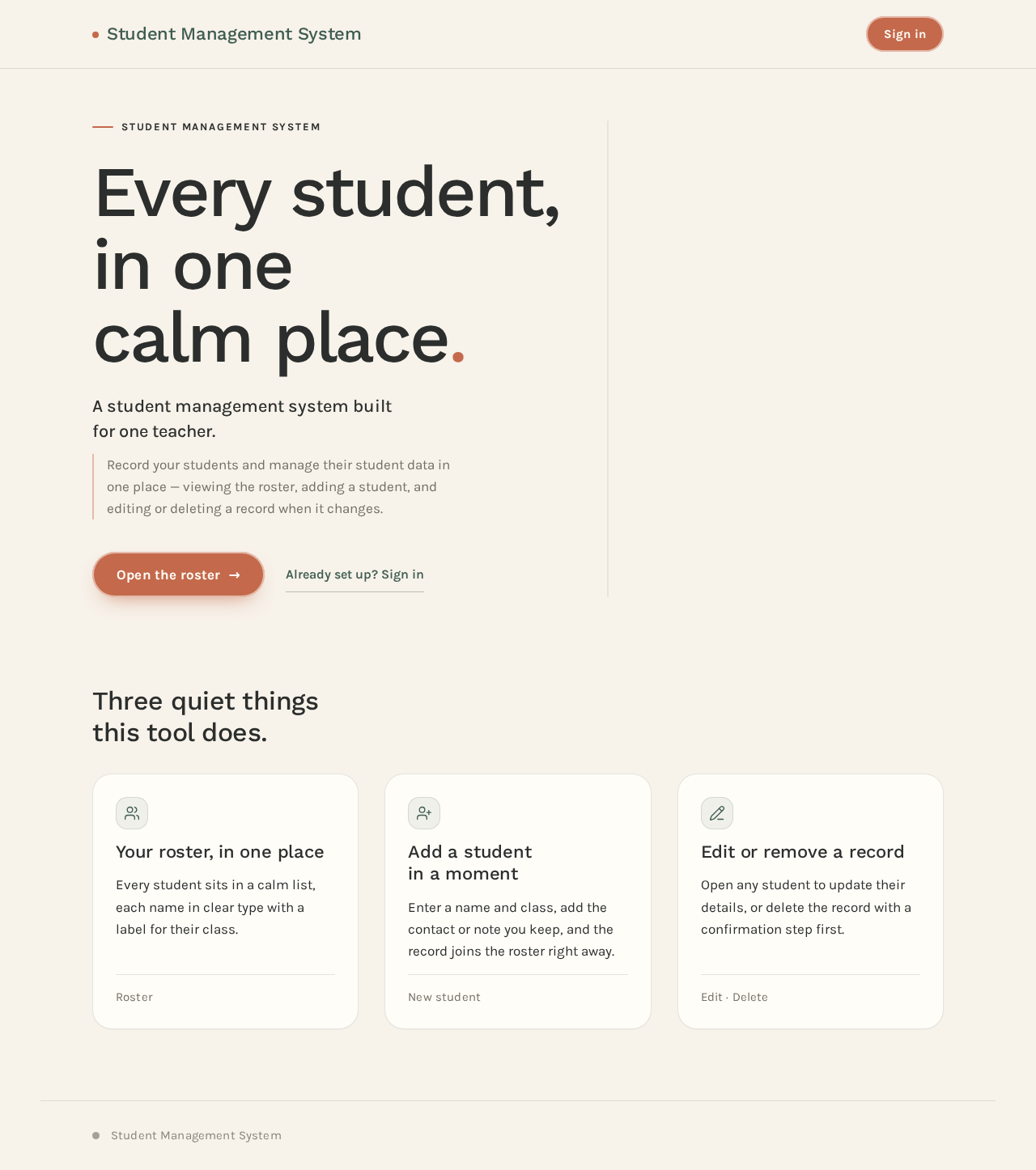
- Information and state: Product name "Student Management System"; hero headline "Every student, in one calm place."; subline "A student management system built for one teacher."; a short explanation that the teacher records students and manages their student data in one place; a calm row of three feature panels describing the roster, adding a student, and editing or deleting a record. Static public content; no session required.
- Primary action: "Open the roster" capsule CTA leading to Login (or directly to Students when a verified session already exists).
- Supporting actions: A secondary text link to Login for a returning teacher.
- Domain entities: None persisted on this page.
- Component responsibilities: Hero block (oversized two-line headline left, soft-edged photo panel right, terracotta capsule CTA pinned beneath the headline); three feature panels; footer with product name.
- States: Loading — not applicable (static content). Empty — not applicable. Success — page renders fully. Error — if the session check fails, the CTA still routes to Login. Recovery — the teacher can always reach Login from the CTA or the secondary link.
Login
- Information and state: Two modes on one page — "Create your account" (self-service enrollment) and "Sign in" (returning verification). Fields: email, password; enrollment additionally asks for display name and password confirmation. Inline validation messages; a submission-in-progress state; an error banner for invalid credentials or an already-enrolled account.
- Primary action: Submit enrollment or sign-in.
- Supporting actions: Toggle between enrollment and sign-in modes; return link to Landing.
- Domain entities: Teacher account (display name, email, password credential).
- Component responsibilities: Mode toggle; form fields with labels and inline errors; submit capsule button with disabled/loading state; error banner; link back to Landing.
- States: Loading — submit button shows progress and is disabled. Empty — blank form with labels. Success — on enrollment or successful sign-in, the teacher is taken to Students. Error — invalid credentials, duplicate enrollment, or validation failure shown inline without losing entered values. Recovery — the teacher corrects fields and resubmits; the mode toggle remains available.
Students
- Information and state: The teacher's roster as soft rows, each row a 24px-radius panel with a hairline rule, the student's name in medium weight, and a sage green label chip holding the class name. A header with the page title and an "Add student" action. Requires a verified session.
- Primary action: Add a student via a form (name, class name, and contact or note fields as captured on the record) that creates the record and appends it to the roster.
- Supporting actions: Open a student row to Student Details; sign out.
- Domain entities: Student (name, class name, additional record fields), Teacher account (owner of the roster).
- Component responsibilities: Roster list with soft row panels and class-name chips; add-student form or panel with validation; empty-state block; loading skeleton; error banner with retry; sign-out control.
- States: Loading — roster skeleton while records load. Empty — a calm empty state explaining no students have been added yet, with the add action prominent. Success — new student appears in the roster immediately after saving. Error — load failure shows a retry banner; save failure keeps the form open with entered values and an inline message. Recovery — retry reloads the roster; the teacher can resubmit the add form.
Student Details
- Information and state: One student record with its fields (name, class name, and the record's other captured fields) shown in an editable form, plus the class-name chip. Requires a verified session.
- Primary action: Save edits to the record.
- Supporting actions: Delete the record behind a confirmation step; return to Students.
- Domain entities: Student (the single record being viewed or edited).
- Component responsibilities: Editable field form with labels and inline validation; save capsule button with loading state; delete action with confirmation dialog; back link to Students; not-found state.
- States: Loading — record skeleton while it loads. Empty — not applicable (a record is always addressed). Success — saved changes are confirmed and reflected on return to Students. Error — load failure shows a retry; save failure keeps edits in place with an inline message; delete failure leaves the record intact with an error message. Recovery — retry reloads; the teacher can re-save or cancel; a deleted record returns the teacher to Students with the row removed.
3. Functional Requirements
FR-1 — Public product explanation (explicit) As a Teacher, I should see a public Landing page that explains the student management system built for one teacher, so that I understand what the tool does before signing in.
- Trigger: the teacher opens the site without a session.
- Observable result: the Landing page renders the product name, hero headline and subline, and three feature panels.
- Access: anonymous.
- Failure/recovery: if the session check fails, the CTA still routes to Login.
- Continuation: the teacher follows "Open the roster" or the sign-in link to Login.
FR-2 — Self-service enrollment (required_inference) As a Teacher, I should create my own account on first use, so that my student records are privately owned and resumable.
- Trigger: the teacher selects "Create your account" on Login and submits display name, email, password, and password confirmation.
- Observable result: the account is created and the teacher is taken to Students with a verified session.
- Access: anonymous entry on Login.
- Failure/recovery: validation errors and duplicate-account errors appear inline without clearing entered values; the teacher corrects and resubmits.
- Continuation: the teacher proceeds to the roster.
FR-3 — Returning identity verification (required_inference) As a Teacher, I should sign in with my email and password, so that I can reach my student records again.
- Trigger: the teacher submits email and password in sign-in mode on Login.
- Observable result: a verified session is established and the teacher is taken to Students.
- Access: anonymous entry on Login.
- Failure/recovery: invalid credentials show an inline error and the form retains the email; the teacher retries or switches to enrollment.
- Continuation: the teacher proceeds to the roster.
FR-4 — Protected student records (required_inference) As a Teacher, I should be required to verify my identity before viewing or changing student records, so that private student data is not exposed.
- Trigger: the teacher requests Students or Student Details without a verified session.
- Observable result: the teacher is routed to Login; after verification the teacher reaches the requested protected page.
- Access: Students and Student Details require login.
- Failure/recovery: an expired or invalid session returns the teacher to Login with a message.
- Continuation: successful verification resumes the protected work.
FR-5 — View the student roster (required_inference) As a Teacher, I should see my students listed in one place, so that I can review my roster at a glance.
- Trigger: the teacher opens Students with a verified session.
- Observable result: each student appears as a soft row panel with the name in medium weight and a sage green class-name chip.
- Access: login required.
- Failure/recovery: a load failure shows a retry banner; retry reloads the roster.
- Continuation: the teacher opens a row or adds a student.
FR-6 — Add a student record (required_inference) As a Teacher, I should add a student record, so that new students are captured in the roster.
- Trigger: the teacher opens the add-student form on Students and submits the student's fields.
- Observable result: the record is saved and appears in the roster immediately.
- Access: login required.
- Failure/recovery: validation errors appear inline; a save failure keeps the form open with entered values and an inline message; the teacher resubmits.
- Continuation: the teacher returns to the roster or opens the new record.
FR-7 — Edit a student record (required_inference) As a Teacher, I should edit one student's record, so that their details stay accurate.
- Trigger: the teacher opens a student from Students and saves changes on Student Details.
- Observable result: the updated values are persisted and reflected in the roster.
- Access: login required.
- Failure/recovery: validation errors appear inline; a save failure keeps edits in place with an error message; the teacher retries or cancels.
- Continuation: the teacher returns to Students.
FR-8 — Delete a student record (required_inference) As a Teacher, I should delete a student record, so that records I no longer need are removed.
- Trigger: the teacher selects delete on Student Details and confirms.
- Observable result: the record is removed and the teacher returns to Students with the row gone.
- Access: login required.
- Failure/recovery: a delete failure leaves the record intact with an error message; the teacher can retry or cancel.
- Continuation: the teacher continues managing the roster.
FR-9 — Single-teacher scope (explicit) As a Teacher, I should be the only user of the system, so that the tool stays focused on my own records.
- Constraint: the system serves a single teacher; there are no additional roles, shared rosters, or administrative tiers.
4. User Personas
Teacher
Product context. The Teacher is the sole user of the Student Management System. They run their own classroom records and need one calm, private place to keep student information current. The tool is used for daily admin work, not for institutional reporting.
Primary goal. Keep an accurate, up-to-date roster of students and manage each student's record without friction.
Distinct accepted responsibilities.
- Establish and verify their own account so records stay private and resumable.
- Review the roster of students.
- Add a new student record.
- Edit an existing student record.
- Delete a record that is no longer needed.
Relevant inputs and decisions. The Teacher enters account credentials on first use and on return; enters student fields when adding a record; decides which fields to change when editing; and confirms before deleting.
Interactions with other participants. There are no other human participants. The Teacher interacts only with the application, which persists and serves their records.
Observable success. The Teacher signs in, sees their roster, and can add, edit, or delete a student with the change reflected immediately — all within a warm, uncluttered interface.
5. Core User Flows
Flow A — First-time enrollment and first roster view
- The Teacher opens the site and lands on Landing (anonymous). They read the headline, subline, and three feature panels.
- The Teacher selects the "Open the roster" capsule CTA and arrives at Login.
- On Login, the Teacher chooses "Create your account" and enters display name, email, password, and password confirmation.
- The Teacher submits. The submit button shows progress and is disabled during the request.
- Observable result: the account is created and the Teacher is taken to Students with a verified session.
- Failure/recovery: if a field is invalid or the email is already enrolled, an inline error appears and the entered values remain; the Teacher corrects and resubmits.
- Continuation: the Teacher sees the empty-state roster and the prominent add action.
Flow B — Returning sign-in
- The Teacher opens Landing and follows the sign-in link, or navigates directly to Login.
- On Login, the Teacher stays in "Sign in" mode and enters email and password.
- The Teacher submits; the button shows progress.
- Observable result: a verified session is established and the Teacher is taken to Students.
- Failure/recovery: invalid credentials show an inline error and retain the email; the Teacher retries or switches to enrollment.
- Continuation: the Teacher reviews the roster.
Flow C — Add a student
- From Students, the Teacher selects "Add student".
- The add-student form opens; the Teacher enters the student's name, class name, and other record fields.
- The Teacher submits. The form shows a saving state.
- Observable result: the new student appears in the roster as a soft row panel with the name in medium weight and a sage green class-name chip.
- Failure/recovery: validation errors appear inline; a save failure keeps the form open with entered values and an inline message; the Teacher resubmits.
- Continuation: the Teacher adds another student or opens the new record.
Flow D — Edit a student
- From Students, the Teacher opens a student row and arrives at Student Details.
- The Teacher changes one or more fields in the editable form.
- The Teacher selects save; the button shows a saving state.
- Observable result: the changes are persisted and reflected in the roster when the Teacher returns to Students.
- Failure/recovery: validation errors appear inline; a save failure keeps edits in place with an error message; the Teacher retries or cancels.
- Continuation: the Teacher returns to the roster.
Flow E — Delete a student
- From Student Details, the Teacher selects delete.
- A confirmation dialog appears; the Teacher confirms.
- Observable result: the record is removed and the Teacher returns to Students with the row gone.
- Failure/recovery: a delete failure leaves the record intact with an error message; the Teacher can retry or cancel.
- Continuation: the Teacher continues managing the roster.
Flow F — Protected access without a session
- The Teacher requests Students or Student Details without a verified session.
- Observable result: the Teacher is routed to Login.
- The Teacher completes enrollment (Flow A) or sign-in (Flow B).
- Continuation: the Teacher reaches the originally requested protected page.
6. Visuals Colors and Theme
The visual language follows the humane-technology direction of Yves Béhar: calm, warm, and safe for daily admin work.
Palette (light mode)
- Background — Oat ground
#F7F2EA(carries most of the page) - Surface —
#FFFDF8 - Text —
#2B2E2C - Primary — Slate green
#3E5C50(main action colour) - Accent — Terracotta
#C4694B(marks one focus item per screen) - Muted —
#8A8578
Typography
- Headings: Work Sans, Medium weight, tight tracking, sentence case. Large calm headings with soft curves.
- Body: Karla.
- Scale: 1.25 modular — 64 / 48 / 32 / 22 / 17 / 15 px. Headline
clamp(40px, 7vw, 88px).
Shape language. Soft rounded blocks with 24px radii; capsule buttons; gentle card edges; no sharp corners.
Layout. Single column with wide margins. One hero block, then a calm row of three feature panels. The student list uses soft rows with clear labels.
Imagery. Soft-lit still life of a desk, a notebook, and a plant; warm natural light on plain grounds; no stock people.
Accessibility of text and controls. Headlines, wordmarks, labels, numbers, card text, and controls stay entirely inside the viewport and their container at 375px, 768px, and 1280px, wrapping or scaling to fit; no element covers any part of them. Imagery and decoration may crop or bleed per the direction but never cover readable text or controls.
Avoid. Bootstrap blue buttons on white; gradient blob heroes; sharp 0px corners; grids of identical hover-lift cards; the generic indigo/blue-on-white SaaS template.
7. Signature Design Concept
The public entry is a split hero on the oat ground. On the left, an oversized two-line headline in Work Sans at clamp(40px, 7vw, 88px) spans nine columns on desktop: "Every student, in one calm place." Beneath it sits a terracotta capsule CTA, "Open the roster", with a 2px inner light edge. On the right, a soft-edged photo panel shows a warm still life of a desk, a notebook, and a plant. Below the hero, a calm row of three feature panels describes the roster, adding a student, and editing or deleting a record. The subline reads "A student management system built for one teacher." The composition recomposes only accepted content and controls; it introduces no new behavior.
8. Interaction Model & Motion Direction
Interaction Model: Animated Motion Tempo: restrained Hero Dimensionality: layered_2d
Landing Hero Motion Brief
- Focal subject: the soft-edged still-life photo panel (desk, notebook, plant) beside the oversized headline.
- Input → transformation → outcome thesis: as the Landing page loads, the headline and subline settle in with one slow breathing fade; the photo panel and terracotta CTA follow with a single soft fade-in. The outcome is a composed first frame that invites the teacher to "Open the roster" — no bounce, no particles.
- Motion vocabulary: slow breathing ease on reveals; one soft fade-in per section.
- Composed first frame: oat ground, oversized two-line headline left, photo panel right, terracotta capsule CTA pinned beneath the headline, three feature panels below.
- Reduced-motion state: with
prefers-reduced-motion, all sections render in their final positions with no fade; the layout remains fully usable and readable.
9. Non-Functional Requirements
- Single-teacher scope (explicit): the system serves exactly one teacher; no multi-user administration, roles, or shared rosters.
- Durable private records (required_inference): student records persist in the application database and are reachable only through a verified teacher session; protected pages never establish access to themselves.
- Identity continuity (required_inference): the teacher's account is application-owned, established by self-service enrollment and verified on return, so records remain bound to the correct owner.
- Readable at every viewport (explicit, from design direction): text and controls remain whole and uncovered at 375px, 768px, and 1280px.
- Reduced-motion support (explicit, from design direction): a usable static arrangement is provided when
prefers-reduced-motionis set. - Calm, warm tone (explicit, from design direction): the interface avoids corporate or generic SaaS styling and follows the specified palette, typography, and shape language.
10. Tech Stack
- Frontend: React application UI.
- Backend: shared FastAPI process for application APIs and domain modules (identity, roster, student records).
- Database: MariaDB for application-owned persistent data (teacher account, student records).
- Infrastructure: docker-compose with the backend, database, and frontend services as provisioned.
11. Assumptions and Constraints
- Assumption: the teacher is the only human user; no other roles or participants exist.
- Assumption: student record fields include at minimum name and class name, with additional contact or note fields captured on the record.
- Constraint: the system is for a single teacher (explicit).
- Constraint: student records are private and require a verified session (required inference for durable private data).
- Constraint: the visual direction (palette, typography, shape, motion) is authoritative for presentation.
- Constraint: no future-horizon capabilities are accepted; everything in this document is current.
12. Glossary
- Teacher — the sole human user of the system; owner of the student roster.
- Roster — the teacher's list of student records shown on the Students page.
- Student record — a persisted entry for one student, holding at least a name and class name.
- Class-name chip — the sage green label on each student row holding the class name.
- Verified session — an authenticated state established on Login that grants access to Students and Student Details.
- Self-service enrollment — the teacher creating their own account on first use.
- Protected page — Students or Student Details, reachable only with a verified session.
Student Management System
Every student, in one calm place.
A student management system built for one teacher.
Record your students and manage their student data in one place — viewing the roster, adding a student, and editing or deleting a record when it changes.

Three quiet things this tool does.
Your roster, in one place
Every student sits in a calm list, each name in clear type with a label for their class.
Roster
Add a student in a moment
Enter a name and class, add the contact or note you keep, and the record joins the roster right away.
New student
Edit or remove a record
Open any student to update their details, or delete the record with a confirmation step first.
Edit · Delete
No comments yet. Be the first!