student-attendence-system
 sarvesh gadage
MINI PROJECT DEVELOPMENT PROMPT Build a complete, beginner-friendly mini project called Student Attendance Management System based on the 10 weekly mini-project reports I have provided. Project Objective Create a web-based application to digitally manage student attendance, maintain student records, calculate attendance percentages, and generate attendance reports. Technology Stack - Frontend: HTML5, CSS3, Bootstrap - Backend: Python Flask - Database: MySQL - IDE: Visual Studio Code Required Modules 1. Login Module - Admin login - Teacher login - Username and password authentication - Role-based dashboard access - Logout functionality 2. Student Registration Module - Add student - Roll number - Student name - Class - Department - Semester - Edit student details - Delete student details - Validate inputs 3. Admin Dashboard - Total students - Total teachers - Total subjects - Total attendance records - Clean dashboard with statistic cards 4. Attendance Management - Select class - Select subject - Select attendance date - Display students - Mark students as Present or Absent - Save attendance in the database - Prevent duplicate attendance records for the same student, subject and date 5. Attendance Records - View attendance history - Search using roll number - Filter by date - Filter by subject - Display records in a table 6. Attendance Percentage Calculate the attendance percentage using: Attendance Percentage = (Total Present Classes / Total Conducted Classes) × 100 Display each student's attendance percentage. 7. Low Attendance Alert - Identify students having attendance below 75% - Display a warning message - Show the students in a low-attendance list 8. Attendance Reports - Student-wise attendance report - Subject-wise attendance report - Total present and absent count - Attendance percentage - Print report option 9. Teacher and Subject Management - Add teachers - Add subjects - Assign subjects to teachers - Manage basic teacher details Database Create MySQL database "attendance_db" with appropriate tables such as: - users - students - teachers - subjects - attendance Use proper primary keys, foreign keys and relationships. UI Design Create a modern, professional college project dashboard. Design requirements: - Sidebar navigation - Top navigation bar - Dashboard statistic cards - Clean tables - Search box - Responsive design - Attractive blue and white color theme - Professional login page - Easy navigation between modules Development Requirements 1. Generate a complete working project, not just sample code. 2. Create all required Python, HTML, CSS and SQL files. 3. Use Flask for backend development. 4. Connect the application to MySQL. 5. Include sample students, teachers and subjects. 6. Create a default admin account for demonstration. 7. Make all buttons and forms functional. 8. Handle errors and invalid inputs. 9. Keep the code simple enough for a second-year engineering student to understand and explain. 10. Do not use unnecessary advanced technologies. Deliverables Provide: - Complete project folder structure - All source code files - MySQL database setup script - requirements.txt - README.md - Installation instructions - How to run the project in VS Code - Sample login credentials - Test cases - Project abstract - Future scope - Conclusion IMPORTANT I have very little time to complete this mini project. Prioritize a fully functional, simple project that can run locally. Build the core modules first and avoid complicated features. Provide every file with complete code and exact setup steps. Do not leave unfinished placeholders or missing functions.


Comments (0)
Sign in to leave a comment
System Requirements
System Requirements Document for student-attendence-system
1. Introduction
This document specifies the Student Attendance Management System, a beginner-friendly, locally run web application built as a college mini project. Its purpose is to digitally manage student attendance: maintain student records, record attendance per class and subject, calculate attendance percentages, flag students below 75%, and produce printable attendance reports. The audience is a second-year engineering student who must build, run, demonstrate and explain the project in a viva, plus the Admin and Teacher who use it.
The product is delivered as a complete working local project: all Python, HTML, CSS and SQL files, a MySQL setup script, requirements.txt, README.md, installation instructions, VS Code run steps, sample login credentials, test cases, a project abstract, future scope and a conclusion. No unfinished placeholders or missing functions are acceptable.
2. System Overview
The system is a Flask web application backed by a MySQL database named attendance_db, with server-rendered HTML5/CSS3/Bootstrap pages. Two human roles use it: the Admin, who manages students, teachers and subjects and sees totals on a dashboard, and the Teacher, who marks attendance and reviews records, percentages, low-attendance alerts and reports. Both authenticate with a username and password and receive role-based dashboard access; both can log out.
Current delivery is a single locally run Flask process serving all pages, connected to MySQL. The database holds the users, students, teachers, subjects and attendance tables with primary keys, foreign keys and relationships. Sample students, teachers and subjects and a default admin account are seeded for demonstration.
2a. Product Interpretation and Delivery Boundary
The application owns its identity: users sign in with a username and password stored in the users table, and the session determines whether the Admin or Teacher dashboard opens. The Landing page and the Login Module are reachable without signing in; every dashboard and management page requires a signed-in user and is restricted to the role that owns it (Admin pages for the Admin, Teacher pages for the Teacher). Logout ends the session and returns the user to the login surface.
All work is first-party and runs locally. There is no external provider, no third-party identity, and no headless delivery. The project deliberately avoids advanced technologies; the current scope is exactly the nine modules below, and anything beyond them (for example richer analytics or notifications) belongs to the stated future scope, not to current pages.
Removed from scope
- None. No concept from the authoritative requirement thread was removed or replaced.
2b. Source Content Inventory
The reference directive for the "10 weekly mini-project reports provided by the user" declares content_source and domain_context. The reports themselves were not supplied as verifiable content in this request, so no factual entities, fields, values, dates, contacts or media from them can be inventoried without invention. The authoritative product facts used throughout this document come from the user's development prompt, which is reproduced faithfully in the requirements, pages and flows below.
2c. Page Content and Component Coverage
Landing
- Information/state: Product name "Student Attendance Management System"; headline "Attendance records, clearly kept."; subline "Mark classes, track percentages and find students below 75% in one place."; a short statement of what the tool does (manage attendance, student records, percentages, reports).
- Primary action: "Open dashboard" call to action routing to the Login Module.
- Supporting actions: A secondary text link to sign in for returning users.
- Domain entities: None persisted; presents the product only.
- Component responsibilities: Split hero — left solid blue panel with wordmark and headline flush left; right white card summarizing the modules and holding the call to action. No form submission here.
- States: Static success state only; no loading, empty or error states because no data is fetched.
Login Module
- Information/state: Username field, password field, a labelled role switch (Admin / Teacher), inline validation messages, authentication error message.
- Primary action: Submit credentials to sign in.
- Supporting actions: Return to Landing; after success, proceed to the role's dashboard.
- Domain entities:
users(username, password, role). - Component responsibilities: Split panel — blue brand panel left, white login card right with the form and role switch; server validates credentials and role, establishes the session, and redirects to the matching dashboard.
- States: Empty (blank form), loading (submit in progress), success (redirect to dashboard), error (wrong username/password or role mismatch shown as a message; empty fields flagged before submit), recovery (correct and resubmit).
Admin Dashboard
- Information/state: Four statistic cards — Total Students, Total Teachers, Total Subjects, Total Attendance Records — each with a small uppercase label above a large tabular number and a 3px blue top rule.
- Primary actions: Navigate via sidebar to Student Registration, Teacher and Subject Management.
- Supporting actions: Top bar with signed-in user and Logout.
- Domain entities: Aggregated counts over
students,teachers,subjects,attendance. - Component responsibilities: Sidebar (fixed 240px, blue), top navigation bar (white), statistic card grid (12-column, stacking to one column at 375px).
- States: Loading (counts computing), success (cards populated), empty (zero counts shown as 0), error (a card shows a dash with a retry message if a count fails).
Student Registration Module
- Information/state: Student list table (roll number, name, class, department, semester) with a search box; add/edit form with fields Roll Number, Student Name, Class, Department, Semester; validation messages.
- Primary actions: Add student; edit student; delete student.
- Supporting actions: Search the student list; cancel an edit.
- Domain entities:
students(primary key, roll number, name, class, department, semester). - Component responsibilities: Form with input validation (required fields, roll number uniqueness, semester numeric range), table with per-row Edit and Delete controls, confirmation on delete.
- States: Empty (no students yet, prompt to add), loading, success (record saved and list refreshed), error (validation failure shown inline; duplicate roll number rejected), recovery (correct fields and resubmit).
Teacher and Subject Management
- Information/state: Teacher list (basic details) and subject list; add-teacher form; add-subject form; subject-to-teacher assignment control.
- Primary actions: Add teacher; add subject; assign a subject to a teacher; edit basic teacher details.
- Supporting actions: View current assignments; remove an assignment.
- Domain entities:
teachers,subjects, assignment relationship between them. - Component responsibilities: Two management panels with forms and tables; assignment selector linking a subject to a teacher via foreign key.
- States: Empty (no teachers/subjects, prompt to add), loading, success (saved and lists refreshed), error (validation failure or invalid assignment shown), recovery (correct and resubmit).
Attendance Management
- Information/state: Class selector, Subject selector, Attendance Date picker, then a student list with a Present/Absent two-state toggle per student; duplicate-prevention notice.
- Primary actions: Load students for the chosen class/subject/date; mark each student Present or Absent; save attendance.
- Supporting actions: Change selection to reload; review before saving.
- Domain entities:
attendance(student, subject, date, status),students,subjects. - Component responsibilities: Selection bar, student roster table with instant-colour toggles, save action writing to
attendancewith a uniqueness rule on (student, subject, date). - States: Empty (no students for the class, message shown), loading (roster fetching), success (attendance saved confirmation), error (duplicate record for same student/subject/date blocked with a message; save failure shown), recovery (adjust selection or statuses and resave).
Attendance Records
- Information/state: Attendance history table; search box for roll number; date filter; subject filter.
- Primary actions: Search by roll number; filter by date; filter by subject.
- Supporting actions: Clear filters to reset the table.
- Domain entities:
attendancejoined tostudentsandsubjects. - Component responsibilities: Filter bar, results table with columns for student, subject, date and status.
- States: Empty (no matching records, message shown), loading, success (filtered table), error (invalid filter input flagged), recovery (clear or correct filters).
Attendance Percentage
- Information/state: Per-student attendance percentage computed as (Total Present Classes / Total Conducted Classes) × 100, with present and conducted counts.
- Primary actions: View each student's percentage.
- Supporting actions: Sort or scan the list; navigate to reports.
- Domain entities: Aggregated
attendanceper student. - Component responsibilities: Percentage table with a CSS percentage gauge per row.
- States: Empty (no conducted classes, percentage shown as not applicable), loading, success (percentages listed), error (computation failure message with retry).
Low Attendance Alert
- Information/state: Warning message plus a low-attendance list of students below 75%, each row carrying a thin orange left rule and an orange percentage value.
- Primary actions: Review the low-attendance list.
- Supporting actions: Navigate to reports or records for detail.
- Domain entities: Aggregated
attendancefiltered to percentage < 75. - Component responsibilities: Warning banner, low-attendance table.
- States: Empty (no students below 75%, reassuring message), loading, success (list shown), error (message with retry).
Attendance Reports
- Information/state: Student-wise attendance report and subject-wise attendance report, each with total present count, total absent count and attendance percentage; a print control.
- Primary actions: Generate student-wise report; generate subject-wise report; print report.
- Supporting actions: Switch between report types.
- Domain entities: Aggregated
attendanceby student and by subject. - Component responsibilities: Report selector, report tables, print stylesheet that prints only the report.
- States: Empty (no data for the selection, message shown), loading, success (report rendered), error (generation failure message), recovery (change selection and regenerate).
3. Functional Requirements
FR-1 — Admin login. As an Admin I should sign in with my username and password so that I reach the Admin dashboard. Provenance: explicit. Trigger: credentials submitted on Login Module. Result: session established with Admin role; redirect to Admin Dashboard. Failure: wrong credentials or wrong role show an error and stay on Login Module; recovery by re-entering. Continuation: sidebar navigation to Admin pages.
FR-2 — Teacher login. As a Teacher I should sign in with my username and password so that I reach the Teacher dashboard. Provenance: explicit. Trigger: credentials submitted on Login Module. Result: session established with Teacher role; redirect to the Teacher's attendance workspace. Failure: wrong credentials or role mismatch show an error; recovery by re-entering.
FR-3 — Role-based dashboard access. As a signed-in user I should only reach the dashboard and pages for my role so that Admin and Teacher work stay separated. Provenance: explicit. Trigger: navigation to a page. Result: Admin pages open for Admin, Teacher pages for Teacher; a mismatched request is refused and redirected to the correct dashboard. Failure: unauthenticated access redirects to Login Module.
FR-4 — Logout. As a signed-in user I should log out so that my session ends. Provenance: explicit. Trigger: Logout control in the top bar. Result: session cleared; return to Login Module. Continuation: sign in again.
FR-5 — Add student. As an Admin I should add a student with roll number, student name, class, department and semester so that the student is registered. Provenance: explicit. Trigger: submit the add form. Result: student saved in students and shown in the list. Failure: missing or invalid fields and duplicate roll number are rejected with inline messages; recovery by correcting and resubmitting.
FR-6 — Edit student. As an Admin I should edit a student's details so that records stay correct. Provenance: explicit. Trigger: Edit on a student row, change fields, save. Result: updated record reflected in the list. Failure: validation errors shown; recovery by correcting.
FR-7 — Delete student. As an Admin I should delete a student so that obsolete records are removed. Provenance: explicit. Trigger: Delete on a student row with confirmation. Result: record removed and list refreshed. Failure: deletion blocked if referenced where integrity requires, with a message; recovery by cancelling.
FR-8 — Validate student inputs. As an Admin I should have student inputs validated so that bad data is not stored. Provenance: explicit. Trigger: form submission. Result: required fields enforced, roll number unique, semester numeric; invalid submissions rejected with messages.
FR-9 — Admin dashboard totals. As an Admin I should see total students, total teachers, total subjects and total attendance records in statistic cards so that I understand the system at a glance. Provenance: explicit. Trigger: opening Admin Dashboard. Result: four cards populated with counts. Failure: a failed count shows a dash with retry.
FR-10 — Select class, subject and date. As a Teacher I should select a class, a subject and an attendance date so that the correct students are displayed. Provenance: explicit. Trigger: choosing the three selectors. Result: the roster of students for that class is displayed. Failure: no students for the class shows an empty message.
FR-11 — Mark Present or Absent. As a Teacher I should mark each student Present or Absent so that the day's attendance is captured. Provenance: explicit. Trigger: toggling each student's status. Result: each student has a Present or Absent state ready to save.
FR-12 — Save attendance. As a Teacher I should save the marked attendance so that it is stored in the database. Provenance: explicit. Trigger: Save. Result: rows written to attendance; confirmation shown. Failure: save error shown; recovery by retrying.
FR-13 — Prevent duplicate attendance. As the system I should prevent duplicate attendance records for the same student, subject and date so that counts stay correct. Provenance: explicit. Trigger: saving attendance that already exists for a student/subject/date. Result: duplicate blocked with a message; existing record preserved.
FR-14 — View attendance history. As a Teacher I should view attendance history in a table so that I can review past records. Provenance: explicit. Trigger: opening Attendance Records. Result: history table displayed.
FR-15 — Search by roll number. As a Teacher I should search attendance by roll number so that I can find a student's records. Provenance: explicit. Trigger: entering a roll number in the search box. Result: matching rows shown. Failure: no matches shows an empty message.
FR-16 — Filter by date. As a Teacher I should filter attendance by date so that I can review a specific day. Provenance: explicit. Trigger: choosing a date filter. Result: table filtered to that date.
FR-17 — Filter by subject. As a Teacher I should filter attendance by subject so that I can review a subject's records. Provenance: explicit. Trigger: choosing a subject filter. Result: table filtered to that subject.
FR-18 — Attendance percentage. As a Teacher I should see each student's attendance percentage computed as (Total Present Classes / Total Conducted Classes) × 100 so that I know their standing. Provenance: explicit. Trigger: opening Attendance Percentage. Result: per-student percentage with present and conducted counts. Failure: no conducted classes shows not applicable.
FR-19 — Low attendance alert. As a Teacher I should see a warning and a list of students below 75% attendance so that I can act on them. Provenance: explicit. Trigger: opening Low Attendance Alert. Result: warning message and low-attendance list with orange markers. Empty: reassuring message when none are below 75%.
FR-20 — Student-wise report. As a Teacher I should generate a student-wise attendance report with total present, total absent and percentage so that I can review a student. Provenance: explicit.
FR-21 — Subject-wise report. As a Teacher I should generate a subject-wise attendance report with total present, total absent and percentage so that I can review a subject. Provenance: explicit.
FR-22 — Print report. As a Teacher I should print an attendance report so that I have a physical copy. Provenance: explicit. Trigger: Print control. Result: print view of the current report only.
FR-23 — Add teachers. As an Admin I should add teachers so that they exist in the system. Provenance: explicit. Trigger: submit add-teacher form. Result: teacher saved and listed. Failure: validation errors shown.
FR-24 — Add subjects. As an Admin I should add subjects so that attendance can be recorded against them. Provenance: explicit. Trigger: submit add-subject form. Result: subject saved and listed. Failure: validation errors shown.
FR-25 — Assign subjects to teachers. As an Admin I should assign subjects to teachers so that responsibility is recorded. Provenance: explicit. Trigger: choosing a subject and teacher and saving the assignment. Result: assignment stored via foreign key and shown. Failure: invalid assignment rejected with a message.
FR-26 — Manage basic teacher details. As an Admin I should edit basic teacher details so that teacher records stay correct. Provenance: explicit. Trigger: edit a teacher and save. Result: updated details shown. Failure: validation errors shown.
FR-27 — MySQL schema. As the system I should use a MySQL database attendance_db with users, students, teachers, subjects and attendance tables with primary keys, foreign keys and relationships so that data is stored correctly. Provenance: explicit.
FR-28 — Consistent UI shell. As a signed-in user I should have sidebar navigation, a top navigation bar, statistic cards, clean tables, a search box, responsive design and a blue and white theme so that navigation is easy and professional. Provenance: explicit.
FR-29 — Sample data and default admin. As a demonstrator I should have sample students, teachers and subjects and a default admin account so that the project can be shown immediately. Provenance: explicit.
FR-30 — Error handling. As a user I should have errors and invalid inputs handled so that the app stays usable. Provenance: explicit. Trigger: invalid input or failed operation. Result: a clear message; recovery path offered.
FR-31 — Database and seed prerequisite. As the system I should have attendance_db and its tables created and seeded before use so that accepted journeys are executable. Provenance: required_inference. Trigger: running the MySQL setup script. Result: schema and seed data present.
FR-32 — Credential verification. As the system I should verify a username and password before protected pages open so that only signed-in users reach dashboards. Provenance: required_inference. Trigger: login submission. Result: session established only on valid credentials.
FR-33 — Deliverables. As the project author I should deliver the folder structure, source files, MySQL setup script, requirements.txt, README.md, installation instructions, VS Code run steps, sample login credentials, test cases, project abstract, future scope and conclusion so that the project is complete and explainable. Provenance: explicit.
4. User Personas
Admin
The Admin is the records owner of the system. Their product context is the Admin Dashboard and the two management modules. Their primary goal is to keep the roster of students, teachers and subjects accurate and to see the system's totals at a glance. Distinct accepted responsibilities: adding, editing and deleting students with validated inputs (roll number, name, class, department, semester); adding teachers and subjects; assigning subjects to teachers; managing basic teacher details; and reading the four statistic cards (total students, teachers, subjects, attendance records). Relevant inputs and decisions: student field values, teacher and subject details, and assignment choices. Interactions: the Admin's records are the data the Teacher later marks attendance against, so the Admin's accuracy directly affects the Teacher's roster and reports. Observable success: the dashboard totals reflect the current records and the management tables show correct, validated entries. The Admin does not mark attendance or generate reports; those belong to the Teacher.
Teacher
The Teacher is the attendance operator. Their product context is the attendance workspace: Attendance Management, Attendance Records, Attendance Percentage, Low Attendance Alert and Attendance Reports. Their primary goal is to record each class's attendance accurately and to review standing and reports. Distinct accepted responsibilities: selecting class, subject and date to display students; marking each student Present or Absent; saving attendance while duplicates for the same student, subject and date are prevented; viewing history; searching by roll number; filtering by date and subject; reading each student's percentage; reviewing the below-75% warning and list; generating student-wise and subject-wise reports with present/absent counts and percentage; and printing reports. Relevant inputs and decisions: which class, subject and date to mark, and each student's status. Interactions: the Teacher depends on the Admin's student, subject and teacher records being present. Observable success: saved attendance appears in records, percentages and reports, and low-attendance students are clearly flagged.
5. Core User Flows
Flow A — Admin signs in and reviews the dashboard
- Admin opens the Landing page and selects "Open dashboard".
- On the Login Module, Admin enters username and password, selects the Admin role, and submits.
- The system verifies credentials (FR-32); on success the Admin Dashboard opens (FR-1, FR-3).
- Admin reads the four statistic cards: total students, teachers, subjects and attendance records (FR-9).
- Admin uses the sidebar to move to Student Registration or Teacher and Subject Management.
- Admin selects Logout to end the session and return to the Login Module (FR-4).
Failure/recovery: wrong credentials show an error and the Admin re-enters them; a failed count shows a dash with retry.
Flow B — Admin registers and maintains students
- From the Admin Dashboard, Admin opens Student Registration.
- Admin fills Roll Number, Student Name, Class, Department and Semester and submits.
- The system validates inputs and rejects missing fields or a duplicate roll number with inline messages (FR-8); on success the student is saved and listed (FR-5).
- To correct a record, Admin selects Edit, changes fields and saves (FR-6).
- To remove a record, Admin selects Delete and confirms (FR-7).
- Admin returns to the dashboard, where the total students card reflects the change.
Failure/recovery: validation errors are corrected and resubmitted; a blocked deletion shows a message and the Admin cancels.
Flow C — Admin manages teachers and subjects
- From the Admin Dashboard, Admin opens Teacher and Subject Management.
- Admin adds a teacher with basic details and saves (FR-23).
- Admin adds a subject and saves (FR-24).
- Admin assigns the subject to a teacher and saves the assignment (FR-25).
- Admin edits basic teacher details as needed (FR-26).
- Admin returns to the dashboard, where the teacher and subject totals reflect the changes.
Failure/recovery: invalid entries or assignments show messages; the Admin corrects and resubmits.
Flow D — Teacher marks and saves attendance
- Teacher signs in on the Login Module with the Teacher role and reaches the attendance workspace (FR-2, FR-3).
- Teacher opens Attendance Management and selects a class, a subject and an attendance date (FR-10).
- The system displays the students for that class.
- Teacher marks each student Present or Absent using the two-state toggle (FR-11).
- Teacher selects Save; the system writes the records to
attendanceand confirms (FR-12). - If a record already exists for the same student, subject and date, the system blocks the duplicate with a message and preserves the existing record (FR-13).
- Teacher continues to Attendance Records to review the saved entries.
Failure/recovery: an empty roster shows a message; a save error is retried; duplicates are reported and the Teacher adjusts the selection.
Flow E — Teacher reviews records and percentages
- Teacher opens Attendance Records and sees the history table (FR-14).
- Teacher searches by roll number (FR-15) and filters by date (FR-16) and by subject (FR-17).
- Teacher opens Attendance Percentage to see each student's percentage computed as (Total Present Classes / Total Conducted Classes) × 100 (FR-18).
- Teacher opens Low Attendance Alert to see the warning and the list of students below 75% (FR-19).
- Teacher selects Logout when finished (FR-4).
Failure/recovery: no matches shows an empty message; clearing filters restores the table; no conducted classes shows not applicable.
Flow F — Teacher generates and prints reports
- Teacher opens Attendance Reports.
- Teacher generates the student-wise report with total present, total absent and percentage (FR-20).
- Teacher generates the subject-wise report with total present, total absent and percentage (FR-21).
- Teacher selects Print to print the current report (FR-22).
- Teacher returns to the workspace or logs out.
Failure/recovery: an empty selection shows a message; the Teacher changes the selection and regenerates.
6. Visuals Colors and Theme
The creative direction is authoritative: functional clarity after Dieter Rams, with the requested blue and white theme used as one signal colour on warm white.
- Muse and headline: Dieter Rams — orderly, honest, easy to explain in a viva.
- Mode: Light mode.
- Colour tokens by role:
- Background:
#F4F2ED(warm off-white ground) - Surface:
#FFFFFF(white panels) - Text:
#1C1C1A(near-black) - Primary:
#1B4F9C(blue — sidebar, buttons, rules, 3px card top rule) - Accent:
#E8590C(Braun orange — low attendance only) - Muted:
#6E6A62(secondary text, labels)
- Background:
- Typography: Headings Archivo, medium weights, tight tracking, sentence case; body IBM Plex Sans. Small uppercase labels with wide tracking sit above data. Modular scale 1.25: 40/32/24/17/15/13; hero headline
clamp(32px, 6vw, 64px). - Shape language: Small 4px radii on controls and cards; 1px hairline borders; square corners on tables and data rules.
- Spacing rhythm: 12-column grid; fixed 240px blue sidebar; white top bar; statistic cards and full-width tables; stacks to one column at 375px.
- Imagery style: Diagrammatic only — thin-line icons, small bar rules and a CSS percentage gauge. No stock photos.
- Avoid: rounded pill buttons, soft drop shadows, gradients, glass panels, decorative illustration, and more than one accent colour beside the orange signal.
7. Signature Design Concept
The public entry is a split panel. The left 55% is a solid blue #1B4F9C block carrying the wordmark and one 64px white Archivo headline flush left: "Attendance records, clearly kept." The right 45% is a white card with the subline "Mark classes, track percentages and find students below 75% in one place." and the "Open dashboard" call to action routing to the Login Module. The same split-panel language carries into the Login Module, where the right card holds the username, password and labelled role switch. Statistic cards on the Admin Dashboard repeat the signature move: a 3px blue top rule, a small uppercase label, and a large tabular number. Low attendance rows carry a thin orange #E8590C left rule and an orange percentage value. Section headers sit on a full-width hairline rule with a right-aligned record count. The concept only recomposes accepted content and controls; it adds no behaviour.
8. Interaction Model & Motion Direction
Interaction Model: Static (direction) Motion Tempo: restrained Hero Dimensionality: flat
Landing Hero Motion Brief
- Focal subject: The solid blue left panel with the white Archivo wordmark and headline, paired with the white right card holding the call to action.
- Input → transformation → outcome thesis: A visitor reads the headline and subline, selects "Open dashboard", and arrives at the Login Module ready to sign in — a single, honest transition with no decorative detour.
- Motion vocabulary: Instant, mechanical feedback; buttons and toggles change state in 120ms; no decorative animation.
- Composed first frame: Blue block flush left with wordmark and 64px headline; white card right with subline and call to action; hairline rules and a right-aligned record count framing the composition.
- Reduced-motion state: Identical static arrangement; the 120ms state changes remain as instant colour swaps with no transition.
9. Non-Functional Requirements
- Local execution. The project must run locally. Provenance: explicit.
- Fixed stack. Frontend HTML5, CSS3 and Bootstrap; backend Python Flask; database MySQL; IDE Visual Studio Code. Provenance: explicit.
- Simplicity. No unnecessary advanced technologies; code must stay simple enough for a second-year engineering student to understand and explain. Provenance: explicit.
- Completeness. No unfinished placeholders or missing functions; all buttons and forms functional. Provenance: explicit.
- Error handling. Errors and invalid inputs are handled with clear messages and recovery paths. Provenance: explicit.
- Theme. Attractive blue and white colour theme, responsive design, professional login page, easy navigation. Provenance: explicit.
- Data integrity. Primary keys, foreign keys and relationships enforced in
attendance_db; duplicate attendance for the same student, subject and date prevented. Provenance: explicit. - Readable at every viewport. Headlines, wordmarks, labels, numbers, card text and controls stay entirely inside the viewport and their container at 375px, 768px and 1280px, wrapping or scaling to fit. Provenance: explicit (creative direction).
10. Tech Stack
- Frontend: HTML5, CSS3, Bootstrap (server-rendered templates). Provenance: explicit.
- Backend: Python Flask. Provenance: explicit.
- Database: MySQL, database
attendance_db. Provenance: explicit. - IDE: Visual Studio Code. Provenance: explicit.
- Dependencies: declared in
requirements.txt(Flask and the MySQL connector). Provenance: explicit. - Provisioned infrastructure: a shared backend process serving the application, a database service for application-owned persistent data, and a frontend UI. The Flask application and its routes live in the shared backend; the MySQL database is the provisioned database service. No additional services are required for the current scope. Provenance: required_inference (infrastructure only; adds no product behaviour).
11. Assumptions and Constraints
- Assumption: The 10 weekly mini-project reports were not supplied as verifiable content; the development prompt is the authoritative source, and no report-specific facts are invented. [Assumption — not specified by user]
- Assumption: A default admin account and sample students, teachers and subjects are seeded by the MySQL setup script for demonstration. Provenance: explicit (sample data and default admin) with required_inference seeding mechanics.
- Constraint: The project runs locally only; no cloud deployment is required. Provenance: explicit.
- Constraint: Only the nine listed modules are in current scope; richer analytics, notifications and other advanced features are future scope. Provenance: explicit.
- Constraint: Role-based access separates Admin pages from Teacher pages; no finer permission model is specified. Provenance: explicit.
- Constraint: The blue and white theme with the Rams-derived tokens in Section 6 is binding; the orange accent is reserved for low attendance. Provenance: explicit (creative direction).
12. Glossary
- Admin: The role that manages students, teachers and subjects and views dashboard totals.
- Teacher: The role that marks attendance and reviews records, percentages, alerts and reports.
- Attendance record: A stored Present/Absent status for one student, one subject and one date.
- Conducted classes: The total number of attendance records for a student (the denominator of the percentage).
- Present classes: The number of attendance records marked Present for a student (the numerator).
- Attendance percentage: (Total Present Classes / Total Conducted Classes) × 100.
- Low attendance: A student whose attendance percentage is below 75%.
attendance_db: The MySQL database holdingusers,students,teachers,subjectsandattendance.- Statistic card: A dashboard tile showing one total (students, teachers, subjects or attendance records).
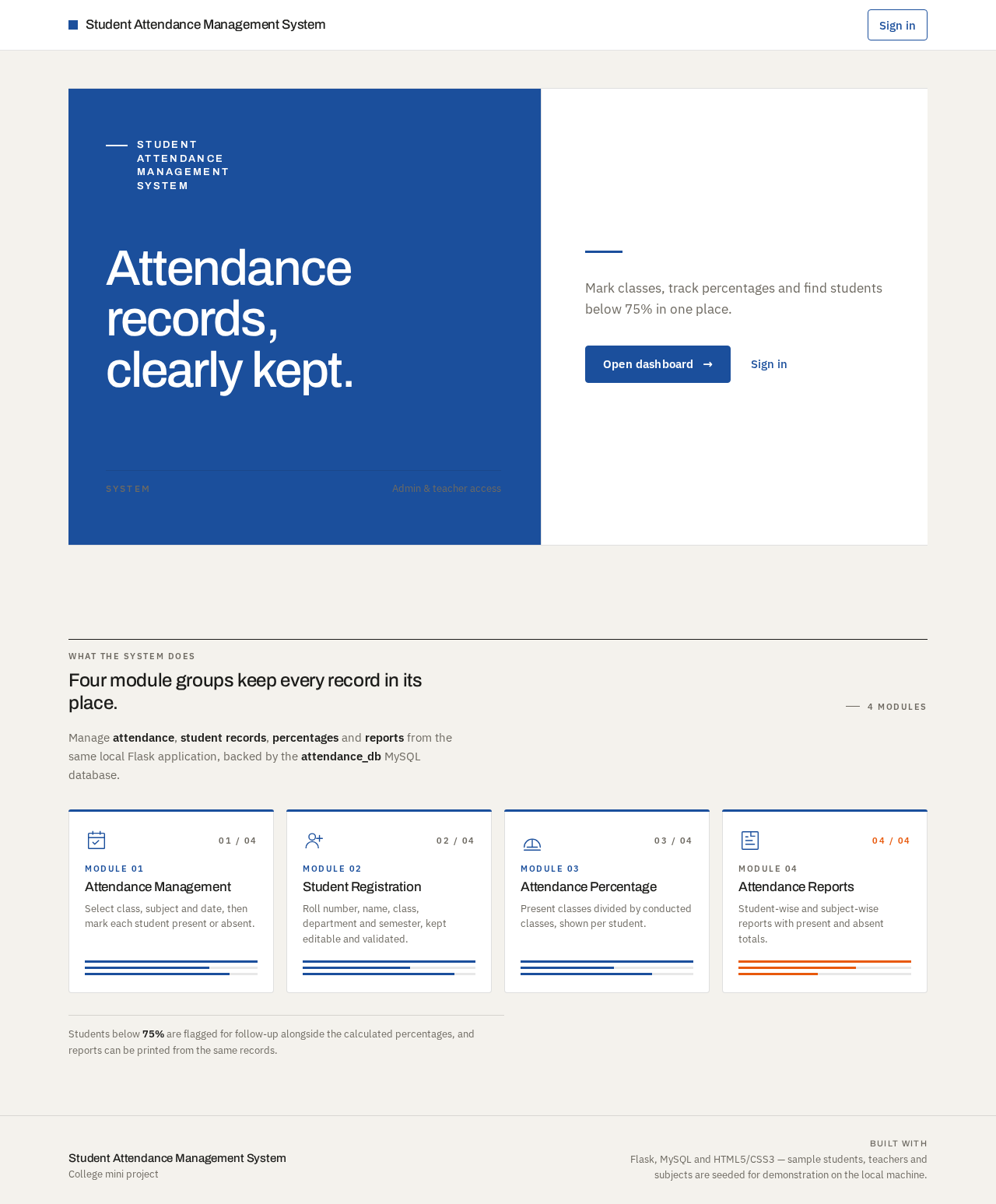
Student Attendance Management System
Attendance records, clearly kept.
Mark classes, track percentages and find students below 75% in one place.
Four module groups keep every record in its place.
Manage attendance, student records, percentages and reports from the same local Flask application, backed by the attendance_db MySQL database.
Module 01
Attendance Management
Select class, subject and date, then mark each student present or absent.
Module 02
Student Registration
Roll number, name, class, department and semester, kept editable and validated.
Module 03
Attendance Percentage
Present classes divided by conducted classes, shown per student.
Module 04
Attendance Reports
Student-wise and subject-wise reports with present and absent totals.
Students below 75% are flagged for follow-up alongside the calculated percentages, and reports can be printed from the same records.
Student Attendance Management System
Attendance records, clearly kept.
Mark classes, track percentages and find students below 75% in one place.
Four module groups keep every record in its place.
Manage attendance, student records, percentages and reports from the same local Flask application, backed by the attendance_db MySQL database.
Module 01
Attendance Management
Select class, subject and date, then mark each student present or absent.
Module 02
Student Registration
Roll number, name, class, department and semester, kept editable and validated.
Module 03
Attendance Percentage
Present classes divided by conducted classes, shown per student.
Module 04
Attendance Reports
Student-wise and subject-wise reports with present and absent totals.
Students below 75% are flagged for follow-up alongside the calculated percentages, and reports can be printed from the same records.
No comments yet. Be the first!