strong-simple
 Diya Trivedi
build a simple single page design of the todo application

Comments (0)
Sign in to leave a comment
System Requirements
System Requirements Document for strong-simple
1. Introduction
strong-simple is a deliberately minimal todo application delivered as a single-page design. Its product intent is narrow and complete: one person captures the tasks they need to do, sees the current list of those tasks, and marks tasks complete as they finish them — all on one page, without navigating elsewhere.
The audience is anyone carrying too many open loops in their head and who wants the fastest possible path from "I must remember this" to "it is written down" to "it is done." The product is a private, domestic tool with a public-poster soul: the interface is loud, declarative, and immediate, because the entire point of a todo app is the visceral satisfaction of crossing something out.
The scope is intentionally small. There is no collaboration, no scheduling, no notification system, no reporting, and no multi-page information architecture. The single-page constraint is a hard product constraint, not a stylistic preference.
2. System Overview
strong-simple is a browser-delivered, single-page todo application. A visitor arrives at a public Landing surface that explains what the application is, who it is for, and what it does, and offers a single entry action into the working list. The working list itself is the Todo page — the one page where all todo work happens: adding items, viewing the current list, filtering the list, and marking items complete.
The only active human actor is the Todo User. There are no other human roles, no administrators, no collaborators, and no reviewers. No system, provider, or external service acts on the user's behalf in the current scope; the application itself owns the todo list state.
Current accepted behavior is limited to:
- A public entry surface that presents the application and hands off to the working list.
- A single working page where the Todo User adds todo items, views the current list, filters it, marks items complete, and removes items.
- A live count of outstanding tasks.
- An empty state for when nothing remains.
Explicitly out of scope for the current delivery: any second working page, any account or sign-in requirement, any sharing or multi-user behavior, any due dates, priorities, tags, reminders, or recurring tasks, and any analytics or reporting surface.
2a. Product Interpretation and Delivery Boundary
Delivery. strong-simple is delivered as a first-party web application with custom UI. The application owns its own interface and its own todo list state. There is no provider-owned surface, no external destination, and no headless-only delivery in the current scope.
Access. Both accepted surfaces are reachable without establishing an identity. The Landing surface is a public entry surface by definition. The Todo surface carries no access requirement in the accepted contract: the Todo User reaches the working list directly from the Landing entry action and begins working immediately. No sign-in, account creation, invitation, or provisioning step is part of the accepted journey, and none is inferred, because the accepted behavior does not require the list to be privately owned, resumed across sessions, or bound to a verified participant. The todo list is a single working list belonging to whoever is using the page.
Current vs. future. Everything described in this document is current. No future-horizon requirements were accepted in the authoritative thread. The single-page constraint governs the current delivery and is not a placeholder for a later multi-page expansion.
2b. Source Content Inventory
Not applicable. No reference directive in this project declares a content_source, so no source content inventory is produced.
2c. Page Content and Component Coverage
The page inventory is the accepted page contract, preserved exactly and in order: Landing, then Todo.
Landing
The public entry surface. It presents the application before any todo work begins.
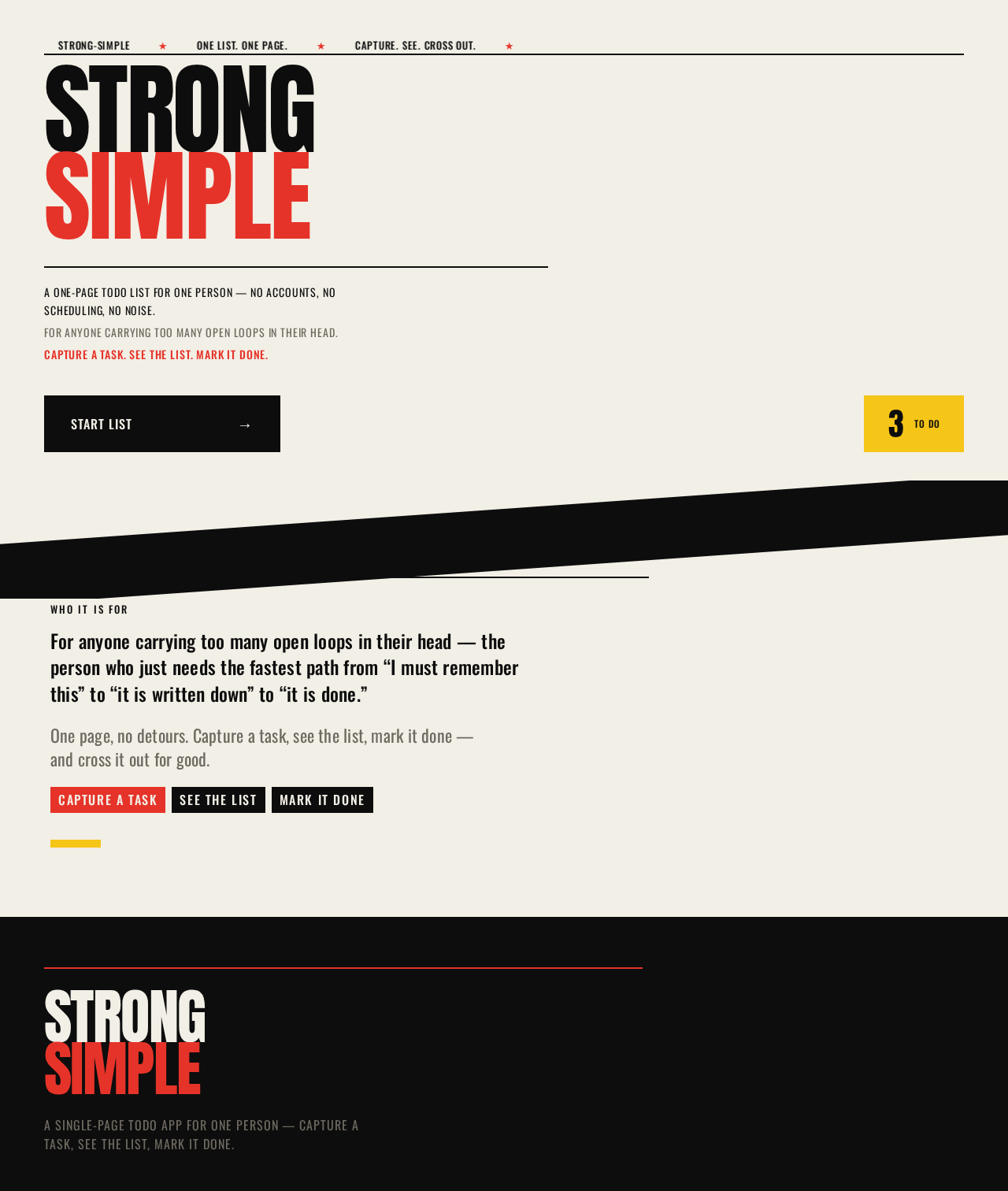
- Information and state. The application name set as an oversized stacked wordmark; a one-line statement of what the application is; a one-line statement of who it is for; a short statement of what it does (capture a task, see the list, mark it done); a live count of outstanding tasks carried over from the working list.
- Primary action. A single hard-edged entry control labeled
START LIST →that takes the Todo User to the Todo page. - Supporting actions. None. There is no secondary navigation, no sign-in control, and no settings entry on this surface.
- Domain entities. The todo list (read-only summary: outstanding task count).
- Component responsibilities.
- Poster hero block — full-bleed warm paper ground holding the stacked
STRONG/SIMPLEwordmark, flush-left, with the decorative off-edge crop applied to the wordmark's final letter only; the readable wordmark sits whole in the upper-left. - Entry control block — flat black rectangle, Oswald all-caps
START LIST →, butted flush against the left margin beneath the stacked words. - Count block — flat yellow rectangle with black numerals showing the live outstanding task count, pinned hard against the right edge at the same vertical position as the entry control.
- Diagonal band — a single 4-degree skewed black strip dividing the poster hero from the content below.
- Explanatory copy block — the who-it-is-for and what-it-does lines, set in Oswald, kept whole and inside the viewport at every breakpoint.
- Poster hero block — full-bleed warm paper ground holding the stacked
- States.
- Loading — the hero renders immediately from static content; the count block shows a neutral placeholder until the list state resolves.
- Empty — when the list has no outstanding tasks, the count block reads
0; the entry control remains available and unchanged. - Success — the count block reflects the true outstanding count; the entry control navigates to the Todo page.
- Error — if the list state cannot be read, the count block shows a muted dash rather than a false number, and the entry control remains fully usable so the Todo User is never blocked from the working list.
- Recovery — the count re-resolves on the next visit to the surface; no error state traps the user on the Landing page.
Todo
The single working page. All todo work happens here.
- Information and state. The current list of todo items; each item's task text and completion state; the active filter selection; the live count of outstanding tasks; the empty state when no items remain.
- Primary actions. Add a todo item; mark a todo item complete; mark a completed item incomplete again; delete a todo item; change the active filter.
- Supporting actions. None beyond the above. There is no edit-in-place requirement, no reordering requirement, and no bulk action requirement in the accepted scope.
- Domain entities.
- Todo item — a task with task text and a completion state (outstanding or complete).
- Todo list — the ordered collection of todo items belonging to the working page.
- Filter — the current view selection over the list: all items, outstanding items, or completed items.
- Component responsibilities.
- List header — section heading plus the yellow count block with black numerals, pinned to the top-right of the list header.
- Filter chip row — flat rectangular blocks in a horizontal row: the active filter is a solid black block with paper-white text; inactive filters are paper with a 2px black border. Filter changes are instant colour-block flips with no transition.
- Input block — a full-width white block, the brightest surface on the page, holding the task text field and the add action. The add action is a Scher-red block.
- Ledger list — a strict single column, max-width 760px, offset left rather than centred. Each todo is a full-width ruled row with a 2px black rule above it: a square checkbox, task text in Oswald 20px, and a small black
×delete control at the far right. No card, no shadow, no hover-lift. - Empty state block — a yellow block filling the list area with
NOTHING LEFT. GOOD.set in Anton. - States.
- Loading — the list area holds its column geometry while items resolve; the input block is available immediately so capture is never delayed.
- Empty — the yellow empty-state block fills the list area with
NOTHING LEFT. GOOD.; the input block and filter chips remain available. - Success — a newly added item stamps into the list; a completed item shows the red strike-wipe and desaturates to muted grey; the count block updates to the true outstanding count.
- Error — if an add, complete, or delete action cannot be applied, the affected row returns to its prior state and a muted inline message states that the change was not saved; the task text the user typed is preserved in the input block so nothing is lost.
- Recovery — the Todo User retries the action directly on the row or re-submits the preserved input text; the list remains fully usable throughout.
3. Functional Requirements
Each requirement below is a distinct story point with its provenance, lifecycle facts, and observable acceptance.
FR-1 — Single-page todo application As a Todo User, I should use a todo application delivered as a single page, so that all my todo work happens in one place without navigating elsewhere.
- Provenance:
explicit - Actor: Todo User. Trigger: opening the application. Observable result: the working list is reachable as one page, and no second working page exists.
- Access state: no identity required.
- Failure/recovery: not applicable — this is a structural constraint on the delivered application.
- Continuation: the Todo User remains on the working page for every todo action.
FR-2 — Public entry surface As a Todo User, I should arrive at a public entry surface that tells me what the application is, who it is for, and what it does, so that I know what I am opening before I begin.
- Provenance:
required_inference - Actor: Todo User. Trigger: opening the application URL. Observable result: the Landing surface renders the application name, a who-it-is-for statement, a what-it-does statement, and a single entry control.
- Access state: anonymous; no identity required.
- Failure/recovery: if the outstanding count cannot be read, the count block shows a muted dash and the entry control remains usable.
- Continuation: the Todo User activates
START LIST →and arrives at the Todo page.
FR-3 — Enter the working list As a Todo User, I should move from the entry surface into the working list with one action, so that I reach the place where I do my work immediately.
- Provenance:
required_inference - Actor: Todo User. Trigger: activating the
START LIST →control on the Landing surface. Observable result: the Todo page renders with the input block, filter chips, and current list. - Access state: anonymous; no identity required, no sign-in step interposed.
- Failure/recovery: if the working list state cannot be read, the page still renders with the input block available and an empty list area.
- Continuation: the Todo User adds their first task.
FR-4 — Add a todo item As a Todo User, I should add a todo item by typing its task text and submitting it, so that a task I am carrying in my head is written down.
- Provenance:
explicit - Actor: Todo User. Trigger: entering task text in the input block and submitting. Observable result: the new item appears in the list as a ruled row with a square checkbox and its task text, and the outstanding count increases by one.
- Access state: no identity required.
- Failure/recovery: if the item cannot be saved, the row is not added, the typed task text remains in the input block, and a muted inline message states the change was not saved.
- Continuation: the Todo User adds another item or moves on to completing one.
FR-5 — View the current list As a Todo User, I should see the current list of my todo items, so that I can see everything I still have to do.
- Provenance:
explicit - Actor: Todo User. Trigger: viewing the Todo page. Observable result: each todo item renders as a full-width ruled row with a 2px black rule above it, a square checkbox, task text in Oswald 20px, and a black
×delete control at the far right. - Access state: no identity required.
- Failure/recovery: if the list cannot be read, the list area renders empty with the input block still available.
- Continuation: the Todo User acts on a row.
FR-6 — Mark a todo item complete As a Todo User, I should mark a todo item complete, so that I get the satisfaction of crossing it out and can see what is left.
- Provenance:
explicit - Actor: Todo User. Trigger: checking the square checkbox on a todo row. Observable result: a Scher-red strike-through wipes left-to-right across the task text over 220ms, the row desaturates to muted grey, and the outstanding count decreases by one.
- Access state: no identity required.
- Failure/recovery: if the completion cannot be saved, the row returns to its outstanding state and a muted inline message states the change was not saved.
- Continuation: the Todo User completes another item or filters the list.
FR-7 — Mark a completed item incomplete again As a Todo User, I should mark a completed item incomplete again, so that a task I closed by mistake returns to my outstanding list.
- Provenance:
required_inference - Actor: Todo User. Trigger: unchecking the square checkbox on a completed row. Observable result: the strike-through is removed, the row returns to full-contrast black text, and the outstanding count increases by one.
- Access state: no identity required.
- Failure/recovery: if the change cannot be saved, the row returns to its completed state and a muted inline message states the change was not saved.
- Continuation: the Todo User continues working the list.
FR-8 — Delete a todo item As a Todo User, I should delete a todo item, so that a task I no longer need stops occupying my list.
- Provenance:
required_inference - Actor: Todo User. Trigger: activating the black
×control at the far right of a todo row. Observable result: the row is removed from the list, and the outstanding count decreases by one if the removed item was outstanding. - Access state: no identity required.
- Failure/recovery: if the deletion cannot be saved, the row remains in place and a muted inline message states the change was not saved.
- Continuation: the Todo User continues working the list.
FR-9 — Filter the list As a Todo User, I should filter the list between all items, outstanding items, and completed items, so that I can look at just the slice I care about right now.
- Provenance:
required_inference - Actor: Todo User. Trigger: activating a filter chip in the filter chip row. Observable result: the active chip becomes a solid black block with paper-white text, the previously active chip becomes paper with a 2px black border, and the list immediately shows only the matching items. The change is an instant colour-block flip with no transition.
- Access state: no identity required.
- Failure/recovery: if the filter cannot be applied, the previously active filter remains selected and the list is unchanged.
- Continuation: the Todo User switches filters again or returns to adding and completing items.
FR-10 — See the outstanding count As a Todo User, I should see a live count of my outstanding tasks, so that I always know how much is left.
- Provenance:
required_inference - Actor: Todo User. Trigger: any change to the list (add, complete, uncomplete, delete). Observable result: the yellow count block with black numerals updates to the true number of outstanding items, on both the Landing surface and the Todo page.
- Access state: no identity required.
- Failure/recovery: if the count cannot be read, the block shows a muted dash rather than a false number.
- Continuation: the count continues to track the list.
FR-11 — Empty state As a Todo User, I should see a clear empty state when nothing remains, so that finishing everything feels like an event rather than a blank screen.
- Provenance:
required_inference - Actor: Todo User. Trigger: the list containing no items, or the active filter matching no items. Observable result: a yellow block fills the list area with
NOTHING LEFT. GOOD.set in Anton. - Access state: no identity required.
- Failure/recovery: not applicable — the empty state is a rendering of a valid list condition.
- Continuation: the input block and filter chips remain available so the Todo User can add the next task.
4. User Personas
Todo User
Product context. The Todo User is the single active human role in strong-simple. They arrive with a head full of open loops and no interest in managing a system. They are not administering anything, not collaborating with anyone, and not reporting to anyone. They want the shortest possible path from remembering a task to having it written down, and from finishing a task to seeing it crossed out.
Primary goal. Keep a single working list of tasks that stays current — capture what needs doing, see what is left, and mark things done — without ever leaving the one page where the list lives.
Distinct accepted responsibilities.
- Capturing a task by typing its text and submitting it (FR-4).
- Reading the current list to see everything outstanding (FR-5).
- Marking a task complete when it is finished (FR-6).
- Reopening a task that was closed by mistake (FR-7).
- Removing a task that is no longer needed (FR-8).
- Narrowing the list to all, outstanding, or completed items (FR-9).
- Reading the outstanding count to know how much is left (FR-10).
Relevant inputs and decisions. The Todo User supplies free-form task text. Their decisions are binary and immediate: is this task done or not, and do I still need it. They also decide which slice of the list they want to look at, and they decide when to leave the entry surface and start working.
Interactions with other accepted participants. None. The Todo User is the only active human actor. No collaborator, reviewer, administrator, or external recipient participates in any accepted capability. The application itself holds the list state; no provider or external service acts on the user's behalf.
Observable success. The list reflects reality: every task the Todo User meant to capture is on it, every finished task shows the red strike and muted grey, the outstanding count matches what is actually left, and the empty state appears when nothing remains. The Todo User never had to navigate away from the working page to achieve any of it.
Constraints carried from source. The Todo User works within a single-page application. There is no second working page to move to, and no account to create or sign into.
5. Core User Flows
Flow A — Arrive and start the list
- The Todo User opens the strong-simple application URL and lands on the Landing surface, anonymously, with no sign-in step.
- The Landing surface renders the poster hero:
STRONGstacked aboveSIMPLEin Anton at poster scale, flush-left, with the decorative off-edge crop applied to the wordmark's final letter only and the readable wordmark sitting whole in the upper-left. - The Todo User reads the who-it-is-for and what-it-does lines, and sees the yellow count block showing the current outstanding task count (or
0, or a muted dash if the count cannot be read). - The Todo User activates the flat black
START LIST →block butted flush against the left margin. - The Todo page renders with the input block, the filter chip row, and the current list.
- Next step: the Todo User captures their first task (Flow B).
Failure and recovery: if the outstanding count cannot be read on the Landing surface, the count block shows a muted dash and the START LIST → control remains fully usable, so the Todo User is never blocked from the working list.
Flow B — Capture a task
- The Todo User is on the Todo page with the white input block available.
- The Todo User types the task text into the input block.
- The Todo User submits the task using the Scher-red add block.
- The new item stamps into the ledger list — a 120ms scale-from-0.96 with an instant opacity snap — as a full-width ruled row with a 2px black rule above it, a square checkbox, the task text in Oswald 20px, and a black
×at the far right. - The yellow count block updates to the new outstanding count.
- Next step: the Todo User captures another task, or moves to completing one (Flow C).
Failure and recovery: if the item cannot be saved, the row is not added, the typed task text stays in the input block so nothing is lost, and a muted inline message states the change was not saved. The Todo User re-submits directly.
Flow C — Complete a task
- The Todo User is on the Todo page looking at the ledger list.
- The Todo User checks the square checkbox on the row for a finished task.
- A Scher-red strike-through wipes left-to-right across the task text over 220ms, then the row desaturates to muted grey.
- The yellow count block decreases by one to the new outstanding count.
- Next step: the Todo User completes another task, or filters the list to see what is left (Flow E).
Failure and recovery: if the completion cannot be saved, the row returns to its outstanding state and a muted inline message states the change was not saved. The Todo User retries the checkbox directly.
Flow D — Reopen or remove a task
- The Todo User is on the Todo page looking at the ledger list.
- To reopen a task closed by mistake, the Todo User unchecks the square checkbox on the completed row. The strike-through is removed, the row returns to full-contrast black text, and the outstanding count increases by one.
- To remove a task no longer needed, the Todo User activates the small black
×at the far right of the row. The row is removed from the list, and the outstanding count decreases by one if the removed item was outstanding. - Next step: the Todo User continues working the list.
Failure and recovery: if either change cannot be saved, the row returns to its prior state and a muted inline message states the change was not saved. The Todo User retries the control directly.
Flow E — Filter the list
- The Todo User is on the Todo page and wants to look at only one slice of the list.
- The Todo User activates a filter chip in the filter chip row — all items, outstanding items, or completed items.
- The active chip flips instantly to a solid black block with paper-white text; the previously active chip flips to paper with a 2px black border. There is no transition.
- The list immediately shows only the matching items. If the active filter matches nothing, the yellow empty-state block fills the list area with
NOTHING LEFT. GOOD.set in Anton. - Next step: the Todo User switches filters again, or returns to adding and completing items.
Failure and recovery: if the filter cannot be applied, the previously active filter remains selected and the list is unchanged.
Flow F — Reach the empty state
- The Todo User is on the Todo page and has completed or deleted the last outstanding task.
- The list area fills with the yellow empty-state block reading
NOTHING LEFT. GOOD.set in Anton. - The yellow count block reads
0. - The input block and filter chip row remain available.
- Next step: the Todo User captures the next task (Flow B) whenever it arrives.
6. Visuals, Colors and Theme
The creative direction is authoritative for this section. It names Paula Scher as the muse and "Typography as architecture — a todo list you can see from across the room" as the headline. The direction is translated below into concrete tokens.
Palette — light mode
| Role | Hex | Use |
|---|---|---|
| Background (paper) | #F2EFE6 | Warm off-white ground. Never pure white. |
| Surface | #FFFFFF | Reserved for the input surface, so the writing area reads as the brightest thing on the page. |
| Text | #0D0D0D | Big flat black type carries everything. |
| Primary (Scher-red) | #E63329 | Functional, not decorative: fills the add block, the completed-item strike, and the active filter chip. |
| Accent (poster yellow) | #F5C518 | Appears once per screen as a colour-block counterweight: the count badge, the empty-state band. |
| Muted | #6E6A61 | Warm grey for timestamps and helper text. |
Proportion: roughly 70% paper/white, 20% black type, 8% red, 2% yellow.
Typography
- Headings: Anton, uppercase, tracking tightened to
-0.02em, leading0.86so stacked lines lock together like a printed broadside. Headline sizes are enormous and flush-left. - Body / UI: Oswald at 400/500. Uppercase for labels with
0.06emtracking to keep all-caps legible at small size; sentence case for input text. - Type scale (1.5 modular): 128 / 88 / 56 / 40 / 28 / 20 / 16.
- Responsive sizing: mobile headline
clamp(56px, 15vw, 128px); section headsclamp(40px, 6vw, 88px); UI labels 13–16px; input text 20px. - Fonts to avoid: Inter, Roboto, Poppins, or any neutral geometric sans. Anton and Oswald only.
Shape language
Hard edges only — no border radius anywhere except the checkbox, which is a perfect square. Composition is built from flat rectangular colour blocks that butt directly against each other with no gaps: a red block meets a black block meets paper. Thin 2px black rules underpin the list rows like a printed ledger. Diagonal bands (a 4-degree skewed black strip) are used exactly once, as the divider between the poster hero and the working list.
Layout
A full-bleed poster hero occupying the first ~70vh: the word STRONG set in Anton at viewport-spanning scale, SIMPLE stacked beneath it in Scher-red, flush-left, bleeding off the right edge so the final letter is cropped by the viewport — decoration only; the readable wordmark sits whole in the upper-left. Below, the working list is a strict single column, max-width 760px, offset left rather than centred, with the input as a full-width white block and each todo as a ruled row: square checkbox, task text in Oswald 20px, delete as a small black × at the far right. Filter chips are flat rectangular blocks in a horizontal row — black when active, paper with a 2px black border when not. The count badge is a yellow block with black numerals pinned to the top-right of the list header.
Imagery
Typography is the image — no photography, no illustration, no icons beyond a square checkbox and a black ×. The only non-type graphic elements are flat colour blocks, the 2px ledger rules, and one diagonal black band. The empty state is a yellow block with NOTHING LEFT. GOOD. set in Anton, filling the list area.
Avoid
Rounded corners, soft shadows, or hover-lift cards — every surface is a hard-edged flat block. Any blue or indigo accent; the palette is paper, black, Scher-red and one yellow. A centred hero with subhead and a pill button — the headline is flush-left and oversized. Gradient blobs, glassmorphism, or frosted panels. Icons beyond the square checkbox and the black ×; no illustration, no photography. Inter, Roboto, Poppins or any neutral geometric sans — Anton and Oswald only. Animating the filter chips or adding easing bounce to the stamp-in. Cropping or overlapping any readable text or control; the off-edge crop applies to the decorative wordmark only.
Readability guarantee
Readable text and controls stay whole at every viewport: headlines, wordmarks, labels, numbers, and controls stay entirely inside the viewport and their container at 375px, 768px, and 1280px, wrapping or scaling (for example font-size: clamp(...) with its mobile size) to fit, and no other element covers any part of them. Imagery, decoration, and motion follow the creative direction: a shape, texture, or animation may be cropped, bled off an edge, rotated, overlapped, or cut exactly as the direction asks, as long as it covers no readable text or control. Moving and scrollable content may cross the viewport or container edge by design and is judged by whether it actually moves or scrolls and whether every item becomes fully readable as it passes. With prefers-reduced-motion, provide a usable static arrangement: wrap items into rows or allow horizontal scrolling so each item can be brought fully into view. Where the direction asks readable text or a control to be cropped, clipped, covered, or run off an edge, keep it whole and carry the gesture with decoration instead; for readable text and controls this rule takes precedence.
The generic indigo/blue-on-white SaaS template is forbidden for this project.
7. Signature Design Concept
The broadside. The public entry is a poster, not a SaaS hero. A full-bleed warm paper ground (#F2EFE6) carries the stacked wordmark: STRONG in Anton at clamp(56px, 15vw, 128px), uppercase, flush-left, sitting on the baseline of the upper third; SIMPLE directly beneath it in Scher-red (#E63329) at the same size, tracked slightly wider. Together the two words span the full viewport width at 1280px, with the final E of SIMPLE running off the right edge — a decorative crop applied to the wordmark only, while the readable wordmark sits whole in the upper-left.
There is no subhead, no blue button, and no gradient. Instead, a single black rectangular CTA block — START LIST → in Oswald all-caps — is pinned flush to the left margin directly under the stacked words, and a yellow block holding the live task count sits hard against the right edge at the same vertical position. A 4-degree skewed black band cuts across the bottom of the hero and hands off to the working list below.
The concept recomposes only accepted content and controls: the application name, the who-it-is-for and what-it-does statements, the outstanding count, and the single entry action into the working list. It introduces no new behavior, page, or destination.
8. Interaction Model & Motion Direction
Interaction Model: Animated Motion Tempo: expressive Hero Dimensionality: flat
Landing Hero Motion Brief
- Focal subject. The stacked
STRONG/SIMPLEwordmark at poster scale, flush-left, with the decorative off-edge crop on the final letter ofSIMPLE. - Input → transformation → outcome thesis. On load, a thin type marquee runs once across the hero spelling the app name, then stops — the poster announces itself and then holds still. The transformation is announcement to stillness: the hero arrives as a printed broadside and stays put, leaving the
START LIST →block and the yellow count block as the only live elements. No accepted behavior is added; the marquee is decoration over the accepted wordmark. - Motion vocabulary. Expressive but hard-edged, in the muse's poster logic: no easing theatrics, no bounce. The marquee runs once and stops. Filter changes are instant colour-block flips with no transition. New todos stamp in — a 120ms scale-from-0.96 with an instant opacity snap, like a rubber stamp hitting paper. Completing a todo triggers a red strike-through that wipes left-to-right over 220ms, then the row desaturates to muted grey.
- Composed first frame. Full-bleed warm paper.
STRONGflush-left on the baseline of the upper third,SIMPLEin Scher-red stacked directly beneath, the final letter cropped by the viewport edge. The blackSTART LIST →block butted flush against the left margin beneath the words; the yellow count block hard against the right edge at the same height. The 4-degree skewed black band cuts across the bottom of the hero. - Reduced-motion state. With
prefers-reduced-motion, the marquee does not run: the hero renders as a static poster with the wordmark, theSTART LIST →block, and the count block in their composed positions. The stamp-in and strike-wipe resolve instantly to their end states — the new row appears at full scale, and a completed row shows the red strike and muted grey immediately. Filter chips remain instant flips. Every readable element stays whole and inside the viewport.
9. Non-Functional Requirements
NFR-1 — Single-page delivery. The todo application is delivered as one page. The working list is not split across multiple pages, and no second working page is introduced. Provenance: explicit user constraint.
NFR-2 — Anonymous access. Both accepted surfaces are reachable without establishing an identity. No sign-in, account creation, invitation, or provisioning step is interposed between the Landing surface and the working list. Provenance: required_inference from the accepted access contract.
NFR-3 — Readable text and controls at every viewport. Headlines, wordmarks, labels, numbers, and controls stay entirely inside the viewport and their container at 375px, 768px, and 1280px, wrapping or scaling to fit, with no other element covering any part of them. Provenance: explicit creative direction.
NFR-4 — Reduced-motion support. With prefers-reduced-motion, the hero renders as a static poster and all motion resolves instantly to its end state, with every item fully readable. Provenance: explicit creative direction.
NFR-5 — Palette and typography fidelity. The interface uses only the specified palette (#F2EFE6, #FFFFFF, #0D0D0D, #E63329, #F5C518, #6E6A61) and only Anton and Oswald. No blue or indigo accent is introduced. Provenance: explicit creative direction.
NFR-6 — Hard-edged surfaces. No border radius anywhere except the square checkbox. No soft shadows, no hover-lift cards, no glassmorphism, no gradients. Provenance: explicit creative direction.
NFR-7 — Immediate capture. The input block is available as soon as the Todo page renders, so task capture is never delayed by list loading. Provenance: required_inference from the accepted capture lifecycle.
NFR-8 — Non-destructive failure handling. When an add, complete, uncomplete, or delete action cannot be saved, the affected row returns to its prior state and the user's typed task text is preserved in the input block. Provenance: required_inference from the accepted failure/recovery lifecycle.
10. Tech Stack
- Frontend: React, delivered as a single-page browser application with custom UI. [Default — not specified by user]
- Backend: Python with FastAPI, serving the todo list state for the single working page. [Default — not specified by user]
- Storage: A lightweight persistent store for the todo list, appropriate to a single working list. [Default — not specified by user]
- Packaging: Docker with docker-compose for local and deployment runs. [Default — not specified by user]
- Orchestration: Kubernetes is not required for this delivery. [Default — not specified by user]
No source-specified technology choices were provided in the authoritative thread; the above are labeled defaults and do not alter any product behavior.
11. Assumptions and Constraints
Constraints (binding).
- The todo application is delivered as a single page. This is an explicit hard constraint from the authoritative source.
- The interface follows the supplied creative direction: Paula Scher poster language, the specified palette, Anton and Oswald only, hard edges, no blue or indigo, no rounded corners or soft shadows.
- Readable text and controls stay whole at every viewport; the off-edge crop applies to the decorative wordmark only.
Assumptions (narrow, labeled).
- [Assumption] The todo list is a single working list belonging to whoever is using the page. No per-user separation, sharing, or ownership binding is required, because the accepted access contract carries no access requirement on either surface.
- [Assumption] The outstanding count shown on the Landing surface reflects the same working list as the Todo page.
- [Assumption] Task text is free-form and has no required format, length rule, or validation beyond being non-empty when submitted.
- [Assumption] The list is presented in the order items were added, with no reordering requirement in the accepted scope.
Explicit exclusions.
- No second working page, and no multi-page information architecture.
- No account creation, sign-in, invitation, or provisioning flow.
- No collaboration, sharing, or multi-user behavior.
- No due dates, priorities, tags, reminders, or recurring tasks.
- No analytics, reporting, or history surface.
- No icons beyond the square checkbox and the black
×; no illustration or photography.
12. Glossary
- Todo User — The single active human role in strong-simple: the person who captures tasks, views the list, and marks tasks complete.
- Todo item — A task in the working list, carrying task text and a completion state of outstanding or complete.
- Todo list — The ordered collection of todo items on the working page.
- Outstanding item — A todo item that has not been marked complete.
- Completed item — A todo item that has been marked complete; it renders with the red strike-through and muted grey desaturation.
- Filter — The current view selection over the list: all items, outstanding items, or completed items.
- Count block — The yellow block with black numerals showing the live outstanding task count.
- Ledger row — The full-width ruled row that renders a single todo item: 2px black rule above, square checkbox, task text in Oswald 20px, black
×delete control at the far right. - Strike-wipe — The Scher-red strike-through that wipes left-to-right across a task's text over 220ms when the item is marked complete.
- Stamp-in — The 120ms scale-from-0.96 with an instant opacity snap applied when a new todo item enters the list.
- Landing — The public entry surface that presents the application and hands off to the working list.
- Todo — The single working page where all todo work happens.
- Poster hero — The full-bleed stacked
STRONG/SIMPLEwordmark block occupying the first ~70vh of the Landing surface.
Strong
Simple
A one-page todo list for one person — no accounts, no scheduling, no noise.
For anyone carrying too many open loops in their head.
Capture a task. See the list. Mark it done.
For anyone carrying too many open loops in their head — the person who just needs the fastest path from “I must remember this” to “it is written down” to “it is done.”
One page, no detours. Capture a task, see the list, mark it done — and cross it out for good.Capture a taskSee the listMark it done
Strong
Simple
A one-page todo list for one person — no accounts, no scheduling, no noise.
For anyone carrying too many open loops in their head.
Capture a task. See the list. Mark it done.
For anyone carrying too many open loops in their head — the person who just needs the fastest path from “I must remember this” to “it is written down” to “it is done.”
One page, no detours. Capture a task, see the list, mark it done — and cross it out for good.Capture a taskSee the listMark it done
No comments yet. Be the first!