steady-chat
 Henrich Lancz
I want to build a small chat app, which will work on Android and also will have a web version as well. The backend should be Node.js or .NET c#. Database MongoDB. Server for authentication will be Authentik. Chat app needs to sign in the user, then show previous chats. There will be users only available from MongoDB. New user we will add manually to Authentik, after login we will add to MongoDB. In the app user can create a new chat. It will be interactive user can see if other user typing.

Comments (0)
Sign in to leave a comment
System Requirements
System Requirements Document for steady-chat
1. Introduction
steady-chat is a small, self-hosted real-time chat application delivered as an Android app and a web version. It is built for a technical operator audience: people who run their own infrastructure, sign in through their own Authentik identity server, and keep a fast, legible chat tool open all day.
The product intent is narrow and deliberate. A user signs in through Authentik, the app shows their previous chats, they can create a new chat, and inside a conversation they exchange messages while seeing when the other participant is typing. User records live only in MongoDB. New users are provisioned manually in Authentik by the operator; the first successful sign-in creates that user's MongoDB record.
The audience is the signed-in chat participant — a single in-product human role, the Chat User — plus the operator who manually provisions Authentik accounts outside the product. steady-chat is not an enterprise dashboard, not a consumer social network, and not a self-service signup product.
2. System Overview
steady-chat is a cross-platform chat client with a shared backend.
- Clients: an Android app and a web version, both presenting the same five surfaces (Landing, Login, Chats, New Chat, Conversation).
- Backend: Node.js or .NET C# (either is acceptable per the explicit constraint), exposing the chat API and the real-time channel that carries messages and typing status.
- Database: MongoDB, which is the only source of user records and the store for conversations and messages.
- Authentication: Authentik is the authentication server. Accounts are created manually in Authentik by the operator; there is no self-service signup in the app.
- Real-time: a persistent channel (WebSocket) delivers new messages and typing indicators between participants.
- Durable state: conversations, messages, and user records persist in MongoDB; short-lived presence and typing state is held in Redis.
2a. Product Interpretation and Delivery Boundary
Delivery ownership. steady-chat owns its own first-party UI on both Android and web. The five surfaces — Landing, Login, Chats, New Chat, Conversation — are application-owned custom pages. Landing is anonymously reachable and explains the product before identity is established. Login is the anonymous entry boundary that hands off to Authentik; it does not itself own credential verification. Chats, New Chat, and Conversation require a signed-in session.
Identity ownership. Identity is provider-owned. Authentik verifies credentials and issues the session; steady-chat never stores or checks passwords. Because the accepted workflow requires that a user's chats and messages remain bound to the correct participant across sessions, steady-chat maintains an application-side user record in MongoDB, created on first successful sign-in if it does not already exist. This is continuity of the accepted chat lifecycle, not a second account system: there is no in-app registration, no password reset, no profile editing, and no account deletion.
Provisioning boundary. Adding a new user to Authentik is an operator action performed outside the product, in Authentik itself. steady-chat does not expose user administration, invitations, or enrollment.
Current vs. future. Everything described in this document is current. No future-horizon features are accepted; anything not listed here (group chats, attachments, message editing, notifications, search across messages, presence beyond typing) is out of scope for this generation.
2b. Source Content Inventory
Not applicable — no reference directive in this project declares content_source.
2c. Page Content and Component Coverage
Landing
- Information / state: the product wordmark
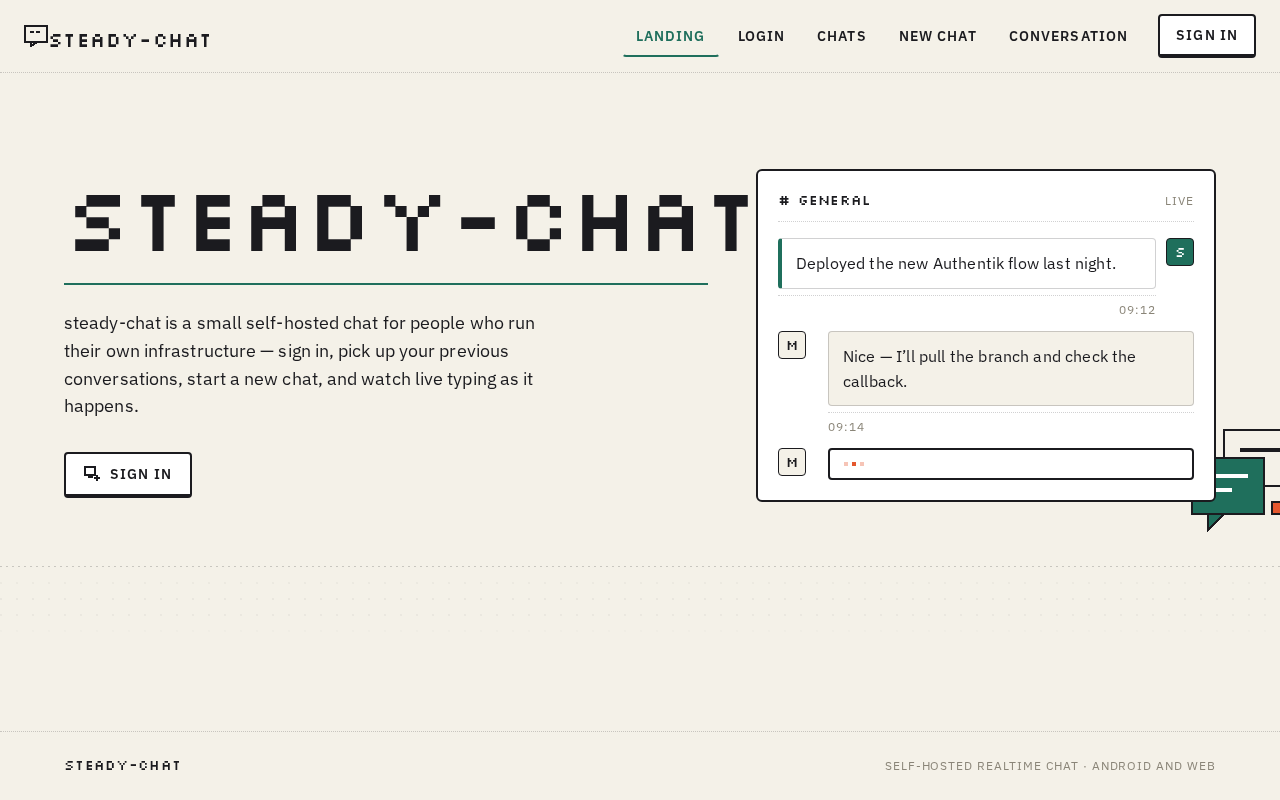
steady-chatset in Silkscreen; a single sentence of IBM Plex Sans body text describing the app; a non-interactive mock of the app showing two message slips and a blinking three-square typing indicator; a pixel speech-bubble glyph bleeding off the right edge; a dotted-grid texture band across the full width. - Primary action: proceed to sign in (routes to Login).
- Supporting actions: none. The hero mock is explicitly non-interactive.
- Domain entities: none persisted; the mock is presentational only.
- Component responsibilities: hero band (asymmetric 7/5 split), wordmark block with pine-green 2px rule, body sentence, static app mock, decorative pixel glyph, dotted-grid band.
- States: loading — not applicable (static content). Empty — not applicable. Success — page renders fully. Error — not applicable. Recovery — not applicable.
Login
- Information / state: the sign-in entry point; a short line stating that accounts are created by the operator in Authentik; the current authentication state (signed out, redirecting, or failed).
- Primary action: start sign-in, which redirects to Authentik.
- Supporting actions: return to Landing.
- Domain entities: none created here; on successful Authentik callback the backend creates the MongoDB user record if absent.
- Component responsibilities: sign-in control (key-cap button), status line, error region, redirect handling for the Authentik callback.
- States: loading — "redirecting to Authentik" while the handoff is in flight. Empty — signed-out default. Success — callback received, session established, route to Chats. Error — Authentik rejects the credentials or the callback fails; show a plain message and offer retry. Recovery — retry returns to the Authentik handoff; the user may also return to Landing.
Chats
- Information / state: the signed-in user's previous chats, ordered by most recent activity; per row: the other participant's square avatar tile with Silkscreen initials, their name, a last-message preview, a timestamp in muted 12px uppercase, and an unread count as a solid signal-orange square with a Silkscreen numeral.
- Primary action: open a chat, which routes to Conversation.
- Supporting actions: start a new chat (routes to New Chat); sign out.
- Domain entities: Conversation (participants, last message, last activity time, unread count), User (display name, avatar initials).
- Component responsibilities: conversation list with 1px dotted ink rules between rows, row hover state (one step darker, instant), unread badge, empty-state block, error region.
- States: loading — list skeleton on the paper ground. Empty — no previous chats yet; Silkscreen header plus a prompt to start a new chat. Success — rows render with previews and timestamps. Error — the list fails to load; show a message and a retry control. Recovery — retry reloads the list; the user can still start a new chat.
New Chat
- Information / state: a picker over the users available from MongoDB, excluding the signed-in user; each entry shows the square avatar tile with Silkscreen initials and the display name.
- Primary action: select a participant and create the chat, which routes to Conversation.
- Supporting actions: cancel and return to Chats.
- Domain entities: User (candidate participants), Conversation (created on selection).
- Component responsibilities: participant list, selection control, create action (key-cap button), empty-state block, error region.
- States: loading — participant list loading. Empty — no other users exist in MongoDB; explain that users are added by the operator. Success — conversation created and opened. Error — creation fails; show a message and allow retry without losing the selection. Recovery — retry re-attempts creation; cancel returns to Chats.
Conversation
- Information / state: the message thread for the open chat, with the other participant's name in the header; own messages as white slips with a 4px pine-green left border and square Silkscreen avatar initials; the other party's messages as paper-ground slips indented 12px; timestamps on their own dotted rule beneath each cluster; the typing indicator as three 4px signal-orange squares blinking in sequence inside a white slip with a 2px ink outline, positioned exactly where the incoming message will appear.
- Primary action: send a message from the composer.
- Supporting actions: return to Chats; scroll back through history.
- Domain entities: Message (sender, body, timestamp, conversation reference), Conversation, typing state for the other participant.
- Component responsibilities: message canvas, message slips, timestamp rules, typing indicator, composer key-cap bar (2px ink outline, 2px solid bottom edge that depresses 2px on send, send glyph in signal orange only while text is present), error region.
- States: loading — thread loading. Empty — no messages yet; Silkscreen header inviting the first message. Success — messages render and new ones slide in 8px from the bottom in 90ms steps. Error — send fails or the real-time channel drops; show a message, keep the typed text, and offer retry. Recovery — retry resends; a dropped channel reconnects and backfills missed messages.
3. Functional Requirements
FR-1 — Cross-platform chat client As a Chat User, I should be able to use steady-chat on Android and on the web, so that I can chat from either device. (explicit)
- Trigger: the user opens the app on Android or in a browser.
- Observable result: the same five surfaces and the same chat behavior are available on both platforms.
- Failure/recovery: if a platform cannot reach the backend, the affected surface shows an error and a retry control.
- Continuation: the user proceeds to sign in or resumes their previous chats.
FR-2 — Sign in through Authentik As a Chat User, I should sign in through Authentik, so that my identity is verified by the operator's own authentication server. (explicit)
- Trigger: the user starts sign-in from Login.
- Input: credentials entered at Authentik.
- Observable result: on success, a session is established and the user is routed to Chats.
- Access state: Login is anonymously reachable; Chats, New Chat, and Conversation require the session.
- Failure/recovery: Authentik rejects the credentials or the callback fails; Login shows a plain message and offers retry.
- Continuation: the user retries, or returns to Landing.
FR-3 — Manual Authentik provisioning prerequisite As a Chat User, I should only be able to sign in if an account for me has already been created manually in Authentik, so that access stays under operator control. (required_inference)
- Trigger: the user attempts sign-in.
- Observable result: sign-in succeeds only for accounts that exist in Authentik; unknown accounts are rejected by Authentik.
- Failure/recovery: rejection is surfaced on Login with a message that accounts are created by the operator.
- Continuation: the user contacts the operator, or returns to Landing.
- Note: creating the Authentik account is an operator action performed outside the product; steady-chat exposes no enrollment, invitation, or user-administration capability.
FR-4 — MongoDB user record created on first login As a Chat User, I should have my user record created in MongoDB on my first successful sign-in if it does not already exist, so that my chats stay bound to me. (required_inference)
- Trigger: a successful Authentik sign-in.
- Observable result: a MongoDB user record exists for the signed-in identity; on subsequent sign-ins the existing record is reused and not duplicated.
- Access state: this happens as part of the authenticated session; the user does not perform a separate step.
- Failure/recovery: if the record cannot be created, the session is not treated as usable and the user is shown an error with retry.
- Continuation: the user lands on Chats with their previous chats.
FR-5 — Users are available only from MongoDB As a Chat User, I should see only users that exist in MongoDB, so that the participant list reflects the operator's provisioned set. (explicit)
- Trigger: the user opens New Chat, or a conversation renders a participant.
- Observable result: the participant list and participant names come from MongoDB records only.
- Failure/recovery: if the user list cannot be loaded, New Chat shows an error and a retry control.
- Continuation: the user selects a participant or cancels back to Chats.
FR-6 — Show previous chats after sign-in As a Chat User, I should see my previous chats after signing in, so that I can resume a conversation. (explicit)
- Trigger: the user completes sign-in, or opens Chats.
- Observable result: the signed-in user's previous chats are listed, ordered by most recent activity, with participant, last-message preview, timestamp, and unread count.
- Failure/recovery: if the list fails to load, Chats shows an error and a retry control.
- Continuation: the user opens a chat, or starts a new one.
FR-7 — Create a new chat As a Chat User, I should create a new chat, so that I can start a conversation with another user. (explicit)
- Trigger: the user opens New Chat and selects a participant.
- Input: the selected participant from the MongoDB-backed user list.
- Observable result: a conversation is created and opened in Conversation.
- Failure/recovery: if creation fails, New Chat shows a message and allows retry without losing the selection.
- Continuation: the user sends the first message, or returns to Chats.
FR-8 — Send and receive messages in a conversation As a Chat User, I should exchange messages inside an open chat, so that the conversation is interactive. (explicit)
- Trigger: the user types in the composer and sends.
- Observable result: the message appears in the thread as the user's own slip and is delivered to the other participant, who sees it in their thread.
- Failure/recovery: if sending fails, the typed text is preserved and a retry is offered; if the real-time channel drops, it reconnects and backfills missed messages.
- Continuation: the user keeps the conversation open or returns to Chats.
FR-9 — See when the other user is typing As a Chat User, I should see when the other user is typing, so that the conversation feels live. (explicit)
- Trigger: the other participant begins typing in the shared conversation.
- Observable result: a typing indicator appears in the thread at the position where the incoming message will appear, and clears when they stop typing or send.
- Failure/recovery: if the real-time channel drops, the indicator clears rather than sticking; it reappears once the channel reconnects.
- Continuation: the incoming message arrives, or the indicator clears.
FR-10 — Resume a previous conversation As a Chat User, I should open a previous chat from my list, so that I can continue where I left off. (explicit)
- Trigger: the user selects a row in Chats.
- Observable result: the Conversation opens with the existing message history loaded.
- Failure/recovery: if the thread fails to load, Conversation shows an error and a retry control.
- Continuation: the user reads history and sends a message, or returns to Chats.
FR-11 — Sign out As a Chat User, I should sign out, so that I can end my session on a shared device. (required_inference)
- Trigger: the user chooses sign out from Chats.
- Observable result: the session ends and the user is returned to Landing; protected surfaces are no longer reachable.
- Failure/recovery: if sign-out cannot complete, the user is told and can retry.
- Continuation: the user signs in again through Login.
4. User Personas
Chat User
Product context. The Chat User is the only in-product human role. They are a technical operator-adjacent participant in a small self-hosted deployment: their account was created for them manually in Authentik by whoever runs the instance, and they sign in with those credentials rather than registering. They use steady-chat on Android and on the web, often keeping it open all day as a working tool rather than a destination they visit occasionally.
Primary goal. Hold a fast, legible, real-time conversation with another provisioned user, and pick up prior conversations exactly where they left off.
Distinct accepted responsibilities.
- Sign in through Authentik, and understand that their account must already exist there.
- Land on their previous chats and read the list: who they were talking to, what was last said, when, and whether anything is unread.
- Start a new chat by choosing another user from the MongoDB-backed user list.
- Exchange messages inside a conversation, with their own messages visually distinct from the other party's.
- Watch for the typing indicator and respond to it as a live signal that the other person is composing.
- Resume a previous conversation from the list.
- Sign out when they are done.
Relevant inputs and decisions. Their Authentik credentials; which conversation to open; which participant to start a new chat with; what to type and when to send; whether to keep a conversation open or return to the list.
Interactions with other accepted participants. The Chat User's counterpart is another Chat User — the other participant in the conversation. Their typing is what produces the indicator the first user sees, and their messages are what arrive in the thread. The operator who provisions Authentik accounts is not an in-product participant; that work happens outside steady-chat.
Observable success. A working real-time chat session: the user signs in, sees their previous chats, opens or creates a conversation, sends and receives messages, and sees the typing indicator appear and clear at the right moment — with the same behavior on Android and on the web.
Source-backed constraints on this role. The role exists only for identities provisioned in Authentik; there is no self-service signup. The role's user record is created in MongoDB on first successful sign-in. The role sees only users that exist in MongoDB.
5. Core User Flows
Flow 1 — First sign-in and arrival at previous chats
- The Chat User opens steady-chat on Android or in the browser and lands on Landing, which explains the app and shows the non-interactive app mock with its blinking typing indicator.
- The user proceeds to Login. The page states that accounts are created by the operator in Authentik.
- The user starts sign-in and is handed off to Authentik, where they enter their credentials.
- Authentik verifies the credentials. If no account exists for this identity, Authentik rejects the attempt and the user returns to Login with a plain message; they must contact the operator, who creates the account manually in Authentik.
- On success, the backend checks MongoDB for a user record for this identity. If none exists, it creates one; if one exists, it reuses it without duplicating.
- The user arrives at Chats, which lists their previous chats ordered by most recent activity, each row showing the other participant's square avatar tile with Silkscreen initials, their name, a last-message preview, a muted timestamp, and an unread count as a signal-orange square if applicable.
- If the list fails to load, Chats shows an error and a retry control; the user retries and the list loads.
- Next step: the user opens a chat, or starts a new one.
Flow 2 — Starting a new chat
- From Chats, the Chat User chooses to start a new chat and arrives at New Chat.
- New Chat loads the users available from MongoDB, excluding the signed-in user, each shown with a square avatar tile and display name.
- If no other users exist, New Chat shows an empty state explaining that users are added by the operator; the user cancels back to Chats.
- The user selects a participant and creates the chat.
- If creation fails, New Chat shows a message and offers retry without losing the selection; the user retries successfully.
- The new conversation opens in Conversation with an empty thread and a Silkscreen header inviting the first message.
- Next step: the user sends the first message.
Flow 3 — Exchanging messages with a live typing indicator
- The Chat User is in Conversation with another Chat User, with the existing history loaded.
- The user types into the composer. The send glyph turns signal orange only while text is present.
- The user sends. The send key cap depresses 2px for 80ms, and the message appears in the thread as a white slip with a 4px pine-green left border and square Silkscreen avatar initials, sliding in 8px from the bottom in 90ms steps.
- The other participant receives the message in their own Conversation view and begins typing. Three 4px signal-orange squares blink in sequence inside a white slip with a 2px ink outline, positioned exactly where their incoming message will appear.
- The indicator clears when the other participant stops typing or sends. Their message arrives as a paper-ground slip indented 12px, with a timestamp on its own dotted rule beneath the cluster.
- If sending fails, the typed text is preserved and a retry is offered; the user retries and the message is delivered.
- If the real-time channel drops, the typing indicator clears rather than sticking, and the channel reconnects and backfills missed messages.
- Next step: the user continues the conversation, or returns to Chats.
Flow 4 — Resuming a previous conversation
- The Chat User is on Chats and selects a row from their previous chats.
- Conversation opens with the existing message history loaded, showing the two-tone thread: their own white slips with pine-green left borders, the other party's paper-ground slips indented 12px, and timestamps on dotted rules beneath each cluster.
- If the thread fails to load, Conversation shows an error and a retry control; the user retries and the history loads.
- The user scrolls back through history, then sends a new message.
- Next step: the user keeps the conversation open, or returns to Chats.
Flow 5 — Signing out
- From Chats, the Chat User chooses sign out.
- The session ends and the user is returned to Landing. Chats, New Chat, and Conversation are no longer reachable.
- If sign-out cannot complete, the user is told and can retry.
- Next step: the user signs in again through Login when they want to resume.
6. Visuals, Colors and Theme
Muse and headline. Susan Kare — charming clarity: pixel-perfect warmth for a small, real-time chat app. Tiny legible symbols with personality, a grid you can feel, monochrome plus a small crisp accent palette on a light ground. Trust comes from legibility and feedback, not from gloss.
Palette (light mode).
| Role | Hex | Use |
|---|---|---|
| Background | #F4F1E8 | Warm paper ground carrying everything |
| Surface | #FFFFFF | Raised message surfaces and the composer only |
| Text | #1B1B1F | All body and heading text (~15:1 on the paper ground) |
| Primary | #1F6F5C | Own messages, primary buttons, active nav rail — deliberately not blue |
| Accent | #E4572E | Live events only: typing indicator, unread counts, send affordance |
| Muted | #8A8578 | Timestamps, metadata, secondary labels |
No gradients anywhere. Colour is flat and countable, like a 1-bit-plus palette.
Typography.
- Headings: Silkscreen — wordmark, screen titles, empty-state headers, avatar initials. All-caps, tight letter-spacing, never below 14px.
- Body: IBM Plex Sans at 400/500/600, line-height 1.55, slightly loose tracking in message bubbles.
- Scale: 1.25 modular on a 16px base — 56 / 44 / 32 / 24 / 20 / 16 / 14 / 12.
- Hero display:
clamp(40px, 7vw, 96px)for the landing wordmark, Silkscreen. - Message body: 16px / 1.55. Metadata: 12px uppercase Plex Sans with 0.08em tracking.
- Hierarchy comes from weight and rule lines, not size inflation.
Shape language. Chunky 2px ink outlines and small 4–6px radii, never larger — corners stay almost square so the pixel grid reads. Avatars are square tiles with a 1px inner rule and Silkscreen initials. Buttons are rectangular with a 2px bottom edge that looks like a physical key cap and depresses on press. Dividers are 1px dotted ink at 20% opacity, like a ruled notebook. No blobs; no pills except the typing indicator's three-square pulse.
Layout. A fixed three-column desk at 1280px: a 72px icon rail on the left (chat, new chat, search, profile — each a Kare-style glyph with a label revealed on hover), a 320px conversation list in the middle on the paper ground with dotted rules between rows, and the message canvas on the right in white with the composer pinned to the bottom. At 768px the rail collapses into a top bar and the list and canvas swap as full-width views. At 375px it is a single column: sticky header with the wordmark in Silkscreen, a horizontally scrollable row of conversation chips, then the thread. Message bubbles are left-aligned slips with a 12px indent for the other party and a pine-green left border for your own; timestamps sit on their own dotted rule beneath each cluster.
Imagery. The product is the imagery. Hand-built 16×16 and 24×24 pixel glyphs for every action — a speech bubble with a tail, a plus in a square, a magnifier, a bell, a paperclip, a checkmark pair for read receipts. Avatar placeholders are generated 5×5 pixel identicons in the pine/orange/ink palette. The landing page uses one large pixel illustration of two speech bubbles overlapping, drawn on a 16px grid, plus a dotted-grid texture band. No photography, no 3D, no stock people, no gradient blobs.
Readable text and controls stay whole at 375px, 768px, and 1280px: headlines, wordmarks, labels, numbers, and controls stay entirely inside the viewport and their container, wrapping or scaling to fit, with no other element covering them. Decoration and imagery may bleed, crop, or overlap as the direction asks, provided they cover no readable text or control.
7. Signature Design Concept
The desk. The public entry is a full-width paper-ground band split asymmetrically 7/5.
On the left, the wordmark steady-chat is set in Silkscreen at clamp(40px, 7vw, 96px), stacked over three lines, with a pine-green 2px rule beneath it and a single sentence of IBM Plex Sans body text under that.
On the right, a live, non-interactive mock of the app itself: a white message canvas holding two slips — one white with a 4px pine-green left border, one paper-ground indented 12px — a blinking three-square typing indicator in signal orange sitting exactly where the next message will appear, and a pixel speech-bubble glyph at 120px bleeding 24px off the right edge of the viewport.
A dotted-grid band runs the full width beneath both halves.
The concept is implementable with the accepted content alone: the wordmark, one sentence of product description, the sign-in entry point, and a presentational mock of the conversation surface. The mock is explicitly non-interactive and introduces no behavior. There is no centred headline, no blue button, and no gradient.
8. Interaction Model & Motion Direction
Interaction Model: Static Motion Tempo: restrained Hero Dimensionality: flat
Landing Hero Motion Brief.
- Focal subject: the non-interactive app mock on the right of the 7/5 split — two message slips and the three-square typing indicator — with the 120px pixel speech-bubble glyph bleeding off the right edge.
- Input → transformation → outcome thesis: the page is still; the only movement is the typing indicator's three 4px signal-orange squares blinking in sequence inside their white slip, which reads as "someone is composing right now" and resolves the visitor's question about what the product does before they ever sign in.
- Motion vocabulary: frame-by-frame and deliberate, never eased theatrics. The typing indicator blinks in sequence like a cursor. Presence dots pulse once every 2.4s. Nothing floats, nothing parallaxes, nothing bounces.
- Composed first frame: paper-ground band, wordmark stacked over three lines on the left with its pine-green rule and one sentence of body text, the white message canvas on the right with both slips already placed, the typing indicator mid-blink, the pixel glyph bleeding off the right edge, and the dotted-grid band running the full width beneath.
- Reduced-motion state: the typing indicator holds a static three-square arrangement with all three squares at full signal orange, and the presence dots hold steady. The composition is unchanged and fully readable.
9. Non-Functional Requirements
NFR-1 — Real-time delivery. Messages and typing status must propagate between participants over a persistent channel with low enough latency that the typing indicator reads as live. (explicit — "interactive user can see if other user typing")
NFR-2 — Durable conversation state. Conversations, messages, and user records must persist in MongoDB so that previous chats survive sign-out, app restart, and device change. (explicit — "show previous chats"; planning scope durable_state_required: true)
NFR-3 — Ephemeral presence state. Short-lived typing and presence state must be held in Redis rather than written to MongoDB, so that transient signals do not pollute durable conversation history. (planning scope redis_required: true)
NFR-4 — Provider-owned authentication. Credential verification must be performed by Authentik. steady-chat must not store, transmit, or validate passwords itself. (explicit — "Server for authentication will be Authentik")
NFR-5 — No self-service enrollment. The product must not expose registration, invitation, or user-administration surfaces. Accounts are created manually in Authentik by the operator. (explicit — "New user we will add manually to Authentik")
NFR-6 — Cross-platform parity. The Android app and the web version must present the same five surfaces and the same chat behavior. (explicit — "work on Android and also will have a web version")
NFR-7 — Legibility and feedback. Status must be readable at a glance: the typing indicator, unread counts, and message ownership must be distinguishable without relying on colour alone, and all readable text and controls must remain whole at 375px, 768px, and 1280px. (creative direction)
NFR-8 — Reduced motion. With prefers-reduced-motion, the interface must present a usable static arrangement: the typing indicator holds a static three-square state and presence dots hold steady. (creative direction)
10. Tech Stack
- Clients: Android app and web version, sharing the same five surfaces and chat behavior. (explicit)
- Backend: Node.js or .NET C# — either satisfies the explicit constraint; one is chosen at implementation time. (explicit)
- Database: MongoDB, the only source of user records and the store for conversations and messages. (explicit)
- Authentication server: Authentik. (explicit)
- Ephemeral state: Redis, for typing and presence signals. (planning scope)
- Real-time transport: WebSocket channel between clients and backend for message delivery and typing status. (required_inference — the accepted typing-indicator and interactive-message behavior requires a persistent bidirectional channel)
- Packaging: Docker and docker-compose for the backend, MongoDB, Redis, and the Authentik integration. (required_inference — the accepted stack is a multi-service self-hosted deployment)
11. Assumptions and Constraints
Constraints (binding).
- The backend must be Node.js or .NET C#. (explicit)
- The database must be MongoDB. (explicit)
- The authentication server must be Authentik. (explicit)
- Users are available only from MongoDB. (explicit)
- New users are added manually to Authentik; there is no self-service signup in the app. (explicit)
- The generic indigo/blue-on-white SaaS template is forbidden for this project. (creative direction)
Assumptions (narrow, labeled).
- A-1. The operator who creates Authentik accounts is not an in-product persona; that work happens in Authentik itself, outside steady-chat. (required_inference)
- A-2. A conversation is between exactly two participants. The source describes "the other user" in the singular and accepts no group-chat capability. (required_inference)
- A-3. The MongoDB user record is keyed to the Authentik identity so that the same person signing in again reuses their record rather than creating a duplicate. (required_inference)
- A-4. Redis is used only for ephemeral typing and presence state; it is not a source of durable conversation history. (planning scope)
- A-5. The web version and the Android app are both first-party clients of the same backend; neither is a wrapper around the other. (required_inference)
- A-6. No future-horizon features are accepted for this generation. Group chats, attachments, message editing, notifications, message search, and presence beyond typing are out of scope. (explicit — none were requested)
12. Glossary
- steady-chat — the product: a small cross-platform real-time chat app with an Android app and a web version.
- Chat User — the only in-product human role: a person provisioned in Authentik who signs in, sees previous chats, creates chats, and exchanges messages.
- Authentik — the authentication server that verifies credentials and issues the session. Identity is provider-owned.
- MongoDB — the database that stores user records, conversations, and messages. It is the only source of users.
- Redis — the store for ephemeral typing and presence state.
- Conversation — a chat between two participants, with its message history.
- Message — a single piece of text sent by one participant into a conversation, with a sender and a timestamp.
- Typing indicator — the live signal showing that the other participant is composing, rendered as three 4px signal-orange squares blinking in sequence at the position where the incoming message will appear.
- Operator — the person who runs the deployment and creates Authentik accounts manually. Not an in-product persona.
- Provisioning — the manual creation of a user account in Authentik by the operator, performed outside steady-chat.
- Key-cap button — the button treatment from the creative direction: rectangular, 2px ink outline, 2px solid bottom edge that depresses 2px on press.
- Pixel glyph — a hand-built 16×16 or 24×24 icon drawn on a 16px grid with 2px ink strokes and no anti-aliased curves.
steady-chat
steady-chat is a small self-hosted chat for people who run their own infrastructure — sign in, pick up your previous conversations, start a new chat, and watch live typing as it happens.
Sign insteady-chat
steady-chat is a small self-hosted chat for people who run their own infrastructure — sign in, pick up your previous conversations, start a new chat, and watch live typing as it happens.
Sign in
No comments yet. Be the first!