starry-projetc
 Diya Trivedi
start a projetc to build a simple todo application

Comments (0)
Sign in to leave a comment
System Requirements
System Requirements Document for starry-projetc
1. Introduction
starry-projetc is a simple, single-user todo application for everyday people on phones and laptops. Its purpose is narrow and complete: a person signs up, signs in, and keeps one personal list of tasks — adding new to-dos, viewing the list with each item's completion status, marking items complete, and deleting items they no longer need. The product's only hard constraint is that it stays simple: one obvious list, no teams, no projects, no scheduling machinery.
The emotional intent is momentum and delight. Finishing a task should feel like a small win rather than a database update, and the interface carries that personality on its surface without adding a single feature.
The audience is the individual Todo User managing their own tasks. Success means their task list stays current and truthfully reflects what is done and what remains.
2. System Overview
starry-projetc is delivered as a first-party web application with application-owned identity and durable, per-user task storage.
Actors
- Todo User — the single active human role. Owns one private todo list.
- Application backend — stores accounts and each user's todo items, enforces that a user only ever sees and changes their own list, and serves the web application.
Accepted behavior (current)
- A public Landing page explains the application, its audience, and its purpose before any identity is established.
- Self-service Sign Up enrolls a new Todo User.
- Login verifies a returning Todo User before their protected todo list is reachable.
- The Todos page is the single cohesive owner of the user's durable list: adding items, viewing items with completion status, marking items complete, and deleting items.
- All list changes persist so the list survives page reload and later return visits.
Ownership and boundaries
- Identity, todo storage, and the list interface are all first-party and application-owned.
- There is no invitation or provisioning path; enrollment is self-service only.
- There is no cross-device sync requirement, no sharing, no collaboration, and no notification system.
Removed from scope
- None. No concept was explicitly removed by the user.
2a. Product Interpretation and Delivery Boundary
starry-projetc is a small, self-contained consumer web application. A visitor arrives at a public Landing page, learns what the app does, and chooses to start a list (Sign Up) or return to an existing one (Login). Once verified, the Todo User works inside a single protected Todos page that holds their entire list and every list action. There is no separate settings area, no profile management, and no administrative surface — the product is the list.
Identity is application-owned because each user's list is durable, private, and must remain bound to the correct person across visits. The Landing, Sign Up, and Login pages are reachable without being signed in; the Todos page requires a verified session. Sign Up and Login are the only ways to establish access; there is no invitation, provisioning, or third-party sign-in path.
Everything described in this document is current. No future-horizon features have been accepted, so none are specified.
2c. Page Content and Component Coverage
Landing
Purpose and information
- Anonymous public entry. Explains the simple todo application, who it is for (everyday people keeping a personal task list), and what it does: add tasks, see them, check them off, delete them.
- Full-bleed hot-pink hero with a cream Archivo Black headline reading "get it done, then get on with it", stacked across up to three lines with a ragged right edge.
- A cream pill CTA "start your list" and a text link "I already have one".
- A sticker cluster to the right of the headline: an oversized lime checkbox with a hand-drawn tick, a tangerine star, and a small rotated cream card showing a sample task with a strikethrough. Decoration only; it never covers the headline, CTA, or link.
- A cream band with a single oversized three-step "how it works" row: add a task, check it off, get on with your day.
- A lime full-bleed band carrying one big statement and a slow marquee of word-stickers ("done", "nice", "next", "one thing at a time").
Primary actions
- "start your list" → Sign Up.
- "I already have one" → Login.
States
- Static content; no loading, empty, or error states beyond normal page load. Under reduced motion the marquee becomes a static wrapped row.
Sign Up
Purpose and information
- Self-service first-use enrollment for a new Todo User.
- Two-column split: solid pink colour field on the left with a giant Archivo Black "welcome" rotated along the edge; form card on cream to the right. On mobile the colour field collapses to a 120px top band with the wordmark.
Fields and controls
- Email address (required).
- Password (required).
- Submit control to create the account.
- Link to Login for people who already have an account.
States
- Empty — blank form with labels.
- Validation error — inline message when a required field is missing or the email is malformed; the form retains entered values.
- Submission error — message when the email is already registered or the account cannot be created; the user can correct and resubmit.
- Success — the account is created and the user proceeds to their Todos page.
Login
Purpose and information
- Returning verification for an existing Todo User.
- Same split layout as Sign Up: pink colour field left with a giant Archivo Black "welcome back" rotated 90 degrees along the edge; form card on cream right. On mobile the colour field becomes a 120px top band with the wordmark.
Fields and controls
- Email address (required).
- Password (required).
- Submit control to sign in.
- Link to Sign Up for people without an account.
States
- Empty — blank form with labels.
- Validation error — inline message when a required field is missing.
- Submission error — message when the credentials do not match an account; the user can retry.
- Success — the user is verified and lands on their Todos page.
Todos
Purpose and information
- The protected, cohesive owner of the signed-in Todo User's durable list.
- Single centred column, max 720px. The list is a stack of paper cards; on mobile a sticky add-bar is pinned to the bottom.
- Each row shows the task text and its completion status (an unchecked or lime-checked checkbox). Completed rows are struck through.
- A "done" counter reflecting how many tasks are complete.
Primary actions
- Add a new todo item via a 999px pill input with a lime "add" button.
- Mark an item complete (and un-complete it) via its checkbox.
- Delete an item.
Supporting actions
- Sign out, returning to the Landing page.
Domain entities
- Todo item: text, completion status, owning user, creation order.
States
- Loading — the list is being retrieved for the signed-in user.
- Empty — a friendly prompt inviting the first task; the add input remains available.
- Success — the list renders with each item's status; the done counter matches.
- Error — a message when the list cannot be loaded or a change cannot be saved, with a retry; the user's last known list remains visible where possible.
- Unauthenticated — a user without a verified session is sent to Login; the list is never shown.
3. Functional Requirements
FR-1 — Add a new todo item (explicit) As a Todo User, I should be able to add a new todo item so that my list captures something I need to do.
- Trigger: the user types task text into the add input on the Todos page and submits.
- Observable result: the new item appears in the list as not complete, and the change is persisted to the user's own list.
- Failure/recovery: if the item cannot be saved, an error is shown and the entered text is preserved so the user can retry.
- Continuation: the input clears and the user can add the next item.
FR-2 — View the list of todo items (explicit) As a Todo User, I should be able to view my list of todo items so that I can see everything I have to do and what is already done.
- Trigger: the user opens the Todos page while signed in.
- Observable result: every item in the user's list is shown with its task text and completion status, plus a count of completed items.
- Failure/recovery: if the list cannot be loaded, an error with a retry is shown.
- Continuation: the user can act on any item from the list.
FR-3 — Mark a todo item as complete (explicit) As a Todo User, I should be able to mark a todo item as complete so that my list reflects what is done.
- Trigger: the user checks an item's checkbox.
- Observable result: the item's status becomes complete, its row is struck through and its checkbox turns lime, and the done counter increases; the change is persisted.
- Failure/recovery: if the change cannot be saved, the item reverts and an error is shown so the user can retry.
- Continuation: the user can un-check the item to return it to incomplete, or continue with other items.
FR-4 — Delete a todo item (explicit) As a Todo User, I should be able to delete a todo item so that my list only contains what I still need.
- Trigger: the user deletes an item from the Todos page.
- Observable result: the item is removed from the list and the done counter adjusts if it was complete; the removal is persisted.
- Failure/recovery: if the removal cannot be saved, the item remains and an error is shown so the user can retry.
- Continuation: the user continues with the remaining list.
FR-5 — Self-service enrollment (required_inference) As a new Todo User, I should be able to create an account with my email and password so that I have my own private list.
- Trigger: the visitor submits the Sign Up form.
- Observable result: an account is created and the user reaches their own empty Todos page.
- Failure/recovery: validation and duplicate-email errors are shown inline and the user can correct and resubmit.
- Continuation: the user adds their first task.
FR-6 — Returning verification (required_inference) As a returning Todo User, I should be able to sign in with my email and password so that I can reach my own saved list.
- Trigger: the user submits the Login form.
- Observable result: the user is verified and lands on their Todos page with their previously saved items.
- Failure/recovery: incorrect credentials produce an inline error and the user can retry.
- Continuation: the user resumes managing their list.
FR-7 — Durable, private per-user list (required_inference) As a Todo User, I should have my list persist and remain private to me so that my tasks are still there when I come back and are never shown to anyone else.
- Trigger: any list change, or a return visit.
- Observable result: changes survive reload and later sign-in; a user only ever sees and changes their own items.
- Failure/recovery: an unauthenticated request for the list is refused and redirected to Login.
- Continuation: the user's list is exactly as they left it.
4. User Personas
Todo User
Product context. An everyday person on a phone or laptop who wants one simple place to keep track of what they need to do. They are not part of a team and are not managing projects; they want a personal list that is quick to update and pleasant to use.
Primary goal. Keep a current, truthful list of their own tasks — add what's new, see what's outstanding and what's done, check things off, and remove what no longer matters.
Distinct responsibilities.
- Enrolls themselves through Sign Up with an email and password; no one invites or provisions them.
- Verifies themselves through Login on return visits.
- Owns and manages exactly one private list on the Todos page: adding items, viewing them with status, marking them complete (and un-complete), and deleting them.
Inputs and decisions. Task text for each new item; the decision of when an item is done (checking it) or no longer needed (deleting it); their email and password at enrollment and sign-in.
Interactions with other participants. None. The Todo User is the only human actor; the application backend stores and returns their list but makes no decisions on their behalf.
Observable success. Their list always matches reality: completed items are visibly checked and counted, deleted items are gone, new items appear immediately, and everything is still there the next time they sign in.
5. Core User Flows
Flow A — First-time use: enroll and add a first task
- The visitor opens the Landing page and reads what the app does and who it is for.
- The visitor selects "start your list" and arrives at Sign Up.
- The visitor enters an email address and password and submits.
- If a field is missing, malformed, or the email is already registered, Sign Up shows an inline error and the visitor corrects and resubmits.
- On success, the account is created and the Todo User lands on their own Todos page, which shows the empty state inviting a first task.
- The Todo User types a task into the add input and submits; the item appears as not complete and is saved.
- The Todo User continues adding items, or leaves and returns later via Login.
Flow B — Returning use: sign in and manage the list
- The returning Todo User opens the Landing page and selects "I already have one", or navigates directly to Login.
- The Todo User enters their email and password and submits.
- If the credentials do not match, Login shows an inline error and the user retries.
- On success, the Todo User lands on Todos, which loads their saved list with each item's status and the done count.
- If the list cannot be loaded, an error with a retry is shown.
Flow C — Complete a task
- From Todos, the Todo User checks an item's checkbox.
- The row is struck through, the checkbox flips to lime, and the done counter increases; the change is saved.
- If saving fails, the item reverts and an error is shown; the user retries.
- The Todo User may un-check the item to return it to incomplete.
Flow D — Delete a task
- From Todos, the Todo User deletes an item.
- The item is removed from the list and the done counter adjusts if it was complete; the removal is saved.
- If saving fails, the item remains and an error is shown; the user retries.
Flow E — Leave and return
- From Todos, the Todo User signs out and returns to Landing.
- Later, the Todo User signs in via Login and finds their list exactly as they left it.
6. Visuals Colors and Theme
Muse and headline. After Jessica Walsh — playful maximalism for a todo app that feels like a reward. Headline: "get it done, then get on with it".
Colour tokens (light mode)
| Role | Hex |
|---|---|
| Background | #F4E9D8 |
| Surface | #FFFBF3 |
| Text | #1A1614 |
| Primary | #F0357E |
| Accent (reward) | #B6E02A |
| Muted | #6E6357 |
| Tangerine (decoration) | #FF8A3D |
| Cobalt (decoration) | #2B4BF2 |
Warm cream ground carries the page; task rows sit on near-white paper. Hot pink is the single dominant colour (add button, active nav pill, hero field). Acid lime is the reward colour and appears only on completed checkmarks and the done counter. Ink for all type; muted for metadata. No white-first page, no gradients, no blue in UI controls.
Typography
- Headings: Archivo Black, all-lowercase or sentence case, tracking
-0.03em, allowed to run enormous and wrap across two or three lines. - Body and UI: DM Sans at 500/700, line-height 1.6; 700 for buttons and labels.
- Scale: 1.4 modular on desktop, 1.3 on mobile — 96/72/48/32/20/17/15. Hero display
clamp(44px, 9vw, 132px); section headsclamp(30px, 4vw, 56px); body 17px/1.6; labels 15px/700.
Shape language. Fat rounded rectangles (24px radius on cards), 999px pills for buttons and inputs, sticker-like circles and squiggles as flat decoration, hard-edged colour blocks with no shadow blur — offset solid ink shadows at 100% opacity, 6px down-right. Section boundaries are straight colour-field edges.
Layout. Asymmetric colour-blocked bands stacked vertically: full-bleed pink hero with type and a floating sticker cluster; cream band with a single oversized three-step row; lime band with one big statement; auth pages as a two-column split (colour field left, form card right, collapsing to form-only on mobile). The Todos page is a single centred column, max 720px, with the list as a stack of paper cards and a sticky add-bar pinned to the bottom on mobile.
Imagery. No photography. Flat vector stickers, squiggles, stars, blobs and hand-drawn arrows in pink, lime, tangerine and cobalt used as props around the type; an illustrated oversized checkbox as the hero's visual anchor. Decoration only — never behind readable text or controls.
Accessibility. Readable text and controls stay whole at 375px, 768px and 1280px, wrapping or scaling to fit; decoration may be cropped or overlapped but never covers text or controls.
7. Signature Design Concept
The public entry is a full-bleed hot-pink first screen with no white. A left-anchored, nine-column Archivo Black headline in cream reads "get it done, then get on with it" across three lines with tight leading and a deliberately ragged right edge. Beneath it sits a single cream pill CTA "start your list" and a text link "I already have one". To the right, overlapping the headline's last line but never covering it, a cluster of flat stickers: an oversized lime checkbox with a hand-drawn tick, a tangerine star, and a small rotated cream card showing a sample task with a strikethrough. The hero's bottom edge is a hard horizontal cut into the cream band. No centred stack, no gradient, no blue button.
The signature moves carry through the product: completion is a colour event (checking a task flips the checkbox to acid lime, strikes the row and rotates it 1.5 degrees for 180ms — lime appears nowhere else); task rows are paper cards with a hard 6px ink offset shadow and 24px radius; the add-input is a 999px pill that grows a pink focus ring and a lime "add" button; a slow marquee of word-stickers drifts across a lime full-bleed band; and the auth pages are a split with a giant rotated Archivo Black greeting along a solid pink field.
8. Interaction Model & Motion Direction
Interaction Model: Animated Motion Tempo: expressive Hero Dimensionality: layered_2d
Landing Hero Motion Brief
- Focal subject: the oversized lime checkbox with a hand-drawn tick, flanked by a tangerine star and a rotated cream sample-task card.
- Thesis: on load, the sticker cluster scales in with a springy
cubic-bezier(0.34, 1.56, 0.64, 1)while the headline and CTA settle into place; the user's input (hover/press on "start your list") scales the pill to 0.96 on press and routes to Sign Up — the outcome is the same accepted navigation, delivered with a small physical reward. - Motion vocabulary: springy scale-in, press-scale to 0.96, 180ms checkbox flip with a 1.5-degree row rotation on completion, and a slow drifting marquee of word-stickers across the lime band.
- Composed first frame: pink field, cream headline fully readable, CTA pill and text link beneath the left edge of the type, sticker cluster to the right overlapping only the headline's last line.
- Reduced-motion state: all spring and flip animations become instant state changes; the marquee becomes a static wrapped row of word-stickers, each fully readable.
9. Non-Functional Requirements
- Simplicity (explicit): the product stays one obvious list with the minimum surfaces needed — Landing, Sign Up, Login, Todos. No adjacent modules.
- Durability (required_inference): todo items and accounts persist across page reload and later sign-in.
- Privacy (required_inference): a user can only read and change their own items; the Todos page requires a verified session.
- Responsiveness (from creative direction): readable text and controls remain whole at 375px, 768px and 1280px.
- Accessibility (from creative direction):
prefers-reduced-motionyields a usable static arrangement; decoration never covers text or controls. - Password handling (required_inference): passwords are stored hashed, never in plain text.
10. Tech Stack
- Frontend: React web application.
- Backend: Python / FastAPI, serving both the API and the application's data needs from one process.
- Storage: a relational database for accounts and todo items, with items scoped to their owning user.
- Deployment: Docker with docker-compose for the frontend and backend services. Kubernetes is not required for this product's scale.
11. Assumptions and Constraints
- Constraint (explicit): the application should be simple.
- Assumption: enrollment is self-service only; there is no invitation or provisioning path.
- Assumption: each user has exactly one private list; there is no sharing or collaboration.
- Assumption: no cross-device sync beyond the user's own account-backed list is required.
- Assumption: no notifications, reminders, due dates, priorities, or categories are in scope.
- Assumption: the product is delivered as a first-party web application with application-owned identity.
12. Glossary
- Todo User — the single active human role; owns one private todo list.
- Todo item — a single task with text and a completion status, belonging to one user.
- Done counter — the count of completed items shown on the Todos page.
- Completion event — the visual reward when an item is checked: lime checkbox, strikethrough, brief row rotation.
- Word-sticker marquee — the slow drifting row of decorative words ("done", "nice", "next", "one thing at a time") on the lime band.
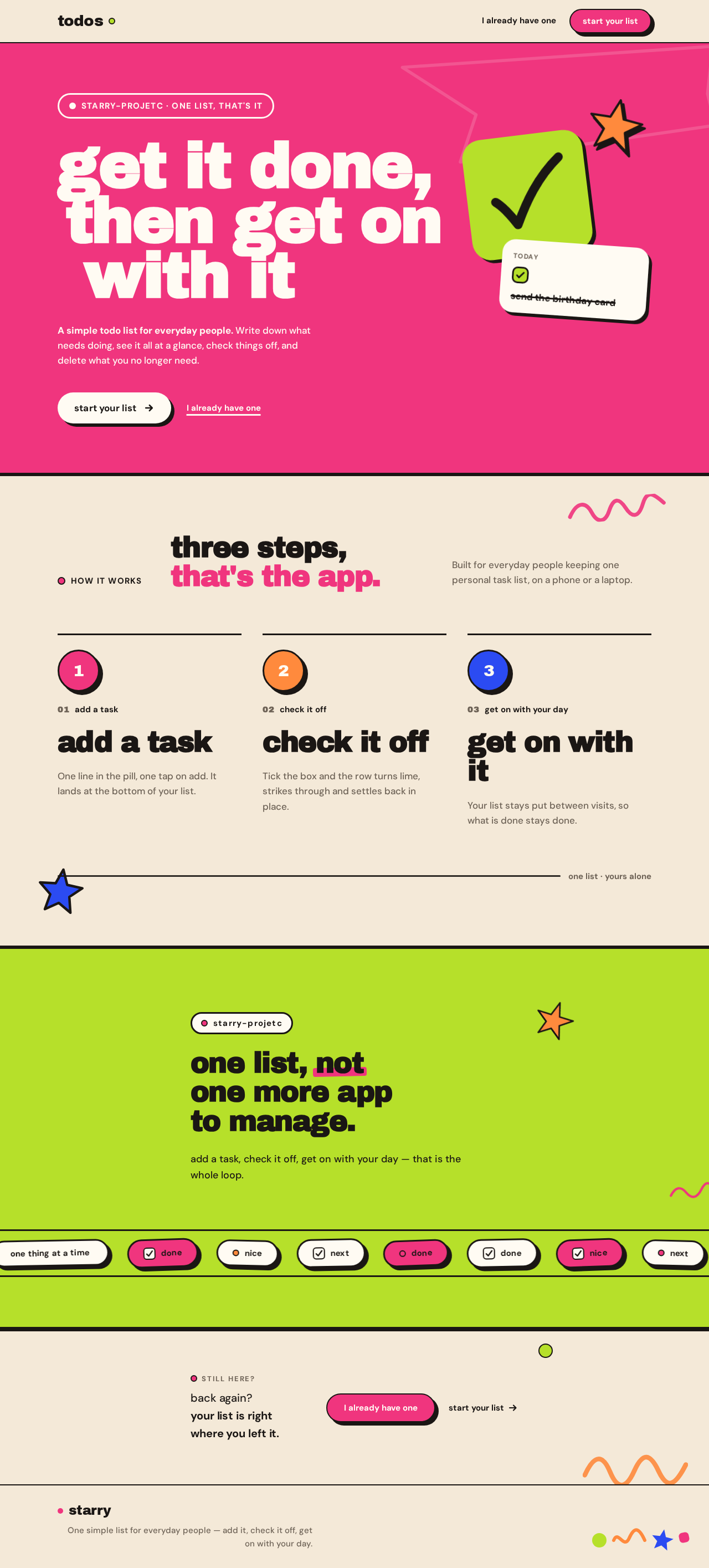
get it done,then get onwith it
A simple todo list for everyday people. Write down what needs doing, see it all at a glance, check things off, and delete what you no longer need.
how it works
three steps, that's the app.
Built for everyday people keeping one personal task list, on a phone or a laptop.
01add a task
add a task
One line in the pill, one tap on add. It lands at the bottom of your list.
02check it off
check it off
Tick the box and the row turns lime, strikes through and settles back in place.
03get on with your day
get on with it
Your list stays put between visits, so what is done stays done.
one list · yours alone
starry-projetc
one list, not one more app to manage.
add a task, check it off, get on with your day — that is the whole loop.
back again? your list is right where you left it.
get it done,then get onwith it
A simple todo list for everyday people. Write down what needs doing, see it all at a glance, check things off, and delete what you no longer need.
how it works
three steps, that's the app.
Built for everyday people keeping one personal task list, on a phone or a laptop.
01add a task
add a task
One line in the pill, one tap on add. It lands at the bottom of your list.
02check it off
check it off
Tick the box and the row turns lime, strikes through and settles back in place.
03get on with your day
get on with it
Your list stays put between visits, so what is done stays done.
one list · yours alone
starry-projetc
one list, not one more app to manage.
add a task, check it off, get on with your day — that is the whole loop.
No comments yet. Be the first!