As a system, I need a unified identity model with role-based access control to manage Crew Member and Actor roles, ensuring secure access to Crew Control and Performance Mode.
As a system, I need a database schema to store Crew Members, Actors, Scenes, and Devices, supporting the management of on-set interactions.
As a system, I need API services for managing scenes, devices, and user authentication, ensuring secure and efficient data handling for Crew Control and Performance Mode.
Depends on:#2#1
Waiting for dependencies
As a system, I need a secure authentication flow using JWT for Crew Members and Actors to access their respective interfaces.
Depends on:#1
Waiting for dependencies
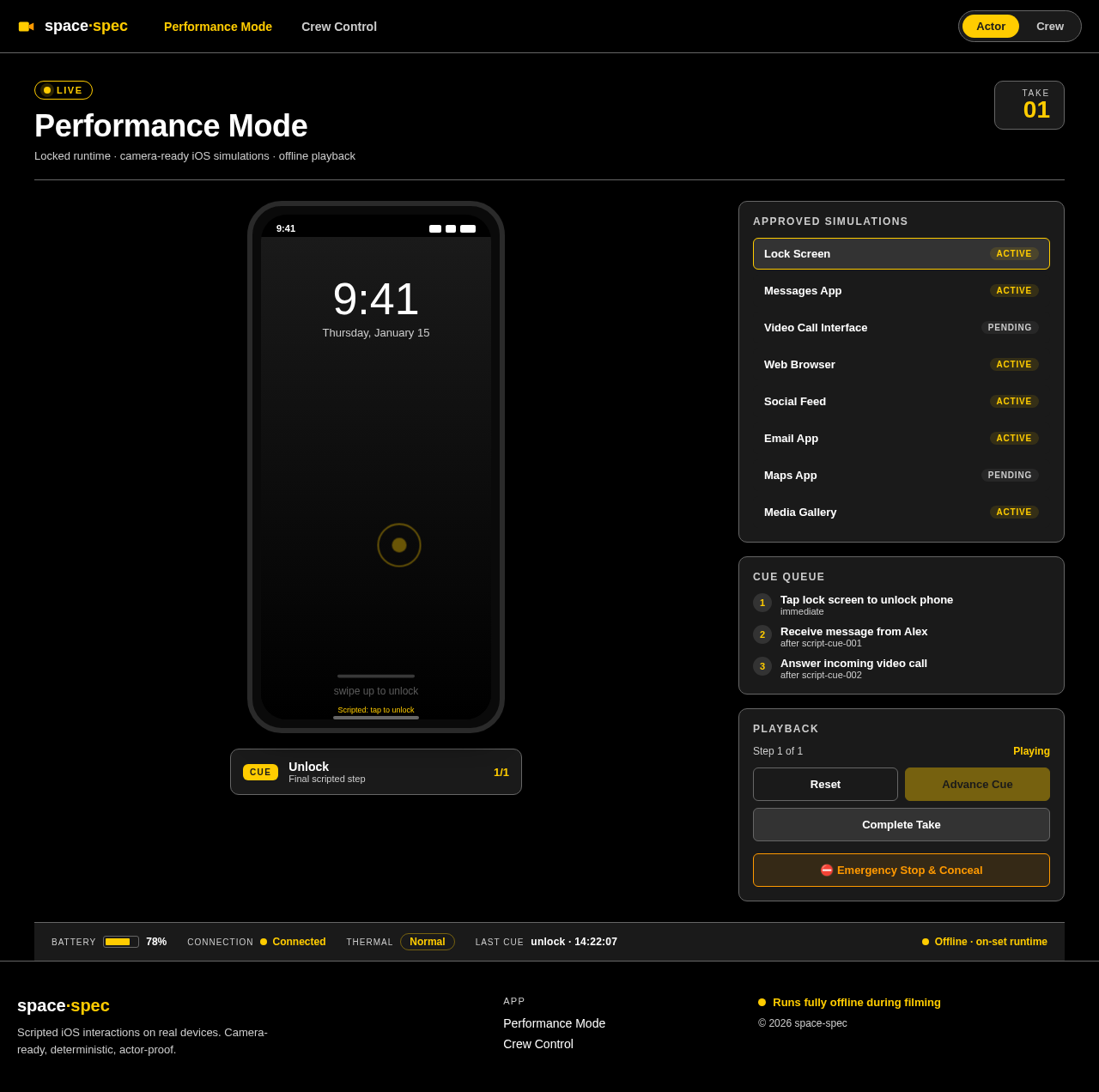
As a frontend developer, implement the SimulationScreen section for the Performance Mode page. This section renders a camera-ready iOS surface for the active simulation type, using a deterministic scripted-path model. The component includes various sub-components such as LockScreen, Messaging, VideoCall, WebBrowse, SocialFeed, Email, Maps, and Media, each rendering different simulated interfaces based on the 'type' prop. The SimulationScreen must handle actor input through a single scripted advance action, using the 'onActorAdvance' callback. The design must adhere to the provided CSS styles, ensuring a seamless and believable on-set experience. Acceptance criteria:
- The SimulationScreen component must render exactly once per page load, displaying the correct sub-component based on the 'type' prop.
- The section must include all visible controls and interactions as defined in the JSX, such as swipe gestures, button clicks, and step-based content changes.
- The design must match the provided CSS, maintaining the specified layout, colors, and animations.
- The section must operate entirely offline, with no backend integration required.
- Access to this page is restricted to the Actor persona only.
Page access: Actor only. Verify the existing restricted-access contract; change authentication or RBAC only in a task that explicitly owns it.
Depends on:#1
Waiting for dependencies
As a frontend developer, implement the CrewControlTakeRecords section to display and manage take recordings for the active scene. This section should show a list of recorded takes with their status, duration, and timestamp. Implement filtering by status and support viewing take details. Manage the take recording state using state hooks for currentTakeNumber, recordingActive, and filterStatus. Acceptance criteria: 1) The Crew Control page must render the CrewControlTakeRecords component exactly once. 2) The section must display a list of takes with accurate status indicators and support filtering. 3) The design must match the provided CSS, including responsive layouts and color themes. 4) No backend integration is required for this section. 5) Access is restricted to Crew Members only.
Page access: Crew Member only. Verify the existing restricted-access contract; change authentication or RBAC only in a task that explicitly owns it.
Depends on:#1
Waiting for dependencies
As a Backend Developer, create API endpoints for managing scenes, including creation, updates, and retrieval of scene data. Ensure secure access and efficient data handling. Acceptance criteria: API endpoints must support CRUD operations for scenes, integrate with the database schema, and enforce role-based access control.
Depends on:#2#1
Waiting for dependencies
As a Backend Developer, create API endpoints for managing devices, including connection, disconnection, and telemetry updates. Ensure secure access and efficient data handling. Acceptance criteria: API endpoints must support device management operations, integrate with the database schema, and enforce role-based access control.
Depends on:#1#2
Waiting for dependencies
As a Backend Developer, create API endpoints for managing Performance Mode interactions, including scripted paths and telemetry updates. Ensure secure access and efficient data handling. Acceptance criteria: API endpoints must support Performance Mode operations, integrate with the database schema, and enforce role-based access control.
Depends on:#2#1
Waiting for dependencies
As a system, I need a routing shell to manage navigation between Crew Control and Performance Mode, ensuring restricted access based on user roles.
Depends on:#1#4
Waiting for dependencies
As a frontend developer, implement the CrewControlSceneEditor section for the Crew Control page. This section is responsible for managing and editing scenes within a production. It includes functionalities such as displaying a list of scenes, editing scene titles and statuses, creating new scenes, selecting and configuring iOS simulations, previewing scenes, and resetting scenes. The section maintains state for selectedSceneId, selectedSimulationId, editMode, and previewActive. Key elements include scene_list, scene_status_indicators, new_scene_button, scene_title_editor, simulation_selector, preview_pane, simulation_editor_controls, scene_controls, reset_scene_button, and save_scene_button. The preview pane displays the current scene's iOS simulation state and is non-interactive. Acceptance criteria: 1) The CrewControlSceneEditor component must render on the Crew Control page, accessible only by Crew Members. 2) The scene list should display scenes filtered by the active production, with status indicators and simulation counts. 3) Users must be able to create new scenes, edit scene titles, and change scene statuses. 4) The simulation editor should allow adding, removing, and configuring simulations, including editing scripted paths. 5) The preview pane must accurately display the current simulation state with tilt effects on mouse movement. 6) The section must integrate with backend services for scene and simulation data management, requiring API endpoints for scene creation, updates, and simulation configuration.
Page access: Crew Member only. Verify the existing restricted-access contract; change authentication or RBAC only in a task that explicitly owns it.
Depends on:#1#3
Waiting for dependencies
As a frontend developer, implement the CrewControlDeviceMonitor section to display and manage iOS device connections and telemetry for Crew Members. This section should show all paired devices with their real-time status, including device name, type, connection status, battery level, last sync timestamp, and thermal status. Implement interactions for connecting, disconnecting, and resyncing devices. Ensure the device connection state is managed using state hooks for connectedDeviceIds, activeDeviceId, and monitoringEnabled. Acceptance criteria: 1) The Crew Control page must render the CrewControlDeviceMonitor component exactly once. 2) The section must display a list of devices with accurate status indicators and support device selection. 3) The design must match the provided CSS, including responsive layouts and color themes. 4) API calls for device connection, disconnection, and resync must be correctly integrated and verified. 5) Access is restricted to Crew Members only.
Page access: Crew Member only. Verify the existing restricted-access contract; change authentication or RBAC only in a task that explicitly owns it.
Depends on:#1#3
Waiting for dependencies
As a frontend developer, implement the Navbar section for the Performance Mode page. This section provides a shared navigation shell with a mode toggle between Performance Mode and Crew Control. The Navbar must include brand elements, responsive navigation links, and a toggle button to switch between modes. The component should manage its open state for mobile views and highlight the active mode. Acceptance criteria: The Navbar must render exactly once on the Performance Mode page, providing navigation links to 'Performance Mode' and 'Crew Control'. The mode toggle should switch between 'Actor' and 'Crew' labels, reflecting the current mode. The design must match the provided CSS, ensuring responsive behavior and correct styling. The Navbar should be accessible to all personas, with mode-specific links conditionally shown based on the current mode.
Page access: Actor only. Verify the existing restricted-access contract; change authentication or RBAC only in a task that explicitly owns it.
Depends on:#5#1
Waiting for dependencies
As a frontend developer, implement the PerformanceModeSimulationRenderer section for the Performance Mode page. This section is responsible for rendering the active iOS simulation, managing playback state, and handling actor input. It includes a full-screen viewport, playback controls, and emergency actions. Acceptance criteria: The component must render exactly once on the Performance Mode page, displaying the current iOS simulation and managing state transitions. It should handle actor inputs, display guided gestures, and provide playback controls (reset, advance, complete take). The design must match the provided CSS, ensuring responsive behavior and correct styling. The component should be accessible to Actors only, with all interactions constrained to scripted paths.
Page access: Actor only. Verify the existing restricted-access contract; change authentication or RBAC only in a task that explicitly owns it.
Depends on:#5#3#1
Waiting for dependencies
As a frontend developer, implement the PerformanceModeDeviceStatus section for the Performance Mode page. This section displays real-time device telemetry, including battery level, connection status, device temperature, last executed cue timestamp, and offline status. Acceptance criteria: The component must render exactly once on the Performance Mode page, displaying all telemetry indicators as specified. It should be read-only, with data flowing from the backend/device telemetry stream. The design must match the provided CSS, ensuring responsive behavior and correct styling. The component should be accessible to all personas, providing real-time device status during live performance.
Page access: Actor only. Verify the existing restricted-access contract; change authentication or RBAC only in a task that explicitly owns it.
Depends on:#5#1#3
Waiting for dependencies
As a frontend developer, implement the Footer section for the Performance Mode page. This section provides a shared footer with branding, project links, and an offline operation confirmation. Acceptance criteria: The Footer must render exactly once on the Performance Mode page, displaying branding and links to 'Performance Mode' and 'Crew Control'. It should confirm offline-capable operation. The design must match the provided CSS, ensuring responsive behavior and correct styling. The component should be accessible to all personas, providing consistent project footer content.
Page access: Actor only. Verify the existing restricted-access contract; change authentication or RBAC only in a task that explicitly owns it.
Depends on:#5#1
Waiting for dependencies
As a frontend developer, implement the CrewControlSidebar section for the Crew Control page. This sidebar provides persistent navigation and context awareness for the crew workflow. It includes quick-access navigation to productions, scenes, and devices, as well as device status badges and a responsive collapse/expand toggle. Acceptance criteria: The CrewControlSidebar must render exactly once on the Crew Control page, displaying the active production context and quick-access lists for scenes and devices. The sidebar must support responsive behavior, collapsing to a drawer on mobile. The design must match the provided CSS, ensuring accessibility and usability. The sidebar is accessible to Crew Members only.
Page access: Crew Member only. Verify the existing restricted-access contract; change authentication or RBAC only in a task that explicitly owns it.
Depends on:#5#1
Waiting for dependencies
As a frontend developer, implement the CrewControlProductionList section for the Crew Control page. This section manages and displays all created productions, supporting search, filtering by status, and creation of new productions. It owns the production selection state and updates the route context. Acceptance criteria: The CrewControlProductionList must render exactly once on the Crew Control page, displaying a list of productions with metadata. It must support search and status filtering, and allow the creation of new productions. The design must match the provided CSS, ensuring accessibility and usability. The section is accessible to Crew Members only.
Page access: Crew Member only. Verify the existing restricted-access contract; change authentication or RBAC only in a task that explicitly owns it.
Depends on:#1#5
Waiting for dependencies
As a Tech Lead, verify the end-to-end integration between the Crew Control frontend implementation and the Crew Control backend API. Ensure data flows correctly, API responses are handled properly in the UI, and all interactions work as expected.
Depends on:#13#17#16#1
Waiting for dependencies
As a Tech Lead, verify the end-to-end integration between the Performance Mode frontend implementation and the Performance Mode backend API. Ensure data flows correctly, API responses are handled properly in the UI, and all interactions work as expected.
Depends on:#1#7#19
Waiting for dependencies



No comments yet. Be the first!