space-spec

byMarcelino Justo

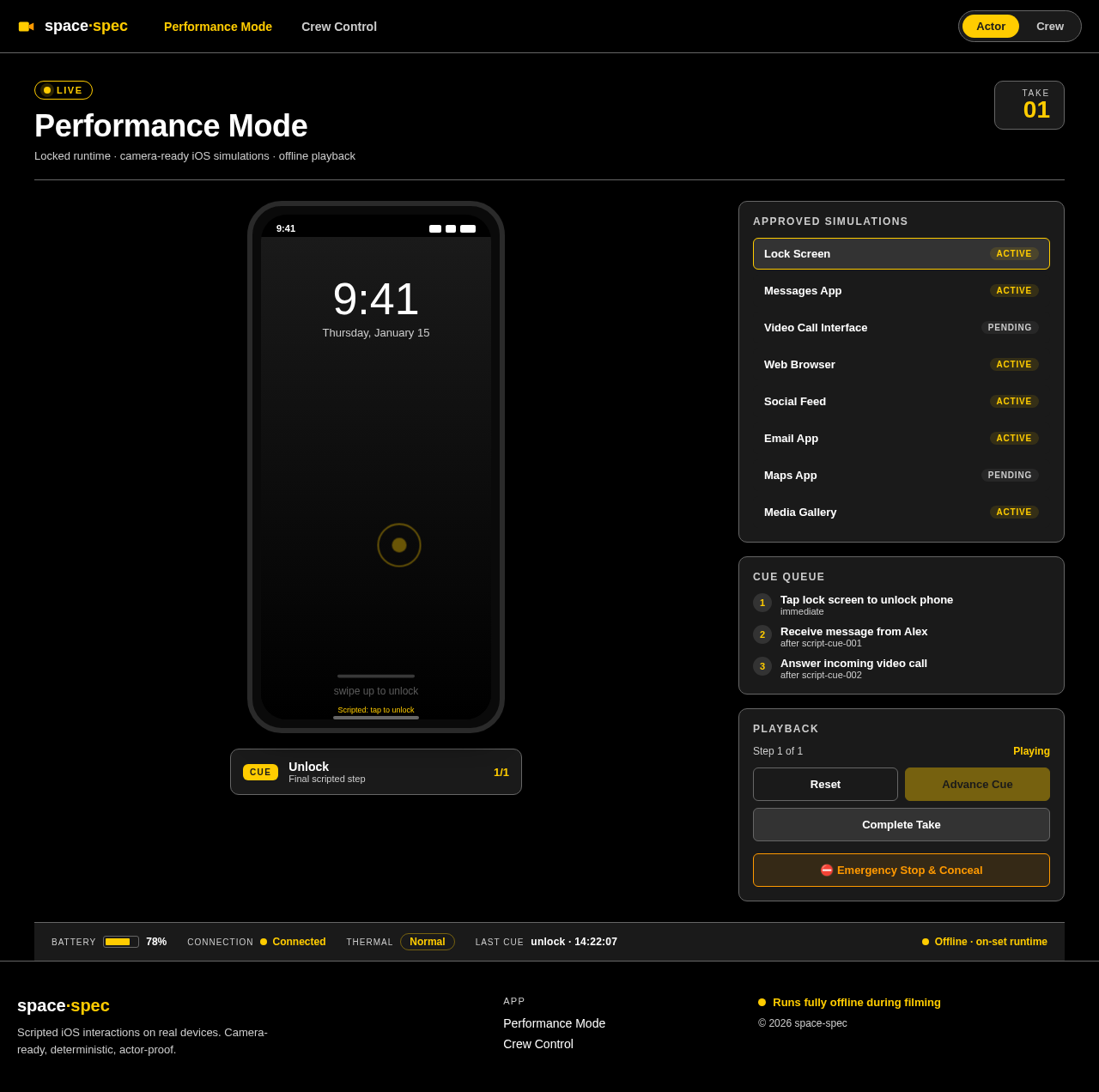
SPEC-1-On-Set Prop Phone Mobile Application Background Film and television productions frequently need actors to interact with believable phones and tablets on camera. Traditional approaches—green screens, static mockups, prerecorded screen captures, or improvised messaging applications—create limitations during filming and often require expensive post-production replacement. This mobile application provides a production-controlled environment for creating and performing scripted iOS interactions directly on physical iOS. It is an original clean-room implementation inspired by publicly described on-set prop-phone workflows. The system consists of two connected experiences: Crew Control is an off-camera desktop or tablet workspace where crew members create productions, configure scenes, edit simulated interfaces, connect devices, rehearse interactions, trigger cues, and monitor the devices currently used on camera. Performance Mode is a locked, full-screen runtime used on the actor’s device. It renders camera-ready simulations without editor controls, operating-system notifications, visible cursors, or unapproved navigation. Actor input is constrained through scripted typing, guided gestures, deterministic transitions, and approved interaction paths. The product must support iOS simulations including messaging, video calls, web browsing, social feeds, email, maps, media galleries, notifications, lock screens, and other extensible interface templates. Because filming environments may have unreliable or prohibited internet access, the scene engine, scripts, assets, device control, authentication bypass, and Performance Mode must operate locally without requiring cloud services. Optional cloud infrastructure may support preparation, backup, collaboration, and synchronization before or after filming, but must never become a runtime dependency during a take. The system prioritizes: Reliable and deterministic playback across repeated takes Low-latency control of one or more performance devices Fast recovery, resetting, and emergency concealment Accurate continuity through versioning and take records Actor-proof interaction that prevents accidental deviations Extensible separation between the scene engine and visual interface templates A dark, high-contrast, production-oriented interface suitable for busy sets

Performance ModeCrew Control
Performance Mode

Comments (0)

No comments yet. Be the first!

System Requirements

System Requirement Document
Page 1 of 5

space-spec System Requirements Document

1. Introduction

The space-spec project is designed to address the challenges faced by film and television productions when actors interact with phones and tablets on camera. Traditional methods such as green screens and static mockups often require costly post-production work. This project aims to provide a mobile application that allows for scripted iOS interactions on physical devices, ensuring a seamless and believable on-set experience.

2. System Overview

The space-spec system comprises two main components:

  1. Crew Control: An off-camera workspace for crew members to create productions, configure scenes, edit simulated interfaces, connect devices, rehearse interactions, trigger cues, and monitor devices used on camera.

  2. Performance Mode: A locked, full-screen runtime on the actor’s device that renders camera-ready simulations without editor controls, notifications, or unapproved navigation. Actor input is constrained through scripted typing, guided gestures, deterministic transitions, and approved interaction paths.

The system supports iOS simulations, including messaging, video calls, web browsing, social feeds, email, maps, media galleries, notifications, lock screens, and other extensible interface templates. It operates entirely offline during filming, with optional cloud support for pre/post-production tasks.

Page 2 of 5

3. Functional Requirements as Story Points

  • As a Crew Member, I should be able to create and configure scenes in the Crew Control workspace.
  • As a Crew Member, I should be able to edit simulated interfaces and connect devices.
  • As a Crew Member, I should be able to rehearse interactions and trigger cues.
  • As a Crew Member, I should be able to monitor devices currently used on camera.
  • As an Actor, I should be able to use the Performance Mode to interact with camera-ready simulations without distractions.
  • As a System, I must support iOS simulations including messaging, video calls, web browsing, social feeds, email, maps, media galleries, notifications, and lock screens.
  • As a System, I must operate locally without requiring cloud services during filming.
  • As a System, I should provide optional cloud infrastructure for preparation, backup, collaboration, and synchronization before or after filming.

4. User Personas

  • Crew Member: Responsible for setting up and managing the on-set prop phone interactions.
  • Actor: Uses the Performance Mode to interact with the simulated iOS environment during filming.

5. Core User Flows

  • Crew Member configures scene -> edits simulated interface -> connects device -> rehearses interaction -> triggers cue -> monitors device.
  • Actor uses Performance Mode -> interacts with simulation -> follows scripted interaction paths.
Page 3 of 5

6. Visuals Colors and Theme

  • primary: #1a1a1a (dark gray for high contrast)
  • primary_light: #333333 (lighter gray for hover states)
  • secondary: #4d4d4d (supporting gray)
  • accent: #ffcc00 (yellow for CTAs and active states)
  • highlight: #ff9900 (orange for hover states and notifications)
  • bg: #000000 (black for background)
  • surface: #1a1a1a (dark gray for cards/panels)
  • text: #ffffff (white for primary text)
  • text_muted: #cccccc (light gray for secondary text)
  • border: #666666 (subtle gray for borders)

7. Signature Design Concept

Interactive Film Set Simulation

The landing page of the space-spec application will feature an interactive film set simulation. Users can click and drag to explore a 3D model of a film set, where each element (e.g., cameras, lights, actors) is interactive. Hovering over an element reveals its role in the production process, and clicking on it provides detailed information and options for interaction. This concept will be implemented using @react-three/fiber for 3D interactions, providing an immersive experience that mirrors the on-set environment.

Page 4 of 5

Landing Hero Motion Brief

The hero section will depict a dynamic film set where a virtual camera pans across a bustling scene. As it moves, various elements like actors and crew members animate to show their roles. The animation will loop every 10 seconds, showcasing the transformation from a static set to a vibrant filming environment. This will be achieved using motion/react for smooth transitions and animations.

8. Interaction Model & Motion Direction

  • Interaction Model: Parallax
  • The landing page will feature layered depth via scroll, with decorative elements translating at different speeds to create a sense of depth. Real content will scroll naturally, enhancing the storytelling aspect of the page.

9. Non-Functional Requirements

  • The system must ensure reliable and deterministic playback across repeated takes.
  • It must provide low-latency control of one or more performance devices.
  • The system should allow for fast recovery, resetting, and emergency concealment.
  • It must maintain accurate continuity through versioning and take records.
  • The interface should be actor-proof, preventing accidental deviations.
  • The system should have a dark, high-contrast, production-oriented interface suitable for busy sets.
Page 5 of 5

10. Tech Stack

  • Frontend: React for Web
  • Backend: Python, FastAPI
  • Database: MySQL or MariaDB, using Alembic for migrations
  • Local Orchestration: Docker, docker-compose
  • Server-side Orchestration: Kubernetes

11. Assumptions and Constraints

  • The application must operate entirely offline during filming.
  • Optional cloud support is available for pre/post-production tasks but is not a runtime dependency.
  • The interface must be suitable for high-contrast, low-light environments typical of film sets.

12. Glossary

  • Crew Control: The workspace for crew members to manage on-set interactions.
  • Performance Mode: The actor's interface for interacting with simulated iOS environments.
  • iOS Simulations: Simulated interfaces that mimic iOS applications for filming purposes.
Performance Mode design preview
Performance Mode: Launch Simulation
Performance Mode: View Lock Screen
Performance Mode: Messaging Interaction
Performance Mode: Video Call Interaction
Performance Mode: Web Browsing
Performance Mode: Social Feed
Performance Mode: Email Interaction
Performance Mode: Maps Interaction
Performance Mode: Media Gallery
Performance Mode: Follow Scripted Path
Performance Mode: Complete Take
Performance Mode design preview
Performance Mode: Launch Simulation
Performance Mode: View Lock Screen
Performance Mode: Messaging Interaction
Performance Mode: Video Call Interaction
Performance Mode: Web Browsing
Performance Mode: Social Feed
Performance Mode: Email Interaction
Performance Mode: Maps Interaction
Performance Mode: Media Gallery
Performance Mode: Follow Scripted Path
Performance Mode: Complete Take