sonic-production
 Abdulwahab Mangal
Build a Production-Ready AI Automation SaaS You are a senior SaaS architect, full-stack engineer, UI/UX designer, AI engineer, DevOps engineer, and security engineer. Build a modern, production-ready AI Automation SaaS platform that allows businesses and individuals to create, manage, and run AI-powered automations without coding. 1. Product Concept Create a SaaS platform where users can connect their favorite apps, describe an automation in natural language, and let AI build the workflow automatically. Example: “Whenever I receive a customer inquiry, analyze the message, classify the lead, save the information to my CRM, generate a personalized response, and notify me on WhatsApp.” The AI should convert this request into a visual automation workflow. Product positioning: “Describe it. Automate it. Let AI run it.” 2. Core Features AI Automation Builder Create an AI assistant that can: * Understand natural-language automation requests * Generate workflows automatically * Recommend triggers and actions * Configure workflow steps * Generate structured workflow JSON * Detect missing configuration * Explain each workflow step * Modify existing workflows through chat * Debug failed workflows * Optimize workflows * Suggest additional automations Example: User: “Every time someone fills out my website contact form, qualify the lead and send me a notification.” AI generates: Trigger: Website Form Submission ↓ AI: Analyze Lead ↓ Condition: Lead Score > 70 ↓ Action: Create CRM Contact ↓ Action: Send Notification ↓ Action: Generate Follow-up Email


Comments (0)
Sign in to leave a comment
System Requirements
System Requirements Document for sonic-production
1. Introduction
The sonic-production project aims to develop a production-ready AI Automation SaaS platform that enables businesses and individuals to create, manage, and run AI-powered automations without the need for coding. The platform will allow users to connect their favorite apps, describe automations in natural language, and let AI build the workflow automatically. The product is positioned with the message: “Describe it. Automate it. Let AI run it.”
2. System Overview
The sonic-production platform is designed to support both businesses and individuals, providing a seamless experience for creating and managing AI-powered automations. The platform's core functionality revolves around an AI Automation Builder that can understand natural-language requests, generate workflows, recommend triggers and actions, and optimize processes. The platform will be delivered as a SaaS solution with a focus on user-friendly interfaces and robust backend integration.
2a. Product Interpretation and Delivery Boundary
The platform will be delivered as a SaaS application with custom UI and app-owned identity. Users will interact with the platform through a series of pages, each serving a specific function in the automation lifecycle. The platform will support anonymous access for initial exploration, with identity verification required for managing and executing automations. The product's scope is limited to the current commitments outlined in the authoritative user requirement thread, with no additional capabilities inferred beyond those necessary for execution.
2b. Source Content Inventory
Not applicable as no content source directive was provided.
2c. Page Content and Component Coverage
Landing
- Purpose: Introduce the AI automation SaaS, its benefits for businesses and individuals, and the describe-to-automate value proposition.
- Components:
- Introduction to the platform
- Overview of core features
- Call-to-action for user registration or login
Login
- Purpose: Allow returning users to verify their identity and access protected automation features.
- Components:
- Username and password fields
- Forgot password link
- Login button
Dashboard
- Purpose: Serve as the central hub for managing existing automations and accessing various platform features.
- Components:
- Summary of existing automations
- Navigation to Automation Builder, Automations, Runs, and Integrations
- Suggestions for additional automations
Automation Builder
- Purpose: Provide a workspace for users to describe automations and receive AI-generated workflow structures.
- Components:
- Natural language input field
- AI-generated workflow visualization
- Configuration options for triggers and actions
Automations
- Purpose: Offer an overview for browsing and managing the user's durable automation records.
- Components:
- List of existing automations
- Options to edit, delete, or duplicate automations
Automation Details
- Purpose: Allow detailed inspection and modification of individual automations.
- Components:
- Visual workflow inspection
- Step-by-step explanations
- Options for conversational modification and optimization
Runs
- Purpose: Facilitate the execution of automations and investigation of failed workflow runs.
- Components:
- List of recent runs
- Status indicators for each run
- Debugging tools for failed runs
Integrations
- Purpose: Manage connections and configurations for applications required by automations.
- Components:
- List of connected apps
- Options to add or remove integrations
- Configuration settings for each integration
3. Functional Requirements
- As an Automation User, I should be able to describe automations in natural language and have the AI generate a workflow automatically. (explicit)
- As an Automation User, I should be able to connect my favorite apps to the platform. (explicit)
- As an Automation User, I should be able to modify existing workflows through a chat interface. (explicit)
- As an Automation User, I should be able to debug failed workflows and optimize them. (explicit)
- As an Automation User, I should be able to view and manage my automation records. (required_inference)
- As an Automation User, I should be able to execute automations and investigate failed runs. (required_inference)
- As an Automation User, I should be able to manage app integrations required by my automations. (required_inference)
4. User Personas
- Automation User: Individuals or business representatives who create, manage, configure, run, modify, debug, and optimize AI-powered automations through the platform.
5. Core User Flows
Anonymous Visitor
- Access the Landing page.
- Explore the platform's features and benefits.
- Choose to register or log in.
New Automation User
- Register through the Landing page.
- Verify identity via email confirmation.
- Log in to access the Dashboard.
- Connect required app integrations.
- Use the Automation Builder to create a new automation.
- Save and execute the automation.
Returning Automation User
- Log in through the Login page.
- Access the Dashboard.
- View existing automations in the Automations page.
- Modify or optimize an automation in the Automation Details page.
- Execute automations and investigate runs in the Runs page.
- Manage app integrations in the Integrations page.
6. Visuals Colors and Theme
- Muse: Gleb Kuznetsov
- Palette:
- Background: #000022
- Surface: #14142B
- Text: #FFFFFF
- Primary: #3F2B96
- Accent: #DA22FF
- Muted: #1E1E2C
- Typography:
- Headings: Space Grotesk
- Body: Orbitron
- Scale: 1.5 modular, 72/48/32/20/16
- Shape Language: Full-bleed 3D scenes with floating glass panels and thin luminous strokes.
- Layout: Radial layouts with floating glass panels and full-bleed imagery.
- Imagery: Abstract 3D objects and product holograms with glowing volumetric forms.
7. Signature Design Concept
The Landing page will feature a full-bleed 3D scene with a central glowing volumetric form, set on a deep black ground with electric cyan and violet highlights. The hero will have layered parallax elements and a floating glass UI overlay, creating an immersive experience that underscores the platform's AI-driven capabilities.
8. Interaction Model & Motion Direction
- Interaction Model: Parallax
- Motion Tempo: Cinematic
- Hero Dimensionality: WebGL
- Landing Hero Motion Brief: The hero will feature a central glowing volumetric form with continuous slow orbit and parallax effects. Light sweeps and data streams will create a dynamic background, enhancing the immersive experience.
9. Non-Functional Requirements
- The platform must support high availability and scalability to accommodate a growing user base.
- Security measures must be in place to protect user data and ensure privacy.
- The platform should provide a responsive design for optimal performance on various devices.
10. Tech Stack
- Frontend: React
- Backend: Python/FastAPI
- Database: PostgreSQL
- Containerization: Docker
- Orchestration: Kubernetes (if required for deployment)
11. Assumptions and Constraints
- The platform must support both businesses and individuals.
- Automations must be createable and runnable without coding.
- The workflow-generation experience must support natural-language input.
- The platform will not include adjacent capabilities beyond those necessary for the described automations.
12. Glossary
- AI Automation Builder: A tool within the platform that allows users to create automations using natural language.
- Automation User: A persona representing individuals or businesses using the platform to create and manage automations.
- Workflow: A sequence of automated actions generated by the AI based on user input.
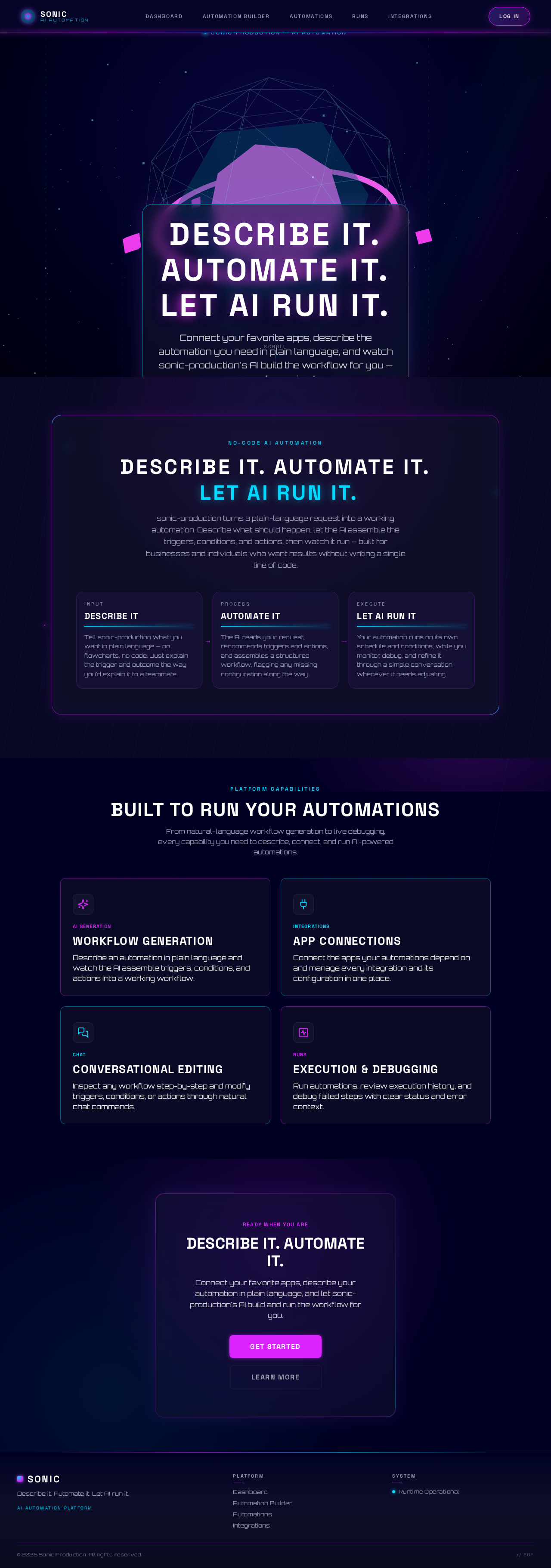
Describe it. Automate it. Let AI run it.
Connect your favorite apps, describe the automation you need in plain language, and watch sonic-production's AI build the workflow for you — no code required.
Describe it.Automate it.Let AI run it.
sonic-production turns a plain-language request into a working automation. Describe what should happen, let the AI assemble the triggers, conditions, and actions, then watch it run — built for businesses and individuals who want results without writing a single line of code.
Describe It
Tell sonic-production what you want in plain language — no flowcharts, no code. Just explain the trigger and outcome the way you'd explain it to a teammate.
Automate It
The AI reads your request, recommends triggers and actions, and assembles a structured workflow, flagging any missing configuration along the way.
Let AI Run It
Your automation runs on its own schedule and conditions, while you monitor, debug, and refine it through a simple conversation whenever it needs adjusting.
Built to Run Your Automations
From natural-language workflow generation to live debugging, every capability you need to describe, connect, and run AI-powered automations.
Workflow Generation
Describe an automation in plain language and watch the AI assemble triggers, conditions, and actions into a working workflow.
App Connections
Connect the apps your automations depend on and manage every integration and its configuration in one place.
Conversational Editing
Inspect any workflow step-by-step and modify triggers, conditions, or actions through natural chat commands.
Execution & Debugging
Run automations, review execution history, and debug failed steps with clear status and error context.
Describe It. Automate It.
Connect your favorite apps, describe your automation in plain language, and let sonic-production's AI build and run the workflow for you.
Describe it. Automate it. Let AI run it.
Connect your favorite apps, describe the automation you need in plain language, and watch sonic-production's AI build the workflow for you — no code required.
Describe it.Automate it.Let AI run it.
sonic-production turns a plain-language request into a working automation. Describe what should happen, let the AI assemble the triggers, conditions, and actions, then watch it run — built for businesses and individuals who want results without writing a single line of code.
Describe It
Tell sonic-production what you want in plain language — no flowcharts, no code. Just explain the trigger and outcome the way you'd explain it to a teammate.
Automate It
The AI reads your request, recommends triggers and actions, and assembles a structured workflow, flagging any missing configuration along the way.
Let AI Run It
Your automation runs on its own schedule and conditions, while you monitor, debug, and refine it through a simple conversation whenever it needs adjusting.
Built to Run Your Automations
From natural-language workflow generation to live debugging, every capability you need to describe, connect, and run AI-powered automations.
Workflow Generation
Describe an automation in plain language and watch the AI assemble triggers, conditions, and actions into a working workflow.
App Connections
Connect the apps your automations depend on and manage every integration and its configuration in one place.
Conversational Editing
Inspect any workflow step-by-step and modify triggers, conditions, or actions through natural chat commands.
Execution & Debugging
Run automations, review execution history, and debug failed steps with clear status and error context.
Describe It. Automate It.
Connect your favorite apps, describe your automation in plain language, and let sonic-production's AI build and run the workflow for you.
No comments yet. Be the first!