solar-wild
 Mohamed Krawia
تقدر تعمل اي

Comments (0)
Sign in to leave a comment
Project Tasks
21 planning tasksGenerate system requirement document
Generate personas & user flows
Create flow for Portfolio Owner
Create flow for Portfolio Visitor
Landing
Fix Landing review findings: Mobile navbar links overlap the wordmark, obscuring… (+1 more)
Fix Landing review finding: Mobile navbar links overlap the wordmark, obscuring…
Landing / Navigation
Landing / Split Hero
Landing / Work Index
Landing / About
Landing / Contact Block
Landing / Footer
Navigation
Footer
Sign Up
Login
Dashboard
Portfolio Editor
Architecture
Workspace task plan
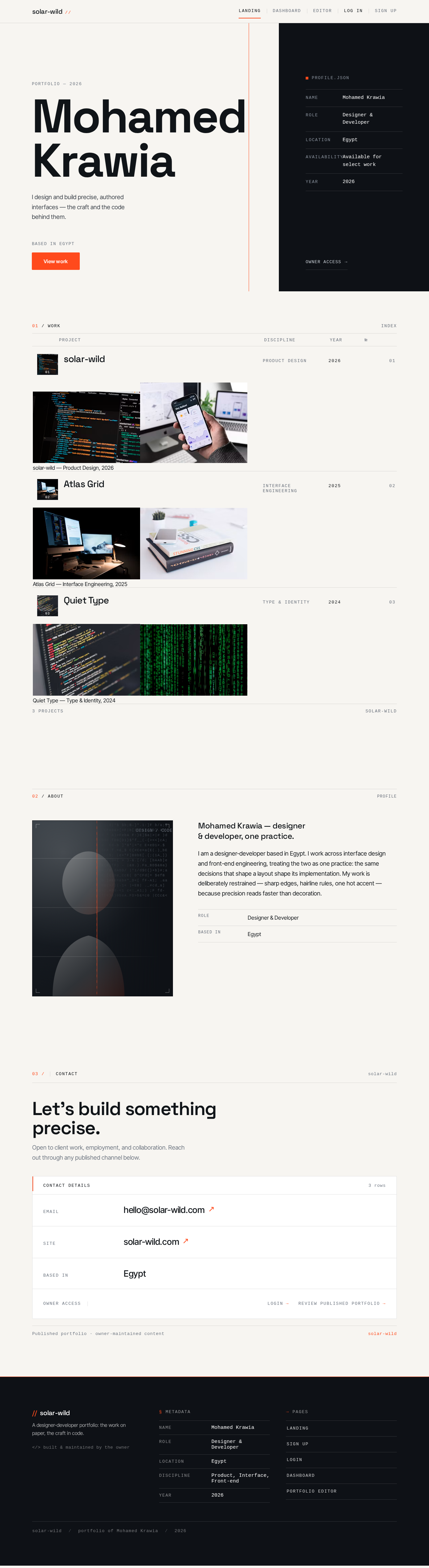
MohamedKrawia
I design and build precise, authored interfaces — the craft and the code behind them.
profile.json
01 / WORK
- solar-wild01
solar-wild — Product Design, 2026
- Atlas Grid02
Atlas Grid — Interface Engineering, 2025
- Quiet Type03
Quiet Type — Type & Identity, 2024


Mohamed Krawia — designer & developer, one practice.
I am a designer-developer based in Egypt. I work across interface design and front-end engineering, treating the two as one practice: the same decisions that shape a layout shape its implementation. My work is deliberately restrained — sharp edges, hairline rules, one hot accent — because precision reads faster than decoration.
- Role
- Designer & Developer
- Based in
- Egypt
Let’s build something precise.
Open to client work, employment, and collaboration. Reach out through any published channel below.
MohamedKrawia
I design and build precise, authored interfaces — the craft and the code behind them.
profile.json
01 / WORK
- solar-wild01
solar-wild — Product Design, 2026
- Atlas Grid02
Atlas Grid — Interface Engineering, 2025
- Quiet Type03
Quiet Type — Type & Identity, 2024
Mohamed Krawia — designer & developer, one practice.
I am a designer-developer based in Egypt. I work across interface design and front-end engineering, treating the two as one practice: the same decisions that shape a layout shape its implementation. My work is deliberately restrained — sharp edges, hairline rules, one hot accent — because precision reads faster than decoration.
- Role
- Designer & Developer
- Based in
- Egypt
Let’s build something precise.
Open to client work, employment, and collaboration. Reach out through any published channel below.
No comments yet. Be the first!