solar-wild
 Mohamed Krawia
تقدر تعمل اي

Comments (0)
Sign in to leave a comment
System Requirements
System Requirements Document for solar-wild
1. Introduction
solar-wild is a professional portfolio website for Mohamed Krawia (محمد), a designer-developer based in Egypt. The product exists to present his work and professional identity to an audience of potential clients, employers, and collaborators, and to give him a private workspace where he sets up and maintains that published portfolio.
The authoritative request is direct and singular in intent: اعملي ويب سايت احترافي بتلفليو — build a professional portfolio website. The word احترافي (professional) is a hard constraint, not decoration: the site must read as authored, precise, and credible within seconds of a visitor's arrival. The product therefore has two faces that must feel like one product:
- A public face — an anonymous, openly reachable presentation of the owner's work, profile, and contact information, judged by visitors who form an impression almost instantly.
- A private face — a protected workspace where the owner enrolls, returns, and maintains the durable portfolio content that the public face renders.
Audience: Portfolio Visitors (potential clients, employers, collaborators) who browse the published work and profile; and the Portfolio Owner, who is the sole active maintainer of the portfolio content.
2. System Overview
solar-wild is a custom-UI web application with an application-owned identity boundary. It delivers:
- An anonymous Landing page presenting the owner's professional portfolio — name, discipline, work index, about, and contact — to any visitor.
- Anonymous Sign Up and Login surfaces where the Portfolio Owner establishes and re-establishes access to protected portfolio work.
- A protected Dashboard giving the owner an overview of the durable portfolio content and its state.
- A protected Portfolio Editor where the owner sets up and maintains the portfolio content that the public Landing page renders.
Actors. Two accepted human personas: Portfolio Owner (the maintainer and the subject of the portfolio) and Portfolio Visitor (the audience). The application itself owns identity, storage, and rendering; there is no third-party identity provider, no external publishing service, and no outbound-only recipient in the accepted scope.
Ownership. The application owns all five destinations and all portfolio content state. Identity is application-owned because the owner must privately own and resume durable, owner-specific portfolio state across sessions.
Narrow exclusions. No e-commerce, no payments, no multi-author or team collaboration, no visitor accounts, no commenting or messaging, no analytics dashboards, no blog/CMS engine, and no third-party authentication provider are part of the accepted scope. Nothing in this document authorizes those capabilities.
2a. Product Interpretation and Delivery Boundary
The product is delivered as a first-party web application. The public portfolio is anonymous and openly reachable — a visitor never needs an account, and no visitor-facing capability is gated. The owner's maintenance work is protected: the Dashboard and Portfolio Editor require an established, verified owner identity, because the portfolio content is durable, owner-specific state that must remain bound to the correct person across sessions and devices.
Access is therefore split cleanly:
- Anonymous entry: Landing (public portfolio), Sign Up (first-use identity establishment), Login (returning verification). Sign Up and Login are reachable without an existing session — a protected destination cannot own the interaction that grants access to itself.
- Protected work: Dashboard and Portfolio Editor, reachable only after verified owner identity.
The identity boundary is a continuity boundary, not a permission system. There is exactly one owner role; no differentiated roles, no role-based visibility, and no shared-state permission controls exist in the accepted scope.
Current horizon: the five destinations above, the portfolio content they carry, and the identity lifecycle that protects owner work.
Future horizon (not current): anything not listed above — including additional content types, integrations, or public features — remains out of scope until explicitly accepted.
2b. Source Content Inventory
No reference directive in this project declares content_source authority. There is no verified external factual corpus to inventory, and no dummy portfolio facts are invented here. All portfolio content (name, discipline, location, availability, year, project entries, bio, contact details) is owner-authored content entered and maintained by the Portfolio Owner through the Portfolio Editor, and rendered by the Landing page. The only source-verified identity facts are: owner name Mohamed Krawia, country EG, and project name solar-wild.
2c. Page Content and Component Coverage
Landing
- Information / state: The owner's professional identity and published work. Left region carries the owner's name, a one-line discipline statement, and the primary call to action. Right region carries a monospace metadata block: name, role, location, availability, year — stacked in ruled rows. Below the fold: a numbered work index (01 / WORK), an about section (02 / ABOUT) splitting portrait from plain-text bio, and a contact block (03 / CONTACT) set as a form-like ruled list.
- Primary actions:
View work— scrolls to the work index. Contact block exposes the owner's published contact details. - Supporting actions: Navigate to Login (owner access). Each work-index row is a focusable/hoverable entry that reveals its project detail state.
- Domain entities: Portfolio Profile (name, role, location, availability, year, discipline statement, bio, portrait), Project (name, discipline, year, photograph/rendered screen, wireframe/skeleton twin), Contact Detail.
- Component responsibilities: Split hero (58/42 desktop, stacked at 375px) with a 1px vermilion seam; monospace metadata block with blinking accent caret; hairline-ruled work index as tabular rows (not a card grid); two-column about with half-rendered portrait; ruled contact list; numbered monospace section openers on full-width hairline rules.
- States:
- Loading: skeleton rows in the work index and a placeholder metadata block; hero text renders immediately from static profile fields.
- Empty: when the owner has published no projects, the work index shows a single ruled row stating that no work is published yet; the hero, about, and contact sections still render from profile content.
- Success: profile and all published projects render; work-index rows respond to hover/focus with the accent treatment; thumbnails swap between photograph and wireframe twin.
- Error: if portfolio content cannot be retrieved, the hero renders from the last known profile fields and the work index shows a non-blocking notice with a retry control; the page never renders blank.
- Recovery: retry re-requests portfolio content in place without a full page reload.
Sign Up
- Information / state: First-use identity establishment for the Portfolio Owner. Explains that an account is required to set up and maintain the portfolio, and that the public portfolio remains openly viewable without one.
- Primary actions: Submit enrollment (email/identifier + credential) to create the owner identity.
- Supporting actions: Navigate to Login for an existing owner; return to Landing.
- Domain entities: Owner Identity (identifier, credential, created state).
- Component responsibilities: Enrollment form with inline field validation; submission control with in-flight state; inline error region; link to Login.
- States:
- Loading: submission control shows an in-flight state and the form is locked against double submission.
- Empty: pristine form with no errors.
- Success: identity created and the owner is taken into the protected workspace to begin portfolio setup.
- Error: field-level validation messages for malformed or missing input; a distinct message when the identifier is already enrolled, with a direct path to Login; a recoverable message when enrollment cannot complete, preserving entered values.
- Recovery: the owner can correct fields and resubmit without re-entering everything.
Login
- Information / state: Returning verification for the Portfolio Owner to regain access to protected portfolio work.
- Primary actions: Submit credentials to verify identity and open the protected workspace.
- Supporting actions: Navigate to Sign Up for a first-time owner; return to Landing.
- Domain entities: Owner Identity, Session.
- Component responsibilities: Credential form; submission control with in-flight state; inline error region; link to Sign Up.
- States:
- Loading: submission control shows an in-flight state; the form is locked against double submission.
- Empty: pristine form with no errors.
- Success: identity verified; the owner lands on the Dashboard with the session established.
- Error: a single non-enumerating message for invalid credentials; a distinct recoverable message when verification cannot complete, preserving the entered identifier.
- Recovery: the owner can retry immediately; repeated failures do not lock the account out of the accepted scope.
Dashboard
- Information / state: Protected overview of the owner's durable portfolio content — published state, project count, last-updated information, and profile completeness. Rendered on the dark code-panel ground with a monospace left rail of section names and a white content canvas.
- Primary actions: Open the Portfolio Editor to continue or begin portfolio setup.
- Supporting actions: Sign out; navigate between rail sections; open the public Landing page to view the published result.
- Domain entities: Portfolio Profile, Project collection, Published state, Last-updated timestamp.
- Component responsibilities: Monospace left rail; overview canvas summarizing profile and project state; entry control into the Portfolio Editor; view-public-site control; sign-out control.
- States:
- Loading: rail renders immediately; canvas shows skeleton summary blocks.
- Empty: a first-run state for a newly enrolled owner — no portfolio content yet, with a single clear path into the Portfolio Editor.
- Success: profile and project summary render with current published state and timestamps.
- Error: if summary data cannot be retrieved, the canvas shows a non-blocking notice with retry; the rail and navigation remain usable.
- Recovery: retry reloads the summary in place; the owner can still enter the Portfolio Editor.
Portfolio Editor
- Information / state: Focused workspace for setting up and maintaining the portfolio content rendered on the public Landing page. Dark code-panel ground, monospace left rail of section names, white editing canvas.
- Primary actions: Create, edit, reorder, and remove Project entries; edit Portfolio Profile fields (name, role, location, availability, year, discipline statement, bio, portrait); edit Contact Details; save changes so they appear on the public Landing page.
- Supporting actions: Navigate between rail sections (profile / work / contact); preview the public result; return to Dashboard.
- Domain entities: Portfolio Profile, Project (name, discipline, year, photograph/rendered screen, wireframe/skeleton twin), Contact Detail, Published state.
- Component responsibilities: Monospace section rail; white editing canvas with per-section forms; project list with reorder and remove controls; per-project media fields for the photograph and its wireframe/skeleton twin; save control with in-flight and saved states; unsaved-changes indicator; preview control.
- States:
- Loading: rail renders immediately; canvas shows skeleton form fields.
- Empty: no projects yet — the work section shows an empty ruled list with a single add-project control; profile fields show their unset state.
- Success: changes save and are reflected on the public Landing page; a saved confirmation is shown.
- Error: field-level validation for malformed entries (for example a missing project name); a recoverable save-failure message that preserves all in-canvas edits so nothing is lost.
- Recovery: the owner can retry the save without re-entering data; navigating away with unsaved changes prompts before discarding.
3. Functional Requirements
FR-1 — Professional portfolio presentation As a Portfolio Visitor, I should see a professional presentation of the owner's portfolio so that I can form a credible impression of their work and identity.
- Provenance: explicit
- Trigger/input: Visitor opens the Landing page.
- Observable result: The Landing page renders the owner's name, discipline statement, work index, about section, and contact block in the authored professional presentation.
- Access state: Anonymous; no account required.
- Failure/recovery: If portfolio content cannot be retrieved, the hero renders from last known profile fields and the work index shows a retry notice; the page never renders blank.
- Continuation: Visitor scrolls into the work index and about sections.
FR-2 — Browse the work index As a Portfolio Visitor, I should browse the owner's projects as a ruled index of name, discipline, and year so that I can scan the body of work quickly.
- Provenance: explicit
- Trigger/input: Visitor scrolls to the work index or activates
View work. - Observable result: Each published project appears as a hairline-separated tabular row showing project name, discipline, and year; the row's left border and title take the accent treatment under pointer or focus.
- Access state: Anonymous.
- Failure/recovery: If no projects are published, a single ruled row states that no work is published yet.
- Continuation: Visitor inspects an individual project's detail state.
FR-3 — Inspect a project's dual representation As a Portfolio Visitor, I should see each project in both its finished and its structural form so that I can appreciate the craft behind the work.
- Provenance: explicit (creative direction)
- Trigger/input: Visitor hovers or focuses a work-index row.
- Observable result: The project thumbnail swaps between its photograph/rendered screen and its wireframe/skeleton twin.
- Access state: Anonymous.
- Failure/recovery: Under reduced-motion preference, the photograph state is shown statically with no swap.
- Continuation: Visitor continues scanning the index or moves to the about section.
FR-4 — Read the owner's profile and contact details As a Portfolio Visitor, I should read the owner's bio and published contact details so that I can evaluate fit and reach out.
- Provenance: explicit
- Trigger/input: Visitor scrolls to the about and contact sections.
- Observable result: The about section renders the portrait and plain-text bio; the contact block renders the owner's published contact details as a ruled list.
- Access state: Anonymous.
- Failure/recovery: Unset profile fields render their unset state rather than broken or placeholder content.
- Continuation: Visitor uses a published contact detail to reach the owner.
FR-5 — Establish owner identity on first use As a Portfolio Owner, I should enroll myself so that I can set up and maintain my portfolio.
- Provenance: required_inference
- Trigger/input: Owner opens Sign Up and submits an identifier and credential.
- Observable result: An owner identity is created and the owner is taken into the protected workspace to begin portfolio setup.
- Access state: Anonymous entry; the resulting session is verified.
- Failure/recovery: Field-level validation for malformed or missing input; a distinct message with a direct path to Login when the identifier is already enrolled; a recoverable message that preserves entered values when enrollment cannot complete.
- Continuation: Owner lands in the protected workspace and opens the Portfolio Editor.
FR-6 — Regain access as a returning owner As a Portfolio Owner, I should verify my identity on return so that I can resume protected portfolio work.
- Provenance: required_inference
- Trigger/input: Owner opens Login and submits credentials.
- Observable result: Identity is verified and the owner lands on the Dashboard with the session established.
- Access state: Anonymous entry; the resulting session is verified.
- Failure/recovery: A single non-enumerating message for invalid credentials; a distinct recoverable message preserving the entered identifier when verification cannot complete; immediate retry is allowed.
- Continuation: Owner reviews the Dashboard and continues into the Portfolio Editor.
FR-7 — Review portfolio state at a glance As a Portfolio Owner, I should see an overview of my portfolio's state so that I know what is published and what needs attention.
- Provenance: required_inference
- Trigger/input: Owner opens the Dashboard after verification.
- Observable result: The Dashboard renders published state, project count, last-updated information, and profile completeness on the dark code-panel ground with a monospace rail.
- Access state: Protected; verified owner identity required.
- Failure/recovery: If summary data cannot be retrieved, a non-blocking notice with retry appears while the rail and navigation remain usable.
- Continuation: Owner opens the Portfolio Editor or views the public site.
FR-8 — Maintain the portfolio profile As a Portfolio Owner, I should edit my profile fields so that the public Landing page presents me accurately.
- Provenance: explicit
- Trigger/input: Owner edits name, role, location, availability, year, discipline statement, bio, or portrait in the Portfolio Editor and saves.
- Observable result: Saved profile fields render on the public Landing page.
- Access state: Protected; verified owner identity required.
- Failure/recovery: Field-level validation for malformed entries; a recoverable save-failure message that preserves all in-canvas edits.
- Continuation: Owner previews the public result or continues editing another section.
FR-9 — Maintain the project collection As a Portfolio Owner, I should create, edit, reorder, and remove projects so that the work index reflects my current body of work.
- Provenance: explicit
- Trigger/input: Owner adds a project, edits its name, discipline, year, photograph/rendered screen, or wireframe/skeleton twin, reorders entries, or removes an entry, then saves.
- Observable result: The work index on the public Landing page reflects the saved project collection in the saved order.
- Access state: Protected; verified owner identity required.
- Failure/recovery: Validation for a missing project name; a recoverable save-failure message preserving all edits; navigating away with unsaved changes prompts before discarding.
- Continuation: Owner previews the public result or returns to the Dashboard.
FR-10 — Maintain published contact details As a Portfolio Owner, I should edit my published contact details so that visitors can reach me through the public site.
- Provenance: explicit
- Trigger/input: Owner edits contact details in the Portfolio Editor and saves.
- Observable result: The contact block on the public Landing page renders the saved details.
- Access state: Protected; verified owner identity required.
- Failure/recovery: Validation for malformed entries; a recoverable save-failure message preserving edits.
- Continuation: Owner previews the public result.
FR-11 — View the published result As a Portfolio Owner, I should open the public site from my workspace so that I can confirm what visitors see.
- Provenance: required_inference
- Trigger/input: Owner activates the view-public-site control from the Dashboard or Portfolio Editor.
- Observable result: The public Landing page opens showing the currently saved portfolio content.
- Access state: The public page itself is anonymous; the control is available only within the protected workspace.
- Failure/recovery: If the public page cannot be reached, the owner remains in the workspace with a non-blocking notice.
- Continuation: Owner returns to the workspace to make further edits.
FR-12 — End the owner session As a Portfolio Owner, I should sign out so that protected portfolio work is not left accessible on a shared device.
- Provenance: required_inference
- Trigger/input: Owner activates sign out from the protected workspace.
- Observable result: The session ends and protected destinations require verification again.
- Access state: Protected; verified owner identity required to invoke.
- Failure/recovery: If sign-out cannot complete, the owner is told and the session is not silently left open.
- Continuation: Owner returns to the anonymous Landing page.
4. User Personas
Portfolio Owner
Product context. Mohamed Krawia is a designer-developer in Egypt who needs a professional portfolio website that presents his work and identity credibly to potential clients, employers, and collaborators. He is the sole maintainer of the portfolio content and the subject of the portfolio itself. He arrives at the product with a specific outcome in mind: a published site that looks authored and precise, not templated.
Primary goal. Set up and maintain a professional portfolio whose public presentation earns a visitor's confidence within seconds, and keep that content current without friction.
Distinct accepted responsibilities. He enrolls himself on first use; he verifies his identity on return; he reviews his portfolio's state from the Dashboard; he maintains his profile fields, his project collection (including each project's photograph and its wireframe/skeleton twin), and his published contact details in the Portfolio Editor; he previews the published result; and he ends his session when finished.
Relevant inputs and decisions. His own professional facts — name, role, location, availability, year, discipline statement, bio, portrait — his project entries with their discipline and year, the paired media for each project, and his published contact details. His key decisions are what to publish, in what order, and when the public presentation is ready.
Interactions with other accepted participants. He is the counterparty to every Portfolio Visitor: the content he saves is exactly what a visitor reads. He never interacts with a visitor directly inside the product — the contact details he publishes are the only channel, and they live outside the product.
Observable success. The public Landing page renders his profile, work index, about, and contact block exactly as he saved them; the work index reflects his current project order; and he can return on any later session, verify, and resume editing without losing prior content.
Constraints carried from source. The presentation must be professional (explicit hard constraint). He is the only owner role — there is no team, no delegation, and no differentiated permission structure.
Portfolio Visitor
Product context. A potential client, employer, or collaborator who arrives at the public site — often from a shared link — with no prior knowledge of the owner and no account. They judge craft in seconds and will leave quickly if the presentation reads as generic or broken.
Primary goal. Review the owner's work and professional profile and form a confident impression of their professionalism, then reach out if the fit is right.
Distinct accepted responsibilities. They browse the work index, inspect individual projects in both their finished and structural forms, read the about section and portrait, and read the published contact details. They never create an account, never edit anything, and never see protected workspace content.
Relevant inputs and decisions. Their attention and their judgment. Their decision is whether the work and profile warrant reaching out, and through which published contact detail.
Interactions with other accepted participants. They are the audience for the Portfolio Owner's saved content. Their experience is entirely determined by what the owner has published; they have no in-product interaction with the owner.
Observable success. They can scan the full work index, inspect any project, read the bio and contact details, and reach the owner through a published contact detail — all without encountering a login wall, an empty section, or a broken state.
Constraints carried from source. No account, no gating, and no visitor-side editing exist in the accepted scope.
5. Core User Flows
Flow A — Portfolio Visitor reviews the work and reaches out
- Starting context: The visitor opens the public Landing page from a shared link. No account, no prior session.
- The visitor lands on the split hero: the owner's name set large on the warm paper side, the monospace metadata block (name, role, location, availability, year) on the dark code-panel side, joined by the vermilion seam.
- The visitor reads the one-line discipline statement and activates
View work, or scrolls directly. - Observable result: The work index renders as hairline-separated tabular rows of project name, discipline, and year — not a card grid.
- The visitor hovers or focuses a row. Observable result: The row's left border and title take the accent treatment, and the project thumbnail swaps from its photograph to its wireframe/skeleton twin.
- The visitor continues through the index, then reaches the about section (02 / ABOUT) and reads the portrait and plain-text bio.
- The visitor reaches the contact block (03 / CONTACT) and reads the published contact details as a ruled list.
- Completion: The visitor uses a published contact detail to reach the owner outside the product.
- Failure/recovery: If portfolio content cannot be retrieved, the hero still renders from last known profile fields and the work index shows a retry notice; the visitor can retry in place. If no projects are published, a single ruled row states so and the rest of the page remains intact.
- Continuation: The visitor may return to the work index or leave; nothing is gated and no account is ever requested.
Flow B — Portfolio Owner enrolls and publishes a first portfolio
- Starting context: Mohamed has no owner identity yet. He opens the public Landing page and follows the owner access path to Sign Up.
- On Sign Up, he enters his identifier and credential and submits. Observable result: The submission control shows an in-flight state and the form locks against double submission.
- Failure/recovery: If a field is malformed or missing, inline validation appears and he corrects it. If the identifier is already enrolled, a distinct message appears with a direct path to Login. If enrollment cannot complete, a recoverable message preserves his entered values and he retries.
- Observable result (success): His owner identity is created and he is taken into the protected workspace.
- He arrives on the Dashboard in its first-run empty state: no portfolio content yet, with a single clear path into the Portfolio Editor.
- He opens the Portfolio Editor. The monospace rail renders immediately; the white canvas shows the profile section.
- He fills his profile fields — name, role, location, availability, year, discipline statement, bio, portrait — and saves. Observable result: A saved confirmation appears and the fields persist.
- He moves to the work section, which shows an empty ruled list with a single add-project control. He adds a project, entering its name, discipline, year, and both media assets — the photograph/rendered screen and its wireframe/skeleton twin — then saves.
- He repeats step 8 for each project and reorders the entries into the order he wants published.
- He moves to the contact section, enters his published contact details, and saves.
- Failure/recovery: If a project is missing its name, field-level validation blocks the save. If a save fails, a recoverable message preserves every in-canvas edit and he retries without re-entering data. If he navigates away with unsaved changes, he is prompted before discarding.
- He activates the view-public-site control. Observable result: The public Landing page opens showing his saved profile, work index in his saved order, about section, and contact block.
- Completion: He returns to the workspace, confirms the presentation, and signs out. Observable result: The session ends and protected destinations require verification again.
- Continuation: He returns to the anonymous Landing page; his published portfolio remains openly viewable to any visitor.
Flow C — Portfolio Owner returns and maintains the portfolio
- Starting context: Mohamed has an existing owner identity and previously published portfolio content. He opens Login.
- He submits his credentials. Observable result: The submission control shows an in-flight state and the form locks against double submission.
- Failure/recovery: Invalid credentials produce a single non-enumerating message and he retries immediately. If verification cannot complete, a distinct recoverable message preserves his entered identifier.
- Observable result (success): His identity is verified and he lands on the Dashboard, which now renders his published state, project count, last-updated information, and profile completeness.
- Failure/recovery: If summary data cannot be retrieved, a non-blocking notice with retry appears while the rail and navigation remain usable; he can still enter the Portfolio Editor.
- He opens the Portfolio Editor and updates what has changed — editing a project's year, replacing a project's photograph or its wireframe twin, removing a project that is no longer current, or revising his bio.
- He saves. Observable result: The saved changes are reflected on the public Landing page.
- Failure/recovery: A failed save preserves all edits with a retry path; unsaved changes prompt before he navigates away.
- He activates the view-public-site control to confirm the published result, then returns to the workspace.
- Completion: He signs out, ending the session.
- Continuation: The updated portfolio is immediately what any Portfolio Visitor sees on the Landing page.
6. Visuals, Colors, and Theme
Muse and headline direction: Adham Dannaway — the portfolio that is half gallery, half source code. The identity is a designer/developer split: white craft UI in dialogue with dark code panels, monospace as a second voice. The register is confident, precise, slightly technical — an authored portfolio, never a corporate brochure.
Color tokens
| Role | Light mode | Notes |
|---|---|---|
| Background | #F7F5F1 | Warm paper-white ground for public pages |
| Surface | #FFFFFF | Reserved for cards and the editor canvas — sheets pinned onto paper |
| Text | #101418 | Ink; also the left half of the split hero |
| Primary | #0E1116 | Deep code-panel; right half of the hero and the full ground of Dashboard/Editor |
| Accent | #FF4A1C | Vermilion — the single hot accent: CTA, active nav underline, cursor highlight, the seam rule |
| Muted | #6E7681 | Metadata, timestamps, monospace labels |
Contrast: #101418 on #F7F5F1 ≈ 16:1; #FF4A1C on #0E1116 ≈ 5.4:1 (large text and controls only); white on #0E1116 ≈ 18:1. No blue, indigo, or violet anywhere.
Typography
- Headings: Space Grotesk, weights 500–700, tracking
-0.03em, sentence case, very large. The display headline is the loudest object on the page and runs the full viewport width in one or two lines. - Monospace companion: JetBrains Mono for labels, section numbers, file-like metadata, and the code half of the hero.
- Body: Inter Tight, weights 400/500, 17–19px, 1.65 leading.
- Scale (1.333 modular): display
clamp(56px, 11vw, 148px)/ h2clamp(32px, 5vw, 64px)/ h328px/ body18px/ mono label13pxuppercase tracked+0.12em/ caption15px.
Shape language
Sharp corners everywhere — 0–4px radius, never pills on the public site. Hairline 1px rules in #101418 at 12% opacity divide the page like a spec sheet. Cards are flat white sheets with a 1px border and no shadow until hover, when a 2px accent border slides in from the left. The split is the master shape: a hard vertical seam at 50% (58/42 on desktop) running from the top of the hero to the fold, with mirrored content on each side.
Layout
- Landing: asymmetric split hero — left half warm paper with the oversized headline and CTA, right half
#0E1116code panel with monospace project metadata; below the fold a hairline-ruled work index (project name / discipline / year as tabular rows, not a card grid), then a two-column about section splitting portrait from plain-text bio, then a contact block set as a form-like ruled list. - Dashboard and Editor: full dark
#0E1116ground, 12-column grid, left rail of section names in monospace, right canvas in white — the owner's editor literally looks like the code half of the public hero. - Widths: max content width 1280px; gutters 24px at 375px, 48px at 768px, 96px at 1280px.
Imagery
Project thumbnails are the hero imagery: each work item is shown twice — a real photograph or rendered screen on the white side, and the same asset reduced to a wireframe/skeleton diagram on the dark side — so the design\xe2\x86\x94code duality is carried by the work itself. A single half-rendered portrait in the about section (left side photographic, right side dissolving into a monospace character grid). No stock people, no gradient blobs, no 3D props.
Avoid
Centred headline + subtext + button hero; blue, indigo, or violet accents anywhere; grids of identical hover-lift cards with soft shadows; pill-shaped buttons and 24px+ rounded corners on the public site; gradient or blob backgrounds; Inter, Roboto, Arial, Helvetica, Poppins, or system-ui for headings; decorative 3D objects or particle fields; playful bouncy easing or springy micro-interactions. The generic indigo/blue-on-white SaaS template is forbidden for this project.
7. Signature Design Concept
The Seam. The public entry is a full-viewport, hard-split hero with no centred headline and no gradient. The left 58% is warm paper #F7F5F1 carrying the owner's name in Space Grotesk at clamp(56px, 11vw, 148px) across two flush-left lines, a one-line discipline statement in Inter Tight beneath it, and a vermilion #FF4A1C rectangular View work CTA pinned flush to the seam at the bottom of the left half. The right 42% is a solid #0E1116 code panel with a monospace metadata block — name, role, location, availability, year — stacked in ruled rows, each separated by a 1px #FFFFFF at 14% rule, with a live accent caret blinking after the last line. The seam itself is a 1px vermilion line running the full height of the viewport.
The concept is implementable with accepted content only: the left half carries the owner's name and discipline statement (Portfolio Profile fields), the right half carries the same profile's metadata fields, and the CTA scrolls to the work index. At 375px the split stacks vertically — headline block on paper first, code panel beneath it — and the headline scales to its 56px mobile size without clipping. The same dark code-panel register continues into the Dashboard and Portfolio Editor, so the private tool reads as a literal continuation of the public hero's right half.
8. Interaction Model & Motion Direction
Interaction Model: Animated Motion Tempo: expressive Hero Dimensionality: layered_2d
Landing Hero Motion Brief
- Focal subject: The hard 58/42 split itself — the oversized flush-left name on warm paper against the solid
#0E1116monospace code panel, joined by the 1px vermilion seam. - Input → transformation → outcome thesis: On load, the two halves slide in from opposite edges and lock at the seam over 500ms; as the visitor scrolls, the two halves separate by a 12px scroll-linked parallax, so the design\xe2\x86\x94code duality is performed by the composition rather than described. The outcome is a hero that reads as two authored halves in dialogue, with the CTA and metadata block fully legible at every point.
- Motion vocabulary: A 500ms reveal on the split seam; cursor-following accent highlight on work-index rows (the row's left border and the project title swap to
#FF4A1Cunder the pointer); hover swaps each project thumbnail between its photograph and its wireframe/skeleton twin; a scroll-linked 12px parallax between the two hero halves; a blinking accent caret after the last metadata line. - Composed first frame: The seam already drawn at full viewport height, the left half's name and discipline statement fully rendered and flush-left, the right half's metadata rows ruled and legible, the vermilion CTA pinned flush to the seam — the two halves at rest, locked, before any scroll.
- Reduced-motion state: The split renders statically side by side with no seam animation and no parallax; thumbnails show the photograph only; the caret does not blink. All text and controls remain whole and fully readable.
9. Non-Functional Requirements
- NFR-1 — Professional presentation (explicit). The public site must read as authored and precise: the specified typography, palette, sharp-corner shape language, and hairline-ruled layout are requirements, not suggestions. Rationale: the explicit hard constraint احترافي.
- NFR-2 — Readable text and controls at every viewport (explicit). Headlines, wordmarks, labels, numbers, card text, and controls stay entirely inside the viewport and their container at 375px, 768px, and 1280px, wrapping or scaling (for example
clamp(...)with its mobile size) to fit, and no other element covers any part of them. Imagery, decoration, and motion may be cropped, bled, rotated, or overlapped as the direction asks, provided they cover no readable text or control. - NFR-3 — Reduced-motion support (explicit). With
prefers-reduced-motion, provide a usable static arrangement: the split renders side by side, thumbnails show the photograph only, and no seam animation or parallax runs. - NFR-4 — Anonymous public reachability (required_inference). The Landing page and all published portfolio content are reachable without an account, a session, or any gating. Rationale: the portfolio's purpose is to be seen by visitors who have no relationship with the product.
- NFR-5 — Protected owner work (required_inference). Dashboard and Portfolio Editor are reachable only after verified owner identity. Rationale: portfolio content is durable, owner-specific state that must remain bound to the correct person across sessions.
- NFR-6 — No differentiated permissions (required_inference). There is exactly one owner role. No role-based visibility, permission tiers, or shared-state access controls exist in the accepted scope.
- NFR-7 — Content durability (required_inference). Saved portfolio content persists across sessions and is what the public Landing page renders on any subsequent visit.
- NFR-8 — No blue/indigo/violet (explicit). The palette excludes blue, indigo, and violet entirely; the generic indigo/blue-on-white SaaS template is forbidden.
10. Tech Stack
- Frontend: React (custom UI, single-page application with client-side routing across the five destinations).
- Backend: Python / FastAPI, providing the owner identity lifecycle (enrollment, verification, session) and portfolio content persistence and retrieval.
- Storage: A relational database for owner identity and portfolio content (profile fields, project collection with paired media references, contact details, published state).
- Media: Object storage for project photographs/rendered screens and their wireframe/skeleton twins, and for the owner's portrait.
- Containerization: Docker with docker-compose for local and single-host deployment.
- Kubernetes: Not required by the accepted scope; omit unless deployment scale later demands it.
No technology choice in this stack is user-specified beyond the product being a professional website; these are the coherent defaults for the accepted delivery shape.
11. Assumptions and Constraints
- A-1 (explicit constraint). The website must be professional in presentation. This is binding on every public surface.
- A-2 (required_inference). Identity is application-owned: the owner enrolls on first use and verifies on return. No third-party identity provider is used.
- A-3 (required_inference). There is exactly one owner identity in the accepted scope — Mohamed Krawia. No multi-owner, team, or delegated access exists.
- A-4 (required_inference). All portfolio content is owner-authored. No external content source, CMS, or imported corpus supplies portfolio facts.
- A-5 (assumption). The owner supplies both media assets for each project — the photograph/rendered screen and its wireframe/skeleton twin. If a twin is not supplied, the photograph state renders alone.
- A-6 (assumption). Contact details are published as plain text or links; no in-product messaging, form submission, or notification delivery exists.
- A-7 (boundary). No e-commerce, payments, visitor accounts, commenting, analytics dashboards, blog/CMS engine, or third-party authentication are in scope.
- A-8 (boundary). Anything not listed in the current horizon — additional content types, integrations, or public features — remains future scope until explicitly accepted.
- A-9 (default — not specified by user). The specific database engine, object-storage provider, and hosting target are unspecified; the stack in Section 10 reflects coherent defaults for the accepted delivery shape.
12. Glossary
- Portfolio Owner — The single active maintainer and subject of the portfolio (Mohamed Krawia). Enrolls, verifies, and maintains all portfolio content.
- Portfolio Visitor — An anonymous audience member who browses the published portfolio and profile without an account.
- Landing — The anonymous public entry page presenting the owner's portfolio, work index, about section, and contact block.
- Sign Up — The anonymous first-use identity establishment surface for the Portfolio Owner.
- Login — The anonymous returning-verification surface for the Portfolio Owner.
- Dashboard — The protected overview of the owner's durable portfolio content and its published state.
- Portfolio Editor — The protected workspace where the owner creates and maintains profile fields, projects, and contact details.
- Portfolio Profile — The owner's identity fields: name, role, location, availability, year, discipline statement, bio, portrait.
- Project — A single work entry with name, discipline, year, a photograph/rendered screen, and its wireframe/skeleton twin.
- Work Index — The hairline-ruled tabular list of published projects on the Landing page (name / discipline / year), not a card grid.
- Wireframe/Skeleton Twin — The structural counterpart of a project's photograph, shown on the dark side of the design\xe2\x86\x94code duality and swapped in on hover.
- The Seam — The 1px vermilion vertical line joining the two halves of the split hero, running the full viewport height.
- Published State — Whether the owner's saved portfolio content is what the public Landing page currently renders.
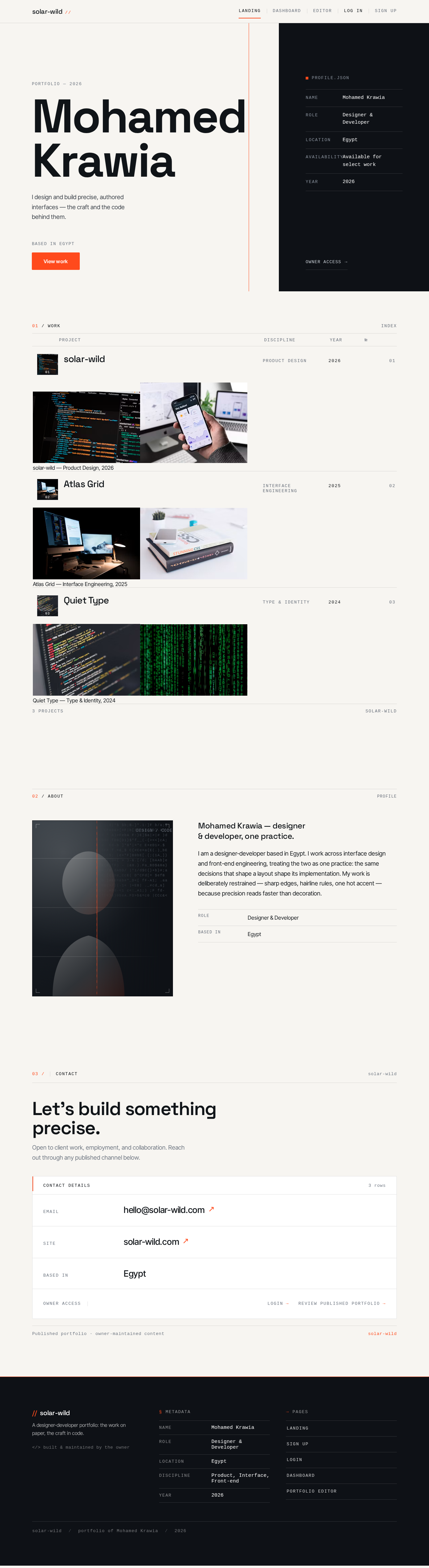
MohamedKrawia
I design and build precise, authored interfaces — the craft and the code behind them.
profile.json
01 / WORK
- solar-wild01
solar-wild — Product Design, 2026
- Atlas Grid02
Atlas Grid — Interface Engineering, 2025
- Quiet Type03
Quiet Type — Type & Identity, 2024


Mohamed Krawia — designer & developer, one practice.
I am a designer-developer based in Egypt. I work across interface design and front-end engineering, treating the two as one practice: the same decisions that shape a layout shape its implementation. My work is deliberately restrained — sharp edges, hairline rules, one hot accent — because precision reads faster than decoration.
- Role
- Designer & Developer
- Based in
- Egypt
Let’s build something precise.
Open to client work, employment, and collaboration. Reach out through any published channel below.
MohamedKrawia
I design and build precise, authored interfaces — the craft and the code behind them.
profile.json
01 / WORK
- solar-wild01
solar-wild — Product Design, 2026
- Atlas Grid02
Atlas Grid — Interface Engineering, 2025
- Quiet Type03
Quiet Type — Type & Identity, 2024
Mohamed Krawia — designer & developer, one practice.
I am a designer-developer based in Egypt. I work across interface design and front-end engineering, treating the two as one practice: the same decisions that shape a layout shape its implementation. My work is deliberately restrained — sharp edges, hairline rules, one hot accent — because precision reads faster than decoration.
- Role
- Designer & Developer
- Based in
- Egypt
Let’s build something precise.
Open to client work, employment, and collaboration. Reach out through any published channel below.
No comments yet. Be the first!