solar-player
 Swailum Zafar
i wanna make andriod app that is a player that is a combination of mx player and vlc

Comments (0)
Sign in to leave a comment
System Requirements
Solar-Player System Requirements Document
1. Introduction
The Solar-Player project aims to develop a fast-loading media player application that supports all codecs and is designed for general users. This document outlines the system requirements for the Solar-Player to ensure it meets the needs of its intended audience.
2. System Overview
2a. Product Interpretation and Delivery Boundary
-
Domain Descriptor: Fast-loading media player
- Source Evidence: User request for a fast-loading application that supports all codecs.
- Confidence: 0.9
-
Product Intent: Develop a standalone media player application that loads quickly and supports all media codecs for general users.
-
Excluded Assumptions:
- Generic media player features not explicitly required.
- Advanced editing or streaming capabilities.
-
Custom Pages:
- Media Player Interface: A first-party custom page allowing users to interact with the media player.
-
Access: Public entry with no application-owned identity required.
-
Behavior Contracts:
- Play Media Files:
- Actor: General Users
- Trigger: User selects a media file to play
- Outcome: Media file is played
- Failure Outcome: File cannot be played
- Load Application Quickly:
- Actor: General Users
- Trigger: User opens the application
- Outcome: Application loads quickly
- Failure Outcome: Application loads slowly
- Play Media Files:
2b. Source Content Inventory
No explicit content sources were provided. Generated/default assumptions will be used where necessary.
2c. Page Content and Component Coverage
Media Player Interface
-
Information and Actions:
- Display media file information (title, duration, format).
- Play, pause, stop, and seek controls.
- Volume control and mute option.
- Playlist management (add, remove, reorder).
- Codec support indicator.
-
Domain Entities:
- Media files (audio and video).
- User playlists.
-
Component Responsibilities:
- Ensure fast loading of media files.
- Support all media codecs.
- Provide user-friendly controls for media playback.
-
States:
- Empty State: No media file selected.
- Loading State: Media file is loading.
- Success State: Media file is playing.
- Error State: Unsupported codec or file cannot be played.
3. Functional Requirements as Story Points
- As a General User, I should be able to open the application and have it load quickly.
explicit - As a General User, I should be able to select and play any media file, regardless of codec.
explicit - As a General User, I should be able to control playback with play, pause, stop, and seek functions.
basic_default - As a General User, I should be able to adjust the volume or mute the audio.
basic_default - As a General User, I should be able to manage a playlist by adding, removing, and reordering media files.
basic_default
4. User Personas
- General Users: Individuals who use the media player for personal entertainment purposes. They expect a seamless experience with fast loading times and broad codec support.
5. Core User Flows
General User Flow
- Launch Application: User opens the Solar-Player application.
- Media Selection: User selects a media file from their device.
- Playback Control: User uses playback controls to play, pause, stop, or seek within the media file.
- Volume Adjustment: User adjusts the volume or mutes the audio as needed.
- Playlist Management: User adds, removes, or reorders media files in their playlist.
6. Visuals Colors and Theme
- Primary: #FF5722 (Orange)
- Primary Light: #FF8A50
- Secondary: #607D8B (Blue Grey)
- Accent: #FFC107 (Amber)
- Highlight: #4CAF50 (Green)
- Background: #FFFFFF (White)
- Surface: #F5F5F5 (Light Grey)
- Text: #212121 (Dark Grey)
- Text Muted: #757575 (Medium Grey)
- Border: #BDBDBD (Grey)
7. Signature Design Concept
The Media Player Interface will feature a clean and intuitive layout, focusing on ease of use and quick access to media controls. The design will incorporate a modern aesthetic with a responsive layout that adapts to various screen sizes. The primary color palette will be used to highlight active controls and provide visual feedback. The interface will include a minimalistic header with essential controls and a footer with playback options, ensuring a cohesive user experience.
8. Interaction Model & Motion Direction
-
Interaction Model: Animated
- Moderate scroll-triggered reveals and hover transitions.
- Spring physics on interactive elements for a polished user experience.
-
Motion Direction: The Media Player Interface will feature subtle animations to enhance user interactions, such as button presses and media loading indicators. These animations will be designed to provide feedback without distracting from the primary function of media playback.
9. Non-Functional Requirements
- Performance: The application must load quickly and efficiently, ensuring minimal wait times for users.
explicit - Compatibility: The application must support all media codecs to ensure broad compatibility with various media files.
explicit
10. Tech Stack
- Frontend: React for Web
- Backend: Python with FastAPI
- Database: MySQL or MariaDB, using Alembic for migrations
- Local Orchestration: Docker and docker-compose
11. Assumptions and Constraints
- The application will not include advanced editing or streaming capabilities.
- The application will be designed for general users without specific accessibility features beyond standard practices.
12. Glossary
- Codec: A device or program that compresses data to enable faster transmission and decompresses received data.
- Media File: A file that contains audio, video, or both, used for playback in a media player.
- Playback Controls: User interface elements that allow users to control the playback of media files, such as play, pause, and stop buttons.
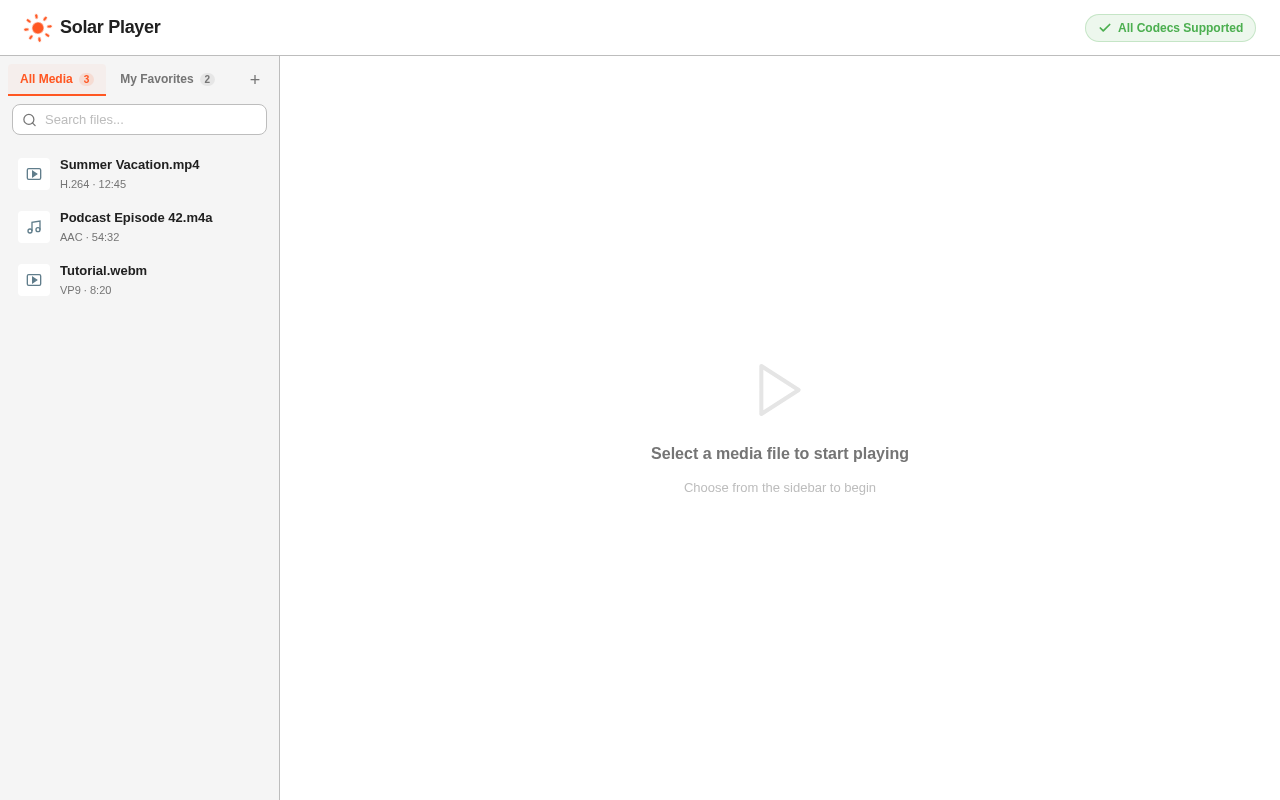
Select a media file to start playing
Choose from the sidebar to begin
Select a media file to start playing
Choose from the sidebar to begin
No comments yet. Be the first!