society-management-dashboard
 Zxyz4545 45
# MASTER PRO MAX PROMPT — SOCIETY MANAGEMENT APP FRONTEND Act as a senior frontend developer and UI/UX designer with over 10 years of experience building professional Society Management ERP applications. **Reference Website:** https://mygate.com/ ## 1. Project Objective Build a complete, professional, responsive Society Management Web Application inspired by MyGate's features, workflows, and user experience. I want an actual application dashboard, not just a landing page or static design. First inspect my existing workspace, account resources, project files, assets, and available society information. Reuse accessible resources wherever possible. **Important: Develop only the frontend. Do not create a new backend or database.** Do not copy MyGate's proprietary source code, logo, or branding. Create an original design with comparable functionality. ## 2. Technology Requirements Use strictly: - HTML5 - CSS3 - Vanilla JavaScript (ES6+) Do not use React, Vue, Angular, Next.js, TypeScript, Tailwind CSS, Bootstrap, or other frontend frameworks. Avoid build tools and unnecessary dependencies. The application must run in a modern browser. ## 3. UI/UX Design Create a premium SaaS dashboard with a clean, modern interface, professional typography, white and light-grey backgrounds, navy-blue and teal accents, consistent spacing, and clear visual hierarchy. Include a collapsible sidebar, top navigation, search, notifications, user profile, society selector, dashboard cards, tables, charts, filters, badges, dropdowns, and modal dialogs. Ensure the interface works smoothly on desktop, tablet, and mobile devices. ## 4. Dashboard Display total societies, buildings, flats, residents, pending visitor approvals, today's visitors, unresolved complaints, maintenance dues, upcoming events, recent notices, and recent activities. Include quick actions for adding residents, approving visitors, creating notices, registering complaints, and viewing reports. Use sample data only when actual accessible data is unavailable, and label it clearly. ## 5. Society Management Create pages for society directory, society profiles, adding and editing societies, buildings, towers, floors, flats, occupancy status, owners, tenants, society documents, contact details, and settings. Provide validated forms, search, filters, and view/edit actions. ## 6. Resident Management Create resident directories and profiles containing names, contact information, building and flat assignments, owner or tenant status, family members, vehicles, emergency contacts, verification status, and move-in/move-out details. Provide add, edit, view, search, and filtering functionality. Keep each society's records separate in the interface. ## 7. Visitors and Security Build visitor management screens for visitor requests, pre-approved visitors, approval and rejection, check-in/check-out, delivery personnel, vendors, cab drivers, domestic help, visitor history, and gate activity logs. Create a mobile-friendly security guard dashboard with large action buttons and clear status indicators. ## 8. Staff Management Provide domestic staff, security personnel, and employee directories. Include profiles, assigned flats, categories, verification status, entry logs, search, filters, and editing dialogs. ## 9. Complaints and Helpdesk Create complaint submission forms, complaint lists, categories, priorities, descriptions, staff assignments, comments, resolution notes, and history. Support Open, In Progress, On Hold, Resolved, and Closed statuses. ## 10. Maintenance and Payments Create interfaces for monthly maintenance bills, payment history, outstanding dues, receipts, late fees, billing periods, expenses, and collection reports. Display amounts in Indian Rupees (₹). Use clearly labelled sample financial data when necessary. Do not implement real payment processing or falsely claim a payment succeeded. ## 11. Notices and Community Include announcements, notice boards, events, community activities, polls, surveys, voting interfaces, and event calendars. Provide forms for creating and editing notices and events. ## 12. Amenities and Bookings Create modules for clubhouses, gyms, swimming pools, community halls, guest rooms, and sports facilities. Include availability calendars, booking requests, approval and cancellation interfaces, booking history, date/time selection, and facility rules. ## 13. Vehicles, Parking, and Documents Provide vehicle registration, parking slot assignments, visitor parking, and parking availability screens. Create document libraries for society rules, meeting minutes, notices, certificates, and other uploaded documents. Include emergency contacts and emergency announcements. Never claim a document has been uploaded unless it actually exists. ## 14. Reports and Analytics Create reports for society occupancy, resident statistics, visitor activity, complaints, maintenance collections, outstanding dues, bookings, and security activity. Include date filters, summary cards, charts, and table views. ## 15. User Roles Provide role-specific interfaces for Super Admin, Society Admin, Committee Member, Resident/Owner, Tenant, Security Guard, and Maintenance Staff. Display relevant navigation and actions for each role. Explain that frontend role selection is for demonstration only and does not provide secure backend authorization. ## 16. Multi-Society Support Support multiple societies through a society selector. Update the visible dashboard, residents, buildings, flats, visitors, complaints, notices, and reports when the selected society changes. Never mix data between societies. Reuse existing accessible records; otherwise, use clearly identified sample data. ## 17. Frontend Interactivity Implement functional navigation, active sidebar states, search, sorting, filtering, pagination, form validation, add/edit/view dialogs, confirmation messages, dropdowns, tabs, status updates, and toast notifications. When backend APIs are unavailable, use mock data or in-memory state for demonstrations. Clearly explain that changes are not permanently stored on a server. Keep API integration code separate so an existing backend can be connected later. ## 18. Project Structure Organize the application into HTML pages, CSS stylesheets, JavaScript modules, and assets. Include separate files for navigation, data handling, API integration, reusable components, and responsive layouts. Keep the source code clean, maintainable, and organized. Use only HTML, CSS, and JavaScript. ## 19. Protect Existing Resources Inspect the existing project before making changes. Preserve existing files, assets, configurations, APIs, backend code, and database connections. Do not delete or overwrite existing resources. Use only accessible information and report any access limitations. ## 20. Testing and Final Delivery Test all pages, navigation links, buttons, forms, search, filters, pagination, dialogs, responsive layouts, and JavaScript functionality. Deliver the complete frontend source code, a list of completed modules, implemented interactions, features requiring backend integration, local running instructions, known issues, and a downloadable ZIP if export is supported. **FINAL REQUIREMENT:** Deliver a polished, responsive, MyGate-inspired Society Management frontend using only HTML5, CSS3, and Vanilla JavaScript. Do not build a new backend or database. Inspect existing resources first, implement all possible frontend interactions, test thoroughly, and honestly report incomplete functionality.

Comments (0)
Sign in to leave a comment
Project Tasks
38 planning tasksGenerate system requirement document
Generate personas & user flows
Architecture
Workspace task plan
Create flow for Super Admin
Create flow for Society Admin
Create flow for Committee Member
Create flow for Resident/Owner
Create flow for Tenant
Create flow for Security Guard
Create flow for Maintenance Staff
Landing
Role Selection
Dashboard
Guard Dashboard
Societies
Buildings & Flats
Residents
Visitors
Gate Logs
Staff
Complaints
Complaint Details
Maintenance
Community
Amenities
Parking
Documents
Reports
Landing / Header
Landing / Hero
Landing / Capability Index
Landing / Sample Metrics
Landing / Faq Accordion
Landing / Entry Band
Landing / Footer
App Header
App Footer
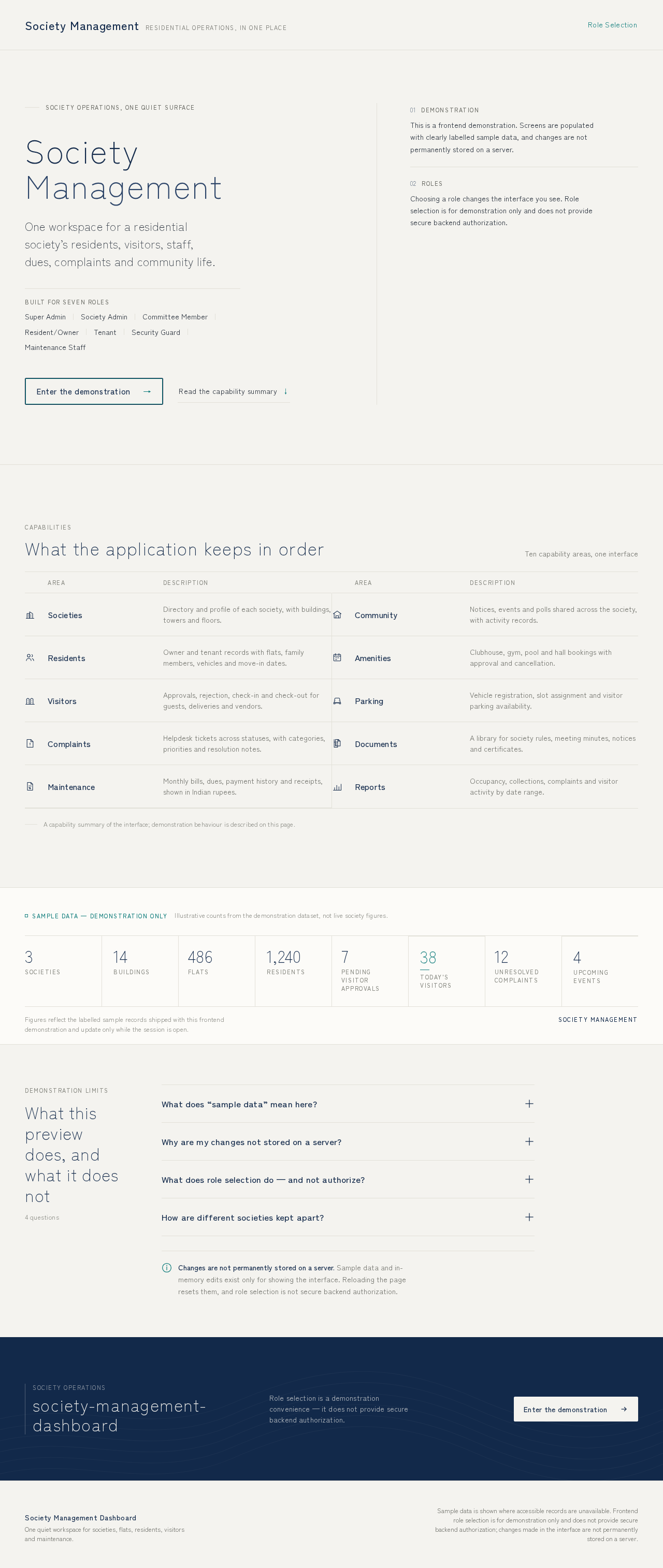
Society Management
Residential operations, in one placeSociety operations, one quiet surface
SocietyManagement
One workspace for a residential society’s residents, visitors, staff, dues, complaints and community life.
Demonstration
This is a frontend demonstration. Screens are populated with clearly labelled sample data, and changes are not permanently stored on a server.
Roles
Choosing a role changes the interface you see. Role selection is for demonstration only and does not provide secure backend authorization.
Sample data — demonstration only
Illustrative counts from the demonstration dataset, not live society figures.
- 3Societies
- 14Buildings
- 486Flats
- 1,240Residents
- 7Pending visitor approvals
- 38Today's visitors
- 12Unresolved complaints
- 4Upcoming events
Figures reflect the labelled sample records shipped with this frontend demonstration and update only while the session is open.
Demonstration limits
What this preview does, and what it does not
4 questions
What does “sample data” mean here?
Every society, building, flat, resident, visitor, complaint, bill and booking you see in the demonstration is sample data. It exists so each screen can be read, sorted and filtered the way it would be in a working society ERP.
The sample records are clearly labelled wherever they represent numbers. They are not real residents, real dues or real gate entries.
Why are my changes not stored on a server?
This frontend is a demonstration. When you add a resident, approve a visitor or register a complaint, the record lives only in the page’s in-memory state for as long as the page stays open.
Reloading or closing the page discards those changes. No backend API, database or payment service is connected, so nothing is saved, delivered or processed.
What does role selection do — and not authorize?
Choosing a role (Super Admin, Society Admin, Committee Member, Resident, Tenant, Security Guard or Maintenance Staff) changes which navigation and actions are displayed, so you can see how each persona works.
Role selection is for demonstration only. It does not grant secure backend authorization, and it can be changed freely without authentication.
How are different societies kept apart?
The society selector re-frames the visible dashboard, residents, buildings, flats, visitors, complaints, notices and reports for the selected society. Sample records are kept separated per society so data from one is never mixed into another.
Changes are not permanently stored on a server. Sample data and in-memory edits exist only for showing the interface. Reloading the page resets them, and role selection is not secure backend authorization.
society-management-dashboard
Role selection is a demonstration convenience — it does not provide secure backend authorization.
Enter the demonstrationSociety Management
Residential operations, in one placeSociety operations, one quiet surface
SocietyManagement
One workspace for a residential society’s residents, visitors, staff, dues, complaints and community life.
Demonstration
This is a frontend demonstration. Screens are populated with clearly labelled sample data, and changes are not permanently stored on a server.
Roles
Choosing a role changes the interface you see. Role selection is for demonstration only and does not provide secure backend authorization.
Sample data — demonstration only
Illustrative counts from the demonstration dataset, not live society figures.
- 3Societies
- 14Buildings
- 486Flats
- 1,240Residents
- 7Pending visitor approvals
- 38Today's visitors
- 12Unresolved complaints
- 4Upcoming events
Figures reflect the labelled sample records shipped with this frontend demonstration and update only while the session is open.
Demonstration limits
What this preview does, and what it does not
4 questions
What does “sample data” mean here?
Every society, building, flat, resident, visitor, complaint, bill and booking you see in the demonstration is sample data. It exists so each screen can be read, sorted and filtered the way it would be in a working society ERP.
The sample records are clearly labelled wherever they represent numbers. They are not real residents, real dues or real gate entries.
Why are my changes not stored on a server?
This frontend is a demonstration. When you add a resident, approve a visitor or register a complaint, the record lives only in the page’s in-memory state for as long as the page stays open.
Reloading or closing the page discards those changes. No backend API, database or payment service is connected, so nothing is saved, delivered or processed.
What does role selection do — and not authorize?
Choosing a role (Super Admin, Society Admin, Committee Member, Resident, Tenant, Security Guard or Maintenance Staff) changes which navigation and actions are displayed, so you can see how each persona works.
Role selection is for demonstration only. It does not grant secure backend authorization, and it can be changed freely without authentication.
How are different societies kept apart?
The society selector re-frames the visible dashboard, residents, buildings, flats, visitors, complaints, notices and reports for the selected society. Sample records are kept separated per society so data from one is never mixed into another.
Changes are not permanently stored on a server. Sample data and in-memory edits exist only for showing the interface. Reloading the page resets them, and role selection is not secure backend authorization.
society-management-dashboard
Role selection is a demonstration convenience — it does not provide secure backend authorization.
Enter the demonstration
No comments yet. Be the first!