society-management-dashboard
 Zxyz4545 45
# MASTER PRO MAX PROMPT — SOCIETY MANAGEMENT APP FRONTEND Act as a senior frontend developer and UI/UX designer with over 10 years of experience building professional Society Management ERP applications. **Reference Website:** https://mygate.com/ ## 1. Project Objective Build a complete, professional, responsive Society Management Web Application inspired by MyGate's features, workflows, and user experience. I want an actual application dashboard, not just a landing page or static design. First inspect my existing workspace, account resources, project files, assets, and available society information. Reuse accessible resources wherever possible. **Important: Develop only the frontend. Do not create a new backend or database.** Do not copy MyGate's proprietary source code, logo, or branding. Create an original design with comparable functionality. ## 2. Technology Requirements Use strictly: - HTML5 - CSS3 - Vanilla JavaScript (ES6+) Do not use React, Vue, Angular, Next.js, TypeScript, Tailwind CSS, Bootstrap, or other frontend frameworks. Avoid build tools and unnecessary dependencies. The application must run in a modern browser. ## 3. UI/UX Design Create a premium SaaS dashboard with a clean, modern interface, professional typography, white and light-grey backgrounds, navy-blue and teal accents, consistent spacing, and clear visual hierarchy. Include a collapsible sidebar, top navigation, search, notifications, user profile, society selector, dashboard cards, tables, charts, filters, badges, dropdowns, and modal dialogs. Ensure the interface works smoothly on desktop, tablet, and mobile devices. ## 4. Dashboard Display total societies, buildings, flats, residents, pending visitor approvals, today's visitors, unresolved complaints, maintenance dues, upcoming events, recent notices, and recent activities. Include quick actions for adding residents, approving visitors, creating notices, registering complaints, and viewing reports. Use sample data only when actual accessible data is unavailable, and label it clearly. ## 5. Society Management Create pages for society directory, society profiles, adding and editing societies, buildings, towers, floors, flats, occupancy status, owners, tenants, society documents, contact details, and settings. Provide validated forms, search, filters, and view/edit actions. ## 6. Resident Management Create resident directories and profiles containing names, contact information, building and flat assignments, owner or tenant status, family members, vehicles, emergency contacts, verification status, and move-in/move-out details. Provide add, edit, view, search, and filtering functionality. Keep each society's records separate in the interface. ## 7. Visitors and Security Build visitor management screens for visitor requests, pre-approved visitors, approval and rejection, check-in/check-out, delivery personnel, vendors, cab drivers, domestic help, visitor history, and gate activity logs. Create a mobile-friendly security guard dashboard with large action buttons and clear status indicators. ## 8. Staff Management Provide domestic staff, security personnel, and employee directories. Include profiles, assigned flats, categories, verification status, entry logs, search, filters, and editing dialogs. ## 9. Complaints and Helpdesk Create complaint submission forms, complaint lists, categories, priorities, descriptions, staff assignments, comments, resolution notes, and history. Support Open, In Progress, On Hold, Resolved, and Closed statuses. ## 10. Maintenance and Payments Create interfaces for monthly maintenance bills, payment history, outstanding dues, receipts, late fees, billing periods, expenses, and collection reports. Display amounts in Indian Rupees (₹). Use clearly labelled sample financial data when necessary. Do not implement real payment processing or falsely claim a payment succeeded. ## 11. Notices and Community Include announcements, notice boards, events, community activities, polls, surveys, voting interfaces, and event calendars. Provide forms for creating and editing notices and events. ## 12. Amenities and Bookings Create modules for clubhouses, gyms, swimming pools, community halls, guest rooms, and sports facilities. Include availability calendars, booking requests, approval and cancellation interfaces, booking history, date/time selection, and facility rules. ## 13. Vehicles, Parking, and Documents Provide vehicle registration, parking slot assignments, visitor parking, and parking availability screens. Create document libraries for society rules, meeting minutes, notices, certificates, and other uploaded documents. Include emergency contacts and emergency announcements. Never claim a document has been uploaded unless it actually exists. ## 14. Reports and Analytics Create reports for society occupancy, resident statistics, visitor activity, complaints, maintenance collections, outstanding dues, bookings, and security activity. Include date filters, summary cards, charts, and table views. ## 15. User Roles Provide role-specific interfaces for Super Admin, Society Admin, Committee Member, Resident/Owner, Tenant, Security Guard, and Maintenance Staff. Display relevant navigation and actions for each role. Explain that frontend role selection is for demonstration only and does not provide secure backend authorization. ## 16. Multi-Society Support Support multiple societies through a society selector. Update the visible dashboard, residents, buildings, flats, visitors, complaints, notices, and reports when the selected society changes. Never mix data between societies. Reuse existing accessible records; otherwise, use clearly identified sample data. ## 17. Frontend Interactivity Implement functional navigation, active sidebar states, search, sorting, filtering, pagination, form validation, add/edit/view dialogs, confirmation messages, dropdowns, tabs, status updates, and toast notifications. When backend APIs are unavailable, use mock data or in-memory state for demonstrations. Clearly explain that changes are not permanently stored on a server. Keep API integration code separate so an existing backend can be connected later. ## 18. Project Structure Organize the application into HTML pages, CSS stylesheets, JavaScript modules, and assets. Include separate files for navigation, data handling, API integration, reusable components, and responsive layouts. Keep the source code clean, maintainable, and organized. Use only HTML, CSS, and JavaScript. ## 19. Protect Existing Resources Inspect the existing project before making changes. Preserve existing files, assets, configurations, APIs, backend code, and database connections. Do not delete or overwrite existing resources. Use only accessible information and report any access limitations. ## 20. Testing and Final Delivery Test all pages, navigation links, buttons, forms, search, filters, pagination, dialogs, responsive layouts, and JavaScript functionality. Deliver the complete frontend source code, a list of completed modules, implemented interactions, features requiring backend integration, local running instructions, known issues, and a downloadable ZIP if export is supported. **FINAL REQUIREMENT:** Deliver a polished, responsive, MyGate-inspired Society Management frontend using only HTML5, CSS3, and Vanilla JavaScript. Do not build a new backend or database. Inspect existing resources first, implement all possible frontend interactions, test thoroughly, and honestly report incomplete functionality.

Comments (0)
Sign in to leave a comment
System Requirements
System Requirements Document for society-management-dashboard
1. Introduction
society-management-dashboard is a complete, professional, responsive Society Management web application frontend, inspired by MyGate's features, workflows, and user experience but built as an original design with comparable functionality. It is an actual working application dashboard — not a landing page or static design — covering multi-society operations: society and building records, residents, visitors and gate security, staff, complaints and helpdesk, maintenance and payments, notices and community, amenities and bookings, vehicles and parking, documents, and reports and analytics.
The product serves Indian residential society operations: Super Admins overseeing multiple societies, Society Admins running day-to-day operations, Committee Members reviewing community matters, Residents/Owners and Tenants using resident-facing workflows, Security Guards working the gate, and Maintenance Staff resolving assigned complaints. The emotional and visual register is calm, orderly, and trustworthy — a dense tool that never feels loud, where a quiet surface makes thousands of records legible.
The application is delivered strictly as HTML5, CSS3, and Vanilla JavaScript (ES6+) running in a modern browser. It does not create a new backend or database; when backend APIs are unavailable it uses clearly labelled sample data and in-memory state, and it explains that changes are not permanently stored on a server. API integration code is kept separate so an existing backend can be connected later.
2. System Overview
The current delivery is a frontend-only, browser-run application composed of HTML pages, CSS stylesheets, JavaScript modules, and assets. Navigation, data handling, API integration, reusable components, and responsive layouts live in separate files. All interactive behavior — navigation, active sidebar states, search, sorting, filtering, pagination, form validation, add/edit/view dialogs, confirmation messages, dropdowns, tabs, status updates, and toast notifications — is implemented client-side.
The application opens on a public Landing page, moves through a demonstration Role Selection surface that states plainly that frontend role selection is not secure backend authorization, and then into the working application shell: a collapsible sidebar, top navigation with global search, notifications, user profile, and a society selector. The society selector is the spine of multi-society support: changing it re-frames the whole page and refreshes the visible dashboard, residents, buildings, flats, visitors, complaints, notices, and reports, and data is never mixed between societies.
Actors are the seven accepted roles: Super Admin, Society Admin, Committee Member, Resident/Owner, Tenant, Security Guard, and Maintenance Staff. Each sees role-relevant navigation and actions. The Security Guard additionally has a dedicated mobile-friendly guard dashboard with large action buttons and clear status indicators.
The provisioned infrastructure inventory includes a shared FastAPI backend process for application APIs and domain modules, a MariaDB database for application-owned persistent data, and a React application UI. These are existing provisioned services that must be preserved and not deleted or overwritten. The current product requirement is explicitly frontend-only in HTML5/CSS3/Vanilla JavaScript with no new backend or database created; the existing backend and database remain untouched and available for later connection through the separate API integration layer. No product capability in this document depends on new server-side behavior.
Removed from scope
- None.
2a. Product Interpretation and Delivery Boundary
This product is a demonstration-grade but fully interactive frontend for society management. Everything a user sees and does — selecting a society, approving a visitor, filing a complaint, booking an amenity, reviewing reports — happens in the browser against in-memory state seeded with clearly labelled sample data wherever actual accessible records are unavailable. The application never claims that a change was saved to a server, never claims a payment succeeded, and never claims a document was uploaded unless it actually exists.
Access is deliberately simple and honest. The Landing page and Role Selection are reachable without any identity. Choosing a role is a demonstration convenience, not authentication, and the interface says so. The working application surfaces are presented as the signed-in workspace of the chosen demonstration role, with the society selector establishing which society's records are in view. Role-specific navigation and actions are shown for each role, but this is presentation only and provides no secure backend authorization.
The delivery boundary is equally explicit. No new backend, database, schema, or server process is created. The existing FastAPI backend, MariaDB database, and React UI in the workspace are inspected and preserved, not modified or replaced. API integration code is isolated in its own module so that an existing backend can be connected later without rewriting the UI. Real payment processing is out of scope. Real document upload verification against a server is out of scope; the document library only lists documents that actually exist in the accessible data.
2c. Page Content and Component Coverage
Landing
- Information/state: Product name and one-sentence purpose; who it serves (the seven roles); what it does (societies, residents, visitors, complaints, maintenance, community, amenities, parking, documents, reports); a clear statement that this is a frontend demonstration with sample data and no server persistence; a clear statement that role selection is not secure authorization.
- Primary actions: Enter the demonstration (go to Role Selection); read the capability summary.
- Supporting actions: Expandable FAQ-style accordion explaining sample data, persistence, and role demonstration limits.
- Domain entities: None persisted; static explanatory content only.
- Component responsibilities: Hero band with product name and single primary call to action; capability list with thin-line pictograms per module; metric-style strip of demonstration counts labelled as sample; accordion component; footer with grouped links.
- States: Loading (static, none needed); empty (not applicable); success (static render); error (not applicable); recovery (not applicable).
Role Selection
- Information/state: The seven roles — Super Admin, Society Admin, Committee Member, Resident/Owner, Tenant, Security Guard, Maintenance Staff — each with a one-line description of what that role sees and does; a persistent notice that frontend role selection is for demonstration only and does not provide secure backend authorization.
- Primary actions: Select a role and continue into the application.
- Supporting actions: Return to Landing; read role descriptions.
- Domain entities: Role (demonstration selection).
- Component responsibilities: Role card grid; authorization disclaimer banner; continue control.
- States: Loading (none); empty (not applicable); success (role selected, navigation to Dashboard); error (no role selected — continue disabled with inline hint); recovery (select a role).
Dashboard
- Information/state: Total societies, buildings, flats, residents, pending visitor approvals, today's visitors, unresolved complaints, maintenance dues, upcoming events, recent notices, and recent activities — all scoped to the active society where applicable, with sample data clearly labelled. A society context band restating the selected society name and unit count.
- Primary actions: Quick actions — add resident, approve visitor, create notice, register complaint, view reports.
- Supporting actions: Change society via the society selector; open notifications; open user profile; global search; collapse/expand sidebar.
- Domain entities: Society, Building, Flat, Resident, Visitor request, Complaint, Maintenance due, Event, Notice, Activity.
- Component responsibilities: Oversized primary metric (maintenance collection) with secondary hairline-ruled stat strip; pending visitor approvals strip; recent notices list; recent activities list; quick action buttons; society selector; top navigation with search, notifications, profile.
- States: Loading (skeleton rules while data resolves); empty (per-section "No records for this society" with sample-data label); success (populated metrics and lists); error (data unavailable — inline message with retry); recovery (retry or switch society).
Guard Dashboard
- Information/state: Today's gate activity for the active society; pending visitor approvals; visitors currently checked in; clear status indicators per visitor and per gate event; large action buttons sized for mobile.
- Primary actions: Approve visitor request; reject visitor request; check visitor in; check visitor out; log a delivery, vendor, cab driver, or domestic help entry.
- Supporting actions: Open visitor history; open gate activity logs; switch society where permitted.
- Domain entities: Visitor request, Visitor, Gate log entry, Staff (domestic help).
- Component responsibilities: Large-button action panel; status indicator list; recent gate events feed; mobile-first layout.
- States: Loading; empty (no pending visitors — calm empty state with still-life accent); success (status updated with toast); error (action failed — inline message and retry); recovery (retry action).
Societies
- Information/state: Society directory with search and filters; society profile view with contact details and settings; add and edit society forms.
- Primary actions: Add society; edit society; view society profile; save validated form.
- Supporting actions: Search; filter; pagination; open settings; view documents and contact details.
- Domain entities: Society, Contact details, Society settings, Society document.
- Component responsibilities: Directory table with ruled rows; search and filter bar; validated add/edit modal; profile detail panel; settings tab.
- States: Loading; empty (no societies — prompt to add); success (saved with toast); error (validation errors inline per field); recovery (correct and resubmit).
Buildings & Flats
- Information/state: Buildings, towers, floors, and flats for the active society; occupancy status; owners and tenants per flat; society documents; contact details; settings.
- Primary actions: Add/edit building, tower, floor, flat; set occupancy status; assign owner or tenant; view flat detail.
- Supporting actions: Search; filter by occupancy; view/edit actions; pagination.
- Domain entities: Building, Tower, Floor, Flat, Occupancy status, Owner, Tenant, Society document, Contact details.
- Component responsibilities: Hierarchical building/flat table; occupancy badges; validated forms; detail drawer; settings tab.
- States: Loading; empty (no buildings — prompt to add); success (saved with toast); error (validation inline); recovery (correct and resubmit).
Residents
- Information/state: Resident directory and profiles with names, contact information, building and flat assignments, owner or tenant status, family members, vehicles, emergency contacts, verification status, and move-in/move-out details — scoped to the active society.
- Primary actions: Add resident; edit resident; view resident profile.
- Supporting actions: Search; filter by building, flat, status, verification; pagination; sort.
- Domain entities: Resident, Family member, Vehicle, Emergency contact, Verification status, Move-in/move-out record, Flat assignment.
- Component responsibilities: Directory table; profile panel; validated add/edit modal; filter bar; pagination controls.
- States: Loading; empty (no residents for this society); success (saved with toast); error (validation inline); recovery (correct and resubmit).
Visitors
- Information/state: Visitor requests, pre-approved visitors, approval and rejection states, check-in/check-out states, and visitor categories — delivery personnel, vendors, cab drivers, domestic help.
- Primary actions: Create visitor request; pre-approve visitor; approve; reject; check in; check out.
- Supporting actions: Search; filter by status and category; view visitor detail; pagination.
- Domain entities: Visitor request, Visitor, Pre-approval, Category, Check-in/check-out record.
- Component responsibilities: Request list with status dots; approval/rejection controls; pre-approval form; category filter; detail modal.
- States: Loading; empty (no visitor requests); success (status updated with toast); error (action failed — inline message); recovery (retry).
Gate Logs
- Information/state: Visitor history and gate activity logs for the active society, with timestamps and event types.
- Primary actions: Review gate activity; open a log entry.
- Supporting actions: Search; filter by date and event type; pagination.
- Domain entities: Gate log entry, Visitor history record.
- Component responsibilities: Ruled log table; date filter; event-type filter; detail view.
- States: Loading; empty (no gate activity); success (populated log); error (data unavailable — retry); recovery (retry).
Staff
- Information/state: Domestic staff, security personnel, and employee directories with profiles, assigned flats, categories, verification status, and entry logs — scoped to the active society.
- Primary actions: Add staff; edit staff; view staff profile.
- Supporting actions: Search; filter by category and verification; view entry logs; pagination.
- Domain entities: Staff member, Category, Assigned flat, Verification status, Entry log.
- Component responsibilities: Directory table; profile panel; editing dialog; filter bar; entry log list.
- States: Loading; empty (no staff records); success (saved with toast); error (validation inline); recovery (correct and resubmit).
Complaints
- Information/state: Complaint submission form; complaint list with categories, priorities, descriptions, staff assignments, comments, resolution notes, and history; statuses Open, In Progress, On Hold, Resolved, Closed.
- Primary actions: Submit complaint; open complaint detail; filter by status, category, priority.
- Supporting actions: Search; sort; pagination.
- Domain entities: Complaint, Category, Priority, Staff assignment, Comment, Resolution note, Status.
- Component responsibilities: Submission form with validation; complaint table with status dots; filter bar; pagination.
- States: Loading; empty (no complaints); success (submitted with toast); error (validation inline); recovery (correct and resubmit).
Complaint Details
- Information/state: Single complaint workspace showing description, category, priority, assigned staff, comments, resolution notes, and full history; current status among Open, In Progress, On Hold, Resolved, Closed.
- Primary actions: Assign staff; add comment; add resolution note; change status.
- Supporting actions: View history; return to complaint list.
- Domain entities: Complaint, Staff assignment, Comment, Resolution note, Status transition.
- Component responsibilities: Detail header with status control; assignment control; comment thread; resolution note editor; history timeline.
- States: Loading; empty (no comments yet); success (update saved with toast); error (update failed — inline message); recovery (retry).
Maintenance
- Information/state: Monthly maintenance bills, payment history, outstanding dues, receipts, late fees, billing periods, expenses, and collection reports — all amounts in Indian Rupees (₹), with clearly labelled sample financial data where necessary.
- Primary actions: View bill; view receipt; review outstanding dues; review collection report; record a demonstration payment status change without claiming real payment processing.
- Supporting actions: Filter by billing period; search; pagination; view expenses.
- Domain entities: Maintenance bill, Payment record, Receipt, Late fee, Billing period, Expense, Collection report.
- Component responsibilities: Bill table; dues summary; receipt view; late-fee display; billing-period filter; expense list; collection report panel; explicit notice that no real payment processing occurs.
- States: Loading; empty (no bills for this period); success (status change reflected with toast and explicit "demonstration only — not a real payment" notice); error (action failed — inline message); recovery (retry).
Community
- Information/state: Announcements, notice board, events, community activities, polls, surveys, voting interfaces, and an event calendar; forms for creating and editing notices and events.
- Primary actions: Create notice; edit notice; create event; edit event; vote in a poll or survey.
- Supporting actions: Browse notice board; view event calendar; filter by type; search.
- Domain entities: Notice, Announcement, Event, Community activity, Poll, Survey, Vote.
- Component responsibilities: Notice board list; event calendar; poll/survey voting controls; create/edit notice form; create/edit event form.
- States: Loading; empty (no notices or events); success (created/edited/voted with toast); error (validation inline); recovery (correct and resubmit).
Amenities
- Information/state: Amenity modules for clubhouses, gyms, swimming pools, community halls, guest rooms, and sports facilities; availability calendars; facility rules; booking requests; approval and cancellation states; booking history; date/time selection.
- Primary actions: Request a booking; approve a booking; cancel a booking; select date and time.
- Supporting actions: View availability calendar; read facility rules; view booking history; filter by amenity.
- Domain entities: Amenity, Availability slot, Booking request, Approval, Cancellation, Facility rule, Booking history record.
- Component responsibilities: Amenity list; availability calendar; date/time picker; booking request form; approval/cancellation controls; rules panel; history list.
- States: Loading; empty (no bookings); success (requested/approved/cancelled with toast); error (slot unavailable or validation — inline message); recovery (choose another slot or correct input).
Parking
- Information/state: Vehicle registrations, parking slot assignments, visitor parking, and parking availability — scoped to the active society.
- Primary actions: Register vehicle; assign parking slot; view visitor parking; view availability.
- Supporting actions: Search; filter by slot type; pagination.
- Domain entities: Vehicle, Parking slot, Slot assignment, Visitor parking, Availability record.
- Component responsibilities: Vehicle table; slot assignment control; availability grid; visitor parking panel.
- States: Loading; empty (no vehicles registered); success (registered/assigned with toast); error (slot already taken — inline message); recovery (choose another slot).
Documents
- Information/state: Document libraries for society rules, meeting minutes, notices, certificates, and other documents; emergency contacts; emergency announcements. Only documents that actually exist in accessible data are listed; nothing is claimed as uploaded unless it exists.
- Primary actions: Browse document library; open a document entry; view emergency contacts; view emergency announcements.
- Supporting actions: Search; filter by category.
- Domain entities: Document, Document category, Emergency contact, Emergency announcement.
- Component responsibilities: Category-grouped document list; document detail view; emergency contacts panel; emergency announcements panel; explicit notice that no upload is claimed unless the document exists.
- States: Loading; empty (no documents in this category — honest empty state, no fabricated entries); success (document listed only when present); error (document unavailable — inline message); recovery (retry or choose another category).
Reports
- Information/state: Reports for society occupancy, resident statistics, visitor activity, complaints, maintenance collections, outstanding dues, bookings, and security activity; date filters; summary cards; charts; table views.
- Primary actions: Select report; apply date filter; view summary cards, charts, and tables.
- Supporting actions: Switch report type; switch society; export view where supported by the browser.
- Domain entities: Report, Date range, Summary metric, Chart series, Table row.
- Component responsibilities: Report selector; date filter; summary card strip; chart component (navy, teal, and two muted neutrals only); ruled table view.
- States: Loading (chart line draws once on load); empty (no data in range — calm empty state); success (populated report); error (data unavailable — retry); recovery (retry or widen date range).
3. Functional Requirements
FR-01 — Original, non-infringing design. As a Super Admin I should see a complete, professional, responsive Society Management application inspired by MyGate's features, workflows, and user experience but with an original design, so that no MyGate proprietary source code, logo, or branding is copied. Provenance: explicit. Trigger: application load. Observable result: original visual identity and comparable functionality. Failure/recovery: none applicable. Continuation: navigate the application.
FR-02 — Frontend-only delivery. As a Super Admin I should use an application that runs entirely in the browser with no new backend or database created, so that the existing workspace is not altered server-side. Provenance: explicit. Trigger: application load. Observable result: all behavior client-side. Failure/recovery: when backend APIs are unavailable, mock data or in-memory state is used and the interface explains that changes are not permanently stored on a server. Continuation: continue working in-session.
FR-03 — Strict technology. As a Super Admin I should receive an application built strictly with HTML5, CSS3, and Vanilla JavaScript (ES6+), with no React, Vue, Angular, Next.js, TypeScript, Tailwind CSS, Bootstrap, or other frontend frameworks and no build tools or unnecessary dependencies, so that it runs in a modern browser. Provenance: explicit. Observable result: source uses only HTML, CSS, and JavaScript. Failure/recovery: none applicable.
FR-04 — Premium SaaS visual system. As a Super Admin I should see a clean, modern interface with professional typography, white and light-grey backgrounds, navy-blue and teal accents, consistent spacing, and clear visual hierarchy. Provenance: explicit. Observable result: consistent visual system across all pages.
FR-05 — Application shell components. As a Super Admin I should have a collapsible sidebar, top navigation, search, notifications, user profile, society selector, dashboard cards, tables, charts, filters, badges, dropdowns, and modal dialogs available across the application. Provenance: explicit. Observable result: each component present and functional. Failure/recovery: sidebar collapse state persists in-session.
FR-06 — Responsive behavior. As a Super Admin I should use the interface smoothly on desktop, tablet, and mobile devices. Provenance: explicit. Observable result: layout adapts at each breakpoint; sidebar becomes a bottom sheet drawer on mobile and the top band collapses to a compact bar.
FR-07 — Dashboard metrics. As a Super Admin I should see total societies, buildings, flats, residents, pending visitor approvals, today's visitors, unresolved complaints, maintenance dues, upcoming events, recent notices, and recent activities on the Dashboard. Provenance: explicit. Observable result: all eleven metrics displayed for the active society where applicable. Failure/recovery: unavailable data shows an inline message with retry.
FR-08 — Dashboard quick actions. As a Super Admin I should have quick actions on the Dashboard for adding residents, approving visitors, creating notices, registering complaints, and viewing reports. Provenance: explicit. Observable result: each quick action opens its corresponding form, dialog, or page. Failure/recovery: validation errors shown inline.
FR-09 — Sample data labelling. As a Super Admin I should see sample data used only when actual accessible data is unavailable, and labelled clearly. Provenance: explicit. Observable result: every sample record or section carries a visible sample-data label.
FR-10 — Society directory and profiles. As a Super Admin I should browse a society directory, view society profiles, and add and edit societies with validated forms, search, filters, and view/edit actions. Provenance: explicit. Observable result: directory and profile reflect saved changes with a toast. Failure/recovery: validation errors inline; correct and resubmit.
FR-11 — Buildings, towers, floors, flats. As a Society Admin I should manage buildings, towers, floors, flats, occupancy status, owners, tenants, society documents, contact details, and settings for the active society with validated forms, search, filters, and view/edit actions. Provenance: explicit. Observable result: hierarchy and occupancy reflect saved changes. Failure/recovery: validation errors inline.
FR-12 — Resident directory and profiles. As a Society Admin I should see resident directories and profiles containing names, contact information, building and flat assignments, owner or tenant status, family members, vehicles, emergency contacts, verification status, and move-in/move-out details. Provenance: explicit. Observable result: all listed fields visible per resident.
FR-13 — Resident add/edit/view/search/filter. As a Society Admin I should add, edit, view, search, and filter residents. Provenance: explicit. Observable result: directory updates with toast on save; filters narrow the list. Failure/recovery: validation errors inline.
FR-14 — Society record separation. As a Society Admin I should see each society's records kept separate in the interface. Provenance: explicit. Observable result: no record from another society appears in the active society's lists.
FR-15 — Visitor management. As a Security Guard I should work with visitor requests, pre-approved visitors, approval and rejection, check-in/check-out, delivery personnel, vendors, cab drivers, domestic help, visitor history, and gate activity logs. Provenance: explicit. Observable result: visitor status changes reflected with toast. Failure/recovery: action failure shows inline message with retry.
FR-16 — Guard dashboard. As a Security Guard I should use a mobile-friendly dashboard with large action buttons and clear status indicators. Provenance: explicit. Observable result: large controls and status dots render correctly on mobile.
FR-17 — Staff directories. As a Society Admin I should browse domestic staff, security personnel, and employee directories with profiles, assigned flats, categories, verification status, entry logs, search, filters, and editing dialogs. Provenance: explicit. Observable result: staff records and entry logs visible and editable.
FR-18 — Complaint submission and lists. As a Resident/Owner I should submit complaints and view complaint lists with categories, priorities, descriptions, staff assignments, comments, resolution notes, and history. Provenance: explicit. Observable result: complaint appears in the list with toast. Failure/recovery: validation errors inline.
FR-19 — Complaint statuses. As a Maintenance Staff I should update complaint status among Open, In Progress, On Hold, Resolved, and Closed. Provenance: explicit. Observable result: status dot and label update with toast. Failure/recovery: update failure shows inline message with retry.
FR-20 — Maintenance interfaces. As a Society Admin I should work with monthly maintenance bills, payment history, outstanding dues, receipts, late fees, billing periods, expenses, and collection reports. Provenance: explicit. Observable result: all listed views present and populated with labelled sample financial data where necessary.
FR-21 — Rupee display. As a Resident/Owner I should see all amounts displayed in Indian Rupees (₹). Provenance: explicit. Observable result: every monetary value uses ₹.
FR-22 — No real payment processing. As a Resident/Owner I should never see a claim that a real payment succeeded, because no real payment processing is implemented. Provenance: explicit. Observable result: any demonstration payment status change is explicitly labelled as demonstration only. Failure/recovery: none applicable.
FR-23 — Notices and community. As a Committee Member I should see announcements, notice boards, events, community activities, polls, surveys, voting interfaces, and event calendars. Provenance: explicit. Observable result: all listed community surfaces present.
FR-24 — Notice and event forms. As a Society Admin I should create and edit notices and events through forms. Provenance: explicit. Observable result: created/edited items appear with toast. Failure/recovery: validation errors inline.
FR-25 — Amenity modules. As a Society Admin I should manage clubhouses, gyms, swimming pools, community halls, guest rooms, and sports facilities. Provenance: explicit. Observable result: each amenity module present.
FR-26 — Availability, booking, approval, cancellation. As a Resident/Owner I should see availability calendars, submit booking requests, and use approval and cancellation interfaces, booking history, date/time selection, and facility rules. Provenance: explicit. Observable result: booking status reflected with toast. Failure/recovery: unavailable slot shows inline message; choose another slot.
FR-27 — Vehicles and parking. As a Society Admin I should register vehicles, assign parking slots, view visitor parking, and view parking availability screens. Provenance: explicit. Observable result: assignments and availability reflected. Failure/recovery: taken slot shows inline message.
FR-28 — Document libraries. As a Committee Member I should browse document libraries for society rules, meeting minutes, notices, certificates, and other uploaded documents. Provenance: explicit. Observable result: only documents that actually exist are listed.
FR-29 — Emergency contacts and announcements. As a Resident/Owner I should see emergency contacts and emergency announcements. Provenance: explicit. Observable result: both panels present on the Documents page.
FR-30 — No false upload claims. As a Committee Member I should never see a document claimed as uploaded unless it actually exists. Provenance: explicit. Observable result: empty categories show honest empty states.
FR-31 — Reports. As a Super Admin I should view reports for society occupancy, resident statistics, visitor activity, complaints, maintenance collections, outstanding dues, bookings, and security activity. Provenance: explicit. Observable result: each report selectable and populated.
FR-32 — Report controls. As a Super Admin I should use date filters, summary cards, charts, and table views within reports. Provenance: explicit. Observable result: filters update cards, charts, and tables. Failure/recovery: no data in range shows calm empty state.
FR-33 — Role-specific interfaces. As a Super Admin I should see role-specific interfaces for Super Admin, Society Admin, Committee Member, Resident/Owner, Tenant, Security Guard, and Maintenance Staff, with relevant navigation and actions for each role. Provenance: explicit. Observable result: navigation and actions differ per selected role.
FR-34 — Authorization disclaimer. As a Super Admin I should see an explanation that frontend role selection is for demonstration only and does not provide secure backend authorization. Provenance: explicit. Observable result: disclaimer visible on Role Selection and within the application shell.
FR-35 — Multi-society selector. As a Super Admin I should switch societies through a society selector that updates the visible dashboard, residents, buildings, flats, visitors, complaints, notices, and reports. Provenance: explicit. Observable result: all listed surfaces refresh for the newly selected society.
FR-36 — No cross-society mixing. As a Super Admin I should never see data mixed between societies. Provenance: explicit. Observable result: every list and metric is scoped to exactly one society.
FR-37 — Reuse or labelled sample data. As a Super Admin I should have existing accessible records reused where available, otherwise clearly identified sample data. Provenance: explicit. Observable result: reused records unlabelled; sample records labelled.
FR-38 — Frontend interactivity. As a Society Admin I should use functional navigation, active sidebar states, search, sorting, filtering, pagination, form validation, add/edit/view dialogs, confirmation messages, dropdowns, tabs, status updates, and toast notifications. Provenance: explicit. Observable result: each interaction works and gives visible feedback.
FR-39 — In-memory state disclosure. As a Society Admin I should see a clear explanation that changes are not permanently stored on a server when backend APIs are unavailable. Provenance: explicit. Observable result: persistent notice in the application shell.
FR-40 — Separate API integration code. As a Super Admin I should have API integration code kept separate so an existing backend can be connected later. Provenance: explicit. Observable result: dedicated API integration module isolated from UI and data modules.
FR-41 — Project structure. As a Super Admin I should receive an application organized into HTML pages, CSS stylesheets, JavaScript modules, and assets, with separate files for navigation, data handling, API integration, reusable components, and responsive layouts, kept clean, maintainable, and organized using only HTML, CSS, and JavaScript. Provenance: explicit. Observable result: file structure matches the stated separation.
FR-42 — Preserve existing resources. As a Super Admin I should have existing files, assets, configurations, APIs, backend code, and database connections preserved and not deleted or overwritten, after the existing project is inspected before changes. Provenance: explicit. Observable result: existing resources intact. Failure/recovery: access limitations reported.
FR-43 — Access limitations reported. As a Super Admin I should have any access limitations reported when only accessible information can be used. Provenance: explicit. Observable result: limitations documented in delivery notes.
FR-44 — Testing. As a Super Admin I should have all pages, navigation links, buttons, forms, search, filters, pagination, dialogs, responsive layouts, and JavaScript functionality tested. Provenance: explicit. Observable result: test coverage reported.
FR-45 — Final delivery package. As a Super Admin I should receive the complete frontend source code, a list of completed modules, implemented interactions, features requiring backend integration, local running instructions, known issues, and a downloadable ZIP if export is supported. Provenance: explicit. Observable result: all delivery items present.
FR-46 — Honest reporting. As a Super Admin I should receive an honest report of incomplete functionality. Provenance: explicit. Observable result: incomplete items listed plainly.
FR-47 — Anonymous landing. As a Super Admin I should reach a Landing page explaining the product before any protected work. Provenance: required_inference. Trigger: first visit. Observable result: Landing renders with product explanation and entry control. Continuation: proceed to Role Selection.
FR-48 — Demonstration role selection. As a Super Admin I should select a demonstration role on the Role Selection surface, with a clear notice that frontend role selection is not secure backend authorization. Provenance: required_inference. Trigger: continue from Landing. Observable result: role chosen and application shell opens with role-relevant navigation. Failure/recovery: no role selected — continue disabled with hint.
FR-49 — Active society selection. As a Super Admin I should choose the active society via the society selector, and all visible society-scoped data should update without mixing records between societies. Provenance: required_inference. Trigger: society selector change. Observable result: society context band and all scoped surfaces re-render for the new society. Continuation: continue working in the new context.
FR-50 — Sample data and persistence disclosure. As a Super Admin I should see sample data clearly labelled when actual accessible data is unavailable, and see an explanation that changes are not permanently stored on a server. Provenance: required_inference. Observable result: labels and disclosure visible throughout.
4. User Personas
Super Admin
Oversees multiple societies through the society selector. Manages society directory entries, buildings, flats, and settings, and reviews cross-society reports and analytics. Primary goal: keep every society's records separate and correct, and see dashboards, residents, visitors, complaints, notices, and reports update correctly on society switch. Distinct responsibilities: society directory and profile management, cross-society reporting, and the demonstration role and society context controls. Inputs and decisions: which society is active, which society records to add or edit, which reports to review. Interactions: with Society Admins on operational records, with Committee Members on oversight reports. Observable success: each society's records stay separate and every scoped surface refreshes correctly on society switch.
Society Admin
Runs day-to-day operations for a single society. Adds and edits residents, approves visitors, creates notices, registers complaints, manages staff, maintenance bills, amenities bookings, and documents. Primary goal: keep operational records and statuses current and validated through forms and dialogs. Distinct responsibilities: resident and staff directories, building and flat management, maintenance billing, notice and event creation, amenity and parking administration. Inputs and decisions: which records to add or edit, which visitors to approve, which bills and notices to issue. Interactions: with Security Guards on visitor approvals, with Maintenance Staff on complaint assignments, with Residents and Tenants on notices and bookings. Observable success: operational records and statuses are current and validated.
Committee Member
Reviews community matters such as complaints, notices, events, polls, surveys, and amenity booking approvals, and monitors maintenance collections and outstanding dues. Primary goal: record community decisions and oversight actions so they are reflected in the relevant lists and reports. Distinct responsibilities: community oversight, poll and survey participation, amenity booking approval, and document library review. Inputs and decisions: which complaints to review, which bookings to approve, how to vote in polls and surveys. Interactions: with Society Admins on community content, with Residents and Tenants on polls and events. Observable success: decisions and oversight actions appear in the relevant lists and reports.
Resident/Owner
Views their flat and society information, submits complaints, pre-approves visitors, books amenities, pays or reviews maintenance dues and receipts, and participates in notices, events, polls, and surveys. Primary goal: submit requests and bookings and see their statuses and history. Distinct responsibilities: complaint submission, visitor pre-approval, amenity booking requests, maintenance dues and receipts review, community participation. Inputs and decisions: which complaint to file, which visitor to pre-approve, which amenity slot to request, how to vote. Interactions: with Security Guards on visitor approvals, with Society Admins on complaints and bookings, with Committee Members on polls. Observable success: requests and bookings are submitted and their statuses and history are visible.
Tenant
Uses resident-facing workflows for their assigned flat: submitting complaints, pre-approving visitors, booking amenities, and viewing notices, events, and maintenance dues. Primary goal: have requests tracked and occupancy status correctly reflected in the resident directory. Distinct responsibilities: the same resident-facing workflows as Resident/Owner but under tenant occupancy status. Inputs and decisions: which complaint to file, which visitor to pre-approve, which amenity to book. Interactions: with Security Guards, Society Admins, and Committee Members. Observable success: requests tracked and occupancy status correctly reflected.
Security Guard
Works from a mobile-friendly guard dashboard with large action buttons to approve or reject visitor requests, check visitors in and out, log deliveries, vendors, cab drivers, and domestic help, and review gate activity. Primary goal: accurately record gate entries and visitor statuses. Distinct responsibilities: gate operations, visitor approval and rejection, check-in/check-out, gate activity review. Inputs and decisions: which visitor to approve or reject, when to check in or out, which category to log. Interactions: with Residents and Tenants on pre-approvals, with Society Admins on gate logs. Observable success: gate entries and visitor statuses accurately recorded.
Maintenance Staff
Receives assigned complaints, adds comments and resolution notes, and updates complaint status through Open, In Progress, On Hold, Resolved, and Closed. Primary goal: progress assigned work and capture resolution history. Distinct responsibilities: complaint assignment handling, comment and resolution note authoring, status transitions. Inputs and decisions: which complaint to work, what resolution note to add, which status to set. Interactions: with Society Admins on assignments, with Residents and Tenants on complaint resolution. Observable success: assigned work progressed and resolution history captured.
5. Core User Flows
Flow 1 — First visit and demonstration entry (Super Admin)
- Super Admin opens the application and lands on the Landing page, which explains the product, its audience, and that it is a frontend demonstration with sample data and no server persistence.
- Super Admin reads the authorization disclaimer and selects the entry control.
- The Role Selection page opens, showing the seven roles with descriptions and the persistent notice that frontend role selection is for demonstration only and does not provide secure backend authorization.
- Super Admin selects a role and continues; the application shell opens on the Dashboard with role-relevant navigation.
- Failure/recovery: if no role is selected, continue is disabled with an inline hint; Super Admin selects a role.
Flow 2 — Switch active society (Super Admin)
- From the Dashboard, Super Admin opens the society selector in the top navigation.
- Super Admin chooses a different society.
- The society context band restates the selected society name and unit count; the Dashboard metrics, recent notices, and recent activities re-render for the new society.
- Super Admin navigates to Residents, Buildings & Flats, Visitors, Complaints, Community, and Reports and confirms each shows only the newly selected society's records.
- Failure/recovery: if a surface fails to load, an inline message with retry appears; Super Admin retries or re-selects the society.
Flow 3 — Add a resident (Society Admin)
- Society Admin opens the Dashboard and uses the add-resident quick action, or opens Residents and chooses add.
- The validated add-resident dialog opens; Society Admin enters name, contact information, building and flat assignment, owner or tenant status, family members, vehicles, emergency contacts, verification status, and move-in/move-out details.
- Society Admin submits; validation errors appear inline per field if any.
- On success, the resident appears in the Residents directory for the active society and a toast confirms the addition.
- Continuation: Society Admin searches or filters the directory to verify the new record.
Flow 4 — Approve a visitor at the gate (Security Guard)
- Security Guard opens the Guard Dashboard on a mobile device; pending visitor approvals and today's gate activity are visible with clear status indicators.
- Security Guard taps the large approve button for a visitor request.
- The visitor status changes and a toast confirms; the visitor appears as approved in the pending list.
- Security Guard taps check-in when the visitor arrives; the status updates and the event is recorded.
- Failure/recovery: if the action fails, an inline message with retry appears; Security Guard retries.
- Continuation: Security Guard opens Gate Logs to review the recorded activity.
Flow 5 — Pre-approve a visitor (Resident/Owner)
- Resident/Owner opens Visitors and chooses to pre-approve a visitor.
- Resident/Owner enters visitor details and category (delivery personnel, vendor, cab driver, or domestic help) and submits.
- The pre-approval appears in the visitor list with its status; a toast confirms.
- The Security Guard sees the pre-approved visitor on the Guard Dashboard and checks the visitor in on arrival.
- Failure/recovery: validation errors appear inline; Resident/Owner corrects and resubmits.
Flow 6 — Submit and resolve a complaint (Resident/Owner → Maintenance Staff)
- Resident/Owner opens Complaints and submits a complaint with category, priority, and description.
- The complaint appears in the list with status Open and a toast confirms.
- Society Admin opens Complaint Details, assigns a Maintenance Staff member, and the assignment is recorded.
- Maintenance Staff opens Complaint Details, adds a comment, sets status to In Progress, and later adds a resolution note and sets status to Resolved.
- Resident/Owner returns to Complaints and sees the updated status and history.
- Failure/recovery: if a status update fails, an inline message with retry appears; Maintenance Staff retries.
Flow 7 — Review maintenance dues and receipts (Resident/Owner)
- Resident/Owner opens Maintenance and views monthly bills, outstanding dues, late fees, and billing periods in Indian Rupees (₹).
- Resident/Owner opens a receipt to review payment history.
- Any demonstration payment status change is explicitly labelled as demonstration only; no real payment processing occurs and no success is falsely claimed.
- Failure/recovery: if data is unavailable, an inline message with retry appears.
Flow 8 — Create a notice and an event (Society Admin)
- Society Admin opens Community and chooses create notice.
- Society Admin fills the notice form and submits; the notice appears on the notice board with a toast.
- Society Admin chooses create event, fills the event form with date and details, and submits; the event appears on the event calendar with a toast.
- Failure/recovery: validation errors appear inline; Society Admin corrects and resubmits.
Flow 9 — Vote in a poll (Committee Member)
- Committee Member opens Community and finds an active poll or survey.
- Committee Member selects an option in the voting interface and submits.
- The vote is recorded and reflected in the poll results with a toast.
- Failure/recovery: if submission fails, an inline message with retry appears.
Flow 10 — Request and approve an amenity booking (Resident/Owner → Committee Member)
- Resident/Owner opens Amenities, reads the facility rules, and views the availability calendar for a chosen amenity.
- Resident/Owner selects a date and time and submits a booking request.
- The booking appears in booking history with a pending status and a toast confirms.
- Committee Member opens Amenities, reviews the pending request, and approves it.
- Resident/Owner returns to Amenities and sees the approved status in booking history.
- Failure/recovery: if the slot is unavailable, an inline message appears; Resident/Owner chooses another slot. Cancellation is available through the cancellation interface.
Flow 11 — Register a vehicle and assign parking (Society Admin)
- Society Admin opens Parking and registers a vehicle.
- Society Admin assigns a parking slot and views parking availability and visitor parking.
- Failure/recovery: if the slot is already taken, an inline message appears; Society Admin chooses another slot.
Flow 12 — Review reports (Super Admin)
- Super Admin opens Reports and selects a report type (occupancy, resident statistics, visitor activity, complaints, maintenance collections, outstanding dues, bookings, or security activity).
- Super Admin applies a date filter; summary cards, charts, and table views update.
- Failure/recovery: if no data exists in the range, a calm empty state appears; Super Admin widens the range.
Flow 13 — Browse documents and emergency information (Committee Member)
- Committee Member opens Documents and browses categories: society rules, meeting minutes, notices, certificates, and other documents.
- Only documents that actually exist are listed; empty categories show honest empty states with no fabricated entries.
- Committee Member views emergency contacts and emergency announcements.
- Failure/recovery: if a document is unavailable, an inline message appears; Committee Member chooses another category.
6. Visuals Colors and Theme
The visual system follows the Kenya Hara "emptiness as content" direction, applied inside the requested white/light-grey ground with navy and teal accents.
Palette (light mode)
- Background (page ground):
#F4F3EF - Surface (cards):
#FCFBF8 - Text (primary):
#1B2430 - Primary (navy):
#12294A - Accent (teal):
#0E7C7B - Muted (labels, metadata):
#8A8B84 - Hairline rule:
#E2E0D8 - Status — open:
#B4552D - Status — in progress:
#0E7C7B - Status — resolved:
#4F6B4A - Status — overdue:
#8C2F39
Roughly 80% paper/white, 15% navy, 5% teal. Teal is reserved for status dots, the active sidebar marker, positive deltas, and one hero numeral — never for large fills.
Typography
- Headings: Zen Kaku Gothic New — Light 300 for display numerals and page titles, 500 for section heads; wide +0.04em tracking; sentence case; no all-caps except tiny 11px labels at +0.14em.
- Body: Zen Kaku Gothic New.
- Scale: 1.25 modular with a wide display step — 64/48/32/22/16/14/12.
- Hero metric:
clamp(40px, 7vw, 88px)weight 300. - Page title:
clamp(24px, 3.2vw, 34px). - Body: 15px/1.65; table: 14px/1.5; micro-label: 11px +0.14em.
Shape language
- Square and near-square: 2px radii on inputs and buttons; 0px on cards, tables, and dividers.
- No pills, no blobs, no shadows — separation comes from 1px hairlines (
#E2E0D8) and generous negative space. - Icons are thin 1.25px outline strokes.
- Sidebar is a flat navy plane with a 3px teal marker on the active item.
Layout
- Fixed 248px navy sidebar (collapsible to 72px icon rail) against a paper-white canvas.
- 96px top band holding society selector, global search, notifications, and profile.
- Content in a centred 12-column grid capped at 1280px with 48px gutters on desktop, 24px on tablet, 16px on mobile.
- Dashboard opens with one oversized metric (maintenance collection, light 88px numeral) and a hairline-ruled row of secondary stats rather than identical cards.
- Tables are full-width with ruled rows and no zebra striping.
- On mobile the sidebar becomes a bottom sheet drawer and the top band collapses to a 56px bar.
Imagery
- No photography in the app chrome.
- Visual interest comes from the interface itself: hairline rule systems, thin-line pictograms for each module (gate, tower, helpdesk, rupee), a single abstract still-life accent on empty-state and login screens (a soft-lit stack of paper forms on a plain ground), and a restrained topographic-style line pattern at 4% opacity behind the sidebar footer.
7. Signature Design Concept
The first screen is the working dashboard, not a marketing hero: a quiet paper canvas where the top-left quadrant holds one oversized light-weight numeral — ₹ collected this month at clamp(40px, 7vw, 88px) in navy with a small teal delta beneath — and to its right a hairline-ruled strip of five secondary counts (societies, flats, residents, pending approvals, open complaints) with no card boxes at all. A narrow navy sidebar with a teal active marker anchors the left edge; a single teal-bordered "Pending visitor approvals" strip sits directly under the numeral as the only coloured element on the screen. Everything else is white space, rules, and small labels — a composition that could not be mistaken for a gradient-blob SaaS hero.
The Landing page carries the same logic: a paper ground, the product name set in light Zen Kaku Gothic New, a single primary entry control, and a hairline-ruled capability list with thin-line pictograms — no photographic hero, no gradient, no pill badges.
8. Interaction Model & Motion Direction
Interaction Model: Static Motion Tempo: still Hero Dimensionality: flat
Landing Hero Motion Brief
- Focal subject: The product name and a single primary entry control on a paper ground, with a hairline-ruled capability list and thin-line pictograms.
- Input → transformation → outcome thesis: On load, the page fades in once at 400ms opacity; the capability list and metric strip settle into place and hold still. No scroll-linked or hover-driven transformation is applied to readable text or controls.
- Motion vocabulary: Slow 400ms opacity fades for page and modal entry; a 200ms width transition on the sidebar collapse; teal status dots that fade on change; charts animate their line draw once on load and then hold still. No bounces, no hover-lift, no parallax.
- Composed first frame: Paper-white ground
#F4F3EF; product name in navy#12294Aat the display step; one primary entry control with 2px radius; a hairline-ruled capability strip beneath; a single teal accent on the entry control's border. - Reduced-motion state: With
prefers-reduced-motion, all fades and transitions are removed; the page renders in its final composed state immediately, and any horizontally scrollable strip wraps into rows so every item is fully readable.
9. Non-Functional Requirements
- NFR-01 — Frontend-only runtime. The application runs entirely in a modern browser with no new backend or database created. Provenance: explicit. Rationale: the user explicitly forbids creating a new backend or database.
- NFR-02 — Strict technology stack. HTML5, CSS3, and Vanilla JavaScript (ES6+) only; no React, Vue, Angular, Next.js, TypeScript, Tailwind CSS, Bootstrap, or other frontend frameworks; no build tools or unnecessary dependencies. Provenance: explicit.
- NFR-03 — Responsive across breakpoints. The interface works smoothly on desktop, tablet, and mobile; readable text and controls stay whole at 375px, 768px, and 1280px, wrapping or scaling to fit. Provenance: explicit.
- NFR-04 — Original design. No MyGate proprietary source code, logo, or branding is copied; the design is original with comparable functionality. Provenance: explicit.
- NFR-05 — Honest data claims. Sample data is labelled clearly; changes are explained as not permanently stored on a server; no payment is claimed to have succeeded; no document is claimed uploaded unless it exists. Provenance: explicit.
- NFR-06 — Society data isolation. No data is mixed between societies in any view. Provenance: explicit.
- NFR-07 — Demonstration authorization disclosure. The interface states that frontend role selection is for demonstration only and does not provide secure backend authorization. Provenance: explicit.
- NFR-08 — Preserve existing resources. Existing files, assets, configurations, APIs, backend code, and database connections are inspected and preserved, not deleted or overwritten; access limitations are reported. Provenance: explicit.
- NFR-09 — Separate API integration layer. API integration code is isolated so an existing backend can be connected later. Provenance: explicit.
- NFR-10 — Accessibility of motion. With
prefers-reduced-motion, a usable static arrangement is provided; scrollable rows wrap or scroll so each item can be brought fully into view. Provenance: required_inference. Rationale: the creative direction requires a reduced-motion state.
10. Tech Stack
- Frontend: HTML5, CSS3, Vanilla JavaScript (ES6+), organized into HTML pages, CSS stylesheets, JavaScript modules, and assets, with separate files for navigation, data handling, API integration, reusable components, and responsive layouts. No frameworks, no build tools. Provenance: explicit.
- API integration: A dedicated JavaScript module isolated from UI and data modules, ready to connect to an existing backend later. Provenance: explicit.
- Existing provisioned services (preserved, not modified):
backend— shared FastAPI process for application APIs and domain modules.database— MariaDB for application-owned persistent data.frontend— React application UI. These are existing workspace resources that must be inspected and preserved; the current product requirement does not create new backend or database work and does not depend on them for its current behavior.
11. Assumptions and Constraints
- A-01: The application is a frontend demonstration; all state is in-memory and is not permanently stored on a server. Provenance: explicit.
- A-02: Sample data is used only where actual accessible data is unavailable and is labelled clearly. Provenance: explicit.
- A-03: Role selection is a demonstration convenience and provides no secure backend authorization. Provenance: explicit.
- A-04: The existing FastAPI backend, MariaDB database, and React UI are preserved as-is and are not required for current behavior. Provenance: explicit (preserve existing resources) + scaffold inventory.
- A-05: Real payment processing is not implemented and no payment success is claimed. Provenance: explicit.
- A-06: No document is claimed uploaded unless it actually exists in accessible data. Provenance: explicit.
- A-07: Data is never mixed between societies. Provenance: explicit.
- A-08: The application runs in a modern browser without a build step. Provenance: explicit.
- A-09: Any access limitations encountered during workspace inspection are reported in the delivery notes. Provenance: explicit.
- A-10: A downloadable ZIP is provided only if export is supported. Provenance: explicit.
12. Glossary
- Society — A residential community managed within the application; the unit of data isolation.
- Society selector — The control that sets the active society and refreshes all society-scoped surfaces.
- Tower / Building / Floor / Flat — The physical hierarchy of a society's units.
- Occupancy status — Whether a flat is occupied and by an owner or tenant.
- Resident/Owner — A flat owner using resident-facing workflows.
- Tenant — An occupant using resident-facing workflows under tenant status.
- Pre-approved visitor — A visitor approved in advance by a resident for gate entry.
- Gate log — A recorded gate activity event for the active society.
- Complaint status — One of Open, In Progress, On Hold, Resolved, Closed.
- Resolution note — The record of how a complaint was resolved.
- Billing period — The month a maintenance bill covers.
- Late fee — An additional charge applied to an overdue maintenance bill.
- Collection report — A summary of maintenance amounts collected.
- Amenity — A bookable facility such as a clubhouse, gym, swimming pool, community hall, guest room, or sports facility.
- Facility rule — The stated conditions for using an amenity.
- Booking history — The record of past and current amenity bookings.
- Visitor parking — Parking reserved for visitors.
- Document library — The categorized collection of society rules, meeting minutes, notices, certificates, and other documents.
- Emergency announcement — A high-priority community announcement.
- Sample data — Clearly labelled demonstration data used when actual accessible data is unavailable.
- Demonstration role — A role selected on the Role Selection surface for presentation only, providing no secure backend authorization.
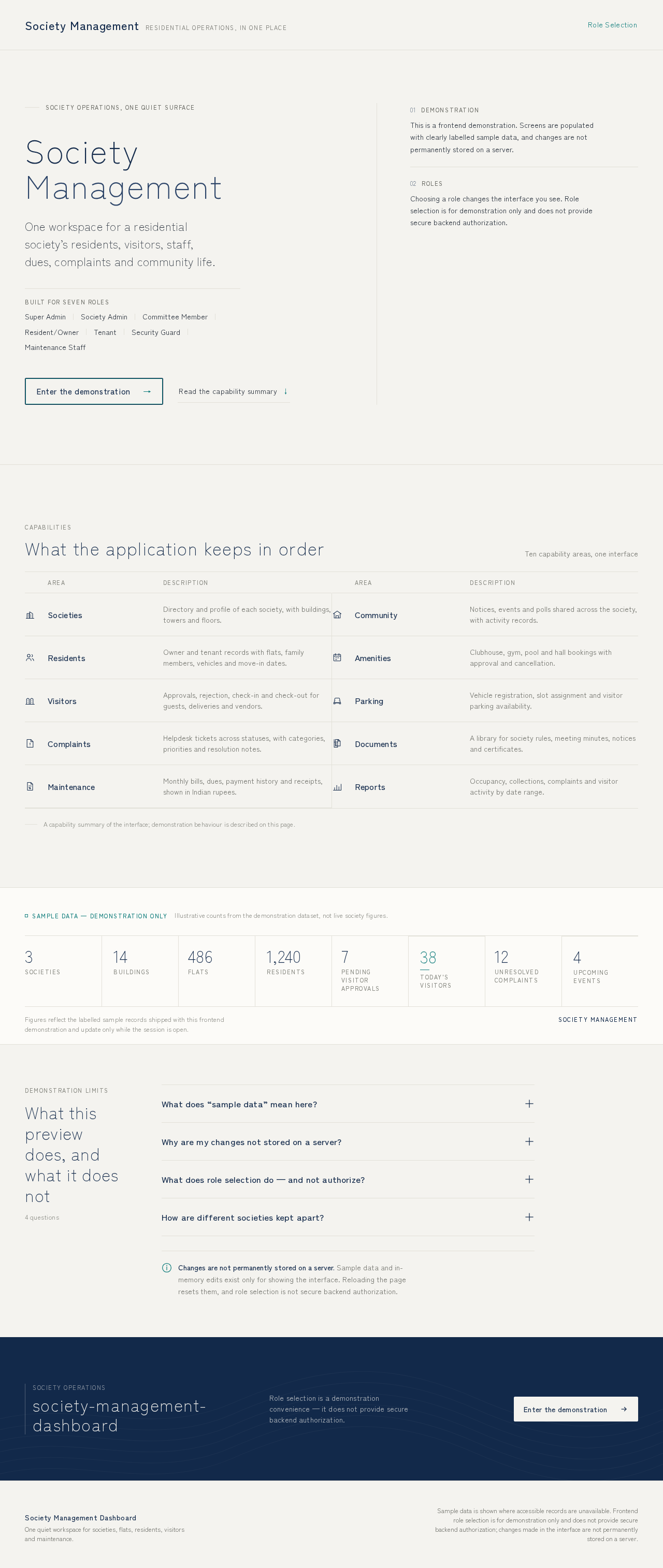
Society Management
Residential operations, in one placeSociety operations, one quiet surface
SocietyManagement
One workspace for a residential society’s residents, visitors, staff, dues, complaints and community life.
Demonstration
This is a frontend demonstration. Screens are populated with clearly labelled sample data, and changes are not permanently stored on a server.
Roles
Choosing a role changes the interface you see. Role selection is for demonstration only and does not provide secure backend authorization.
Sample data — demonstration only
Illustrative counts from the demonstration dataset, not live society figures.
- 3Societies
- 14Buildings
- 486Flats
- 1,240Residents
- 7Pending visitor approvals
- 38Today's visitors
- 12Unresolved complaints
- 4Upcoming events
Figures reflect the labelled sample records shipped with this frontend demonstration and update only while the session is open.
Demonstration limits
What this preview does, and what it does not
4 questions
What does “sample data” mean here?
Every society, building, flat, resident, visitor, complaint, bill and booking you see in the demonstration is sample data. It exists so each screen can be read, sorted and filtered the way it would be in a working society ERP.
The sample records are clearly labelled wherever they represent numbers. They are not real residents, real dues or real gate entries.
Why are my changes not stored on a server?
This frontend is a demonstration. When you add a resident, approve a visitor or register a complaint, the record lives only in the page’s in-memory state for as long as the page stays open.
Reloading or closing the page discards those changes. No backend API, database or payment service is connected, so nothing is saved, delivered or processed.
What does role selection do — and not authorize?
Choosing a role (Super Admin, Society Admin, Committee Member, Resident, Tenant, Security Guard or Maintenance Staff) changes which navigation and actions are displayed, so you can see how each persona works.
Role selection is for demonstration only. It does not grant secure backend authorization, and it can be changed freely without authentication.
How are different societies kept apart?
The society selector re-frames the visible dashboard, residents, buildings, flats, visitors, complaints, notices and reports for the selected society. Sample records are kept separated per society so data from one is never mixed into another.
Changes are not permanently stored on a server. Sample data and in-memory edits exist only for showing the interface. Reloading the page resets them, and role selection is not secure backend authorization.
society-management-dashboard
Role selection is a demonstration convenience — it does not provide secure backend authorization.
Enter the demonstrationSociety Management
Residential operations, in one placeSociety operations, one quiet surface
SocietyManagement
One workspace for a residential society’s residents, visitors, staff, dues, complaints and community life.
Demonstration
This is a frontend demonstration. Screens are populated with clearly labelled sample data, and changes are not permanently stored on a server.
Roles
Choosing a role changes the interface you see. Role selection is for demonstration only and does not provide secure backend authorization.
Sample data — demonstration only
Illustrative counts from the demonstration dataset, not live society figures.
- 3Societies
- 14Buildings
- 486Flats
- 1,240Residents
- 7Pending visitor approvals
- 38Today's visitors
- 12Unresolved complaints
- 4Upcoming events
Figures reflect the labelled sample records shipped with this frontend demonstration and update only while the session is open.
Demonstration limits
What this preview does, and what it does not
4 questions
What does “sample data” mean here?
Every society, building, flat, resident, visitor, complaint, bill and booking you see in the demonstration is sample data. It exists so each screen can be read, sorted and filtered the way it would be in a working society ERP.
The sample records are clearly labelled wherever they represent numbers. They are not real residents, real dues or real gate entries.
Why are my changes not stored on a server?
This frontend is a demonstration. When you add a resident, approve a visitor or register a complaint, the record lives only in the page’s in-memory state for as long as the page stays open.
Reloading or closing the page discards those changes. No backend API, database or payment service is connected, so nothing is saved, delivered or processed.
What does role selection do — and not authorize?
Choosing a role (Super Admin, Society Admin, Committee Member, Resident, Tenant, Security Guard or Maintenance Staff) changes which navigation and actions are displayed, so you can see how each persona works.
Role selection is for demonstration only. It does not grant secure backend authorization, and it can be changed freely without authentication.
How are different societies kept apart?
The society selector re-frames the visible dashboard, residents, buildings, flats, visitors, complaints, notices and reports for the selected society. Sample records are kept separated per society so data from one is never mixed into another.
Changes are not permanently stored on a server. Sample data and in-memory edits exist only for showing the interface. Reloading the page resets them, and role selection is not secure backend authorization.
society-management-dashboard
Role selection is a demonstration convenience — it does not provide secure backend authorization.
Enter the demonstration
No comments yet. Be the first!