silent-saas
 Hemen Ashodia
build a saas application

Comments (0)
Sign in to leave a comment
System Requirements
System Requirements Document for silent-saas
1. Introduction
The silent-saas project aims to develop a Software as a Service (SaaS) application designed for business users. The application will provide a clear, functional interface that emphasizes usability, simplicity, and precision, in line with the principles of Dieter Rams. The target audience includes SaaS Account Owners and SaaS End Users who require an intuitive platform to manage their workspaces and perform core tasks efficiently.
2. System Overview
The silent-saas application will be delivered as an online service, accessible through a web interface. It will include a public landing page, a login surface for identity management, a workspace for core user activities, and a settings page for account management. The application will support self-service account creation and returning sign-in functionality. The design will adhere to a strict grid layout with a focus on functional clarity, using a palette of high-contrast colors for readability and emphasis.
2a. Product Interpretation and Delivery Boundary
The application will be delivered as a SaaS product, with application-owned identity management to support user account creation and sign-in. The system will include four main pages: Landing, Login, Workspace, and Settings. Each page serves a distinct purpose and is accessible based on user identity and role. The application will not include decorative animations or complex typography, maintaining a focus on clarity and functionality.
2b. Source Content Inventory
Not applicable as no content source directive was provided.
2c. Page Content and Component Coverage
Landing
- Purpose: Introduce the SaaS product to anonymous visitors, explaining its purpose and benefits.
- Components:
- Product overview and key features.
- Call-to-action for account creation or login.
- Diagrammatic line art illustrating product use.
- States: Loading, success, error.
Login
- Purpose: Facilitate account creation and user sign-in.
- Components:
- Self-service account creation form.
- Returning user login form.
- Password recovery option.
- States: Loading, success, error, account creation confirmation.
Workspace
- Purpose: Provide a protected environment for users to perform core tasks.
- Components:
- Dashboard displaying user-specific data and tools.
- Task management interface.
- Notifications and alerts.
- States: Loading, success, error, session timeout.
Settings
- Purpose: Allow account owners to manage account and workspace settings.
- Components:
- Account information and subscription management.
- Workspace configuration options.
- Security settings.
- States: Loading, success, error, unauthorized access.
3. Functional Requirements
- As a SaaS Account Owner, I should be able to create an account to access the application. (Provenance: required_inference)
- As a SaaS End User, I should be able to log in to access my workspace. (Provenance: required_inference)
- As a SaaS Account Owner, I should be able to manage account and workspace settings. (Provenance: required_inference)
- As a SaaS End User, I should be able to perform core tasks within the workspace. (Provenance: required_inference)
- As an anonymous visitor, I should be able to understand the product from the Landing page. (Provenance: required_inference)
4. User Personas
SaaS Account Owner
- Context: Responsible for setting up and managing the SaaS account and workspace.
- Primary Goal: Ensure the service is configured to meet business needs and manage subscriptions.
- Responsibilities: Account creation, settings management, subscription oversight.
- Interactions: Engages with the Login and Settings pages for account management.
SaaS End User
- Context: Uses the SaaS application to perform daily tasks.
- Primary Goal: Complete work efficiently using the tools provided in the workspace.
- Responsibilities: Task management, data entry, and tool utilization within the workspace.
- Interactions: Primarily interacts with the Workspace page for task completion.
5. Core User Flows
-
Anonymous Visitor to Account Owner
- Start at the Landing page.
- Understand the product and click on "Create Account."
- Complete the account creation form on the Login page.
- Receive confirmation and proceed to the Workspace.
-
Returning User Sign-In
- Start at the Login page.
- Enter credentials and sign in.
- Access the Workspace for task management.
-
Account Management by Account Owner
- Sign in and navigate to the Settings page.
- Update account information and manage subscriptions.
- Save changes and return to the Workspace.
-
End User Task Completion
- Sign in and access the Workspace.
- Use tools and features to complete tasks.
- Log out upon task completion.
6. Visuals Colors and Theme
- Muse: Dieter Rams
- Palette: Background #F2F2F2, Surface #FFFFFF, Text #000000, Primary #FF6600, Accent #009933, Muted #CCCCCC.
- Typography: Headings in Archivo, Body in Work Sans, modular scale 1.25.
- Shape Language: Rounded-rectangle controls.
- Layout: Strict grid with generous whitespace.
7. Signature Design Concept
The Landing page will feature a single-column design with a studio-lit render of the application's interface against a plain off-white background. The hero will prominently display a functional aspect of the SaaS product, using high-contrast orange accents to draw attention to key actions.
8. Interaction Model & Motion Direction
- Interaction Model: Static
- Motion Tempo: Restrained
- Hero Dimensionality: Flat
- Landing Hero Motion Brief: The hero will feature a static, product-first image with no motion, emphasizing clarity and functionality.
9. Non-Functional Requirements
- The application must be accessible via modern web browsers.
- The design must adhere to accessibility standards for readability and navigation.
- The system should provide instant feedback for user interactions.
10. Tech Stack
- Frontend: React
- Backend: Python/FastAPI
- Storage: Appropriate database solution
- Containerization: Docker/docker-compose
11. Assumptions and Constraints
- The application will not include decorative animations.
- User identity management is required for access to protected pages.
- The design will follow the principles of Dieter Rams for functional clarity.
12. Glossary
- SaaS: Software as a Service, a software distribution model in which applications are hosted by a service provider and made available to customers over the internet.
- Workspace: The primary area within the application where users perform their tasks.
- Account Owner: The individual responsible for managing the SaaS account and settings.
- End User: An individual who uses the SaaS application to perform tasks.
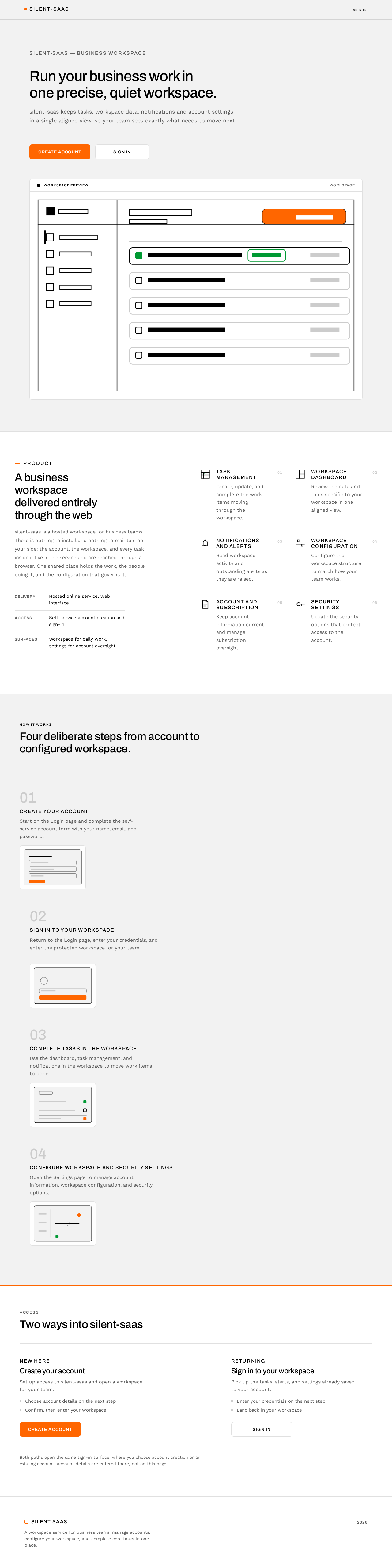
silent-saas — Business workspace
Run your business work in one precise, quiet workspace.
silent-saas keeps tasks, workspace data, notifications and account settings in a single aligned view, so your team sees exactly what needs to move next.
A business workspace delivered entirely through the web
silent-saas is a hosted workspace for business teams. There is nothing to install and nothing to maintain on your side: the account, the workspace, and every task inside it live in the service and are reached through a browser. One shared place holds the work, the people doing it, and the configuration that governs it.
- Delivery
- Hosted online service, web interface
- Access
- Self-service account creation and sign-in
- Surfaces
- Workspace for daily work, settings for account oversight
Task management
Create, update, and complete the work items moving through the workspace.
Workspace dashboard
Review the data and tools specific to your workspace in one aligned view.
Notifications and alerts
Read workspace activity and outstanding alerts as they are raised.
Workspace configuration
Configure the workspace structure to match how your team works.
Account and subscription
Keep account information current and manage subscription oversight.
Security settings
Update the security options that protect access to the account.
HOW IT WORKS
Four deliberate steps from account to configured workspace.
- 01
Create your account
Start on the Login page and complete the self-service account form with your name, email, and password.
- 02
Sign in to your workspace
Return to the Login page, enter your credentials, and enter the protected workspace for your team.
- 03
Complete tasks in the workspace
Use the dashboard, task management, and notifications in the workspace to move work items to done.
- 04
Configure workspace and security settings
Open the Settings page to manage account information, workspace configuration, and security options.
Access
Two ways into silent-saas
New here
Create your account
Set up access to silent-saas and open a workspace for your team.
- Choose account details on the next step
- Confirm, then enter your workspace
Returning
Sign in to your workspace
Pick up the tasks, alerts, and settings already saved to your account.
- Enter your credentials on the next step
- Land back in your workspace
Both paths open the same sign-in surface, where you choose account creation or an existing account. Account details are entered there, not on this page.
silent-saas — Business workspace
Run your business work in one precise, quiet workspace.
silent-saas keeps tasks, workspace data, notifications and account settings in a single aligned view, so your team sees exactly what needs to move next.
A business workspace delivered entirely through the web
silent-saas is a hosted workspace for business teams. There is nothing to install and nothing to maintain on your side: the account, the workspace, and every task inside it live in the service and are reached through a browser. One shared place holds the work, the people doing it, and the configuration that governs it.
- Delivery
- Hosted online service, web interface
- Access
- Self-service account creation and sign-in
- Surfaces
- Workspace for daily work, settings for account oversight
Task management
Create, update, and complete the work items moving through the workspace.
Workspace dashboard
Review the data and tools specific to your workspace in one aligned view.
Notifications and alerts
Read workspace activity and outstanding alerts as they are raised.
Workspace configuration
Configure the workspace structure to match how your team works.
Account and subscription
Keep account information current and manage subscription oversight.
Security settings
Update the security options that protect access to the account.
HOW IT WORKS
Four deliberate steps from account to configured workspace.
- 01
Create your account
Start on the Login page and complete the self-service account form with your name, email, and password.
- 02
Sign in to your workspace
Return to the Login page, enter your credentials, and enter the protected workspace for your team.
- 03
Complete tasks in the workspace
Use the dashboard, task management, and notifications in the workspace to move work items to done.
- 04
Configure workspace and security settings
Open the Settings page to manage account information, workspace configuration, and security options.
Access
Two ways into silent-saas
New here
Create your account
Set up access to silent-saas and open a workspace for your team.
- Choose account details on the next step
- Confirm, then enter your workspace
Returning
Sign in to your workspace
Pick up the tasks, alerts, and settings already saved to your account.
- Enter your credentials on the next step
- Land back in your workspace
Both paths open the same sign-in surface, where you choose account creation or an existing account. Account details are entered there, not on this page.
No comments yet. Be the first!