shiny-calculator
 Diya Trivedi
start a project to build simple single page design of calculator

Comments (0)
Sign in to leave a comment
System Requirements
System Requirements Document for shiny-calculator
1. Introduction
shiny-calculator is a simple, single-page calculator. The product intent, taken directly from the authoritative requirement thread, is to deliver a calculator as a single-page design — one surface, no additional pages, no navigation elsewhere. A person opens the page, enters numbers and operations, and reads the computed result.
The audience is anyone who needs quick arithmetic: a single Calculator User who wants to complete a calculation on one page without navigating anywhere else. The design register is functional focus and quiet confidence — numbers are the content, and the interface is built to make computation feel precise, rhythmic and almost musical.
2. System Overview
shiny-calculator is a browser-delivered, single-page calculator. It has exactly one product surface — the Calculator page — which is also the anonymous entry point. There is no account, no sign-in, no persistence of calculations, and no second page.
Actors
- Calculator User (human, sole active persona): opens the Calculator page, enters numbers and operations, and reads the result.
- No other human personas, systems, providers, or external services participate in the accepted product behavior.
Accepted behavior at a glance
- A single-page calculator where the user enters numbers and operations and sees the computed result.
- The calculator is the only product surface; no additional pages are requested.
- The design must be simple and fit on a single page.
Narrow exclusions
- No additional pages, routes, or destinations beyond the Calculator page.
- No account creation, authentication, or user profile.
- No history, saved calculations, or persistence beyond the current session's on-screen state.
- No scientific, graphing, programmer, or unit-conversion modes are requested.
2a. Product Interpretation and Delivery Boundary
The product is a first-party, application-owned, anonymous single-page calculator. The Calculator page is publicly reachable with no identity requirement — there is no durable actor-specific state, commitment, entitlement, or value transfer that would require application-owned identity. All calculation state lives in the page for the duration of the visit.
Current horizon: the single Calculator page with number entry, operation selection, and result display, styled per the Swiss geometric direction.
Future horizon: none stated. Anything not listed in Section 3 is out of scope for this generation.
2b. Source Content Inventory
Not applicable — no reference directive declares a content_source.
2c. Page Content and Component Coverage
Calculator
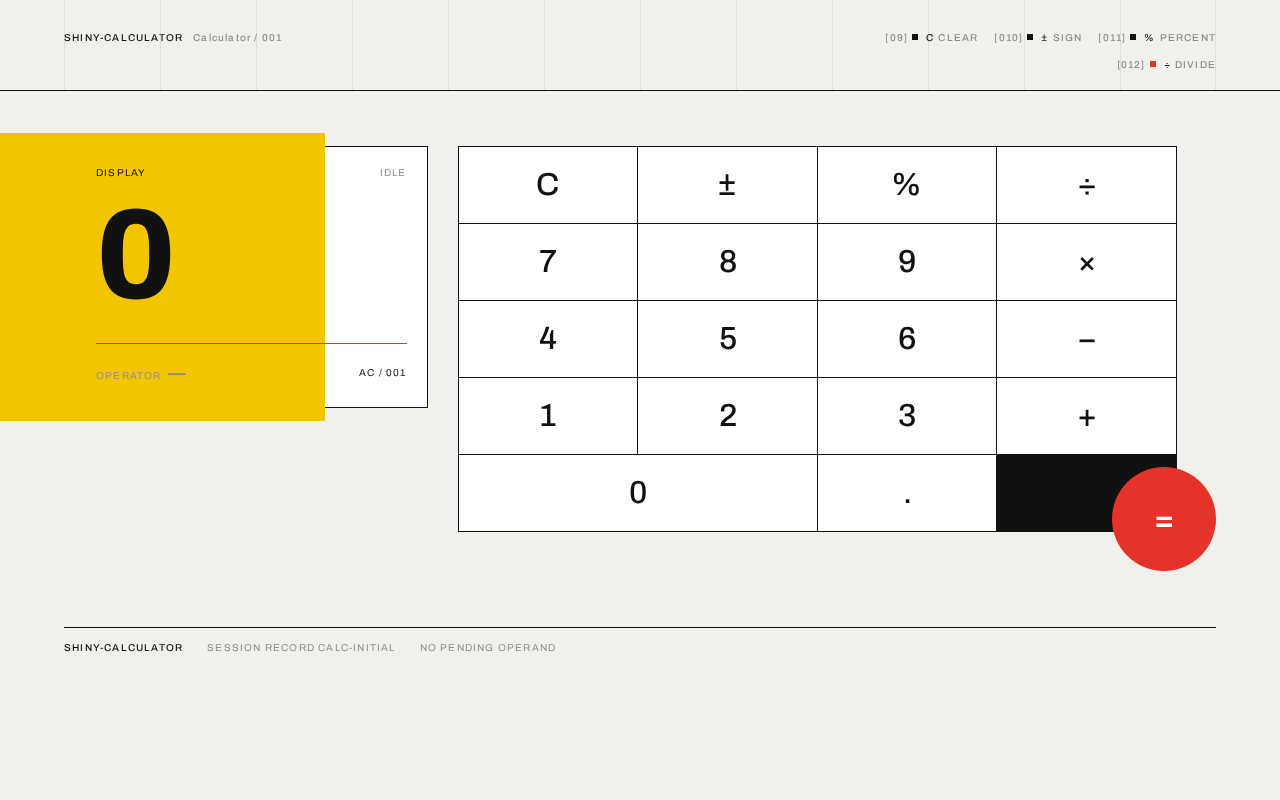
The sole product surface and anonymous public entry. A full-viewport warm paper ground (#F2F0EB) with a faint 12-column hairline grid. Top-left carries a micro-label CALCULATOR / 001. The display numeral sits centre-left on a yellow (#F2C500) geometric plane that bleeds off the left edge; the keypad occupies the right two-thirds as a hard-edged modular grid; a single red circle is the equals key, overlapping the grid boundary at bottom-right.
Information and state
- Current display value (the oversized numeral), flush-left, Archivo 800, 144px desktop / 96px tablet / 56px mobile.
- Active operator indicator (the currently selected operation, marked in Swiss red #E63329).
- Pending operand and accumulated expression state held in the page for the current visit.
- Micro-labels:
CALCULATOR / 001top-left; a vertical stack of operation micro-labels (C, ±, %, ÷) aligned to the grid.
Primary actions
- Enter digits 0–9 and a decimal point.
- Select an operation: add, subtract, multiply, divide.
- Evaluate with the equals key (red circle).
- Clear (C) to reset the current entry/expression.
- Toggle sign (±).
- Percent (%).
Supporting actions
- Hover states: 1px inner black border on keys.
- Key press: instant 80ms background flash from white to red (equals) or yellow (operators) and back.
Domain entities
- Display value — the numeral currently shown.
- Pending operand — the first number entered before an operator.
- Active operator — the selected arithmetic operation.
- Expression state — the in-page accumulation of operand, operator, and current entry.
Component responsibilities
- Display plane — renders the current numeral on the yellow geometric plane; updates with no transition.
- Keypad grid — 4×5 modular grid of hard-edged white keys separated by 1px black hairlines; routes digit, operator, clear, sign, percent, and equals input.
- Equals circle — the single red circular key overlapping the bottom-right grid boundary; triggers evaluation.
- Micro-label rail — uppercase Archivo 10px labels with +0.12em tracking, aligned to the grid.
- Grid overlay — faint 12-column hairlines at 8% black opacity as page texture.
States
- Loading: not applicable — the page renders immediately with display
0and an idle keypad. - Empty / initial: display shows
0; no operator active; no pending operand. - Success: after equals, the display shows the computed result; the active operator indicator clears.
- Error: division by zero or an invalid expression shows an error state in the display (e.g.
Error) rather than a numeric result; the next digit or C recovers to a fresh entry. - Recovery: pressing C resets display to
0and clears pending operand and active operator; entering a new digit after an error starts a fresh entry.
3. Functional Requirements
FR-1 — Single-page calculator surface (explicit) As a Calculator User I should open a single page that presents a calculator so that I can perform arithmetic without navigating anywhere else.
- Trigger: the user opens the application.
- Observable result: the Calculator page renders with the display showing
0and the keypad available. - Access: anonymous, no identity required.
- Failure/recovery: if the page fails to render, reloading restores the initial state.
- Continuation: the user proceeds to enter a calculation (FR-2 through FR-6).
FR-2 — Enter digits (explicit) As a Calculator User I should press digit keys (0–9) and a decimal point so that the number I intend to compute appears in the display.
- Trigger: the user presses a digit or decimal key.
- Observable result: the display numeral updates immediately (no transition) to reflect the entered digits.
- Access: anonymous.
- Failure/recovery: pressing C clears the entry back to
0. - Continuation: the user selects an operator (FR-3) or evaluates (FR-6).
FR-3 — Select an operation (explicit) As a Calculator User I should select an arithmetic operation (add, subtract, multiply, divide) so that the calculator knows how to combine my numbers.
- Trigger: the user presses an operator key.
- Observable result: the active operator is indicated in Swiss red (#E63329); the operator key flashes yellow for 80ms.
- Access: anonymous.
- Failure/recovery: selecting a different operator replaces the active operator.
- Continuation: the user enters the second operand (FR-2) and evaluates (FR-6).
FR-4 — Clear (explicit) As a Calculator User I should press C so that I can reset the current entry or expression and start over.
- Trigger: the user presses C.
- Observable result: the display returns to
0; pending operand and active operator are cleared. - Access: anonymous.
- Continuation: the user begins a fresh calculation.
FR-5 — Sign toggle and percent (explicit) As a Calculator User I should press ± to change the sign of the current value and % to apply a percentage so that I can handle negative values and percentage calculations.
- Trigger: the user presses ± or %.
- Observable result: the display numeral updates to the negated value or the percentage value.
- Access: anonymous.
- Failure/recovery: pressing C restores a fresh entry.
- Continuation: the user continues the calculation or evaluates.
FR-6 — Evaluate with equals (explicit) As a Calculator User I should press the red equals key so that the calculator computes and shows the result of my expression.
- Trigger: the user presses the equals key (red circle).
- Observable result: the display shows the computed result; the equals key flashes red for 80ms; the active operator indicator clears.
- Access: anonymous.
- Failure/recovery: division by zero or an invalid expression shows an error state in the display; the next digit or C recovers to a fresh entry.
- Continuation: the user may chain a new operation on the result or press C to start over.
FR-7 — Simple single-page design constraint (explicit) As a Calculator User I should experience a simple design that fits on a single page so that the calculator is immediately usable without clutter or navigation.
- Observable result: all calculator controls and the display are visible on one page at 375px, 768px, and 1280px viewports; no additional pages exist.
- Access: anonymous.
4. User Personas
Calculator User
Product context. The Calculator User is anyone who needs quick arithmetic and opens shiny-calculator in a browser. They arrive with a number in mind and want the answer on one page, without accounts, menus, or navigation.
Primary goal. Complete a calculation — enter numbers, choose an operation, and read the result — on a single page.
Distinct accepted responsibilities.
- Enter digits and a decimal point (FR-2).
- Select an arithmetic operation (FR-3).
- Clear the current entry or expression (FR-4).
- Toggle sign and apply percent (FR-5).
- Evaluate with the equals key (FR-6).
Relevant inputs and decisions. Which digits to enter, which operator to apply, when to evaluate, and when to clear and start over. The user decides when a calculation is complete.
Interactions with other participants. None — the Calculator User is the sole active human participant. There is no counterparty, recipient, or beneficiary whose state changes as a result of a calculation.
Observable success. The display shows the computed result after pressing equals; the user can read it at a glance and either chain another operation or clear to start fresh.
Constraints. The experience must be simple and fit on a single page; no additional pages are available.
5. Core User Flows
Flow A — Perform a basic calculation
- Starting context: The Calculator User opens shiny-calculator in a browser. The Calculator page renders anonymously with the display showing
0and the keypad available. - Enter first operand: The user presses digit keys; the display numeral updates immediately to show the entered number.
- Select operation: The user presses an operator key (e.g. ÷). The active operator is indicated in Swiss red; the operator key flashes yellow for 80ms.
- Enter second operand: The user presses digit keys; the display updates to the second number.
- Evaluate: The user presses the red equals circle. The equals key flashes red for 80ms; the display shows the computed result; the active operator indicator clears.
- Observable result: The result is visible as the oversized display numeral.
- Continuation: The user may chain a new operation on the result or press C to start a fresh calculation.
Flow B — Clear and start over
- Starting context: The user is mid-calculation or has just seen a result.
- Clear: The user presses C. The display returns to
0; pending operand and active operator are cleared. - Continuation: The user begins a fresh calculation (Flow A).
Flow C — Handle an error
- Starting context: The user has entered an expression that cannot be evaluated (e.g. division by zero).
- Evaluate: The user presses equals. The display shows an error state (e.g.
Error) instead of a numeric result. - Recovery: The user presses C or enters a new digit; the display resets to a fresh entry.
- Continuation: The user proceeds with a valid calculation (Flow A).
Flow D — Sign and percent
- Starting context: The user has entered a number.
- Toggle sign: The user presses ±; the display numeral updates to the negated value.
- Apply percent: The user presses %; the display updates to the percentage value.
- Continuation: The user continues the calculation or evaluates (Flow A, step 5).
6. Visuals Colors and Theme
Muse: Josef Müller-Brockmann. Headline idea: Swiss geometric rigour for a calculator that computes like a concert poster.
Mode: Light only.
Colour tokens (exact hex by role)
- Background (warm paper ground):
#F2F0EB - Surface (key faces, display rectangle):
#FFFFFF - Text (type, rules, hairlines):
#111111 - Primary (equals key, active operator):
#E63329 - Accent (geometric plane behind display, operator flash):
#F2C500 - Muted (secondary labels):
#8C8C8C
No gradients, no shadows beyond a 1px hairline. No blue or indigo anywhere.
Typography
- Headings / display numeral: Archivo, weight 700–800, tracking -0.04em, flush-left, ragged-right. No italics, no decorative ligatures.
- Body / key glyphs: Archivo Medium at 500; small caps for section micro-labels.
- Type scale (1.5 modular): display 56px mobile / 96px tablet / 144px desktop; section label 11px; key glyph 28px mobile / 32px desktop; body 16px / 18px; micro-label 10px uppercase tracked +0.12em.
Shape language
- Hard edges only. Keys are perfect squares or 1:1.2 rectangles with 0px radius, separated by 1px black hairlines forming a visible modular grid.
- The display sits in a white rectangle that bleeds into a yellow geometric plane.
- A single red circle (equals) and a red horizontal rule are the only curves and the only signal colour.
- No rounded corners, no soft shadows, no gradients.
Layout
- 12-column asymmetric Swiss grid on the warm paper ground.
- Left column (4 cols): oversized display numeral and a vertical stack of micro-labels (C, ±, %, ÷).
- Right column (8 cols): keypad as a 4×5 modular grid of hard-edged keys.
- Equals key is a red circle overlapping the grid boundary at bottom-right.
- Mobile: display stacks above the keypad, flush-left, red circle pinned to the right edge.
- Outer margins: 24px mobile, 64px desktop.
Imagery style
- No photography, no illustration, no icons beyond geometric pictograms.
- The visual content is the grid itself: black rules, a yellow plane, a red circle, and the numerals.
- A faint 12-column grid overlay may be visible as 1px hairlines at 8% black opacity.
Readability constraint
- Headlines, labels, numbers, and controls stay entirely inside the viewport and their container at 375px, 768px, and 1280px, wrapping or scaling (e.g.
clamp(...)) to fit. Decoration (the yellow plane, red circle, grid overlay) may bleed off edges but must cover no readable text or control.
7. Signature Design Concept
The first screen is the calculator, not a marketing hero. A full-viewport warm paper ground (#F2F0EB) carries a faint 12-column hairline grid at 8% black opacity. Top-left: a 10px uppercase micro-label CALCULATOR / 001 in black. Centre-left: the display numeral at 144px Archivo 800, flush-left, sitting on a yellow (#F2C500) rectangular plane that bleeds off the left edge by 40px. Right two-thirds: the keypad as a hard-edged modular grid of white keys with black hairlines, the red equals circle overlapping the bottom-right corner. No centred headline, no subtext, no button, no gradient.
The signature moves are: the oversized display numeral on a bleeding yellow plane; the keypad as a visible modular grid of hard-edged keys; the single red circle as the equals key overlapping the grid boundary; faint 12-column grid hairlines as page texture; and micro-labels in uppercase Archivo at 10px with +0.12em tracking, aligned like exhibition captions.
8. Interaction Model & Motion Direction
Interaction Model: Static (direction) Motion Tempo: still Hero Dimensionality: flat
Landing Hero Motion Brief
- Focal subject: the oversized display numeral on the yellow geometric plane, with the keypad grid and red equals circle as the composed counterweight.
- Input → transformation → outcome thesis: a key press produces an instant 80ms background flash from white to red (equals) or yellow (operators) and back; the display numeral updates with no transition; the outcome is the new numeral, placed by mathematical intent.
- Motion vocabulary: instant key-press flash (80ms), 1px inner black border on hover, caret blink in the display. No decorative animation, no bouncy or springy key animations.
- Composed first frame: warm paper ground with faint grid;
CALCULATOR / 001top-left; display numeral0at 144px on the yellow plane bleeding off the left edge; keypad grid on the right; red equals circle overlapping bottom-right. - Reduced-motion state: identical static composition; the 80ms flash and caret blink are suppressed or reduced to an instant state change; all controls remain fully usable and readable.
9. Non-Functional Requirements
NFR-1 — Single-page constraint (explicit) The product must consist of exactly one page. No additional pages, routes, or destinations may exist. Rationale: explicit user requirement ("simple single page design of calculator") and the exact page-count constraint of 1.
NFR-2 — Simplicity (explicit) The design must be simple and fit on a single page. Rationale: explicit user constraint.
NFR-3 — Responsive readability (explicit, from creative direction) Readable text and controls stay whole at 375px, 768px, and 1280px; no element covers any part of them. Decoration may bleed off edges. Rationale: creative direction readability rule.
NFR-4 — Immediate render (required_inference)
The page renders immediately with display 0 and an idle keypad; no loading state is required. Rationale: a single-page utility with no data dependencies.
NFR-5 — Anonymous access (required_inference) The Calculator page is publicly reachable with no identity requirement. Rationale: no durable actor-specific state, commitment, entitlement, or value transfer exists that would require application-owned identity.
NFR-6 — Palette discipline (explicit, from creative direction) Only two accent colours (red #E63329 and yellow #F2C500) are used; no blue or indigo anywhere; no gradients, glassmorphism, or soft drop shadows. Rationale: creative direction.
10. Tech Stack
- Frontend: React (single-page application) with a component-based keypad and display.
- Styling: CSS with Archivo font family; hard-edged grid layout; no UI component library that imposes rounded corners or shadows.
- Backend: None required — all calculation logic runs client-side in the browser.
- Storage: None — no persistence of calculations.
- Deployment: Static hosting of the built single-page application.
(No source-specified technology choices were provided; the above are the minimal stack needed to deliver the accepted single-page calculator.)
11. Assumptions and Constraints
Assumptions
- A-1 (required_inference): Calculation logic executes entirely in the browser; no server round-trip is needed for arithmetic.
- A-2 (required_inference): The calculator supports the four basic arithmetic operations (add, subtract, multiply, divide) plus clear, sign toggle, and percent, as implied by the micro-label stack (C, ±, %, ÷) in the creative direction.
- A-3 (required_inference): Division by zero and invalid expressions produce an error state in the display rather than a numeric result.
Constraints
- C-1 (explicit): Exactly one page — the Calculator.
- C-2 (explicit): The design must be simple and fit on a single page.
- C-3 (explicit): No additional pages are requested.
- C-4 (explicit, creative direction): Hard edges only; no rounded corners, gradients, or soft shadows; only red and yellow accents; no blue or indigo.
12. Glossary
- Calculator page — the sole product surface; the single-page calculator.
- Display numeral — the oversized numeral showing the current value or result.
- Active operator — the currently selected arithmetic operation, indicated in Swiss red.
- Pending operand — the first number entered before an operator is selected.
- Equals circle — the single red circular key that evaluates the expression.
- Micro-label — a 10px uppercase Archivo label with +0.12em tracking, aligned to the grid.
- Swiss grid — the 12-column asymmetric layout system derived from the Müller-Brockmann direction.
shiny-calculatorSession record calc-initialNo pending operand
shiny-calculatorSession record calc-initialNo pending operand
No comments yet. Be the first!