sharp-todo
build simple to-do with no designs just pure logic


Comments (0)
Sign in to leave a comment
Project Tasks14
Implement HomeHeader for Home
As a frontend developer, implement the HomeHeader section for the Home page. This section renders a `motion.header` with className `hh-header` that animates in from opacity 0 and y:-12 using framer-motion (duration 0.4, easeOut). Inside is a `hh-title-row` containing a `motion.div` logo mark with a whileHover scale:1.08 spring animation (stiffness:400, damping:15) wrapping an SVG checkmark polyline (stroke #F1FAEE, strokeWidth 2.5), plus an h1 with className `hh-app-title` showing 'sharp-todo'. Below the row is a tagline paragraph with className `hh-tagline`. Import HomeHeader.css for styles.
Implement HomeWelcome for Home
As a frontend developer, implement the HomeWelcome section for the Home page. This section uses framer-motion with a `containerVariants` (staggerChildren:0.12, delayChildren:0.1) and `itemVariants` (opacity 0→1, y:10→0, cubic-bezier ease) orchestrated via `initial='hidden'` and `animate='visible'`. It renders an h2 greeting 'Welcome back!' with a `motion.span` wave emoji (👋) that plays a rotate keyframe animation [0,14,-8,14,-4,10,0] with transformOrigin '70% 80%' after 0.5s delay. Also includes a `motion.p` encouragement text and a `motion.hr` divider, both staggered via itemVariants. Import HomeWelcome.css.
Implement HomeAddTask for Home
As a frontend developer, implement the HomeAddTask section for the Home page. Uses `useState` for `task` (string) and `showToast` (boolean), plus `useRef` for `inputRef`. The `handleAdd` function validates non-empty input, clears task state, sets showToast true, resets it after 1800ms, and refocuses the input. `handleKeyDown` triggers handleAdd on Enter. Renders a `motion.div` form (hat-form, animates opacity 0→1 y:12→0) containing a controlled text input (`hat-input`) with aria-label and a `motion.button` (`hat-btn`) with whileTap scale:0.95 using Lucide `Plus` icon (size 18, strokeWidth 2.5). Uses `AnimatePresence` to conditionally show a `hat-toast` div (animate in y:6→0, exit y→-4) with 'Task added successfully!' text. Import HomeAddTask.css.
Implement HomeTaskList for Home
As a frontend developer, implement the HomeTaskList section for the Home page. Uses `useState` for `tasks` (initialTasks array of 6 items with id, text, completed fields) and `flippedId` (null or task id). Implements: `toggleComplete` (toggles completed on a task, stopPropagation), `handleFlip` (sets flippedId to toggle card flip), `handleDelete` (filters task out and resets flippedId), `handleEdit` (uses prompt() to edit task text, resets flippedId), `handleBack` (resets flippedId). Each task renders as a `motion.div` with layout, enter (opacity 0, y:20→0) and exit (opacity 0, x:-60) animations via AnimatePresence. The inner `motion.div` (`htl-card-inner`) animates `rotateY` between 0 and 180 (spring stiffness:260, damping:25) based on isFlipped. Card front shows a `htl-checkbox` div with Lucide `Check` icon when completed (stopPropagation on click), task text with completed strikethrough class. Card back (rotateY:180) shows Lucide `Pencil`, `Trash2`, `RotateCcw` action buttons. Import HomeTaskList.css.
Implement HomeEmptyState for Home
As a frontend developer, implement the HomeEmptyState section for the Home page. Uses framer-motion with `containerVariants` (staggerChildren:0.15, delayChildren:0.1), `itemVariants` (opacity 0→1, y:16→0, cubic-bezier ease, 0.5s), `pencilVariants` (opacity/x:20→0/rotate:-30, delay:0.4), `checkVariants` (scale 0→1 spring stiffness:300 damping:15, delay:0.6), `dashedVariants` (opacity/scale 0.95→1, delay:0.7). Renders a CSS notebook illustration (`hes-notebook` with `hes-notebook-spine` and six `hes-notebook-line` divs), a `motion.svg` pencil graphic (`hes-pencil`, viewBox 0 0 48 120) with rect body, polygon tip, and eraser rect, and a `motion.div` check float (`hes-check-float`) with an SVG polyline checkmark icon. Also renders `motion.p` message 'No tasks yet. Add one to get started!' and a `motion.p` hint, both using itemVariants. Import HomeEmptyState.css.
Create Task DB Models
As a Backend Developer, define the SQLAlchemy ORM model for the Task entity with fields: id (int, primary key, auto-increment), text (string, not null), completed (boolean, default false), created_at (datetime, server default now). Set up Alembic migration environment and generate the initial migration script for the tasks table. Include seed data script with a few sample tasks for development.
Implement TaskCardContainer for TaskCard
As a frontend developer, implement the TaskCardContainer section for the TaskCard page. This is the root orchestration component that manages the full task list state. Implement: (1) `useState` hooks for `tasks` (INITIAL_TASKS array with 3 seed tasks), `newTask` (string), `flippedId` (null|number), `showEditModal`, `editingTask`, `editValue`, `isSaving`, `showConfirm`, `deletingTask`, `isDeleting`, `deletedTask`; (2) `useRef` for `undoTimerRef` used in undo timeout logic with `UNDO_TIMEOUT_MS = 4000`; (3) `handleAdd` form submit handler that trims and appends a new task with `Date.now()` id; (4) `handleFlip` toggling `flippedId`; (5) `handleToggleDone` toggling `done` on a task; (6) `handleEditStart`/`handleEditClose`/`handleEditSave` modal handlers with simulated async save using `await new Promise`; (7) `handleDeleteStart`/`handleDeleteCancel`/`handleDeleteConfirm` confirmation handlers with undo toast; (8) `framer-motion` `AnimatePresence` with `overlayVariants`, `dialogVariants`, and `toastVariants` (spring-based) for modal overlay, dialog, and undo toast animations. Import `TaskCardContainer.css`. This component is the top-level container for the TaskCard page and must be built first.
Implement TaskCardFlip for TaskCard
As a frontend developer, implement the TaskCardFlip section for the TaskCard page. This is a standalone 3D card-flip demo component. Implement: (1) `useState` `isFlipped` boolean toggled by `handleFlip` and reset by `handleBack`; (2) a `tcf-scene` wrapper containing a `motion.div` with `animate={{ rotateY: isFlipped ? 180 : 0 }}`, `transition={{ duration: 0.5, ...SPRING }}` (SPRING = `{ type: 'spring', stiffness: 260, damping: 28 }`), `style={{ transformStyle: 'preserve-3d' }}`, `whileHover={{ scale: 1.02 }}`, `whileTap={{ scale: 0.98 }}`; (3) front face `tcf-face tcf-face--front` showing task label, title, meta, `tcf-status-badge` with dot and 'In Progress', and a flip-hint with a rotate SVG icon; (4) back face `tcf-face tcf-face--back` with 'Actions' title and two `motion.button` elements (`tcf-btn--edit`, `tcf-btn--delete`) with `whileHover={{ x: 2 }}` and `whileTap={{ scale: 0.97 }}`; (5) keyboard accessibility via `onKeyDown` handling Enter/Space; (6) ARIA labels switching based on `isFlipped`. Import `TaskCardFlip.css`. This section is independent of other sections and can be built in parallel.
Implement TaskCardFrontSide for TaskCard
As a frontend developer, implement the TaskCardFrontSide section for the TaskCard page. This section renders the visible front face of a task card with completion toggle. Implement: (1) `useState` `isCompleted` boolean toggled by `handleToggleComplete` (with `e.stopPropagation()`); (2) `motion.div` card with `cardVariants` (initial: `{ opacity: 0, y: 16, scale: 0.97 }`, animate with cubic-bezier ease); (3) `tcfs-corner-accent` decorative element; (4) `tcfs-status-row` containing a `motion.button` checkbox wrapper that applies `tcfs-completed` class when done, `whileTap={{ scale: 0.88 }}`; (5) `AnimatePresence mode='wait'` switching between check-icon (`checkVariants`: spring stiffness 500, damping 22) and empty-circle span; (6) `motion.span` task text with `textVariants` animating `color` (#264653 → #8D99AE) and `textDecoration` ('none' → 'line-through') based on `isCompleted`; (7) full ARIA labeling (`aria-label` toggling between 'Mark task as incomplete'/'Mark task as complete'). Import `TaskCardFrontSide.css`. This section is independent of other sections and can be built in parallel.
Implement TaskCardBackSide for TaskCard
As a frontend developer, implement the TaskCardBackSide section for the TaskCard page. This section renders the back face of a flipped task card with Edit and Delete action buttons. Implement: (1) inline SVG icon components `EditIcon` (pencil path with `d='M13 2a1.415 1.415 0 0 1 2 2L6 13l-3 1 1-3L13 2z'`) and `DeleteIcon` (trash can with polyline, paths, and lines); (2) `containerVariants` with `staggerChildren: 0.1` and `delayChildren: 0.1` for sequential button entrance; (3) `btnVariants` for each button (hidden: `{ opacity: 0, y: 8 }`, visible with `easeOut`); (4) `motion.div` `tcbs-inner` initialized with `hidden`/`visible` variants; (5) `tcbs-label` 'Task Actions' heading; (6) `tcbs-button-group` containing two `motion.button` elements: `tcbs-btn-edit` and `tcbs-btn-delete`, each with `whileTap={{ scale: 0.96 }}`, ARIA labels, and stub `onClick` handlers (`handleEdit`/`handleDelete`) meant to be wired up by `TaskCardActions`. Import `TaskCardBackSide.css`. This section is independent and can be built in parallel.
Build Tasks CRUD API
As a Backend Developer, implement the FastAPI CRUD endpoints for tasks: GET /api/tasks (list all tasks), POST /api/tasks (create task), PUT /api/tasks/{id} (update task text/completion status), DELETE /api/tasks/{id} (delete task). Each endpoint should return appropriate HTTP status codes and JSON responses. Include request/response Pydantic models for TaskCreate, TaskUpdate, and TaskResponse schemas.
Implement TaskCardActions for TaskCard
As a frontend developer, implement the TaskCardActions section for the TaskCard page. This is a self-contained demo of the full edit+delete action flow. Implement: (1) `useState` hooks for `task` (DEMO_TASK with id `'task-demo-001'`), `showEditModal`, `showConfirm`, `editText`, `isSaving`, `isDeleting`, `deletedTask`, `isDeleted`; (2) `useRef` `undoTimerRef` for `UNDO_TIMEOUT_MS = 4000` auto-finalize timer; (3) `handleEditOpen`/`handleEditClose`/`handleEditSave` — save simulates `await new Promise((r) => setTimeout(r, 800))` (async API PUT `/api/tasks/:id`); (4) `handleDeleteOpen`/`handleDeleteCancel`/`handleDeleteConfirm` — delete simulates `await new Promise((r) => setTimeout(r, 600))` (async API DELETE `/api/tasks/:id`), then moves task to `deletedTask` with undo timeout; (5) `handleUndo` canceling the timer and restoring task; (6) lucide-react icons `Edit2`, `Trash2`, `CheckCircle`, `X`, `AlertTriangle` used in modal and toast UI; (7) `AnimatePresence` rendering: edit modal with `overlayVariants` + `dialogVariants` (spring stiffness 380, damping 26), delete confirm dialog with same variants, and undo toast with `toastVariants` (spring stiffness 340, damping 22, y: 24→0). Import `TaskCardActions.css`. Depends on `TaskCardBackSide` (shares the edit/delete action contract).
Integrate Home Page API
As a Tech Lead, verify the end-to-end integration between the Home page frontend implementation (HomeAddTask, HomeTaskList, HomeHeader, HomeWelcome, HomeEmptyState) and the Tasks CRUD backend API. Ensure: task list fetches from GET /api/tasks on mount, new tasks POST to /api/tasks and update UI, completion toggles call PUT /api/tasks/{id}, delete calls DELETE /api/tasks/{id}, empty state renders correctly when API returns empty array, and error states are handled gracefully. Note: HomeAddTask (78d0b2ae), HomeTaskList (7b7acf41-fe27-4374-ac5f-1f141c8f6962), HomeEmptyState (289a86e5) frontend tasks should depend on the backend API task (temp_backend_tasks_api).
Integrate TaskCard API
As a Tech Lead, verify the end-to-end integration between the TaskCard page frontend implementation (TaskCardContainer, TaskCardActions, TaskCardBackSide, TaskCardFrontSide, TaskCardFlip) and the Tasks CRUD backend API. Ensure: edit save calls PUT /api/tasks/{id} and reflects changes in UI, delete confirm calls DELETE /api/tasks/{id} and removes the card, completion toggle calls PUT /api/tasks/{id} with updated completed status, undo toast works correctly, and card flip animation triggers correctly after API responses. Note: TaskCardContainer (f2ce4cb6), TaskCardActions (d346864b) frontend tasks should depend on temp_backend_tasks_api.
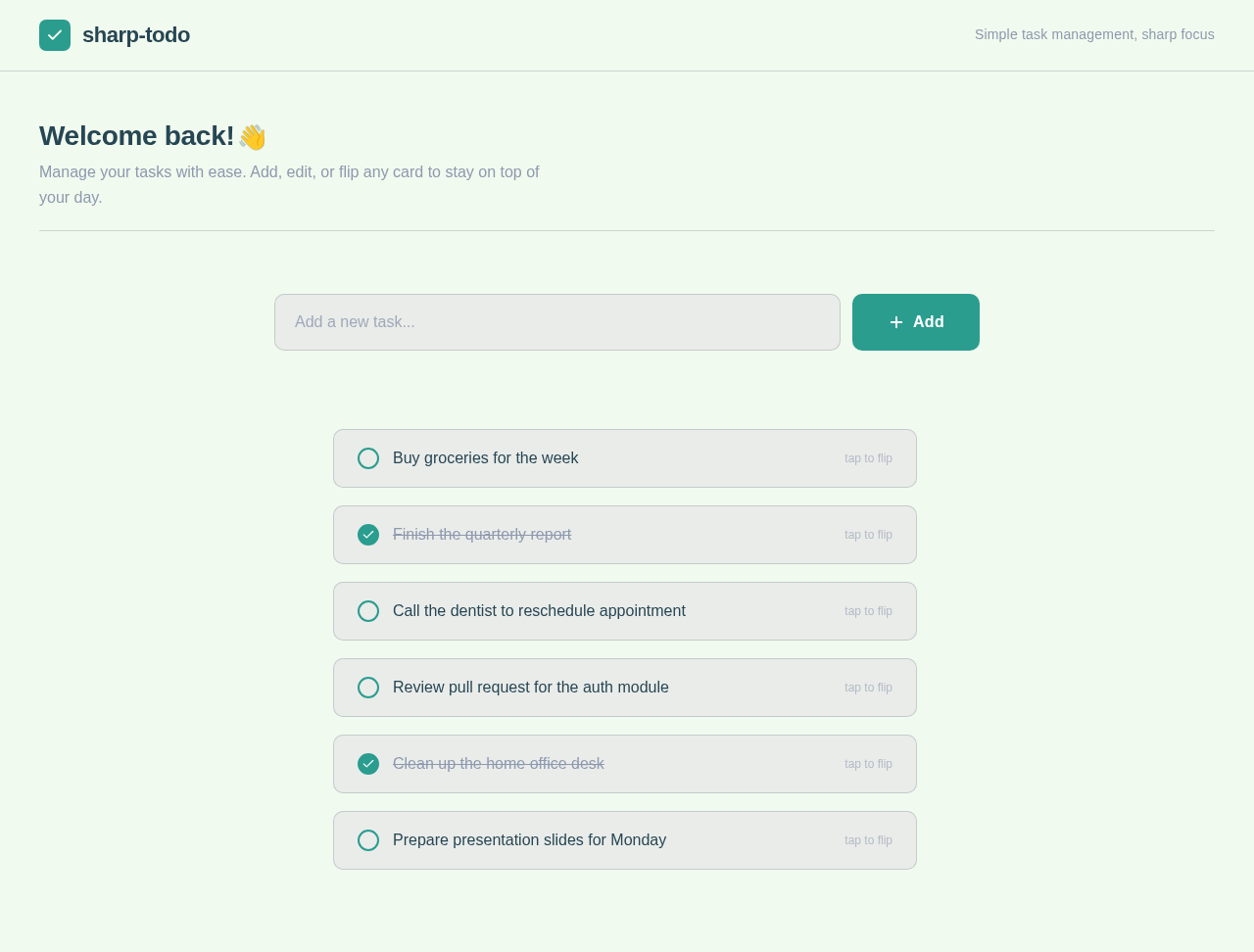
sharp-todo
Simple task management, sharp focus
Welcome back!👋
Manage your tasks with ease. Add, edit, or flip any card to stay on top of your day.
Use the input above to create your first task→
No comments yet. Be the first!