sharp-project
Create simple calculator

Comments (0)
Sign in to leave a comment
Project Tasks7
Implement CalculatorHeader for Calculator
As a frontend developer, implement the CalculatorHeader section for the Calculator page. This section renders a <header className='ch-header'> containing: (1) a decorative layer with 6 animated math symbols (+, −, ×, ÷, =, %) using framer-motion with `decoVariants` (opacity: 0.06, scale spring animation, staggered delays via `custom` prop); (2) a `ch-content` div with an animated title row that splits 'sharp-project Calculator' into individual characters using `useMemo`, each character animated with `charVariants` (y: 40→0, rotateX: -90→0, spring stiffness 260, per-char delay of 0.025*i); (3) a `motion.p` subtitle with `subtitleVariants` (y: 16→0, opacity fade, delayed after title completes); (4) a `motion.div` separator line with `lineVariants` (scaleX: 0→1). Uses `framer-motion` for all animations. Accessibility: title row uses aria-label and role='heading' aria-level='1', individual chars are aria-hidden. This is the root layout section — no cross-page dependencies.
Implement CalculatorDisplay for Calculator
As a frontend developer, implement the CalculatorDisplay section for the Calculator page. This section renders the calculator's live display using 5 state hooks: `expression` (string), `display` (string, init '0'), `currentOp` (null|string), `prevValue` (null|string), `waitingForOperand` (boolean). Core logic: `calculate` useCallback handles +, -, *, / with division-by-zero guard returning 'Error'. `handleKeyDown` useCallback handles digit input (0-9), decimal (.), operator keys (+,-,*,/), Enter/= for evaluation, Escape/C/c for clear, and Backspace for delete — all wired via `useEffect` on `window.addEventListener('keydown')`. Display uses `AnimatePresence` with `mode='wait'` for animated transitions between values, and `displayChars = display.split('')` for per-character rendering. OPERATORS map converts raw symbols to display glyphs (÷, ×, −). This section is independent of CalculatorHeader and can be built in parallel.
Implement CalculatorGrid for Calculator
As a frontend developer, implement the CalculatorGrid section for the Calculator page. This section renders an 18-button calculator keypad defined by a static `buttons` array with typed entries (type: 'clear'|'operator'|'number'|'highlight'|'equals') and a `wide: true` flag for the '0' button. Uses `pressedKey` state and `handlePress` useCallback (sets pressedKey, auto-clears after 200ms timeout) to drive animated press feedback. Each button is a `motion.button` with: `whileTap={{ scale: 0.88 }}`, `animate` prop providing a bounce keyframe sequence `[1, 0.88, 1.06, 1]` when pressed, `whileHover={{ y: -2 }}`, and `springTransition` (stiffness: 500, damping: 15, mass: 0.6). Button CSS classes are composed dynamically (`cg-btn`, `cg-btn--{type}`, `cg-btn--zero`). Each button includes a `<span className='cg-ripple' />` and full aria-label accessibility mapping for operators and special keys. This section is independent of CalculatorHeader and CalculatorDisplay and can be built in parallel.
Implement CalculatorFooter for Calculator
As a frontend developer, implement the CalculatorFooter section for the Calculator page. This section renders a <footer className='cf-footer'> containing a single `motion.div` with `initial={{ opacity: 0, y: 12 }}`, `animate={{ opacity: 1, y: 0 }}`, and `transition={{ duration: 0.5, ease: 'easeOut', delay: 0.3 }}`. Inside: a `cf-divider` line element, a `cf-accessibility-note` paragraph referencing WCAG standards and responsive design, a `cf-branding` div with a `cf-branding-dot` span and 'sharp-project' text, and a `cf-copyright` paragraph showing '© 2026 sharp-project. All rights reserved.' This is a simple static section — no state, no API calls. This section is independent of other Calculator sections and can be built in parallel.
Build Calculate API Endpoint
As a Backend Developer, implement a FastAPI endpoint POST /api/calculate that accepts a JSON body with fields: `operand1` (float), `operand2` (float), and `operator` (string: '+', '-', '*', '/'). Returns a JSON response with `result` (float or string 'Error' for division by zero) and `expression` (string). Include input validation via Pydantic models, proper HTTP error handling, and CORS configuration to allow requests from the React frontend. This endpoint supports the CalculatorDisplay section's calculation logic and can optionally offload server-side computation.
Setup Global Theme Design System
As a Frontend Developer, configure the global theme and design system for the sharp-project React app. Define CSS custom properties (variables) for the full color palette: primary (#1A73E8), primary_light (#E8F0FE), secondary (#F4B400), accent (#EA4335), highlight (#FBBC05), bg (#FFFFFF), surface (rgba(240,240,240,0.8)), text (#202124), text_muted (#5F6368), border (rgba(218,220,224,0.2)). Set up global base styles, typography, reset CSS, and responsive breakpoints. Install and configure framer-motion for the animated interaction model. This is a prerequisite for all frontend section tasks.
Integrate Calculator Frontend Backend
As a Tech Lead, verify the end-to-end integration between the Calculator frontend implementation and the Calculate API backend endpoint. Ensure data flows correctly from CalculatorDisplay's handleKeyDown/calculate logic through the POST /api/calculate endpoint, API responses (result, expression) are handled and rendered correctly in the display, error states (division by zero, invalid input) surface properly in the UI, and all arithmetic operations work as expected. Note: CalculatorDisplay (fd72f216), CalculatorGrid (4d78e419), and the backend API task (temp_backend_calculate_api) must be completed before this integration task.
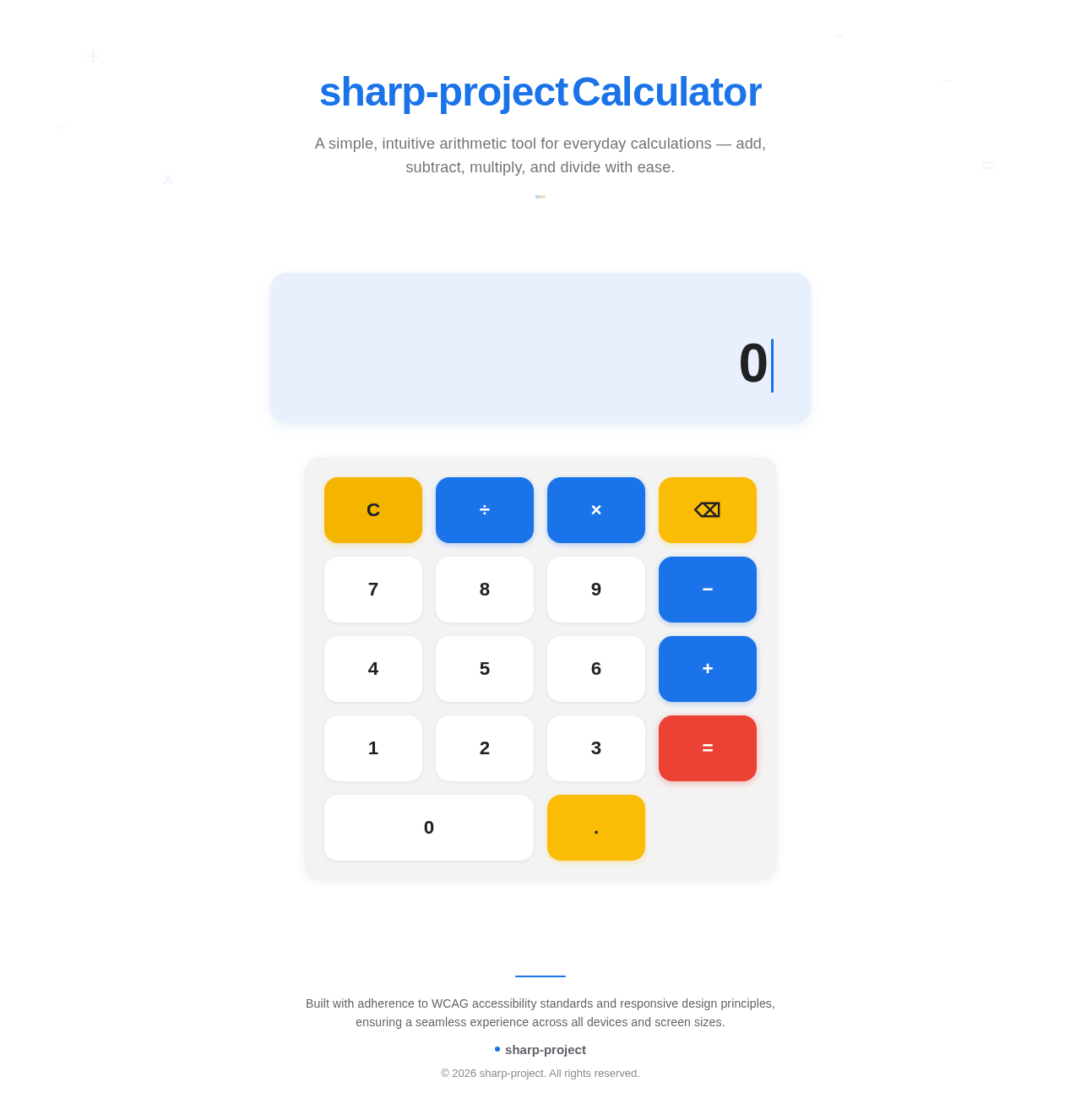
A simple, intuitive arithmetic tool for everyday calculations — add, subtract, multiply, and divide with ease.
No comments yet. Be the first!