sharp-page
want to create a prject of simple single page calculator

Comments (0)
Sign in to leave a comment
Project Tasks6
Implement CalculatorContainer for Calculator
As a frontend developer, implement the CalculatorContainer section for the Calculator page. This section is the core calculator UI built with React hooks: `useState` (display, expression, operand, operator, waitingForOperand, isResult, bouncingKey), `useCallback`, and `useEffect`. Implement the BUTTONS array (19 buttons including zero with gridSpan:2) rendered via a button grid, with types: 'clear', 'sign', 'percent', 'operator', 'number', 'zero', 'decimal', 'equals'. Implement handlers: `handleNumber` (12-char input cap), `handleDecimal`, `handleOperator` (chained operations), `handleEquals` (dispatches `calculatorResult` CustomEvent with expression+result), `handleClear` (resets all state), `handleSign` (+/-), `handlePercent`. Implement `triggerBounce` via `bouncingKey` state for CSS bounce animation on button press. Implement `formatDisplay` utility (toPrecision(12), toExponential fallback for >14 chars, DISPLAY_LABELS mapping * → × and / → ÷). Listen for `calculatorLoad` CustomEvent to load a value from HistoryPanel back into display. Wire up CalculatorContainer.css with 4-column grid layout, button type styling (operator=blue #3498db, equals, clear, zero span). This is a root page with no cross-page dependencies.
Setup Theme and Design System
As a Frontend Developer, set up the global theme and design system for the sharp-page calculator application. Configure CSS variables or a theme file with the defined color palette: primary (#3498db), primary_light (#85c1e9), secondary (#2ecc71), accent (#e74c3c), highlight (#f1c40f), bg (#ecf0f1), surface (rgba(255,255,255,0.9)), text (#2c3e50), text_muted (#95a5a6), border (rgba(44,62,80,0.2)). Set up global styles including font families, base resets, and responsive breakpoints. Ensure the bounce animation keyframe is defined globally for reuse by CalculatorContainer. This task should be completed before the section-level frontend tasks.
Implement HistoryPanel for Calculator
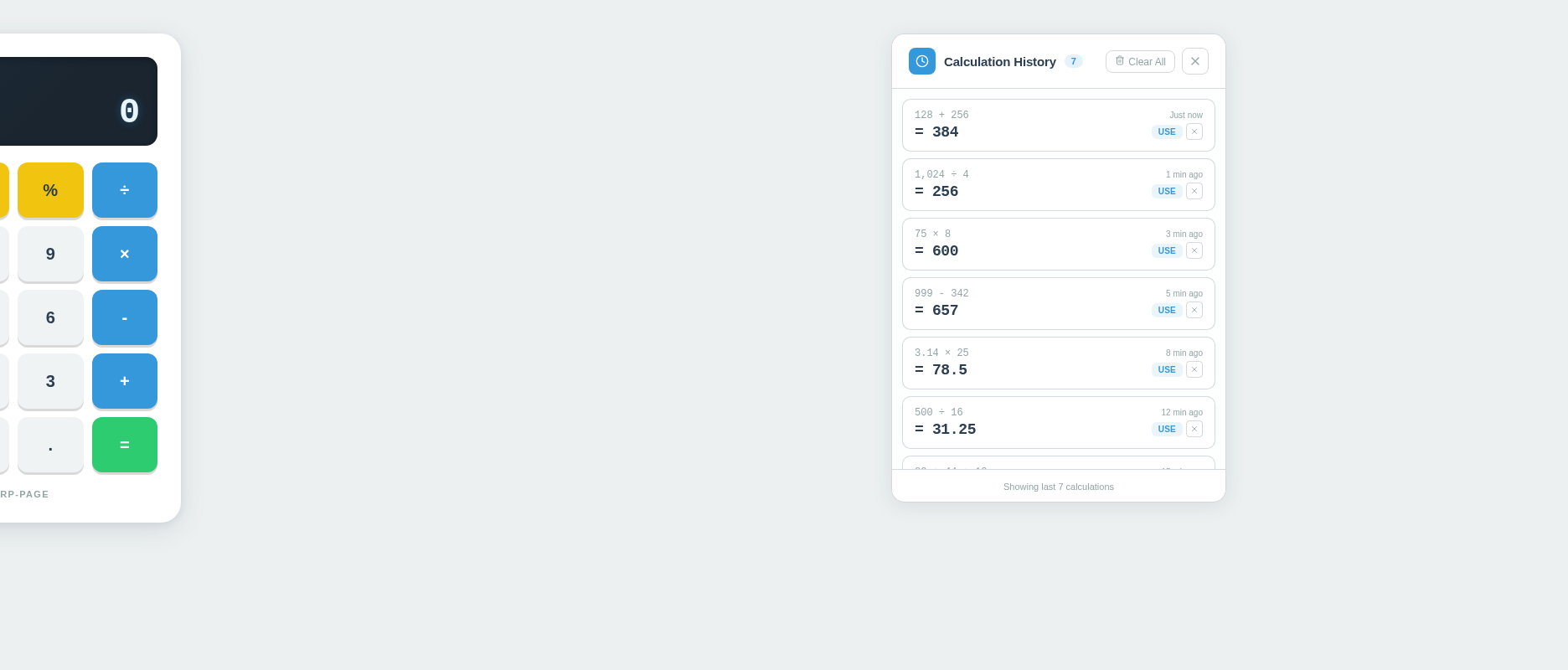
As a frontend developer, implement the HistoryPanel section for the Calculator page. This section renders a slide-in history panel using React hooks: `useState` (history array initialized with 7 SAMPLE_HISTORY entries, visible boolean), `useEffect` (event listener), and `useRef` (listRef for scroll). Implement event-driven integration: listen for `calculatorResult` CustomEvent (dispatched by CalculatorContainer on equals) to prepend new entries with auto-incrementing `nextId`; dispatch `calculatorLoad` CustomEvent via `handleUseEntry` to send a past result back to the calculator display. Implement handlers: `handleClearAll` (empty history array), `handleRemoveEntry` (filter by id), `handleClose` (setVisible false, returns null). Render hp-root > hp-panel with: hp-header containing hp-title-group (Clock icon from lucide-react, title text, hp-count-badge showing history.length), hp-header-actions (Trash2 'Clear All' button, X close button with aria-label). Render history list with per-entry: expression, result, RotateCcw 'use' button, X remove button, time label. Render empty state div when history.length === 0. Wire up HistoryPanel.css (6314 chars) panel styling. HistoryPanel depends on CalculatorContainer for the CustomEvent contract.
Ensure Responsive Accessibility Setup
As a Frontend Developer, implement global responsive design and accessibility configurations for the sharp-page calculator. Set up responsive CSS media queries so the calculator layout adapts correctly across desktop, tablet, and mobile screen sizes. Add ARIA roles, labels, and keyboard navigation support to ensure the calculator is accessible. Verify color contrast ratios meet WCAG AA standards using the defined color palette. Note: depends on temp_theme_setup for base theme variables.
Deploy Static React Application
As a DevOps Engineer, configure the build and deployment pipeline for the sharp-page single-page static React application. Set up the production build process (e.g., Vite or Create React App build scripts), configure static file serving, and ensure the application is deployable to a static hosting environment. Verify that the built assets load quickly and that the SPA routing works correctly on the target hosting platform. Note: The SRD specifies this is a static site with no backend integration.
Integrate Calculator and HistoryPanel
As a Tech Lead, verify the end-to-end integration between the CalculatorContainer frontend implementation and the HistoryPanel frontend implementation. Ensure the CustomEvent contract works correctly: `calculatorResult` is dispatched by CalculatorContainer on equals press and correctly received by HistoryPanel to prepend a new entry; `calculatorLoad` is dispatched by HistoryPanel on 'use' button click and correctly received by CalculatorContainer to load the past result into the display. Verify history count badge updates, clear-all and remove-entry interactions, and slide-in panel visibility toggling all work end-to-end across both components.
No comments yet. Be the first!