shadow-calculator
create a project to build a simple single page calculator with no advance operations

Comments (0)
Sign in to leave a comment
Project Tasks9
Implement CalculatorHeader for Calculator
As a frontend developer, implement the CalculatorHeader section for the Calculator page. This section renders a <header> with className 'ch-header' containing a centered content block. It uses framer-motion to animate three elements on mount: (1) an <h1> with className 'ch-title' displaying 'Shadow-Calculator' that slides in from y:-18 with opacity fade over 0.6s using a custom cubic-bezier ease [0.22,1,0.36,1]; (2) a <p> with className 'ch-tagline' displaying 'Simple. Fast. Accurate.' that fades in from y:8 with a 0.3s delay; (3) a decorative underline wrapper with className 'ch-underline-wrapper' that animates scaleX from 0 to 1 with a 0.55s delay, revealing a <div className='ch-underline'> accent bar. Import CalculatorHeader.css for layout and typography styles. No state or props required — purely presentational with entrance animations.
Implement Calculator Logic Engine
As a Frontend Developer, implement the core calculator logic that wires together the CalculatorKeypad and CalculatorDisplay components. Create a calculatorEngine module (or hook) that: (1) maintains state for currentValue, previousValue, operator, and waitingForOperand; (2) handles number input, operator selection, equals evaluation, and clear operations; (3) dispatches 'calculator-update' custom DOM events on window with detail.value and detail.expression so CalculatorDisplay can subscribe and update. Handle edge cases: division by zero (return 'Error'), chaining operations, and operator override. This is the integration glue referenced in the CalculatorKeypad task description ('does NOT yet dispatch calculator-update events'). Note: depends on CalculatorKeypad (39cfc456) and CalculatorDisplay (8dbaf985) being implemented.
Setup Theme and Design System
As a Frontend Developer, set up the global CSS design-system / theme layer for Shadow-Calculator. Create a tokens file (e.g. tokens.css or theme.js) defining all color variables from the SRD: primary #4A90E2, primary_light #A6C8FF, secondary #FF6F61, accent #FFD700, highlight #FFA500, bg #F5F5F5, surface rgba(255,255,255,0.9), text #333333, text_muted #777777, border rgba(0,0,0,0.1). Set up global CSS resets, base typography (large readable numbers), and ensure framer-motion is installed and configured. Establish responsive breakpoints for desktop and mobile. This is a prerequisite for all section-level styling tasks (CalculatorHeader, CalculatorKeypad, CalculatorDisplay, CalculatorFooter).
Implement CalculatorDisplay for Calculator
As a frontend developer, implement the CalculatorDisplay section for the Calculator page. This section uses useState for 'displayValue' (default '0'), 'expression' (default ''), and 'animKey' (integer counter), plus a useRef 'prevValueRef' to track the previous value. It subscribes to a custom DOM event 'calculator-update' on window via useEffect, reading e.detail.value and e.detail.expression to update display state and increment animKey to trigger re-animation. The formatDisplay() function handles edge cases: empty/null/undefined returns '0'; 'Error'/'Infinity'/'-Infinity'/'NaN' pass through; numbers ≥1e12 use toExponential(4); all others use toLocaleString('en-US') with decimal preservation. The render uses a framer-motion <motion.div className='cd-panel'> with spring entrance (stiffness:260, damping:24, delay:0.1). Inside, an AnimatePresence wraps the expression text with expressionVariants (spring x slide, stiffness:300, damping:24) and the main display value with resultVariants (spring scale+y, stiffness:400, damping:28, mass:0.8) — both using mode='wait' and keyed by their values for exit/enter animation on change. Import CalculatorDisplay.css.
Implement CalculatorFooter for Calculator
As a frontend developer, implement the CalculatorFooter section for the Calculator page. This section renders a <motion.footer className='cf-footer'> that animates in from y:8 with opacity fade over 0.4s with a 0.2s delay (easeOut). Inside a 'cf-inner' div, a top row ('cf-top-row') displays a copyright span 'Shadow-Calculator © 2024', a decorative separator span (aria-hidden), and a version badge 'v1.0'. A bottom row ('cf-bottom-row') contains a keyboard hint using semantic <kbd className='cf-kbd'> elements showing '0'–'9' and 'Enter' for quick input. A 'cf-accessibility' span announces full keyboard support for accessibility. No state or props required — purely presentational with a single entrance animation. Import CalculatorFooter.css.
Assemble Calculator Page Layout
As a Frontend Developer, create the top-level Calculator page component that composes all four sections: CalculatorHeader, CalculatorDisplay, CalculatorKeypad, and CalculatorFooter. Implement the 'floating keypad' shadow effect using CSS box-shadow that moves dynamically on user interaction as specified in the Signature Design Concept. Ensure the page is responsive (desktop and mobile) per Non-Functional Requirements. Wire the page into the React app entry point. Note: depends on all four section tasks (10001004, 39cfc456, 5639d404, 8dbaf985) and the calculator logic engine (temp_calc_logic) being implemented.
Implement CalculatorKeypad for Calculator
As a frontend developer, implement the CalculatorKeypad section for the Calculator page. This section defines a static BUTTONS array of 18 button config objects with label, type ('clear','operation','number','equals'), optional id, and optional span (boolean for zero-wide button). It uses useState for 'ripples' (object keyed by button index holding arrays of {id,x,y}) and useRef 'rippleCounter' for unique ripple IDs. The handleRipple useCallback computes click position relative to the button's bounding rect, adds a ripple entry, then removes it after 500ms via setTimeout. Each button renders as a <motion.button> with whileTap scale:0.92, whileHover scale:1.05, and a springTransition (stiffness:500, damping:15, mass:0.8). Button CSS classes are built by getButtonClass() combining 'ck-btn', 'ck-btn--{type}', and 'ck-btn--zero' for span buttons. Ripple spans are rendered inside each button with position data. The outer <motion.div className='ck-keypad-inner'> animates in from y:30 over 0.5s easeOut. The keypad currently renders buttons but does NOT yet dispatch calculator-update events — note this integration point for wiring up calculator logic. Import CalculatorKeypad.css.
Configure Static Frontend Deployment
As a DevOps Engineer, configure the build and deployment pipeline for the Shadow-Calculator static frontend. Set up: (1) production build script (e.g. npm run build / vite build) outputting optimized static assets; (2) CI/CD pipeline (e.g. GitHub Actions) that builds and deploys on push to main; (3) static hosting configuration (e.g. Nginx config, CDN, or static host such as Vercel/Netlify/S3). Ensure the app loads within 2 seconds on a standard connection per NFRs. Configure environment-appropriate asset caching headers. Note: No backend deployment needed per SRD (Backend: None required).
Integrate Calculator End-to-End Flow
As a Tech Lead, verify the end-to-end integration of the complete Shadow-Calculator application. Ensure: (1) CalculatorKeypad button presses correctly dispatch 'calculator-update' events via the logic engine; (2) CalculatorDisplay receives and renders updated values and expressions with correct animations; (3) all arithmetic operations (add, subtract, multiply, divide), clear, chaining, and edge cases (division by zero) work correctly in the assembled page; (4) keyboard hints shown in CalculatorFooter map correctly to functional inputs if keyboard support is wired; (5) entrance animations for all sections play correctly on load. Note: depends on temp_calculator_page and temp_calc_logic being complete.
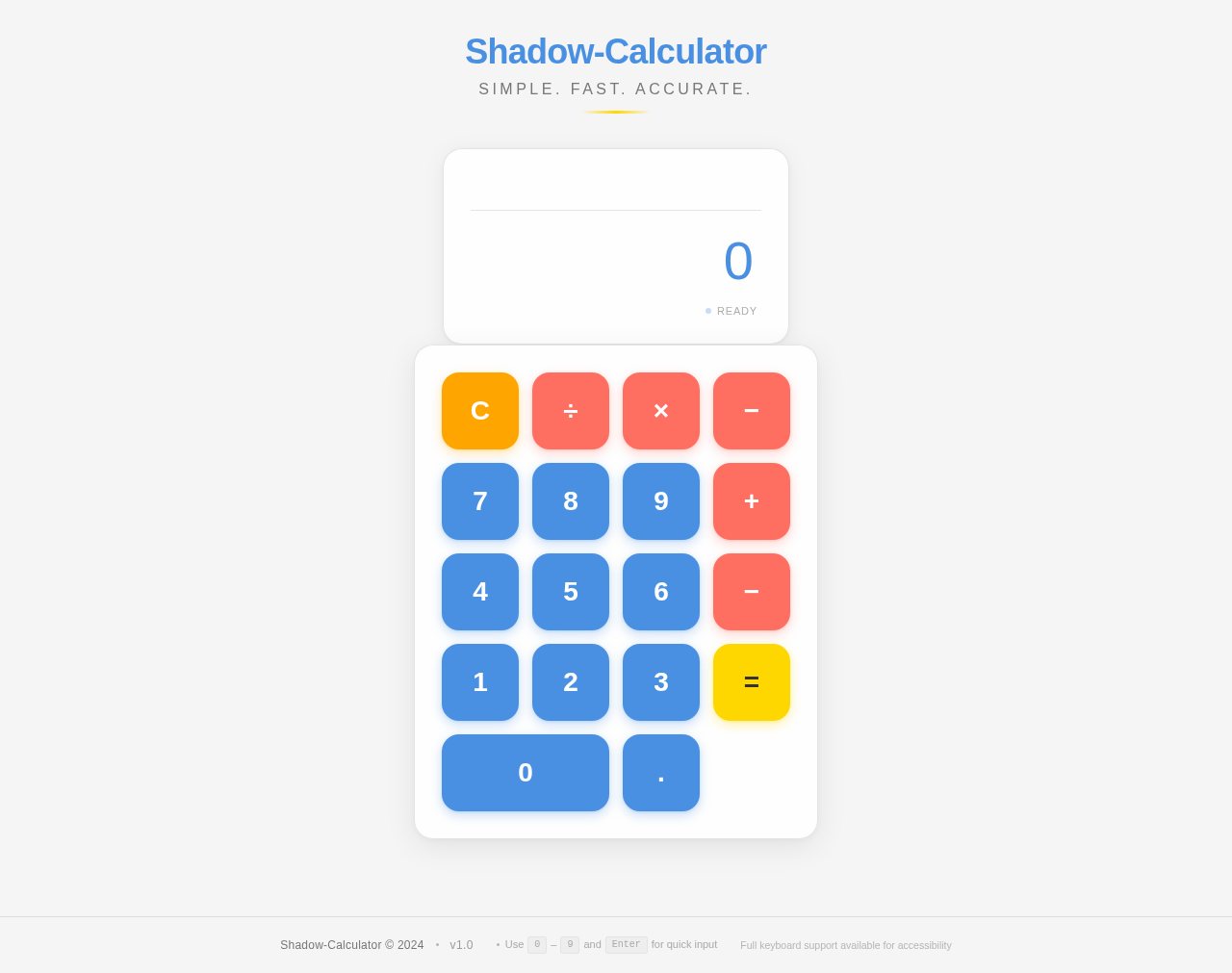
Shadow-Calculator
Simple. Fast. Accurate.
No comments yet. Be the first!