sehatscribe-ai
 Muhammad ramzan
# SehatScribe AI — Medical Assistant Web App Act as a senior full-stack developer, AI engineer, healthcare software architect, and professional UI/UX designer. Build a responsive web app called **SehatScribe AI** for doctors in Pakistan. Its main purpose is to save doctors' time by converting speech into clinical notes and explaining handwritten prescriptions in simple Urdu or English. IMPORTANT: This is a clinical documentation assistant, NOT an autonomous doctor. Never invent diagnoses, medicines, dosages, allergies, examination findings, or missing medical information. ## 1. DESIGN AND INTERFACE Create a premium, professional healthcare SaaS dashboard: - Clean white background, blue/teal accents, modern cards and professional icons. - Responsive on desktop, tablet and mobile. - English and Urdu language switch. - Proper right-to-left layout for Urdu. - Simple navigation: Dashboard, New Consultation, Prescription Reader, Saved Drafts, Settings. - Professional loading, error, empty and success states. - All visible buttons must work. - Use React and TypeScript if supported. ## 2. FEATURE A: VOICE-TO-MEDICAL-NOTES Create a working microphone interface with Start, Stop, Pause/Resume where supported, recording status, and editable transcription. Support Urdu, English, and mixed Urdu-English speech where the chosen speech recognition engine permits it. Use browser speech recognition if available. If unsupported or permission is denied, show a clear error and provide a manual text input fallback. Never pretend recording or transcription succeeded when it did not. After transcription, use Gemini AI to organize the doctor's actual words into: 1. Chief Complaint 2. History of Present Illness 3. Duration of Symptoms 4. Relevant Symptoms 5. Medical History 6. Allergies 7. Current Medicines 8. Examination Findings 9. Doctor's Assessment 10. Plan and Instructions 11. Missing or Unclear Information Only populate fields supported by the doctor's words. Keep unspecified fields empty or label them "Not provided." Preserve medicine names, numbers, strengths, units, negations and durations. Flag uncertain words, numbers, medicine names and dosages for doctor review. Allow the doctor to edit the original transcript and every generated section before saving or printing. ## 3. FEATURE B: PRESCRIPTION IMAGE READER Create a prescription upload tool with: - Drag-and-drop and file selection. - Image preview, replace and remove controls. - File type and size validation. - Clear processing and error messages. Use a real image-capable Gemini model or suitable OCR integration to extract the visible handwriting. Display two separate panels: A. Extracted Prescription Text B. Simple Patient-Friendly Explanation Requirements: - Preserve the original medicine names, strengths, frequency, quantity and duration as written. - Mark unclear handwriting and uncertain fields as "Needs confirmation." - Never guess unreadable medicine names or dosages. - Explain only what can reasonably be supported by the prescription. - Provide Urdu and English explanations. - Clearly separate extracted text from AI interpretation. - Do not independently recommend medicines, change dosages, stop medicines, or make treatment decisions. - If a medicine's purpose cannot be established confidently, tell the user to confirm with the doctor or pharmacist. ## 4. FEATURE C: EDITABLE CLINICAL DOCUMENT Create an editable, print-friendly A4 document containing: - Configurable clinic and doctor name. - Patient name or demo ID. - Consultation date. - Clinical notes. - Medicine details only when explicitly supplied and confirmed by the doctor. - Doctor's instructions and patient-friendly explanation. Include Edit, Copy, Print, Clear Draft and Review controls. The output must have a clear DRAFT / REQUIRES DOCTOR REVIEW status until the doctor explicitly confirms it. Never automatically sign or finalize a prescription. ## 5. DASHBOARD Show: - Welcome section. - New Consultation button. - Upload Prescription button. - Recent demo drafts. - Simple demo statistics, clearly labelled as demo data. - Privacy notice and doctor-review reminder. Use synthetic patient information only during development. ## 6. GEMINI API INTEGRATION Integrate the currently supported image-capable Gemini model through a secure server-side API route. - Never hardcode API keys in client-side code. - Read secrets from environment variables. - Validate inputs and structured outputs. - Handle quota limits, timeouts, API errors and malformed responses. - Use structured JSON output where supported. - Keep UI, AI processing and validation logic separate. - Do not use fake AI responses or hardcoded success messages. - Explain any missing API key or configuration requirement. - Provide manual fallback functionality when AI is unavailable. Suggested structured response: { "extracted_text": "", "clinical_sections": {}, "patient_explanation": "", "uncertain_fields": [], "missing_information": [], "review_required": true } Validate the response before displaying it. Do not render model output as trusted HTML. ## 7. PRIVACY AND SECURITY For this prototype: - Use synthetic demo patients only. - Do not upload real medical records. - Explain when information is sent to an external AI service. - Do not save raw audio or prescription images unnecessarily. - Provide a way to clear temporary data. - Do not store sensitive medical data in browser local storage by default. - Never claim medical privacy compliance without verification. Before real clinical use, implement and review authentication, authorization, encryption, secure storage, retention/deletion policies, audit logs and backups. ## 8. DEVELOPMENT PLAN Build in phases: Phase 1: Complete responsive dashboard and functional UI. Phase 2: Voice recording, transcription, editing and fallback. Phase 3: Prescription image upload and real AI/OCR extraction. Phase 4: Urdu/English patient-friendly explanation. Phase 5: Doctor review, draft editing, copy and print. Phase 6: Test and fix the complete workflow. Start with Phase 1. Build clean, reusable code that supports later integration. Do not rebuild working components unnecessarily. ## 9. ACCEPTANCE TESTS Verify: - App runs without compilation errors. - English/Urdu switching works, including Urdu RTL. - Microphone permissions and unsupported browsers are handled. - Prescription images can be previewed, replaced and removed. - Unreadable text is flagged rather than guessed. - Missing clinical information is never fabricated. - The doctor can edit, review, copy and print. - Loading and API errors are handled. - API secrets are not exposed in browser code. - All visible controls have functional behavior. After each phase, summarize files changed, working features, setup requirements, limitations and tests performed. Build a polished, usable MVP first. Prioritize reliability, doctor control, simple Urdu explanations, accessibility and privacy over unnecessary features. BEGIN WITH PHASE 1 NOW. Do not merely describe the app; implement it in the available environment.

Comments (0)
Sign in to leave a comment
Project Tasks
30 planning tasksGenerate system requirement document
Generate personas & user flows
Create flow for Doctor
Create flow for Clinic Administrator / Clinic Setup Owner
Landing
Fix Landing review finding: frontend/src/components/Navigation.jsx: The anonymous Landing…
Fix Landing review findings: Q2 as reviewed now: The entry tiles are stacked… (+1 more)
Fix Landing review findings: Hero readout labels break into unreadable fragments at… (+3 more)
Landing / Navigation
Landing / Instrument Band
Landing / Entry Tiles
Landing / Capability Ledger
Landing / Boundary Statement
Landing / Footer
Fix Landing: Hero readout labels break into unreadable fragments at desktop and tablet…
Fix Landing: Entry tile text is broken into narrow, fragmented lines at tablet width…
Fix Landing: Measured internal clipping at mobile (375px viewport): button.lib-lang__btn clipped by…
Fix Landing: The landing entry surface renders a permanent failure state because the orchestrator…
Fix Landing: The anonymous Landing page still exposes navigation links to protected workspace…
Navigation
Footer
Login
Dashboard
Sign Up
New Consultation
Prescription Reader
Saved Drafts
Settings
Architecture
Workspace task plan
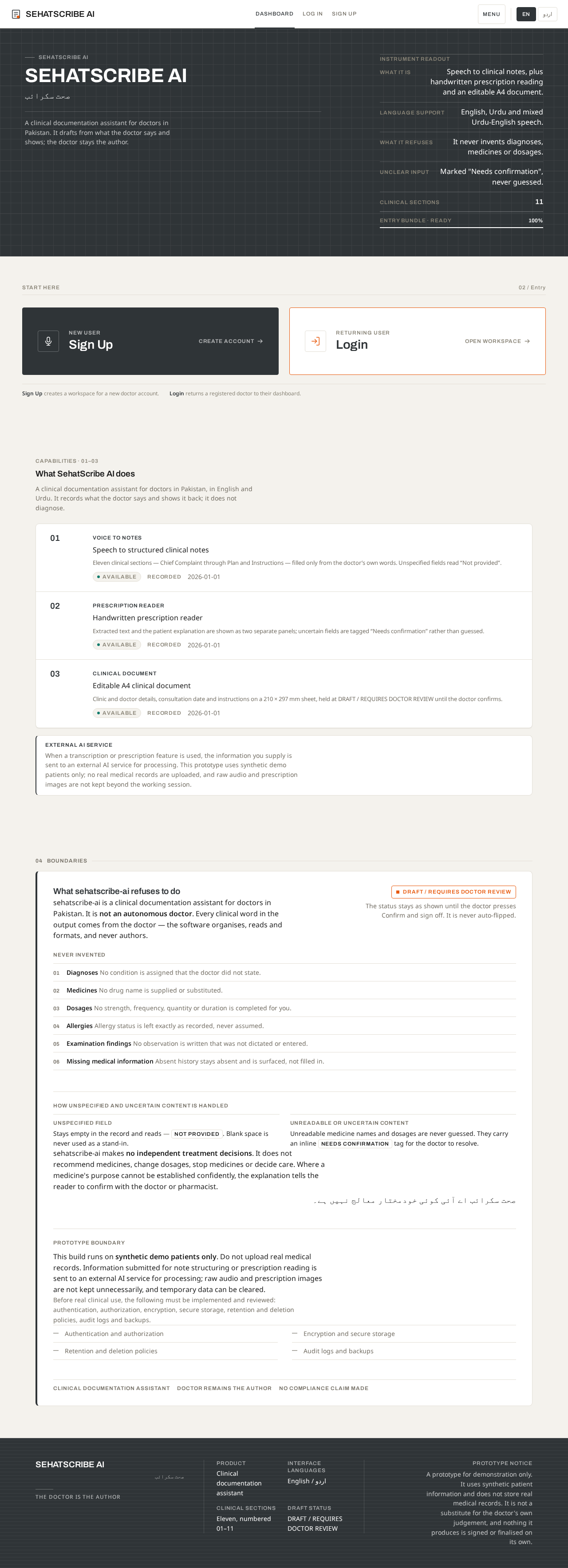
SehatScribe AI
صحت سکرائب
A clinical documentation assistant for doctors in Pakistan. It drafts from what the doctor says and shows; the doctor stays the author.
Instrument readout
Start here
02 / EntrySign Up creates a workspace for a new doctor account.
Login returns a registered doctor to their dashboard.
Capabilities · 01–03
What SehatScribe AI does
A clinical documentation assistant for doctors in Pakistan, in English and Urdu. It records what the doctor says and shows it back; it does not diagnose.
- Voice to notesSpeech to structured clinical notesEleven clinical sections — Chief Complaint through Plan and Instructions — filled only from the doctor’s own words. Unspecified fields read “Not provided”.
- Prescription readerHandwritten prescription readerExtracted text and the patient explanation are shown as two separate panels; uncertain fields are tagged “Needs confirmation” rather than guessed.
- Clinical documentEditable A4 clinical documentClinic and doctor details, consultation date and instructions on a 210 × 297 mm sheet, held at DRAFT / REQUIRES DOCTOR REVIEW until the doctor confirms.
External AI service
When a transcription or prescription feature is used, the information you supply is sent to an external AI service for processing. This prototype uses synthetic demo patients only; no real medical records are uploaded, and raw audio and prescription images are not kept beyond the working session.
What sehatscribe-ai refuses to do
sehatscribe-ai is a clinical documentation assistant for doctors in Pakistan. It is not an autonomous doctor. Every clinical word in the output comes from the doctor — the software organises, reads and formats, and never authors.
Never invented
- Diagnoses No condition is assigned that the doctor did not state.
- Medicines No drug name is supplied or substituted.
- Dosages No strength, frequency, quantity or duration is completed for you.
- Allergies Allergy status is left exactly as recorded, never assumed.
- Examination findings No observation is written that was not dictated or entered.
- Missing medical information Absent history stays absent and is surfaced, not filled in.
How unspecified and uncertain content is handled
Stays empty in the record and reads — Not provided. Blank space is never used as a stand-in.
Unreadable medicine names and dosages are never guessed. They carry an inline Needs confirmation tag for the doctor to resolve.
sehatscribe-ai makes no independent treatment decisions. It does not recommend medicines, change dosages, stop medicines or decide care. Where a medicine's purpose cannot be established confidently, the explanation tells the reader to confirm with the doctor or pharmacist.
صحت سکرائب اے آئی کوئی خودمختار معالج نہیں ہے۔
Prototype boundary
This build runs on synthetic demo patients only. Do not upload real medical records. Information submitted for note structuring or prescription reading is sent to an external AI service for processing; raw audio and prescription images are not kept unnecessarily, and temporary data can be cleared.
Before real clinical use, the following must be implemented and reviewed: authentication, authorization, encryption, secure storage, retention and deletion policies, audit logs and backups.
- Authentication and authorization
- Encryption and secure storage
- Retention and deletion policies
- Audit logs and backups
SehatScribe AI
صحت سکرائب
A clinical documentation assistant for doctors in Pakistan. It drafts from what the doctor says and shows; the doctor stays the author.
Instrument readout
Start here
02 / EntrySign Up creates a workspace for a new doctor account.
Login returns a registered doctor to their dashboard.
Capabilities · 01–03
What SehatScribe AI does
A clinical documentation assistant for doctors in Pakistan, in English and Urdu. It records what the doctor says and shows it back; it does not diagnose.
- Voice to notesSpeech to structured clinical notesEleven clinical sections — Chief Complaint through Plan and Instructions — filled only from the doctor’s own words. Unspecified fields read “Not provided”.
- Prescription readerHandwritten prescription readerExtracted text and the patient explanation are shown as two separate panels; uncertain fields are tagged “Needs confirmation” rather than guessed.
- Clinical documentEditable A4 clinical documentClinic and doctor details, consultation date and instructions on a 210 × 297 mm sheet, held at DRAFT / REQUIRES DOCTOR REVIEW until the doctor confirms.
External AI service
When a transcription or prescription feature is used, the information you supply is sent to an external AI service for processing. This prototype uses synthetic demo patients only; no real medical records are uploaded, and raw audio and prescription images are not kept beyond the working session.
What sehatscribe-ai refuses to do
sehatscribe-ai is a clinical documentation assistant for doctors in Pakistan. It is not an autonomous doctor. Every clinical word in the output comes from the doctor — the software organises, reads and formats, and never authors.
Never invented
- Diagnoses No condition is assigned that the doctor did not state.
- Medicines No drug name is supplied or substituted.
- Dosages No strength, frequency, quantity or duration is completed for you.
- Allergies Allergy status is left exactly as recorded, never assumed.
- Examination findings No observation is written that was not dictated or entered.
- Missing medical information Absent history stays absent and is surfaced, not filled in.
How unspecified and uncertain content is handled
Stays empty in the record and reads — Not provided. Blank space is never used as a stand-in.
Unreadable medicine names and dosages are never guessed. They carry an inline Needs confirmation tag for the doctor to resolve.
sehatscribe-ai makes no independent treatment decisions. It does not recommend medicines, change dosages, stop medicines or decide care. Where a medicine's purpose cannot be established confidently, the explanation tells the reader to confirm with the doctor or pharmacist.
صحت سکرائب اے آئی کوئی خودمختار معالج نہیں ہے۔
Prototype boundary
This build runs on synthetic demo patients only. Do not upload real medical records. Information submitted for note structuring or prescription reading is sent to an external AI service for processing; raw audio and prescription images are not kept unnecessarily, and temporary data can be cleared.
Before real clinical use, the following must be implemented and reviewed: authentication, authorization, encryption, secure storage, retention and deletion policies, audit logs and backups.
- Authentication and authorization
- Encryption and secure storage
- Retention and deletion policies
- Audit logs and backups
No comments yet. Be the first!