sehatscribe-ai
 Muhammad ramzan
# SehatScribe AI — Medical Assistant Web App Act as a senior full-stack developer, AI engineer, healthcare software architect, and professional UI/UX designer. Build a responsive web app called **SehatScribe AI** for doctors in Pakistan. Its main purpose is to save doctors' time by converting speech into clinical notes and explaining handwritten prescriptions in simple Urdu or English. IMPORTANT: This is a clinical documentation assistant, NOT an autonomous doctor. Never invent diagnoses, medicines, dosages, allergies, examination findings, or missing medical information. ## 1. DESIGN AND INTERFACE Create a premium, professional healthcare SaaS dashboard: - Clean white background, blue/teal accents, modern cards and professional icons. - Responsive on desktop, tablet and mobile. - English and Urdu language switch. - Proper right-to-left layout for Urdu. - Simple navigation: Dashboard, New Consultation, Prescription Reader, Saved Drafts, Settings. - Professional loading, error, empty and success states. - All visible buttons must work. - Use React and TypeScript if supported. ## 2. FEATURE A: VOICE-TO-MEDICAL-NOTES Create a working microphone interface with Start, Stop, Pause/Resume where supported, recording status, and editable transcription. Support Urdu, English, and mixed Urdu-English speech where the chosen speech recognition engine permits it. Use browser speech recognition if available. If unsupported or permission is denied, show a clear error and provide a manual text input fallback. Never pretend recording or transcription succeeded when it did not. After transcription, use Gemini AI to organize the doctor's actual words into: 1. Chief Complaint 2. History of Present Illness 3. Duration of Symptoms 4. Relevant Symptoms 5. Medical History 6. Allergies 7. Current Medicines 8. Examination Findings 9. Doctor's Assessment 10. Plan and Instructions 11. Missing or Unclear Information Only populate fields supported by the doctor's words. Keep unspecified fields empty or label them "Not provided." Preserve medicine names, numbers, strengths, units, negations and durations. Flag uncertain words, numbers, medicine names and dosages for doctor review. Allow the doctor to edit the original transcript and every generated section before saving or printing. ## 3. FEATURE B: PRESCRIPTION IMAGE READER Create a prescription upload tool with: - Drag-and-drop and file selection. - Image preview, replace and remove controls. - File type and size validation. - Clear processing and error messages. Use a real image-capable Gemini model or suitable OCR integration to extract the visible handwriting. Display two separate panels: A. Extracted Prescription Text B. Simple Patient-Friendly Explanation Requirements: - Preserve the original medicine names, strengths, frequency, quantity and duration as written. - Mark unclear handwriting and uncertain fields as "Needs confirmation." - Never guess unreadable medicine names or dosages. - Explain only what can reasonably be supported by the prescription. - Provide Urdu and English explanations. - Clearly separate extracted text from AI interpretation. - Do not independently recommend medicines, change dosages, stop medicines, or make treatment decisions. - If a medicine's purpose cannot be established confidently, tell the user to confirm with the doctor or pharmacist. ## 4. FEATURE C: EDITABLE CLINICAL DOCUMENT Create an editable, print-friendly A4 document containing: - Configurable clinic and doctor name. - Patient name or demo ID. - Consultation date. - Clinical notes. - Medicine details only when explicitly supplied and confirmed by the doctor. - Doctor's instructions and patient-friendly explanation. Include Edit, Copy, Print, Clear Draft and Review controls. The output must have a clear DRAFT / REQUIRES DOCTOR REVIEW status until the doctor explicitly confirms it. Never automatically sign or finalize a prescription. ## 5. DASHBOARD Show: - Welcome section. - New Consultation button. - Upload Prescription button. - Recent demo drafts. - Simple demo statistics, clearly labelled as demo data. - Privacy notice and doctor-review reminder. Use synthetic patient information only during development. ## 6. GEMINI API INTEGRATION Integrate the currently supported image-capable Gemini model through a secure server-side API route. - Never hardcode API keys in client-side code. - Read secrets from environment variables. - Validate inputs and structured outputs. - Handle quota limits, timeouts, API errors and malformed responses. - Use structured JSON output where supported. - Keep UI, AI processing and validation logic separate. - Do not use fake AI responses or hardcoded success messages. - Explain any missing API key or configuration requirement. - Provide manual fallback functionality when AI is unavailable. Suggested structured response: { "extracted_text": "", "clinical_sections": {}, "patient_explanation": "", "uncertain_fields": [], "missing_information": [], "review_required": true } Validate the response before displaying it. Do not render model output as trusted HTML. ## 7. PRIVACY AND SECURITY For this prototype: - Use synthetic demo patients only. - Do not upload real medical records. - Explain when information is sent to an external AI service. - Do not save raw audio or prescription images unnecessarily. - Provide a way to clear temporary data. - Do not store sensitive medical data in browser local storage by default. - Never claim medical privacy compliance without verification. Before real clinical use, implement and review authentication, authorization, encryption, secure storage, retention/deletion policies, audit logs and backups. ## 8. DEVELOPMENT PLAN Build in phases: Phase 1: Complete responsive dashboard and functional UI. Phase 2: Voice recording, transcription, editing and fallback. Phase 3: Prescription image upload and real AI/OCR extraction. Phase 4: Urdu/English patient-friendly explanation. Phase 5: Doctor review, draft editing, copy and print. Phase 6: Test and fix the complete workflow. Start with Phase 1. Build clean, reusable code that supports later integration. Do not rebuild working components unnecessarily. ## 9. ACCEPTANCE TESTS Verify: - App runs without compilation errors. - English/Urdu switching works, including Urdu RTL. - Microphone permissions and unsupported browsers are handled. - Prescription images can be previewed, replaced and removed. - Unreadable text is flagged rather than guessed. - Missing clinical information is never fabricated. - The doctor can edit, review, copy and print. - Loading and API errors are handled. - API secrets are not exposed in browser code. - All visible controls have functional behavior. After each phase, summarize files changed, working features, setup requirements, limitations and tests performed. Build a polished, usable MVP first. Prioritize reliability, doctor control, simple Urdu explanations, accessibility and privacy over unnecessary features. BEGIN WITH PHASE 1 NOW. Do not merely describe the app; implement it in the available environment.

Comments (0)
Sign in to leave a comment
System Requirements
System Requirements Document for sehatscribe-ai
1. Introduction
SehatScribe AI is a responsive web application for doctors in Pakistan whose purpose is to save clinicians' time by converting speech into structured clinical notes and by explaining handwritten prescriptions in simple Urdu or English. The product is a clinical documentation assistant, not an autonomous doctor: it never invents diagnoses, medicines, dosages, allergies, examination findings, or missing medical information. Every clinical field it produces is traceable to the doctor's own words or to the visible content of an uploaded prescription, and every output remains under explicit doctor control until the doctor confirms it.
The audience is practising doctors working in busy outpatient settings — general practitioners, consultants and clinic staff — who work quickly between patients, often on a shared laptop or tablet, and who need an instrument that is reliable, calm and honest about its own state. A secondary audience is the clinic setup owner who configures the clinic and doctor identity that appears on printed documents. The interface is bilingual: English and Urdu sit side by side, with a proper right-to-left layout for Urdu.
2. System Overview
SehatScribe AI is delivered as a responsive web application built with React and TypeScript, backed by a secure server-side API route that mediates all access to the image-capable Gemini model. The client never holds API secrets; all AI processing and response validation happen server-side, and the UI, AI processing and validation logic are kept separate.
The current delivery covers the full MVP workflow described in the source: a premium professional healthcare dashboard; a voice-to-medical-notes workspace with a working microphone interface, editable transcription and Gemini-organized clinical sections; a prescription image reader with upload, preview, replace, remove and two separate output panels; an editable, print-friendly A4 clinical document with review controls; saved drafts; and settings for language, clinic identity, API configuration explanation and clearing temporary data.
Two accepted human personas act in the product: the Doctor, who records consultations, edits transcripts and generated sections, uploads prescriptions, reviews and confirms drafts, and prints documents; and the Clinic Administrator / Clinic Setup Owner, who configures the clinic and doctor name used on the printed A4 document and manages app settings within the same prototype workspace. Both personas establish access to protected clinical state through self-service enrollment or returning verification.
The prototype uses synthetic demo patients only. It does not upload real medical records, does not save raw audio or prescription images unnecessarily, does not store sensitive medical data in browser local storage by default, and never claims medical privacy compliance without verification. Authentication, authorization, encryption, secure storage, retention/deletion policies, audit logs and backups are explicitly deferred to work that must be implemented and reviewed before real clinical use.
2a. Product Interpretation and Delivery Boundary
SehatScribe AI is delivered as a first-party web application. The anonymous entry surface is the Landing page, which explains what the product is and what it refuses to do. Because the product holds durable, doctor-specific clinical documentation state — transcripts, generated clinical sections, saved drafts and confirmed documents — the application owns identity: a doctor or clinic setup owner establishes access through Sign Up and returns through Login before reaching any protected destination. The protected destinations are Dashboard, New Consultation, Prescription Reader, Saved Drafts and Settings. Landing, Login and Sign Up are reachable without an established identity; the protected destinations are not.
AI work is not owned by the browser. All Gemini calls — organizing the doctor's transcript into the eleven clinical sections, and extracting handwriting from a prescription image — are made through a secure server-side API route that reads secrets from environment variables. When the API key or configuration is missing, when quota limits are hit, when a request times out, or when a response is malformed, the product says so plainly and offers the manual fallback path rather than fabricating a result. The product never uses fake AI responses or hardcoded success messages.
The current delivery horizon is the MVP described in the source, built in the six phases the source names, beginning with Phase 1: the complete responsive dashboard and functional UI. The following are explicitly outside the current delivery and belong to the pre-real-clinical-use horizon: authentication hardening, authorization, encryption, secure storage, retention and deletion policies, audit logs and backups. Real patient data is outside the current prototype boundary entirely — synthetic demo patients only.
2b. Source Content Inventory
Not applicable. No reference directive in this request declares a content_source authority, so no source content inventory is produced.
2c. Page Content and Component Coverage
Landing
- Information and state: Anonymous first impression explaining that SehatScribe AI is a clinical documentation assistant for doctors in Pakistan that converts speech into clinical notes and explains handwritten prescriptions in simple Urdu or English. States plainly that the product is not an autonomous doctor and never invents diagnoses, medicines, dosages, allergies, examination findings or missing medical information.
- Primary actions: Enter the product through Sign Up (new user) or Login (returning user).
- Supporting actions: Switch interface language between English and Urdu; the Urdu state renders the page right-to-left.
- Domain entities: Product description, capability summary, language preference.
- Component responsibilities: Graphite instrument band carrying the English wordmark "SehatScribe AI" in Archivo uppercase flush left against the 12-column grid, with the Urdu wordmark "صحت سکرائب" in Noto Nastaliq Urdu directly beneath it in white; a ruled data strip on the right of the band; two equal action tiles on the paper ground below the band; a language switch in the fixed instrument header.
- States: Loading (initial bundle), empty (no user-specific content on this surface), success (page rendered), error (bundle or configuration failure surfaces a plain message with a retry), recovery (retry re-requests the entry surface).
Login
- Information and state: Returning verification for the Doctor and the Clinic Administrator / Clinic Setup Owner. Explains that protected clinical documentation state requires an established identity.
- Primary actions: Submit credentials to establish a session; navigate to Sign Up if no identity exists yet.
- Supporting actions: Switch interface language; toggle password visibility; recover from a failed submission.
- Domain entities: Identity credential, session.
- Component responsibilities: Credential form with labelled inputs, inline validation messages, submit control, link to Sign Up, language switch in the header.
- States: Loading (submission in progress, submit control disabled with a determinate progress rule), empty (blank form), success (session established, redirect to Dashboard), error (invalid credentials or server failure shown as a plain message without revealing which field was wrong), recovery (form remains populated except the secret field, resubmission allowed).
Sign Up
- Information and state: Self-service enrollment for the Doctor and the Clinic Administrator / Clinic Setup Owner. The source establishes no invitation or provisioning boundary, so enrollment is self-service.
- Primary actions: Create an identity and establish a session.
- Supporting actions: Switch interface language; navigate to Login if an identity already exists.
- Domain entities: Identity credential, session.
- Component responsibilities: Enrollment form with labelled inputs, inline validation, submit control, link to Login, language switch in the header.
- States: Loading (submission in progress), empty (blank form), success (identity created, redirect to Dashboard), error (validation failure or server failure shown plainly), recovery (form retains non-secret entries for correction).
Dashboard
- Information and state: Welcome section; recent demo drafts; simple demo statistics clearly labelled as demo data; privacy notice; doctor-review reminder. The graphite instrument band carries today's demo consultation count, drafts pending review, and the current speech-recognition engine status as aligned label/value pairs with tabular numerals.
- Primary actions: New Consultation button; Upload Prescription button.
- Supporting actions: Open a recent demo draft into Saved Drafts; switch interface language; navigate to any destination in the nav rail.
- Domain entities: Demo draft, demo statistic, speech-recognition engine status, privacy notice, doctor-review reminder.
- Component responsibilities: Graphite instrument band with English wordmark in Archivo uppercase and Urdu wordmark in Noto Nastaliq Urdu beneath it; ruled data strip of label/value pairs; two large equal action tiles directly on the paper ground — "New Consultation" in graphite with a white mic glyph, and "Upload Prescription" in white with a 1px orange border and an orange upload glyph; recent demo drafts list; demo statistics block carrying an explicit "demo data" label; privacy notice panel; doctor-review reminder panel; 56px left icon-and-label nav rail on desktop collapsing to a bottom tab bar at 375px; fixed 64px instrument header carrying the language switch, patient context and the persistent review-status chip.
- States: Loading (skeleton label/value rows and a determinate progress rule), empty (no recent demo drafts — a muted em-dash with the words "No drafts yet" rather than blank space), success (band, tiles, drafts and statistics rendered), error (a failed statistics or drafts fetch shows a plain message with retry, and the action tiles remain usable), recovery (retry re-requests only the failed region).
New Consultation
- Information and state: Recording status; editable transcription; the eleven Gemini-organized clinical sections numbered 01–11; the editable print-friendly A4 clinical document; the persistent DRAFT / REQUIRES DOCTOR REVIEW status chip.
- Primary actions: Start, Pause/Resume and Stop recording as three distinct mechanical states; organize the transcript into the eleven clinical sections via Gemini; edit the original transcript; edit every generated section; save the draft; print the A4 document; Confirm and sign off.
- Supporting actions: Manual text input fallback when speech recognition is unsupported or microphone permission is denied; clear the draft; copy the document; review controls; switch interface language.
- Domain entities: Transcript, the eleven clinical sections (Chief Complaint, History of Present Illness, Duration of Symptoms, Relevant Symptoms, Medical History, Allergies, Current Medicines, Examination Findings, Doctor's Assessment, Plan and Instructions, Missing or Unclear Information), uncertain-field flags, missing-information list, patient name or demo ID, consultation date, clinic and doctor name, medicine details, doctor's instructions, patient-friendly explanation, draft status.
- Component responsibilities: Circular bezel recording button with a square-wave blink and a monospace tabular timer; ruled waveform grid that fills in real time during recording; editable transcript area; eleven numbered label/value rows with hairline rules, uppercase 12px labels in the left column and content in the right, with unspecified fields showing a muted "—" plus the words "Not provided"; inline orange "Needs confirmation" tags on uncertain words, numbers, medicine names and dosages; A4 print sheet rendered as a real 210×297mm page centred on the paper ground with crop marks; Edit, Copy, Print, Clear Draft and Review controls; persistent DRAFT / REQUIRES DOCTOR REVIEW status chip in the header.
- States: Loading (determinate progress rule during AI organization), empty (no transcript yet — the eleven sections show "Not provided" and the document shows an empty draft), success (sections populated only from the doctor's words; document rendered as DRAFT), error (unsupported browser or denied microphone permission shows a clear error and reveals the manual text input fallback; AI failure, quota limit, timeout or malformed response shows a plain message and offers the manual fallback), recovery (the doctor can retype or paste the transcript manually and re-run organization, or edit sections by hand).
Prescription Reader
- Information and state: Uploaded prescription image framed as a specimen on the bench; two separate ruled panels — "Extracted Prescription Text" and "Patient Explanation" — separated by a 1px vertical rule and labelled in uppercase small caps; inline orange "Needs confirmation" tags on uncertain fields.
- Primary actions: Upload a prescription image by drag-and-drop or file selection; extract the visible handwriting via a real image-capable Gemini model or suitable OCR integration; replace the image; remove the image.
- Supporting actions: Preview the image; switch the explanation language between Urdu and English; clear temporary data; switch interface language.
- Domain entities: Prescription image, extracted prescription text, patient-friendly explanation, uncertain fields, missing information, review-required flag.
- Component responsibilities: Drop zone with drag-and-drop and file selection; file type and size validation with clear messages; image preview with replace and remove controls; two-column split at 1280px stacking with a visible divider at 768px and 375px; extracted-text panel; patient-explanation panel; "Needs confirmation" tags; a plain statement that information is sent to an external AI service.
- States: Loading (determinate progress rule during extraction), empty (no image uploaded — the drop zone is shown with its validation rules stated), success (both panels populated, extracted text clearly separated from AI interpretation), error (invalid file type or size rejected with a clear message; extraction failure, quota limit, timeout or malformed response shown plainly with a retry and the manual fallback), recovery (the doctor can replace the image, retry extraction, or type the extracted text manually).
Saved Drafts
- Information and state: List of saved clinical drafts with their DRAFT / REQUIRES DOCTOR REVIEW status; each entry shows enough context to identify the consultation.
- Primary actions: Open a saved draft to continue review or printing.
- Supporting actions: Switch interface language; navigate to any destination in the nav rail.
- Domain entities: Saved draft, draft status, consultation date, patient name or demo ID.
- Component responsibilities: Draft list with status chips; empty-state panel; per-draft open control.
- States: Loading (skeleton rows), empty (a muted em-dash with the words "No saved drafts" and a link to New Consultation), success (drafts listed with status chips), error (a failed fetch shows a plain message with retry), recovery (retry re-requests the list).
Settings
- Information and state: Language switch; configurable clinic and doctor name used on the A4 document; explanation of the API configuration requirement; a way to clear temporary data.
- Primary actions: Save clinic and doctor name; switch language between English and Urdu; clear temporary data.
- Supporting actions: Read the API configuration explanation; read the privacy notice.
- Domain entities: Clinic name, doctor name, language preference, API configuration status, temporary data.
- Component responsibilities: Labelled inputs for clinic and doctor name with a save control; language switch; API configuration explanation panel that states plainly when the key or configuration is missing; clear-temporary-data control with a confirmation step; privacy notice panel.
- States: Loading (settings fetch in progress), empty (clinic and doctor name unset — the fields show a muted em-dash placeholder), success (settings saved with a teal-green confirmation), error (a failed save shows a plain message and retains the entered values), recovery (retry the save; clearing temporary data reports its own success or failure).
3. Functional Requirements
FR-01 — Responsive web application foundation (explicit) As a Doctor, I should use a responsive web app called SehatScribe AI built with React and TypeScript, so that I can work on desktop, tablet and mobile.
- Trigger: the doctor opens the application.
- Observable result: the application renders and remains usable at desktop, tablet and mobile widths.
- Failure/recovery: a bundle or configuration failure shows a plain message with a retry.
- Continuation: the doctor proceeds to the destination they need.
FR-02 — Clinical documentation assistant boundary (explicit) As a Doctor, I should be able to rely on the product never inventing diagnoses, medicines, dosages, allergies, examination findings or missing medical information, so that I remain the author of the clinical record.
- Trigger: any AI-assisted step.
- Observable result: every populated clinical field is traceable to the doctor's words or the visible prescription content; nothing else is produced.
- Failure/recovery: when the source material does not support a field, the field stays empty or reads "Not provided".
- Continuation: the doctor supplies the missing information themselves if they wish.
FR-03 — Premium professional healthcare dashboard design (explicit) As a Doctor, I should see a premium, professional healthcare SaaS dashboard with a clean white background, blue/teal accents, modern cards and professional icons, so that the tool feels like a reliable clinical instrument.
- Trigger: the doctor opens any destination.
- Observable result: the interface uses the specified surfaces, accents, cards and icons consistently.
- Continuation: the doctor works without visual friction.
FR-04 — English and Urdu language switch with RTL (explicit) As a Doctor, I should switch the interface between English and Urdu, with a proper right-to-left layout for Urdu, so that I can work in the language I read fastest.
- Trigger: the doctor uses the language switch.
- Observable result: all interface text changes language and the Urdu state renders right-to-left.
- Failure/recovery: if a string is missing in the selected language, the interface falls back without breaking layout.
- Continuation: the doctor continues working in the selected language.
FR-05 — Simple navigation across five destinations (explicit) As a Doctor, I should navigate simply between Dashboard, New Consultation, Prescription Reader, Saved Drafts and Settings, so that I can move between tasks without hunting.
- Trigger: the doctor selects a destination in the nav rail or bottom tab bar.
- Observable result: the selected destination renders.
- Continuation: the doctor performs the task that destination owns.
FR-06 — Professional loading, error, empty and success states (explicit) As a Doctor, I should see professional loading, error, empty and success states throughout, so that I always know what the system is doing.
- Trigger: any asynchronous operation or empty data condition.
- Observable result: the appropriate state is shown, with a determinate progress rule during AI processing.
- Failure/recovery: error states state the problem plainly and offer a retry.
- Continuation: the doctor retries or proceeds.
FR-07 — All visible buttons work (explicit) As a Doctor, I should find that every visible control has functional behaviour, so that nothing in the interface is decorative or misleading.
- Trigger: the doctor activates any visible control.
- Observable result: the control performs its stated action or reports why it cannot.
- Continuation: the doctor continues.
FR-08 — Microphone interface with Start, Stop and Pause/Resume (explicit) As a Doctor, I should record a consultation with Start, Stop and Pause/Resume where supported, with a visible recording status, so that I can capture the consultation hands-free.
- Trigger: the doctor presses Start.
- Observable result: recording status is visible, the circular bezel button shows a square-wave blink, the ruled waveform grid fills in real time, and a monospace tabular timer counts up.
- Failure/recovery: if the browser does not support speech recognition or microphone permission is denied, a clear error is shown and the manual text input fallback is revealed; the product never pretends recording or transcription succeeded when it did not.
- Continuation: the doctor stops recording and proceeds to transcription, or uses the manual fallback.
FR-09 — Urdu, English and mixed speech support (explicit) As a Doctor, I should speak Urdu, English, or a mix of both, so that I can dictate naturally.
- Trigger: the doctor records.
- Observable result: the chosen speech recognition engine transcribes what it permits; the engine's current status is visible on the Dashboard data strip.
- Failure/recovery: where the engine does not permit a language or mix, the limitation is stated and the manual fallback is available.
- Continuation: the doctor edits the transcript or types it manually.
FR-10 — Editable transcription (explicit) As a Doctor, I should edit the original transcript, so that I can correct recognition errors before the notes are organized.
- Trigger: the doctor edits the transcript field.
- Observable result: the edited transcript is the text used for organization and is preserved with the draft.
- Continuation: the doctor organizes the transcript or saves the draft.
FR-11 — Gemini organization into eleven clinical sections (explicit) As a Doctor, I should have Gemini organize my actual words into Chief Complaint, History of Present Illness, Duration of Symptoms, Relevant Symptoms, Medical History, Allergies, Current Medicines, Examination Findings, Doctor's Assessment, Plan and Instructions, and Missing or Unclear Information, so that I get structured notes without retyping.
- Trigger: the doctor requests organization of the transcript.
- Observable result: the eleven sections are populated only from the doctor's words, rendered as numbered label/value rows 01–11.
- Failure/recovery: quota limits, timeouts, API errors and malformed responses are handled with a plain message and the manual fallback.
- Continuation: the doctor edits the sections or saves the draft.
FR-12 — Unspecified fields stay empty or read "Not provided" (explicit) As a Doctor, I should see unspecified fields kept empty or labelled "Not provided", so that I can tell the difference between absent information and information I gave.
- Trigger: organization completes.
- Observable result: unspecified fields show a muted "—" plus the words "Not provided", never blank space and never invented content.
- Continuation: the doctor fills the field or leaves it.
FR-13 — Preserve medicine names, numbers, strengths, units, negations and durations (explicit) As a Doctor, I should have medicine names, numbers, strengths, units, negations and durations preserved exactly as I said them, so that the clinical record is faithful.
- Trigger: organization completes.
- Observable result: these values appear unchanged in the generated sections.
- Continuation: the doctor reviews and edits.
FR-14 — Flag uncertain content for doctor review (explicit) As a Doctor, I should see uncertain words, numbers, medicine names and dosages flagged for my review, so that I catch anything the system was unsure about.
- Trigger: organization completes with low-confidence content.
- Observable result: inline orange "Needs confirmation" tags appear on the flagged items.
- Continuation: the doctor confirms or corrects each flagged item.
FR-15 — Edit every generated section before saving or printing (explicit) As a Doctor, I should edit every generated section before saving or printing, so that the final document is mine.
- Trigger: the doctor edits a section.
- Observable result: the edited content replaces the generated content and is preserved with the draft.
- Continuation: the doctor saves, prints, or continues editing.
FR-16 — Prescription upload by drag-and-drop and file selection (explicit) As a Doctor, I should upload a prescription image by drag-and-drop or file selection, so that I can read handwriting I cannot decipher.
- Trigger: the doctor drops a file or selects one.
- Observable result: the file is accepted and previewed.
- Failure/recovery: invalid file type or size is rejected with a clear message.
- Continuation: the doctor extracts the handwriting or replaces the image.
FR-17 — Image preview, replace and remove controls (explicit) As a Doctor, I should preview, replace and remove the uploaded prescription image, so that I can correct a wrong upload.
- Trigger: the doctor uses preview, replace or remove.
- Observable result: the image is shown, swapped, or cleared accordingly.
- Continuation: the doctor extracts, re-uploads, or leaves the reader.
FR-18 — File type and size validation with clear messages (explicit) As a Doctor, I should have file type and size validated with clear messages, so that I know immediately why an upload was rejected.
- Trigger: the doctor uploads a file.
- Observable result: valid files proceed; invalid files are rejected with a message naming the reason.
- Continuation: the doctor uploads a valid file.
FR-19 — Real image-capable Gemini or OCR extraction (explicit) As a Doctor, I should have the visible handwriting extracted by a real image-capable Gemini model or suitable OCR integration, so that the extracted text reflects what is actually on the page.
- Trigger: the doctor requests extraction.
- Observable result: the extracted text appears in the "Extracted Prescription Text" panel.
- Failure/recovery: quota limits, timeouts, API errors and malformed responses are handled with a plain message, a retry, and the manual fallback.
- Continuation: the doctor reviews the extracted text.
FR-20 — Two separate panels: extracted text and patient explanation (explicit) As a Doctor, I should see the extracted prescription text and the simple patient-friendly explanation in two separate panels, so that I never confuse what was written with what was interpreted.
- Trigger: extraction completes.
- Observable result: two ruled panels separated by a 1px vertical rule, labelled in uppercase small caps, side by side at 1280px and stacked with a visible divider at 768px and 375px.
- Continuation: the doctor reads, edits, or copies either panel.
FR-21 — Preserve prescription values as written (explicit) As a Doctor, I should have the original medicine names, strengths, frequency, quantity and duration preserved as written, so that the extracted text is faithful to the prescription.
- Trigger: extraction completes.
- Observable result: these values appear as written.
- Continuation: the doctor reviews the extracted text.
FR-22 — Mark unclear handwriting as "Needs confirmation" (explicit) As a Doctor, I should see unclear handwriting and uncertain fields marked "Needs confirmation", so that I know exactly what to verify.
- Trigger: extraction encounters unclear content.
- Observable result: an inline orange "Needs confirmation" tag appears on each uncertain field.
- Continuation: the doctor confirms or corrects each flagged field.
FR-23 — Never guess unreadable medicine names or dosages (explicit) As a Doctor, I should never receive a guessed medicine name or dosage, so that no fabricated value can reach a patient.
- Trigger: extraction encounters unreadable content.
- Observable result: the field is marked "Needs confirmation" rather than filled with a guess.
- Continuation: the doctor confirms with the doctor or pharmacist as instructed.
FR-24 — Explain only what the prescription supports (explicit) As a Doctor, I should have the patient-friendly explanation cover only what the prescription reasonably supports, so that the explanation does not overreach.
- Trigger: the explanation is generated.
- Observable result: the explanation stays within the prescription's content.
- Continuation: the doctor reviews the explanation.
FR-25 — Urdu and English explanations (explicit) As a Doctor, I should provide the patient-friendly explanation in Urdu and English, so that I can hand it to the patient in the language they read.
- Trigger: the doctor selects the explanation language.
- Observable result: the explanation renders in the selected language, with Urdu rendered right-to-left.
- Continuation: the doctor copies or prints the explanation.
FR-26 — Clearly separate extracted text from AI interpretation (explicit) As a Doctor, I should see extracted text and AI interpretation clearly separated, so that I always know which is which.
- Trigger: both panels are populated.
- Observable result: the two panels are visually and structurally distinct.
- Continuation: the doctor uses each panel appropriately.
FR-27 — No independent treatment decisions (explicit) As a Doctor, I should never have the product recommend medicines, change dosages, stop medicines, or make treatment decisions, so that clinical authority stays with me.
- Trigger: any AI-assisted step.
- Observable result: no recommendation, dosage change, discontinuation or treatment decision is produced.
- Continuation: the doctor makes the clinical decision.
FR-28 — Confirm with doctor or pharmacist when purpose is unclear (explicit) As a Doctor, I should be told to confirm with the doctor or pharmacist when a medicine's purpose cannot be established confidently, so that uncertainty is surfaced rather than hidden.
- Trigger: the explanation cannot confidently establish a medicine's purpose.
- Observable result: the panel states that the purpose should be confirmed with the doctor or pharmacist.
- Continuation: the doctor or patient follows that instruction.
FR-29 — Editable, print-friendly A4 clinical document (explicit) As a Doctor, I should produce an editable, print-friendly A4 document containing configurable clinic and doctor name, patient name or demo ID, consultation date, clinical notes, medicine details only when explicitly supplied and confirmed by me, and my instructions and the patient-friendly explanation, so that I can hand the patient a proper document.
- Trigger: the doctor opens the document in New Consultation.
- Observable result: a real 210×297mm print sheet is rendered centred on the paper ground with crop marks.
- Failure/recovery: printing failures are reported plainly.
- Continuation: the doctor edits, copies, prints, clears or reviews.
FR-30 — Edit, Copy, Print, Clear Draft and Review controls (explicit) As a Doctor, I should have Edit, Copy, Print, Clear Draft and Review controls on the document, so that I control the document's lifecycle.
- Trigger: the doctor activates a control.
- Observable result: the corresponding action occurs — editing opens the fields, copying places the document text on the clipboard, printing opens the print flow, clearing empties the draft after confirmation, and Review surfaces the review state.
- Failure/recovery: a failed copy or print is reported plainly.
- Continuation: the doctor continues editing, printing, or confirming.
FR-31 — DRAFT / REQUIRES DOCTOR REVIEW status until explicit confirmation (explicit) As a Doctor, I should see a clear DRAFT / REQUIRES DOCTOR REVIEW status until I explicitly confirm, so that nothing is ever presented as final without my sign-off.
- Trigger: a document exists.
- Observable result: the persistent status chip in the header shows DRAFT / REQUIRES DOCTOR REVIEW in Braun orange and only turns teal-green after the doctor presses "Confirm and sign off"; the chip is never auto-flipped.
- Continuation: the doctor confirms or continues editing.
FR-32 — Never automatically sign or finalize (explicit) As a Doctor, I should never have a prescription automatically signed or finalized, so that no document leaves the system as final without my action.
- Trigger: any AI-assisted or save step.
- Observable result: the document remains a draft until the doctor explicitly confirms.
- Continuation: the doctor confirms when ready.
FR-33 — Dashboard welcome, actions, drafts, statistics, notices (explicit) As a Doctor, I should see a welcome section, a New Consultation button, an Upload Prescription button, recent demo drafts, simple demo statistics clearly labelled as demo data, a privacy notice and a doctor-review reminder on the Dashboard, so that I can start work and understand the prototype's limits at a glance.
- Trigger: the doctor opens the Dashboard.
- Observable result: all of these elements render, with the demo statistics carrying an explicit "demo data" label.
- Failure/recovery: a failed drafts or statistics fetch shows a plain message with retry while the action tiles remain usable.
- Continuation: the doctor starts a consultation or uploads a prescription.
FR-34 — Synthetic patient information only during development (explicit) As a Doctor, I should see only synthetic patient information during development, so that no real patient data enters the prototype.
- Trigger: any demo data is displayed.
- Observable result: all patient information shown is synthetic and labelled as demo data.
- Continuation: the doctor uses the prototype for evaluation only.
FR-35 — Secure server-side Gemini API route (explicit) As a Doctor, I should have all Gemini calls made through a secure server-side API route, so that my clinical content is processed by a controlled backend rather than directly from the browser.
- Trigger: the doctor requests organization or extraction.
- Observable result: the request is made server-side and the validated result is returned to the UI.
- Failure/recovery: server-side failures are reported plainly with the manual fallback.
- Continuation: the doctor reviews the result or uses the fallback.
FR-36 — No hardcoded API keys; secrets from environment variables (explicit) As a Doctor, I should have API secrets read from environment variables and never hardcoded in client-side code, so that my credentials are not exposed in the browser.
- Trigger: the application loads and makes AI requests.
- Observable result: no API key appears in client-side code or network payloads from the browser.
- Continuation: the doctor uses the product normally.
FR-37 — Validate inputs and structured outputs; handle quota, timeouts, errors, malformed responses (explicit) As a Doctor, I should have inputs and structured outputs validated, with quota limits, timeouts, API errors and malformed responses handled, so that a bad response never reaches the clinical record.
- Trigger: an AI request completes or fails.
- Observable result: valid responses are displayed; invalid ones are rejected with a plain message.
- Failure/recovery: quota limits, timeouts, API errors and malformed responses each produce a clear message and the manual fallback.
- Continuation: the doctor retries or falls back.
FR-38 — Structured JSON output where supported (explicit) As a Doctor, I should have the AI return structured JSON where supported, so that the response can be validated before display.
- Trigger: an AI request is made.
- Observable result: the response follows the structured shape with
extracted_text,clinical_sections,patient_explanation,uncertain_fields,missing_informationandreview_required. - Failure/recovery: a response that does not match the shape is rejected.
- Continuation: the doctor sees the validated result or the fallback.
FR-39 — Separate UI, AI processing and validation logic (explicit) As a Doctor, I should have the UI, AI processing and validation logic kept separate, so that the product stays maintainable and each layer can be reasoned about independently.
- Trigger: development and maintenance.
- Observable result: the three concerns live in distinct modules.
- Continuation: the product evolves without rebuilding working components.
FR-40 — No fake AI responses or hardcoded success messages (explicit) As a Doctor, I should never see a fake AI response or a hardcoded success message, so that I can trust what the interface tells me.
- Trigger: any AI-assisted step.
- Observable result: only real, validated results are displayed; failures are reported as failures.
- Continuation: the doctor retries or uses the fallback.
FR-41 — Explain missing API key or configuration; manual fallback when AI is unavailable (explicit) As a Doctor, I should be told plainly when the API key or configuration is missing, and I should have manual fallback functionality when AI is unavailable, so that I can still complete my work.
- Trigger: the API key or configuration is missing, or AI is unavailable.
- Observable result: a plain explanation appears and the manual fallback is offered.
- Continuation: the doctor completes the work manually.
FR-42 — Validate response before display; never render model output as trusted HTML (explicit) As a Doctor, I should have model output validated before display and never rendered as trusted HTML, so that a malformed or hostile response cannot affect the interface.
- Trigger: an AI response is received.
- Observable result: the response is validated and rendered as text, not as trusted HTML.
- Failure/recovery: an invalid response is rejected with a plain message.
- Continuation: the doctor sees the validated result or the fallback.
FR-43 — Prototype privacy rules (explicit) As a Doctor, I should have the prototype use synthetic demo patients only, not upload real medical records, explain when information is sent to an external AI service, not save raw audio or prescription images unnecessarily, provide a way to clear temporary data, not store sensitive medical data in browser local storage by default, and never claim medical privacy compliance without verification, so that I understand the prototype's privacy boundary.
- Trigger: any step that handles clinical content.
- Observable result: each of these rules is honoured and the external-AI disclosure is visible where content is sent.
- Continuation: the doctor uses the prototype within its stated boundary.
FR-44 — Pre-real-clinical-use hardening is deferred (explicit) As a Doctor, I should understand that authentication, authorization, encryption, secure storage, retention/deletion policies, audit logs and backups must be implemented and reviewed before real clinical use, so that I do not mistake the prototype for a production clinical system.
- Trigger: the doctor reads the privacy notice or the pre-use boundary statement.
- Observable result: the deferred work is stated plainly.
- Continuation: the doctor uses the prototype for evaluation only.
FR-45 — Phased development plan (explicit) As a Doctor, I should have the product built in the six phases the source names — Phase 1 responsive dashboard and functional UI; Phase 2 voice recording, transcription, editing and fallback; Phase 3 prescription image upload and real AI/OCR extraction; Phase 4 Urdu/English patient-friendly explanation; Phase 5 doctor review, draft editing, copy and print; Phase 6 test and fix the complete workflow — so that the MVP arrives in a reliable order.
- Trigger: development proceeds.
- Observable result: each phase delivers its stated scope.
- Continuation: the next phase begins without rebuilding working components.
FR-46 — Start with Phase 1; do not rebuild working components (explicit) As a Doctor, I should have Phase 1 — the complete responsive dashboard and functional UI — built first, with clean, reusable code that supports later integration and without rebuilding working components unnecessarily, so that the foundation is solid.
- Trigger: development begins.
- Observable result: the responsive dashboard and functional UI are delivered first.
- Continuation: later phases integrate into the existing foundation.
FR-47 — Acceptance tests (explicit) As a Doctor, I should have the following verified: the app runs without compilation errors; English/Urdu switching works including Urdu RTL; microphone permissions and unsupported browsers are handled; prescription images can be previewed, replaced and removed; unreadable text is flagged rather than guessed; missing clinical information is never fabricated; I can edit, review, copy and print; loading and API errors are handled; API secrets are not exposed in browser code; and all visible controls have functional behaviour.
- Trigger: each phase completes.
- Observable result: each acceptance test is verified.
- Continuation: the next phase begins.
FR-48 — Phase summary after each phase (explicit) As a Doctor, I should receive a summary after each phase covering files changed, working features, setup requirements, limitations and tests performed, so that I know exactly what was delivered.
- Trigger: a phase completes.
- Observable result: the summary is produced.
- Continuation: the next phase begins.
FR-49 — Polished, usable MVP prioritising reliability, doctor control, Urdu explanations, accessibility and privacy (explicit) As a Doctor, I should receive a polished, usable MVP that prioritises reliability, doctor control, simple Urdu explanations, accessibility and privacy over unnecessary features, so that the tool is trustworthy from the first use.
- Trigger: the MVP is delivered.
- Observable result: these priorities are visible in the delivered product.
- Continuation: the doctor uses the MVP.
FR-50 — Self-service enrollment and returning verification (required_inference) As a Doctor, I should complete self-service enrollment or returning verification before accessing protected clinical documentation state, so that my transcripts, drafts and confirmed documents remain bound to me.
- Trigger: the doctor opens a protected destination without an established session.
- Observable result: the doctor is directed to Sign Up or Login and, once verified, reaches the requested destination.
- Failure/recovery: invalid credentials or a failed enrollment are reported plainly and the form remains correctable.
- Continuation: the doctor proceeds to the protected destination.
FR-51 — Clinic setup owner enrollment and verification (required_inference) As a Clinic Administrator / Clinic Setup Owner, I should complete self-service enrollment or returning verification before configuring the clinic and doctor name in Settings, so that the printed document carries the correct practice identity.
- Trigger: the clinic setup owner opens Settings without an established session.
- Observable result: the owner is directed to Sign Up or Login and, once verified, reaches Settings.
- Failure/recovery: invalid credentials or a failed enrollment are reported plainly.
- Continuation: the owner configures the clinic and doctor name.
FR-52 — Server-side Gemini configuration from environment secrets (required_inference) As a Doctor, I should have the secure server-side Gemini API route configured with environment-variable secrets for transcript organization and prescription extraction, so that AI features work without exposing credentials.
- Trigger: the server starts and an AI request is made.
- Observable result: the route reads its secret from the environment and performs the request.
- Failure/recovery: a missing key or configuration produces the plain explanation and the manual fallback.
- Continuation: the doctor uses the AI feature or the fallback.
FR-53 — Manual text input fallback for speech recognition (required_inference) As a Doctor, I should have a manual text input fallback available when speech recognition is unsupported or microphone permission is denied, so that I can still produce clinical notes.
- Trigger: speech recognition is unsupported or permission is denied.
- Observable result: a clear error is shown and the manual text input is revealed.
- Continuation: the doctor types or pastes the transcript and organizes it.
FR-54 — Manual fallback when AI is unavailable (required_inference) As a Doctor, I should have manual fallback functionality available when AI is unavailable or API configuration is missing, so that I can complete the clinical document by hand.
- Trigger: AI is unavailable or configuration is missing.
- Observable result: the manual path is offered and the eleven sections and document remain editable.
- Continuation: the doctor completes the document manually.
4. User Personas
Doctor
Product context. A practising doctor in Pakistan working in a busy outpatient setting, often on a shared laptop or tablet between patients. The doctor's time is the scarcest resource in the room, and the tool exists to give some of it back without ever taking clinical authority away.
Primary goal. Convert a spoken consultation into structured clinical notes and turn a handwritten prescription into readable text plus a simple Urdu or English explanation for the patient, while remaining the sole author of the clinical record.
Distinct accepted responsibilities. The doctor records the consultation with Start, Stop and Pause/Resume; speaks Urdu, English or a mix; edits the original transcript; has Gemini organize the doctor's actual words into the eleven clinical sections; edits every generated section; reviews flagged uncertain words, numbers, medicine names and dosages; uploads a prescription image by drag-and-drop or file selection; previews, replaces and removes that image; extracts the visible handwriting; reads the extracted text and the patient-friendly explanation as two separate panels; edits, copies, prints, clears and reviews the A4 clinical document; and explicitly confirms the document before it stops being a draft.
Relevant inputs and decisions. The doctor's own spoken words; the uploaded prescription image; the language of the patient-facing explanation; whether each flagged item is correct; whether medicine details are explicitly supplied and confirmed; and whether the document is ready to be confirmed and signed off.
Interactions with other accepted participants. The doctor is the sole actor on the Prescription Reader and the primary actor on New Consultation, Saved Drafts and Dashboard. The doctor shares Settings with the Clinic Administrator / Clinic Setup Owner, who configures the clinic and doctor name that appears on the doctor's printed document. The doctor's work depends on the server-side Gemini route being configured, and on the browser's speech recognition engine where it is available.
Observable success. The eleven clinical sections contain only what the doctor said, with unspecified fields reading "Not provided"; uncertain content carries "Needs confirmation" tags; the prescription reader shows extracted text and explanation in separate panels with unreadable content flagged rather than guessed; the A4 document prints correctly with the configured clinic and doctor name; and the status chip turns teal-green only after the doctor presses "Confirm and sign off".
Clinic Administrator / Clinic Setup Owner
Product context. The person responsible for the practice identity that appears on documents leaving the clinic. They work within the same prototype workspace as the doctor and are concerned with correctness of the printed artefact rather than with the clinical content itself.
Primary goal. Ensure that the editable, print-friendly A4 clinical document carries the correct clinic and doctor name, and that the app's settings reflect the practice.
Distinct accepted responsibilities. The clinic setup owner establishes access through self-service enrollment or returning verification; configures the clinic and doctor name used on the A4 document; manages the app's settings; reads the API configuration explanation; and clears temporary data.
Relevant inputs and decisions. The clinic's registered name; the doctor's name as it should appear on printed documents; the interface language; and whether temporary data should be cleared.
Interactions with other accepted participants. The clinic setup owner shares Settings with the Doctor and shares the Dashboard as a protected destination. The clinic and doctor name they configure appear on the Doctor's printed A4 document, which is the point of contact between the two roles.
Observable success. The clinic and doctor name are saved and appear correctly on the printed A4 document; the language switch works including Urdu RTL; the API configuration explanation states plainly whether the key is present; and clearing temporary data reports its own success or failure.
5. Core User Flows
Flow 1 — Doctor establishes access and reaches the Dashboard
- The Doctor opens SehatScribe AI and lands on Landing, which explains that the product is a clinical documentation assistant for doctors in Pakistan and that it never invents clinical content.
- The Doctor selects Sign Up (first use) or Login (returning).
- On Sign Up, the Doctor enters their details and submits. On Login, the Doctor enters their credentials and submits.
- The system validates the submission. On success, a session is established and the Doctor is taken to Dashboard. On failure, a plain message appears and the form remains correctable.
- On Dashboard, the Doctor sees the graphite instrument band with the English and Urdu wordmarks, the ruled data strip showing today's demo consultation count, drafts pending review and the current speech-recognition engine status, the two action tiles, the recent demo drafts, the demo statistics labelled as demo data, the privacy notice and the doctor-review reminder.
- The Doctor continues to New Consultation or Prescription Reader.
Flow 2 — Doctor records a consultation and produces structured clinical notes
- From Dashboard, the Doctor presses the "New Consultation" tile and arrives at New Consultation.
- The Doctor presses Start on the circular bezel recording button. The button shows a square-wave blink, the ruled waveform grid fills in real time, and the monospace tabular timer counts up. The recording status is visible.
- The Doctor speaks in Urdu, English, or a mix. Where the chosen speech recognition engine permits it, the speech is transcribed.
- If the browser does not support speech recognition or microphone permission is denied, a clear error appears and the manual text input fallback is revealed. The product does not pretend recording or transcription succeeded.
- The Doctor presses Pause/Resume as needed and Stop when finished.
- The Doctor edits the original transcript to correct recognition errors.
- The Doctor requests organization. The server-side Gemini route organizes the doctor's actual words into the eleven clinical sections, numbered 01–11 as aligned label/value rows with hairline rules.
- Only fields supported by the doctor's words are populated. Unspecified fields show a muted "—" plus the words "Not provided". Medicine names, numbers, strengths, units, negations and durations are preserved. Uncertain words, numbers, medicine names and dosages carry inline orange "Needs confirmation" tags.
- If the API key is missing, quota is exhausted, the request times out, or the response is malformed, a plain message appears and the manual fallback is offered. No fake response is shown.
- The Doctor edits every generated section as needed and resolves each flagged item.
- The Doctor continues to the clinical document (Flow 5) or saves the draft.
Flow 3 — Doctor reads a handwritten prescription
- From Dashboard, the Doctor presses the "Upload Prescription" tile and arrives at Prescription Reader.
- The Doctor drags a prescription image onto the drop zone or selects it with the file picker.
- The system validates the file type and size. An invalid file is rejected with a clear message naming the reason.
- The image is previewed, framed as a specimen on the bench. The Doctor can replace or remove it.
- The Doctor requests extraction. The server-side route uses a real image-capable Gemini model or suitable OCR integration to extract the visible handwriting.
- The extracted text appears in the "Extracted Prescription Text" panel. Original medicine names, strengths, frequency, quantity and duration are preserved as written. Unclear handwriting and uncertain fields carry an inline orange "Needs confirmation" tag. Unreadable medicine names and dosages are never guessed.
- The patient-friendly explanation appears in the separate "Patient Explanation" panel, separated by a 1px vertical rule and labelled in uppercase small caps. The explanation covers only what the prescription reasonably supports. Where a medicine's purpose cannot be established confidently, the panel tells the user to confirm with the doctor or pharmacist.
- The Doctor switches the explanation between Urdu and English. Urdu renders right-to-left.
- If extraction fails, quota is exhausted, the request times out, or the response is malformed, a plain message appears with a retry and the manual fallback. The Doctor can replace the image or type the extracted text manually.
- The Doctor continues to the clinical document (Flow 5) or leaves the reader.
Flow 4 — Doctor revisits a saved draft
- The Doctor opens Saved Drafts from the nav rail.
- The list of saved clinical drafts renders with each draft's DRAFT / REQUIRES DOCTOR REVIEW status chip.
- If no drafts exist, a muted em-dash with the words "No saved drafts" appears alongside a link to New Consultation.
- The Doctor opens a draft and continues review or printing in New Consultation.
- If the fetch fails, a plain message appears with a retry.
Flow 5 — Doctor reviews, edits, copies, prints and confirms the A4 clinical document
- In New Consultation, the Doctor views the editable, print-friendly A4 document rendered as a real 210×297mm print sheet centred on the paper ground with crop marks.
- The document shows the configurable clinic and doctor name, the patient name or demo ID, the consultation date, the clinical notes, medicine details only when explicitly supplied and confirmed by the Doctor, and the Doctor's instructions and the patient-friendly explanation.
- The persistent status chip in the header reads DRAFT / REQUIRES DOCTOR REVIEW in Braun orange. It is never auto-flipped.
- The Doctor uses Edit to change any field, Copy to place the document text on the clipboard, Print to open the print flow, Clear Draft to empty the draft after confirmation, and Review to surface the review state.
- A failed copy or print is reported plainly.
- When the Doctor is satisfied, the Doctor presses "Confirm and sign off". Only then does the status chip turn teal-green.
- The Doctor saves the draft, which then appears in Saved Drafts.
Flow 6 — Clinic setup owner configures the practice identity
- The Clinic Administrator / Clinic Setup Owner opens SehatScribe AI and establishes access through Sign Up or Login.
- The owner opens Settings from the nav rail.
- The owner enters the clinic name and the doctor name that should appear on the A4 document and saves.
- On success, a teal-green confirmation appears. On failure, a plain message appears and the entered values are retained for correction.
- The owner reads the API configuration explanation, which states plainly whether the key or configuration is missing.
- The owner switches the interface language between English and Urdu; the Urdu state renders right-to-left.
- The owner uses the clear-temporary-data control, which asks for confirmation and then reports its own success or failure.
- The configured clinic and doctor name now appear on the Doctor's printed A4 document.
6. Visuals Colors and Theme
The visual language is Less, but better — clinical precision after Dieter Rams. The muse is Dieter Rams; the headline is that the tool must feel like a reliable instrument, not a chatbot. A strict modular grid, label/value pairs and a single signal colour map directly onto the eleven clinical sections, the "Not provided" rule and the DRAFT / REQUIRES DOCTOR REVIEW status. The one saturated signal accent doubles as the review flag — the exact thing that must never be missed.
Colour tokens (light mode).
| Role | Hex | Use |
|---|---|---|
| Background (paper ground) | #F4F2ED | Warm off-white page ground |
| Surface | #FFFFFF | Pure white panels so data cards read as instruments on a bench |
| Text | #1A1A1A | Black-ink text for all clinical content |
| Primary (graphite) | #2F3437 | Structure: rules, headers, nav rail, primary buttons, instrument band |
| Accent (signal) | #E8590C | Braun-derived orange; used sparingly and semantically only: recording status, "Needs confirmation" flags, DRAFT / REQUIRES DOCTOR REVIEW badges, and the one primary action per screen |
| Muted | #8A8578 | Secondary text, "Not provided" em-dashes, labels |
| Hairline border | #E3DFD6 | 1px borders on panels and controls |
| Confirmed / saved | #0F7A6B | Teal-green second status colour for confirmed and saved states, so orange is never diluted |
Proportion: approximately 75% paper and white, 20% graphite, 5% signal colour. No gradients, no glass, no shadows beyond a 1px hairline and a single soft 2px lift.
Typography.
- Headings: Archivo — grotesque, medium-to-semibold weights, tight tracking (-0.01em). Sentence case for section titles; uppercase small-caps with 0.08em letterspacing for labels, statuses and table headers. Headings are never larger than they need to be; hierarchy comes from weight, rules and position, not size inflation.
- Body: Noto Sans.
- Urdu body: Noto Nastaliq Urdu at 18px with 1.9 line-height.
- Scale: 1.25 modular — 40 / 32 / 24 / 19 / 16 / 14 / 12. Display headline
clamp(32px, 5vw, 44px); section titles 19px; labels 12px uppercase; body 16px with 1.55 line-height. - Numerals are tabular everywhere clinical values appear.
Shape language. Modular rounded rectangles: 4px radius on controls, 8px on panels, 1px hairline borders in #E3DFD6, no drop shadows except a single 2px lift on the active panel. Circular bezels only where a value is a dial-like metric (recording timer, confidence indicator). Hard edges on the grid, soft edges only on the things you press. Pills are reserved for status chips, not for buttons or inputs.
Layout. A strict 12-column grid with a 56px left icon-and-label nav rail on desktop, collapsing to a bottom tab bar at 375px. A fixed 64px instrument header carries the language switch, patient context and the persistent review-status chip. Every clinical section is an aligned label/value row inside a numbered panel — the eleven sections numbered 01–11 exactly as the brief lists them, with "Not provided" rendered as a muted em-dash rather than empty space. The prescription reader is a true two-column split: extracted text and patient explanation side by side at 1280px, stacked with a visible divider at 768px and 375px. The A4 document is a real 210×297mm print sheet, centred on the paper ground with crop marks.
Imagery. No photography, no stock doctors, no illustration for its own sake. Imagery is diagrammatic: thin-stroke 1.5px line icons for nav and controls, a schematic signal-waveform drawn as a ruled grid during recording, and a topographic-style ruled pattern used as a quiet header texture at 6% opacity. Where the product shows a prescription image, that image is the only photographic content on screen and is framed like a specimen on a bench.
7. Signature Design Concept
The public entry is a graphite instrument panel, not a marketing banner. A graphite #2F3437 horizontal band spans the top third of the content area on the paper ground #F4F2ED. Flush left against the 12-column grid, "SehatScribe AI" is set in Archivo uppercase at clamp(32px, 5vw, 44px). Immediately beneath it in white, the Urdu wordmark "صحت سکرائب" is set in Noto Nastaliq Urdu. Both wordmarks sit fully inside the viewport at 375px, 768px and 1280px.
On the right of the same band sits a live ruled data strip: today's demo consultation count, drafts pending review, and the current speech-recognition engine status — each as an aligned label/value pair with tabular numerals, separated by hairline rules.
Below the band, two large equal action tiles sit directly on the paper ground: "New Consultation" in graphite with a white mic glyph, and "Upload Prescription" in white with a 1px orange border and an orange upload glyph. There is no centred headline, no subtext paragraph, no blue button and no gradient. The composition reads as signage on a bench: the product's name, its current state, and the two things you can do next.
8. Interaction Model & Motion Direction
Interaction Model: Static Motion Tempo: restrained Hero Dimensionality: flat
Landing Hero Motion Brief. The focal subject is the graphite instrument band with the English and Urdu wordmarks and the ruled data strip. The input→transformation→outcome thesis is: the page loads → the band and its label/value pairs settle into place in a single 160ms opacity step → the two action tiles are immediately pressable. The motion vocabulary is instant, mechanical feedback only: 120ms state changes, a hard on/off recording pulse, a number that counts up without easing flourish. No bounce, no float, no parallax. The composed first frame shows the graphite band, both wordmarks, the ruled data strip and the two action tiles fully rendered and fully inside the viewport. The reduced-motion state removes the 160ms opacity step entirely and renders the same composed frame statically, with the recording indicator's square-wave blink replaced by a steady on-state.
The only looping motion anywhere in the product is the recording indicator's 1s square-wave blink and a determinate progress rule during AI processing. Section reveals are a single 160ms opacity step.
9. Non-Functional Requirements
NFR-01 — Responsive across desktop, tablet and mobile (explicit) The application must remain usable and correctly laid out on desktop, tablet and mobile. Rationale: the source requires responsiveness and the audience works on shared laptops and tablets in a busy OPD.
NFR-02 — Bilingual interface with correct RTL (explicit) The interface must switch between English and Urdu, with a proper right-to-left layout for Urdu. Rationale: the source requires the language switch and RTL layout, and Urdu script must remain the loudest thing on screen.
NFR-03 — No compilation errors (explicit) The application must run without compilation errors. Rationale: named in the source acceptance tests.
NFR-04 — API secrets never exposed in browser code (explicit) API keys must never be hardcoded in client-side code and must be read from environment variables. Rationale: named in the source acceptance tests and constraints.
NFR-05 — No fake AI responses or hardcoded success messages (explicit) The product must never display a fabricated AI response or a hardcoded success message. Rationale: the product's entire value depends on honest state reporting.
NFR-06 — Model output never rendered as trusted HTML (explicit) Model output must be validated before display and must never be rendered as trusted HTML. Rationale: named in the source constraints.
NFR-07 — No unnecessary retention of raw audio or prescription images (explicit) Raw audio and prescription images must not be saved unnecessarily. Rationale: named in the source privacy constraints.
NFR-08 — No sensitive medical data in browser local storage by default (explicit) Sensitive medical data must not be stored in browser local storage by default. Rationale: named in the source privacy constraints.
NFR-09 — No unverified privacy compliance claims (explicit) The product must never claim medical privacy compliance without verification. Rationale: named in the source privacy constraints.
NFR-10 — Synthetic demo patients only (explicit) Only synthetic patient information may be used during development, and real medical records must not be uploaded. Rationale: named in the source privacy constraints.
NFR-11 — External AI disclosure (explicit) The product must explain when information is sent to an external AI service. Rationale: named in the source privacy constraints.
NFR-12 — Clear temporary data (explicit) The product must provide a way to clear temporary data. Rationale: named in the source privacy constraints.
NFR-13 — Accessibility (explicit) The MVP must prioritise accessibility. Rationale: named in the source's stated priorities.
NFR-14 — Readable text and controls stay whole at every viewport (explicit) Headlines, wordmarks, labels, numbers, cards' text and controls must stay entirely inside the viewport and their container at 375px, 768px and 1280px, wrapping or scaling to fit, with no other element covering any part of them. Rationale: stated in the creative direction and required for the bilingual clinical surface to remain legible.
NFR-15 — Pre-real-clinical-use hardening is deferred (explicit) Authentication, authorization, encryption, secure storage, retention/deletion policies, audit logs and backups must be implemented and reviewed before real clinical use. Rationale: named in the source privacy constraints as a precondition for real clinical use.
10. Tech Stack
- Frontend: React with TypeScript. (explicit — the source specifies React and TypeScript if supported.)
- Backend: A secure server-side API route that mediates all Gemini calls, reads secrets from environment variables, validates inputs and structured outputs, and handles quota limits, timeouts, API errors and malformed responses. (explicit)
- AI: The currently supported image-capable Gemini model, used both for organizing the doctor's transcript into the eleven clinical sections and for extracting handwriting from prescription images, with structured JSON output where supported. (explicit)
- Speech recognition: The browser's speech recognition engine where available, with a manual text input fallback when it is unsupported or permission is denied. (explicit)
- Storage: Durable storage for saved clinical drafts and for the configured clinic and doctor name, so that drafts can be revisited in Saved Drafts and the practice identity persists. (required_inference — the source requires saved drafts and configurable clinic and doctor name, which require durable state.)
- Containerisation: Docker and docker-compose for the frontend and backend services. (Default — not specified by user.)
11. Assumptions and Constraints
Assumptions.
- The prototype is evaluated with synthetic demo patients only; no real patient data enters the system during development. (explicit)
- The browser's speech recognition engine is the primary transcription mechanism, and its availability and language coverage vary by browser; where it does not permit a language or mix, the manual fallback is the accepted path. (explicit)
- The clinic and doctor name configured in Settings are the values that appear on the printed A4 document. (explicit)
- The eleven clinical sections are numbered 01–11 in the order the source lists them. (explicit)
- The Doctor and the Clinic Administrator / Clinic Setup Owner share the same prototype workspace. (required_inference)
Constraints.
- The product is a clinical documentation assistant, not an autonomous doctor: it never invents diagnoses, medicines, dosages, allergies, examination findings or missing medical information. (explicit)
- Only clinical fields supported by the doctor's words are populated; unspecified fields stay empty or read "Not provided". (explicit)
- Unreadable medicine names and dosages are never guessed; unclear handwriting and uncertain fields are marked "Needs confirmation". (explicit)
- The product does not independently recommend medicines, change dosages, stop medicines, or make treatment decisions. (explicit)
- Where a medicine's purpose cannot be established confidently, the user is told to confirm with the doctor or pharmacist. (explicit)
- Medicine details appear on the clinical document only when explicitly supplied and confirmed by the doctor. (explicit)
- The output carries a clear DRAFT / REQUIRES DOCTOR REVIEW status until the doctor explicitly confirms it; the product never automatically signs or finalizes a prescription. (explicit)
- API keys are never hardcoded in client-side code; secrets are read from environment variables. (explicit)
- The product does not use fake AI responses or hardcoded success messages. (explicit)
- Model output is never rendered as trusted HTML. (explicit)
- For this prototype: synthetic demo patients only; real medical records are not uploaded. (explicit)
- Raw audio and prescription images are not saved unnecessarily. (explicit)
- Sensitive medical data is not stored in browser local storage by default. (explicit)
- The product never claims medical privacy compliance without verification. (explicit)
- Before real clinical use, authentication, authorization, encryption, secure storage, retention/deletion policies, audit logs and backups must be implemented and reviewed. (explicit)
- Development starts with Phase 1 and does not rebuild working components unnecessarily. (explicit)
- Phase 1 is implemented in the available environment rather than merely described. (explicit)
12. Glossary
- SehatScribe AI — The responsive web application for doctors in Pakistan that converts speech into clinical notes and explains handwritten prescriptions in simple Urdu or English.
- Clinical documentation assistant — The product's role: it organizes and explains what the doctor said or what the prescription shows, and never acts as an autonomous doctor.
- The eleven clinical sections — Chief Complaint (01), History of Present Illness (02), Duration of Symptoms (03), Relevant Symptoms (04), Medical History (05), Allergies (06), Current Medicines (07), Examination Findings (08), Doctor's Assessment (09), Plan and Instructions (10), and Missing or Unclear Information (11).
- "Not provided" — The label shown for a clinical field the doctor's words did not support; rendered as a muted em-dash plus the words "Not provided", never as blank space.
- "Needs confirmation" — The inline orange tag applied to unclear handwriting and uncertain fields, including uncertain words, numbers, medicine names and dosages.
- DRAFT / REQUIRES DOCTOR REVIEW — The persistent status chip shown in Braun orange until the doctor explicitly presses "Confirm and sign off", after which it turns teal-green. It is never auto-flipped.
- A4 clinical document — The editable, print-friendly 210×297mm print sheet containing the configurable clinic and doctor name, patient name or demo ID, consultation date, clinical notes, confirmed medicine details, the doctor's instructions and the patient-friendly explanation.
- Extracted Prescription Text — The panel showing the visible handwriting extracted from the uploaded prescription, with original medicine names, strengths, frequency, quantity and duration preserved as written.
- Patient Explanation — The separate panel showing the simple patient-friendly explanation in Urdu or English, covering only what the prescription reasonably supports.
- Manual fallback — The manual text input path offered when speech recognition is unsupported or microphone permission is denied, and the manual path offered when AI is unavailable or API configuration is missing.
- Structured response — The validated JSON shape returned by the AI route, containing
extracted_text,clinical_sections,patient_explanation,uncertain_fields,missing_informationandreview_required. - Synthetic demo patient — A fabricated patient record used only during development; no real patient data enters the prototype.
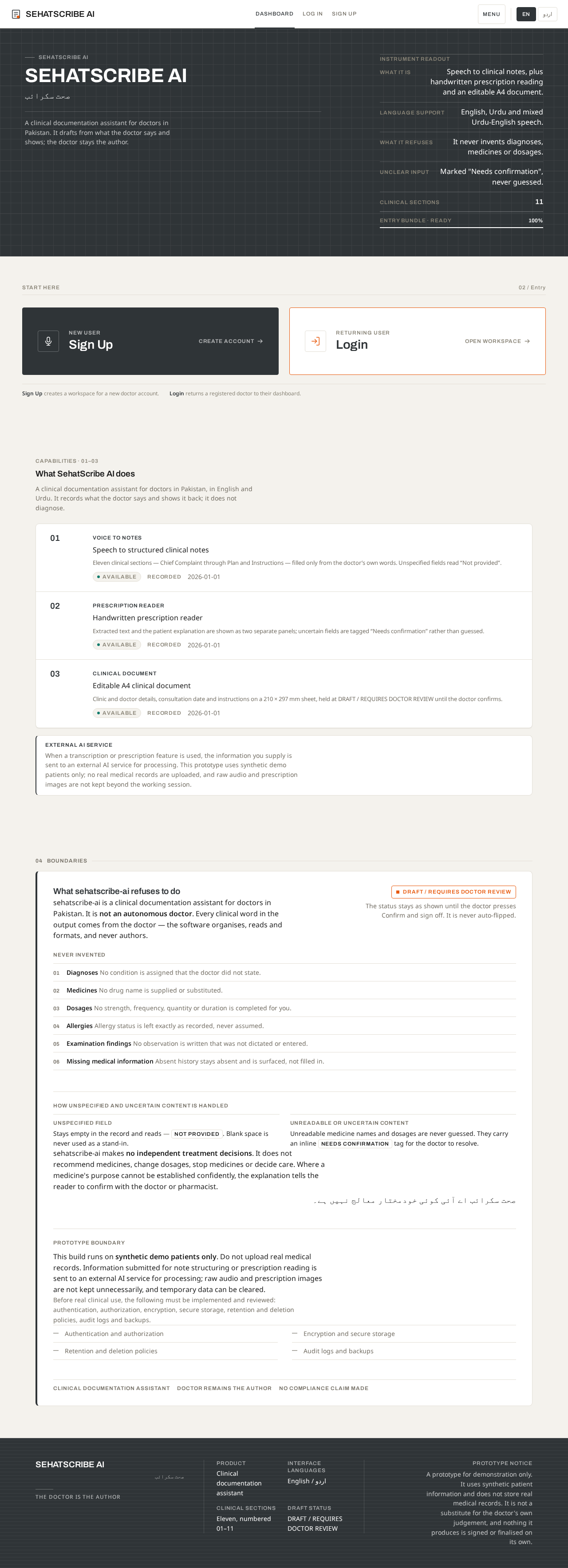
SehatScribe AI
صحت سکرائب
A clinical documentation assistant for doctors in Pakistan. It drafts from what the doctor says and shows; the doctor stays the author.
Instrument readout
Start here
02 / EntrySign Up creates a workspace for a new doctor account.
Login returns a registered doctor to their dashboard.
Capabilities · 01–03
What SehatScribe AI does
A clinical documentation assistant for doctors in Pakistan, in English and Urdu. It records what the doctor says and shows it back; it does not diagnose.
- Voice to notesSpeech to structured clinical notesEleven clinical sections — Chief Complaint through Plan and Instructions — filled only from the doctor’s own words. Unspecified fields read “Not provided”.
- Prescription readerHandwritten prescription readerExtracted text and the patient explanation are shown as two separate panels; uncertain fields are tagged “Needs confirmation” rather than guessed.
- Clinical documentEditable A4 clinical documentClinic and doctor details, consultation date and instructions on a 210 × 297 mm sheet, held at DRAFT / REQUIRES DOCTOR REVIEW until the doctor confirms.
External AI service
When a transcription or prescription feature is used, the information you supply is sent to an external AI service for processing. This prototype uses synthetic demo patients only; no real medical records are uploaded, and raw audio and prescription images are not kept beyond the working session.
What sehatscribe-ai refuses to do
sehatscribe-ai is a clinical documentation assistant for doctors in Pakistan. It is not an autonomous doctor. Every clinical word in the output comes from the doctor — the software organises, reads and formats, and never authors.
Never invented
- Diagnoses No condition is assigned that the doctor did not state.
- Medicines No drug name is supplied or substituted.
- Dosages No strength, frequency, quantity or duration is completed for you.
- Allergies Allergy status is left exactly as recorded, never assumed.
- Examination findings No observation is written that was not dictated or entered.
- Missing medical information Absent history stays absent and is surfaced, not filled in.
How unspecified and uncertain content is handled
Stays empty in the record and reads — Not provided. Blank space is never used as a stand-in.
Unreadable medicine names and dosages are never guessed. They carry an inline Needs confirmation tag for the doctor to resolve.
sehatscribe-ai makes no independent treatment decisions. It does not recommend medicines, change dosages, stop medicines or decide care. Where a medicine's purpose cannot be established confidently, the explanation tells the reader to confirm with the doctor or pharmacist.
صحت سکرائب اے آئی کوئی خودمختار معالج نہیں ہے۔
Prototype boundary
This build runs on synthetic demo patients only. Do not upload real medical records. Information submitted for note structuring or prescription reading is sent to an external AI service for processing; raw audio and prescription images are not kept unnecessarily, and temporary data can be cleared.
Before real clinical use, the following must be implemented and reviewed: authentication, authorization, encryption, secure storage, retention and deletion policies, audit logs and backups.
- Authentication and authorization
- Encryption and secure storage
- Retention and deletion policies
- Audit logs and backups
SehatScribe AI
صحت سکرائب
A clinical documentation assistant for doctors in Pakistan. It drafts from what the doctor says and shows; the doctor stays the author.
Instrument readout
Start here
02 / EntrySign Up creates a workspace for a new doctor account.
Login returns a registered doctor to their dashboard.
Capabilities · 01–03
What SehatScribe AI does
A clinical documentation assistant for doctors in Pakistan, in English and Urdu. It records what the doctor says and shows it back; it does not diagnose.
- Voice to notesSpeech to structured clinical notesEleven clinical sections — Chief Complaint through Plan and Instructions — filled only from the doctor’s own words. Unspecified fields read “Not provided”.
- Prescription readerHandwritten prescription readerExtracted text and the patient explanation are shown as two separate panels; uncertain fields are tagged “Needs confirmation” rather than guessed.
- Clinical documentEditable A4 clinical documentClinic and doctor details, consultation date and instructions on a 210 × 297 mm sheet, held at DRAFT / REQUIRES DOCTOR REVIEW until the doctor confirms.
External AI service
When a transcription or prescription feature is used, the information you supply is sent to an external AI service for processing. This prototype uses synthetic demo patients only; no real medical records are uploaded, and raw audio and prescription images are not kept beyond the working session.
What sehatscribe-ai refuses to do
sehatscribe-ai is a clinical documentation assistant for doctors in Pakistan. It is not an autonomous doctor. Every clinical word in the output comes from the doctor — the software organises, reads and formats, and never authors.
Never invented
- Diagnoses No condition is assigned that the doctor did not state.
- Medicines No drug name is supplied or substituted.
- Dosages No strength, frequency, quantity or duration is completed for you.
- Allergies Allergy status is left exactly as recorded, never assumed.
- Examination findings No observation is written that was not dictated or entered.
- Missing medical information Absent history stays absent and is surfaced, not filled in.
How unspecified and uncertain content is handled
Stays empty in the record and reads — Not provided. Blank space is never used as a stand-in.
Unreadable medicine names and dosages are never guessed. They carry an inline Needs confirmation tag for the doctor to resolve.
sehatscribe-ai makes no independent treatment decisions. It does not recommend medicines, change dosages, stop medicines or decide care. Where a medicine's purpose cannot be established confidently, the explanation tells the reader to confirm with the doctor or pharmacist.
صحت سکرائب اے آئی کوئی خودمختار معالج نہیں ہے۔
Prototype boundary
This build runs on synthetic demo patients only. Do not upload real medical records. Information submitted for note structuring or prescription reading is sent to an external AI service for processing; raw audio and prescription images are not kept unnecessarily, and temporary data can be cleared.
Before real clinical use, the following must be implemented and reviewed: authentication, authorization, encryption, secure storage, retention and deletion policies, audit logs and backups.
- Authentication and authorization
- Encryption and secure storage
- Retention and deletion policies
- Audit logs and backups
No comments yet. Be the first!