scenic-calculator
 Monin Modi
create a single paged calculator application
Comments (0)
Sign in to leave a comment
Project Tasks5
Implement Theme & Structure
As a user I want to be able to see the scenic-calculator application with the correct visual theme and structure based on the mock-design pages. Implement the color palette (#F5F9FF background, #FFFFFF surface, #333333 text, #4CAF50 accent, #B0BEC5 muted), global CSS/styling setup, and overall layout structure to match the design pages exactly. Remove any pages not needed for this single-page calculator app (login, signup, welcome, dashboard, ai-assistant, settings pages). This task must be completed independently before any other feature tasks begin.
Build Calculator Page
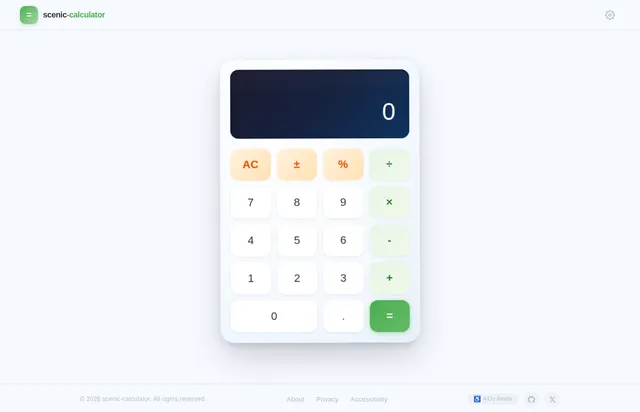
As a user I want to be able to use the calculator frontend to perform basic arithmetic operations (addition, subtraction, multiplication, division). Implement the Calculator page based on the existing JSX design (Calculator v2). The page should feature the 'floating island' design concept with an animated sky background that shifts colors based on time of day, a gently swaying floating island with drifting clouds, a sleek calculator interface with smooth hover animations on buttons, and a responsive layout that scales correctly on both desktop and mobile. User flow: View Interface → Enter First Number → Select Operation → Enter Second Number → View Result → Clear Display → repeat. Ensure the display shows current input and results clearly, and the clear button resets the state.
Implement Arithmetic API
As a user I want to be able to use the backend API to perform basic arithmetic operations (addition, subtraction, multiplication, division) with accurate results. Implement a FastAPI backend with endpoints for each arithmetic operation. Endpoints should accept two numeric inputs and an operation type, validate inputs (e.g., division by zero handling), and return the computed result. Use US decimal system formatting conventions. Ensure the API can handle up to 100 concurrent users without performance degradation and responds within acceptable latency.
Integrate Frontend with API
As a user I want to be able to see calculation results on the calculator frontend by connecting it to the backend arithmetic API. Wire up the Calculator page UI to call the FastAPI backend endpoints for add, subtract, multiply, and divide operations. Handle API responses and display results on the calculator display. Implement error handling for edge cases such as division by zero and invalid inputs, showing user-friendly error messages. Ensure smooth UX with loading states if needed.
Ensure Accessibility & Responsiveness
As a user I want to be able to use the calculator on any device and with assistive technologies. Audit and implement WCAG 2.1 AA accessibility standards across the Calculator page: add ARIA labels to buttons and display, ensure keyboard navigation works for all calculator operations, verify sufficient color contrast ratios for all text and interactive elements. Validate full responsiveness across desktop, tablet, and mobile breakpoints ensuring the floating island design scales correctly. Test on Chrome, Firefox, Safari, and Edge for cross-browser compatibility.
No comments yet. Be the first!