scenic-calculator
 Monin Modi
create a single paged calculator application
Comments (0)
Sign in to leave a comment
System Requirements
System Requirements Document (SRD)
Project Name: scenic-calculator
1. Introduction
The scenic-calculator project is a single-page calculator application designed to provide users with a simple, intuitive interface for performing basic arithmetic operations. This lightweight tool is tailored for quick calculations, ensuring accessibility and ease of use for a broad audience.
This document outlines the system requirements for the scenic-calculator project, including functional and non-functional specifications, user personas, and design concepts. The project is being developed for Monin Modi, based in the United States, and will adhere to locale-specific defaults such as the US decimal system and formatting conventions.
2. System Overview
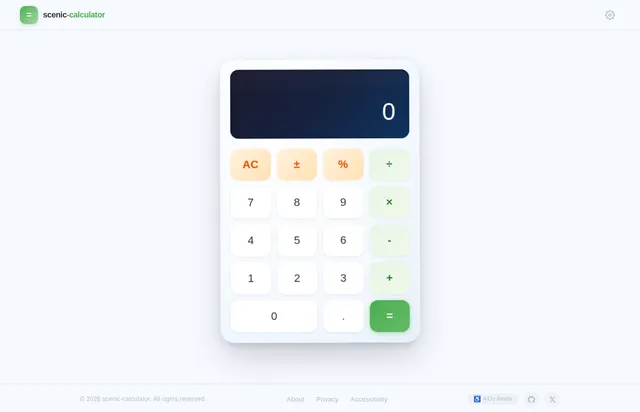
The scenic-calculator is a web-based application that will allow users to perform basic arithmetic operations, including addition, subtraction, multiplication, and division. The application will be designed as a single-page app (SPA) to ensure a seamless user experience with minimal load times.
The system will prioritize simplicity, speed, and usability, making it ideal for users who need quick and accurate calculations. The calculator will feature a clean and visually appealing interface, optimized for both desktop and mobile devices.
3. Functional Requirements
- As a User, I should be able to perform addition of two numbers.
- As a User, I should be able to perform subtraction of two numbers.
- As a User, I should be able to perform multiplication of two numbers.
- As a User, I should be able to perform division of two numbers.
4. User Personas
4.1 General User
- Description: A general user who needs a quick and reliable tool for basic arithmetic calculations.
- Goals:
- Perform simple calculations without unnecessary complexity.
- Access the calculator on both desktop and mobile devices.
- Pain Points:
- Overly complicated interfaces.
- Slow-loading or resource-heavy applications.
5. Visuals Colors and Theme
The scenic-calculator will feature a unique and calming color palette inspired by scenic landscapes, reflecting the project's name. The colors will evoke a sense of simplicity and focus while maintaining visual appeal.
- Background: #F5F9FF (soft sky blue)
- Surface: #FFFFFF (pure white for calculator buttons and display)
- Text: #333333 (dark gray for high contrast and readability)
- Accent: #4CAF50 (vivid green for action buttons like "equals")
- Muted Tones: #B0BEC5 (soft gray for secondary elements like borders)
6. Signature Design Concept
The scenic-calculator will feature a "floating island" design concept for its homepage. The calculator interface will appear as a sleek, modern device resting on a 3D-rendered floating island surrounded by a serene, animated sky.
Key Features:
- Interactive Background: The sky will subtly shift colors based on the time of day (e.g., sunrise hues in the morning, starry night in the evening).
- Micro-Animations: The floating island will gently sway, and clouds will drift across the screen, creating a dynamic and engaging experience.
- Responsive Design: On mobile devices, the floating island will scale down while maintaining its aesthetic appeal.
- Hover Effects: Buttons will have smooth hover animations, such as slight elevation and color shifts, to enhance interactivity.
This design will make the scenic-calculator not only functional but also visually memorable and enjoyable to use.
7. Non-Functional Requirements
- The application must load within 2 seconds on a standard broadband connection.
- The calculator must be fully responsive and compatible with modern browsers (Chrome, Firefox, Safari, Edge).
- The system must handle up to 100 concurrent users without performance degradation.
- The application must adhere to accessibility standards (WCAG 2.1 AA).
8. Tech Stack
Frontend
- React for Web
Backend
- Python
- FastAPI
Database
- Not required for this project as it is a single-page application without persistent data.
Local Orchestration
- Docker
9. Assumptions and Constraints
- The application will only support basic arithmetic operations (addition, subtraction, multiplication, division).
- No user authentication or data storage is required.
- The calculator will use the US decimal system and formatting conventions.
- The project will be deployed as a web application and optimized for both desktop and mobile browsers.
10. Glossary
- SPA (Single-Page Application): A web application that interacts with the user by dynamically rewriting the current page rather than loading entire new pages from a server.
- WCAG (Web Content Accessibility Guidelines): A set of guidelines for making web content more accessible to people with disabilities.
- Responsive Design: An approach to web design that ensures a website looks and functions well on devices of all sizes.
No comments yet. Be the first!