sam-ai
 Sumit Sawant
Build a futuristic personal AI assistant named SAM AI, inspired by JARVIS. It should have a beautiful mobile-first interface, voice and text conversation, multilingual support, an AI chat brain, task management, reminders, and a secure user permission system. Design a dark interface with elegant blue glowing elements. Plan a scalable frontend, backend, database and cloud architecture. Keep the project modular so Android integrations and background cloud task execution can be added later.

Comments (0)
Sign in to leave a comment
System Requirements
System Requirements Document for sam-ai
1. Introduction
SAM AI is a fully functional futuristic personal AI assistant inspired by JARVIS: a single, calm, cinematic command centre where one person converses with a real AI brain by voice and by text, in Hindi, English, and multiple other languages, and follows through on everyday tasks and reminders — all while retaining explicit control over what the assistant is permitted to access. SAM AI has a friendly, intelligent, and professional personality: warm and helpful in tone, precise and competent in substance, never gimmicky or childish. The product is delivered as a mobile-first web application with a dark interface and elegant blue glowing elements, backed by a scalable frontend, backend, database, and cloud architecture that stays modular so Android integrations and background cloud task execution can be added later.
The audience is the individual power user — represented here by the single accepted persona, the SAM AI user — who wants an assistant that feels intelligent and alive, yet trustworthy and legible: a control room, not a spaceship toy. The interface must be beautiful and mobile-first, the conversation must work by voice and text across languages, and the permission system must be secure, so the assistant only reaches what the user has granted. Every control the product presents must be real: the chat is connected to a real AI model through a secure backend API, and there are no fake buttons and no simulated AI responses.
This document is the System Requirements Document for the sam-ai project. It specifies the current product behavior, the seven-page information architecture, the visual and interaction direction, and the technical delivery boundary.
Success Criteria
- A new user can move from the anonymous Landing page through self-service Sign Up and reach a working conversation with SAM AI.
- A returning user can verify identity on Login and resume their own conversation history, tasks, reminders, and permission grants.
- The user can hold a conversation with the AI chat brain by text and by voice, receive AI voice responses, and switch the conversation language between Hindi, English, and other languages.
- The user can view their chat history, which persists across sessions.
- Every chat reply comes from a real AI model reached through a secure backend API; no button is fake and no AI response is simulated.
- The user can create, view, and manage tasks and reminders, and those records persist across sessions.
- The user can review requested permissions and grant or revoke them, and the assistant's access is limited to what is granted.
- The interface renders as a dark, blue-glowing, mobile-first experience that stays legible and whole at 375px, 768px, and 1280px.
- The architecture remains modular so Android integrations and background cloud task execution can be added later without re-architecting the current system.
2. System Overview
SAM AI is a mobile-first web application composed of seven pages: an anonymous Landing page, Sign Up and Login identity surfaces, and four protected working surfaces — Chat, Tasks, Reminders, and Permissions. The application owns user identity: a person enrolls through self-service Sign Up, verifies on return through Login, and thereafter owns durable conversation history, tasks, reminders, and permission grants bound to their account.
The current delivery is a React frontend talking to a shared FastAPI backend. The backend hosts the application APIs and domain modules for conversation, chat history, voice transcription and speech synthesis, tasks, reminders, and permissions, and calls model providers through a LiteLLM gateway. The chat is connected to a real AI model through this secure backend API: the browser never holds model-provider credentials, and no reply is generated or simulated on the client. Application-owned persistent data lives in MariaDB; the LiteLLM gateway uses its own PostgreSQL instance, kept separate from application storage. The AI chat brain is a backend capability that the Chat page invokes; it is not a separate product surface.
The single active human actor is the SAM AI user. The AI chat brain, the LiteLLM gateway, the model providers behind it, and the database are non-persona system actors. There is no differentiated role or permission tier among humans: the permission system governs what the assistant may access on the user's behalf, not what one human may see versus another.
The project is deliberately modular. Android integrations and background cloud task execution are explicitly out of the current build; the architecture is structured so they can be added later without changing the current pages or behavior.
Removed from scope
- Android integrations (current build; modular extension point only)
- Background cloud task execution (current build; modular extension point only)
2a. Product Interpretation and Delivery Boundary
SAM AI is delivered as a first-party web application. The anonymous entry boundary is the Landing page, which explains the assistant and its conversation, task, reminder, and permission capabilities before sign-in. Identity is application-owned: Sign Up establishes a new account, and Login verifies a returning user. Both are anonymously reachable; the protected surfaces — Chat, Tasks, Reminders, and Permissions — require login and are unavailable until identity is established.
The AI chat brain, durable storage of tasks and reminders, and secure permission enforcement are backend responsibilities executed by the shared FastAPI process, with model calls routed through the LiteLLM gateway. These are supporting system processes; every human-facing interaction — composing a message, speaking, switching language, creating a task, setting a reminder, granting or revoking a permission — is owned by a first-party page.
The current build stops at the web application. Android integrations and background cloud task execution are future horizons: the codebase and service boundaries are kept modular so they can be added later, but no current page, requirement, or flow depends on them.
2c. Page Content and Component Coverage
Landing
- Information/state: Anonymous public entry. Presents the SAM AI wordmark, a two-line subline describing the assistant, a single primary CTA ("Start a conversation"), and a top-right micro-label ("PERSONAL INTELLIGENCE · ONLINE") with a pulsing mint status dot. A full-bleed WebGL particle field is the background; the SAM orb sits low-centre as the field's gravitational core.
- Primary action: "Start a conversation" — routes an anonymous visitor to Sign Up (or Login for a returning visitor).
- Supporting actions: Navigate to Login for returning users.
- Domain entities: None persisted; the page is presentational and entry-only.
- Component responsibilities: Hero particle field (real-time WebGL, state-reactive), SAM orb (breathing luminous sphere), wordmark and subline block on a scrim, outlined CTA, status micro-label with mint dot.
- States: Loading — field initializes with a still first frame before motion begins. Empty — not applicable (no data). Success — CTA routes to Sign Up. Error — if WebGL is unavailable, a static still frame of the field renders and all text and controls remain fully legible. Recovery — reduced-motion preference freezes the field and orb into a static, fully legible arrangement.
Sign Up
- Information/state: Anonymous identity-access surface. A single glass-free panel centred on the generative ground with the orb dimmed behind it. Collects the credentials needed to establish a SAM AI account.
- Primary action: Submit enrollment to create the account and proceed to Chat.
- Supporting actions: Navigate to Login if the visitor already has an account.
- Domain entities: User account (identity, credentials).
- Component responsibilities: Centred enrollment panel, input fields with validation, submit control, link to Login, dimmed orb backdrop.
- States: Loading — submit disabled with a pending indicator while the account is created. Empty — blank fields with inline guidance. Success — account created, session established, redirect to Chat. Error — invalid or incomplete input shows inline field errors; a taken identity or server failure shows a recoverable message without losing entered data. Recovery — the user corrects input and resubmits, or switches to Login.
Login
- Information/state: Anonymous identity-access surface for returning verification. Same centred-panel treatment as Sign Up with the orb dimmed behind it.
- Primary action: Submit credentials to verify identity and reach the protected surfaces.
- Supporting actions: Navigate to Sign Up for a new account.
- Domain entities: User account (identity, credentials).
- Component responsibilities: Centred verification panel, credential fields, submit control, link to Sign Up, dimmed orb backdrop.
- States: Loading — submit disabled with a pending indicator during verification. Empty — blank fields. Success — verified, redirect to Chat with the user's own history, tasks, reminders, and permissions restored. Error — incorrect credentials show a recoverable message without revealing which field failed. Recovery — retry, or switch to Sign Up.
Chat
- Information/state: Primary protected conversation workspace. Displays the conversation thread with the SAM AI chat brain, the SAM orb above the conversation on mobile and in the left rail on desktop, a language selector for multilingual conversation, and a bottom composer dock (text field + mic + send) pinned above the safe area. On desktop, a right context panel shows live tasks and the next reminder; on mobile this is a swipe-up sheet.
- Primary action: Send a text message to the AI chat brain and receive a reply.
- Supporting actions: Activate the mic to speak a message; switch conversation language; open the context panel/sheet to glance at tasks and the next reminder.
- Domain entities: Conversation, message (role, content, language, timestamp), language setting.
- Component responsibilities: Conversation thread with 220ms fade-up message arrival, SAM orb with radial mic pulse and breathing idle, "thought trace" component (mint arc sweeping the orb with a mono status line while SAM composes), composer dock, language selector, context panel/sheet with ruled rows and mono timestamps.
- States: Loading — thought trace shows the current step ("reading your reminders…") while the reply composes. Empty — a first-run greeting invites the user to speak or type. Success — reply arrives and collapses the thought trace into the final message. Error — a failed model call shows a recoverable inline notice with a retry affordance and preserves the user's message. Recovery — retry the message or continue the conversation; mic permission denial shows guidance to grant it on the Permissions page.
Tasks
- Information/state: Protected owner for the user's tasks. Ruled rows with mono timestamps and small generative arc marks — never identical hover-lift cards.
- Primary action: Create a task.
- Supporting actions: View the task list; manage a task (update its details or mark it complete).
- Domain entities: Task (title, details, status, timestamp).
- Component responsibilities: Task list with ruled rows and generative data marks, create-task control, per-task management controls, empty-state prompt.
- States: Loading — list skeleton with ruled placeholders. Empty — prompt to create the first task. Success — new or updated task appears in the list with a mono timestamp. Error — a failed save shows a recoverable inline notice and preserves entered data. Recovery — retry the save or dismiss and re-enter.
Reminders
- Information/state: Protected owner for the user's reminders. Ruled rows with mono timestamps and generative arc marks; the next reminder is surfaced in the Chat context panel.
- Primary action: Create a reminder.
- Supporting actions: View the reminder list; manage a reminder (update its details or remove it).
- Domain entities: Reminder (title, scheduled time, status).
- Component responsibilities: Reminder list with ruled rows and generative data marks, create-reminder control with time selection, per-reminder management controls, empty-state prompt.
- States: Loading — list skeleton with ruled placeholders. Empty — prompt to create the first reminder. Success — new or updated reminder appears with a mono timestamp; a fired reminder shows a mint confirmed state. Error — a failed save shows a recoverable inline notice and preserves entered data. Recovery — retry the save or re-enter.
Permissions
- Information/state: Protected secure permission surface. Each permission is a ruled row with a mint or dim status dot, a mono permission key, and a single toggle. The page shows what the assistant has requested and what is currently granted.
- Primary action: Grant a requested permission.
- Supporting actions: Revoke a granted permission.
- Domain entities: Permission (key, description, granted state).
- Component responsibilities: Permission rows with status dot, mono key, and toggle; 200ms colour drain from mint to muted on state change; explanatory copy that the assistant's access is limited to what is granted.
- States: Loading — rows render with dim dots until grant state resolves. Empty — a message that no permissions have been requested yet. Success — toggle reflects the new state with the colour drain; granted rows show mint dots. Error — a failed change reverts the toggle and shows a recoverable inline notice. Recovery — retry the toggle.
3. Functional Requirements
FR-1 — Futuristic personal AI assistant identity. As a SAM AI user, I should interact with a futuristic personal AI assistant named SAM AI, inspired by JARVIS, so that the product feels like a single intelligent companion. (explicit)
- Lifecycle: The assistant identity is present across Landing, Chat, and the protected surfaces via the SAM orb and wordmark. Observable acceptance: the product presents itself as SAM AI throughout.
FR-2 — Mobile-first, dark, blue-glowing interface. As a SAM AI user, I should see a beautiful mobile-first interface with a dark theme and elegant blue glowing elements, so that the assistant feels futuristic and legible. (explicit)
- Lifecycle: Applies to every page. Observable acceptance: dark ground, blue glow, and mobile-first layout hold at 375px, 768px, and 1280px with all readable text and controls whole.
FR-3 — Voice conversation. As a SAM AI user, I should converse with the assistant by voice, so that I can talk to it hands-free. (explicit)
- Lifecycle: On Chat, the user activates the mic; the orb pulses once radially; the particle field brightens and swirls while listening; the spoken message is transcribed into the conversation and sent to the AI chat brain; a reply arrives. Failure: mic permission denial shows guidance to grant it on Permissions; transcription failure shows a recoverable notice. Continuation: the user retries or types instead.
FR-4 — Text conversation. As a SAM AI user, I should converse with the assistant by text, so that I can type messages and read replies. (explicit)
- Lifecycle: On Chat, the user types in the composer dock and sends; the thought trace shows while SAM composes; the reply arrives with a 220ms fade-up. Failure: a failed model call shows a recoverable inline notice and preserves the message. Continuation: retry or continue.
FR-5 — Multilingual support. As a SAM AI user, I should switch the conversation language, so that I can converse in multiple languages. (explicit)
- Lifecycle: On Chat, the user selects a language; subsequent messages and replies use that language; the setting persists for the user. Observable acceptance: the selected language is reflected in the conversation.
FR-6 — AI chat brain. As a SAM AI user, I should receive intelligent replies from an AI chat brain, so that the conversation is useful and coherent. (explicit)
- Lifecycle: The backend routes model calls through the LiteLLM gateway; the thought trace surfaces the current step while composing; the reply collapses the trace into the final message. Failure: gateway or provider failure shows a recoverable notice. Continuation: retry.
FR-7 — Task management. As a SAM AI user, I should create, view, and manage tasks, so that I can track what I need to do. (explicit)
- Lifecycle: On Tasks, the user creates a task; it appears as a ruled row with a mono timestamp; the user can update or complete it. Failure: a failed save shows a recoverable notice and preserves data. Continuation: retry or re-enter.
FR-8 — Reminder management. As a SAM AI user, I should create, view, and manage reminders, so that I am reminded at the right time. (explicit)
- Lifecycle: On Reminders, the user creates a reminder with a scheduled time; it appears with a mono timestamp; the next reminder surfaces in the Chat context panel; a fired reminder shows a mint confirmed state. Failure: a failed save shows a recoverable notice and preserves data. Continuation: retry or re-enter.
FR-9 — Secure user permission system. As a SAM AI user, I should review requested permissions and grant or revoke them, so that the assistant only accesses what I allow. (explicit)
- Lifecycle: On Permissions, each permission is a ruled row with a status dot, mono key, and toggle; granting shows a mint dot, revoking drains to muted over 200ms; the assistant's access is limited to what is granted. Failure: a failed change reverts the toggle with a recoverable notice. Continuation: retry.
FR-10 — Scalable, modular architecture. As a SAM AI user, I should benefit from a scalable frontend, backend, database, and cloud architecture kept modular, so that Android integrations and background cloud task execution can be added later. (explicit)
- Lifecycle: The React frontend, shared FastAPI backend, MariaDB application storage, and LiteLLM gateway with its own PostgreSQL are structured as modular services. Observable acceptance: the current pages and behavior do not depend on Android or background execution, and those extension points remain open.
FR-11 — Self-service enrollment. As a SAM AI user, I should be able to establish a SAM AI account through self-service Sign Up, so that I can own durable conversation, tasks, reminders, and permissions. (required_inference)
- Lifecycle: On Sign Up, the user submits credentials; the account is created; a session is established; the user is routed to Chat. Failure: invalid input or a taken identity shows a recoverable message without losing entered data. Continuation: correct and resubmit, or switch to Login.
FR-12 — Returning verification. As a SAM AI user, I should verify my identity on Login, so that I can reach my own protected conversation, tasks, reminders, and permissions. (required_inference)
- Lifecycle: On Login, the user submits credentials; verification succeeds; the user is routed to Chat with their own history, tasks, reminders, and permissions restored. Failure: incorrect credentials show a recoverable message. Continuation: retry or switch to Sign Up.
FR-13 — Backend execution and enforcement. As a SAM AI user, I should have my conversation, tasks, reminders, and permissions executed and enforced by the backend, so that my data is durable and my grants are honored. (required_inference)
- Lifecycle: The shared FastAPI backend executes the AI chat brain via LiteLLM, persists tasks and reminders in MariaDB, and enforces permission grants. Observable acceptance: data persists across sessions and the assistant's access is limited to granted permissions.
4. User Personas
SAM AI user
- Product context: A single individual power user who wants a calm, cinematic command centre for a personal AI assistant. They use SAM AI on a mobile-first web interface, often on a phone, and expect the assistant to feel intelligent and alive while remaining trustworthy and legible.
- Primary goal: A single futuristic assistant that handles conversation and everyday task/reminder follow-through while keeping control over what the assistant may access.
- Distinct accepted responsibilities: Converse with SAM AI by voice and by text; switch the conversation language; create, view, and manage tasks; create, view, and manage reminders; review requested permissions and grant or revoke them; enroll through self-service Sign Up and verify on return through Login.
- Relevant inputs or decisions: What to say or type; which language to converse in; what tasks and reminders to create or change; which permissions to grant or revoke; whether to enroll or log in.
- Interactions with other accepted participants: The user interacts with the AI chat brain (a system actor) through Chat, and with the LiteLLM gateway and model providers only indirectly. There is no other human participant; the user is the sole active human actor.
- Observable success: The user holds a coherent conversation by voice and text in their chosen language, sees their tasks and reminders persist and surface, and can confirm at a glance which permissions the assistant holds.
5. Core User Flows
Flow A — First-time enrollment and first conversation
- The visitor opens the anonymous Landing page. The full-bleed particle field drifts; the SAM orb breathes low-centre; the wordmark, subline, and "Start a conversation" CTA sit on a scrim in the lower-left.
- The visitor selects "Start a conversation" and is routed to Sign Up.
- On Sign Up, the visitor enters credentials in the centred panel and submits. The submit control shows a pending state while the account is created.
- On success, a session is established and the user is routed to Chat. On failure (invalid input or taken identity), inline errors appear without losing entered data; the user corrects and resubmits, or switches to Login.
- On Chat, the user sees a first-run greeting and the composer dock. They type a message and send it.
- The thought trace sweeps a mint arc around the orb with a mono status line while SAM composes; the reply arrives with a 220ms fade-up and the trace collapses into the final message.
- The user optionally activates the mic; the orb pulses once radially and the field brightens while listening; the spoken message is transcribed and sent; a reply arrives.
- The user optionally switches the conversation language; subsequent messages and replies use that language.
Flow B — Returning verification and resume
- The returning user opens Login from Landing or from the Sign Up link.
- On Login, the user enters credentials and submits; the submit control shows a pending state during verification.
- On success, the user is routed to Chat with their own conversation history, tasks, reminders, and permission grants restored. On failure, a recoverable message appears; the user retries or switches to Sign Up.
Flow C — Task management
- From the command deck, the user opens Tasks.
- The user creates a task; it appears as a ruled row with a mono timestamp and a generative arc mark.
- The user updates or completes a task; the change persists. On a failed save, a recoverable inline notice appears and entered data is preserved; the user retries or re-enters.
Flow D — Reminder management
- From the command deck, the user opens Reminders.
- The user creates a reminder with a scheduled time; it appears with a mono timestamp.
- The next reminder surfaces in the Chat context panel (desktop) or swipe-up sheet (mobile). When a reminder fires, it shows a mint confirmed state.
- The user updates or removes a reminder; the change persists. On a failed save, a recoverable notice appears and data is preserved; the user retries or re-enters.
Flow E — Permission review and control
- The user opens Permissions.
- Each permission appears as a ruled row with a mint or dim status dot, a mono permission key, and a single toggle.
- The user grants a requested permission; the dot turns mint and the toggle reflects the new state. The assistant's access is now limited to what is granted.
- The user revokes a granted permission; the state drains from mint to muted over 200ms. On a failed change, the toggle reverts and a recoverable notice appears; the user retries.
- If a mic permission is denied during voice use on Chat, the user is guided to Permissions to grant it, then returns to Chat to retry.
6. Visuals Colors and Theme
The visual direction is "Data made physical — a JARVIS-grade intelligence rendered as living blue light," with Refik Anadol as muse. The register is futuristic awe that stays trustworthy and legible: a control room, not a spaceship toy.
Palette (dark mode):
- Background:
#05070C(near-black ink ground, ~60% of every screen) - Surface:
#0D131F(panels with 1pxrgba(63,169,255,0.18)hairlines) - Text:
#EAF2FF(~16:1 on background) - Primary:
#3FA9FF(SAM intelligence blue — generative field, active states, single primary CTA; glowing, never flat-filled) - Accent:
#7CF5E1(cold mint — live/confirmed states: listening, granted permission, reminder fired) - Muted:
#7C8BA6(12px+ labels only, never body copy)
Typography:
- Headings: Space Grotesk, 500–600 weight, tight
-0.02emtracking. - Micro-labels: Space Grotesk 500 uppercase,
0.18emtracking, 11–12px, muted blue. - Body: IBM Plex Sans 400/500, 16–17px, 1.55 line-height.
- Numeric and timestamp data: IBM Plex Mono.
- Scale (1.25 modular): 56 → 44 → 34 → 26 → 20 → 17 → 15 → 12. Display headline
clamp(56px, 9vw, 96px)on Landing; page titlesclamp(34px, 5vw, 48px); chat body 17px; labels 12px uppercase.
Shape language: Soft-edged rectangular panels with 14–20px radii and hairline luminous borders, floating over a full-bleed generative ground. The one circular form is the SAM orb. Buttons are rounded-rectangles (12px) with a 1px inner light edge; never pill-shaped. Dividers are 1px rgba(234,242,255,0.08) rules; section boundaries are gradients of darkness, not hard lines.
Layout: Mobile-first single column at 375px — the SAM orb sits in a fixed 40vh top zone, conversation stacks beneath, and a bottom composer dock is pinned above the safe area. At 768px the orb shrinks to a left rail and the conversation takes a 62ch measure. At 1280px it becomes a three-zone command deck: a 240px left navigation rail (Chat, Tasks, Reminders, Permissions), a centre conversation column, and a 320px right context panel. Landing, Sign Up, Login, Chat, Tasks, Reminders, and Permissions all inherit the same dark command-deck grid; auth screens centre a single glass-free panel on the generative ground with the orb dimmed behind it.
Imagery: No stock photography and no device mockups. Imagery is generative: a WebGL particle/flow field derived from the assistant's own activity. Task and reminder surfaces use small generative data marks (thin concentric arcs, tick marks, sparkline-like traces) instead of icons. Permission rows use luminous status dots rather than illustrated shields.
Glow: Rendered as soft radial bloom behind content, never as text shadow that reduces legibility.
7. Signature Design Concept
The Landing first screen is a full-bleed near-black viewport with a single crafted real-time WebGL particle field — thousands of cold-blue (#3FA9FF) points flowing in a slow fluid current, blooming into mint (#7CF5E1) where density peaks — occupying the entire background and bleeding off all four edges. The SAM orb, ~180px on mobile and ~320px on desktop, sits low-centre as the field's gravitational core.
Type does not sit in a centred stack: the wordmark SAM AI is set in Space Grotesk at clamp(56px, 9vw, 96px) flush-left in the lower-left quadrant, with a two-line 17px IBM Plex Sans subline beneath it and a single outlined CTA ("Start a conversation") pinned under the text, all kept inside the viewport at 375px. Top-right carries a small uppercase micro-label ("PERSONAL INTELLIGENCE · ONLINE") with a pulsing mint status dot. Nothing is centred, no gradient blob is used, and the field never covers the wordmark, subline, or CTA — those sit on a scrim that darkens the field beneath them.
The signature moves carry through the product: the full-bleed particle field is both hero and state indicator (brightening and swirling while SAM listens or thinks, calming when idle); the SAM orb pulses once radially on every mic activation; the "thought trace" sweeps a thin mint arc around the orb with a single line of IBM Plex Mono text typing the current step, then collapses into the final message; the instrument-style context panel renders tasks and the next reminder as ruled rows with mono timestamps and generative arc marks; and permission rows read as a live instrument readout with mint or dim status dots, mono keys, and a single toggle whose state change triggers a 200ms colour drain.
8. Interaction Model & Motion Direction
Interaction Model: Animated Motion Tempo: cinematic Hero Dimensionality: webgl
Landing Hero Motion Brief
- Focal subject: The full-bleed WebGL particle field with the SAM orb as its gravitational core, wordmark and CTA on a scrim in the lower-left.
- Input → transformation → outcome thesis: As the visitor arrives, the field drifts continuously at ~0.15× real time with no looping seam; the orb breathes (scale 1.0→1.04 over 4s); scroll morphs the field's hue temperature subtly and reveals sections with a 300ms fade; selecting "Start a conversation" routes to Sign Up. The field never covers the wordmark, subline, or CTA.
- Motion vocabulary: Slow continuous drift; breathing orb; subtle hue-temperature morph on scroll; 300ms section fade; 220ms fade-up with 8px rise for message arrival; single radial pulse on mic activation; 200ms colour drain on permission toggle. No bouncy or springy easing.
- Composed first frame: Near-black viewport, cold-blue particle field bleeding off all four edges, orb low-centre, wordmark flush-left lower-left on a scrim, two-line subline beneath, outlined CTA pinned under the text, top-right micro-label with pulsing mint dot.
- Reduced-motion state: The field becomes a single still frame, the orb freezes, and message arrival is instant; all text and controls remain fully legible and whole.
Landing Hero 3D Scene Brief — DIRECTION-DERIVED A single crafted real-time WebGL particle field (React Three Fiber) of thousands of cold-blue points flowing in a slow fluid current, blooming to mint where density peaks, with the SAM orb as a breathing luminous sphere at its core. The scene shows the product's defining state — an AI brain you can see thinking — and reacts to listening/thinking states on Chat. It is not a game or a toy; it stays behind a scrim wherever readable text and controls sit.
9. Non-Functional Requirements
- Mobile-first responsiveness (explicit): The interface must be mobile-first and hold at 375px, 768px, and 1280px. Headlines, wordmarks, labels, numbers, card text, and controls stay entirely inside the viewport and their container, wrapping or scaling to fit; no other element covers any part of them.
- Dark, blue-glowing visual constraint (explicit): The visual design must be dark with elegant blue glowing elements. Glow is soft radial bloom behind content, never text shadow on body copy or labels.
- Secure permission system (explicit): The user permission system must be secure. The assistant's access is limited to what the user has granted; permission state is enforced by the backend.
- Modularity (explicit): The project must remain modular so Android integrations and background cloud task execution can be added later. Neither is part of the current build.
- Scalability (explicit): The frontend, backend, database, and cloud architecture must be planned to scale.
- Accessibility (required_inference): Under
prefers-reduced-motion, the field becomes a single still frame, the orb freezes, and message arrival is instant, with a fully legible static arrangement. - Durability (required_inference): Conversation history, tasks, reminders, and permission grants persist across sessions in application-owned storage.
10. Tech Stack
- Frontend: React application UI, mobile-first, with a real-time WebGL particle field (React Three Fiber) for the hero and state indicator.
- Backend: Shared FastAPI process hosting application APIs and domain modules for conversation, tasks, reminders, and permissions.
- Database: MariaDB for application-owned persistent data (users, conversations, tasks, reminders, permissions).
- AI gateway: LiteLLM gateway for the backend's model-provider calls.
- Gateway storage: PostgreSQL supporting LiteLLM, kept separate from application-owned storage.
- Cloud architecture: Scalable, modular service boundaries so Android integrations and background cloud task execution can be added later.
11. Assumptions and Constraints
- Assumption (narrow): The single active human actor is the SAM AI user; there is no differentiated human role or permission tier. The permission system governs the assistant's access, not human visibility.
- Assumption (narrow): Identity is application-owned and self-service; Sign Up and Login are anonymously reachable, and Chat, Tasks, Reminders, and Permissions require login.
- Constraint (explicit): The interface must be mobile-first.
- Constraint (explicit): The visual design must be dark with elegant blue glowing elements.
- Constraint (explicit): Android integrations and background cloud task execution are not part of the current build; the project must remain modular so they can be added later.
- Constraint (explicit): The user permission system must be secure.
- Constraint (explicit): The project is planned with a scalable frontend, backend, database, and cloud architecture.
12. Glossary
- SAM AI: The futuristic personal AI assistant that is the product, inspired by JARVIS.
- SAM orb: The breathing luminous sphere that is the assistant's presence and the single most memorable shape.
- AI chat brain: The backend capability that powers the assistant's conversation, routed through the LiteLLM gateway.
- Thought trace: The component that sweeps a mint arc around the orb with a mono status line while SAM composes a reply.
- Particle field: The full-bleed WebGL generative visual that is both the hero and the product's state indicator.
- Permission: A grant that limits what the assistant may access on the user's behalf.
- Command deck: The 1280px three-zone layout (left navigation rail, centre conversation column, right context panel).
- LiteLLM gateway: The service that routes the backend's model-provider calls.
- Context panel: The instrument-style panel (desktop) or swipe-up sheet (mobile) showing live tasks and the next reminder.
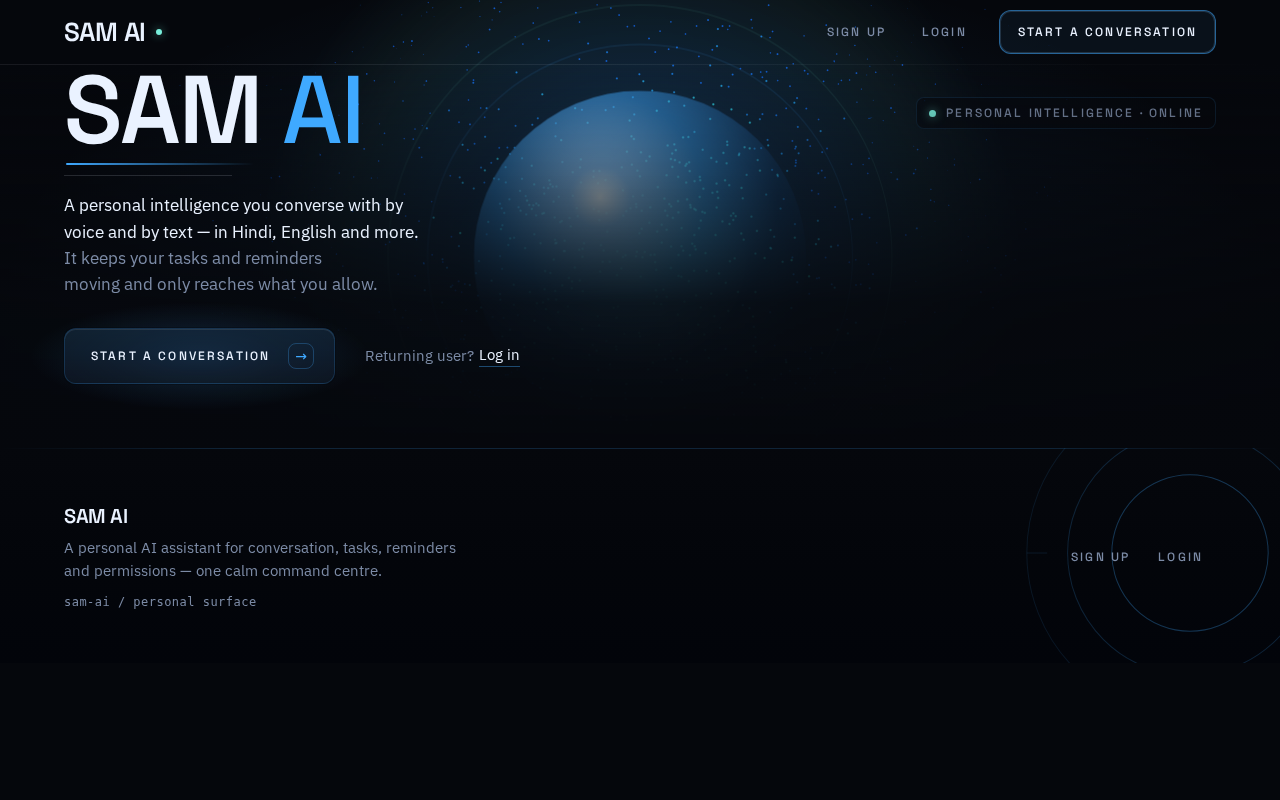
PERSONAL INTELLIGENCE · ONLINE
SAMAI
A personal intelligence you converse with by voice and by text — in Hindi, English and more. It keeps your tasks and reminders moving and only reaches what you allow.
PERSONAL INTELLIGENCE · ONLINE
SAMAI
A personal intelligence you converse with by voice and by text — in Hindi, English and more. It keeps your tasks and reminders moving and only reaches what you allow.
No comments yet. Be the first!