rustic-hi
 Nandu Katasani
Hi

Comments (0)
Sign in to leave a comment
System Requirements
System Requirements Document for rustic-hi
1. Introduction
rustic-hi is a personal AI agent built for one person. The product intent, taken directly from the authoritative requirement thread, is to give a single user — Nandu — a personal agent that consolidates their day-to-day assistance needs all in one place, rather than spread across separate tools. The agent is personal: it is tailored to the individual user's way of thinking and working, and the user interacts with it conversationally, in a chat-style interface.
The audience is exactly one human actor: the Personal Agent Owner. There is no team, no shared workspace, and no multi-user behavior. The product is a hand-built, dependable instrument for one desk — a place where the owner talks to their agent, keeps the resulting conversations, and shapes how the agent thinks and works.
This document defines the current delivery: an anonymous public entry, self-service enrollment, returning verification, the conversational workspace, the preserved conversation history, and the personalization workspace that tailors the agent to its owner.
2. System Overview
rustic-hi is a first-party web application with an application-owned identity boundary and custom UI. It delivers:
- A public entry surface that explains the personal AI agent, its individual focus, and its all-in-one assistance purpose to an anonymous visitor.
- Self-service enrollment so the owner can independently begin using the agent and accumulate durable personal state.
- Returning verification so the owner can get back to their preserved conversations and personalization.
- A conversational workspace where the owner sends messages, receives agent responses, and starts a new conversation.
- A revisitable conversation history for browsing preserved exchanges and continuing prior conversations.
- A personalization workspace for tailoring the agent to the owner's way of thinking and working.
Actors. The only active human actor is the Personal Agent Owner. The AI agent itself is a system-side responder, not a persona: it produces responses inside the owner's conversational workspace and holds no independent goals, destinations, or account.
Ownership. All six surfaces are application-owned custom pages. Identity is application-owned: the owner privately owns and resumes durable, actor-specific state (their conversations and their personalization), so enrollment and returning verification are first-party interactions. The Landing page is anonymously reachable; Chat, Conversations, and Personalization require the owner to be verified.
Narrow exclusions. The agent is personal to a single user; no multi-user or shared-account behavior is in scope. The agent's day-to-day capabilities — managing tasks, answering questions from notes, drafting messages — were raised only as examples and are not confirmed scope; they are not built as features, modules, or destinations. No adjacent account-management capabilities (password reset flows, profile administration, billing, team management) are added.
2a. Product Interpretation and Delivery Boundary
rustic-hi is delivered as a first-party web application the owner signs into and uses directly. The public entry is anonymous and explains what the agent is and what "all in one place" means before any identity exists. Because the owner's conversations and personalization must survive across sessions and remain bound to the correct person, the application owns identity: the owner establishes it once through self-service enrollment, and verifies it on return. The protected working surfaces — Chat, Conversations, and Personalization — are unavailable until that verification succeeds; the anonymous entry never owns the interaction that establishes access to itself.
Everything the owner does with the agent happens inside the application: conversation, history, and personalization are first-party surfaces, not provider-owned or external destinations. The agent's responses are produced by the application's backend on the owner's behalf and rendered inside the owner's conversational workspace.
Current horizon. The six surfaces above, the enrollment and verification boundary, the conversational workspace, the preserved history, and the personalization workspace are all current.
Future horizon. Any expansion of the agent's day-to-day capabilities beyond conversation, history, and personalization — including the example capabilities named in the source (task management, answering questions from notes, drafting messages) — remains unconfirmed and out of current scope. Nothing in this document commits to them.
2b. Source Content Inventory
Not applicable. No reference directive in this project declares a content_source, so no source content inventory is produced.
2c. Page Content and Component Coverage
Landing
- Information and state. Anonymous public entry. Full-viewport kraft field. A 2px ink rule runs the full width at 18vh. Above the rule, hard-left, the headline ALL IN ONE PLACE. in Alfa Slab One, breaking across three lines, with the third line cut into a denim block that bleeds off the right viewport edge. Below the rule, a two-column band: left, the circular orange badge stamp reading PERSONAL AGENT · NANDU; right, four lines of Oswald body copy explaining the personal agent, its individual focus, and its all-in-one assistance purpose, plus a chunky bordered CTA START YOUR AGENT. A thin all-caps ticker strip runs along the very bottom edge. Alternating kraft and paper sections below the first screen, each opened by a ruled label bar.
- Primary action. Start the agent — routes the anonymous visitor into enrollment.
- Supporting actions. Return to the entry from any later surface; read the explanatory sections.
- Domain entities. None persisted. The page reads no owner state.
- Component responsibilities. Hero headline band with the denim block bleed; circular badge/stamp mark (also the app mark and loader); ruled label bars opening each section; halftone-dot texture band at 6% opacity on kraft sections; ticker strip; primary CTA with 3px offset shadow.
- States. Loading: badge-stamp loader centered on kraft. Empty: not applicable — the page is static explanatory content. Success: the visitor reads the explanation and activates the CTA. Error: if the CTA cannot reach enrollment, the CTA shows a pressed-flat state and an inline all-caps message on a ruled bar, with the CTA remaining available to retry. Recovery: retry the CTA; the explanatory content stays readable throughout.
Login
- Information and state. Anonymous identity-access surface for returning verification. Ruled panel with a 2px top rule and an all-caps label bar. Two fields: email and password. A chunky bordered submit button with a 3px offset shadow. A ruled link row leading to enrollment for a visitor who has no identity yet.
- Primary action. Verify identity and enter the protected workspace.
- Supporting actions. Move to enrollment; return to the public entry.
- Domain entities. Owner identity (email, password credential).
- Component responsibilities. Ruled form panel; labeled inputs with 2px ink borders; submit button; inline error region on a ruled bar; link row to enrollment.
- States. Loading: submit button presses flat and the badge-stamp loader replaces the button label. Empty: fields blank with all-caps placeholder labels. Success: verification succeeds and the owner lands in Chat with their preserved conversations and personalization intact. Error: unrecognized credentials or a failed request show an inline all-caps error on a ruled bar above the form; the entered email is preserved and the password field is cleared. Recovery: correct the credentials and resubmit, or follow the link row to enrollment.
Sign Up
- Information and state. Anonymous identity-access surface for self-service enrollment. Ruled panel with an all-caps label bar. Fields for the owner's email and password, plus a display name used to address the owner. A chunky bordered submit button with a 3px offset shadow. A ruled link row leading to returning verification.
- Primary action. Establish the owner's identity and enter the agent.
- Supporting actions. Move to returning verification; return to the public entry.
- Domain entities. Owner identity (email, password credential, display name).
- Component responsibilities. Ruled form panel; labeled inputs with 2px ink borders; submit button; inline error region on a ruled bar; link row to Login.
- States. Loading: submit button presses flat and the badge-stamp loader replaces the button label. Empty: fields blank with all-caps placeholder labels. Success: identity is established, the owner lands in Chat, and the workspace opens with an empty conversation ready for the first message. Error: an already-enrolled email, an invalid email, or a rejected password shows an inline all-caps error on a ruled bar; entered values other than the password are preserved. Recovery: correct the flagged field and resubmit, or follow the link row to Login if the owner already has an identity.
Chat
- Information and state. The primary conversational workspace, available only to a verified owner. Fixed 248px denim left rail listing the owner's conversations as ruled rows with an orange 4px active marker that slides as a solid block between rows. Message stream centered at a 720px measure. Composer pinned to the bottom as a thick bordered slab. A thin all-caps ticker strip across the top of the page reads the agent's current status. A new-conversation control sits at the head of the left rail.
- Primary action. Send a message to the agent and receive its response.
- Supporting actions. Start a new conversation; select an existing conversation from the left rail; open the full Conversations index; open Personalization.
- Domain entities. Conversation (title, created time, last-activity time), Message (author — owner or agent, body, timestamp), Agent status.
- Component responsibilities. Denim left rail with ruled conversation rows and the sliding orange active marker; new-conversation control; 720px message stream; user message bubbles as denim 2px-bordered rectangles with a 3px offset solid shadow; agent message bubbles as paper 2px-bordered rectangles with the same offset shadow; composer slab with a bordered input and the orange send action; status ticker strip; badge-stamp loader.
- States. Loading: badge-stamp loader in the message stream while a conversation's messages are fetched; the composer stays visible but disabled. Empty: a new conversation shows the badge-stamp empty-state motif with an all-caps prompt inviting the owner to write the first message. Success: the owner's message stamps into the stream and the agent's response stamps in beneath it; the conversation appears in or updates its left-rail row. Error: if a send fails, the owner's message stays in the stream marked with an all-caps failed label and a retry control on a ruled bar; if a response fails, an all-caps notice appears in the stream with a retry control. Recovery: retry the failed message or response from its inline control; the composer remains usable for a new message.
Conversations
- Information and state. Revisitable history for a verified owner. Badge-coded index cards in a 3-up ruled grid, each card carrying the conversation title, a badge-coded status mark, and the last-activity timestamp in muted taupe. A ruled label bar opens the page.
- Primary action. Open a preserved conversation and continue it in Chat.
- Supporting actions. Scan and compare preserved exchanges by title, badge, and timestamp; start a new conversation; open Personalization.
- Domain entities. Conversation (title, badge code, created time, last-activity time, message count).
- Component responsibilities. Ruled label bar; 3-up ruled card grid; badge-coded status marks using mustard and forest fills only; muted taupe metadata line; badge-stamp empty-state motif.
- States. Loading: badge-stamp loader centered over the grid area. Empty: the badge-stamp motif with an all-caps message stating no conversations are preserved yet and a control to start the first one. Success: cards render in the grid; selecting one opens it in Chat at its most recent position. Error: if history cannot be loaded, an all-caps error appears on a ruled bar with a retry control. Recovery: retry the load; if a single conversation cannot be opened, the card shows an inline all-caps failure label and the grid remains usable.
Personalization
- Information and state. Focused workspace for a verified owner, laid out as numbered ruled rows like a spec sheet: 01 Name & voice, 02 How you think, 03 What it should handle. Each row carries an all-caps label on a 2px ruled bar and its own bordered inputs. A save control sits at the foot of the sheet.
- Primary action. Save changes that tailor the agent to the owner's way of thinking and working.
- Supporting actions. Review the current personalization values; return to Chat; open Conversations.
- Domain entities. Personalization profile (owner display name, agent voice, how-the-owner-thinks notes, what-the-agent-should-handle notes).
- Component responsibilities. Numbered ruled rows with all-caps labels; bordered text inputs and text areas; save control with 3px offset shadow; inline confirmation and error regions on ruled bars.
- States. Loading: badge-stamp loader over the sheet while current values are fetched. Empty: rows render with blank inputs and all-caps placeholder guidance describing what each row is for. Success: the save control presses flat and an all-caps confirmation appears on a ruled bar; the saved values persist and are reflected in the owner's subsequent agent responses. Error: a failed save shows an all-caps error on a ruled bar and keeps the owner's unsaved edits in place. Recovery: retry the save; the edited values are not discarded.
3. Functional Requirements
FR-1 — Personal agent for the owner As a Personal Agent Owner, I should have a personal AI agent of my own, so that my day-to-day assistance is handled by one agent dedicated to me.
- Provenance: explicit.
- Lifecycle: initiated by the owner entering the application; the agent is the system-side responder bound to the owner's identity; observable result is an agent that responds to the owner inside their own workspace; failure is an unavailable agent, surfaced as an all-caps notice with retry; continuation is the owner's next message.
- Acceptance: the owner has exactly one agent bound to their identity, and no other person's state is visible in it.
FR-2 — Tailored to how the owner thinks and works As a Personal Agent Owner, I should be able to tailor the agent to my way of thinking and working, so that its assistance fits me rather than a generic user.
- Provenance: explicit.
- Lifecycle: initiated by the owner in Personalization; input is the owner's saved personalization values; observable result is that saved values persist and shape subsequent agent responses; failure is a failed save, surfaced inline with the edits preserved; continuation is returning to Chat and seeing the tailored behavior.
- Acceptance: saved personalization values survive a return visit and are reflected in the agent's responses.
FR-3 — All in one place As a Personal Agent Owner, I should have my assistance needs consolidated in one place, so that I do not switch between separate tools.
- Provenance: explicit.
- Lifecycle: initiated by the owner using the application; the observable result is that conversation, preserved history, and personalization are all reachable inside the same application; failure is an unreachable surface, surfaced with retry; continuation is the owner's next action in the same place.
- Acceptance: the owner reaches conversation, history, and personalization without leaving the application.
FR-4 — Conversational interaction As a Personal Agent Owner, I should interact with my agent conversationally, so that I can ask, say, and refine things in plain language.
- Provenance: explicit.
- Lifecycle: initiated by the owner composing a message in Chat; the agent responds in the same stream; observable result is the owner's message and the agent's response rendered as bordered bubbles; failure is a failed send or response, surfaced inline with retry; continuation is the next message.
- Acceptance: the owner sends a message and receives an agent response in the same conversation stream.
FR-5 — Start a new conversation As a Personal Agent Owner, I should be able to start a new conversation, so that a fresh topic does not have to continue an old thread.
- Provenance: required_inference.
- Lifecycle: initiated by the owner activating the new-conversation control in Chat; observable result is an empty conversation with the badge-stamp empty state and a ready composer; failure is a conversation that cannot be created, surfaced inline with retry; continuation is writing the first message.
- Acceptance: a new conversation is created, appears in the left rail, and accepts the owner's first message.
FR-6 — Preserved conversation history As a Personal Agent Owner, I should have my conversations preserved, so that what I have already worked through is still there when I come back.
- Provenance: required_inference.
- Lifecycle: initiated by the owner's use of Chat; the application preserves each conversation and its messages; observable result is the conversation appearing in the left rail and in the Conversations index with its title and last-activity time; failure is history that cannot be loaded, surfaced with retry; continuation is opening a preserved conversation.
- Acceptance: a conversation created in one session is present and openable in a later session.
FR-7 — Browse and continue prior conversations As a Personal Agent Owner, I should be able to browse my preserved exchanges and continue a prior conversation, so that I can pick a thread back up instead of restarting it.
- Provenance: required_inference.
- Lifecycle: initiated by the owner opening Conversations; input is the badge-coded card grid; observable result is the selected conversation opening in Chat at its most recent position; failure is a conversation that cannot be opened, surfaced on its card with retry; continuation is sending the next message in that thread.
- Acceptance: selecting a card opens that conversation in Chat and the owner can send a further message in it.
FR-8 — Self-service enrollment As a Personal Agent Owner, I should be able to enroll myself before first use, so that I can begin using my agent without waiting on anyone else.
- Provenance: required_inference.
- Lifecycle: initiated by an anonymous visitor activating START YOUR AGENT on Landing and completing the Sign Up form; observable result is an established identity and entry into Chat with an empty conversation ready; failure is a rejected email or password, surfaced inline with entered values preserved; continuation is the first message.
- Acceptance: a visitor with no prior identity completes Sign Up and lands in Chat as a verified owner.
FR-9 — Returning verification As a Personal Agent Owner, I should be able to verify myself on return, so that I get back to my preserved conversations and personalization.
- Provenance: required_inference.
- Lifecycle: initiated by a returning owner completing the Login form; observable result is entry into Chat with preserved conversations in the left rail and personalization values intact; failure is unrecognized credentials, surfaced inline with the email preserved; continuation is resuming the last conversation or starting a new one.
- Acceptance: a returning owner verifies and finds their prior conversations and personalization unchanged.
FR-10 — Protected workspace As a Personal Agent Owner, I should have my conversations and personalization kept private to me, so that my personal agent stays personal.
- Provenance: required_inference.
- Lifecycle: initiated by any attempt to reach Chat, Conversations, or Personalization; the application requires a verified identity before rendering them; observable result is that an unverified visitor is directed to verification and no owner state is shown; failure is a verification that does not succeed, surfaced on the access surface; continuation is verification followed by entry.
- Acceptance: Chat, Conversations, and Personalization do not render owner state without a verified identity.
4. User Personas
Personal Agent Owner
Product context. The Personal Agent Owner is the single user of rustic-hi — Nandu. They want a personal AI agent that consolidates their day-to-day assistance into one place. They converse with the agent through a chat interface and rely on it to handle their personal tasks, questions, and drafting needs, with the agent tailored to how they think and work. Success means one unified place where their personal assistance needs are handled without switching between separate tools.
Primary goal. To have one dependable, personal agent that handles their day-to-day assistance in a single place, shaped to the way they actually think and work.
Distinct accepted responsibilities.
- Enrolling themselves before first use, so the agent becomes theirs.
- Verifying themselves on return, so their preserved work is still there.
- Holding a conversation with the agent — sending messages and reading responses.
- Starting a new conversation when a topic is fresh.
- Browsing preserved exchanges and continuing a prior conversation.
- Tailoring the agent to their way of thinking and working.
Relevant inputs and decisions. What to say to the agent and when to start a new thread rather than continue one; which preserved conversation to reopen; what to record about their name and voice, how they think, and what the agent should handle; whether to save or revise personalization values.
Interactions with other accepted participants. The only other participant in the owner's work is the agent itself, which responds inside the owner's conversational workspace. The agent is a system-side responder, not a persona: it holds no independent goals, no account, and no destination of its own. There is no second human participant, no team, and no shared state — the owner's conversations and personalization are theirs alone.
Observable success. The owner returns after time away, verifies, and finds their conversations and personalization exactly as they left them; they send a message and get a response that reflects how they have tailored the agent; they move between conversation, history, and personalization without leaving the application.
Source-backed constraints. The agent is personal to a single user; no multi-user or shared-account behavior applies. The agent's day-to-day capabilities beyond conversation, history, and personalization — managing tasks, answering questions from notes, drafting messages — were raised only as examples and are not confirmed scope.
5. Core User Flows
Flow 1 — First use: enrolling and meeting the agent
- The Personal Agent Owner arrives at Landing as an anonymous visitor. The kraft field, the 2px ink rule at 18vh, and the headline ALL IN ONE PLACE. with its denim block bleeding off the right edge establish what the product is.
- The owner reads the two-column band below the rule: the circular orange PERSONAL AGENT · NANDU badge stamp on the left, and on the right four lines of Oswald copy explaining the personal agent, its individual focus, and its all-in-one assistance purpose.
- The owner activates START YOUR AGENT and is taken to Sign Up.
- On Sign Up, the owner enters their email, a password, and the display name the agent should use for them, then submits. The submit button presses flat and the badge-stamp loader replaces its label.
- Enrollment succeeds. The owner lands in Chat as a verified owner, with an empty conversation showing the badge-stamp empty-state motif and an all-caps prompt inviting the first message.
- The owner writes their first message in the composer slab and sends it. Their message stamps into the stream as a denim bordered bubble; the agent's response stamps in beneath it as a paper bordered bubble.
- The conversation appears in the denim left rail as a ruled row with the orange active marker. The owner continues the exchange, or starts a new conversation from the new-conversation control at the head of the rail.
Failure and recovery: if the email is already enrolled, or the email or password is rejected, an inline all-caps error appears on a ruled bar above the form and the entered values other than the password are preserved. The owner corrects the flagged field and resubmits, or follows the link row to Login if they already have an identity.
Flow 2 — Returning: verifying and resuming preserved work
- The Personal Agent Owner returns and opens Login.
- The owner enters their email and password and submits. The submit button presses flat and the badge-stamp loader replaces its label.
- Verification succeeds. The owner lands in Chat with their preserved conversations listed as ruled rows in the denim left rail and their personalization values intact.
- The owner selects a conversation from the left rail. The orange 4px active marker slides as a solid block to that row and the conversation's messages load into the 720px stream.
- The owner sends the next message in that thread and receives the agent's response.
Failure and recovery: if the credentials are not recognized, an inline all-caps error appears on a ruled bar above the form, the email is preserved, and the password field is cleared. The owner corrects the credentials and resubmits, or follows the link row to Sign Up.
Flow 3 — Browsing history and continuing a prior conversation
- From Chat, the Personal Agent Owner opens Conversations.
- The owner scans the 3-up ruled grid of badge-coded index cards, each showing a conversation title, a badge-coded status mark, and the last-activity timestamp in muted taupe.
- The owner selects a card. That conversation opens in Chat at its most recent position, with the orange active marker on its left-rail row.
- The owner reads the preserved exchange and sends a further message to continue the thread.
Failure and recovery: if the history cannot be loaded, an all-caps error appears on a ruled bar with a retry control, and the owner retries. If a single conversation cannot be opened, its card shows an inline all-caps failure label while the rest of the grid stays usable.
Empty state: if no conversations are preserved yet, the badge-stamp motif appears with an all-caps message and a control to start the first conversation.
Flow 4 — Tailoring the agent to how the owner thinks and works
- From Chat or Conversations, the Personal Agent Owner opens Personalization.
- The owner works down the numbered ruled rows like a spec sheet: 01 Name & voice, 02 How you think, 03 What it should handle. Each row carries its all-caps label on a 2px ruled bar above its bordered inputs.
- The owner edits the values — the name and voice the agent should use, notes on how they think, and notes on what the agent should handle.
- The owner activates the save control. It presses flat and an all-caps confirmation appears on a ruled bar.
- The owner returns to Chat and sends a message. The agent's response reflects the saved personalization.
Failure and recovery: if the save fails, an all-caps error appears on a ruled bar and the owner's unsaved edits remain in place. The owner retries the save without losing the edits.
Flow 5 — Starting a fresh conversation
- In Chat, the Personal Agent Owner activates the new-conversation control at the head of the denim left rail.
- An empty conversation opens in the 720px stream with the badge-stamp empty-state motif and an all-caps prompt for the first message.
- The owner writes and sends the first message. It stamps into the stream and the agent's response stamps in beneath it.
- The new conversation takes its place as a ruled row in the left rail, and the orange active marker sits on it.
Failure and recovery: if the conversation cannot be created, an inline all-caps notice appears with a retry control, and the owner retries or continues in the conversation already open.
6. Visuals Colors and Theme
The creative direction is authoritative for this section.
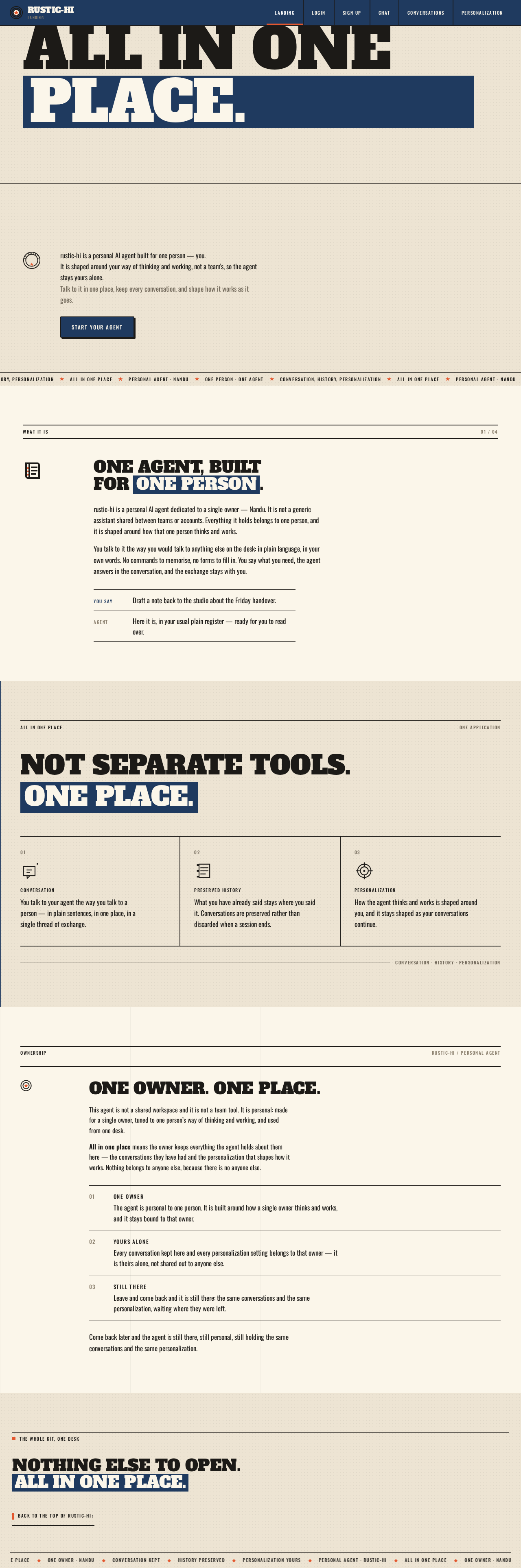
All in onePlace.
rustic-hi is a personal AI agent built for one person — you.
It is shaped around your way of thinking and working, not a team's, so the agent stays yours alone.
Talk to it in one place, keep every conversation, and shape how it works as it goes.
One agent, built for one person.
rustic-hi is a personal AI agent dedicated to a single owner — Nandu. It is not a generic assistant shared between teams or accounts. Everything it holds belongs to one person, and it is shaped around how that one person thinks and works.
You talk to it the way you would talk to anything else on the desk: in plain language, in your own words. No commands to memorise, no forms to fill in. You say what you need, the agent answers in the conversation, and the exchange stays with you.
Not separate tools. One place.
Conversation
You talk to your agent the way you talk to a person — in plain sentences, in one place, in a single thread of exchange.
Preserved History
What you have already said stays where you said it. Conversations are preserved rather than discarded when a session ends.
Personalization
How the agent thinks and works is shaped around you, and it stays shaped as your conversations continue.
One owner. One place.
This agent is not a shared workspace and it is not a team tool. It is personal: made for a single owner, tuned to one person’s way of thinking and working, and used from one desk.
All in one place means the owner keeps everything the agent holds about them here — the conversations they have had and the personalization that shapes how it works. Nothing belongs to anyone else, because there is no anyone else.
- 01One owner
The agent is personal to one person. It is built around how a single owner thinks and works, and it stays bound to that owner.
- 02Yours alone
Every conversation kept here and every personalization setting belongs to that owner — it is theirs alone, not shared out to anyone else.
- 03Still there
Leave and come back and it is still there: the same conversations and the same personalization, waiting where they were left.
Come back later and the agent is still there, still personal, still holding the same conversations and the same personalization.
Nothing else to open. All in one place.
All in onePlace.
rustic-hi is a personal AI agent built for one person — you.
It is shaped around your way of thinking and working, not a team's, so the agent stays yours alone.
Talk to it in one place, keep every conversation, and shape how it works as it goes.
One agent, built for one person.
rustic-hi is a personal AI agent dedicated to a single owner — Nandu. It is not a generic assistant shared between teams or accounts. Everything it holds belongs to one person, and it is shaped around how that one person thinks and works.
You talk to it the way you would talk to anything else on the desk: in plain language, in your own words. No commands to memorise, no forms to fill in. You say what you need, the agent answers in the conversation, and the exchange stays with you.
Not separate tools. One place.
Conversation
You talk to your agent the way you talk to a person — in plain sentences, in one place, in a single thread of exchange.
Preserved History
What you have already said stays where you said it. Conversations are preserved rather than discarded when a session ends.
Personalization
How the agent thinks and works is shaped around you, and it stays shaped as your conversations continue.
One owner. One place.
This agent is not a shared workspace and it is not a team tool. It is personal: made for a single owner, tuned to one person’s way of thinking and working, and used from one desk.
All in one place means the owner keeps everything the agent holds about them here — the conversations they have had and the personalization that shapes how it works. Nothing belongs to anyone else, because there is no anyone else.
- 01One owner
The agent is personal to one person. It is built around how a single owner thinks and works, and it stays bound to that owner.
- 02Yours alone
Every conversation kept here and every personalization setting belongs to that owner — it is theirs alone, not shared out to anyone else.
- 03Still there
Leave and come back and it is still there: the same conversations and the same personalization, waiting where they were left.
Come back later and the agent is still there, still personal, still holding the same conversations and the same personalization.
No comments yet. Be the first!